Apache Iceberg Row Lineage: Tracking Data Lineage at the Row-Level
25 min read
If you've ever needed to figure out exactly which rows changed in a data lake table in the last hour, you already know the options aren't great. Snapshots and time travel can show you the table at two points; however, comparing them gives you file-level differences, not row-level ones. A row that got updated looks like a brand new row in any file-based difference. You can fall back on an updated_at column, but that only works if every upstream job remembers to set it. Or you can stand up a separate CDC pipeline, which then becomes a thing you have to maintain.
Apache Iceberg row lineage fixes this in the table format itself. In v3, each row carries a stable ID and a marker for when it was last touched, so to pull changes you write a WHERE clause. No sidecar log, no mirror table, no timestamp guessing.
The rest of this post is about how that actually works, why the design ended up the way it did, and the parts that still bite you in practice.
What is Row Lineage in Apache Iceberg?
Quick refresher in case you need it: Iceberg is a table format for data lakes, and every commit to an Iceberg table produces a new snapshot with a sequence number that goes up by one. Before v3, that sequence number was the finest grain of tracking you got. You knew something changed in snapshot 47, but not which rows. v3 pushes the tracking down to the row itself. Every row now knows its own identity and the last commit that touched it
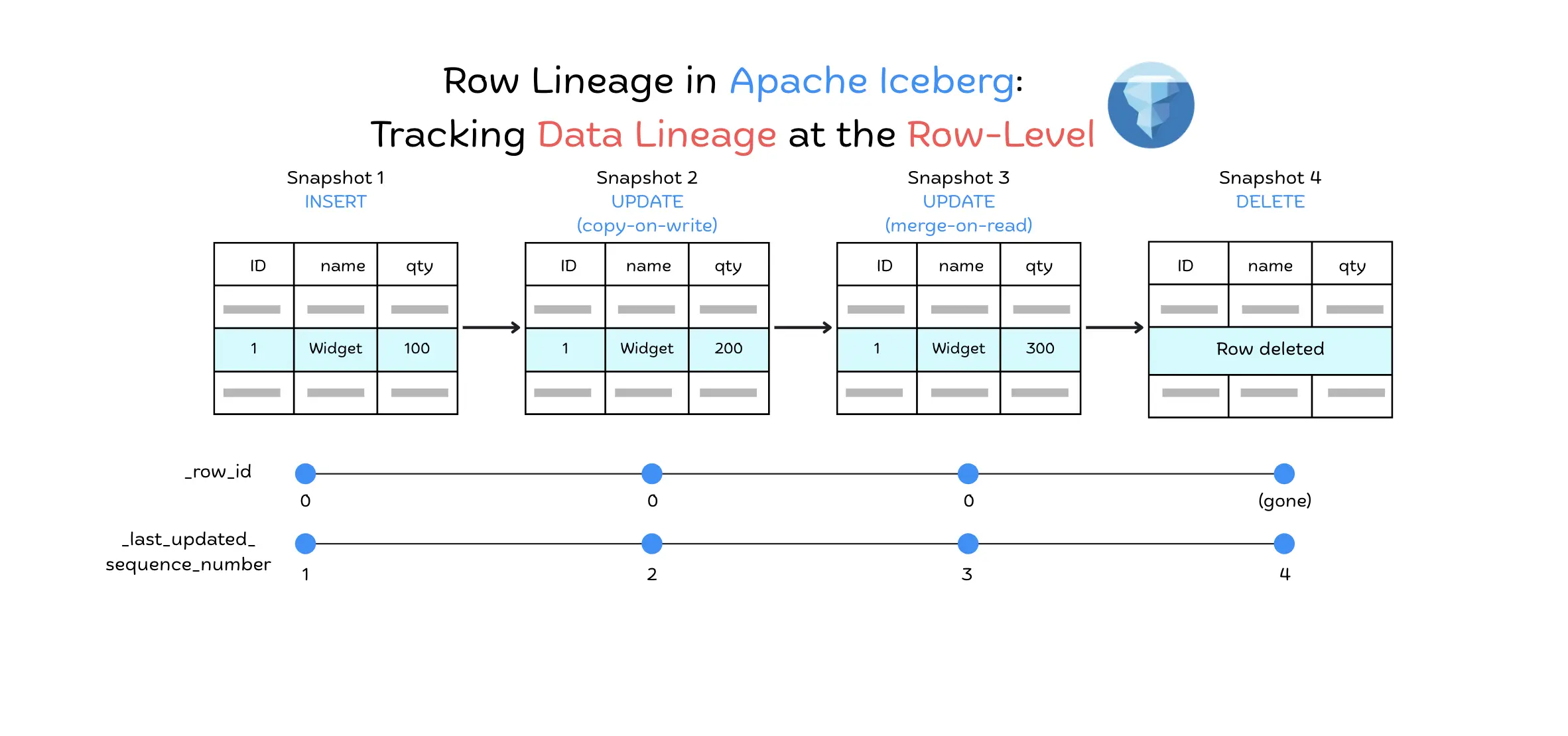
Row lineage in Iceberg consists of two special metadata fields that are automatically added to each row in a v3 table. The first is _row_id, a unique identifier for the row within the table that stays static across the row's lifetime. Each row is assigned a unique _row_id when it is first created.
Why use _row_id instead of a primary key?
Because large analytic tables often have no reliable natural key. Iceberg assigns a system-generated _row_id instead of relying on a primary key because it needs a consistent identifier that stays with a row across changes like updates and deletes. A primary key depends on user-defined fields, and large analytic tables in a data lake often have no unique or natural key to use. A system-generated _row_id avoids that problem.
By design, _row_id stays stable through copy-on-write updates, merge-on-read updates, and compaction. Getting that behavior depends on the Iceberg version doing the write: for the Spark 3.5 integration, update-time lineage support landed in Iceberg 1.10.0 (PR #12736, covering UPDATE and MERGE). On 1.10 or later, an update keeps the original _row_id and only advances _last_updated_sequence_number. The experiment below shows this on Spark 3.5 with Iceberg 1.10.
CREATE TABLE lineage_test (id BIGINT, name STRING, qty INT)
USING iceberg
TBLPROPERTIES ('format-version' = '3');

INSERT INTO lineage_test VALUES (1, 'Widget', 100);

-- Case 1: copy-on-write update
ALTER TABLE lineage_test SET TBLPROPERTIES ('write.update.mode' = 'copy-on-write');
UPDATE lineage_test SET qty = 200 WHERE id = 1;

-- Case 2: merge-on-read update (uses deletion vectors in v3)
ALTER TABLE lineage_test SET TBLPROPERTIES ('write.update.mode' = 'merge-on-read');
UPDATE lineage_test SET qty = 300 WHERE id = 1;

-- Case 3: explicit delete then insert
DELETE FROM lineage_test WHERE id = 1;
INSERT INTO lineage_test VALUES (1, 'Widget', 400);
| Snapshot | Operation | qty | _row_id | _last_updated_sequence_number | Identity preserved? |
|---|---|---|---|---|---|
| 1 | Initial insert | 100 | 0 | 1 | — |
| 2 | Update (copy-on-write) | 200 | 0 | 2 | Yes |
| 3 | Update (merge-on-read) | 300 | 0 | 3 | Yes |
| 4 | Delete | — | (gone) | — | Row removed |
| 5 | Insert new row | 400 | 3 | 5 | No, new row |
Both updates keep _row_id = 0 while the sequence number advances, so the row's identity is preserved across the change. The new row inserted in snapshot 5 is a genuinely different row and gets a fresh ID.
How does Iceberg figure out the _row_id for any row, especially during updates?
When a row is first written to the table, Iceberg assigns a unique _row_id based on a globally increasing identifier. The _row_id is assigned using the row ID of the first row from the snapshot (or data file), plus its position within the file. This ensures every row is assigned a unique and stable ID.
For updates, the existing _row_id is meant to be carried over. When a row is modified through copy-on-write or merge-on-read, an engine that implements lineage writes keeps the same _row_id, preserving the row's identity, while only _last_updated_sequence_number advances. This means that even if the row's data changes, its identity (_row_id) remains the same across all updates, making it possible to track the full history of the row.
The second field, _last_updated_sequence_number, is the sequence number of the snapshot (commit) in which the row was last modified. For a newly inserted row, this will be the sequence number of the insert commit; if the row is updated later, this field is updated to the newer sequence number of the update commit.
These lineage fields are stored as hidden metadata columns and do not require any changes to your table schema or application code. As long as a table is using format version 3, Iceberg will maintain _row_id and _last_updated_sequence_number for you automatically. Engines like Spark, Trino, and Flink expose these fields either directly or via system column syntax (for example, Trino uses $row_id and $last_updated_sequence_number in queries, whereas Spark and Flink refer to them as normal columns _row_id and _last_updated_sequence_number). The lineage columns enable queries to reason about row versioning and history directly from the data, without custom tracking mechanisms.
Before row lineage existed, Iceberg could tell you only the overall changes between snapshots (via snapshot diffs or change logs), but it was difficult to pinpoint individual row modifications or reconstruct a detailed change history for a row. With row-level metadata on each row, you can now query an Iceberg table and filter by these lineage fields to get all incremental changes with full fidelity, making it much easier to implement auditing and CDC use cases. In other words, row lineage elevates Iceberg from just tracking files and snapshots to also tracking individual rows through time.
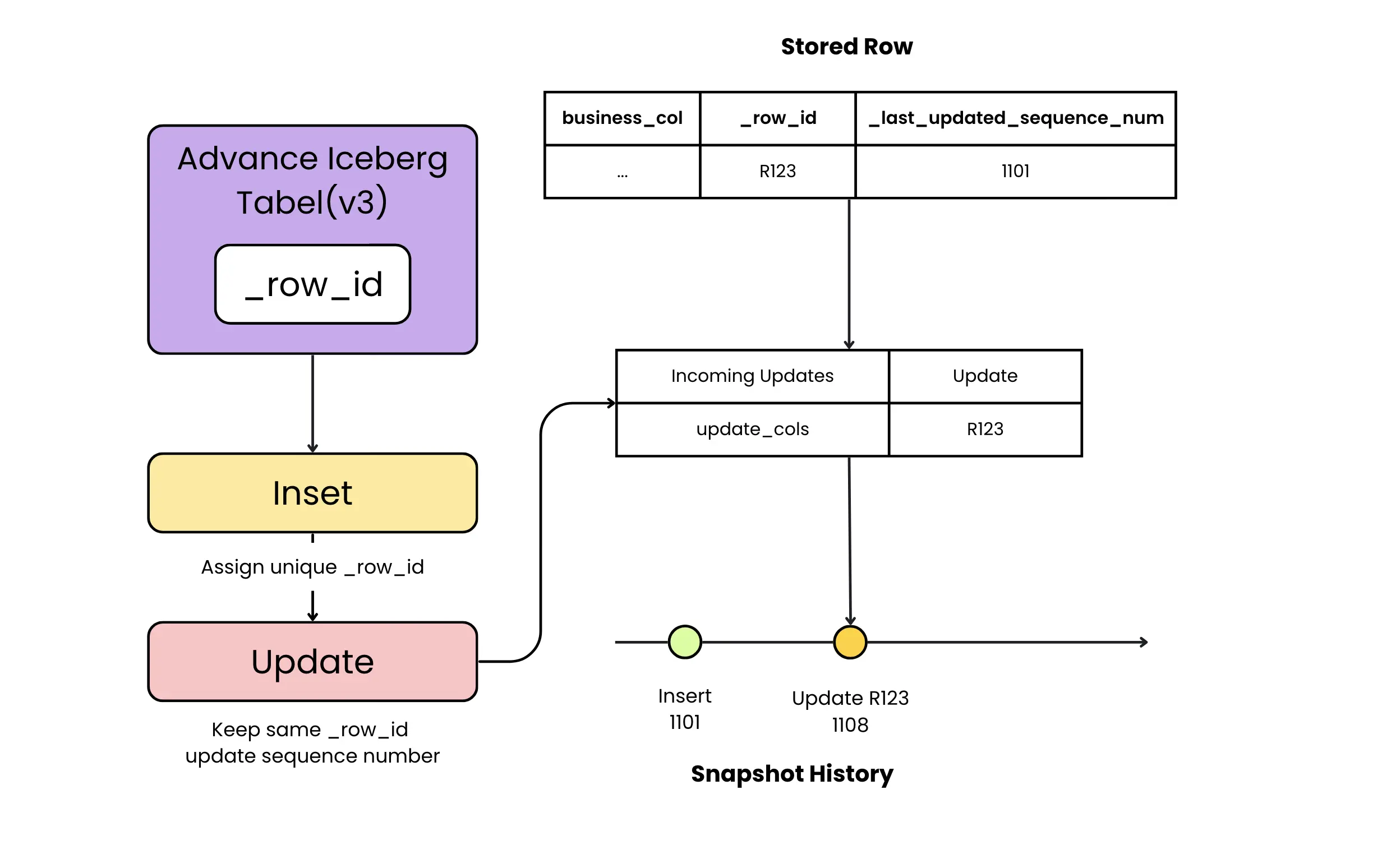
How Row Lineage Works Under the Hood
The tricky part of row lineage is making it work in a distributed setting. Multiple writers may be inserting concurrently. Files get rewritten during compaction. A row's ID has to stay the same through all of that, and no two rows can ever collide. Iceberg pulls this off by assigning IDs lazily at commit time rather than at write time, which means a retried or failed commit doesn't poison the ID space. Here's how it works at each level.
Table-level row ID counter. Each Iceberg table in v3 maintains a next-row-id counter in its metadata. This counter tracks the next available _row_id that can be assigned. When a new snapshot (commit) is about to be created, the table's current next-row-id is used as the starting point for row IDs in that commit.
Snapshot commit allocation. When a writer commits a new snapshot, the snapshot metadata records a first-row-id for that snapshot equal to the table's next-row-id at commit time. All new rows added in this snapshot will have IDs starting from this value. The next-row-id counter is then incremented (during the atomic commit) by the number of new row IDs assigned, ensuring no two snapshots ever reuse the same ID range.
Manifest and file ranges. Within the snapshot, new data is often split across multiple manifest files (which in turn reference the actual data files). Iceberg assigns each new manifest a contiguous range of row IDs. The first new manifest in a commit gets the snapshot's first-row-id; subsequent manifests get starting IDs that are offset by the number of new rows accounted for in previous manifests. This chained assignment guarantees that every manifest covers a unique segment of the ID space, preserving a global ordering of row IDs even if data is partitioned into separate files.
Deferred assignment in data files. The sequence looks like this when a row makes it to disk:
- The data file is written with
first_row_id = null. The writer doesn't know its assigned range yet. - At commit time, the manifest list is written, and each manifest gets a starting row ID based on its position in the commit.
- At read time, any file still missing a
first_row_idinherits one from its manifest, and per-row IDs are computed asmanifest_first_row_id + file_offset + row_position. The benefit of this is that data files never need to be rewritten just to assign IDs. If a commit retries, only the manifest list has to change.
Row updates and moves. What happens when a row is updated or migrated to a new file (e.g. due to compaction or clustering)? Iceberg's lineage design dictates that if an engine chooses to model the update as a true update (rather than a delete+insert), it should carry over the existing _row_id to the new file. When the updated row is written, its _last_updated_sequence_number is left unassigned in the data file and is resolved via inheritance at read time to the sequence number of the commit that wrote it. This is the same inheritance mechanism Iceberg uses for newly inserted rows, and it's why the commit sequence number doesn't need to be known until the snapshot is successfully committed. The _row_id remains the same, preserving the row's identity, but its _last_updated_sequence_number reflects the latest commit. This allows the system to recognize it as the same logical row that has changed in a new snapshot.
If an engine uses delete + insert (an equality model) to implement updates, which Iceberg also supports, the new row will get a new _row_id because the original row was deleted without explicitly preserving the ID. In this case, the change will appear as a deletion of one ID and insertion of a different ID.
How to avoid this in practice
The good news is that most of the time, you don't have to think about this. If you're using normal SQL on a recent engine, things just work. The trickier cases are streaming pipelines and homegrown CDC code. A few things to keep in mind.
-
Stick with SQL UPDATE and MERGE. When you write
UPDATEorMERGE INTO ... WHEN MATCHED THEN UPDATE, you're telling the engine "this row is the same row, just with new values." That's the signal that lets it preserve the_row_id. The problem starts when application code does its ownDELETEfollowed byINSERT. At that point, as far as the table knows, those are two completely separate operations on two different rows. -
Watch the update mode. Set
write.update.modeto copy-on-write or merge-on-read explicitly. On v3 tables, merge-on-read uses deletion vectors by default. Deletion vectors are the delete type the spec preserves lineage through, but whether the original_row_idis actually carried forward depends on your engine's Iceberg version (for Spark 3.5, that means 1.10 or later). Equality deletes are the failure mode here, and they mostly show up in streaming writers where the engine can't cheaply look up the original row's position. -
Be careful with streaming ingest. Flink, Kafka Connect, and similar tools sometimes default to equality-delete semantics for performance reasons. They don't want to do a position lookup on every row. If you're streaming CDC from Postgres or MySQL into Iceberg, check your writer's config before assuming
_row_idsurvives. There's a real tradeoff here: equality deletes are cheaper to write; position deletes preserve identity. Pick based on whether downstream consumers care about row continuity. -
Test your own write path. This is what bit us on an earlier run: on Spark 3.5 with Iceberg 1.9.0, the same merge-on-read UPDATE that succeeds above didn't preserve _row_id. The spec says it should; the Spark 3.5 implementation didn't catch up until Iceberg 1.10. The only way to know for sure with your stack is to insert a row, update it, and check whether the ID survives. It's a ten-second test that prevents a much bigger problem downstream.
Row lineage works most effectively when updates are applied in a way that preserves row IDs, similar to how a database would perform an update.
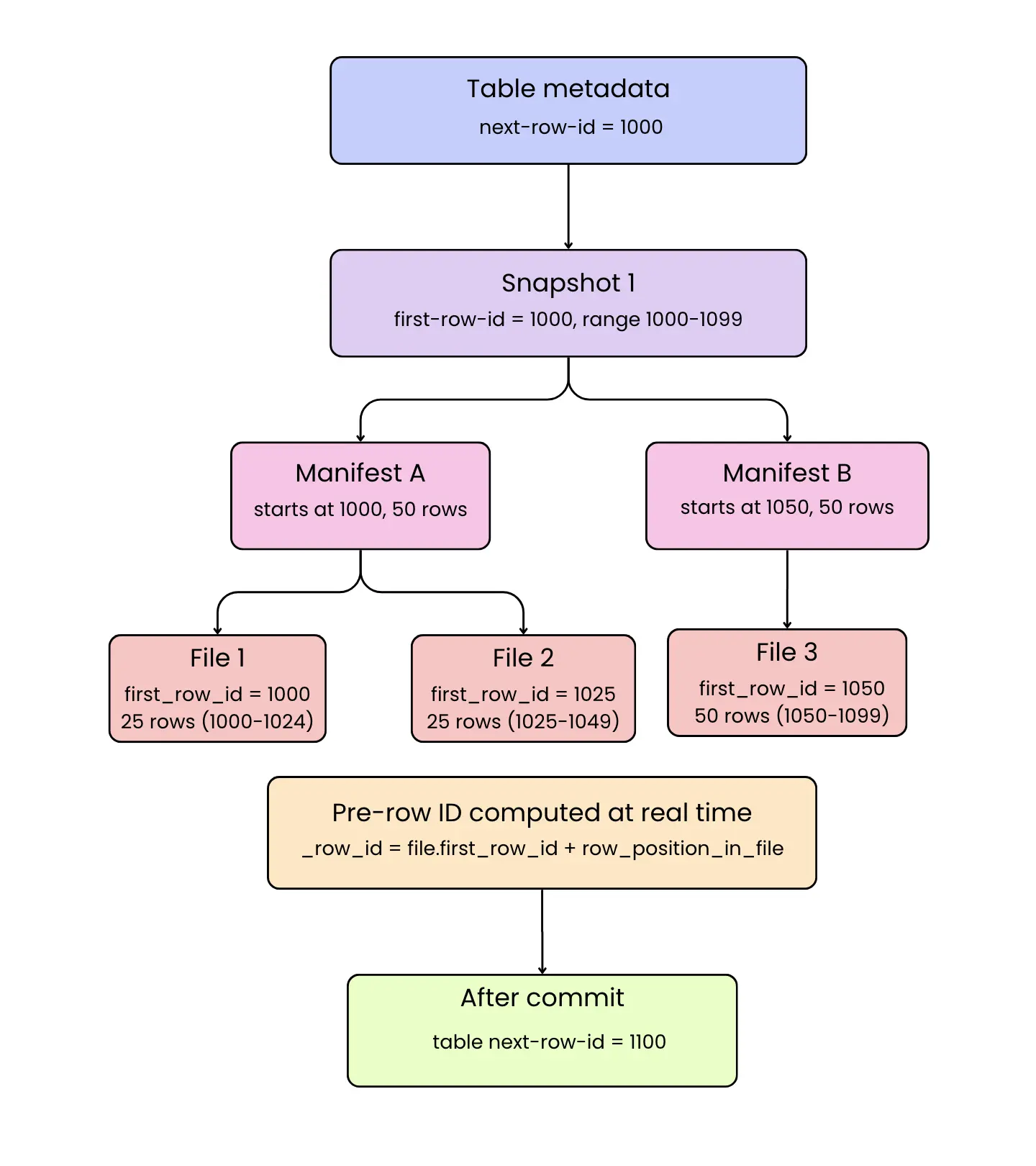
By deferring and chaining the assignment of row IDs in this manner, Iceberg ensures global uniqueness and consistency of _row_id across the entire table. Even if data is partitioned or written in parallel, no two rows will ever share the same ID, and the IDs roughly track commit order, which isn't quite the same as insert order. Say two writers start at the same time. Whichever one commits first gets the lower ID range, regardless of which one started writing rows first. And even inside a single commit, the per-row ordering depends on how the engine partitions and shuffles data internally. Two rows from the same INSERT INTO ... VALUES (a), (b) can land with their _row_id values in either order. The _last_updated_sequence_number is always set to the commit that last touched the row, which means it will inherit the latest sequence number on any insert or true update (one that modifies the existing row in place rather than treating the change as a delete followed by an insert). Together, these two fields give each row a stable identity and a version history pointer.
Benefits and Use Cases of Row Lineage
-
Efficient incremental data processing. Perhaps the biggest benefit is making incremental change queries trivial. Rather than diffing entire snapshots or scanning for timestamp differences, an engine can simply query for all rows with
_last_updated_sequence_numbergreater than X to get the changes since snapshot X. Because_last_updated_sequence_numberis stored as metadata, the query engine can often prune files or use metadata-only reads to find these rows, instead of reading the whole dataset. This dramatically speeds up change data capture (CDC) pipelines, where downstream systems only need the new or changed rows since the last checkpoint. As Databricks describes it in their Iceberg v3 announcement, row lineage lets engines find row-level changes by matching versions of rows across commits, so they can process changes selectively and make downstream updates faster and cheaper. (Databricks: Apache Iceberg v3: Moving the Ecosystem Towards Unification) -
Fine-grained auditing and compliance. Row lineage provides a built-in audit trail for data modifications. Because each row carries the sequence number of its last update, you can retrieve a full history of changes by looking at past snapshots and matching the row IDs. For compliance scenarios, you can answer questions like “When was this record last changed and where did it come from?” much more easily. The (AWS Big Data Blog) notes that lineage gives full fidelity change history for audit and governance – previously, Iceberg’s snapshot diff would only show the net result, but now you can trace every insert/update to each row. And since the IDs are stable, you can even track if a row was deleted: if a previously existing _row_id is no longer present in the latest snapshot, that indicates the row was removed in some commit (though identifying deletions may require comparing snapshots or using Iceberg’s delete files).
-
Stable keys for downstream systems. Downstream analytics systems or applications can rely on Iceberg's
_row_idas a stable primary key for the data. If the same row appears in multiple snapshots (with the same ID), it's the same logical entity evolving over time. If a new row appears with a new ID, it truly represents a new entity. This stability was not available in append-only logs or file-based diffs, where an update might look like a brand new record. With row lineage, it is possible to, for example, ingest changes from Iceberg into an operational database or search index and use_row_idas the key to perform upserts, ensuring you update existing entries rather than duplicating them.
Querying Changes with Row Lineage: Examples
One of the best ways to appreciate row lineage is to see it in action with some queries. Let's walk through a simple example using SQL (this could be Spark SQL, Trino, and so on, as long as the engine supports Iceberg v3).
Suppose we have an Iceberg v3 table named product_data that has row lineage enabled. After performing some transactions (inserts, updates, deletes), we want to retrieve all the changes that occurred after a certain point. We can do this by filtering on _last_updated_sequence_number. Here is an example depicting row lineage in Iceberg v3:
-- Create table with Iceberg v3 + row lineage enabled
CREATE TABLE product_data (
  product_id BIGINT,
  name       STRING,
  quantity   INT
)
USING iceberg
TBLPROPERTIES ('format-version' = '3');

-- Snapshot 1: insert 4 products
INSERT INTO product_data (product_id, name, quantity) VALUES
  (1, 'Thermal Bottle', 123),
  (2, 'Desk Mat', 345),
  (3, 'USB-C Hub', 567),
  (4, 'Notebook', 869);

-- Snapshot 2: update one row (product_id = 2)
UPDATE product_data
SET name = 'Desk Mat (Revised)'
WHERE product_id = 2;

-- Snapshot 3: delete one row (delete product_id = 4)
DELETE FROM product_data
WHERE product_id = 4;

-- Snapshot 4: insert a new row
INSERT INTO product_data (product_id, name, quantity) VALUES
  (5, 'Wireless Mouse', 979);

-- Query: rows inserted/updated after sequence number 0
SELECT
  product_id, name, quantity,
  _row_id, _last_updated_sequence_number
FROM product_data
WHERE _last_updated_sequence_number > 0
ORDER BY _last_updated_sequence_number, _row_id;
In a fresh table where we inserted some rows and then made a couple of updates/deletes, the result might look like this:
- Rows that were inserted in the first snapshot will appear with
_last_updated_sequence_number = 1. (If we filtered with_last_updated_sequence_number > 0, we'd get those initial inserts as "changes since snapshot 0". In practice, you might filter using a higher number once you have a baseline.) - If a row was updated in a later snapshot, that row will appear with the higher sequence number. In our example above, the row with
product_id = 2was updated, and indeed its_last_updated_sequence_numberbecame 3 (assuming the update happened in the third snapshot). The_row_idfor that product remains the same as when it was first inserted, allowing us to correlate it back to the original insert. - Any row that was deleted will simply not show up in the current snapshot results. In the example, we deleted
product_id = 4, so that row is absent from the query output. We see the remaining rows that are either inserted or updated. A deleted row's last-known_row_idand data would still exist in older snapshots if we needed to audit it via time travel.
The above query demonstrates an incremental pull of changes. In a production scenario, you might remember the last sequence number you processed (say, 100) and then run a similar query with WHERE _last_updated_sequence_number > 100 on the next run to get all new changes. Because this is built into Iceberg, no custom CDC mirror tables or extra log files are needed; you are simply querying the table itself. The Iceberg metadata (manifest files) can often satisfy the predicate on _last_updated_sequence_number without full table scans, making this very efficient.
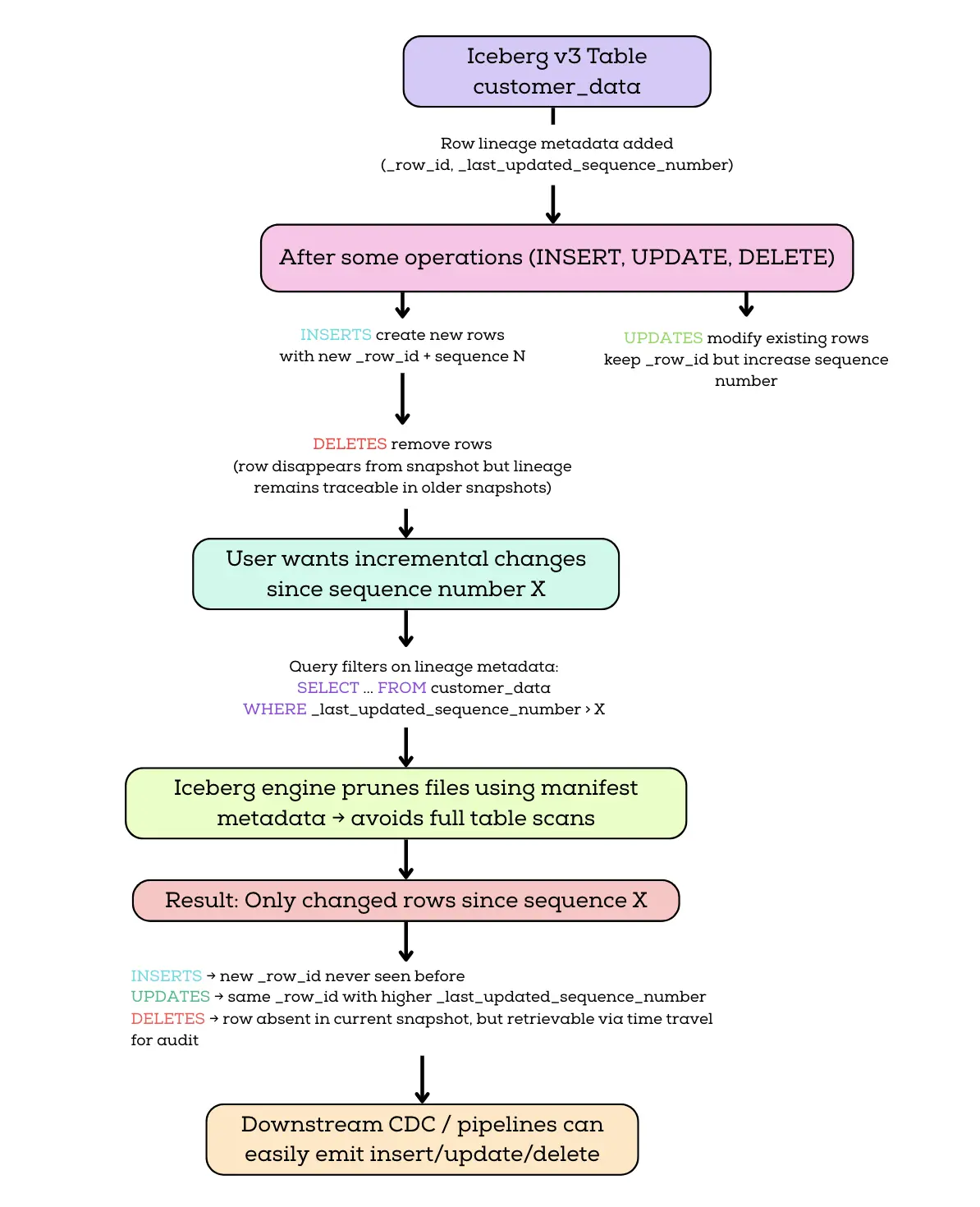
It also lets you follow a single row across snapshots, which is the part pure snapshot-diff can't really do. Snapshot history has always been there in Iceberg, but it's organized by commit, not by row. If you diff snapshot 5 against snapshot 10 and a row is gone, you know something changed. You just don't know whether it was the same logical row the whole time, or whether it got deleted and reinserted with the same business key somewhere in between, or whether it was updated three times along the way. To answer that with snapshot-diff alone, you'd have to walk every intermediate snapshot and match rows by business keys yourself, hoping nothing collided.
With _row_id, that whole reconstruction goes away. A row inserted in snapshot 5, updated in snapshot 7, and deleted in snapshot 10 leaves a clean trail: the same _row_id shows up with increasing _last_updated_sequence_number values from snapshot 5 through 9, then disappears in snapshot 10. You can query that history directly instead of stitching it together.
A single query against the live table gives you the row's current identity and the last time it changed, not its full trail:
SELECT _row_id, _last_updated_sequence_number
FROM lineage_test
WHERE _row_id = 0;
To see every snapshot the row changed in, read the table at each snapshot and watch _last_updated_sequence_number advance. First pull the snapshot IDs from the metadata table (these are assigned per commit, so the values on your machine will differ from any shown here):
SELECT snapshot_id, committed_at
FROM lineage_test.snapshots
ORDER BY committed_at;
Then plug those IDs into a time-travel query, one branch per snapshot. The snapshot IDs below are from our run; substitute your own from the query above (yours will differ, since they're assigned per commit):
- SQL
- Python (PySpark)
SELECT 1 AS snapshot, _row_id, qty, _last_updated_sequence_number AS last_seq
FROM lineage_test VERSION AS OF 2005109397149177061 WHERE _row_id = 0
UNION ALL
SELECT 2, _row_id, qty, _last_updated_sequence_number
FROM lineage_test VERSION AS OF 3517781618417195484 WHERE _row_id = 0
UNION ALL
SELECT 3, _row_id, qty, _last_updated_sequence_number
FROM lineage_test VERSION AS OF 8726901000894316292 WHERE _row_id = 0
UNION ALL
SELECT 4, _row_id, qty, _last_updated_sequence_number
FROM lineage_test VERSION AS OF 1047375627323916752 WHERE _row_id = 0
ORDER BY snapshot;
# Reads the snapshot IDs at runtime, so there is nothing to substitute by hand.
# Needs Spark 3.5 with Iceberg 1.10.
snapshots = spark.sql(
    "SELECT snapshot_id, committed_at FROM lineage_test.snapshots ORDER BY committed_at"
).collect()

print(f"{'snapshot':<10}{'_row_id':<9}{'qty':<6}{'last_seq':<9}")
for i, s in enumerate(snapshots, start=1):
    rows = spark.sql(
        f"SELECT qty, _row_id AS rid, _last_updated_sequence_number AS seq "
        f"FROM lineage_test VERSION AS OF {s.snapshot_id} WHERE _row_id = 0"
    ).collect()
    if rows:
        r = rows[0]
        print(f"{i:<10}{str(r.rid):<9}{str(r.qty):<6}{str(r.seq):<9}")
    else:
        print(f"{i:<10}{'(row gone)':<9}{'-':<6}{'-':<9}")
| snapshot | _row_id | qty | last_seq |
|---|---|---|---|
| 1 | 0 | 100 | 1 |
| 2 | 0 | 200 | 2 |
| 3 | 0 | 300 | 3 |
| 4 | (row gone) | — | — |
The _row_id stays 0 the whole way down, which is what lets you filter on it instead of a business key. last_seq advances on every change, and the row drops out at the delete, so the snapshots where last_seq moves are the ones the row changed in. Because the filter is the stable _row_id rather than id, this still works even if a business key gets reused later.
This guarantee applies when the insert and delete occur in separate commits. If an insert and delete happen within the same snapshot (i.e. as part of a single atomic commit), Iceberg does not expose the intermediate state since snapshots represent the final committed view of the table. In such cases, the row's transient existence is not observable.
What Row Lineage Doesn't Solve
Row lineage is genuinely useful, but it's not magic. A few things are worth knowing before you build anything important on top of it.
Equality-delete updates break it, and your Iceberg version matters too. The spec says lineage is only guaranteed through copy-on-write updates and merge-on-read updates with position deletes or deletion vectors. Equality deletes are excluded because an equality-delete writer never reads the existing row and can't carry its ID forward. Choosing copy-on-write or merge-on-read with deletion vectors is the correct setting, but the setting only takes effect if your Iceberg version implements the carry-forward. On Spark 3.5 with Iceberg 1.10.0, a merge-on-read UPDATE preserves the ID: _row_id stays fixed while _last_updated_sequence_number advances.
| event | qty | _row_id | _last_updated_sequence_number |
|---|---|---|---|
| insert | 100 | 0 | 1 |
| update | 200 | 0 | 2 |
Support for this in the Spark 3.5 integration landed in Iceberg 1.10.0 (PR #12736, covering UPDATE and MERGE). Earlier versions could write the correct delete file without carrying the original _row_id forward, because locating the row and copying its ID into the rewritten data file are two separate steps in the writer. The spec requires that second step, that a row moved to a new data file keep its existing _row_id, and excludes only equality deletes. AWS ships the working combination in Amazon EMR 7.12 (Spark 3.5.6 with Iceberg 1.10). Check the Iceberg version behind your engine, not only the Spark version, and test before depending on it.
You don't get history before the upgrade. Switching a v2 table to v3 doesn't go back and assign IDs to old data. Your audit trail effectively starts the day you flip the property. If you need lineage going further back than that, you'll need another mechanism in place. Iceberg won't reconstruct it for you.
Engine support is uneven, and reading is easier than writing. Reading lineage works on recent versions of Spark, EMR, Databricks, StarRocks, Dremio, and (as of release 480) Trino. The trickier question is whether your write engine preserves _row_id on update. Test it before you depend on it. Write a row, update it, and check whether the ID survives. If it doesn't, you have a delete and an insert pretending to be an update.
Same-commit changes are invisible. Lineage records what each commit did, not what happened inside it. A row inserted and deleted in the same atomic commit was never there, as far as the table is concerned. This is usually what you want, but it's worth knowing if you're counting on full intra-commit fidelity.
Enabling and Using Row Lineage (Iceberg v3)
To take advantage of row lineage, you need to be on Iceberg format version 3. Heads up: most engines still create new tables as v2 by default. Trino and Starburst, for example, won't switch you to v3 unless you ask for it. So plan to set format-version = 3 explicitly when you create the table.
The good news is that v3 isn't bleeding-edge anymore. AWS rolled out v3 deletion vectors and row lineage across EMR, Glue, S3 Tables, and SageMaker in late 2025. Databricks supports it through Unity Catalog. Starburst, Dremio, and StarRocks have added v3 support, and Trino added row lineage in release 480 (March 2026), though support there is recent and still maturing. The defaults will almost certainly flip to v3 over the next year, but for now, the opt-in is on you.
For new tables, specify the table property format-version = 3 when creating the table. For example, in Spark SQL:
CREATE TABLE mydb.my_table (
  -- columns
)
USING iceberg
TBLPROPERTIES ('format-version' = '3');
This ensures the table is created as v3, and row lineage will be active from the get-go. Upgrading Existing Tables: If you have an Iceberg v2 table, you can upgrade it in place to v3. This is an atomic metadata operation – no data rewrite is needed. For example:
ALTER TABLE mydb.my_old_table
SET TBLPROPERTIES ('format-version' = '3');
When you run this, Iceberg will bump the table's spec version to 3 and begin tracking row lineage for all new changes going forward. All existing data files remain as they are (with no _row_id fields written in them yet), but the table metadata now knows to treat them as having the lineage columns as null. For snapshots created before the upgrade, _row_id will be NULL because first-row-id was not recorded.
Iceberg will not retroactively assign row IDs to old snapshots. Historical data from before the upgrade will not have meaningful _row_id or _last_updated_sequence_number values because those were not tracked in v2. Any new writes after the upgrade will have lineage. This is usually fine, as audit requirements often apply from the point of enabling onward. Just be aware that you won't get a full change history from before the upgrade unless you had other mechanisms in place.
Once on v3, the lineage fields are present for new writes. Reading them is well supported, but whether a write path actually preserves _row_id on update depends on the engine and its Iceberg version, as the Spark 3.5 case above showed. For that integration, update-time preservation landed in Iceberg 1.10.0, which AWS ships in EMR 7.12 (Spark 3.5.6 with Iceberg 1.10). Always verify your write engine preserves _row_id before depending on it, and don't mix v2 and v3 writers on the same table.
Conclusion
Row lineage is one of those features that looks like a small spec change and ends up shifting what's actually feasible to build on a data lake. The practical test for your setup is simple: pick a non-critical table, switch it to v3, run an update through whatever engine writes to it, and check whether _row_id stayed the same. If yes, you have CDC. If no, you have a delete and an insert wearing a costume, and you'll want to figure out why before anything downstream depends on it.
The spec is here, the engines are mostly here, and defaults will catch up in 2026. The cheapest move right now is to try it on something small so you know what you're working with before something forces you to.