PostgreSQL CDC Setup on AWS RDS: Step-by-Step OLake Guide

What and Why's of CDC?
Change Data Capture (CDC) is a method used in databases to track and record changes made to data. Recent trends in the data engineering industry point towards the increasing importance of real-time data processing and the integration of artificial intelligence (AI) in data architecture.
This led to an enormous increase in the need for faster processing and decision-making based on this data. PostgreSQL CDC enables organizations to:
-
High-throughput data ELT without putting query pressure on DB.
-
Implement real-time data replication with updates, insert & deletes.
CDC is usually stored in append-only logs called WAL (Write-ahead-logs) in Postgres. The above mechanism is called Logical Replication in postgres (Explained below)
This document is intended for those who need to modify their existing database for CDC.
This guide is specifically for RDS PostgreSQL and not for RDS Aurora PostgreSQL.
Understanding Logical Replication
PostgreSQL CDC relies on logical replication, a powerful feature that enables real-time data synchronization. Unlike physical replication (which replicates the entire database at the byte level), logical replication works at the data level by:
- Capturing logical changes: Records inserts, updates, and deletes as they happen
- Publishing changes: Makes these changes available through publications and replication slots
- Streaming data: Sends only the actual data changes, not the entire database blocks
- Supporting selective replication: Allows you to replicate specific tables or schemas
Logical replication uses PostgreSQL's Write-Ahead Log (WAL) to track changes and then publishes them to subscribers in near real-time, making it ideal for CDC implementations.
Prerequisites
You can only enable logical replication if your PostgreSQL version is 10 or later.
- Turning on the logical replication (If it's not already on), requires a DB instance restart.
- If you want to use logical replication on a read replica, your PostgreSQL version must be 16 or later.
- Otherwise you need to restart master/primary postgres node
This doc assumes you have already setup the database instance
Access is needed to modify following (please contact your DevOps team who has setup the RDS DB):
-
A database parameter group (Default one gets created when you create RDS instance) - Specifies how that database should be configured
-
A VPC security group - used to connect to your database running on RDS securely
Create a new Database Parameter Group
AWS RDS already has a default RDS parameter group as given in the below picture, and you won’t be able to edit the parameters from this group.
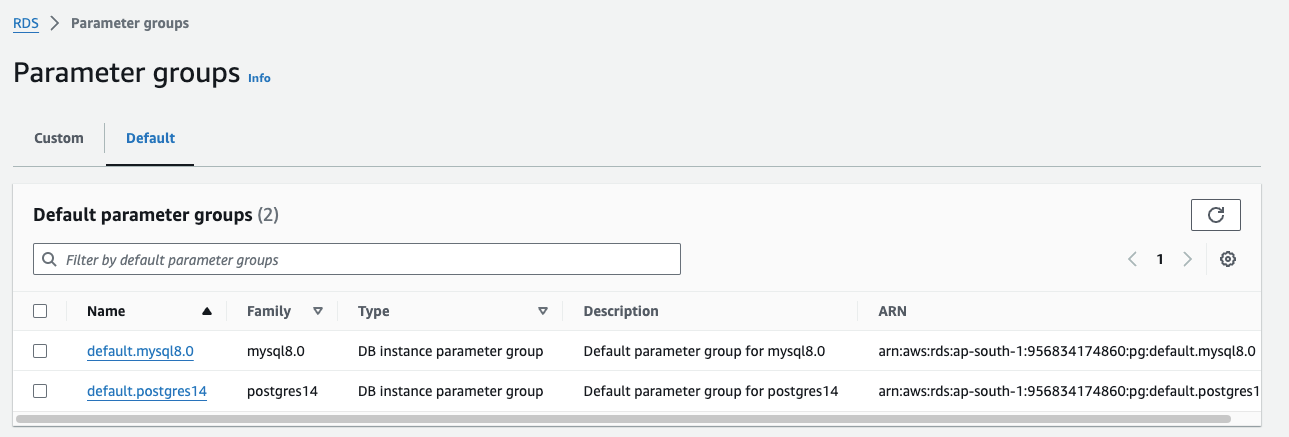
Hence it is advised to create a new parameter group as suggested below.
-
Navigate to RDS and then to Parameter groups and the click on Create parameter group
-
Enter details such as Name, Description and Database details.
-
In Engine type, choose Postgres (different from Aurora Postgres)
-
Choose the required postgres version
-
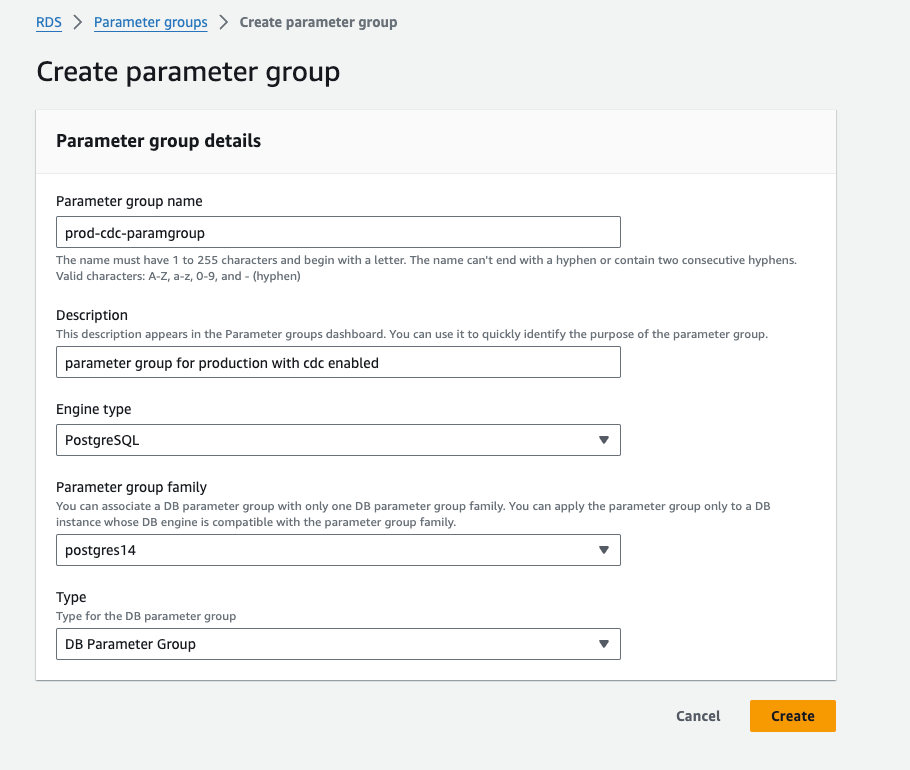
- Click on Create and parameter group will be created.
Modify Database Parameter Group
Some of the parameters need to be changed to configure this database for PostgreSQL CDC.
All of the mentioned parameters can be modified even in an existing parameter group if you are not using a default one.
(Tip: Even in the parameter group, there are a few Non Modifiable types. You can check the Value Type in the details of the parameter group for this information.)

Click edit on the created parameter group and set the following parameters:
-
Set
rds.logical_replicationto 1 in the parameter group. -
Set
max_replication_slotsto at least 5 (default is 20) so that the internal replication by RDS is not affected. Best practice is to set this to the number of concurrent replication streams you expect for PostgreSQL CDC. -
Set
max_wal_sendersto at least 7 (default is 20). It’s best to set this value greater thanmax_replication_slots. A common practice is to set it to max_replication_slots + 2. -
Set
wal_sender_timeoutto 0 (default is 30000).
Save these changes. Restart the database instance for the changes to be effective.
If you are wondering what you have done, let’s get into details:
-
rds.logical_replication: This parameter enables or disables logical replication for a PostgreSQL DB instance. Logical replication is a method used to replicate changes made to a database at a logical level, capturing changes to the data itself, such as inserts, updates, and deletes, and then replicating those changes to another database in near real-time. Note that logical replication is a kind of technique used for PostgreSQL CDC. -
max_replication_slots: This parameter specifies the maximum number of replication slots to be used for WAL replication in PostgreSQL CDC. -
max_wal_senders: This parameter specifies the maximum number of WAL senders or processes that can be connected to the server for streaming replication. -
wal_sender_timeout: This parameter specifies the time (in milliseconds) that the server allows for the WAL sender processes to send data without receiving an acknowledgment before the connection is closed.
Configure above parameter group & VPC Security Group
Everything on RDS runs within virtual private networks, which means we need to configure accessibility to our DB instance from OLake Go. Configure inbound and outbound access routes.
-
Navigate to RDS → Databases → Our Postgres DB → Modify (Top right corner)
-
Choose the new parameter group created in the parameter group section.
-
The VPC security group you have selected, should have connectivity from OLake Go setup.
-
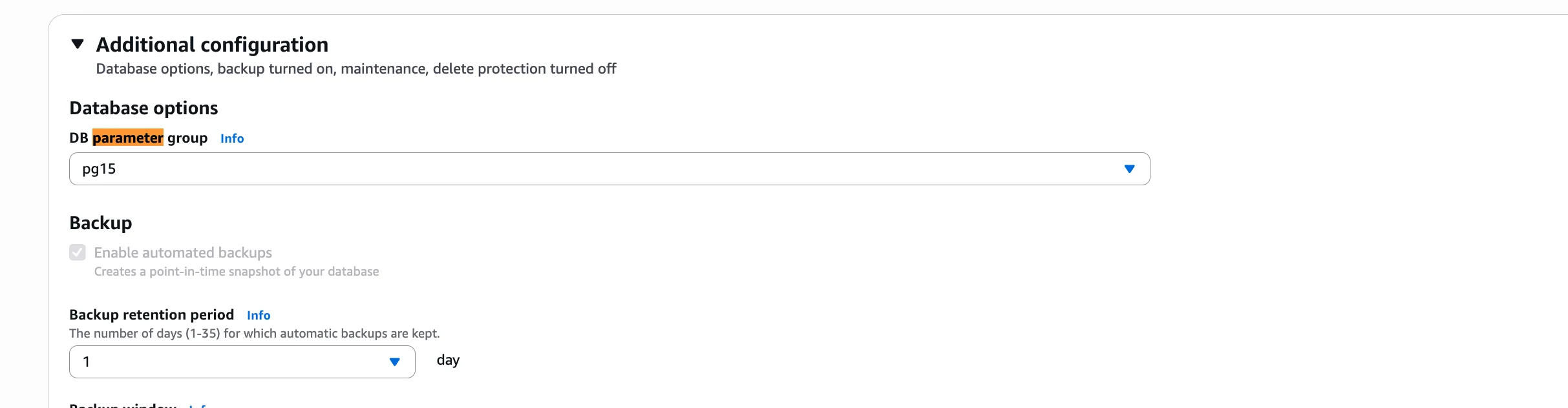
In Additional configuration, specify the DB parameter group to use the group we just created for PostgreSQL CDC.
Backup Retention Period: Choose a backup retention period of at least 7 days.
-
At the bottom, Continue -> Apply immediately -> Modify DB instance.
-
This needs restarting of the DB instance, Depends on if you are configuring on read-replica (only on PG version 16 & above possible) or master node, that has to be restarted.
Check Connectivity
To check if it is properly configured, connect to your database and run this command.
select * from pg_settings where name in ('wal_level', 'rds.logical_replication')
You should see results like below ( settings , on and logical )

Now we could connect to this database using our Postgres root user. However, best practices are to use a dedicated account which has the minimal set of required privileges for CDC. Use this user credentials to connect to the Postgres source
Create a user and grant replication access
The following commands will create a new user:
CREATE USER <user_name> PASSWORD 'your_password_here';
Now, provide this user with read-only access to relevant schemas and tables. Re-run this command for each schema you expect to replicate data from:
GRANT USAGE ON SCHEMA <schema_name> TO <user_name>;
GRANT SELECT ON ALL TABLES IN SCHEMA <schema_name> TO <user_name>;
ALTER DEFAULT PRIVILEGES IN SCHEMA <schema_name> GRANT SELECT ON TABLES TO <user_name>;
User also need rds_replication role, run the below command for the same:
grant rds_replication to <user_name>;
Create publication and replication slot for CDC
# To check all the replication slot
SELECT * FROM pg_replication_slots;

# Create a publication for all tables (or specific tables) with the name you will use in OLake
CREATE PUBLICATION olake_publication FOR ALL TABLES WITH (publish = 'insert,update,delete,truncate');

# To create a replication slot with pgoutput
SELECT pg_create_logical_replication_slot('<slot_name>','pgoutput'); --> Replace <slot_name> with the name of the slot that you would like to create

# If you want to delete a replication slot
select pg_drop_replication_slot('<slot_name>');

# To check all the publications
SELECT * from pg_publication;
Now you are ready to configure the ETL/ELT sync using OLake Go to dump the data into Apache Iceberg or Parquets for downstream analytics or machine-learning.
This setup can be used for other downstream processing as well, example PG --> Debezium --> Kafka --> Other backend-services consuming the CDC.
FAQs
OLake Go
Replicate databases, Kafka, and S3 into Apache Iceberg with OLake Go, an open source EL engine built for Iceberg from the ground up.