IBM Db2 LUW to Lakehouse: Sync to Apache Iceberg Using OLake

If you're trying to sync an IBM Db2 for LUW (Linux/Unix/Windows) database to Iceberg using OLake, this guide is for you.
Db2 doesn't always show up in "modern stack" discussions, but in the real world, it's still powering a lot of serious, business-critical systems. Teams keep Db2 around because it's stable, fast, and quite tested for high-volume transactional workloads.
And that's exactly where OLake fits in—it helps you take data that lives in Db2 and move it into your lakehouse, which can be Iceberg tables, downstream analytics, AI/ML, or even reporting, without turning it into a multi-month migration project.
This blog will walk you through:
- what the connector does
- what you should set up first
- how to configure it
- what to expect from the first sync
- and the DB2-specific setup (RUNSTATS, REORG pending, dates/time).
First: quick note on setup (UI vs CLI)
You can set up the Db2 connector either through the OLake UI or through CLI / Docker-based flows.
In this blog, I'll explain everything from the UI point of view, because that's the fastest way to get most teams running.
If you prefer CLI, don't worry—the same configuration fields apply, and we maintain a matching guide in our docs. You can follow the DB2 connector docs here.
What is Db2 LUW, and why do teams still use it?
Db2 LUW is IBM's relational database for Linux/Unix/Windows environments—the "workhorse" setup you'll find behind a lot of operational apps.
Where it shows up most often:
- Financial services and insurance (stable, always-on transactional systems)
- Manufacturing and retail (order + inventory flows)
- Telecom and government (large-scale, long-running enterprise systems)
A good way to think about it: if a company has an app that's been running reliably for years and handles real revenue or real operations, Db2 is one of the databases you'll see in that category.
And there are modern examples too—IBM case studies mention Db2 being used in production contexts like PUMA's architecture discussions.
So the question becomes: how do you unlock that Db2 data for analytics and lakehouse workflows without messing with the source system?
That's the job of this connector.
What the OLake Db2 connector does
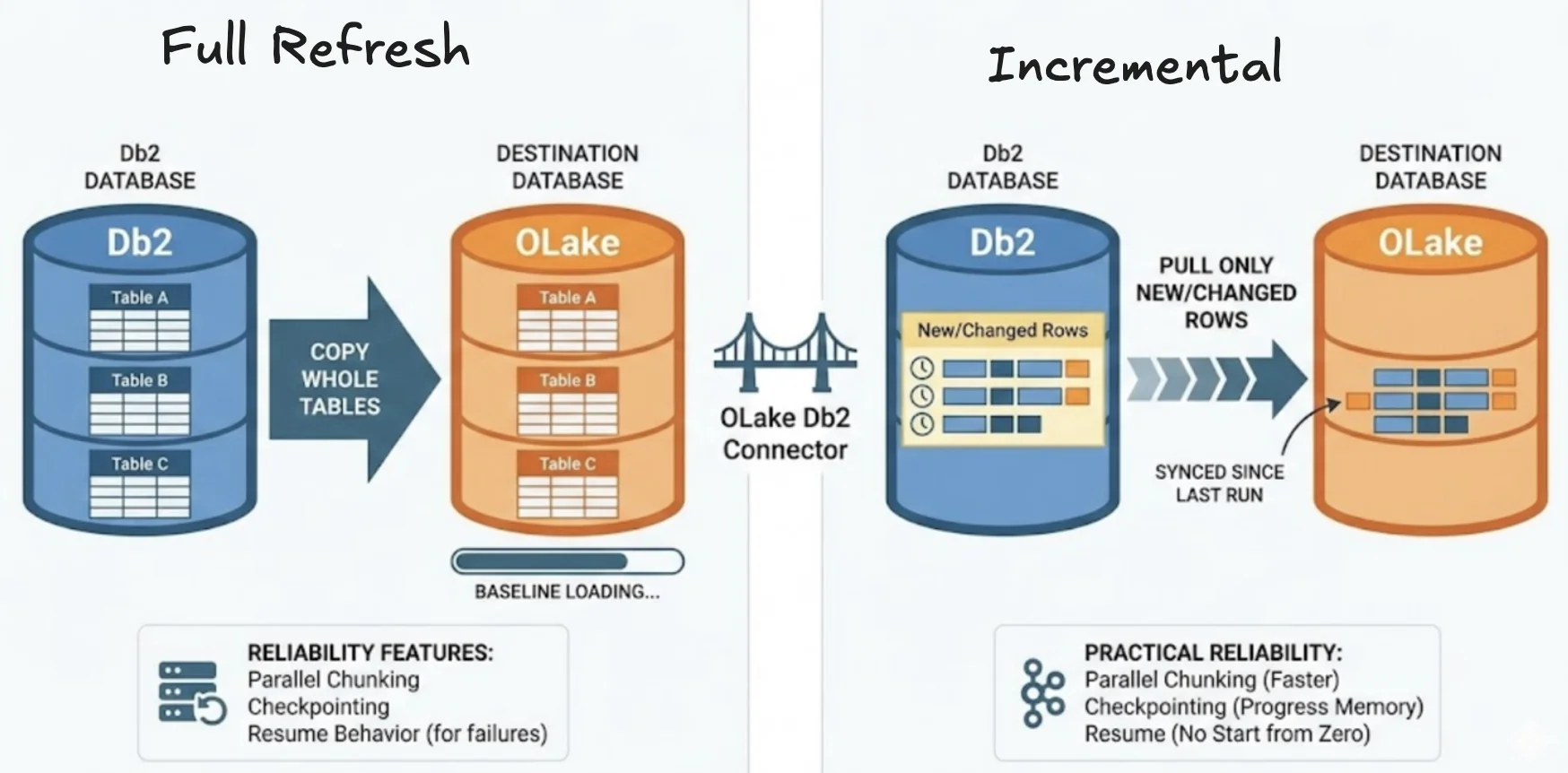
This connector is the bridge between Db2 and OLake.
It can do two big things:
1) Full refresh (one-time snapshot)
This copies the whole table(s) into your destination. It's what you do on day one to get a clean baseline.
2) Incremental (keep it updated)
After the baseline exists, incremental mode keeps pulling only the new/changed rows since the last sync—so your tables stay fresh.
Under the hood, we focus on practical reliability features too:
- parallel chunking to move large tables faster
- checkpointing so progress is remembered
- and resume behavior so a failed full load doesn't always mean "start from zero"
That reliability part matters a lot in real environments, because networks blip, credentials rotate, and someone will always schedule maintenance at the worst time.
Which sync mode should you pick?
Here's the simplest way to decide:
If you're doing this for the first time, start with a full refresh so the destination has the complete picture of the table.
After that initial snapshot, flip to incremental to keep the destination up-to-date without repeatedly copying old rows. Incremental is lighter on database IO and cheaper in terms of compute, but it requires that the table has a reliable way to detect changes (like a last-modified timestamp or an incrementing primary key).
If your table doesn't have that, you either add a change-tracking column or stick to periodic full refreshes depending on how fresh you need the data to be.
Prerequisites
Before you click anything, make sure these are true:
- Db2 version: 11.5.0 or higher
- Credentials: your Db2 user should have read access to the tables you plan to sync
- Platform note: IBM Data Server ODBC/CLI driver is not supported on ARM-based CPU architecture—so avoid that setup for Db2 connectivity or you'll hit driver issues
Now let's actually set it up.
Setup using the OLake UI
If you are interested to setup using the CLI, check the docs here.
Open OLake and go to Sources → Create Source → choose Db2.
Now you'll see a handful of fields. Here's what they mean and an example to help you along the way:
| Field | What arrives here | Example |
|---|---|---|
| Db2 Host | hostname/IP where Db2 runs | db2-luw-host |
| Db2 Port | Db2 listening port | 50000 |
| Database Name | the Db2 database | olake-db |
| Username / Password | User authentication | db2-user / ******** |
| Max Threads | parallel workers for faster reads | 10 |
| JDBC URL Params | JDBC URL params are just key=value options appended to the JDBC connection URL | {"connectTimeout":"20"} |
| SSL Mode | disable or require | disable |
| SSH Config | connect through an SSH tunnel | - |
| Retry Count | retries before failing | 3 |
More threads can speed up big tables, but don't crank it blindly. Db2 is fast, but if you over-parallelize you can create lock pressure or timeouts. If you're unsure, start around 5–10, run one sync, then tune.
Test Connection - what to expect
When you click Test Connection, OLake does a quick "sanity check" before you spend time setting up syncs.
Under the hood, OLake is basically trying to answer:
"Can I reach this Db2 server over the network, and can I log in successfully using the credentials you gave me?"
What OLake actually does during the test
Even though it feels like a single button click, a few things happen in sequence:
-
Network reachability check (implicit)
- OLake attempts to connect to the host and port you provided. If the port isn't reachable, the connection will fail before it even gets to authentication.
-
JDBC handshake + session creation
- If the port is reachable, the DB2 driver tries to establish a session with the database. This is where driver-level settings and SSL mode start to matter.
-
Authentication (username/password)
- Once the handshake starts, Db2 validates the credentials. If the user/password is wrong, you'll typically get an authentication-style error quickly.
-
Basic authorization / access checks
- In many cases, "connection" can succeed but you still don't have the right privileges to inspect schemas/tables. That can show up either in the test itself or later when you try to select tables.
So the goal of Test Connection is not "prove the pipeline works end-to-end."
It's actually to prove the fundamentals are correct (route + auth + security settings).
If Test Connection fails
Most failures fall into a small set of categories. Here's how to interpret them like a human, not like a log parser.
1) Wrong host or port
If the host or port is wrong, DNS resolution fails.
If you think humans make errors, then you are right and you can check these:
- Someone shared the wrong endpoint (internal vs external hostname)
- Db2 is listening on a different port than expected
What you can check:
- Confirm the Db2 listener port with your DB team
- Try the host from the same network where OLake is running (not from your laptop)
2) Firewall / security group / private networking
Even if the host and port are correct, OLake must be allowed to reach Db2 over the network path:
- Security group rules (cloud)
- VPC routing / peering
- Firewall rules on the VM
- "Only allow from whitelisted IPs" setups
What you can try:
- If Db2 is in a private subnet and not directly reachable, use SSH tunneling (often the quickest fix)
- Or ask for the OLake runtime IP/CIDR to be allowed
3) Missing privileges (connection works, but access fails later)
This one trips people up because it can feel inconsistent.
Sometimes:
- Test Connection succeeds
- But when you try to list schemas/tables or start sync, it fails
That usually means:
- the user can log in
- but doesn't have SELECT privileges on target tables
- or can't read metadata in the schema
What to do:
- Ask DB admin to grant read access to the schema/tables you need
- Confirm the user can run a simple query like:
SELECT 1 FROM schema.table FETCH FIRST 1 ROW ONLY;
Data type mapping (how Db2 types land in OLake)
When you replicate into a lakehouse, type stability matters. So we map Db2 types into predictable destination types.
Typical mapping looks like:
SMALLINT,INTEGER→intBIGINT→bigintREAL→floatFLOAT,NUMERIC,DOUBLE,DECIMAL,DECFLOAT→doubleCHAR,VARCHAR,CLOB,XML,BLOB, ... →stringBOOLEAN→booleanDATE,TIMESTAMP→timestamp
One important behavior to know:
Timestamps are ingested in UTC.
That helps avoid "time drift" when downstream tools assume a single timeline.
RUNSTATS: Highlight of DB2
OLake requires updated Db2 statistics for sync. If table/index stats are stale, planning gets worse. And for ingestion tools, stale stats can lead to inefficient chunking decisions.
So before you run syncs, run:
CALL SYSPROC.ADMIN_CMD(
  'RUNSTATS ON TABLE schema_name.table_name AND INDEXES ALL'
);
Do this especially when:
- the table was recently bulk-loaded
- table layout changed
- the table is huge and you want predictable performance
Date & time handling (how we avoid bad rows breaking your pipeline)
Dates are where pipelines die silently or painfully.
Some systems allow weird values (year 0000, invalid dates, etc.). Many downstream engines don't.
So OLake normalizes those "bad" values during transfer using simple rules:
- Year = 0000 → replaced with epoch start
0000-05-10→1970-01-01
- Year > 9999 → capped at 9999
10000-03-12→9999-03-12
- Invalid month/day → replaced with epoch start
2024-13-15→1970-01-012023-04-31→1970-01-01
This keeps ingestion consistent and prevents "one bad row killed the job."
Troubleshooting: "REORG PENDING" after ALTER TABLE
Db2 requires some attention to setup and this problem can sprout up.
Some ALTER TABLE operations can put a table into REORG PENDING state. When that happens, queries or sync jobs can fail with errors like SQL0668N.
Fix is straightforward:
CALL SYSPROC.ADMIN_CMD('REORG TABLE schema_name.table_name');
After REORG, the table becomes queryable again and sync resumes normally.
If the connection keeps failing - what we can check internally
If you're stuck in "Test Connection failed" loops, here's the exact order we recommend checking:
- Network reachability: can the OLake runtime reach host:port?
- Credentials: correct user/pass?
- Privileges: can that user actually read the tables?
- SSL / SSH: required by your environment? configured correctly?
- Machine compatibility: not running unsupported driver combos (like Linux arm64 + ODBC/CLI)
Most teams resolve it by step 2 or 3.
Wrap-up
If you're setting up Db2 → OLake, you're on the right track. The best way to do this is exactly what you're doing: start simple, get a clean first sync working, and then build from there.
Db2 is still a big part of how a lot of enterprises run their core systems—and OLake makes it much easier to bring that Db2 data into open lakehouse formats, so you can actually use it for analytics, reporting, and downstream workloads without touching (or rewriting) the source system.
If anything breaks along the way, don't stress around and drop at the OLake community and devs would be there to help you in no time. Most of the time it's a small network/permission/SSL thing and we can point you to the fix quickly.
And once you're happy with your Db2 setup and you're ready to expand your pipeline to other sources, check out our other connector guides here.
OLake
Achieve 5x speed data replication to Lakehouse format with OLake, our open source platform for efficient, quick and scalable big data ingestion for real-time analytics.