Ingesting Files from S3 with OLake: Turn Buckets into Reliable Streams (AWS + MinIO + LocalStack)

Most teams don't start their data architecture with "a perfect warehouse-ready dataset." They start with files.
Exports land in S3. Logs get dumped into folders. Partners upload daily drops. Batch jobs write Parquet into date partitions. And very quickly S3 becomes the place where data lives first—even when you don't want to treat it like a raw blob store forever.
The problem is: S3 is storage, not a dataset manager. It won't tell you what changed since the last run. It won't infer schema. It won't group files into logical datasets. And it definitely won't help you scale ingestion when the bucket gets big.
That's exactly what the OLake S3 Source connector is meant to solve.
It lets you ingest data from Amazon S3 and S3-compatible storage like MinIO and LocalStack, and it does it in a way that matches how buckets are usually structured in real life: folders represent datasets, files arrive over time, and you want ingestion to be incremental and fast.
You can configure it from the OLake UI or run it locally (Docker) if you're keeping things open-source and dev-friendly.
What this connector is really doing
Instead of treating S3 as "one giant bucket of files", OLake treats it like a place where multiple datasets naturally exist side-by-side.
If you've got data organized like:
users/…orders/…products/…
…then you already implicitly have multiple streams. OLake just makes that explicit.
Once it identifies those streams, it focuses on three things you always want in S3 ingestion:
- Read the right files
- Understand the data shape
- Keep syncing without re-reading everything
That's why the connector includes format support, schema inference, stream discovery through folder grouping, and incremental sync using S3 metadata—without you building that machinery yourself.

(click to zoom in)
How data flows
Let me walk you through a typical run—this is how data moves and why each step matters.
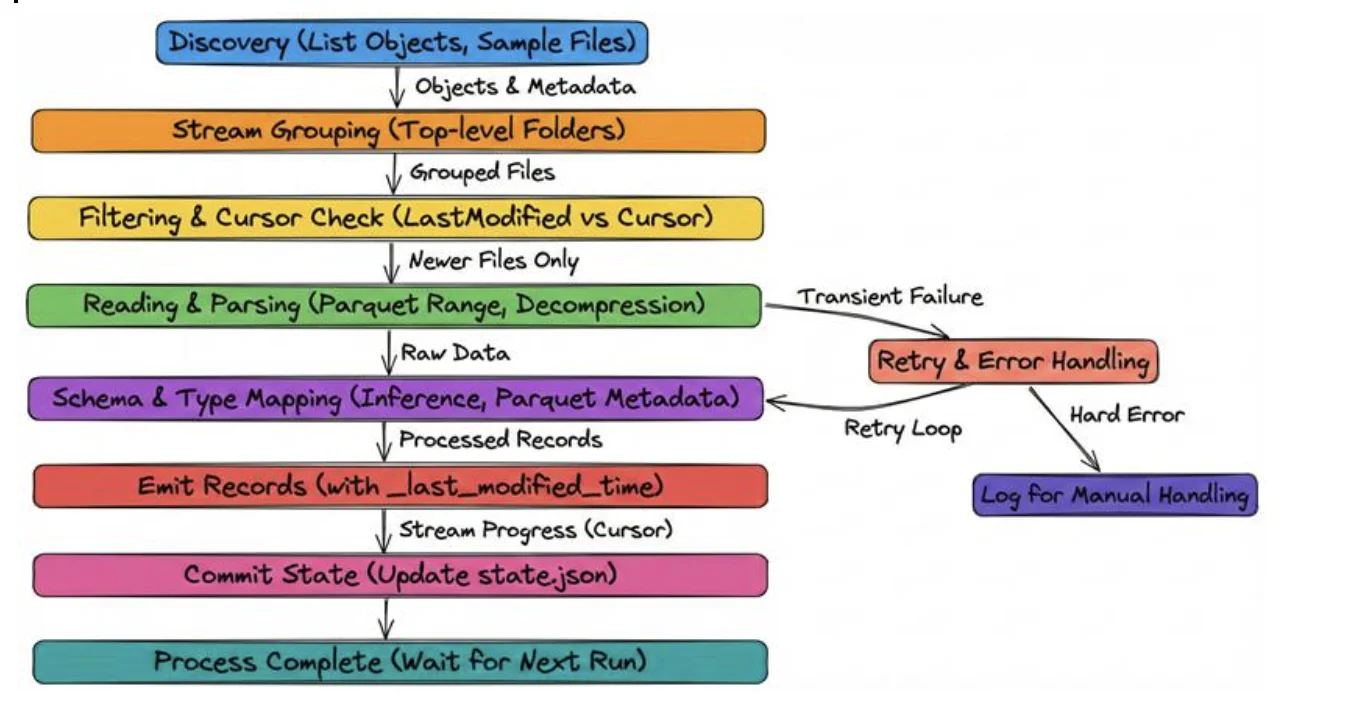
Discovery
The connector lists objects in the bucket under your path_prefix.
It groups files by top-level folder (stream) and samples files for schema inference.
It also records _last_modified_time from object metadata.
Stream grouping
Files in bucket/prefix/<stream>/… become part of the <stream> stream. This gives you logical tables directly from folder structure.
Filtering & Cursor
If you run incremental mode, the connector compares each file's LastModified to the stored cursor for that stream and only reads files that are newer.
Reading & Parsing
The connector reads files (supports Parquet range reads for efficiency) and decompresses .gz transparently.
Schema & Type Mapping
CSV files: OLake samples rows and picks the safest data type that works across all values (for example, treating mixed values as strings if needed).
JSON files: Primitive types like strings, numbers, and booleans are detected automatically. Nested objects or arrays are stored as JSON strings.
Parquet files: OLake reads the schema directly from the file metadata, so no inference is needed.
OLake automatically figures out column types while reading files, so you don't need to define schemas manually:
Emit & Record Metadata
Each record produced includes _last_modified_time so downstream consumers or the connector's state can use it as a cursor.
Commit State
After a successful run, the connector updates the state.json with the latest _last_modified_time per stream.
Retry & Error Handling
Transient failures are retried according to your retry_count. Hard parsing errors appear in logs for manual handling.
This flow gives you visibility and speed—you only process what changed and you keep track of per-stream progress.
Stream grouping: how OLake turns folder structure into datasets
This is the feature that makes the connector feel like it was built by people who've actually dealt with messy buckets.
OLake automatically groups files into streams based on folder structure. Here's the mental model:
The first folder after your configured path_prefix becomes the stream name.
So if your bucket looks like:
s3://my-bucket/data/
├── users/
│   ├── 2024-01-01/users.parquet
│   └── 2024-01-02/users.parquet
├── orders/
│   ├── 2024-01-01/orders.parquet
│   └── 2024-01-02/orders.parquet
└── products/
    └── products.csv.gz
…and your path_prefix is data/, OLake creates:
usersstreamordersstreamproductsstream
The key rule
To keep your expectations up and not worried on a friday production the grouping happens at level 1 only. That means everything under users/** is treated as one stream regardless of subfolders (daily partitions, hourly folders, etc.).
This is usually what you want because it matches the "dataset folder" style most teams use.
Formats supported: OLake reads what people actually store in buckets
S3 buckets almost always end up storing a mix of:
- CSV exports
- JSON events/logs
- Parquet outputs from batch/streaming jobs
OLake supports all three and handles them in the "obvious, non-annoying" way.
CSV (plain or gzipped)
CSV is messy, but it's common, so the connector gives you enough control to make it work reliably: delimiter, header detection, quote character, and skipping initial rows when needed. Schema is inferred from header + sampling, but OLake stays conservative because CSV is inherently ambiguous.
Supported:
.csv.csv.gz
JSON (multiple shapes, plain or gzipped)
JSON is even more inconsistent across teams, so OLake handles the common real-world patterns:
- JSONL (line-delimited)
- JSON arrays
- single JSON objects
It auto-detects which one you've got and infers schema from primitives. Nested objects and arrays are preserved by serializing them into JSON strings (which keeps ingestion stable even if the structure changes).
Supported:
.json,.jsonl.json.gz,.jsonl.gz
Parquet (native schema, efficient reads)
Parquet is the easiest case. OLake reads schema directly from Parquet metadata, so there's no guessing and it scales well. It also supports efficient streaming reads with S3 range requests, which matters for large files.
Supported:
.parquet
Compression: you don't need to configure
A small but important quality-of-life thing: if your files end with .gz, OLake automatically decompresses them. That's it. No extra "compression" field, no special mode, no separate connector.
This is especially useful for S3 ingestion because .gz is often the default for CSV and JSON exports.
Sync modes: full refresh vs incremental
The connector supports two sync modes, and the difference is simple:
Full Refresh
This is the "scan everything every run" mode.
- Great for first-time loads
- Great for backfills
- Fine for small buckets
But in production, re-reading every object every time gets expensive and slow.
Incremental
Incremental is where this connector becomes operationally clean.
OLake uses the S3 object LastModified timestamp as the cursor for incremental syncs.
This means:
- If a file is new or updated, it will be picked up in the next sync
- If a file is unchanged, it will be skipped
- If a file is deleted from S3, OLake does not track or emit delete events
Incremental sync only detects additions and updates. Deletions in S3 are not propagated to downstream systems.
If deletions must be reflected, run a full refresh to reconcile the destination state.
"What has changed since last time?" without requiring you to maintain your own catalog or tracking table.
Prerequisites: what you need to make this smooth
To avoid the access denied issue make sure that the necessary policies exist.
The OLake S3 Source connector works with Amazon S3 without any version restrictions and is fully compatible with standard AWS-managed buckets. For local development and testing using S3-compatible services, MinIO version 2020 or newer is required to ensure compatibility with the S3 API features used by the connector.
When using LocalStack, a minimum version of 0.12+ is recommended for stable S3 behavior and IAM simulation.
In terms of data formats, the connector supports CSV, JSON, and Parquet files. These formats cover most common data export and analytics use cases, allowing teams to ingest both structured and semi-structured data reliably.
Required permissions
OLake needs to list objects and read them:
s3:ListBuckets3:GetObject
Here's the recommended read-only IAM policy:
{
  "Version": "2012-10-17",
  "Statement": [
    {
      "Effect": "Allow",
      "Action": [
        "s3:ListBucket"
      ],
      "Resource": [
        "arn:aws:s3:::<YOUR_S3_BUCKET>"
      ]
    },
    {
      "Effect": "Allow",
      "Action": [
        "s3:GetObject"
      ],
      "Resource": [
        "arn:aws:s3:::<YOUR_S3_BUCKET>/*"
      ]
    }
  ]
}
Replace <YOUR_S3_BUCKET> with your bucket name.
Authentication (AWS vs MinIO/LocalStack)
AWS S3
OLake always needs credentials to access S3, but you don't always have to enter them explicitly.
If credentials are not provided in the OLake configuration, the connector automatically uses the AWS default credential chain. This is the recommended approach for production deployments.
OLake checks for credentials in the following order:
- Static credentials in configuration (
access_key_id,secret_access_key) - Environment variables (
AWS_ACCESS_KEY_ID,AWS_SECRET_ACCESS_KEY) - IAM role attached to the compute (EC2 instance profile, ECS task role, EKS IRSA)
- AWS credentials file (
~/.aws/credentials)
Use IAM roles instead of static keys to improve security and avoid credential leakage.
MinIO / LocalStack (S3-compatible services)
For non-AWS S3 services like MinIO or LocalStack, credentials must be provided explicitly, since there is no AWS-managed identity system.
You typically need to configure:
- Custom S3 endpoint URL
- Static access key and secret key
These values must match the credentials configured on the MinIO or LocalStack server.
Configuration
If you are interested to setup using the CLI, check the docs here.
You can configure S3 sources in the OLake UI or via the CLI. Below are the fields you'll set and recommended values.
Here's a table you can go by just ticking off:
AWS S3
| Field | Description | Example |
|---|---|---|
| Bucket Name (required) | S3 bucket name (no s3://) | my-data-warehouse |
| Region (required) | AWS region | us-east-1 |
| Path Prefix | Optional prefix to limit discovery | data/ |
| Access Key ID | Optional (use IAM chain for prod) | <YOUR_KEY> |
| Secret Access Key | Optional (use IAM chain for prod) | <YOUR_SECRET> |
| File Format (required) | CSV / JSON / Parquet | parquet |
| Max Threads | Concurrent file processors | 10 |
| Retry Count | Retry attempts for transient failures | 3 |
S3-Compatible Services (MinIO / LocalStack)
For non-AWS endpoints, provide Endpoint (e.g. http://minio:9000) and credentials that match the server.
MinIO example:
- Endpoint:
http://minio:9000 - Access Key ID:
minioadmin - Secret Access Key:
minioadmin
LocalStack example:
- Endpoint:
http://localhost:4566 - Access Key ID:
test - Secret Access Key:
test
CSV/JSON/Parquet options (when you need them)
You won't always need to worry about format-specific configuration, especially if you're working with Parquet or well-structured JSON. In most cases, the connector can infer everything it needs automatically. CSV, however, is the format that usually requires a bit of tuning, because CSV files don't carry schema information explicitly.
For CSV sources, you can configure a few important options to ensure correct parsing. The delimiter defaults to a comma (,), but can be adjusted for semicolon- or tab-separated files. The Has Header setting (enabled by default) tells the connector whether the first row contains column names.
You can also use Skip Rows to ignore metadata or comments at the top of a file, and configure the Quote Character (default ") for properly handling quoted fields. Compression does not need to be configured manually—it is inferred automatically from the file extension, so files ending with .csv.gz are treated as gzipped CSV files.
Parquet files generally require no tuning at all, since the schema is embedded directly in the file metadata and can be read reliably by the connector. JSON also typically needs no additional configuration, unless different JSON formats (such as JSONL and JSON arrays) are mixed within the same folder. For best results, each JSON format should be kept in its own stream folder.
Data type mapping
OLake tries to keep ingestion stable and predictable while still giving useful typing.
| File Format | Source Type | Destination Type | Notes |
|---|---|---|---|
| CSV | inferred | string / int / double / timestamptz / boolean | Uses AND logic across sampled rows |
| JSON | string | string | JSON string fields |
| JSON | number (integer) | bigint | |
| JSON | number (float) | double | |
| JSON | boolean | boolean | |
| JSON | object/array | string | Nested objects/arrays serialized as JSON strings |
| Parquet | STRING/BINARY | string | Maps directly from Parquet types |
| Parquet | INT32/INT64 | int / bigint | |
| Parquet | FLOAT/DOUBLE | float / double | |
| Parquet | BOOLEAN | boolean | |
| Parquet | TIMESTAMP_MILLIS | timestamptz | |
| Parquet | DATE | date | |
| Parquet | DECIMAL | float | Converted to float64. May result in precision loss for high-precision decimal values. |
| All formats | _last_modified_time | timestamptz | S3 LastModified metadata (added by connector) |
Timezone: OLake ingests timestamps in UTC (timestamptz) regardless of source timezone.
Parquet DECIMAL types are converted to float64 during ingestion.
While this works well for analytical use cases, very high-precision or fixed-scale decimal values may lose precision. If exact precision is required (for example, financial data), consider storing values as strings or using a destination that supports native decimal types.
Date and time handling (edge cases)
To keep downstream destinations happy, OLake normalizes problematic dates:
- Year = 0000: replaced with epoch start
1970-01-01. Example:0000-05-10→1970-01-01. - Year > 9999: capped at 9999 (month/day preserved). Example:
10000-03-12→9999-03-12. - Invalid month/day: replaced with epoch start
1970-01-01. Examples:2024-13-15→1970-01-01,2023-04-31→1970-01-01.
These rules apply to date, time, and timestamp columns during transfer.
Incremental sync details
Here's how olake tracks the change and how cursor moves:
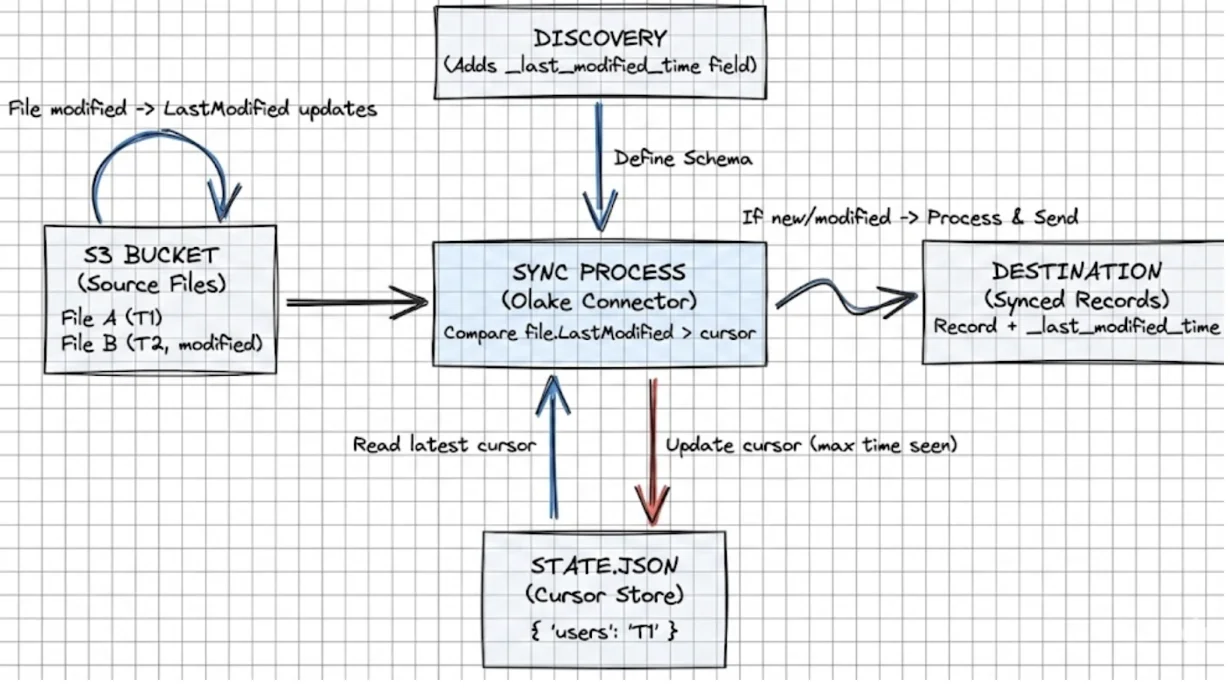
The connector uses the file LastModified timestamp as a cursor per stream.
Workflow:
- Discovery adds
_last_modified_timeto streams. - During sync, each record gets the file's
LastModifiedas_last_modified_time. - The
state.jsontracks the latest_last_modified_timeper stream. - Future runs only process files with
LastModified > cursor.
State example:
{
  "users": { "_last_modified_time": "2024-01-15T10:30:00Z" },
  "orders": { "_last_modified_time": "2024-01-15T11:45:00Z" }
}
What happens if a file is modified?
If content changes and the file is re-uploaded, S3 updates LastModified, and the connector will pick it up again in incremental mode. That's the correct behavior for correctness.
Useful commands while testing
List objects under a prefix:
aws s3 ls s3://bucket-name/prefix/ --recursive
LocalStack using awslocal:
awslocal s3 ls
Check MinIO health:
curl http://localhost:9000/minio/health/live
Validate JSON locally:
jq . < file.json
Inspect Parquet schema:
parquet-tools schema file.parquet
Run these before blaming the connector—they help you quickly isolate environment or file-format issues.
Troubleshooting
Every other setup we built can't be full-proof if some errors arrive this would help:
Connection Failed - Access Denied
Error: failed to list objects: AccessDenied: Access Denied
Cause: Insufficient IAM permissions or wrong credentials.
Fix: Check credentials or IAM role policy. Ensure s3:ListBucket and s3:GetObject on the target bucket.
No Streams Discovered
Cause: Files not in folder structure or wrong path_prefix.
Fix: Ensure bucket/prefix/stream_name/files layout. Confirm extensions (.csv/.json/.parquet).
Schema Inference Failed (CSV)
Error: failed to infer schema: invalid delimiter or header configuration
Cause: Wrong delimiter or header flag.
Fix: Check Has Header, Delimiter, Skip Rows. Test with sample CSV.
JSON Format Not Detected
Cause: Mixed JSON formats or invalid JSON.
Fix: Separate JSONL from JSON Arrays. jq . < file.json to validate.
Parquet Cannot Be Read
Error: failed to read parquet schema: not a parquet file
Cause: Corrupt file or wrong extension.
Fix: parquet-tools schema file.parquet, re-upload if necessary.
Incremental Sync Not Working
Cause: State file not persisted or wrong sync mode.
Fix: Ensure state.json is writable, sync_mode is incremental, and cursor_field includes _last_modified_time. Pass --state /path/to/state.json when running CLI.
MinIO Connection Timeout
Error: dial tcp: i/o timeout
Cause: Network or wrong endpoint.
Fix: docker ps | grep minio, verify endpoint http://hostname:9000. Use container names inside Docker networks.
Files Not Syncing Despite Being Present
Cause: Extension mismatch or compression not detected.
Fix: Ensure extensions are correct and files are non-empty: aws s3 ls s3://bucket/prefix/ --recursive --human-readable.
Out of Memory Errors
Error: FATAL runtime: out of memory
Cause: Too many large files processed concurrently.
Fix: Reduce max_threads to 3–5, split large files (>5GB), or increase memory.
Permission Denied - LocalStack
Cause: LocalStack IAM simulator behavior.
Fix: LocalStack accepts test/test by default. Ensure endpoint http://localhost:4566 and confirm bucket with awslocal s3 ls.
If the issue isn't listed, post to the OLake Slack with connector config (omit secrets) and connector logs.
Best practices & scaling tips (practical)
- Prefer AWS credential chain (IAM roles) in production to avoid static secrets.
- Store and back up
state.jsonin a reliable location. - Tune
max_threadsgradually—memory and networking are the limits, not CPU alone. - Keep one logical dataset per top-level folder and avoid mixed formats in the same stream folder.
- Add monitoring and alerting for failure spikes and long-running syncs.
And once you're happy with your S3 setup and you're ready to expand your pipeline to other sources, check out our other connector guides here.
OLake
Achieve 5x speed data replication to Lakehouse format with OLake, our open source platform for efficient, quick and scalable big data ingestion for real-time analytics.