Interoperability Unlocked: OLake Go Now Writes Iceberg Deletion Vectors

If you've spent any time running data pipelines into Apache Iceberg, you've probably run into a question that sounds simple but has surprisingly deep roots: what actually happens when a row gets deleted or updated?
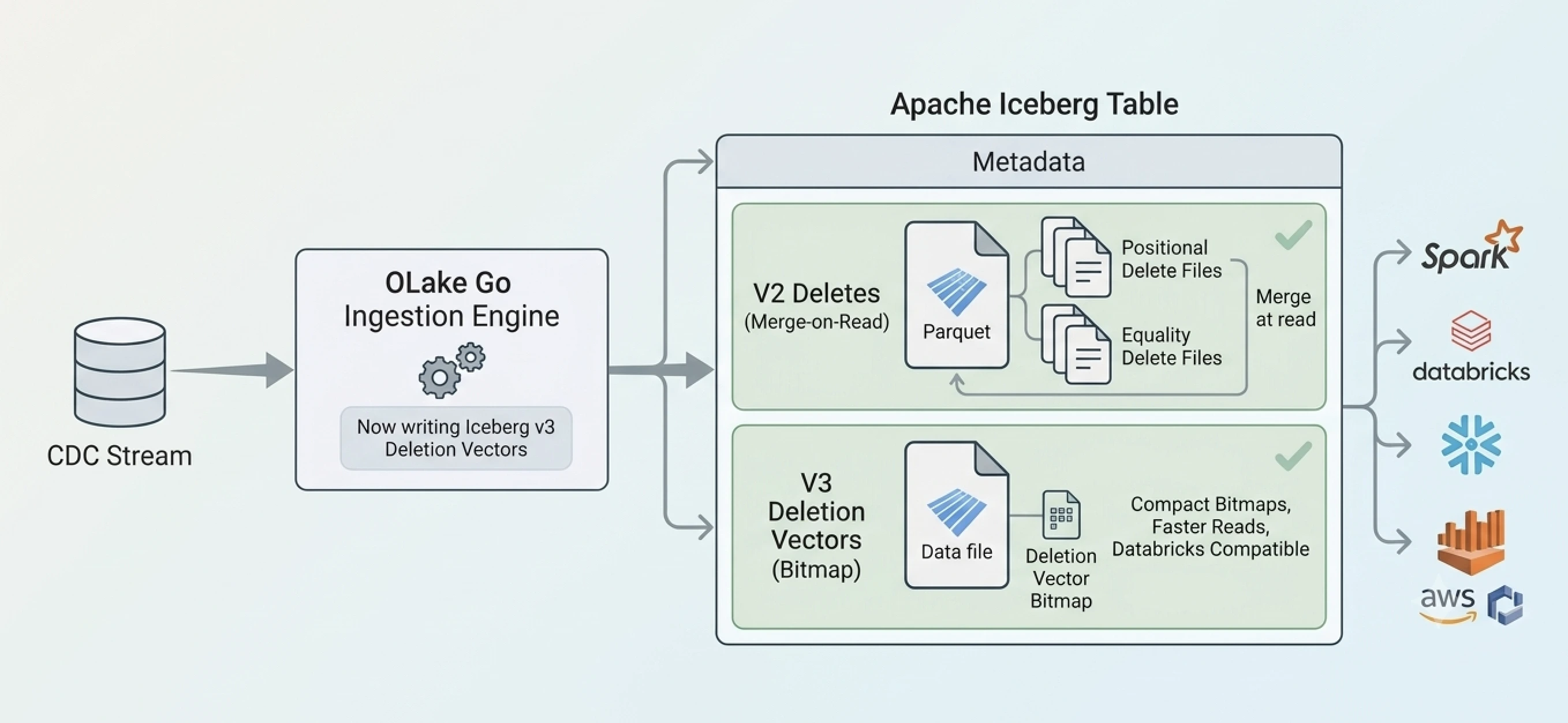
It's a question worth sitting with, because the answer touches almost everything about how Iceberg works under the hood, and it's directly relevant to a change we're rolling out in OLake Go. Starting with the release of OLake Version 0.11.0, OLake Go can write Iceberg tables using a third delete format called deletion vectors, on top of the two it already supported. That might sound like a small technical addition, but it actually closes a real gap that's been sitting in Iceberg pipelines for a while: the gap between what your ingestion tool writes and what your query engine can actually read.
This post is going to walk through that whole story from the ground up. We'll start with why Iceberg needs delete formats at all, go deep into how the two existing formats work, look honestly at where they start to struggle, then unpack exactly how deletion vectors solve that problem, and finally talk about what this means for anyone building a pipeline with OLake Go. We'll also spend real time on one specific engine, Databricks, because it's the clearest example of why this matters in practice.
Why deleting a row in Iceberg is not Strighforward
To understand why Iceberg has three different ways to delete a row, you first have to understand a constraint that shapes everything about how Iceberg tables work: the actual data sitting on disk is stored in Parquet files, and Parquet files are immutable. Once a Parquet file is written and closed, you cannot reach into it and change a single byte. You can't edit row 41,237 to update a price. You can't delete row 12 and shift everything else up. The file, as a physical object sitting in object storage or on a filesystem, is frozen the moment it's written.
Iceberg gives you two fundamentally different strategies for handling this:
1. Copy on Write
Copy-on-write means exactly what it says. When a row needs to be deleted or updated, Iceberg rewrites the entire data file that row lives in, producing a brand new file that contains everything except the deleted row, or with the updated row's new values baked in. The old file gets marked as no longer part of the current table state, and the new file takes its place. This makes copy-on-write an extremely expensive operation, as even a small update touching multiple files forces every affected Parquet file to be completely rewritten from scratch.
2. Merge on Read
Instead of rewriting the original data file, merge-on-read leaves it completely untouched and instead writes a small, separate file that records what has changed. At query time, when someone reads the table, the query engine combines the original data file with this separate "delete file" to reconstruct the correct, current view of the data. The deleted rows get filtered out on the fly, during the read, rather than being physically removed at write time.
The obvious appeal here is speed at write time. Deleting a single row no longer means rewriting a 500 megabyte file. It means writing a tiny file, sometimes just a few kilobytes, that records the fact that a delete happened. For CDC pipelines processing a constant stream of small changes, this is a massive win on the write side.
But this also comes with a tradeoff. Every read now has to do extra work. Instead of just scanning a data file and returning results, the query engine has to also fetch the relevant delete files, apply them, and filter out anything that's been marked deleted. If a data file has accumulated a lot of delete files over time, this merge step can get expensive.
Iceberg provides two different ways to write these delete files:
1. Equality Deletes -
It records what that row looked like, or more specifically, the value of one or more columns that identify it. Suppose you are replicating a table, a row in the source was deleted, lets say id = 2 has been deleted. The equality delete file says "any row in this table where id equals 2 should be considered deleted."
2. Positional Deletes -
Positional deletes take the opposite philosophy. Instead of describing a row by its values, they describe it by its exact physical location. A positional delete file is a small file containing pairs that look like (file_path, row_position). It says something like "row number 10 inside the file named data-00001.parquet is deleted". No condition to evaluate, no column values to match. Just a direct coordinate.
OLake Go supports both of these strategies. But with Iceberg format V3, the spec introduced a third way to record row-level deletes that is deletion vectors.
Idea behind Deletion vectors
Instead of writing a new file every time a delete happens, a deletion vector represents deleted rows as a bitmap. One bit per row position in a data file. If a data file has a thousand rows, its deletion vector is conceptually just a thousand bits, one for each row, where a value of 0 means "this row is still alive" and a value of 1 means "this row has been deleted."
Picture a data file holding five rows, at positions 0 through 4. If a CDC pipeline deletes the row at position 2, the deletion vector for that file becomes:
row:    0  1  2  3  4
bit:    0  0  1  0  0
That's it. No new Parquet file describing a condition or a coordinate. Just a flag that gets flipped for that one position. If another row, say position 1, later gets deleted too, the same bitmap simply gets updated to reflect both:
row:    0  1  2  3  4
bit:    0  1  1  0  0
At read time, this becomes remarkably cheap to apply. Instead of joining against a pile of delete files or evaluating conditions row by row, the query engine checks one bit per row it's scanning. Is the bit at this position set? If yes, skip the row. If no, return it. That's a direct, constant time lookup, dramatically simpler than either evaluating an equality condition or scanning through potentially hundreds of separate positional delete files.
Why Databricks Only Supports Deletion Vectors?
While most Iceberg engines (Spark, Flink, Trino, Snowflake) support merge-on-read (Iceberg v2) by reconciling delete files to handle heavy CDC volumes, Databricks is the exception which only supports merge-on-read (Iceberg v3).
Under v2, every delete or update writes a new small Parquet file, whether that's an equality condition or a positional coordinate. Under sustained CDC traffic, a frequently touched data file can end up referenced by dozens or hundreds of these delete files within a day or two. Reading that file correctly then means opening every one of those delete files, decoding each, and merging them all before returning a single row. Query planning gets heavier too, since the engine has to track a growing many-to-many relationship between data files and the delete files piling up against them. And each delete file, however small the actual deleted-row information is, still carries a full Parquet footer and metadata overhead, so the format itself adds cost on top of the sheer number of files. The result is a table that gets progressively slower to query the longer it runs without compaction, which turns compaction from routine maintenance into something you have to run constantly just to keep reads fast.
Databricks appears to have sidestepped this problem entirely rather than inherited it. Its other table format, Delta Lake, already had its own bitmap based deletion vectors running in production before Iceberg v3 existed, built on the same idea: one compact bitmap per data file, checked directly at read time, instead of an ever-growing stack of separate delete files. Databricks' engine never had to solve the many-to-many delete file problem, because it never adopted the format that creates it. So when Iceberg v3 formalized its own deletion vectors, the fit was natural. Databricks' engine already knew how to check a bitmap against row positions, and extending that same path to Iceberg v3 tables was a contained piece of work.
This is exactly the gap that made OLake Go's previous default a real constraint. A pipeline writing equality deletes because that suited its CDC workload would leave a Databricks user with a disadvantage as it does not support Iceberg v2 delete formats. Now that OLake Go can write deletion vectors directly, that specific failure mode disappears. A table ingested through OLake Go in Upsert mode with deletion vectors selected reads correctly in Databricks from the start, no rewrite and no silent gap between what was deleted and what the query returns.
What OLake Go supporting this actually changes?
With this release, OLake Go adds deletion vectors as a third option. You can now choose your delete format directly in your job or stream settings, picking whichever of the three, equality deletes, positional deletes, or deletion vectors, best fits how you're going to query the resulting table.
OLake Go now asks which downstream query engine you're going to use to read the table. Based on that answer, it only shows you the delete format options that engine actually supports, instead of leaving you to figure out compatibility on your own and find out later that a query came back with stale or missing rows.
So if you select Spark as your query engine, which reads all three formats, you'll see all three options available to choose from. But if you select Databricks, which only reads deletion vectors, OLake Go narrows the list down to just that one option, and doesn't even show you equality or positional deletes as something you could pick. The format mismatch we've been talking about through this whole post, where a table gets written in a format the query engine downstream can't read, becomes something the job setup itself protects you from, rather than something you find out about after the fact.
If we look closely at the query engine landscape, support for these three delete formats is not uniform, and in some cases the differences are stark enough to actually break your pipeline if you pick the wrong one. For instance:
1. Databricks - Its documentation is explicit that it does not support reading either v2 positional deletes or v2 equality deletes at all and only reads deletion vectors.
2. Snowflake - It sits in a different spot. It reads v2 positional deletes and, as of a relatively recent update, deletion vectors too, but it has never supported equality deletes at all, for either managed or externally managed tables.
3. Amazon Athena - It is currently locked to an older Iceberg specification version and can read v2 tables just fine, including both equality and positional deletes, but cannot open or read a v3 table at all yet.
4. Spark, DuckDB, Flink - Then we have these engines (and many others) that comfortably read all three formats today, no caveats.
Before release of OLake Version 0.11.0, OLake Go only supported append only ingestion mode for unity catalog. Not a performance problem, an actual correctness problem, as the engine simply can't interpret the delete format your data was written in. Now that OLake Go can write any of the three formats, that constraint goes away. You pick the format based on who's actually going to be reading the data.
This is really what we mean by interoperability here. It's not an abstract buzzword. It's the very concrete fact that OLake Go can now serve a Databricks-first team, a Snowflake-first team, and a modern Spark or Flink stack, all from the same ingestion tool, just by choosing the right delete format for each destination.
Tutorial: Writing Iceberg Tables with Deletion Vectors
In this tutorial, we'll write Iceberg tables with deletion vectors from MySQL to Snowflake Horizon Catalog using OLake Go. Checkout the Quickstart docs to spin up OLake UI.
Access the services:
- OLake UI:
http://localhost:8000 - Default Login:
- Username:
admin - Password:
admin
- Username:
1. Connect to MySQL as source
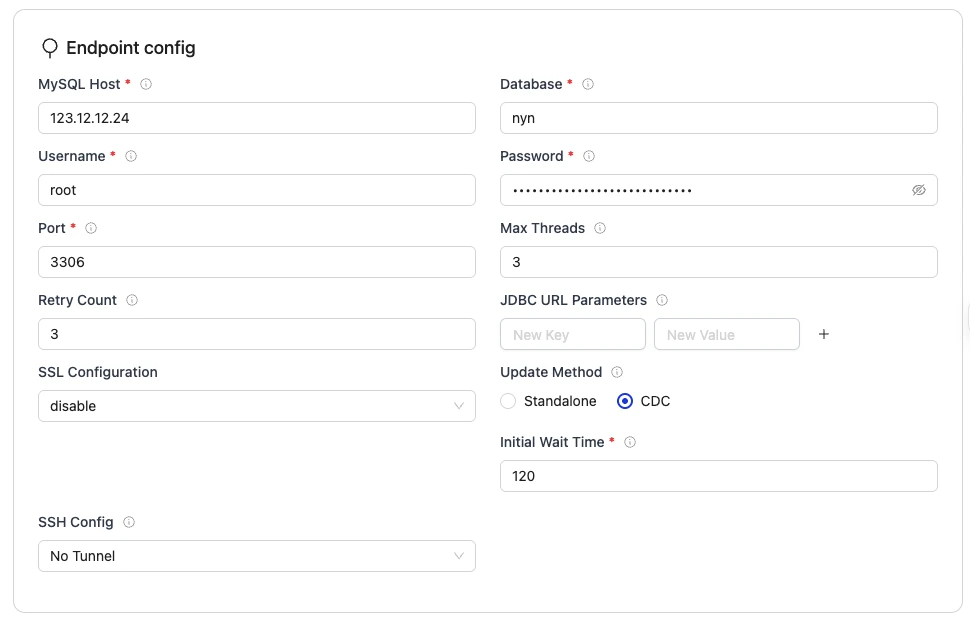
In the OLake UI, create a MySQL source and enter the connection details. You can find the detailed explanation of connection details in the MySQL source page.
2. Connect Snowflake Horizon Catalog in OLake Go
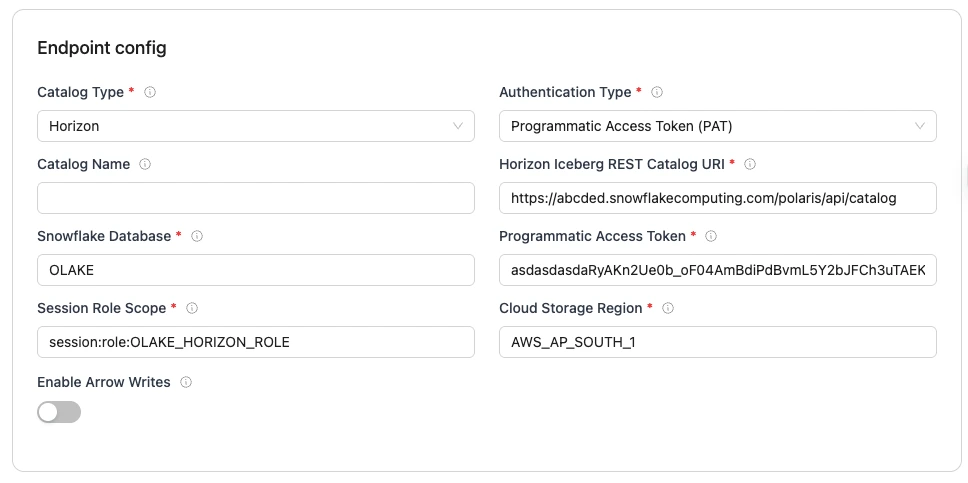
In the OLake UI, create an Iceberg destination and set the catalog type to Horizon Catalog. Enter the catalog URL, Snowflake database, role, and credentials for the authentication method you use in Snowflake (Personal Access Token, Key-Pair, or External OAuth).
The full setup, including every authentication method and configuration option, is in Horizon Catalog setup. Once the connection succeeds, any OLake source can write to this destination.
3. Create a Job
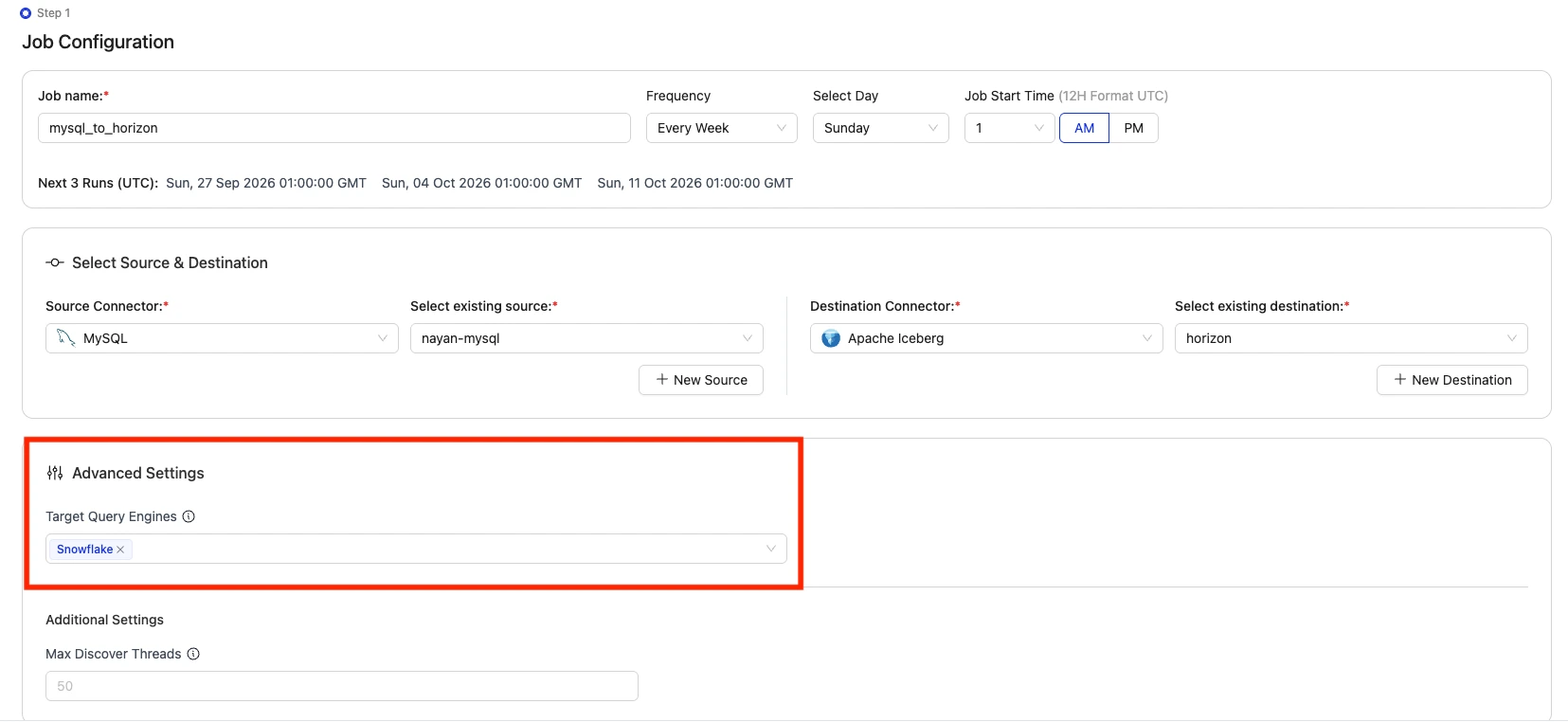
In the OLake UI, create a job and select the source and destination you created in the previous steps. In the advanced settings, select the query engine you want to use to read the table. We will select Snowflake as the query engine. This makes sure that in the streams page we only get to see the delete formats (upsert type) relevant to Snowflake.
4. Select the Streams
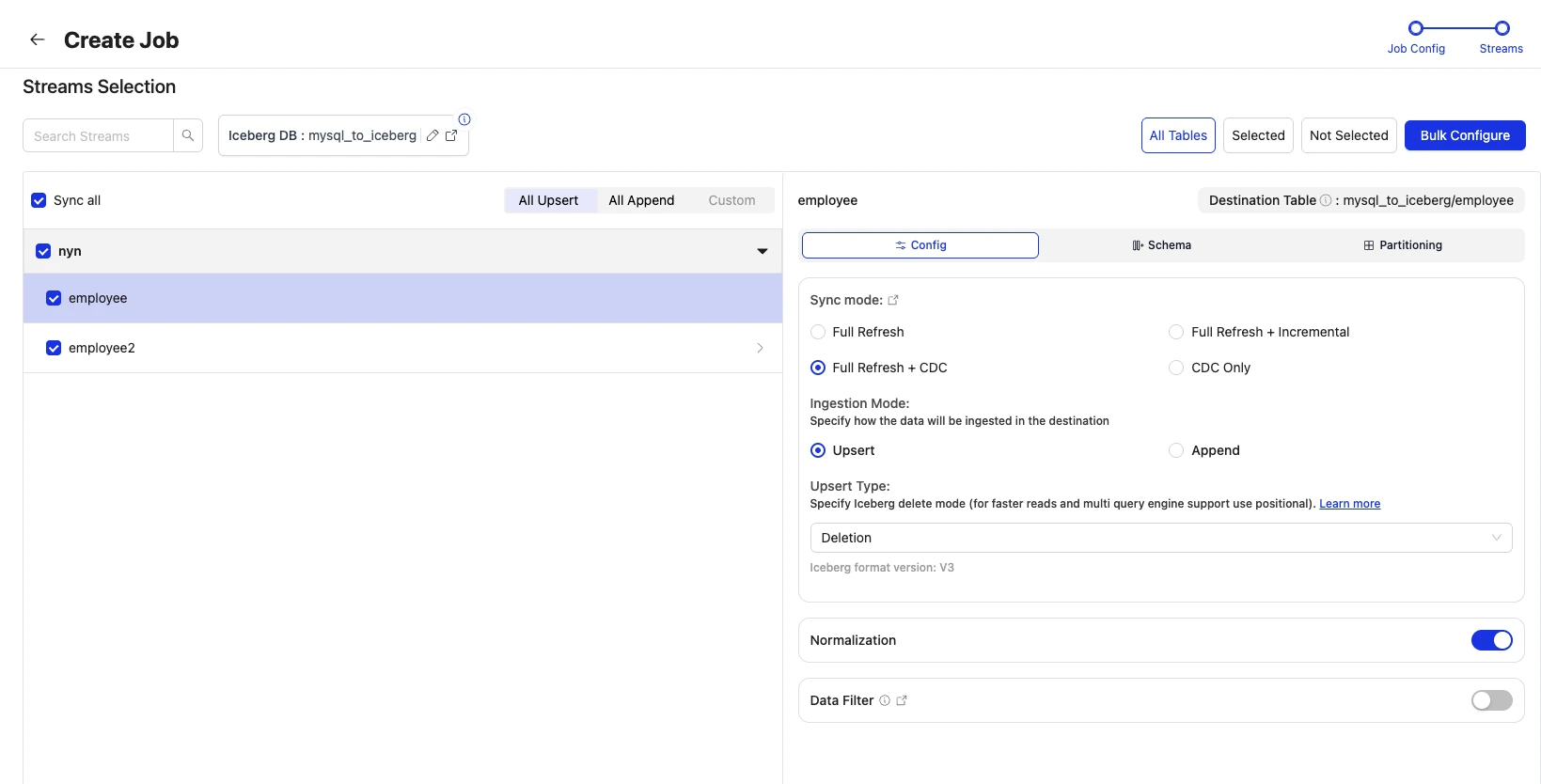
In the streams page, we will be selecting employee table, select the sync mode as Full Refresh + CDC, ingestion mode as Upsert and the Upsert Type as Deletion Vectors.
Then we save the job and run the sync!
How to think about choosing a format
Given all three options are now on the table, the practical question becomes which one to actually pick for a given pipeline, and the honest answer is that it depends entirely on who's going to be reading the data downstream, and there's a general performance ordering worth keeping in mind once compatibility is settled.
If your primary query engine only supports deletion vectors, as is the case with Databricks, that decision is effectively made for you. If you're feeding an older or more conservative engine that's still capped at v2, like Athena today, deletion vectors aren't on the table at all, but that still leaves a real choice between equality and positional deletes, and it's worth being deliberate about which one you pick rather than defaulting to whichever is more convenient to write.
OLake Go helps with this decision through the Target Query Engine setting in Advanced Settings, which automatically filters delete format options to only those supported by your selected query engine(s).
As a general rule, read performance across the three formats follows a fairly consistent order: deletion vectors are fastest to apply at query time, positional deletes come next, and equality deletes are the slowest of the three. The reason traces straight back to how each format works under the hood. A deletion vector is a direct bit lookup. A positional delete is a direct coordinate lookup, checking whether a given file and row position appears in a small set of records. An equality delete requires evaluating a condition against every row's actual values, which behaves more like a filter or a join than a lookup, and that cost grows with both the number of rows scanned and the number of equality delete files that have accumulated. So if you're capped at v2 because your engine, like Athena, doesn't yet read v3, positional deletes will generally give you faster reads than equality deletes for the same workload.
That said, this isn't a decision to make on read performance alone. Positional deletes push more work onto the write side, because whatever is producing them needs to know exactly which file and row position a target row currently occupies, which is real bookkeeping to maintain. Equality deletes skip that entirely, since a CDC event usually already carries the primary key you need, no lookup required. So the honest framing is that positional deletes tend to win when read performance matters more and you can afford the extra write-side tracking, which describes most steady-state analytical workloads, while equality deletes stay reasonable when write-side simplicity matters more, such as during a burst of very high-frequency changes where minimizing write latency is the priority.
We've put together a detailed table listing which query engines support which catalog as well as delete formats, over on the OLake Go Compatibility with Query Engines page.
Wrapping Up
The short version of everything above is this. Iceberg has always needed a way to represent deletes and updates without rewriting entire data files every time, and it's offered increasingly sophisticated ways of doing that over time, from equality deletes to positional deletes to, now, deletion vectors. Each step has traded off write simplicity against read efficiency in different ways, and deletion vectors represent the current best answer to that tradeoff for high-frequency CDC workloads specifically, while also happening to be the only format some engines, Databricks chief among them, are willing to read at all.
OLake Go now writes all three. That means the format you choose is no longer a limitation imposed by your ingestion tool. It's a decision you get to make based on what actually works best for the engines querying your data, whether that's picking the fastest option for a modern lakehouse stack, staying compatible with an older engine that hasn't caught up to v3 yet, or making sure a Databricks user downstream can actually see correct results at all. That flexibility is the interoperability we're talking about, and it's now built directly into how you configure an OLake Go pipeline.
OLake Go
Replicate databases, Kafka, and S3 into Apache Iceberg with OLake Go, an open source EL engine built for Iceberg from the ground up.