PostgreSQL CDC to Iceberg: Tools & Setup
16 min read
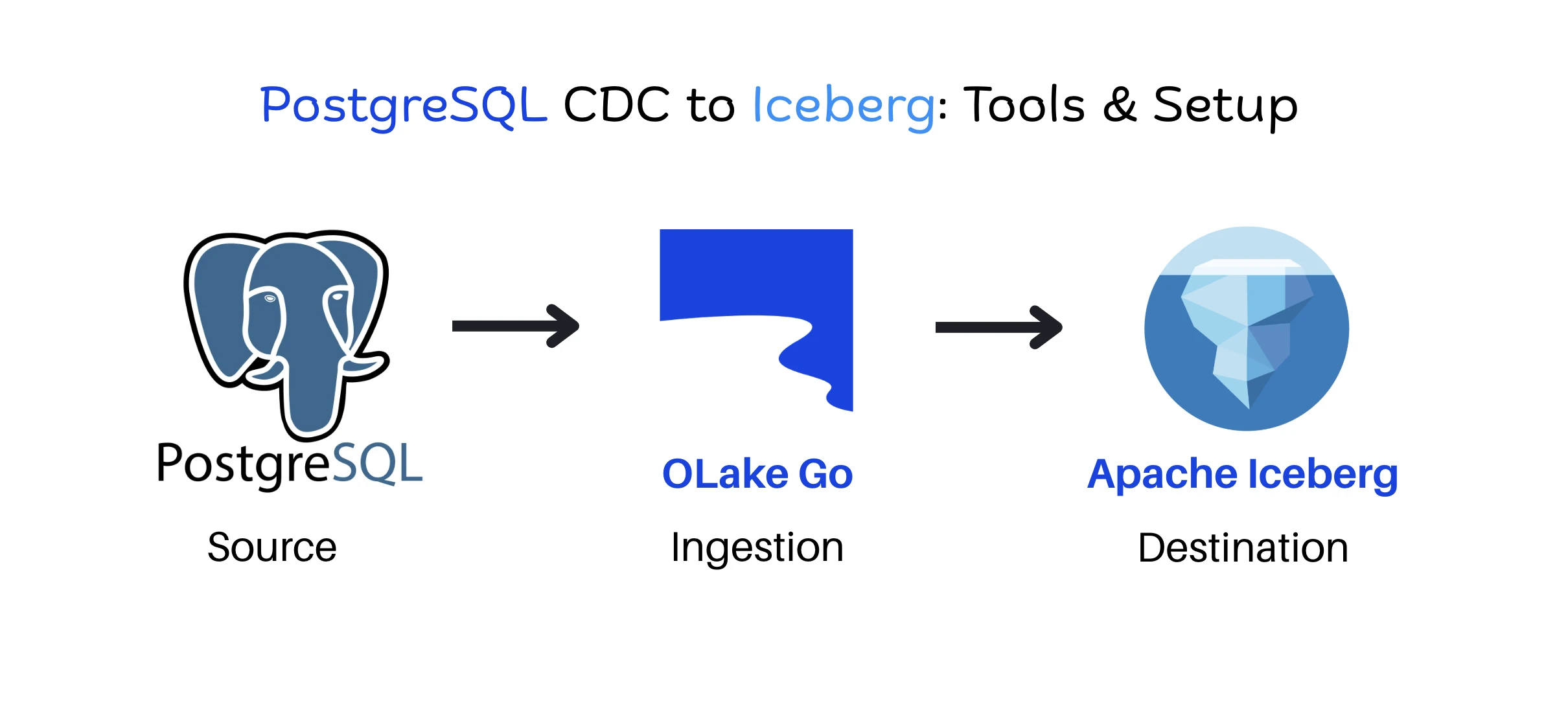
PostgreSQL CDC (change data capture) to Apache Iceberg is the process of reading row-level inserts, updates, and deletes from the PostgreSQL write-ahead log (WAL) and applying them to Iceberg tables in object storage so query engines can work with a current copy of operational data without running analytics against the production database.
The standard way to build this pipeline has long put Apache Spark in the path, either as a Structured Streaming job running MERGE INTO or as a batch job that folds raw change events into a clean table. Spark handles this well, but it brings a cluster to size, tune, and pay for, and when replication is its only job, the ingestion layer can end up heavier than the analytics layer it feeds.
There are now three common ways to replicate PostgreSQL CDC data to Iceberg without Spark:
-
Debezium and Kafka, with the Iceberg Kafka Connect sink writing change events to Iceberg
-
Apache Flink, using Flink CDC to read the WAL and the Iceberg Flink sink to write upserts
-
OLake Go, an open-source data ingestion tool that reads the WAL and writes Iceberg tables directly, with no broker or processing cluster in between
This guide explains how each approach works, walks through a PostgreSQL CDC setup with OLake Go, and covers the production challenges that apply regardless of the tool.
For the current, tested walkthrough, see Postgres to Apache Iceberg.
Why Use CDC to Replicate PostgreSQL Data to Iceberg?
The simplest way to copy PostgreSQL data into a lakehouse is to export full tables on a schedule or to query rows whose updated_at value changed since the last run. Full exports scale with table size rather than with the volume of change, so a 500 GB table costs the same to copy whether 10 rows changed or 10 million did. Cursor-based queries are lighter, although they miss hard deletes and depend on every application updating the cursor column correctly.
CDC avoids both problems because it reads the database's own record of every committed change, which brings three practical benefits:
Complete change history: Every insert, update, and delete is captured from the WAL, including deletes that a query-based sync never sees. Lower load on the source: After the initial snapshot, the pipeline reads a log stream instead of scanning tables. Fresher data: Changes can reach Iceberg within seconds or minutes instead of waiting for a nightly batch. Iceberg then provides ACID commits on object storage, schema evolution without table rewrites, time travel, and an open specification that engines such as Trino, Athena, DuckDB, and Snowflake can read, so analysts get one copy of operational data that multiple engines can query.
How PostgreSQL CDC to Iceberg Works
Every PostgreSQL to Iceberg CDC pipeline captures changes from the WAL, combines them with a snapshot of existing data, and writes both into Iceberg as atomic commits.
Capturing changes from the PostgreSQL WAL
When wal_level is set to logical, PostgreSQL can decode WAL records into row-level change events through an output plugin. The built-in plugin, pgoutput, has shipped with PostgreSQL since version 10 and is the one most CDC tools now use.
Two database objects control what a CDC client receives. A publication defines which tables and operations enter the change stream, while a replication slot tracks the last WAL position (LSN) the client has confirmed and makes PostgreSQL retain any WAL the client has not read yet. A table's replica identity then controls how much of the old row is written to the WAL for updates and deletes: only the primary key by default, or every column with REPLICA IDENTITY FULL.
Snapshot first, then stream
Because the WAL only holds recent changes, CDC tools first take a snapshot of each table and then read from the replication slot at a position that lines up with that snapshot, so changes made during the snapshot are not lost. On large tables the snapshot is usually the slowest step, which is why tools that read tables in parallel chunks make a noticeable difference.
Writing changes to Iceberg
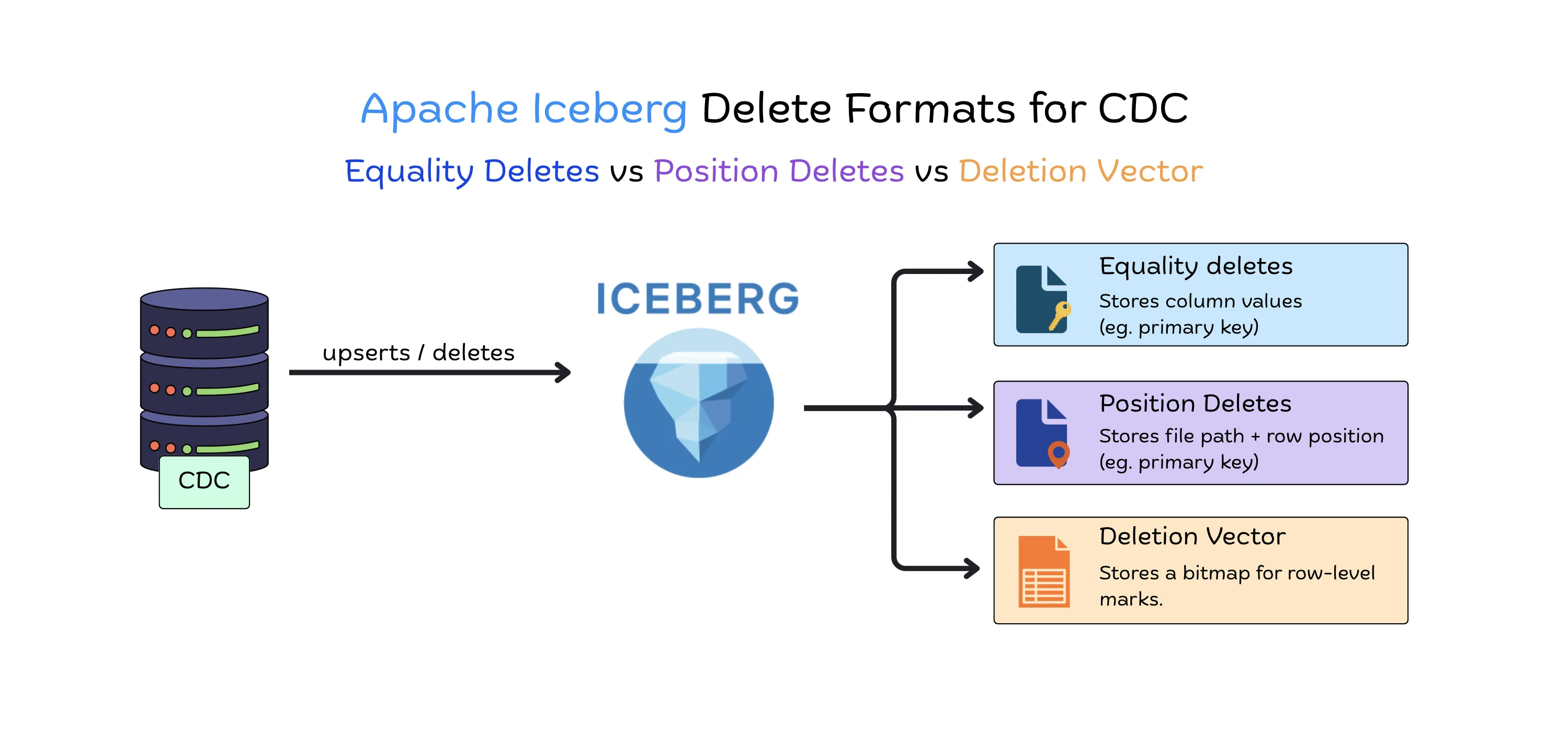
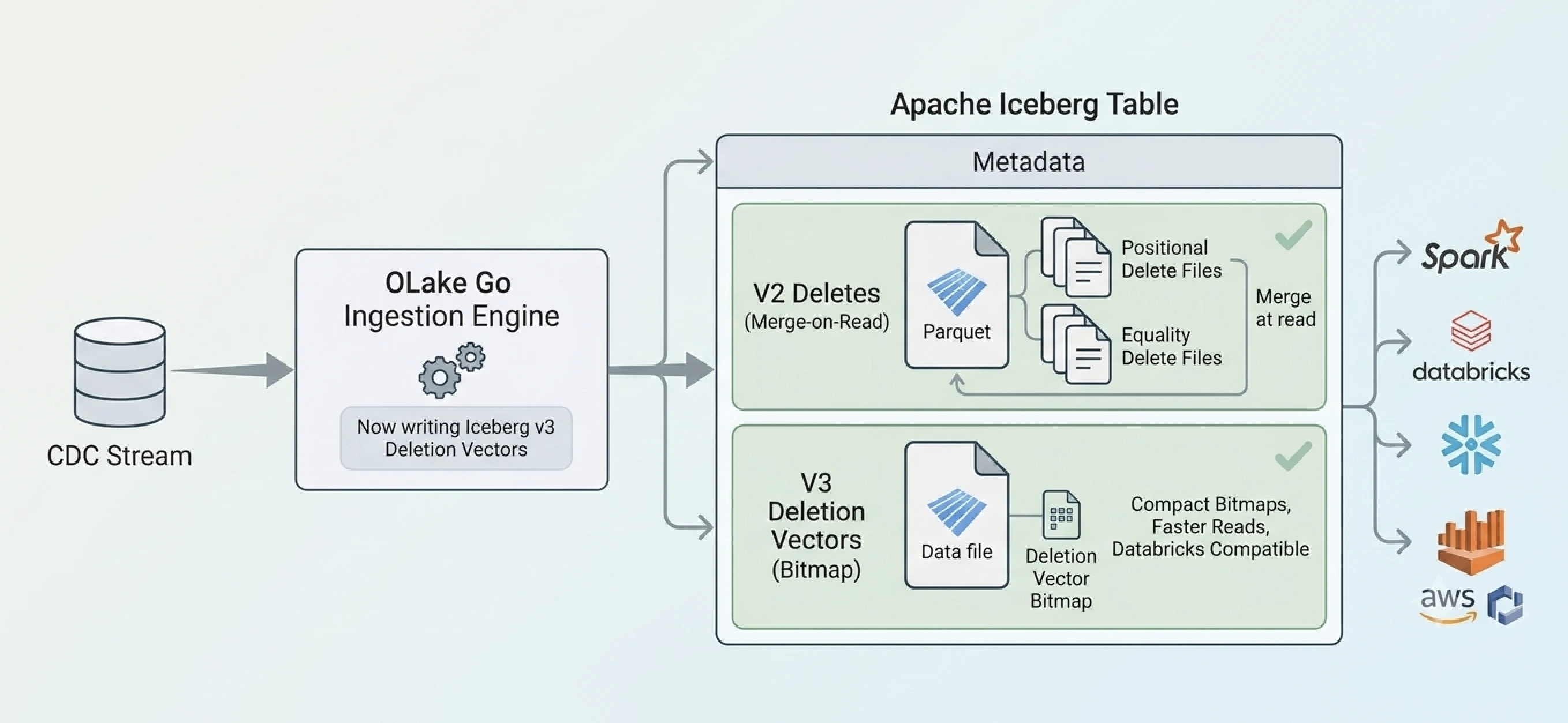
Inserts become new Parquet data files, while updates and deletes need row-level deletes. Iceberg format version 2 supports two kinds: position deletes record the file and row position of a deleted row, and equality deletes record column values such as a primary key. Format version 3 adds deletion vectors as a more compact form of position deletes.
Streaming CDC writers usually rely on equality deletes, because an update event carries the primary key but not the location of the old row. Equality deletes are cheap to write, and the cost moves to the read side, where engines apply them at scan time (merge-on-read) until compaction rewrites the data. Each commit goes through an Iceberg catalog, such as AWS Glue, a REST catalog, Hive Metastore, or JDBC, so readers never see a partial write.
Three Spark-free architectures
Kafka:  PostgreSQL WAL → Debezium → Kafka → Iceberg Kafka Connect sink → Iceberg
Flink:  PostgreSQL WAL → Flink CDC → Iceberg Flink sink (upsert) → Iceberg
OLake:  PostgreSQL WAL → OLake Go → Iceberg
Debezium, Kafka, and Kafka Connect. Debezium publishes change events to one Kafka topic per table, and the Apache Iceberg Kafka Connect sink commits them to Iceberg on a fixed interval. The sink in the Apache Iceberg project currently appends records rather than applying upserts, because the upsert mode from the original Tabular connector was not part of the donated code. The result is a changelog table, and building a current-state table needs a separate merge job, which is often where Spark returns.
Apache Flink. Flink reads the WAL with the Flink CDC PostgreSQL connector, or consumes Debezium events from Kafka, and writes to Iceberg with upsert mode enabled on a format version 2 table that has a primary key. The sink converts updates and deletes into equality deletes and commits on each checkpoint, and Flink CDC 3.5 and later offers a PostgreSQL source and an Iceberg sink in its YAML pipeline API for replication without Flink SQL, on tables that have a primary key The trade-off is running a Flink cluster, with its checkpoint storage, state management, and JVM tuning.
OLake Go. OLake Go reads the WAL through pgoutput, snapshots tables in parallel chunks, and writes Parquet data files and equality delete files through the Iceberg catalog, with no broker, processing cluster, or Spark job in the path.
PostgreSQL CDC to Iceberg Without Spark Using OLake Go
OLake Go is the replication tool in the open-source OLake project, released under the Apache 2.0 license. It moves data from databases such as PostgreSQL, MySQL, MongoDB, and Oracle into Apache Iceberg tables or Parquet files and runs as Docker containers managed from a web UI or a CLI.
For PostgreSQL, OLake Go supports four sync modes:
-
Full Refresh for a one-time copy of a table
-
Full Refresh + CDC for an initial snapshot followed by ongoing WAL changes
-
CDC Only for new changes without a historical load
-
Full Refresh + Incremental for tables where a cursor column is enough
CDC runs on the native pgoutput plugin, since the older wal2json method is deprecated. Full loads split large tables into chunks that are read in parallel and checkpointed, so an interrupted sync resumes where it stopped instead of starting over.
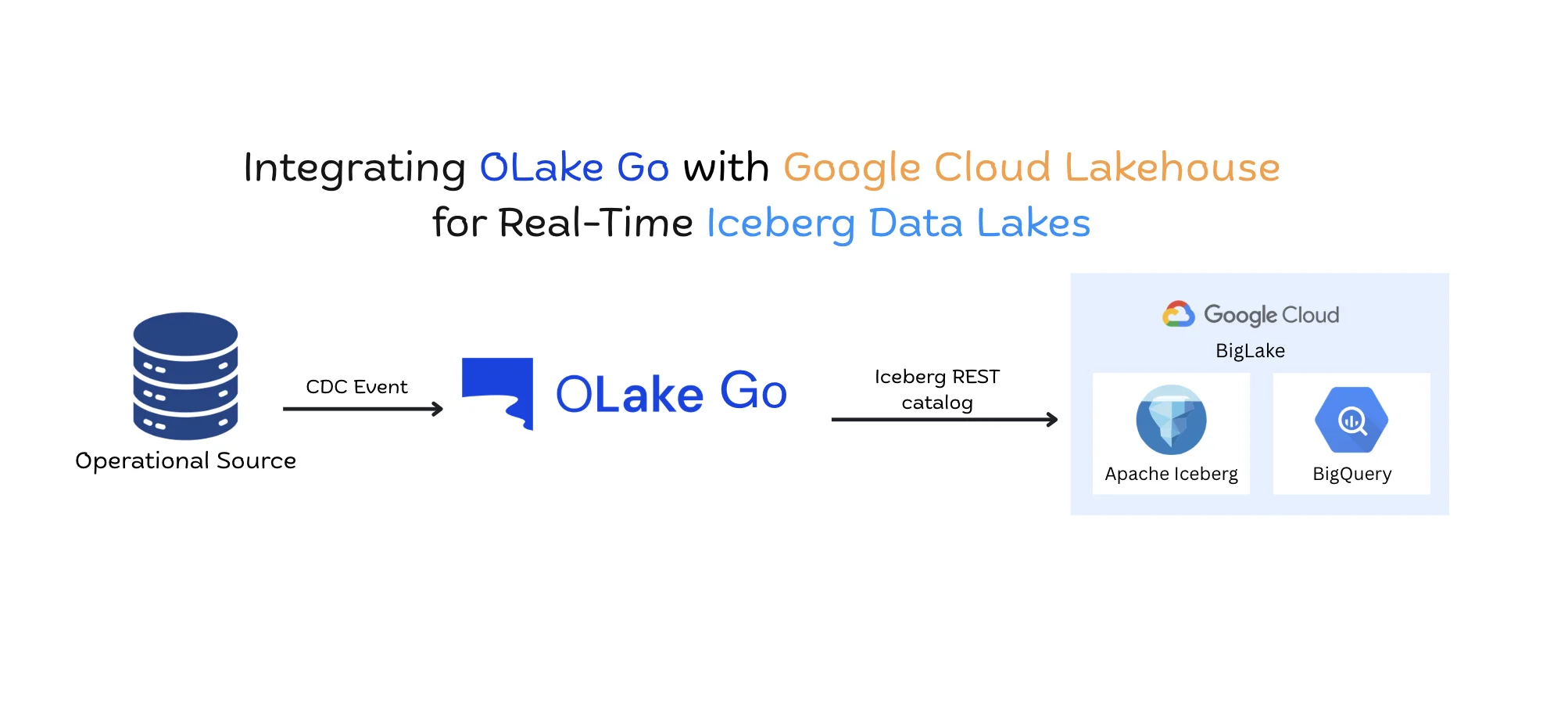
The initial load writes append-only data files, and CDC syncs add data files together with equality delete files keyed on the _olake_id column, plus position deletes when the same row changes more than once inside a single sync, giving merge-on-read upserts without rewriting existing files. An _op_type metadata column marks each record's operation, so downstream queries can separate deletes from inserts and updates. OLake Go supports AWS Glue, Hive Metastore, JDBC, and REST catalogs, including Nessie, Lakekeeper, Amazon S3 Tables, Apache Polaris, Unity Catalog, and Google BigLake, and it evolves Iceberg schemas automatically when source columns change.
Table maintenance is handled by the companion project OLake Fusion, which connects to the same catalog and runs compaction on a per-table schedule. Its Lite, Medium, and Full compaction tiers can be scheduled independently, so light cleanup runs often and full rewrites run occasionally, without writing Spark maintenance scripts.
How to Set Up PostgreSQL CDC With OLake
The steps below use a self-managed PostgreSQL server and the OLake UI. Amazon RDS, Aurora, Google Cloud SQL, and Azure Database for PostgreSQL enable logical replication through parameter groups or database flags instead, so use the matching guide in the OLake PostgreSQL connector documentation for those.
Prerequisites: PostgreSQL 10 or later with permission to edit postgresql.conf and pg_hba.conf, Docker with at least 4 GB of RAM and port 8000 free, and an Iceberg catalog with object storage, such as a REST catalog (e.g., Lakekeeper) or AWS Glue with Amazon S3
Step 1: Enable logical replication
Update postgresql.conf and restart PostgreSQL:
wal_level = logical
max_replication_slots = 10
max_wal_senders = 15
wal_sender_timeout = 0
max_slot_wal_keep_size = 1GB
Setting wal_sender_timeout to 0 keeps PostgreSQL from closing the replication connection during long snapshots, and max_slot_wal_keep_size (PostgreSQL 13 and later) caps the WAL a slot can hold, so size it to your write volume. Add pg_hba.conf entries that allow the CDC user both regular and replication connections from the OLake Go host.
Step 2: Create a replication user
CREATE USER cdc_user WITH PASSWORD 'strongpassword';
ALTER ROLE cdc_user WITH REPLICATION;
GRANT CONNECT ON DATABASE mydb TO cdc_user;
GRANT USAGE ON SCHEMA public TO cdc_user;
GRANT SELECT ON ALL TABLES IN SCHEMA public TO cdc_user;
ALTER DEFAULT PRIVILEGES IN SCHEMA public GRANT SELECT ON TABLES TO cdc_user;
Step 3: Set replica identity where needed
Tables with a primary key work with the default replica identity. Use REPLICA IDENTITY FULL for tables without a primary key, for tables where deleted rows should keep every column value, and for tables with TOAST columns, such as long text or JSON, that must stay populated when other columns change:
ALTER TABLE public.orders REPLICA IDENTITY FULL;
Step 4: Create a publication and replication slot
Create the publication first, then create the slot in the same database OLake Go connects to:
CREATE PUBLICATION olake_publication FOR TABLE public.orders, public.customers;
ALTER PUBLICATION olake_publication SET (publish_via_partition_root = true);
SELECT pg_create_logical_replication_slot('olake_slot', 'pgoutput');
The publish_via_partition_root setting (PostgreSQL 13 and later) publishes changes as the root partitioned table instead of the individual partitions, which is what most Iceberg destinations expect for a partitioned source table. Give each OLake Go job its own slot and publication, because sharing them across jobs causes data loss.
Step 5: Start the OLake UI
curl -sSL https://raw.githubusercontent.com/datazip-inc/olake-ui/master/docker-compose-v1.yml | docker compose -f - up -d
Open http://localhost:8000 and log in with the default credentials (admin, password), as described in the quickstart guide.
Step 6: Create the PostgreSQL source
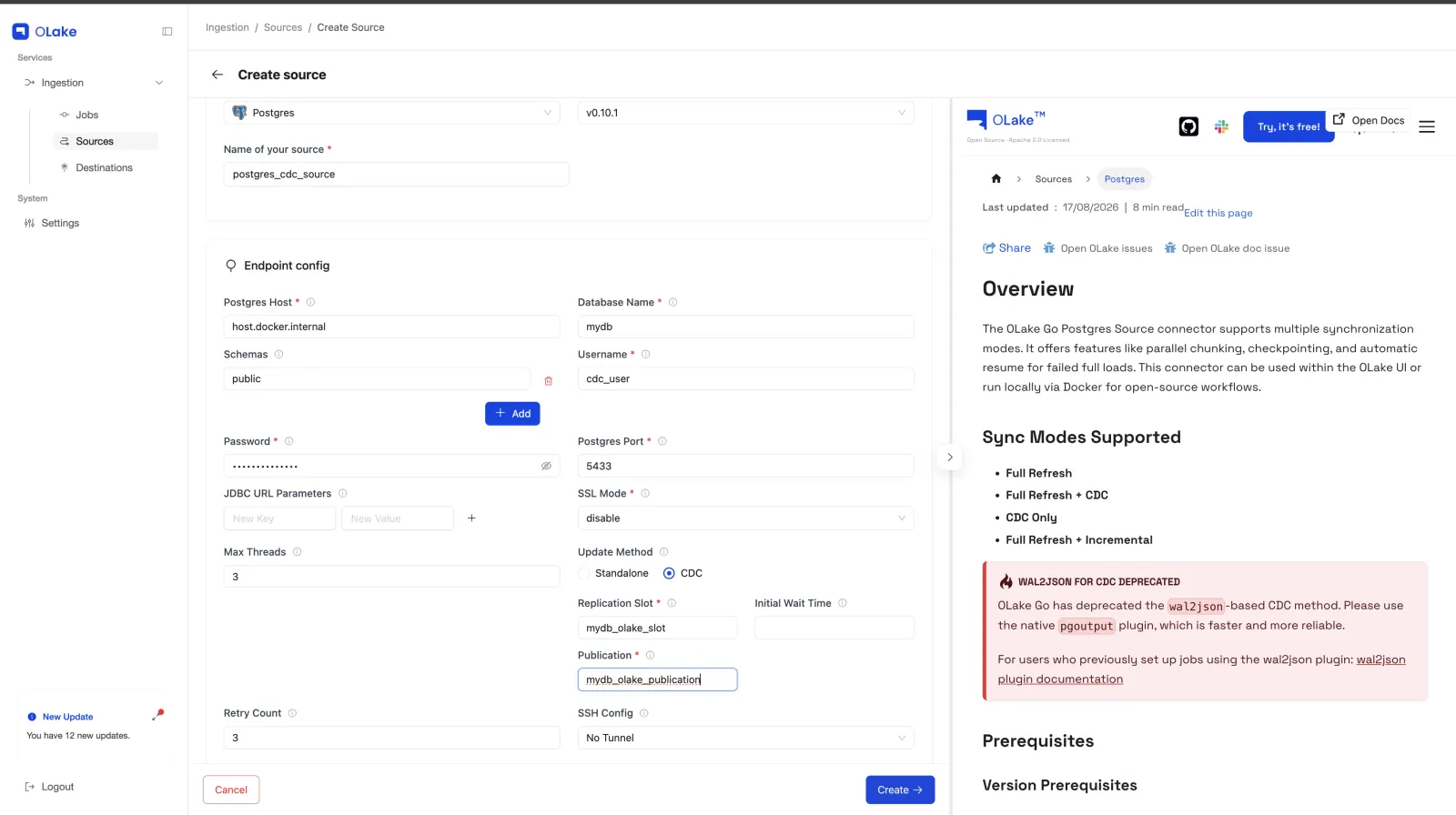
Go to Sources, click Create Source, and select Postgres. Enter the connection details, set Update Method to CDC, and enter the replication slot and publication names exactly as created in PostgreSQL. Max Threads controls how many worker threads the connector runs in parallel, and SSL Mode controls encryption. Test the connection to save the source.
Step 7: Create the Iceberg destination
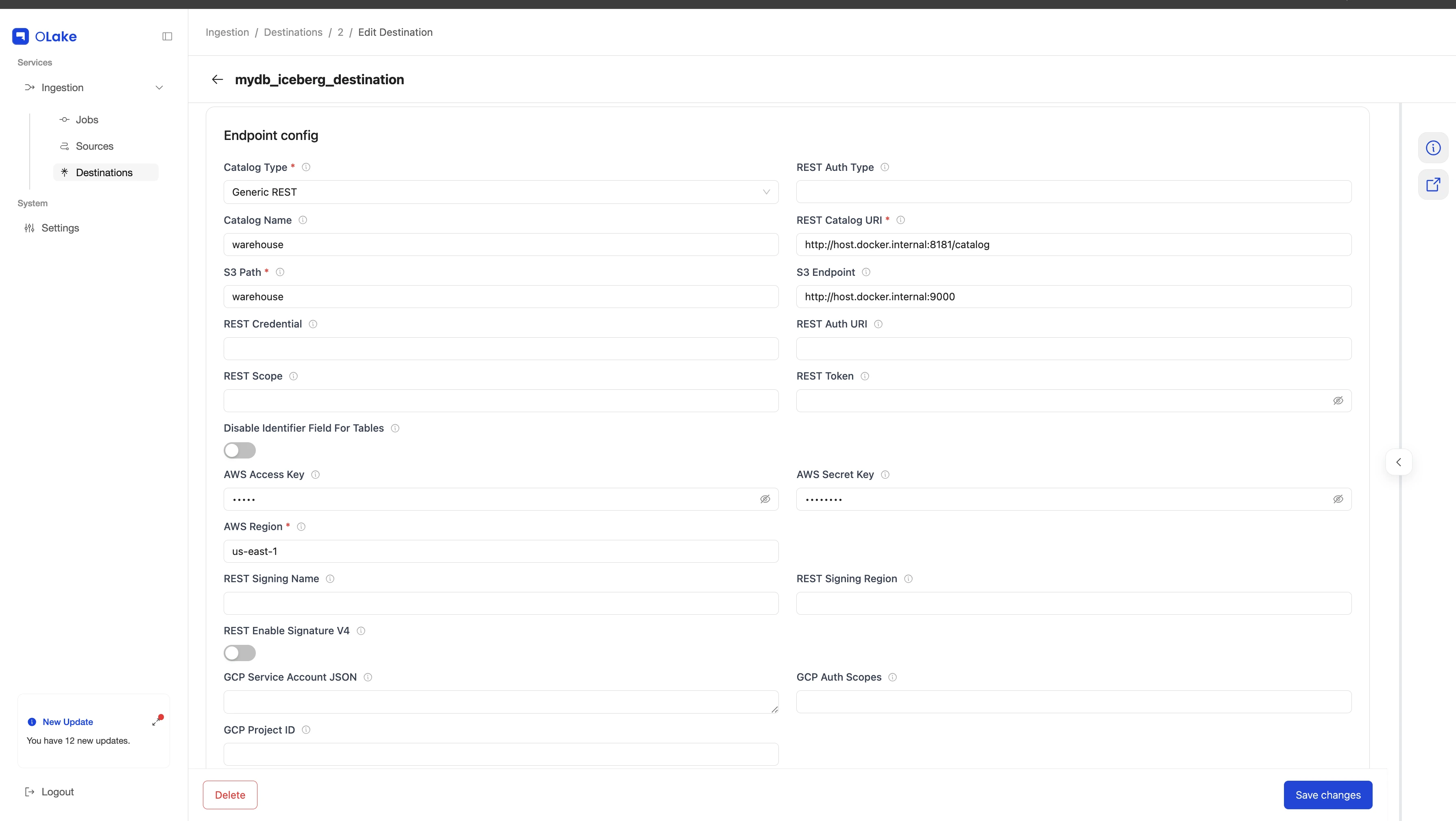
Go to Destinations, click Create Destination, select Apache Iceberg, and choose a catalog type such as Generic REST. Fill in the catalog and storage details for a REST catalog. This includes the REST catalog URL, S3 endpoint, warehouse/catalog name, region, and credentials and test the connection to save.
Step 8: Create a job and configure streams
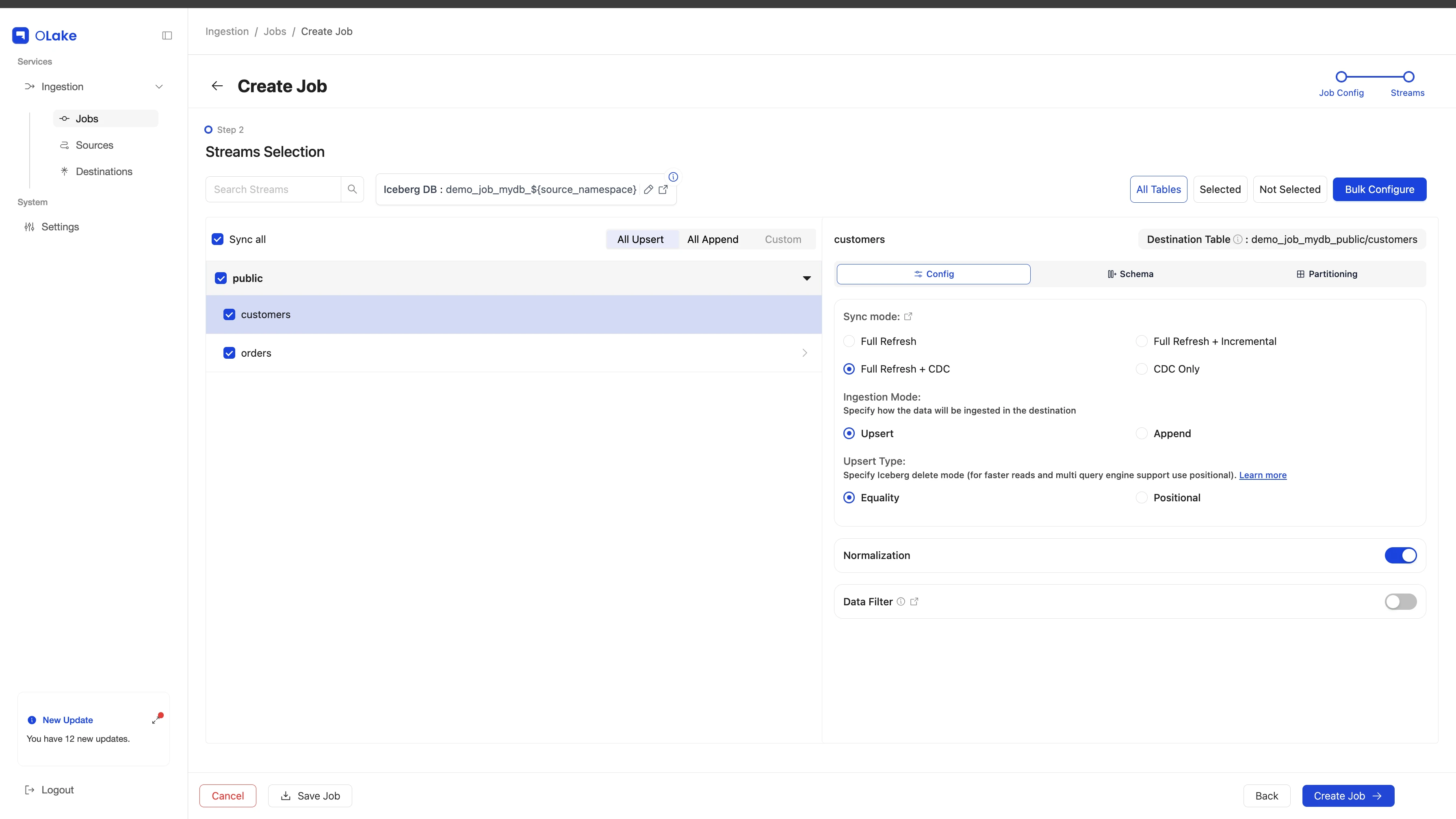
Go to Jobs, click Create Job, name it, choose a sync frequency, and select the source and destination so OLake Go can validate both. On the Streams page, select the tables to replicate, set each one to Full Refresh + CDC, and turn on Normalization. The same panel supports Iceberg partitioning, such as by year on a timestamp column, and row filters. Click Create Job to save.
Step 9: Run the sync and verify the data
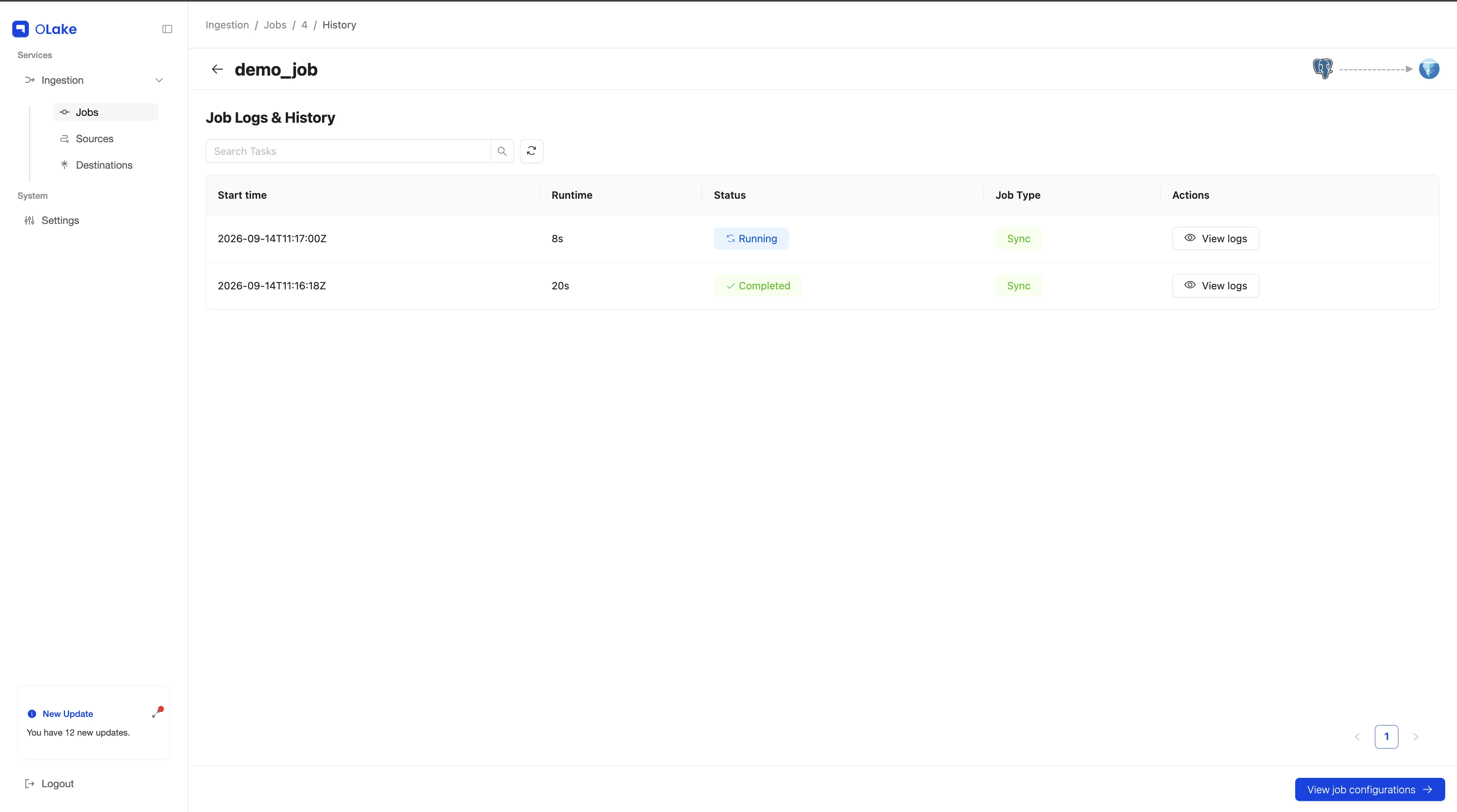
Start the job with Sync Now from its actions menu or wait for the next scheduled run, then follow progress in Job Logs and History. To confirm CDC end-to-end, insert, update, and delete a few rows in PostgreSQL, sync again, and query the table from an engine that supports equality deletes, such as Trino. The same pipeline can also run through the OLake Go CLI or on Kubernetes with Helm.
Common Challenges With PostgreSQL CDC to Iceberg
WAL growth from idle replication slots
A replication slot keeps WAL until its consumer confirms it, so a failed job, a paused schedule, or a forgotten test slot lets WAL pile up on the primary until the disk fills. Monitor slot lag, drop unused slots, and set max_slot_wal_keep_size so a stuck slot is invalidated before it affects the database. An invalidated slot means a new snapshot, which is far easier to recover from than an outage.
SELECT slot_name, active,
       pg_size_pretty(pg_wal_lsn_diff(pg_current_wal_lsn(), restart_lsn)) AS retained_wal
FROM pg_replication_slots;
Partial rows for deletes and TOAST columns
With the default replica identity, delete events carry only the primary key, so deleted rows in Iceberg show nulls in every other column. Updates that leave a TOAST column untouched also omit it from the WAL. REPLICA IDENTITY FULL fixes both cases but enlarges WAL records, so apply it only to the tables that need it.
Schema changes
PostgreSQL logical replication does not replicate DDL, so the CDC tool must detect column changes and apply them to the Iceberg schema. Iceberg supports additions, renames, and type widening without rewriting data, although Kafka-based pipelines also need converter and schema registry settings that accept the new structure. OLake Go applies supported schema changes to Iceberg tables automatically.
Small files and delete file build-up
Frequent CDC commits create many small data files and a steady stream of equality delete files, which every query must open and apply, so latency and object storage request costs climb over time. Compaction rewrites small files and folds deletes into the data, while snapshot expiration removes metadata that is no longer needed. Spark's rewrite_data_files is the usual compaction tool, and teams that do not want to write and operate their own Spark maintenance jobs can use OLake Fusion or a catalog service with built-in compaction after confirming that it resolves equality delete files.
Query engine support for equality deletes
Engine support for equality deletes is uneven, and an engine that does not apply them can return rows that were already updated or deleted in PostgreSQL. Check every engine on the read side before choosing a write strategy, and plan on regular compaction or a merge-on-read to copy-on-write conversion for engines without support.
Which PostgreSQL CDC to Iceberg Approach Should You Choose?
| Debezium + Kafka + Kafka Connect | Flink CDC + Iceberg Flink sink | OLake Go | |
|---|---|---|---|
| Components to operate | Debezium, Kafka, Kafka Connect, and usually a schema registry | Flink cluster with checkpoint storage, plus Kafka if Debezium feeds it | OLake Go containers |
| Updates and deletes | Appended as change events, with a separate merge job for the current state | Upserts through equality deletes on tables with a primary key | Upserts through equality deletes |
| Freshness | Set by the sink commit interval | Set by the checkpoint interval | Set by the job schedule |
| Transformations | Single message transforms | Flink SQL and DataStream API | Row filters and partitioning |
| Best fit | Kafka already carries change events for other consumers. | Joins, enrichment, or second-level latency | Replicating PostgreSQL tables into Iceberg with the least infrastructure |
For teams whose goal is getting PostgreSQL tables into Iceberg for analytics, OLake Go is the most direct option, because one tool handles the snapshot, the WAL stream, and the Iceberg commits that would otherwise need a broker, a stream processor, and a merge job. It is the natural starting point when there is no Kafka or Flink platform to reuse.
Flink fits pipelines that transform data in flight, join CDC streams with other sources, or need changes within seconds, provided the team can run Flink in production. The Kafka path fits when Kafka already feeds other consumers, such as microservices or search indexes, and the lakehouse is one more subscriber, as long as there is a plan for the merge step. Whichever approach you choose, plan for compaction from the start and confirm that every query engine handles the delete format your writer produces.
Conclusion
Replicating PostgreSQL CDC data into Apache Iceberg no longer requires Spark. Every approach shares the same foundation of pgoutput logical replication, a publication and replication slot, a snapshot followed by the WAL stream, and row-level deletes in Iceberg, and the difference lies in how much infrastructure sits between the two systems. Kafka and Flink suit teams that already run them or need more than replication, while OLake Go covers the replication path on its own. To try it, follow the OLake Go quickstart, connect a CDC-enabled PostgreSQL source, and point it at an Iceberg catalog, and bring setup questions to the OLake Slack community.