PostgreSQL DROP REPLICATION SLOT: Syntax and Examples
11 min read
A replication slot tells PostgreSQL to keep write-ahead log (WAL) until a specific consumer has read it, whether that consumer is a streaming standby, a logical replication subscriber or a CDC tool. When the consumer is retired, replaced or gone for good, its slot stays behind and keeps holding WAL. Left alone, it can fill the disk under pg_wal and, for logical slots, stop VACUUM from cleaning up system catalogs.
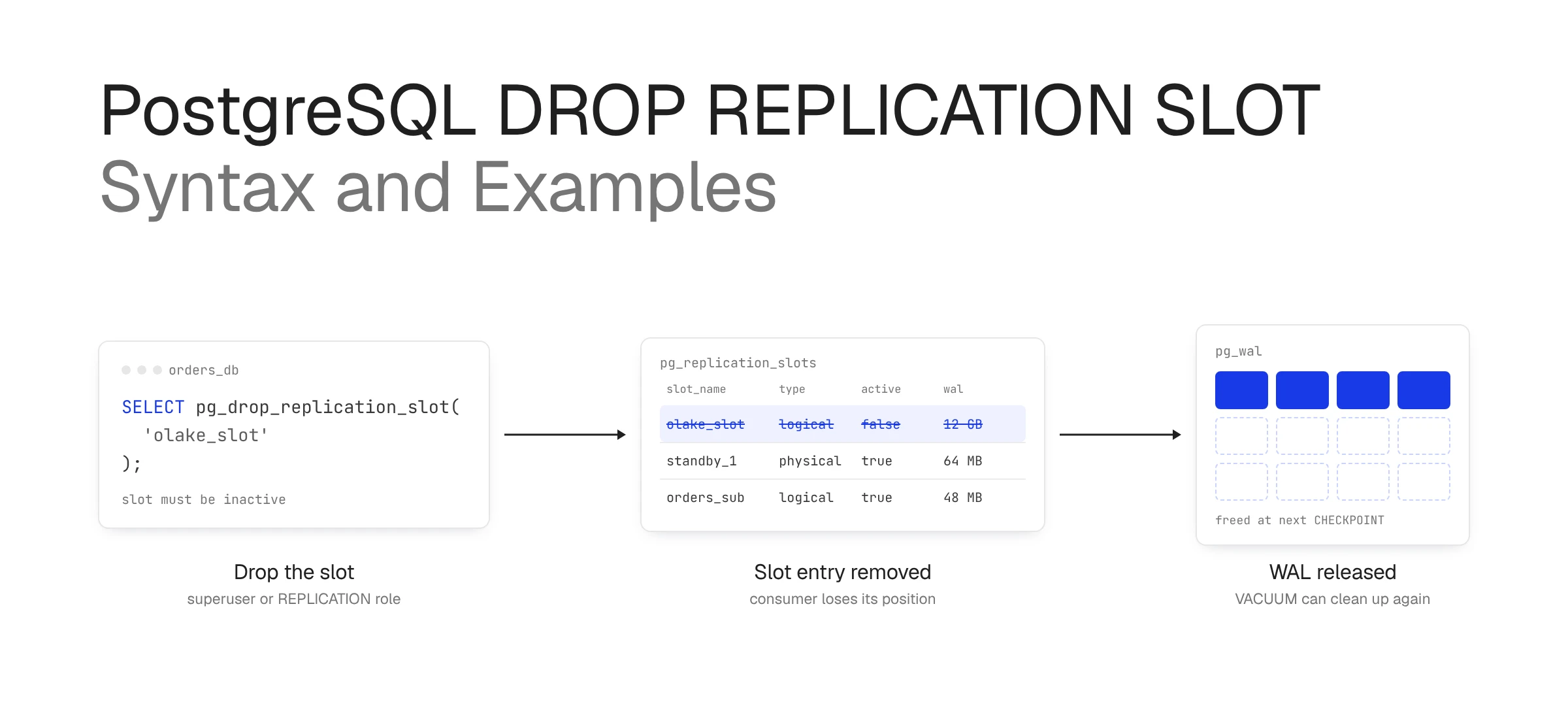
To remove a slot, run SELECT pg_drop_replication_slot('slot_name'); as a superuser or a role with the REPLICATION attribute. The slot must be inactive, a logical slot must be dropped from the database it was created in, and the drop is permanent: the consumer cannot resume from where it stopped and has to resynchronize from a fresh snapshot or base backup.
This guide covers how slots work, the physical and logical slot types, the syntax and its variants, fixes for errors such as "replication slot is active for PID", what changes after a drop and the queries to run before you remove one. Examples use PostgreSQL 18 and also work on versions 14 through 17 unless a section notes otherwise.
What Is a Replication Slot in PostgreSQL?
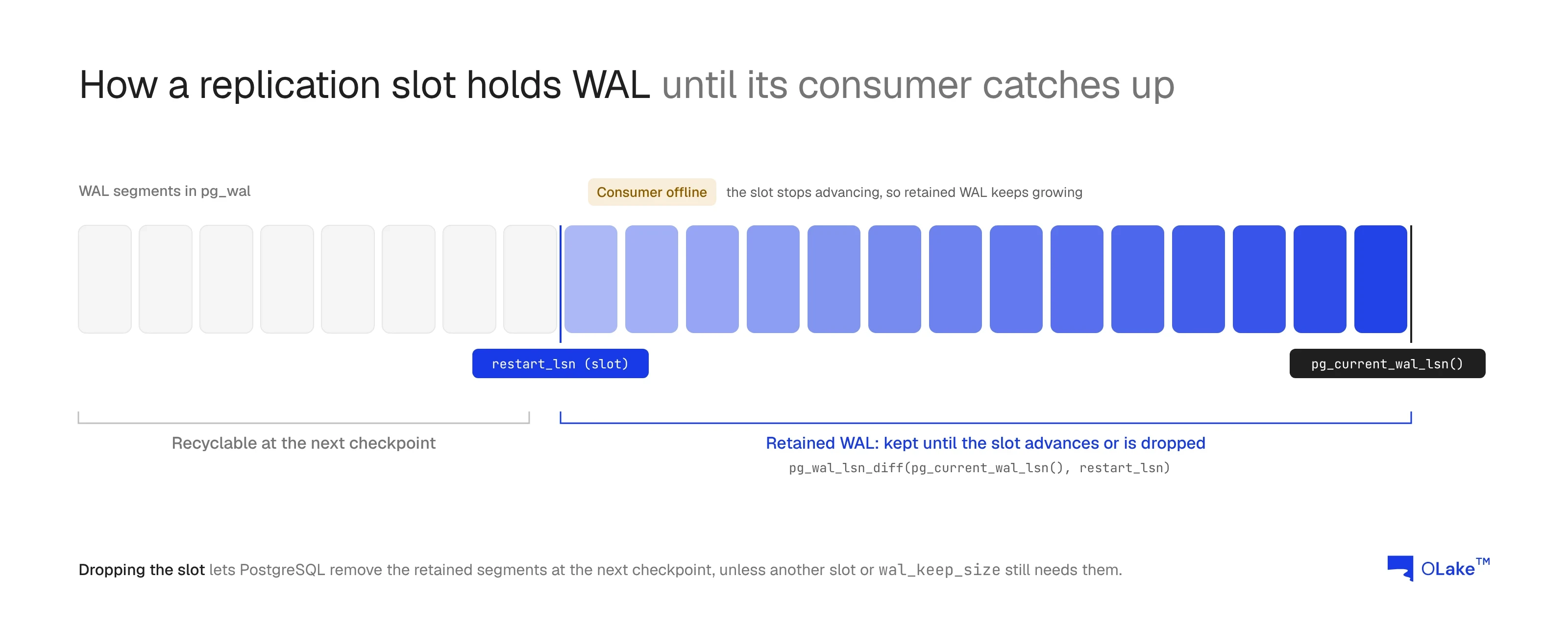
A replication slot is a named, persistent marker on the primary server that records how far a specific consumer has read the write-ahead log (WAL). As long as the slot exists, PostgreSQL keeps every WAL segment the consumer has not yet confirmed, even if the consumer is offline for hours.
That guarantee is the reason slots exist. Without one, a standby or a CDC tool that disconnects for too long comes back to find its WAL already recycled, and it has to start over from a fresh copy of the data.
The same guarantee is why slots need cleanup. A slot whose consumer is gone for good keeps holding WAL, so the pg_wal directory grows until the disk fills. Logical slots also hold back the catalog horizon, which stops VACUUM from removing dead rows in system catalogs. Dropping the slot is how you release both.
How PostgreSQL Replication Slots Work
Every change in PostgreSQL is written to WAL first, and each position in the WAL has a log sequence number (LSN). A slot stores the LSNs its consumer still depends on, and the checkpointer uses those values to decide which WAL segments are safe to remove.
Three fields in pg_replication_slots carry most of that state:
restart_lsnis the oldest WAL position the consumer may still need. WAL from this point onward is kept.confirmed_flush_lsnis, for logical slots, the position the consumer has confirmed it received. Changes before it are no longer sent again.catalog_xminis, for logical slots, the oldest transaction whose catalog rows must be kept so the slot can still decode old changes.
When a consumer connects, a WAL sender process streams changes from the slot's position and the slot shows active = true with that process's ID in active_pid. When the consumer disconnects, the slot stays behind with active = false, still holding its position and its WAL.
PostgreSQL offers two safety valves for slots that fall too far behind. max_slot_wal_keep_size (PostgreSQL 13 and later) caps how much WAL a slot may retain, and idle_replication_slot_timeout (PostgreSQL 18 and later) invalidates slots that stay inactive for too long. Both default to off, so on most servers an abandoned slot keeps its WAL until someone drops it.
Types of PostgreSQL Replication Slots
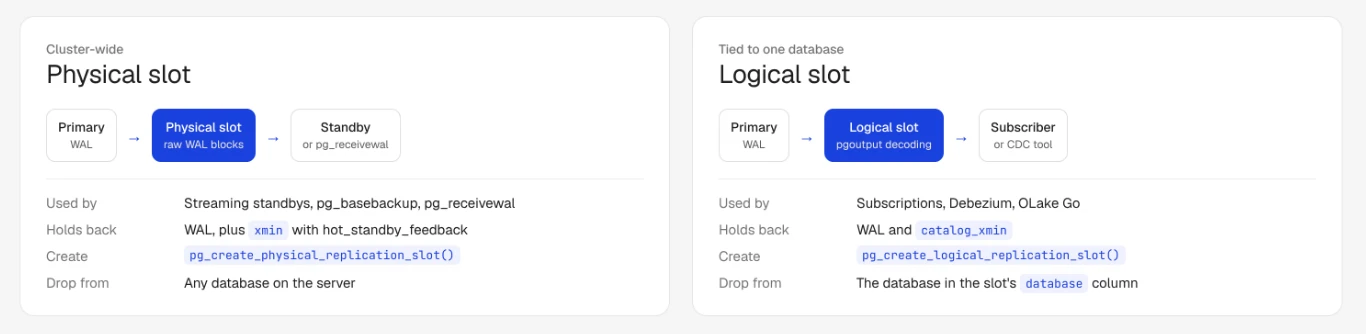
PostgreSQL has two kinds of slots, and either kind can also be temporary.
| Physical slot | Logical slot | |
|---|---|---|
| Used by | Streaming replication standbys, pg_basebackup, pg_receivewal | Logical replication subscriptions, CDC tools such as Debezium and OLake Go |
| What it streams | Raw WAL blocks | Decoded row changes through an output plugin such as pgoutput |
| Tied to a database | No, cluster-wide | Yes, the database it was created in |
| Holds back | WAL, and xmin if hot_standby_feedback is on | WAL and catalog_xmin |
| Created with | pg_create_physical_replication_slot() | pg_create_logical_replication_slot() or CREATE SUBSCRIPTION |
Temporary slots exist only for the session that created them and are dropped automatically when that session ends or hits an error. pg_basebackup uses one by default, which is why backups rarely leave slots behind.
Failover slots (PostgreSQL 17 and later) are logical slots created with failover = true, so that a standby keeps a synchronized copy. On the standby these copies show synced = true, and they are managed from the primary rather than dropped by hand.
PostgreSQL DROP REPLICATION SLOT Syntax
There are two ways to drop a slot: the SQL function, which is what you will use almost every time, and a command in the replication protocol.
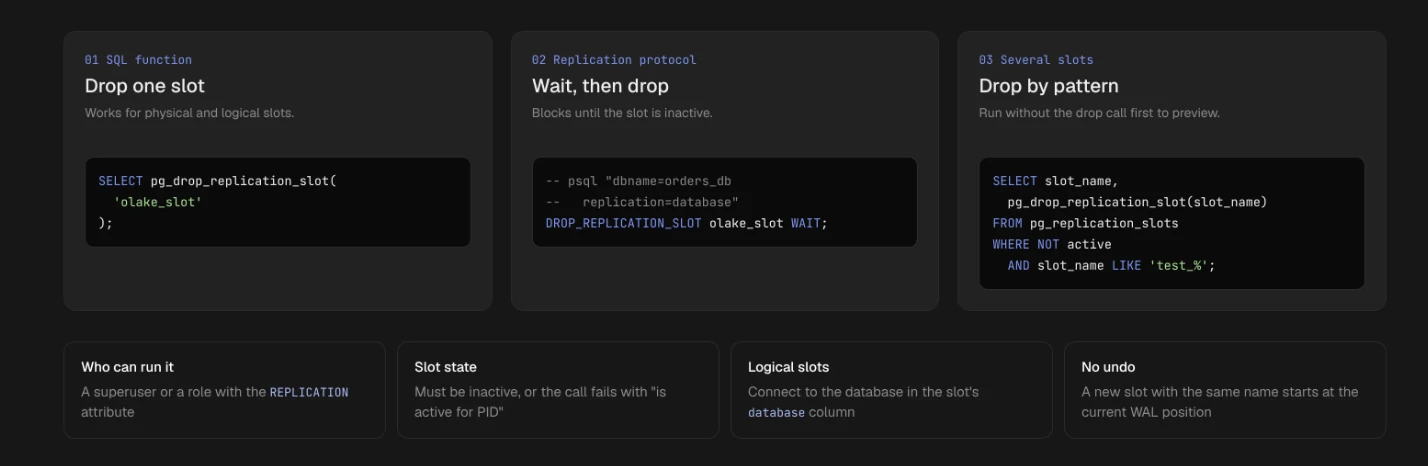
The SQL function
SELECT pg_drop_replication_slot('slot_name');
The function takes one argument, the slot name, and returns nothing. It works for both physical and logical slots, with three rules:
- The role must be a superuser or have the
REPLICATIONattribute. - The slot must be inactive. If a process is still streaming from it, the call fails.
- A logical slot must be dropped from a session connected to the database it belongs to, which is the
databasecolumn inpg_replication_slots.
A typical example for a logical slot created by a CDC job:
\c orders_db
SELECT pg_drop_replication_slot('olake_slot');
The replication protocol command
Clients that connect with the replication protocol, such as psql "dbname=orders_db replication=database", can use the command form:
DROP_REPLICATION_SLOT olake_slot WAIT;
Without WAIT, the command fails if the slot is active, just like the function. With WAIT, it blocks until the slot becomes inactive and then drops it, which is handy in scripts that stop a consumer and clean up right after.
Dropping several slots at once
The function takes one name, so combine it with a query to remove every inactive slot that matches a pattern:
SELECT slot_name, pg_drop_replication_slot(slot_name)
FROM pg_replication_slots
WHERE NOT active
  AND slot_name LIKE 'test_%';
Run the same query without the pg_drop_replication_slot call first, so you see exactly which slots will go.
PostgreSQL Replication Slot Removal Solutions
Most failed drops fall into one of the cases below. Each comes with the error you are likely to see and the fix.
The slot is still active
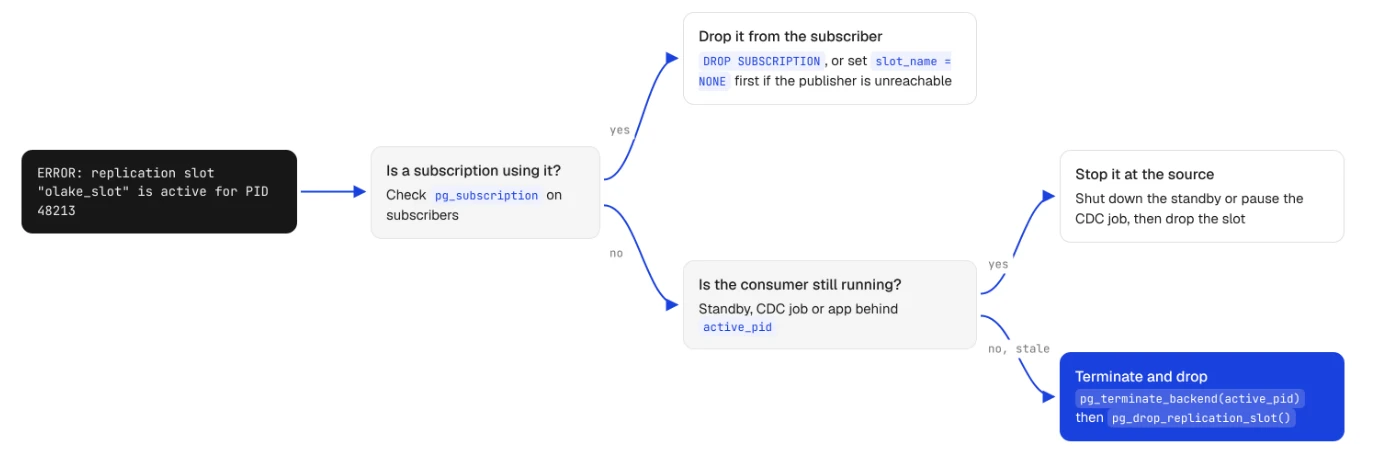
ERROR: replication slot "olake_slot" is active for PID 48213
A WAL sender is still streaming from the slot. Stop the consumer first: shut down the standby, pause the CDC job or disable the subscription. If the consumer is already gone and the connection is stale, end the backend and drop the slot back to back, so nothing has time to reconnect in between:
SELECT pg_terminate_backend(active_pid)
FROM pg_replication_slots
WHERE slot_name = 'olake_slot' AND active;

SELECT pg_drop_replication_slot('olake_slot');
If the same error comes back with a new PID, the consumer is still running and reconnected right away. Terminating backends will not win that race, so stop the consumer at its source.
The slot belongs to another database
A logical slot fails to drop when the session is connected to a different database than the one in the slot's database column. Reconnect with \c <database> and run the drop again.
The slot belongs to a logical replication subscription
Do not drop a subscription's slot directly on the publisher while the subscription still exists, because the subscriber will keep trying to use it. Run DROP SUBSCRIPTION on the subscriber instead, which drops the remote slot too. If the publisher is unreachable, detach the slot first and clean it up on the publisher later:
ALTER SUBSCRIPTION orders_sub DISABLE;
ALTER SUBSCRIPTION orders_sub SET (slot_name = NONE);
DROP SUBSCRIPTION orders_sub;
The slot is invalidated
A slot with wal_status = 'lost' or a non-null invalidation_reason can no longer be used, so there is nothing to save. Drop it, create a new one and resynchronize the consumer from a fresh snapshot.
The slot is a synced copy on a standby
Slots with synced = true on a standby are maintained from the primary. Drop or change the slot on the primary, and the standby follows.
What Happens When You Drop a Replication Slot?
Dropping a slot removes its entry immediately and gives back what it was holding, but the disk space does not return in the same second.
- WAL is released at the next checkpoint. Segments that only the dropped slot needed are removed or recycled when the checkpointer next runs. Run
CHECKPOINT;if you need the space right away. - VACUUM can clean up again. The slot's
xminandcatalog_xminstop holding back the cleanup horizon, so dead rows that piled up can be removed on the next VACUUM. - The consumer loses its position for good. Changes the consumer had not read yet are no longer kept. A standby has to be rebuilt from a new base backup, and a logical consumer needs a new slot plus a fresh initial snapshot, or it will silently miss every change made in between.
- The drop cannot be undone. Creating a slot with the same name starts at the current WAL position, not where the old one stopped.
That third point is the one to check before every drop. If the consumer is only paused, such as a CDC job during a maintenance window, keep the slot and watch its retained WAL instead. With OLake Go, for example, each job uses its own pgoutput slot, so a slot should be dropped only when its job is being retired.
How to Monitor Replication Slots Before Dropping Them
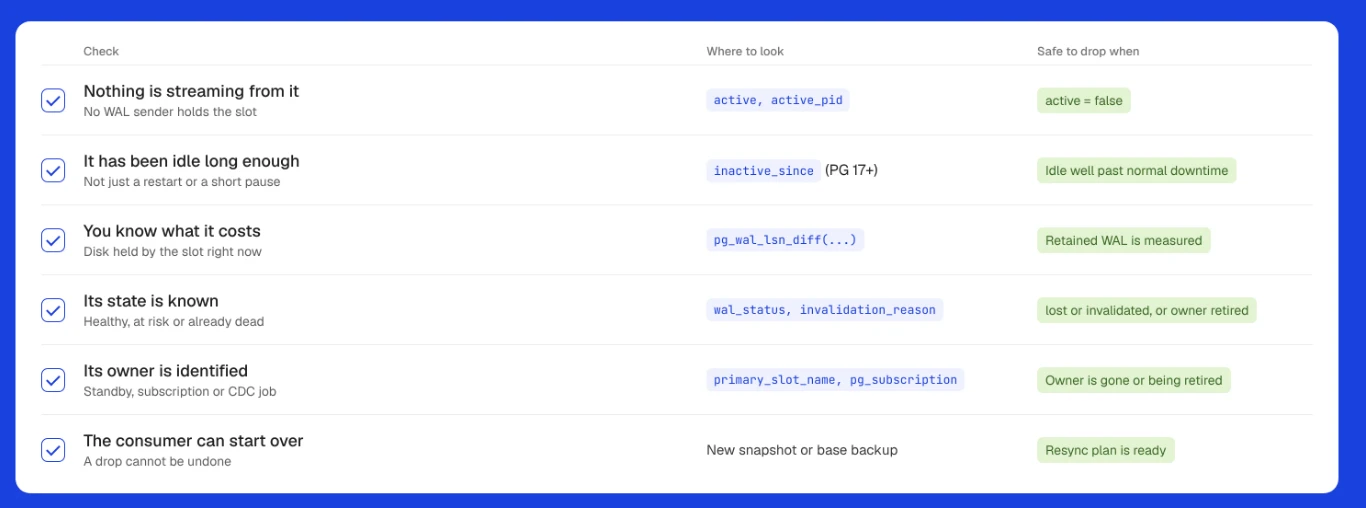
Three checks tell you whether a slot is safe to drop: is anything using it, how much WAL is it holding and is it still valid.
List every slot with its retained WAL
SELECT slot_name,
       slot_type,
       database,
       active,
       active_pid,
       wal_status,
       pg_size_pretty(
         pg_wal_lsn_diff(pg_current_wal_lsn(), restart_lsn)
       ) AS retained_wal,
       inactive_since,
       invalidation_reason
FROM pg_replication_slots
ORDER BY pg_wal_lsn_diff(pg_current_wal_lsn(), restart_lsn) DESC;
The inactive_since and invalidation_reason columns exist in PostgreSQL 17 and later, so leave them out on older versions.
Read the results
| Column | What to look for |
|---|---|
active | false means no process is streaming. It is a candidate, not a verdict. |
inactive_since | How long the slot has been idle. Hours can be a restart, weeks usually means the consumer is gone. |
retained_wal | How much disk the slot is costing you right now. |
wal_status | reserved and extended are healthy, unreserved means WAL will be removed at the next checkpoint, lost means the slot is no longer usable. |
invalidation_reason | wal_removed, rows_removed, wal_level_insufficient or idle_timeout (PostgreSQL 18) means the slot is already dead. |
safe_wal_size | Bytes left before the slot is lost, shown only when max_slot_wal_keep_size is set. |
Find who owns the slot
For active slots, pg_stat_replication shows the client behind the WAL sender:
SELECT pid, application_name, client_addr, state
FROM pg_stat_replication;
Match pid to active_pid to identify the standby or tool. For an inactive slot, check standby configs (primary_slot_name), subscriptions (SELECT subname, subslotname FROM pg_subscription; on subscribers) and CDC job settings before dropping it.
Set guardrails so slots cannot fill the disk
Set max_slot_wal_keep_size to a value that fits your disk, and on PostgreSQL 18 consider idle_replication_slot_timeout for slots that should never sit idle for long. Then alert when retained_wal grows past a threshold or wal_status leaves reserved, so you hear about an abandoned slot before the disk does.
Conclusion
Dropping a replication slot takes one function call, pg_drop_replication_slot('slot_name'), but the decision deserves more care than the command. Confirm the slot is inactive, connect to the right database for logical slots, check who owned it and accept that its consumer will need a fresh start.
The better long-term fix is to stop slots from becoming a problem: set max_slot_wal_keep_size, monitor retained WAL and give every consumer its own clearly named slot. For more on how slots fit into CDC pipelines, see PostgreSQL CDC to Apache Iceberg.