11 Best AWS ETL Tools in 2026, Compared
37 min read
Key takeaways
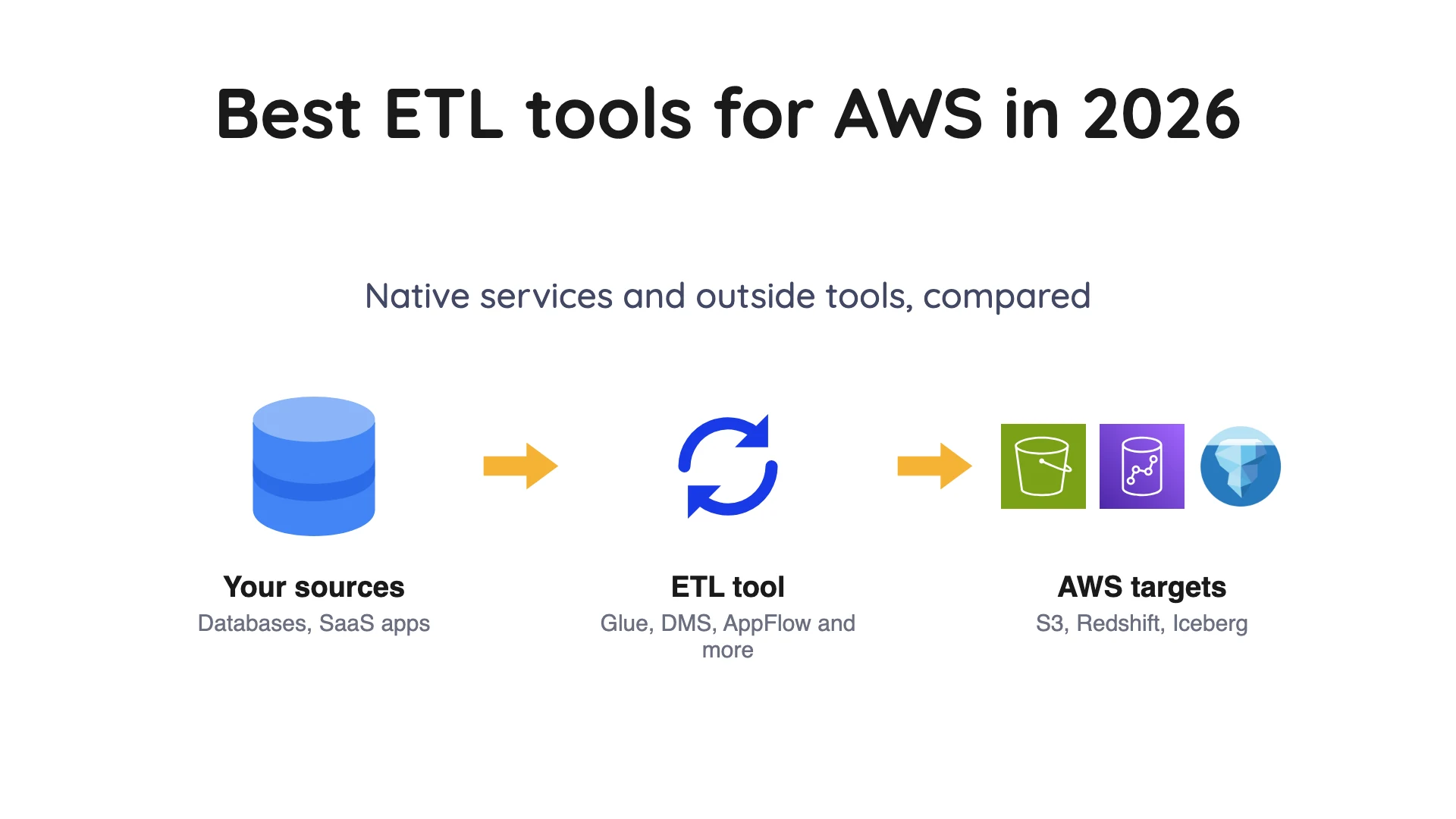
- Pick AWS ETL (extract, transform, load) tools by where your data starts. Software-as-a-service (SaaS) apps such as Salesforce fit Amazon AppFlow or AWS Glue zero-ETL, a live database fits AWS DMS (Database Migration Service), and Spark code or big batch jobs fit AWS Glue.
- AWS DMS cannot write Apache Iceberg directly. It lands raw change data capture (CDC) or full-load files in an Amazon S3 bucket, and a second step such as a Glue job turns them into Iceberg tables. AWS's own list of DMS targets has no Iceberg entry.
- The billing unit drives the price. Glue bills compute time, DMS bills instance or capacity hours, AppFlow bills runs and gigabytes, and Fivetran bills monthly active rows.
- Two names are off the table. AWS Data Pipeline is closed to new customers, and the Firehose database-to-Iceberg preview ended on 30 September 2025.
ETL (extract, transform, load) copies data out of one system, reshapes it, and loads it into another. Many teams now load first and reshape later (ELT), and people search for both as "ETL", so this page covers both.
Prices and limits come from each vendor's own pages, read on 8 October 2026. Rates change often, so confirm on the vendor's page before you buy.
AWS loads its rate tables in the browser, so the AWS rates below come from its official price list files. Those are the Glue file (US East, Ohio, published 6 October 2026) and the DMS (Database Migration Service) file (US East, N. Virginia, published 11 September 2026).
AWS ETL tools at a glance
| Tool | Kind | Best for | Database change capture | Billing unit |
|---|---|---|---|---|
| AWS Glue | AWS service | Spark code, batch jobs, the Data Catalog | Not found in the docs for self-managed databases | DPU-hours |
| AWS DMS | AWS service | Moving a live database into AWS | Yes, from database logs | Instance or capacity hours |
| Glue zero-ETL | AWS feature | SaaS apps and DynamoDB into the lake | Self-managed databases go to Redshift only | Per GB ingested plus compute |
| Amazon AppFlow | AWS service | Small SaaS pulls into S3 or Redshift | Not found in the docs | Flow runs and GB |
| Amazon Data Firehose | AWS service | Streams into S3, Redshift or Iceberg | Database source preview ended | Per GB |
 OLake Go OLake Go | Open-source replication | Database changes into Iceberg or Parquet | Yes, from database logs, for four databases | Free licence, you run the servers |
| Fivetran | Managed ELT | Many connectors, no servers | Not covered here | Monthly active rows |
| Airbyte | Self-hosted Core and cloud | Connector choice, self-hosting | Yes, on scheduled syncs | Credits (Cloud), free (Core) |
| Hevo | Managed ELT | Small teams, Redshift | Log-based pipelines per its docs | Events |
| Matillion | Managed ETL | Visual pipelines in Redshift | Streaming CDC listed on the Scale card | Credits |
| Informatica | Enterprise suite | Large, governed estates | Not covered here | Processing units |
How we picked
Two tests. A tool had to move data into AWS storage or a warehouse, and its own pages had to say how you buy it or how it bills. We started with AWS's own services, then added outside tools that name Amazon Redshift or S3 as a destination in their docs.
This is a reading of vendor documents, not a lab test. We did not run these tools.
Entries carry a "What users say" line only where a public thread or review page we opened in October 2026 shows a concrete experience. Every quote is one person's view, not a verdict.
Anything we could not source from a primary page is left out, which covers AWS Lambda, Amazon EMR (Elastic MapReduce), Amazon MWAA (Managed Workflows for Apache Airflow) and Amazon Kinesis Data Streams as stand-alone ETL options. The tools are grouped by kind, not ranked: each entry says what it is best for and where it is the wrong choice.
Which tool fits which source
Your source cuts the list in half. A SaaS app has an API and no database log. Databases keep a log of changes that some tools can read, and streams or piles of files need a different kind of tool again.
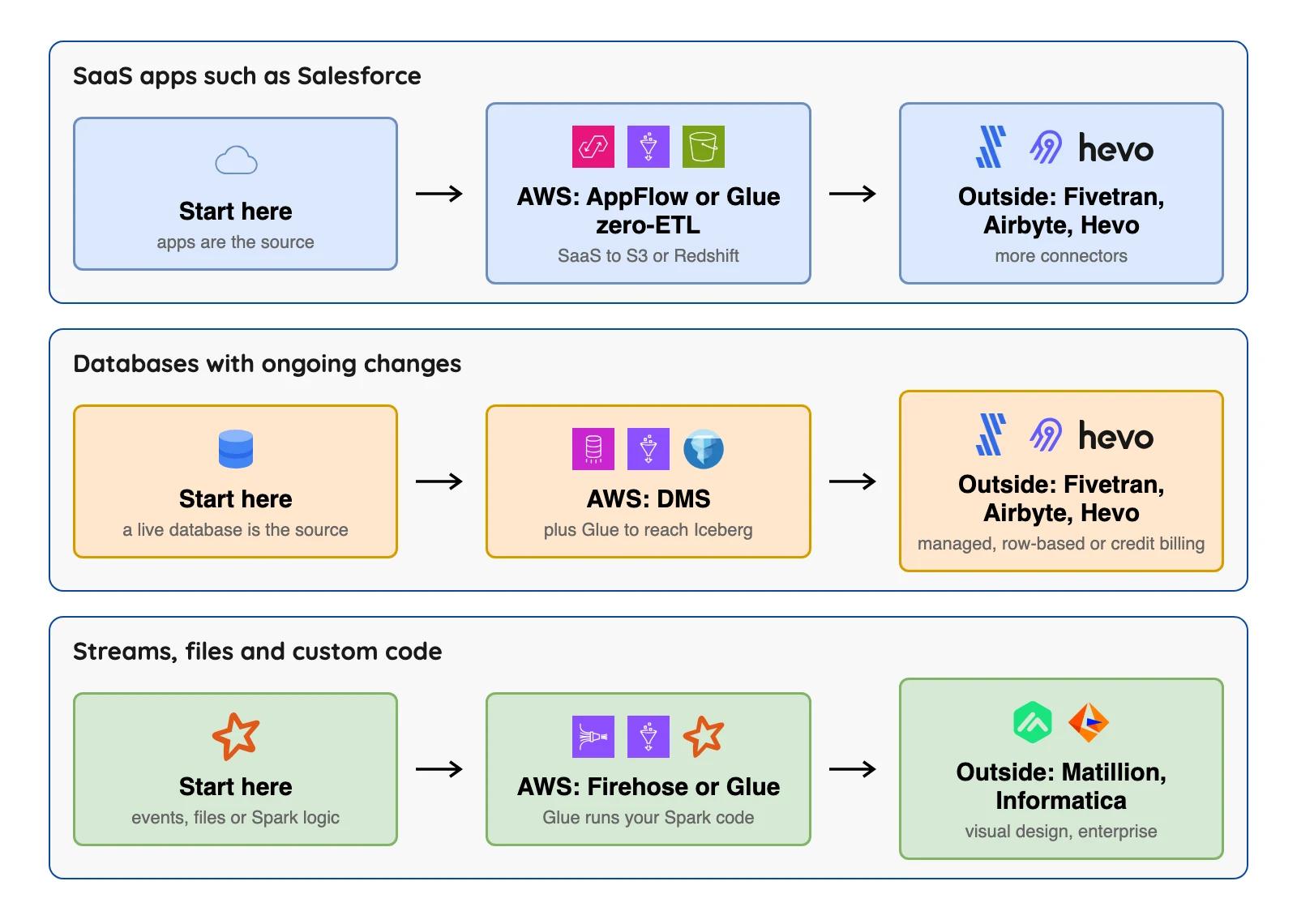
You will see change data capture (CDC) a lot below. It means reading a database's own log of changes instead of re-reading whole tables, which keeps a copy fresh without hammering the source.
The 11 best AWS ETL tools
AWS native services
1. AWS Glue: best for Spark code and batch jobs
AWS Glue home page, October 2026.
At a glance
- Kind: serverless Spark-based ETL (extract, transform, load) service
- Billing: DPU-hours, billed by the second per the Glue FAQ (a DPU is a data processing unit, the compute Glue rents to run a job)
- Rates: $0.44 per DPU-hour for earlier Glue versions and $0.308 for Glue 6.0 and above (US East, Ohio, AWS price list file published 6 October 2026)
AWS describes Glue as a serverless data integration service. Glue runs jobs on Apache Spark, a data processing engine, and has a visual editor called Glue Studio. Alongside jobs it keeps the Glue Data Catalog, a table list that other tools below can use as an Iceberg catalog (the index that tells an engine where a table's files are).
AWS announced Glue 6.0 on 21 August 2026 with "30% lower pricing than previous AWS Glue versions" (AWS News Blog). AWS's job docs say a job created without a version defaults to Glue 5.1, which is the higher rate, so set the version on purpose.
What's good
- AWS says Glue is serverless, so there is no infrastructure to manage, and that you can connect to "more than 70 diverse data sources". Other tools here can write to its Data Catalog.
- You pay for the time a job runs, not for environment provisioning or shutdown, and billing is per second with a 1-minute minimum (Glue FAQ).
- The Data Catalog's first million metadata objects and first million requests a month are free, and extra objects cost $1.00 per 100,000 a month (pricing page).
- Worker sizes run from G.1X (1 DPU, 4 vCPU, 16 GB) up to G.16X (16 DPU, 64 vCPU, 256 GB), per the job docs.
- Iceberg table optimization in the Data Catalog is billed at $0.44 per DPU-hour, per second, with a 1-minute minimum (pricing page).
- AWS's DMS data lake blog uses Glue jobs to apply database changes to Iceberg tables, one way to do the step after DMS.
Where it falls short
- Glue's docs describe job bookmarks (a record of what a job already processed) and JDBC reads (queries over a standard database connection) for incremental loads, and we found no native log-based CDC for self-managed databases in them.
- A Glue ETL job needs at least 2 DPUs and gets 10 by default (Glue FAQ), and the Spark code is on you.
- The pricing page shows no free tier for ETL jobs. Its free items are the Data Catalog's first million objects and requests.
- Crawlers are billed at $0.44 per DPU-hour (pricing page) with a 10-minute minimum per run (Glue FAQ).
- Memory-optimized job runs cost more, at $0.52 per DPU-hour, or $0.364 on Glue 6.0 and above (US East, Ohio, price list file).
- Temporary files, data quality results and shuffle files stored in S3 are billed at standard S3 rates (pricing page).
2. AWS DMS: best for moving a live database into AWS
AWS DMS home page, October 2026.
At a glance
- Kind: managed replication service
- Billing: hourly for replication instances or Serverless capacity
- Rate: $0.0745 an hour for a dms.t3.medium instance (US East, N. Virginia, single-AZ, on-demand, AWS price list file published 11 September 2026)
DMS copies a whole database, then keeps it current. AWS's CDC docs describe reading changes from the transaction logs of sources such as Oracle, SQL Server, MySQL and PostgreSQL.
What's good
- One task can load existing data and then keep applying changes, or apply changes only, per the CDC docs.
- The same docs say DMS reads Oracle redo logs with the LogMiner API or a binary reader, SQL Server through MS-Replication or MS-CDC, and MySQL from row-based binary logs.
- The pricing page lists three options: on-demand, serverless and Database Savings Plans. On-demand, you pay for replication instances and any additional log storage.
- Serverless capacity is billed by the hour: 1 DCU is $0.0819 an hour and 16 DCU is $1.311 an hour in US East (N. Virginia), per the price list file.
- All data transfer into DMS is free, and so is transfer to RDS and EC2 databases in the same Availability Zone (pricing page).
- The S3 docs say CSV is the default output with Parquet as an option, and the first field of each CDC record marks an insert (I), update (U) or delete (D).
Where it falls short
- AWS's DMS target list has no Apache Iceberg entry.
- AWS's data lake blog lands changes in S3, then uses Glue jobs. In that design a file for a table with no primary key is not processed, and an SQS FIFO queue keeps the change files in order.
- The CDC docs say "There are no SLAs for CDC latency." Latency can increase to several minutes or longer depending on source workload, network and other factors.
- S3 targets record "no ALTER statement" when a source column changes, and DMS does not alter earlier records to match (S3 docs).
- The same S3 docs say BatchApply is not supported for an S3 endpoint and might lose data, and that full LOB mode is not supported.
- The CDC start point is fixed when the task is created, so a different start point needs a new task. PostgreSQL sources do not support a custom CDC start time (CDC docs).
What users say: In the Hacker News thread "We migrated our PostgreSQL database with 11 seconds downtime" (January 2024), one commenter wrote that "schema changes totally messed it up".
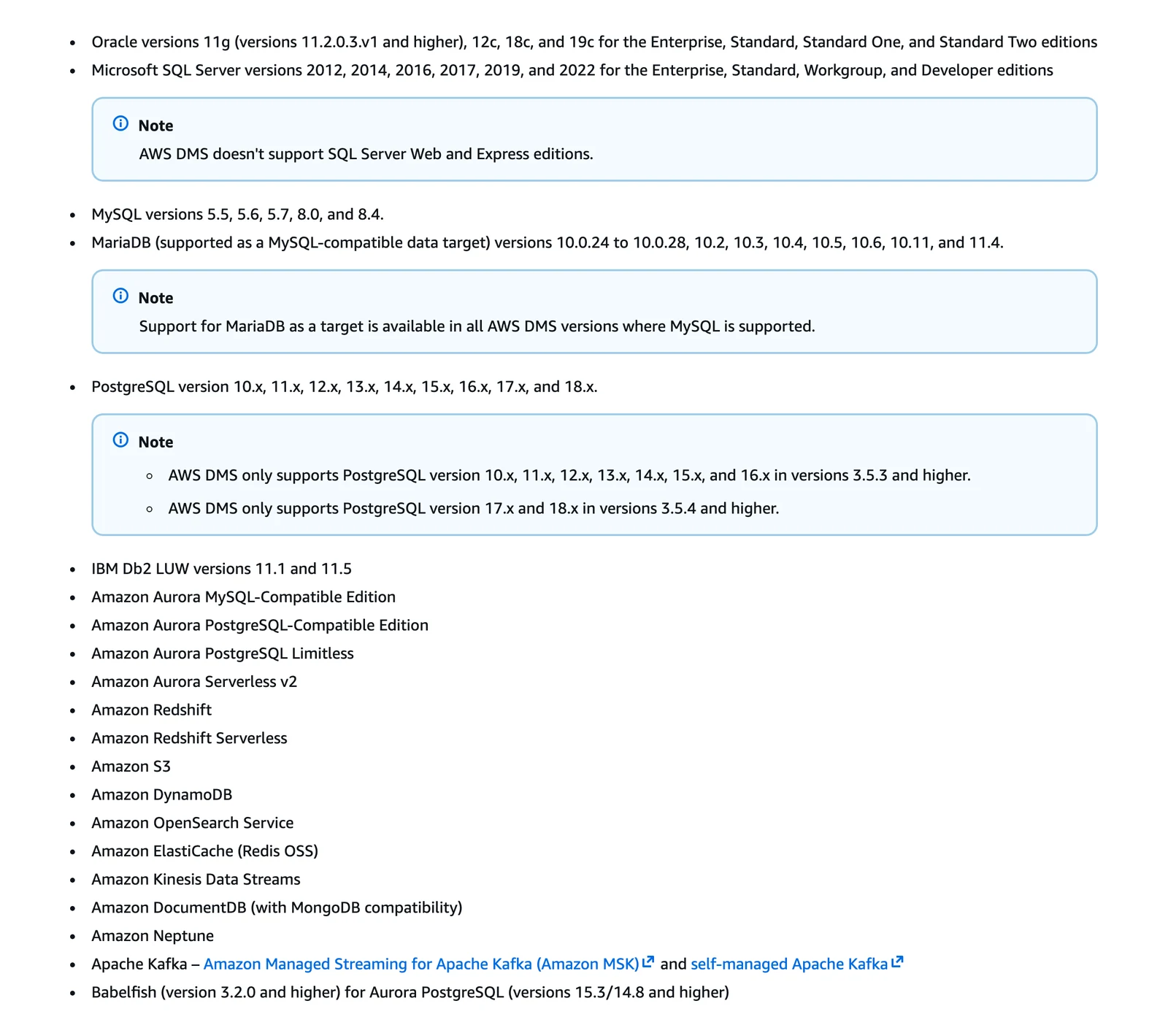
AWS DMS documentation, target endpoints, October 2026.
3. AWS Glue zero-ETL: best for SaaS and DynamoDB data with no pipeline code
AWS Glue home page, October 2026.
At a glance
- Kind: managed integrations inside Glue
- Sources listed: DynamoDB, Oracle Database@AWS and SaaS apps such as Salesforce, SAP and Zendesk
- Billing: $1.50 per GB of data ingested from applications (US East, Ohio, AWS price list file published 6 October 2026), plus target compute
Targets include Amazon S3 and S3 Tables, plus Redshift. Glue's docs are clear about the limit for databases.
What's good
- AWS calls these fully managed integrations that minimize the need to build ETL pipelines.
- The Glue docs list application sources including Facebook Ads, Instagram Ads, Salesforce, SAP OData, ServiceNow, Zendesk and Zoho CRM, plus DynamoDB and Oracle Database@AWS.
- Listed targets are a general purpose S3 bucket, S3 Tables, Redshift Managed Storage and a Redshift data warehouse (same docs).
- AWS says it does not charge an additional fee for the zero-ETL integration. You pay for the source and target resources (pricing page).
- For application sources the same price file lists $0.44 per DPU-hour for the compute that processes zero-ETL data written to S3.
Where it falls short
- AWS's docs say: "For self-managed database sources, you can replicate data only to an Amazon Redshift data warehouse. Other targets are not supported." The self-managed sources listed are Oracle, SQL Server, MySQL and PostgreSQL.
- Ingestion from applications is billed at $1.50 per GB (US East, Ohio, price list file), and each ingestion request has a minimum volume of 1 MB (pricing page).
- For S3 targets you also pay Glue compute per DPU-hour, billed per second with a 1-minute minimum (same page).
- For DynamoDB sources, DynamoDB charges a separate fee to export data from continuous backups (same page).
4. Amazon AppFlow: best for small SaaS pulls
Amazon AppFlow home page, October 2026.
At a glance
- Kind: managed SaaS-to-AWS flow service
- Billing: $0.001 per successful flow run, per AWS's pricing page
- Data: $0.02 per GB processed, the rate AWS uses in its pricing examples for destinations on AWS
AWS says AppFlow transfers data between SaaS apps, such as Salesforce, and AWS services, such as S3 and Redshift. Its pricing page says a flow run that checks for new data counts as a run even when nothing new is found.
What's good
- Two numbers set the price, and a small flow costs cents (see our arithmetic below).
- Pricing is pay as you go with no upfront fees, per the pricing page.
- Flows can run on demand or on a schedule, and one docs example triggers a flow on each new record created in Salesforce (AppFlow docs).
- A docs example moves Salesforce, Marketo, ServiceNow and Zendesk data to S3 weekly, in aggregate up to 100GB per flow (same docs).
- Custom Connector SDKs for Python and Java let you build connectors for sources the service does not already integrate (same docs).
- AppFlow supports ingestion of Salesforce Platform events and Change Data Capture events. The docs name no database change capture (same docs).
Where it falls short
- AWS's overview names SaaS apps as sources, not databases, and we found no database log reading on it.
- Destinations that are not on AWS are priced differently, so check the pricing page before you plan one.
- The overview names S3 and Redshift as destinations and does not mention Iceberg.
- Beyond runs and data processed, you are charged standard request and storage rates to read and write AWS services such as S3 (pricing page).
- Some connectors, SAP for example, allow extra concurrent processes per flow run, and each extra process is charged as an additional flow (same page).
- The pricing page states no free tier amount.
5. Amazon Data Firehose: best for streams into S3, Redshift or Iceberg
Amazon Data Firehose home page, October 2026.
At a glance
- Kind: managed delivery service for streaming data
- Iceberg: can route records from one stream into different Iceberg tables and apply inserts, updates and deletes (AWS docs)
- Billing: for an Iceberg destination, per GB ingested, per AWS's Firehose pricing page, which has no database-source rate
Think of Firehose as a delivery truck for streaming records. AWS's pricing page lists Amazon MSK (managed Kafka) and Kinesis Data Streams among its sources, and its Iceberg docs say the tables can sit in S3 or S3 Tables.
What's good
- It is an AWS path from an event stream to Iceberg tables, and one stream can feed several tables.
- For Iceberg destinations the pricing page lists $0.045 per GB delivered from a Kinesis Data Streams source, billed per GB ingested with no 5KB increments.
- Firehose supports fine-grained access control on Iceberg tables in S3 with AWS Lake Formation (destination docs).
- The considerations page says the Glue Data Catalog supports automatic compaction of Iceberg tables, and that you can compact by hand with Athena OPTIMIZE and expire snapshots with VACUUM.
- Setting the AppendOnly flag to true, for inserts only, lets Firehose scale automatically to match your throughput, and it can be set only through the CreateDeliveryStream API (same page).
Where it falls short
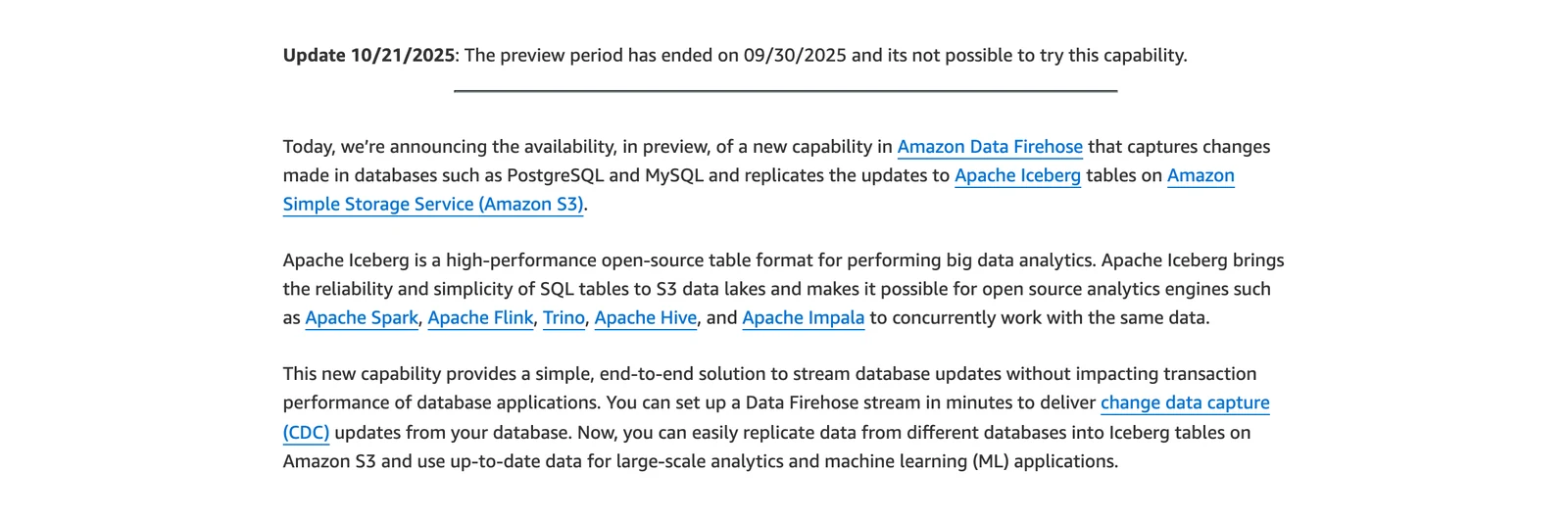
- The database-as-source feature was only a preview, and AWS's announcement post now says the preview period "has ended on 09/30/2025".
- For self-managed Iceberg tables, you handle compaction (merging small files) and snapshot expiration (removing old table versions) yourself. AWS adds that the Glue Data Catalog can compact Iceberg tables automatically, billed separately (Firehose docs).
- An update writes a delete file (a marker for removed rows) plus an insert, and delete files incur S3 put charges, per AWS.
- Column names and data types in the source data must exactly match those of the target tables for Firehose to deliver successfully (same page).
- As ingest throughput rises, the number of partitions that can be written actively falls: about 3,000 at 20 MB/s or less, 100 at 40 to 400 MB/s, and 1 at 750 MB/s to 1.5 GB/s (same page).
- Amazon MSK Serverless is not supported as a source for Iceberg tables, and AWS does not recommend several streams writing to the same Iceberg table (same page).
AWS News Blog, Amazon Data Firehose database replication post, October 2026.
Tools from outside AWS
6. OLake Go: best for database changes into Iceberg on storage you own

OLake home page, October 2026.
At a glance
- Kind: open-source database replication, licensed Apache 2.0
- Change capture: Postgres, MySQL/MariaDB, MongoDB and SQL Server, per the connector docs (we did not test them)
- Output: Apache Iceberg and Parquet
- Price: free licence, you pay for your own servers
- Support: contact the OLake team
OLake Go moves databases, not SaaS apps, and it does not transform data on the way. You run it yourself with Docker, Helm on Kubernetes or the OLake UI.
What's good
- One tool does the first load and then the change capture for four database families, with Full Refresh, Full Refresh + Incremental, Full Refresh + CDC and CDC Only sync modes (docs).
- Oracle, Db2, S3 and Kafka also work as sources, without database change capture.
- It writes Iceberg tables to catalogs such as AWS Glue, with eleven catalog types listed on the catalog compatibility page, or Parquet files on object storage such as S3, MinIO and Google Cloud Storage.
- Syncs are stateful and resumable: after a crash, a network failure or a pause they resume from the last checkpoint instead of starting over (docs).
- Parallel chunking splits large tables into chunks that are read in parallel, in the Full Refresh, Full Refresh + CDC and Full Refresh + Incremental modes (docs).
- Schema discovery runs at the start of every sync, and a new source column is added to the Iceberg schema automatically (schema evolution docs).
Bottom line: Pick OLake Go when your sources are Postgres, MySQL/MariaDB, MongoDB or SQL Server and you want Iceberg or Parquet on storage you run.
7. Fivetran: best for many connectors with no servers
Fivetran home page, October 2026.
At a glance
- Kind: managed ELT service
- Free plan: up to 500,000 monthly active rows (MAR)
- Billing: MAR, counted per connection; list rates are in its Service Consumption Table (V.10, effective 1 February 2026: Standard starts at $495 per million MAR plus a $5 base per connection)
Fivetran's docs list Amazon Redshift among its destinations. It can also write Parquet files to an S3 bucket through its Managed Data Lake Service, with AWS Glue as an optional catalog for Iceberg tables.
What's good
- Fivetran describes itself as fully managed, so you run no servers (we did not test that), and its pricing page lists a free plan.
- Its pricing page lists Standard with unlimited users, 15-minute syncs, 700+ fully managed connectors and a dbt Core integration. Enterprise adds 1-minute syncs, custom roles and a Hybrid deployment option.
- The same page says you can save up to 22% on an annual contract.
- Its Managed Data Lake Service docs say it writes Parquet files to cloud object storage (Amazon S3, Azure Data Lake Storage or Google Cloud Storage) and always creates and maintains Iceberg table metadata.
Where it falls short
- Its troubleshooting docs say AWS Glue compaction is not supported on Fivetran-managed Iceberg tables, and the next sync restores the managed state.
- A row counts as active when it changes (MAR definition), and the pricing page says updates include deletes, so busy tables push the bill up.
- The pricing page prints no per-row rate; the service consumption table lists Standard from $495 per million MAR, Enterprise from $661.67 and Business Critical from $1,061.67 (list price per connection, before discounts).
- The pricing page lists 15-minute syncs for Standard and 1-minute syncs for Enterprise. It also applies a $5 base charge to standard connections with usage between 1 MAR and 1M MAR.
- The Managed Data Lake Service docs say Fivetran does not support position deletes for Iceberg tables, nor the S3 Glacier Flexible Retrieval, Glacier Deep Archive or Intelligent-Tiering archive tiers.
- The destinations page says it is not always possible to load large datasets into row stores like PostgreSQL and MySQL, and that your provider's compute charges depend on data volume and sync frequency.
What users say: A Hacker News commenter on the thread about Fivetran and dbt Labs merging (October 2025) wrote that "Fivetran is convenient but absurdly expensive."
8. Airbyte: best for connector choice and self-hosting
Airbyte home page, October 2026.
At a glance
- Kind: ELT with a self-hosted Core edition and a paid cloud
- Core: free to self-host under the Elastic License 2.0 (licence FAQ)
- Cloud: Standard "Starting at $20 /month" with 5 credits included and extra credits at $5 each, per Airbyte's pricing page (read 8 October 2026)
Airbyte's docs list Redshift, S3, S3 Data Lake and others as destinations. The S3 Data Lake connector writes Iceberg to S3 and supports AWS Glue, Nessie, Polaris and REST (representational state transfer, a standard web interface) catalogs.
What's good
- Airbyte's licence FAQ says no limits exist on volume or users for open-source use. Your costs are servers and the people who run them.
- The comparison matrix on its pricing page lists 700+ connectors on all four plans.
- Its CDC docs list Postgres, MySQL, SQL Server, MongoDB, Oracle, SAP HANA and Db2 as current CDC sources, read on a sync interval.
- The S3 Data Lake docs list Full Refresh Overwrite, Append and Overwrite + Deduped, plus Incremental Append and Append + Deduped. Dedup is merge-on-read, using the stream's primary keys as Iceberg identifier columns.
- The pricing page shows a 14-day free trial with 400 credits, and Plus starting at $189 a month for a 40-credit package.
- Its Max Sync Frequency row reads 1 hr for Standard, 15 min for Plus, and 5 min for Pro and Enterprise Flex (same page).
Where it falls short
- Database change capture runs as scheduled syncs, not as a continuous stream, per its CDC docs. The first CDC sync takes a snapshot with a SELECT statement, which is effectively a Full Refresh.
- The same docs say changes made by TRUNCATE or ALTER do not appear in the logs, so they do not reach the destination, and a refresh is required after you add a new table to a CDC connection.
- The S3 Data Lake docs say the connector never rewrites existing Iceberg data files and warn against running compaction during a truncate refresh (a full reload that replaces the table's data).
- In the S3 Data Lake connector, objects and unions are written as string columns of serialized JSON. On Airbyte Cloud with the Glue catalog, an Airbyte team member must enable IAM role authentication.
- Marketplace connectors are community-maintained with no SLA, per Airbyte's support levels. Enterprise connectors are not available to Open Source or standard Cloud customers.
- Pro and Enterprise Flex use capacity-based pricing with "Talk to sales" on the pricing page, so no price is published for them.
What users say: A reviewer on AWS Marketplace (August 2026) notes "occasional syncing issues or rate-limit errors with third-party APIs".
9. Hevo: best for small teams loading Redshift
Hevo Data home page, October 2026.
At a glance
- Kind: managed ELT service
- Free plan: $0, up to 1 million events a month
- Paid: Starter from $299 a month ($265 on annual billing), Professional from $849 a month, per Hevo's pricing page (read 8 October 2026)
Hevo's docs list Amazon Redshift and Redshift Serverless as destinations. Its billing word is "event", which means every record inserted, updated or deleted in the destination.
What's good
- The plans are tiered and posted, and there is a 14-day free trial with no credit card (pricing page).
- Hevo's docs describe log-based pipelines for MySQL (BinLog), PostgreSQL (logical replication), SQL Server (Change Tracking), MongoDB (Change Streams or OpLog), Oracle (Redo Logs) and DynamoDB (Streams).
- The pricing page says the Free plan allows up to 5 users and 1-hour scheduling, with limited connectors.
- Starter adds up to 10 users, 150+ connectors, a dbt integration, SSH/SSL and 24*7 email and live chat support (same page).
Where it falls short
- Streaming pipelines show on the Professional and Business Critical columns of the pricing page, and the docs say Hevo Sales must enable streaming, which from Release 2.21 covers those sources except SQL Server (all variants) and DynamoDB. Business Critical is "Custom."
- Its only Iceberg route in the docs we read is an Early Access Edge destination into Snowflake-managed Iceberg tables, not Iceberg on S3 with an open catalog.
- That route needs an active Snowflake account, a Snowflake warehouse and database, and an S3 bucket with an IAM policy that grants Snowflake access. Engines such as Spark and Trino read the tables through the Horizon Iceberg REST Catalog API (same docs).
- The same docs warn that a Snowflake Iceberg destination configured with access credentials may stop connecting at any time, because Snowflake is deprecating password-based authentication. Hevo recommends key pair authentication.
- By Hevo's definition, every insert, update or delete is an event, so a row updated five times is five events and busy tables use up quota fast.
- Events above your plan's quota are on-demand and charged on top of the plan, and the page shows no rate for them (same page).
What users say: A reviewer on AWS Marketplace (August 2026) says "Hevo is designed for fast individual pipelines, but struggles with many concurrent pipelines."
10. Matillion: best for visual pipelines inside Redshift
Matillion home page, October 2026.
At a glance
- Kind: cloud ETL platform
- Billing: credits, driven by task hours (credit consumption terms)
- Price: not published on Matillion's pricing page (read 8 October 2026)
Matillion's streaming docs say streaming pipelines can write to Amazon S3, and a pre-built pipeline loads that change data into Redshift. The streaming runner is deployed in your own cloud.
What's good
- Analysts can design pipelines visually. The Developer card on the pricing page lists a low-code canvas with SQL and Python, pre-built connectors and a built-in Git repository.
- The credit rates are public in Matillion's credit consumption terms: orchestration is 1 credit per task hour and transformation is 3. Streaming CDC pipelines are 1 credit per task hour for the essential type and 2 for the premium type.
- Task hours count only while a pipeline runs, in 2-second increments. Validation and sampling do not count (same terms).
- Matillion's streaming docs list Db2 for IBM i, SQL Server, MySQL, Oracle and PostgreSQL as CDC sources, and describe "near-real-time data ingestion" into cloud storage or a warehouse.
- The Teams card lists 5 developer users, an audit log and a Service Level Agreement. Scale adds custom SSO, hybrid cloud deployment and data lineage tracking (pricing page).
- Per the pricing FAQ, you can contract directly with Matillion or pay through your AWS, Azure or Snowflake account.
Where it falls short
- No plan shows a dollar price, and the price per credit is not published.
- Streaming change data capture is listed on the Scale card of the pricing page, and the streaming docs say the feature is "only available to customers on specific Maia plans."
- Streaming pipelines "only currently support relational databases as sources" per the streaming docs. The streaming runner is deployed and configured in your own cloud infrastructure, with one runner per pipeline.
- Developer users beyond the included ones cost 70 credits per user a month (credit terms).
- The credit terms say the overage rate "will be listed on the Order Form", and under Pay-Go (capped at 60 days after the term) you lose access to all Products unless you sign a new term. Pay-Go brings no support services.
- The terms do not define the "essential" and "premium" CDC pipeline types.
What users say: A reviewer on AWS Marketplace (June 2026) wrote "My main concern is around pricing. I'd really like more transparency and predictability on cost," in a review about whether the Maia AI assistant stays bundled.
11. Informatica: best for large, governed estates
At a glance
- Kind: enterprise data management suite (the cloud product is called IDMC)
- Price: an AWS Marketplace listing shows $131,760 for 12 months for a bundle of 120 IPUs (Informatica Processing Units) a month (read 8 October 2026)
- Iceberg: its connector docs describe an Amazon SageMaker Lakehouse connector that can read from or write to Apache Iceberg tables
The listing is a list price for one bundle, not a rate card.
What's good
- Its AWS Marketplace listing describes IPUs as one shared currency across data integration, ingestion and master data management services, and offers 12-month, 24-month and 36-month contract tabs.
- Its connector docs describe an Open Table Connector that reads or writes Apache Iceberg or Delta Lake tables.
- The same docs say the Amazon SageMaker Lakehouse connector works with Iceberg data in S3 managed by the AWS Glue Data Catalog or the S3 tables catalog.
- The Oracle CDC V2 Connector retrieves Oracle change records from a PowerExchange change data capture environment (same docs).
- The pricing page lists "Free Cloud Data Integration" and a "Data Warehouse Trial" under Get Started.
Where it falls short
- Its pricing page shows no dollar price per IPU and no calculator, and ends with a "get quote" button.
- The page says IPU consumption is calculated per scaler, based on the scaler's usage including Secure Agent, CDI-e and Data Mass Ingestion volume, so several usage measures feed the bill.
- Overage fee rates are not published on the page either.
What each option bills for
The billing unit is usually the answer to a surprising invoice, and it matters more than any feature. Glue and DMS charge for capacity or compute time, so an idle DMS instance still costs money. AppFlow charges per run and per gigabyte, and Fivetran charges per changed row.
Here are four small examples with invented workloads. The first row comes from AWS's Glue page, and the rest are our arithmetic on the vendor rates above, so treat them as illustrations, not quotes.
| Example | Math | Result |
|---|---|---|
| Glue job, 6 DPUs for 15 minutes, at $0.44 | 6 x 0.25 hours x $0.44 | $0.66 (AWS's own page example) |
| The same job on Glue 6.0, at $0.308 | 6 x 0.25 hours x $0.308 | about $0.46 |
| One dms.t3.medium instance for a 730-hour month | $0.0745 x 730 | about $54.39, before storage and transfer |
| A daily AppFlow flow moving 10 GB a month to S3 | 30 runs x $0.001 + 10 GB x $0.02 | $0.23 |
Sources: AWS Glue pricing for the $0.66 example, AWS Glue US East (Ohio) price list, AWS DMS price list, Amazon AppFlow pricing. Checked October 2026.
Glue rates are US East (Ohio) and the DMS rate is US East (N. Virginia). The AppFlow row uses the rates in AWS's worked pricing example (Europe, Frankfurt, S3 to Snowflake hosted on AWS). Other regions can differ, and storage, data transfer and target costs come on top.
Pick the right AWS ETL tool
| If your situation is... | Start with | Iceberg tables on S3, per the sources above |
|---|---|---|
| A few SaaS apps into S3 or Redshift | AppFlow | Not named on AppFlow's overview |
| SaaS apps or DynamoDB with no pipeline to build | Glue zero-ETL | S3 Tables is a listed target, not for self-managed databases |
| A live database moving into AWS | DMS | No Iceberg target, so a second step is needed |
| Database changes into Iceberg tables on S3 | DMS plus Glue, or a tool that writes Iceberg itself | AWS's blog uses Glue jobs after DMS |
| Spark code and big batch transforms | Glue | AWS's DMS data lake blog uses Glue jobs to write Iceberg |
| Events already in Kafka or Kinesis | Firehose | Delivers streams into Iceberg tables |
| Many SaaS connectors, no servers | Fivetran or Airbyte Cloud | Both document an Iceberg route, with the limits above |
| A tool you host yourself | Airbyte Core | The S3 Data Lake connector writes Iceberg |
| Postgres, MySQL, MongoDB or SQL Server changes into Iceberg you run | OLake Go | Writes Iceberg and Parquet itself, per its docs |
| Redshift loads, a small team, posted prices | Hevo | Only Snowflake-managed Iceberg, in Early Access |
| Visual pipelines run inside Redshift | Matillion | Not covered here |
| A big governed estate | Informatica | A SageMaker Lakehouse connector reads and writes Iceberg |
Want a quicker answer? Try this short quiz.
Which AWS ETL tool fits you?
Question 1 of 5
Where does your data start?
The source cuts the list in half right away.
Tools that often appear on these lists but are not here
AWS Data Pipeline is not a current option. AWS's docs say it is "no longer available to new customers" and is in maintenance mode with no new features planned. Existing customers can keep using it, so do not start a new project on it.
A note on Iceberg and open table formats
Many teams now want Apache Iceberg tables on S3, so several engines can read the same data. AWS's DMS target list does not name Iceberg, AppFlow's overview does not mention it, and Firehose takes streams rather than databases as its source now. Glue, Airbyte, Informatica and Fivetran each document a route, and the limits we found are in their entries above.
If that is your goal, OLake Go (entry 6) writes Iceberg or Parquet on storage you own, and the OLake Go docs cover the rest.
Test two finalists before you commit
Run one real table through two finalists and write down what you see. This checklist is our suggestion, not a vendor procedure, and one table does not prove production reliability.
- Initial load: do the row counts in the destination match the source?
- Update: does a changed row show up as a change or as a second copy?
- Delete: what happens to a row you delete at the source?
- Column change: add or rename a column and note what lands, or what fails.
- Restart: stop the job mid-run, restart it, and check for gaps or duplicates.
- Bill: compare the month's usage with the vendor's billing unit, then confirm the rates on its page.