Azure Data Factory Pricing Explained (2026)
23 min read
Key takeaways
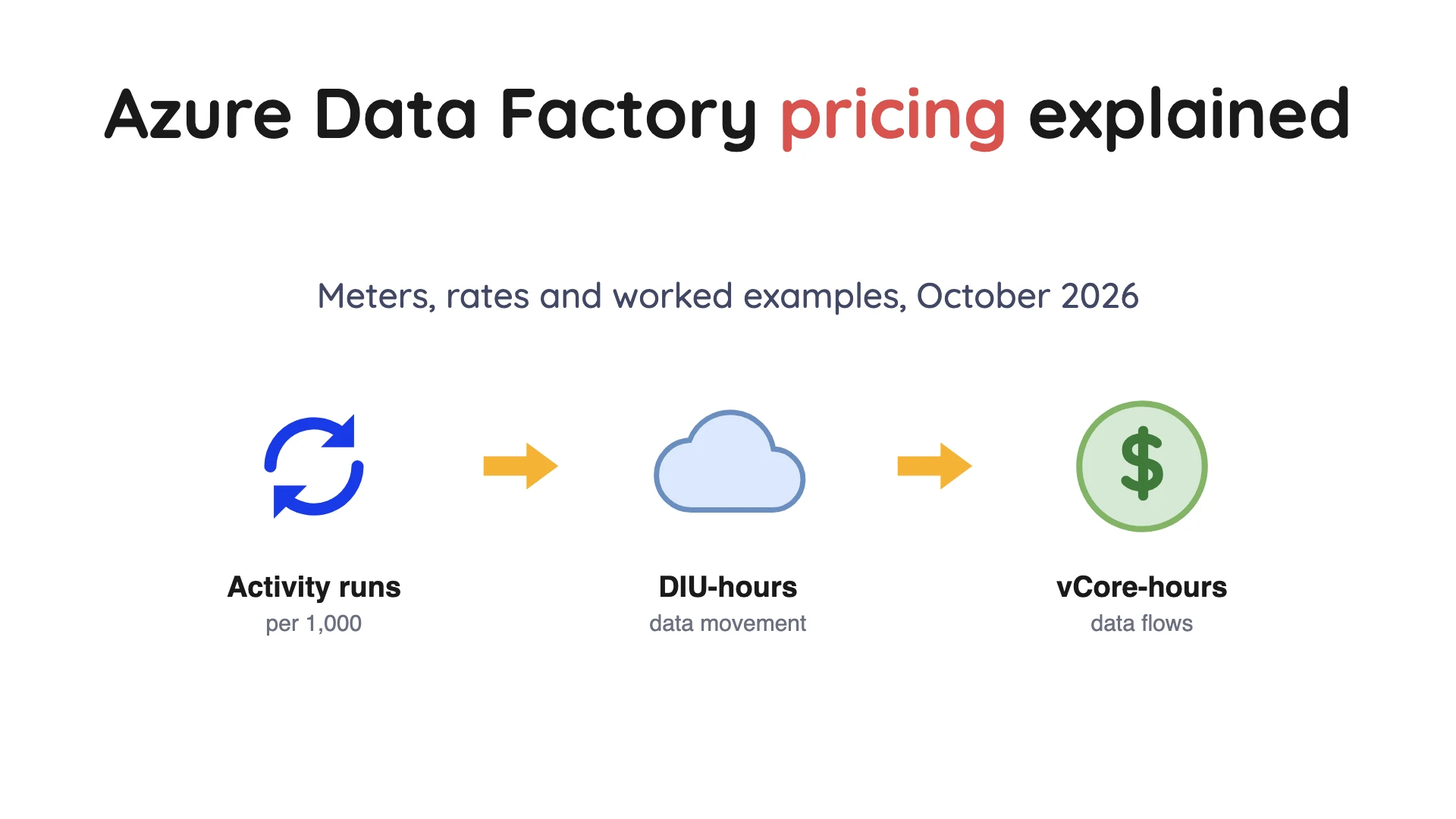
Azure Data Factory has no plan and no seat price. You pay for meters instead, and there are a few of them. They are $1 per 1,000 activity runs, $0.25 per data integration unit (DIU) hour for copying data, and $0.274 per vCore-hour for data flows (East US, US dollars) (checked Oct 2026).
In our busy hourly example (made-up inputs), copy time is about 87% of a $1,662.84 monthly subtotal, and data flows add only $131.52. A small daily copy costs about $1.
Microsoft's pricing page text shows "$-" until it loads, so note the region before you trust any number.
- Azure Data Factory bills on a consumption basis, which is Microsoft's term. A few meters still run when nothing is moving, such as debug time to live and inactive pipelines (both covered below). The main meters are activity runs, DIU-hours (copy compute, where a DIU is a data integration unit), vCore-hours (data flow compute), and small charges for operations like monitoring.
- Rates here are East US in US dollars, and your region may differ. For example, the price feed lists General Purpose data flow at $0.27325 per vCore-hour in East US and $0.28425 in Central India (checked Oct 2026).
- Pipeline activity is $0.005 an hour on the Azure runtime. On the managed virtual network option it's $1 an hour (checked Oct 2026), 200 times the Azure rate.
- Data flows have an 8 vCore minimum. A debug session you forgot about is billed by the hour, idle time to live included.
- Microsoft now tells new users to start with Fabric Data Factory, and that one is billed differently.
- If the job is copying PostgreSQL, MySQL, MongoDB or SQL Server tables into Iceberg, OLake Go is open source and has no meter; you pay for your own servers and staff.
Every rate below comes from Microsoft's own pricing page, read in a live browser (checked Oct 2026), or from Microsoft's own Azure Retail Prices feed, pulled the same day. Where the two disagree, we tell you.
The worked examples are our own arithmetic on Microsoft's published rates. Examples 1, 3 and 4 use made-up inputs, and example 2 uses Microsoft's own. We did not run Azure Data Factory, so none of this is a test result.
Azure Data Factory pricing: the short version
Azure Data Factory (ADF) is Microsoft's cloud service for moving and reshaping data, and Microsoft calls it a managed cloud service for hybrid extract-transform-load (ETL) projects. ETL just means copying data out of one system, changing it, and loading it into another.
There's no plan to buy. Microsoft says ADF is billed on a consumption basis, so your invoice shows one line per meter.
Here are the core meters, as Microsoft's page shows them for East US.
| Meter | What it counts | Azure runtime | Managed VNET runtime | Self-hosted runtime |
|---|---|---|---|---|
| Activity runs | Activity runs, trigger runs, debug runs | $1 per 1,000 runs | $1 per 1,000 runs | $1.50 per 1,000 runs |
| Data movement | Copy time | $0.25 per DIU-hour | $0.25 per DIU-hour | $0.10 per hour |
| Pipeline activity | Lookup, Get Metadata, Delete | $0.005 per hour | $1 per hour | $0.002 per hour |
| External activity | Databricks, stored procedure and similar | $0.00025 per hour | $1 per hour | $0.0001 per hour |
Prices from Microsoft's page, East US, US dollars (checked Oct 2026). Confirm on the page before you decide.
The same page calls the copy activity secure, reliable, performant and scalable. That is Microsoft's wording, and the page gives no throughput or reliability figure, so we treat it as a description and not a measured result.
What the terms mean
A few terms decide the bill, so here they are in plain words.
- Pipeline: a set of steps, called activities, that run together. A trigger starts it on a schedule or an event.
- Activity run: one execution of one step.
- Integration runtime: the compute that does the work. Microsoft's docs list three types: Azure, self-hosted and a third type for running SQL Server Integration Services (SSIS) packages, called Azure-SSIS.
- DIU: a bundle of CPU, memory and network that powers a copy. Microsoft allows 4 to 256 DIUs per copy run.
- vCore: one virtual processor core. Data flows are billed in vCore-hours, which is cores multiplied by hours.
- Data flow: a visual transformation that runs on a temporary Apache Spark cluster, which is a group of machines working together.
Microsoft says integration runtime charges are prorated by the minute and rounded up. Its own example: a job that takes 2 minutes and 20 seconds is billed as 3 minutes.
How a copy run turns into a bill
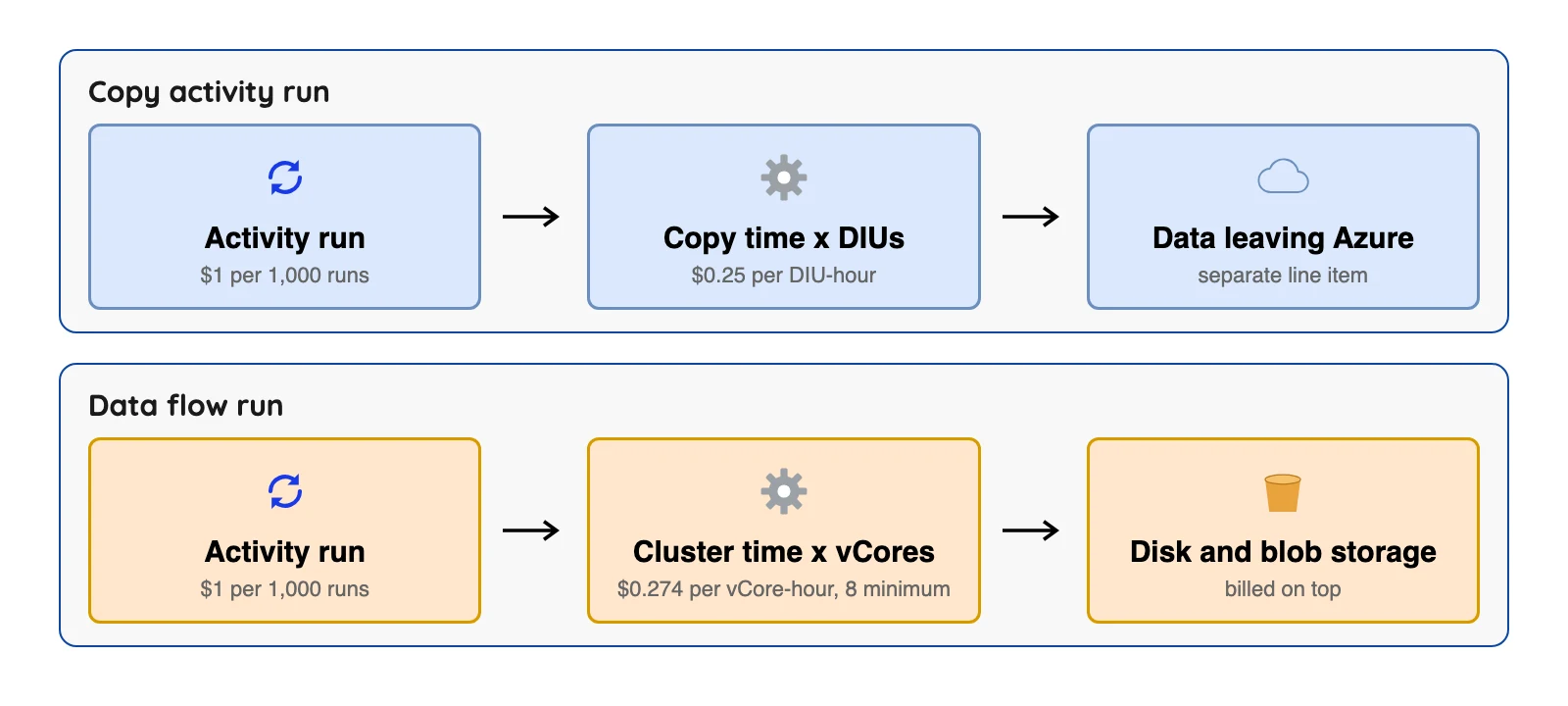
A copy gets billed three times. It counts as one activity run, it uses DIU-hours while it copies, and data sent out of an Azure datacenter can add a separate outbound transfer line.
Microsoft's formula for copy compute is DIUs used, times copy duration, times the price per DIU-hour. Leave the DIU setting on "Auto" and the service picks a number between 4 and 256 based on your source, destination and data pattern.
So you can't guess the bill from the data size alone. Microsoft's own advice is to run a trial on a sample and measure the meters.
Data flows: vCore-hours and the 8 vCore floor
Data flows bill by cluster time, so the cost grows with cores and hours. Microsoft's page says you pay for cluster execution and debugging per vCore-hour, and that the minimum cluster size is 8 vCores.
They also bill for the managed disk and blob storage they need, on top of the vCore-hours.
| Data flow item (East US) | Rate on Microsoft's page (checked Oct 2026) |
|---|---|
| General Purpose, pay as you go | $0.274 per vCore-hour |
| General Purpose, 1-year reserved | $0.205 per vCore-hour, about 25% savings |
| General Purpose, 3-year reserved | $0.178 per vCore-hour, about 35% savings |
| Memory Optimized | Shown as N/A |
The price feed lists General Purpose at $0.27325, while the page shows $0.274. We don't know why they differ by a fraction of a cent, so the examples use the page's $0.274. We also skip the feed's Memory Optimized rate, because the live page shows N/A for East US.
Microsoft says a cold cluster takes a few minutes to start, and each job gets its own cluster by default. We found no page that says whether those start-up minutes are billed, so check the billableDuration field in your activity output, which Microsoft's cost guide points to.
The three integration runtime types, and why they cost differently
The managed virtual network option is a setting on the Azure type with its own rates, so we show it as a separate row.
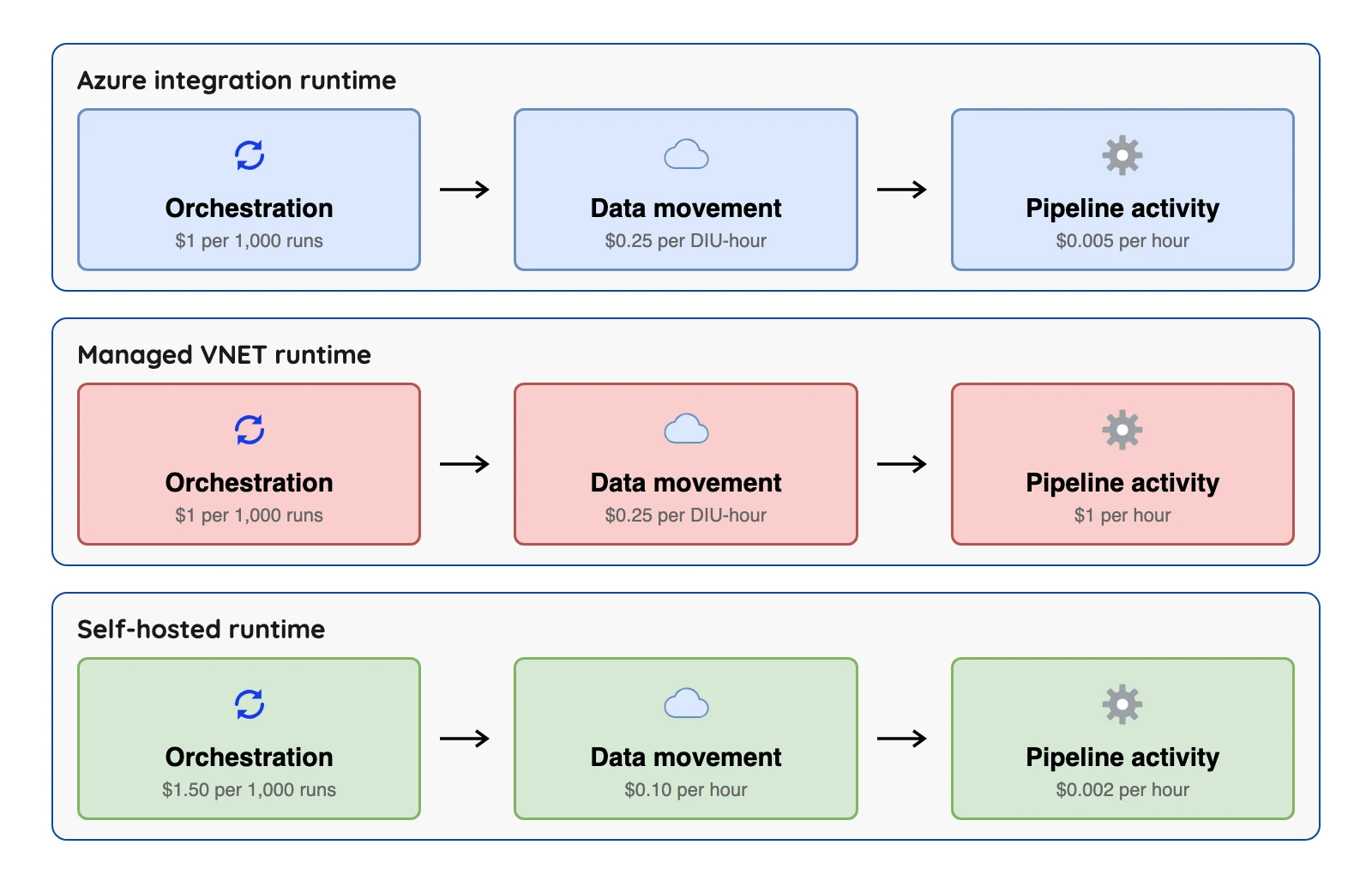
Azure runtime type. This is serverless compute that Microsoft runs for you. It handles data flows and cloud-to-cloud copies, and you pay only for what you use.
Azure runtime with a managed virtual network (VNET). This is the Azure runtime with a Microsoft-managed private network, for reaching data stores over private links. Its pipeline activity rate is $1 an hour on the page, against $0.005 on the plain Azure runtime (checked Oct 2026). Microsoft's page notes the $1 rate covers up to 50 concurrent pipeline activities, or up to 800 for external activities.
Microsoft's charge examples add one limit on that cost. They show that external activities running at the same time within the limit, with a time to live set, are charged once.
Self-hosted runtime. This is software you install on your own machine, so it can reach databases behind your firewall. Microsoft says it's only supported on Windows, and you provide the machine. Data movement is $0.10 an hour instead of a per-DIU rate, but activity runs cost $1.50 per 1,000.
SQL Server Integration Services (SSIS) runtime. It runs SSIS packages, which are older ETL jobs built for SQL Server, and Microsoft calls it Azure-SSIS. Think of it as a cluster of virtual machines that you pay for by the node.
Worked examples (our arithmetic, not Microsoft's)
All four examples use East US rates from the table above. Examples 1, 3 and 4 use made-up inputs, so swap in yours, while example 2 uses Microsoft's own inputs.
Microsoft's footnote says the activity run meter counts activity runs, trigger runs and debug runs, so each example counts a trigger run too. Operations (read, write and monitoring) are left out, so each total is a subtotal. Storage where data lands, and any later compute that builds or maintains tables, are billed separately and aren't included.
Example 1: a small daily copy
One pipeline runs daily for 30 days. It has three steps: a Lookup, a Copy and a stored procedure. The Copy runs 2 minutes at 4 DIUs, and the Lookup and the stored procedure each take 1 minute.
| Meter | Arithmetic | Cost |
|---|---|---|
| Activity runs | 90 activity runs + 30 trigger runs = 120 at $1 per 1,000 | $0.12 |
| Copy | 4 DIUs x 2/60 hour x 30 days = 4 DIU-hours at $0.25 | $1.00 |
| Lookup (pipeline activity) | 0.5 hour at $0.005 | under $0.01 |
| Stored procedure (external) | 0.5 hour at $0.00025 | under $0.01 |
| Total | about $1.12 a month |
Example 2: Microsoft's own 1 TB a day sizing
This one isn't ours. Microsoft's cost guide walks through moving 1 TB a day from Amazon S3 to Azure Data Lake Storage Gen2. A trial of 100 GB measured 1.2667 DIU-hours, so the month is 380 DIU-hours, and Microsoft says its prices in that example are hypothetical.
| Meter | Arithmetic | Cost |
|---|---|---|
| Copy | 380 DIU-hours at $0.25 | $95.00 |
| Activity runs | 30 activity runs at $1 per 1,000 | $0.03 |
| Trigger runs (our addition) | 30 at $1 per 1,000 | $0.03 |
| Total | about $95.06 a month |
That 1.2667 figure came from one dataset. Microsoft warns your result will vary with data shape, network speed and the limits on both sides.
Example 3: a busy hourly setup with data flows
Twenty pipelines run every hour for 30 days, which is 720 runs each. Each has one Copy (3 minutes at 8 DIUs) and four Lookups (1 minute each). A separate nightly pipeline runs three data flows for 20 minutes each on 16 vCores.
| Meter | Arithmetic | Cost |
|---|---|---|
| Activity runs | 72,000 activity runs + 14,400 trigger runs + 120 nightly runs (1 trigger and 3 data flows, 30 nights) = 86,520 at $1 per 1,000 | $86.52 |
| Copy | 20 x 720 x 8 DIUs x 3/60 hour = 5,760 DIU-hours at $0.25 | $1,440.00 |
| Lookups | 57,600 runs of 1 minute = 960 hours at $0.005 | $4.80 |
| Data flows | 3 x 30 nights x 1/3 hour x 16 vCores = 480 vCore-hours at $0.274 | $131.52 |
| Total | $1,662.84 a month |
Copy time is about 87% of that subtotal. In this example, cutting copy time is the biggest lever you have, and the data flows barely matter.
Example 4: a five-minute schedule
One pipeline runs every 5 minutes, which is 288 runs a day and 8,640 over 30 days. It has a Copy of 1 minute at 4 DIUs and a Lookup of 1 minute.
| Meter | Arithmetic | Cost |
|---|---|---|
| Activity runs | 17,280 activity runs + 8,640 trigger runs = 25,920 at $1 per 1,000 | $25.92 |
| Copy | 8,640 runs x 4 DIUs x 1/60 hour = 576 DIU-hours at $0.25 | $144.00 |
| Lookup (pipeline activity) | 8,640 runs of 1 minute = 144 hours at $0.005 | $0.72 |
| Total | $170.64 a month |
One tiny pipeline costs more than 150 times the daily one in example 1. Frequency is the only thing that changed, so check whether that data needs to land every 5 minutes.
Which meter dominates
The biggest line isn't the same in every example, which means the first thing to fix depends on your workload.
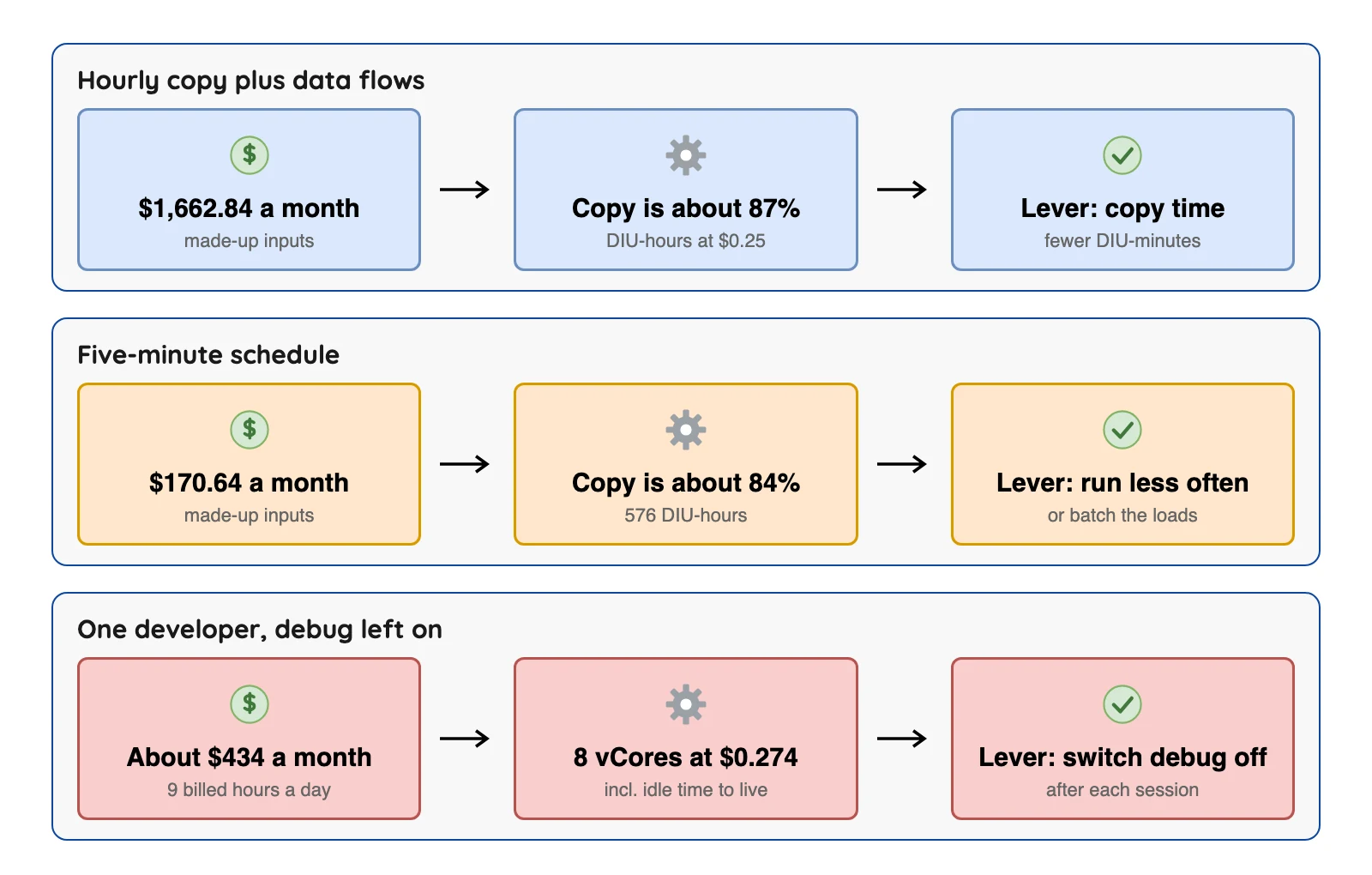
Our arithmetic on Microsoft's East US rates, October 2026. Inputs are made up.
The same example 3 on a self-hosted runtime
What if you move the same copies and Lookups to a self-hosted runtime? The trigger-run rate is our assumption. Data flows stay on the Azure runtime, because Microsoft's runtime table lists them only under that type.
| Meter | Arithmetic | Cost |
|---|---|---|
| Activity runs, hourly pipelines | 86,400 runs at $1.50 per 1,000 | $129.60 |
| Activity runs, nightly pipeline (Azure runtime) | 120 runs at $1 per 1,000 | $0.12 |
| Copy | 720 hours of copy time at $0.10 | $72.00 |
| Lookups | 960 hours at $0.002 | $1.92 |
| Data flows | Same as before | $131.52 |
| Total | $335.16 a month |
That's a $1,327.68 lower Azure bill. It isn't like for like, though: we assumed the same 3-minute copies, and the Windows machines aren't priced.
From a trial run to your invoice
Microsoft's cost guide suggests running a sample, reading what each meter used, then scaling up.
- Run your heaviest pipeline once on a sample, such as 100 GB.
- Open the Monitor tab and select the Consumption button next to the pipeline run. It shows the amount used for each meter, though not the price.
- For a single activity, open its Output and read the
billableDurationproperty. - Multiply by your region's rate for that meter, then by runs per month, or type the amounts into Microsoft's pricing calculator.
Microsoft's price feed accepts a filter, and this is the one we used. Look for the meters Cloud Orchestration Activity Run, Cloud Data Movement, Cloud Pipeline Activity, Azure Managed VNET Pipeline Activity and Self Hosted Data Movement, and the product Azure Data Factory v2 Data Flow - General Purpose.
https://prices.azure.com/api/retail/prices?$filter=serviceName eq 'Azure Data Factory v2' and armRegionName eq 'eastus' and priceType eq 'Consumption'
Change eastus to your region name.
Change Data Capture and debugging
The Change Data Capture resource
ADF has a factory-level Change Data Capture (CDC) resource. CDC means copying only the rows that changed, by reading the database's own change records, which beats re-copying everything. Microsoft's CDC page says you are billed for four cores of General Purpose data flows while data is being processed, and that the resource can run continuously.
Microsoft's pricing page adds that CDC is billed at General Purpose rates for 4-vCore clusters "during public preview of CDC". At $0.274, four cores cost $1.096 an hour. Here's what that looks like.
- Two hours of processing a day: 60 hours a month, so $65.76.
- Processing all day, every day: 720 hours, so $789.12.
The CDC page lists SAP (business software) CDC, SQL Server, Azure SQL Database, Azure SQL Managed Instance, Azure Cosmos DB and Snowflake as native CDC sources. Microsoft says Fabric replaces CDC artifacts with copy jobs, so check which one your project would use.
Debug sessions
Debug mode tests a data flow on a live cluster, and it can leak money quietly. Microsoft's debug docs say the default auto-resolve runtime starts 8 general cores with a 60-minute time to live. They add that you're charged for every hour each debug session runs, idle time to live included.
Take one developer.
Their session runs 8 hours, then idles for the 60-minute time to live. That's 9 billed hours at 8 vCores and $0.274, or $19.73 a day, and about $434 over 22 working days.
Each browser session gets its own cluster, so two developers cost twice as much.
Operations and monitoring
Two small meters sit under everything. Read and write operations, which create, read, update or delete factory objects, are $0.50 per 50,000 entities. Monitoring, which retrieves run records, is $0.25 per 50,000 records (checked Oct 2026).
Azure-SSIS runtime pricing
Running SSIS packages? Then you pay for virtual machine nodes by the second, according to Microsoft's SSIS pricing page. The page text shows "$-" again, so the rates below come from the price feed (checked Oct 2026).
| East US, one D4 v3 node (4 cores) | Per hour | Running 120 hours | Running 720 hours |
|---|---|---|---|
| Standard, license included | $0.969 | $116.28 | $697.68 |
| Standard, with Azure Hybrid Benefit | $0.579 | $69.48 | $416.88 |
Azure Hybrid Benefit applies your existing SQL Server licenses with active Software Assurance, per Microsoft's SSIS page. That page also says the SSIS catalog database on Azure SQL Database is billed separately. Per Microsoft's SSIS runtime management page, stopping the runtime releases its nodes and stops billing.
Costs that surprise people
These are the surprises Microsoft's own pages point to.
| Surprise | What Microsoft's pages say | Why it matters |
|---|---|---|
| Managed VNET activities | $1 per hour for pipeline and external activities, against $0.005 and $0.00025 on the Azure runtime | A private network setting can raise the activity line a great deal, so price it before you switch it on |
| Debug time to live | Debug sessions are billed including the idle time to live | A session keeps billing until you turn debug off or it times out |
| Debug runs | Counted as activity runs and in monitoring | Testing is not free |
| Data leaving Azure | Copy that sends data out of an Azure datacenter adds a separate outbound data transfer line | The copy meter may not be the whole cost, and we did not check which routes are free |
| Inactive pipelines | The price feed lists an inactive pipeline at $0.80 a month. The page's FAQ calls a pipeline inactive when it has no trigger and zero runs in a month, and its price text shows "$-" | 100 forgotten pipelines would be $80 a month, so clear out old ones |
| Per-pipeline billing | Opt-in per factory, and operations, SSIS nodes and data flows on a runtime with time to live file under a fall-back line | Charge-back reports will not add up pipeline by pipeline |
One more trap: the pricing page also carries old V1 sections. The "first 5 low-frequency activities are free" line belongs to the old V1 model, and we found no free plan for V2.
Reserved capacity: when it pays off
Microsoft sells one-year and three-year reservations for data flow compute, and the one-year rate of $0.205 is 74.8% of the pay-as-you-go $0.274. So a reservation only wins if you use at least about 75% of the reserved hours.
Microsoft's reservation docs call the discount "use-it-or-lose-it": it applies hour by hour to matching compute, and an unused hour is lost. Reserving 16 vCores for a 730-hour month is 11,680 vCore-hours, while example 3 uses 480, about 4%, so the reservation would cost far more than it saves.
How to lower an Azure Data Factory bill
These fixes mostly come from Microsoft's docs, and the DIU comparison is our own arithmetic. We tested none of them.
- Measure before you scale. Run a sample, read the consumption view, then scale up, as Microsoft's cost guide says.
- Turn on per-pipeline billing. It shows which pipeline costs what.
- Compare copy runs by DIUs times billed minutes. Faster isn't always cheaper. In our made-up case, 4 DIUs for 10 minutes is 0.67 DIU-hours, and 16 DIUs for 3 minutes is 0.8, even though the second finishes sooner. Read the DIUs used in the copy monitoring view.
- Turn debug off. Flip the debug slider off and the session closes, and billing stops.
- Use time to live for back-to-back data flows. Microsoft says a time to live reuses a cluster for sequential data flows. It doesn't help parallel data flows, and it isn't available on the auto-resolve runtime.
- Start small on cluster size. Microsoft says to start small and scale up, because past a point more cores just stop helping.
Azure Data Factory or Fabric Data Factory
Microsoft's docs call Data Factory in Microsoft Fabric "the next generation of Azure Data Factory" and tell new users to start with it. Microsoft also says new Fabric features are not backported to Azure Data Factory.
The billing is different too. Fabric Data Factory uses capacity units: pipelines use one meter for running activities and one for moving data, and Dataflow Gen2 uses its own compute meters. Microsoft's comparison says Fabric has no charges for external or pipeline activities, only activity runs and pipeline data movement.
The Fabric page we read lists no per-unit dollar rate, so we won't give one.
What practitioners say about the cost
We read public review pages in November 2026. These are individual opinions, each with its link, and not a representative sample.
On the cost side, one reviewer on the PeerSpot pricing page wrote: "The pricing model is based on usage and is not cheap." The same reviewer added that they pay "about $2,000 per month". The page shows no date for that review.
On the other side, a data engineer on PeerSpot's reviews page said in May 2025 that the service costs "30% of the former cost" of their previous solution. The review does not name the earlier tool. The figure is the reviewer's own estimate.
These two views fit the pattern in our examples. Small, steady jobs can cost very little, but usage-based meters make a big bill hard to predict before you run a trial.
Who the pricing fits, and what to compare
Azure Data Factory's pricing fits a team that already lives on Azure and has pipelines that run a few times a day. It also suits SSIS shops that want to move packages without rewriting them, and teams that must reach on-premises databases through a self-hosted runtime.
It fits less well when runs are very frequent, when data flows run all day, or when you want one flat monthly number. In those cases the meters add up in ways that are hard to forecast.
Options to compare:
- Per-row or credit-based tools bill on a different unit, such as changed rows or credits, as with Fivetran and Airbyte.
- Another cloud's tool, such as AWS Glue.
- Open-source software you run yourself, such as OLake Go, which copies PostgreSQL, MySQL and MariaDB, MongoDB and SQL Server into Apache Iceberg or Parquet on storage you choose. The software is free; you pay for the servers and the staff.
- Fabric Data Factory, if you already buy Fabric capacity.
For a wider list, see Best Azure ETL tools.
Which pricing model fits you?
Question 1 of 4
Where does your team already live?
The post says Azure Data Factory fits teams that already live on Azure.
Q1. How much does Azure Data Factory cost?
Q2. Is Azure Data Factory free?
Q3. What is a DIU in Azure Data Factory?
Q4. Why is my Azure Data Factory bill higher than expected?
Q5. What is the difference between Azure and self-hosted integration runtime pricing?
Q6. Does Azure Data Factory charge for debugging?
Q7. Is Azure Data Factory being replaced by Fabric Data Factory?
Conclusion
In our made-up examples Azure Data Factory costs little for small, short jobs, and the meters make big ones hard to forecast. The bill depends on copy time, cluster time, runtime type and region, and the only way to learn those is a trial.
So run that trial on your heaviest pipeline. Then apply the arithmetic above with your region's rates, and compare the total with a credit or per-row tool, or with OLake Go if the job is copying databases into Iceberg, before you commit.