Azure Data Lake Storage Pricing Explained (2026)
23 min read
Key takeaways
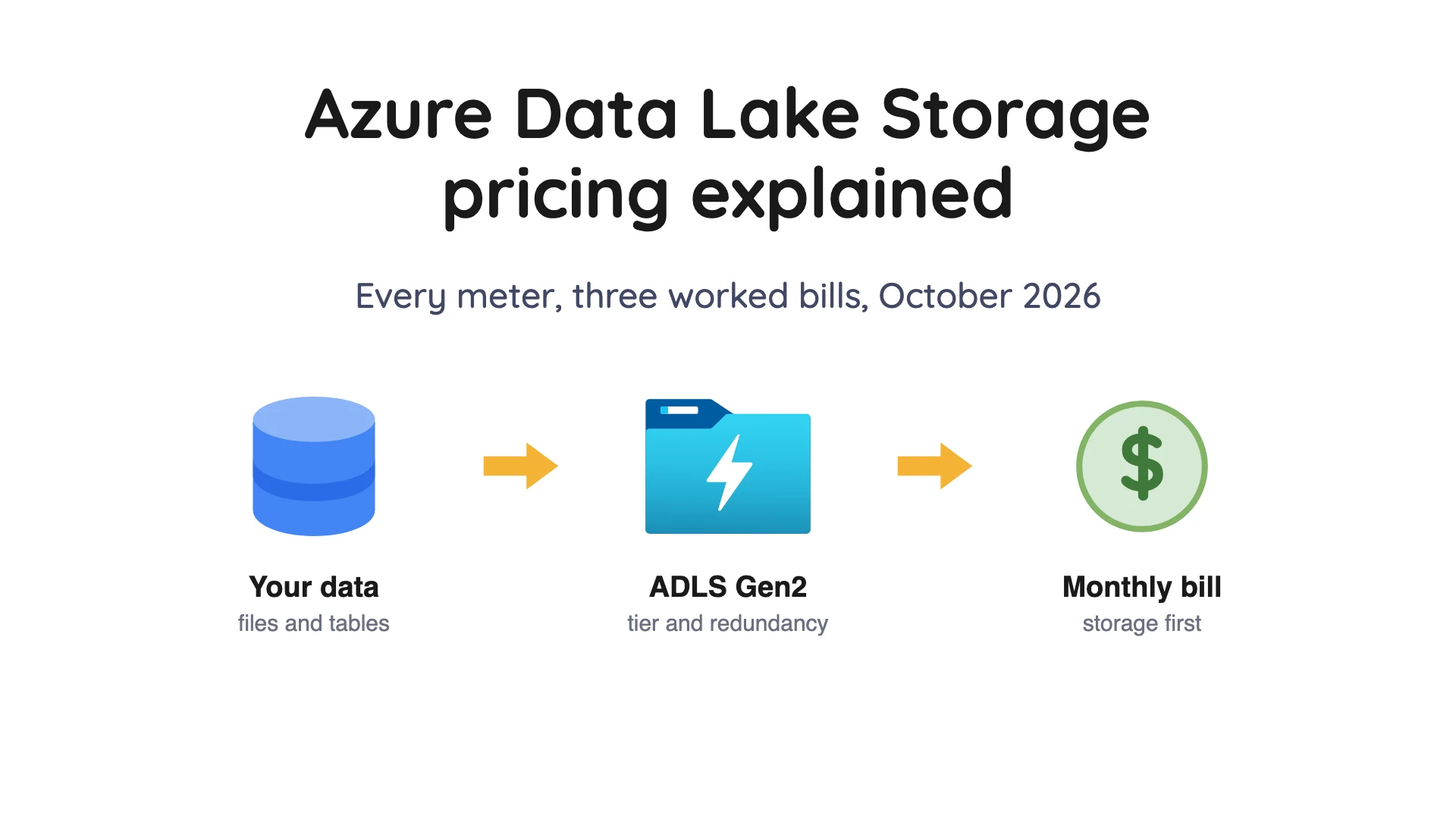
Azure Data Lake Storage (ADLS) Gen2 costs $0.021 per GB a month for hot storage in East US, with the hierarchical namespace switched on, on Microsoft's rendered pricing page. Operations are billed on top. That's $0.065 per 10,000 writes and $0.0052 per 10,000 reads, counted in 4 MB steps.
(The page rounds storage rates, and Microsoft's own price API lists the same hot rate as $0.0208.)
In our three worked bills, storage was 98.6% to 99% of the total. Two things move that number, and you control both: file size (every 4 MB of a file is one billed operation) and the access tier you pick.
Next to S3 Standard in US East at $0.023 per GB, ADLS hot storage is about 9% cheaper per GB. S3 is cheaper per request, though. Prices checked October 2026.
- ADLS Gen2 isn't a separate product. Microsoft says it's a set of capabilities on Blob Storage that you switch on with the hierarchical namespace setting, priced at Blob Storage levels.
- Hot storage is $0.021 per GB a month in East US (hierarchical namespace, locally redundant). Cool is $0.016, cold is $0.0036 and archive is $0.001.
- Operations are billed per 10,000, in 4 MB steps, so tiny files can cost more to write than to store. Writing 100 GB as 128 KB files cost $5.32 in operations in our example, against $0.17 as 100 MB files.
- The hierarchical namespace adds an Index meter. Hot writes are $0.065 per 10,000 in East US with it, against $0.05 in the page's flat default view (East US 2), about 30% more.
- Redundancy is the other big lever. In East US, hot first-tier storage runs from $0.021 with locally redundant storage (LRS) to $0.059 with the read-access (RA) versions of geo-redundant storage (GRS) and geo-zone-redundant storage (GZRS).
- Against S3 Standard, ADLS has the lower hot storage rate in these two Regions and S3 has the lower request rates. We didn't compare premium or archive tiers.
We didn't run Azure ourselves. Every rate below comes from Microsoft's pages or Microsoft's public price API (checked Oct 2026), and every bill is our own arithmetic on those rates.
Azure Data Lake Storage pricing: what you're billed for
Azure Data Lake Storage is a way of using Azure Blob Storage for big data analytics. Microsoft says it "isn't a dedicated service or account type" and that you turn it on by enabling the hierarchical namespace setting. A hierarchical namespace means real folders and sub-folders, instead of file names that only look like paths.
Microsoft prices the two modes on one page. The meters are:
| Meter | What is counted | When it applies |
|---|---|---|
| Data storage | GB stored per month, by access tier | Always |
| Operations | Reads and writes, in 4 MB steps, per 10,000 | Always |
| Index | GB per month for the folder structure and access lists | Hierarchical namespace accounts only |
| Data retrieval | GB read back | Cool, cold and archive tiers |
| Early deletion | Days left in the tier's minimum stay | Cool, cold and archive tiers |
| Query acceleration | GB scanned and GB returned | Only if you use it |
| Geo-replication transfer | GB copied to another Region | Geo-redundant accounts |
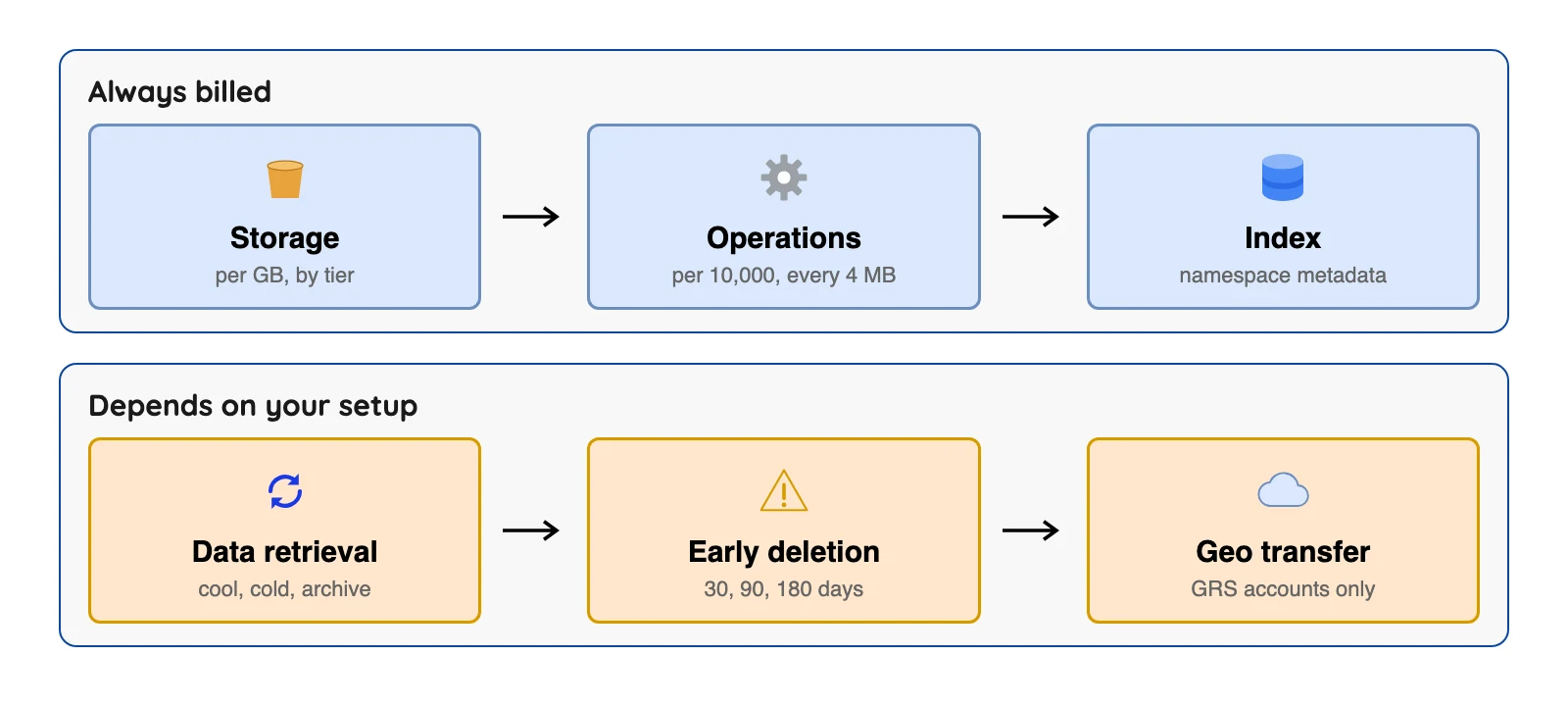
Microsoft's cost-planning guide lists most of these meters. It says the Index meter bills for the space a hierarchical file structure needs, including access control lists (ACLs). An ACL is simply a list of who may read or write a folder or file, and the guide says index data always sits in the hot tier.
Microsoft's archived Gen1 page says Gen1 "is now retired" and its resources are no longer accessible.
The ADLS Gen2 rate card (East US, October 2026)
All rates are East US, hierarchical namespace, locally redundant storage (LRS, three copies in one data centre), read from Microsoft's ADLS pricing page (checked Oct 2026) with those options selected.
| Meter | Premium | Hot | Cool | Cold | Archive |
|---|---|---|---|---|---|
| Storage, per GB a month | $0.15 | $0.021 (first 51,200 GB) | $0.016 | $0.0036 | $0.001 |
| Write operations, per 10,000 (every 4 MB) | $0.0228 | $0.065 | $0.13 | $0.234 | $0.13 |
| Read operations, per 10,000 (every 4 MB) | $0.00182 | $0.0052 | $0.013 | $0.13 | $6.50 |
| Data retrieval, per GB | Not applicable | Free | $0.01 | $0.03 | $0.02 |
| Early deletion period | None listed | None | 30 days | 90 days | 180 days |
Hot storage drops to $0.02 for the next 460,800 GB and $0.020 beyond 512,000 GB on the same page (checked Oct 2026). Microsoft can change them, so confirm on its page before you decide.
Two cautions on reading that page. First, it rounds storage to three decimals, and Microsoft's Retail Prices API (checked Oct 2026) lists East US hierarchical hot storage at $0.0208, cool at $0.0152 and archive at $0.00099. So your invoice may come in a hair lower than our arithmetic.
Second, the page opens on East US 2 with a flat namespace, where hot is $0.019 and a hot write is $0.05 per 10,000. Copy numbers from that default view and you may be quoting a different Region and mode than the one you run.
What the hierarchical namespace changes on the bill
Microsoft says that once you enable it, you can't revert it to a flat namespace.
The table sets East US hierarchical against the page's default flat view (East US 2).
| Item | Flat namespace (East US 2) | Hierarchical namespace (East US) |
|---|---|---|
| Hot storage, first 51,200 GB | $0.019 | $0.021 |
| Hot write operations, per 10,000 | $0.05 | $0.065 |
| Hot read operations, per 10,000 | $0.004 | $0.0052 |
| Index meter | Not listed | $0.0297 per GB a month (hot) |
Source: the same pricing page (checked Oct 2026); $0.065 is 1.3 times $0.05, by our arithmetic. We captured no East US flat view, so part of the gap may be Region. Microsoft's page says the namespace adds a charge for folder metadata.
Microsoft's argument is that folder operations get cheaper in compute time. It says renaming or deleting a directory becomes one atomic metadata operation. Analytics tools such as Hive and Spark (open-source engines that process large datasets) write output to a temporary place and then rename it, and without the namespace Microsoft says that rename can take "longer than the analytics process itself".
Microsoft also claims that in "many workloads, the compute resource represents more than 85% of the total cost". So a faster job can lower the total even when storage costs more. We can't check that claim, and it depends on your workload.
Already have a flat account? The upgrade guide says the upgrade itself costs nothing, storage cost doesn't change, and it's one-way. It also says transaction cost can change depending on which endpoint your tools use, so read the next paragraph before you flip it.
Your tools may call one of two web addresses. Per Microsoft's cost guide, requests to the dfs.core.windows.net address use the Data Lake Storage price page, and requests to the blob.core.windows.net address use the block blob price page. Pick the file-structure setting on the price page that matches the address your tools really call.
Three worked monthly bills (our arithmetic, not Microsoft's)
All three bills use East US, hot tier, LRS, hierarchical namespace and the rounded rates on the page, so they run a touch high against the API's more precise rates.
We made up the usage. Every file is 100 MB, which is exactly 25 steps of 4 MB, and we count one operation per 4 MB. Microsoft's page also lists calls like CreatePath and FlushFile as writes, so a real bill has extra operations that we left out.
| Assumption | Small | Medium | Large |
|---|---|---|---|
| Data stored | 100 GB | 1 TB (1,024 GB) | 100 TB (102,400 GB) |
| New data written a month | 10 GB | 100 GB | 5,120 GB |
| Data read a month | 100 GB | 1,024 GB | 102,400 GB |
| Charge | Small | Medium | Large |
|---|---|---|---|
| Storage | $2.10 | $21.50 | $2,099.20 |
| Write operations | $0.02 | $0.17 | $8.52 |
| Read operations | $0.01 | $0.14 | $13.63 |
| Total | $2.13 | $21.81 | $2,121.35 |
We added the totals before rounding each line. The Index meter is not in these bills, because we found no rule on Microsoft's pages for how big the index is, and it depends on your folder and ACL setup. Treat these totals as a floor.
To check the large column: storage is 51,200 GB at $0.021 plus 51,200 GB at $0.02, which is $1,075.20 plus $1,024.00. Writing 5,120 GB is 1,310,720 operations (5,120 x 256), at $0.065 per 10,000, or $8.52.
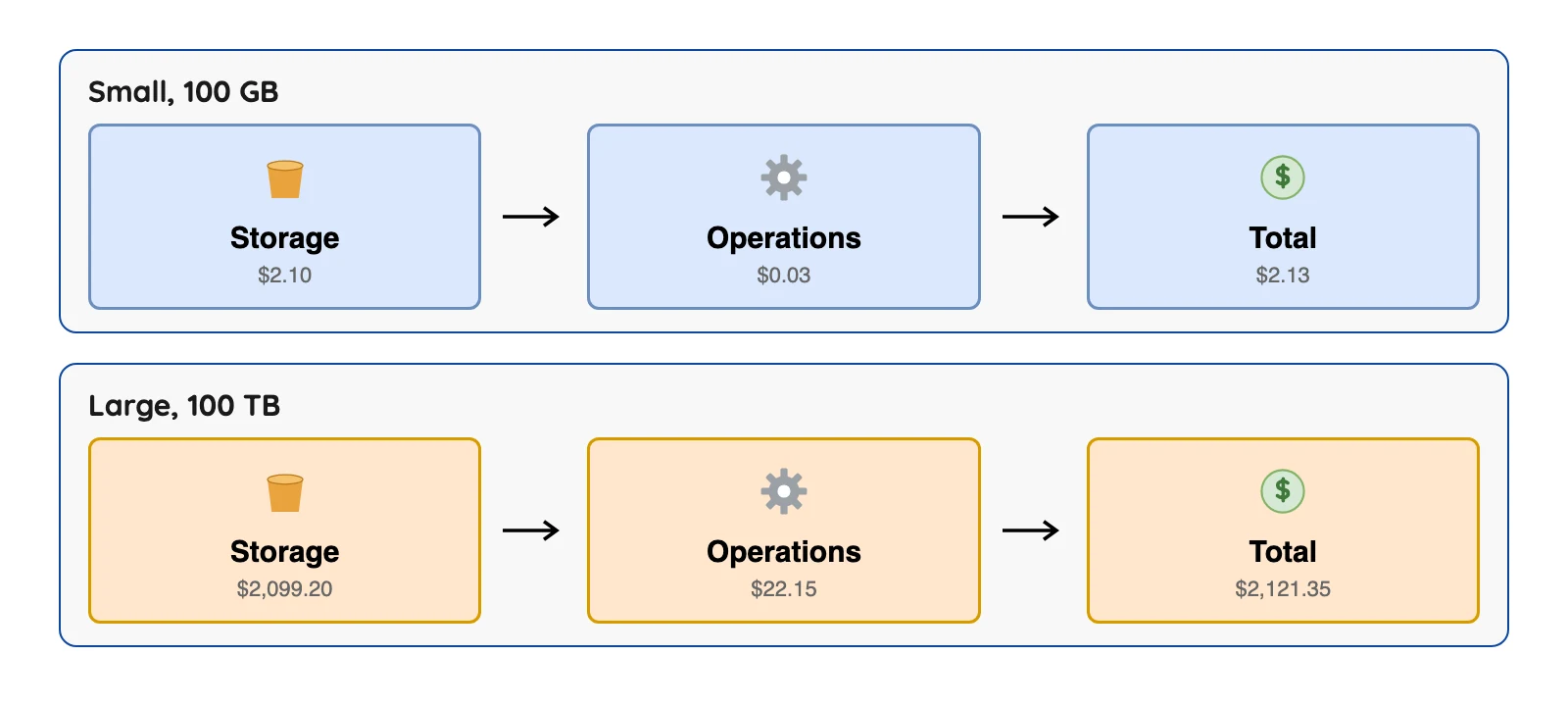
Storage was 98.6%, 98.6% and 99.0% of the three totals. That split comes from our usage guesses, and heavy reading or lots of small files would change it.
Estimate your own bill in five steps
Take your Region's rates from the pricing page, then work through these.
- Storage. GB stored x the rate for your tier. Hot is $0.021 for the first 51,200 GB in East US.
- Writes. Add up the 4 MB steps you write in a month (a file under 4 MB still counts as one), divide by 10,000, and multiply by $0.065.
- Reads. The same count for reads, multiplied by $0.0052.
- Retrieval, if cool, cold or archive. GB read x $0.01, $0.03 or $0.02.
- Add the extras. Index, early deletion, geo-replication transfer and anything else from the meter table, only if they apply to you.
If your number lands far from your real bill, check the file count first.
Small files: operations are billed per 4 MB
Microsoft's best-practice guide says read and write operations "are billed in 4-megabyte increments", so you are charged "whether or not the file contains 4 megabytes or only a few kilobytes".
Take 100 GB of new data written in a month. At 100 MB per file that's 1,024 files and 25,600 write operations, which is $0.17. Switch to 128 KB files and you get 819,200 operations, which is $5.32.
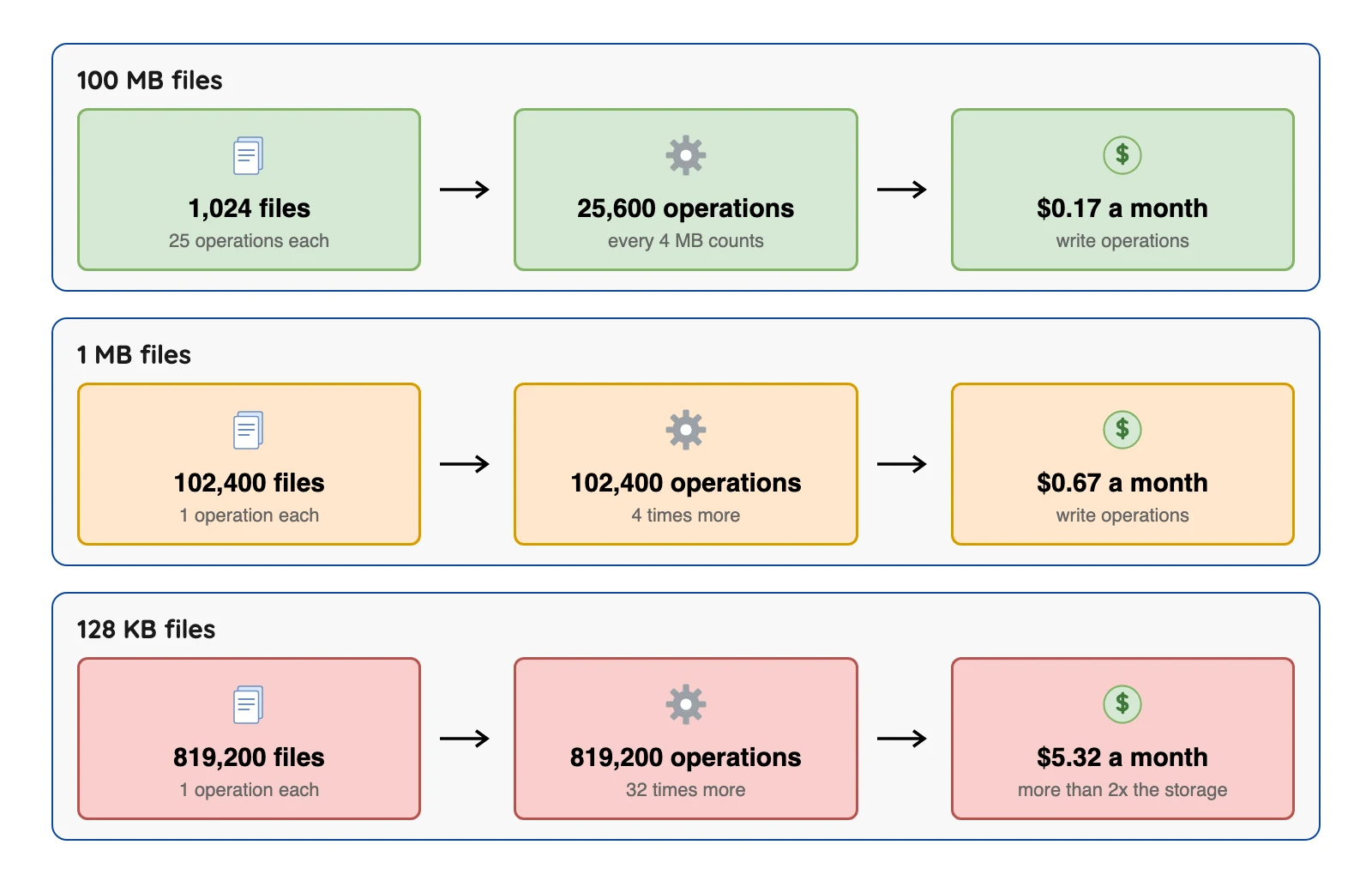
Storing those 100 GB for a month costs $2.10. So with 128 KB files, writing costs more than twice what storing does. Reading them back adds the same pattern at $0.0052 per 10,000.
Microsoft's advice is to organise data "into larger sized files for better performance (256 MB to 100 GB in size)". It also says you should have some process to combine small files into larger ones.
S3 also bills per request. Using AWS's $0.005 per 1,000 PUT (upload) requests, the same 819,200 files cost about $4.10 in S3 Standard requests, against $5.32 here. Small files hurt on both clouds.
Picking a tier: hot, cool, cold or archive
Colder tiers shrink the storage line and make touching your data pricier. How much you read decides which tier costs less.
For cool, the storage saving is $0.005 per GB a month ($0.021 less $0.016). Reading a GB back costs $0.01 retrieval plus a little more in read operations, about $0.0102. By our arithmetic, if you read more than about half of a cool dataset in a month, hot is cheaper.
Cold works the same way, with a break-even of about 52%: a saving of $0.0174 per GB against about $0.0332 per GB read. This ignores write costs, which are higher in cool ($0.13) and cold ($0.234) than in hot ($0.065), and the minimum stay below. Treat it as a rule of thumb.
| Tier | Minimum stay | Catch, per Microsoft |
|---|---|---|
| Cool | 30 days | Higher access costs than hot |
| Cold | 90 days | Higher access costs than cool |
| Archive | 180 days | Offline, moving it back to an online tier (rehydration) can take up to 15 hours |
Source: Microsoft's access tiers guide. Moving or deleting early is charged for the days you skipped. Microsoft's example: a blob moved to cool and then deleted after 21 days is billed an early deletion fee equal to 9 days (30 minus 21) of cool storage.
Archive is the cheapest to hold at $0.001 per GB, and the priciest to read. A read operation is $6.50 per 10,000 against $0.0052 in hot. Keep it for data you expect to leave alone.
Microsoft has a smart tier that moves objects from hot to cool after 30 days without access, and to cold after 90 days of inactivity. It bills the normal rates of whichever tier holds the object, adds a monitoring fee for objects over 128 KiB, and charges no early deletion or retrieval fees.
Smart tier needs a zone-redundant account, meaning zone-redundant storage (ZRS), geo-zone-redundant storage (GZRS) or read-access GZRS (RA-GZRS), and on the page hot ZRS storage is $0.026 per GB against $0.021 for LRS. We could not find the monitoring fee rate on the smart tier page, so we can't tell you whether it pays off for your data.
Premium tier: when does it pay?
Premium looks pricey at $0.15 per GB a month, about seven times hot. In return, writes cost $0.0228 per 10,000 and reads $0.00182. Microsoft's best-practice guide says premium can be economical if your workloads "execute a large number of transactions".
So how many is "a large number"? For 100 GB stored, premium costs $12.90 a month more than hot ($15.00 against $2.10). Each 10,000 writes saves $0.0422, so you'd need about 3 million write operations a month, or about 12 TB written at 4 MB each, to break even on writes alone.
On reads the saving is $0.00338 per 10,000, so you'd need roughly 38 million read operations. That's our arithmetic, and it ignores latency, which is the reason Microsoft gives for choosing premium. One more thing: premium can't use reserved capacity.
Redundancy and Region change the biggest line
Redundancy is how many copies Azure keeps, and where. Hot first-tier storage in East US with the hierarchical namespace runs from $0.021 to $0.059 by redundancy.
| Redundancy | What it means | Hot, per GB a month | 1 TB (1,024 GB) |
|---|---|---|---|
| LRS | Copies in one data centre | $0.021 | $21.50 |
| ZRS | Copies across zones in one Region | $0.026 | $26.62 |
| GRS (geo-redundant) | Copies in a second Region | $0.046 | $47.10 |
| GZRS (geo-zone-redundant) | Zones plus a second Region | $0.047 | $48.13 |
| RA-GRS | GRS plus read access to the second copy | $0.059 | $60.42 |
| RA-GZRS | GZRS plus read access to the second copy | $0.059 | $60.42 |
So geo-redundant storage (GRS) costs about 2.2 times LRS for the same hot data, by our arithmetic. Pick it when you need a second Region.
Region matters too. East US 2 with a flat namespace is the page's default view, and it shows hot at $0.019, about 10% under the $0.021 we used. Settle your Region first, then compare quotes.
Reserved capacity
If your storage is steady month to month, you can commit to it. Microsoft's reserved capacity guide says you buy in units of 100 TiB or 1 PiB, for one or three years. It covers both block blob and Azure Data Lake Storage data in standard accounts.
The pricing page lists these for East US, hierarchical namespace and LRS (checked Oct 2026).
| Reservation | 1 year | 3 years |
|---|---|---|
| 100 TB a month, hot | $1,747 | $1,406 |
| 100 TB a month, cool | $1,277 | $1,028 |
| 100 TB a month, archive | $91 | $84 |
| 1 PB a month, hot | $17,013 | $13,523 |
The page labels these per month. Pay-as-you-go hot storage for 100 TB (102,400 GB) comes to $2,099.20 a month in our arithmetic, so the one-year and three-year rates would be about 17% and 33% lower. Confirm the unit in the Azure portal before you buy.
Know the limits, though. Microsoft says a reservation covers stored capacity only, not early deletion, operations, bandwidth or data transfer. It also says reserved capacity is not available for premium accounts, and that a reservation is valid only for the Region, tier and redundancy you chose.
Costs that are easy to miss
Each line below is tied to a Microsoft page, and we found no survey of which one bites hardest, so we don't rank them.
- The Index meter. It applies only with a hierarchical namespace and is billed per GB a month. The pricing page lists $0.0297 for hot. Microsoft doesn't say how big the index grows, so check a small test account's bill before you plan.
- Changing the default tier. Microsoft's cost guide warns that switching an account's default from hot to cool charges write operations for every blob with an inferred tier. Switching back charges reads and retrieval.
- Soft delete and versioning. Microsoft says overwritten blobs can create snapshots that aren't logged, and that every write with versioning on creates a new version you pay to store.
- Query acceleration. It bills data scanned ($0.002 per GB) and data returned ($0.0007 per GB in hot) instead of normal operations (checked Oct 2026). Microsoft's query acceleration page says it handles one file per request, CSV and JSON input, and no joins.
- SFTP. Microsoft says enabling the SFTP endpoint incurs an hourly cost, and suggests enabling it only while you transfer data.
- Your tools. Whatever writes into the lake, such as Azure Data Factory or our open-source OLake Go (see our docs), has its own costs. We priced storage only.
ADLS and S3 Standard side by side
The S3 numbers are from AWS's price file (checked Oct 2026) for US East (N. Virginia), S3 Standard. The Azure numbers are the East US hierarchical view above.
| Item | ADLS Gen2 hot (East US) | S3 Standard (N. Virginia) |
|---|---|---|
| Storage, first 50 TB or 51,200 GB | $0.021 per GB | $0.023 per GB |
| Writes | $0.065 per 10,000 (every 4 MB) | $0.05 per 10,000 PUT requests |
| Reads | $0.0052 per 10,000 (every 4 MB) | $0.004 per 10,000 GET requests |
| Medium bill (1 TB, our usage) | $21.81 | $23.56 |
| Large bill (100 TB, our usage) | $2,121.35 | $2,304.68 |
The S3 bills use one request per 100 MB file, which is a simplification, because a multipart upload makes more than one request. On those numbers ADLS came out 7.4% cheaper in the medium bill and 8.0% cheaper in the large one.
In this comparison ADLS has the lower hot storage rate, and S3 has lower per-operation prices and no 4 MB stepping in our model. We compared only the hot tier.
Why older guides disagree with this one
If another page shows a different number, check three things: the Region, the file-structure setting, and the date.
- A TechTarget guide from April 2023 compares Gen1 and Gen2. Gen1 is retired, so its Gen1 half describes a service you can't buy any more. Its Gen2 half may still help.
- Dremio's explainer was first published in June 2019 and quotes hot at $0.0184 per GB, so treat it as history.
- A nOps guide from May 2026 says Azure hot is 22% cheaper than S3 at $0.018 against $0.023. We could not match $0.018 to the East US or East US 2 views we read, and it compares storage rates only, so request prices never enter the picture.
- A Pump guide from December 2025 quotes $0.021, $0.065 and $0.0052, which match the East US hierarchical view we read.
How to lower an ADLS bill
These levers come from Microsoft's pages. We give no percentage savings, because they depend on your data.
- Check your Region and redundancy. LRS to GRS is about 2.2 times the hot storage line in East US.
- Make files bigger. Microsoft suggests 256 MB to 100 GB, and every file under 4 MB pays for a full operation.
- Match tier to reads. Cool and cold only help if you read well under half the data each month, by our arithmetic.
- Watch minimum stays. Moving or deleting early triggers a prorated early deletion fee.
- Reserve steady capacity. One or three years, in 100 TiB or 1 PiB units, for stored data only.
- Ask whether you need the namespace. If your workload never renames folders, Microsoft says it may gain nothing from it.
- Model before you move. Use the rate card above with your own file counts.
What practitioners say
Little is public, and nearly all of it sits on one site. We opened PeerSpot on October 2, 2026, and couldn't open Reddit, G2 or Capterra, so treat this as thin evidence.
| Source | What it says | Date |
|---|---|---|
| PeerSpot, ADLS reviews (praise, performance) | "we have never faced any issues even though we handle at least a TB of data every day" | Not dated on the page |
| Same page (complaint, cost) | "To give Azure Data Lake Storage a ten out of ten, they need to optimize the cost." The page's overall rating is 9 out of 10 | Not dated on the page |
These are individual opinions, read on October 2, 2026. Two comments make no trend.
Which setup should you pick?
The table covers price only, not speed or features.
| Your situation | What the rate card says |
|---|---|
| Analytics tools that rename or delete whole folders | Hot writes list about 30% higher with the hierarchical namespace (see the caveat above), and Microsoft says it can cut compute time |
| Files mostly 100 MB or bigger | Storage is about 99% of the bill in our examples, so tier and redundancy matter most |
| Lots of files under 4 MB | Operations can pass storage cost. Merge files first |
| Data you rarely read | Cool or cold can cut the storage line, as long as you read well under half of it each month |
| Steady capacity over 100 TB | Reserved capacity lists about 17% to 33% below pay-as-you-go for hot, by our reading |
| Backups or image storage with no folder logic | The flat view lists lower operation prices, and Microsoft says these may gain nothing from the namespace |
Try the short quiz for your own setup.
Which storage setup fits you?
Question 1 of 5
How often do you read most of this data?
Colder tiers save on storage and charge more to read it back.
FAQ
Q1. How much does Azure Data Lake Storage cost per GB?
Q2. Is Azure Data Lake Storage the same as Blob Storage?
Q3. Does the hierarchical namespace cost extra?
Q4. Why are small files expensive in ADLS?
Q5. Is Azure Data Lake Storage cheaper than S3?
Q6. Does Azure Data Lake Storage have a free tier?
Q7. What happened to Azure Data Lake Storage Gen1?
Conclusion
A rate card alone won't predict your bill. You pay for storage by tier and redundancy, for operations in 4 MB steps, and for an Index meter if you use the hierarchical namespace. In our three examples, storage was at least 98.6% of the bill.
Before you commit, check four things: your Region, your redundancy level, your average file size and how much of the data you read each month. Then run the rate card with your own numbers.
Prices were checked in October 2026, and Microsoft may change them. For where a lake like this fits, see data lake vs data lakehouse and the best data lake tools.