Best Azure ETL Tools in 2026, Compared
34 min read
Key takeaways
Start with where your data should land, because that answers half the question. If your analytics live in Microsoft Fabric, look at Fabric mirroring (free replication compute, read-only Delta tables) or a Fabric Copy job. Paying per use outside Fabric?
Azure Data Factory still works, though Microsoft now calls Fabric Data Factory its next generation. On Azure Databricks, use Lakeflow Connect; for lots of SaaS connectors and no servers, look at Fivetran or Hevo. For Azure databases into Iceberg on your own storage, look at OLake Go.
- Microsoft has two Data Factory products. Azure Data Factory (ADF) is billed per use. Fabric Data Factory is billed through a Fabric capacity, and Microsoft's docs call it "the next generation of Azure Data Factory".
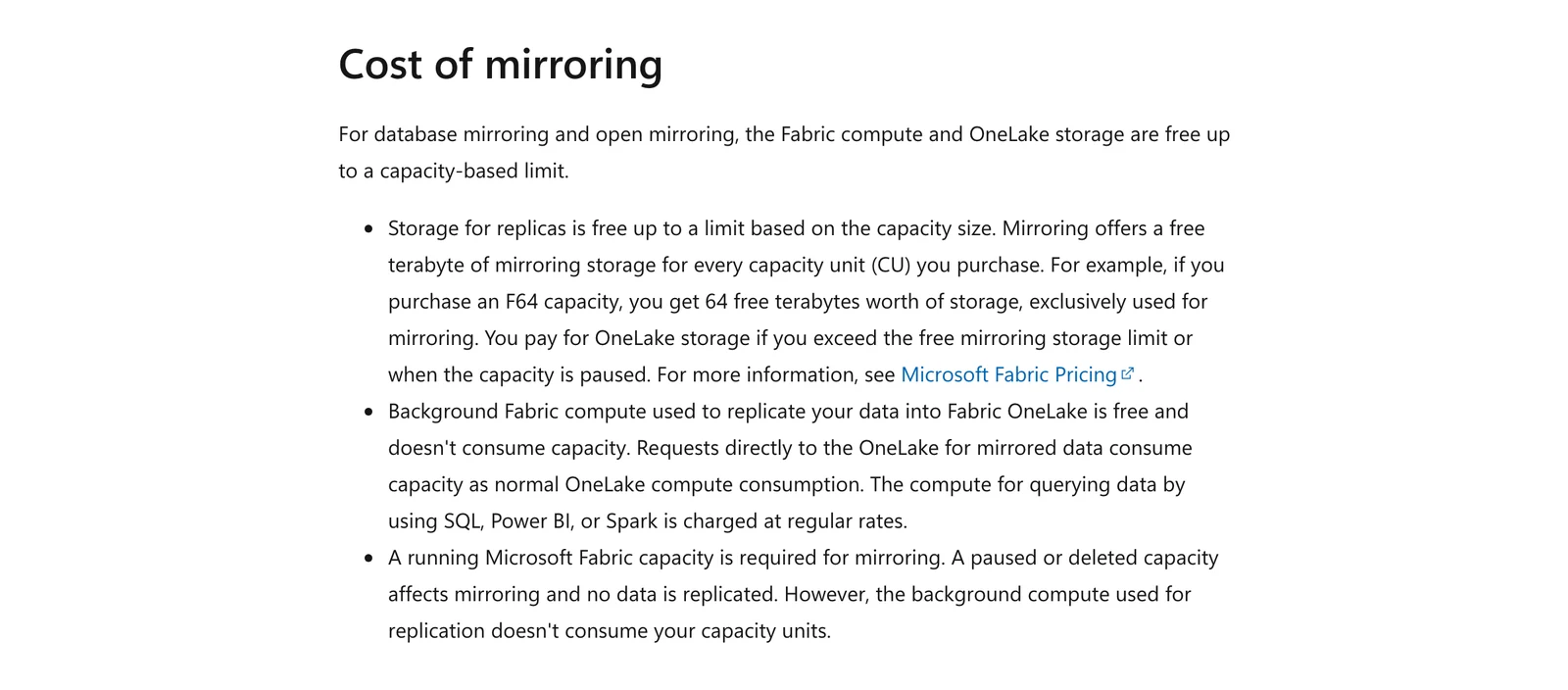
- Fabric mirroring is free to run, but not free to use. Microsoft says replication compute and storage are free up to a limit. You still need a running Fabric capacity, and that's the catch.
- Log-based change capture is narrower than it looks. Fabric's Copy job lists change data capture (CDC) in preview for a short list of connectors, and PostgreSQL, MySQL and MongoDB aren't on it.
- Most Microsoft and Databricks lake paths write Delta, not Iceberg. Fabric and Databricks Lakeflow Connect write Delta tables. ADF can write Iceberg to Azure Data Lake Storage (ADLS) Gen2, and Fivetran's docs say its data lake service always writes Iceberg metadata over Parquet files.
- One printed ADF price doesn't match Microsoft's. Hevo's Azure ETL page (September 8, 2026) lists ADF at "$0.005/activity run." Microsoft's price feed shows $1 per 1,000 activity runs, so check the source before you trust any rate you see on a third-party page.
ETL means extract, transform, load: you copy data out of one system, reshape it, and put it in another. Plenty of teams now load first and reshape later (that's ELT, short for extract, load, transform), and search lumps both under "ETL." So this page covers both kinds, plus a few tools that only copy.
ETL or ELT? Decide this first
Before you compare any tools, pick the pattern. Microsoft's ETL guide says choose ETL for heavy transformation away from a constrained target, complex rules or staging audits. Choose ELT when the target is a lakehouse or warehouse with elastic compute, or when you need raw data kept.
| If this is true | Lean toward | Azure tools that fit |
|---|---|---|
| Your target is Fabric, Databricks or a lake with its own compute | ELT: load raw, reshape in the target | Fabric Copy job and mirroring, Lakeflow Connect, Fivetran, Hevo |
| You must clean or audit data before it lands | ETL: reshape in the pipeline | Azure Data Factory data flows, Matillion, Informatica |
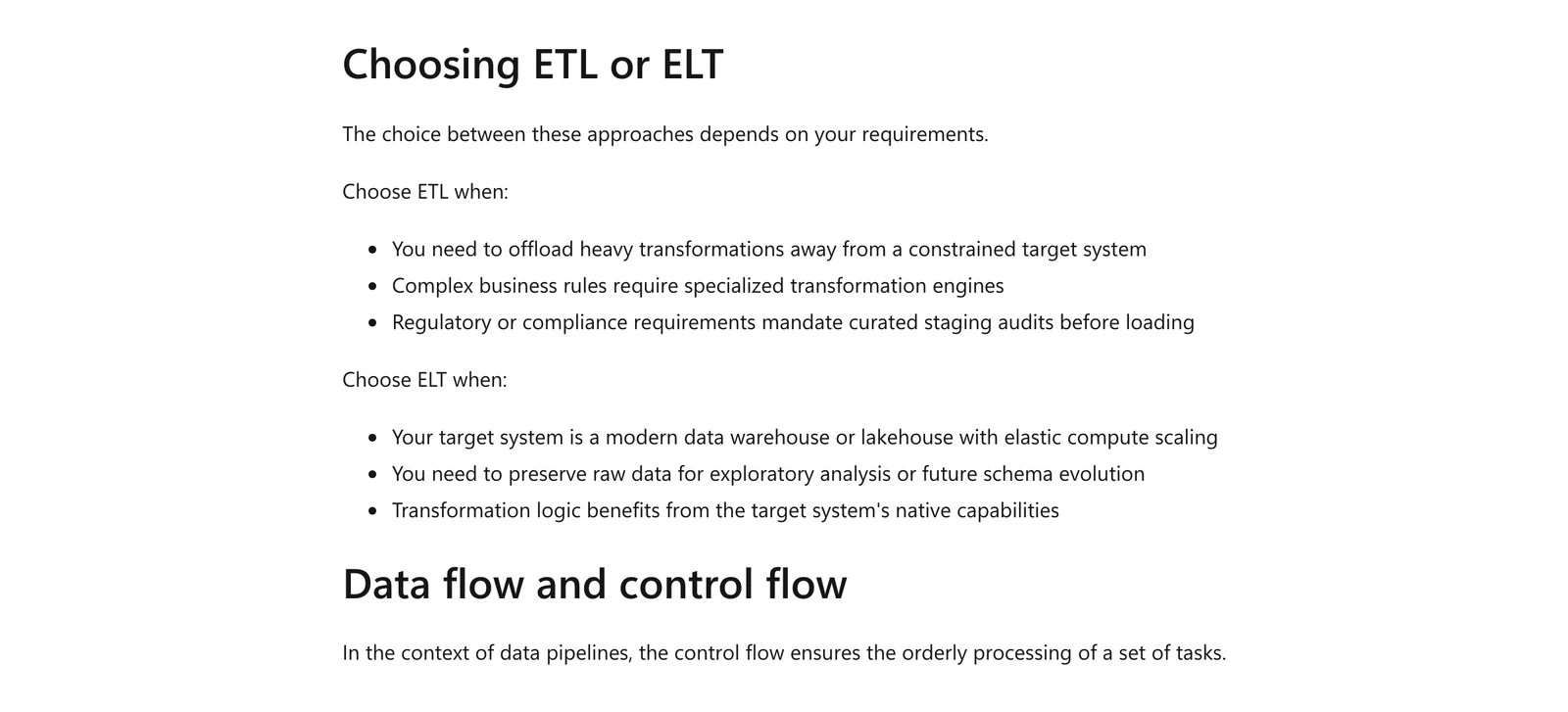
Microsoft Learn, Choosing ETL or ELT, October 2026.
Prices and limits come from each vendor's own pages, read in October 2026. Plans change often, so check the vendor's page before you decide.
We did not run the other tools. When we quote users, the words are exact and carry the site and month. They're single reviews or comments, not measurements.
Azure ETL tools at a glance
| Tool | Kind | Fits | Database change capture | Billing unit | Where it is the wrong pick |
|---|---|---|---|---|---|
| Fabric Data Factory | Microsoft SaaS | Copy jobs and pipelines into OneLake | Preview, short source list | Fabric capacity units | You need SQL Server Integration Services (SSIS) packages or managed private networks |
| Azure Data Factory | Microsoft PaaS | Hybrid, SSIS and pay-per-use pipelines | Native CDC for a few connectors | Activity runs, DIU-hours, vCore-hours | You are starting fresh on Fabric |
| Fabric mirroring | Microsoft SaaS | Read-only copies of databases in OneLake | Yes, per source | Free compute, Fabric capacity must run | You want to transform or write elsewhere |
| Synapse pipelines | Microsoft PaaS | Teams already in a Synapse workspace | Not published on pages read | Not readable on the page | You want new Fabric features |
| Azure Databricks Lakeflow Connect | Databricks service | Databases into Databricks Delta tables | Yes, four databases | DBUs per second, always-on gateway | Your target is not Databricks |
 OLake Go OLake Go | Open-source replication | Azure databases into Iceberg or Parquet on your storage | Yes, from database logs, for four databases | Open source, you run the servers | Not listed here |
| Fivetran | Managed ELT | Many connectors, no servers | Yes, many databases | Monthly active rows | You want the rate on the pricing page itself (it sits in a separate table), or a fixed monthly price |
| Airbyte | Self-hosted Core and cloud | Self-hosting, connector choice | Scheduled syncs | Free (Core), credits (Cloud) | You want Synapse or Iceberg on Azure Data Lake Storage (ADLS) |
| Hevo | Managed ELT | Small teams loading Synapse | Yes, log-based pipelines | Events | You want ADLS or Fabric as target |
| Matillion | Cloud ETL | Visual pipelines | Streaming CDC on the Scale card | Credits | You want a published price |
| Informatica | Enterprise suite | Large, governed estates | Yes, replication jobs | Processing units | You want a dollar price per unit before a sales call |
How we picked
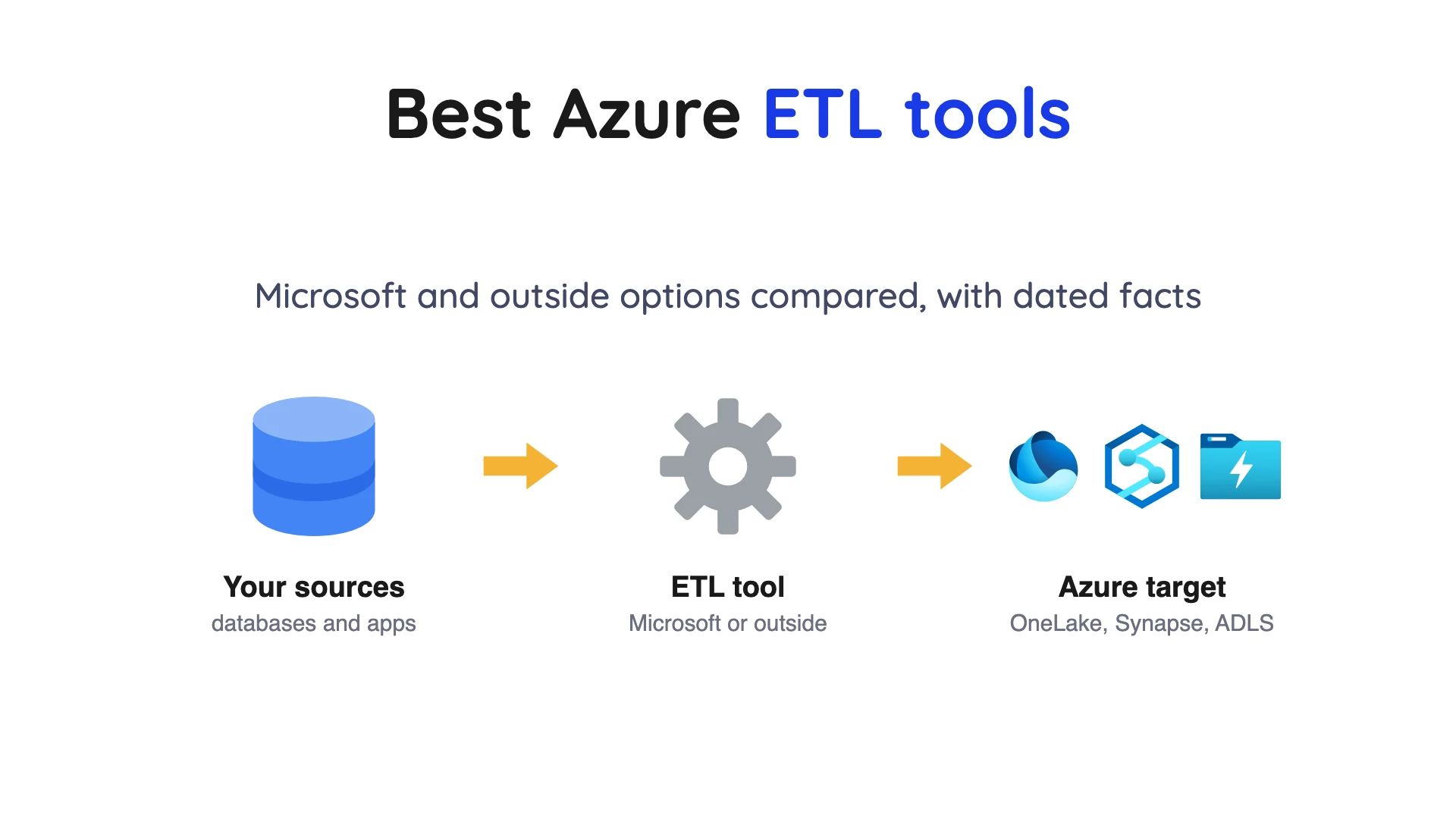
The rules were simple. A tool had to move data into an Azure service or an Azure-hosted lake, and its own pages had to say how you buy it. We read Microsoft's documentation first, then looked at outside tools that name an Azure source or target.
If we couldn't source a tool from a primary page, it's out. The order is not a ranking. Entries for other vendors list limits from their own pages, and that includes each Microsoft service.
Which Azure ETL tools fit where your data lands
Where the data lands removes half the list at once.
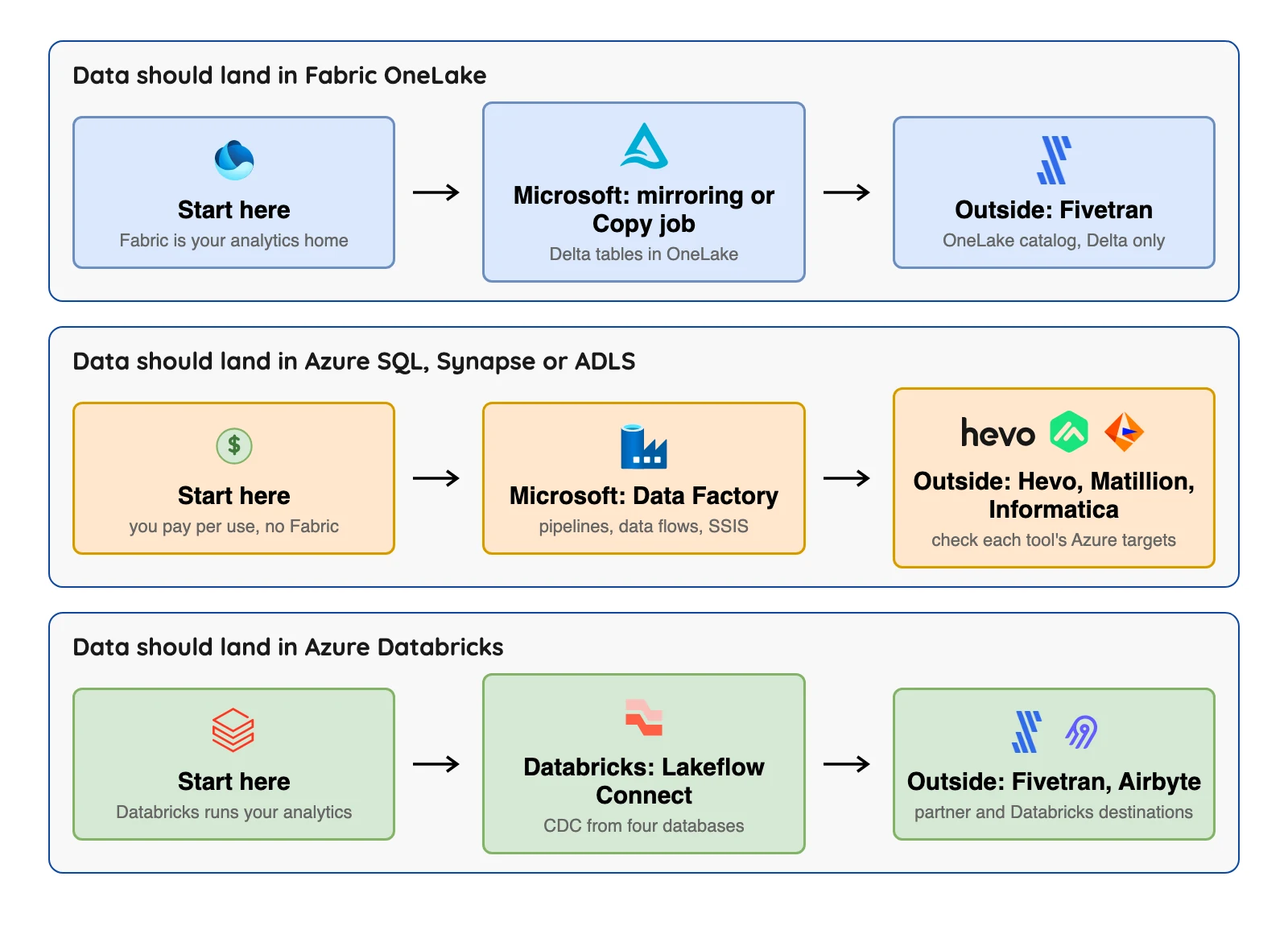
One term you'll see a lot is change data capture (CDC), which means reading a database's own change log instead of re-reading whole tables, so a copy stays fresh without hammering the source.
The same ETL guide lists Fabric Data Factory first for pipelines and Azure Data Factory for "hybrid and non-Fabric scenarios." That's the split this page follows.
The 11 Azure ETL tools
Eleven tools, three groups, starting with the Microsoft services.
Microsoft services
1. Fabric Data Factory: copy jobs into OneLake
At a glance
- Kind: Microsoft's software-as-a-service (SaaS) data movement inside Microsoft Fabric
- Billing: Fabric capacity units (CUs). Copy job meters are 1.5 CU-hours for a full copy and 3 CU-hours for an incremental copy
- Entry price: Microsoft's Fabric pricing page lists F2 (2 capacity units) at $262.80 a month, pay as you go
Microsoft's compare page says Fabric Data Factory is "the next generation of Azure Data Factory" and uses OneLake, Fabric's built-in data lake. A Copy job moves data on a schedule, and you don't have to build a pipeline. Per Microsoft's data movement guide, it can do a full copy, an incremental copy using a watermark column, or CDC replication.
Where it fits
- The data movement guide says to use a Copy job for raw (bronze) data, because it handles scheduling, column mapping and incremental loads without pipelines.
- Per Microsoft's Copy job connector page, it supports append, overwrite, upsert and a history-keeping mode called SCD Type 2 (in preview). It also runs behind firewalls through a gateway.
- The same connector page (last updated 2026-09-16) lists Oracle, PostgreSQL, MySQL, MariaDB, MongoDB, Snowflake, Google BigQuery, Salesforce and Azure Data Lake Storage Gen2 among the sources and destinations for a Copy job.
- Microsoft says CDC in copy jobs "enables automated replication of changed data (including inserted, updated, and deleted records)" from a source to a destination, so deletes are carried over on the supported connectors.
- Microsoft's compare page says approximately 90% of the activities in Azure Data Factory are already available in Fabric Data Factory, and that billing has "no charges for external or pipeline activities, only activity runs and pipeline data movement" on top of the capacity.
Where it falls short
- CDC replication is Preview and covers Azure SQL, SQL Server, Oracle and a few more, but not PostgreSQL, MySQL or MongoDB, per Microsoft's connector page.
- SSIS runtimes and managed virtual networks are "To be determined" in Fabric, per the compare page. The same page lists the SSIS activity, Synapse Notebook and Spark job definition activities as not available (N/A) in Fabric Data Factory, though ADF has them.
- Incremental copy meters at 3 CU hours against 1.5 for a full copy, and Microsoft says the 3 CU hours rate applies to the initial full load in incremental mode as well as the later runs, per its Copy job pricing page.
- On the connector page, SCD Type 2 in Copy job "is currently in preview", and it is not supported yet when you run CDC replication from Oracle sources.
- Microsoft's Copy job pricing page says consumption rates "are subject to change at any time."
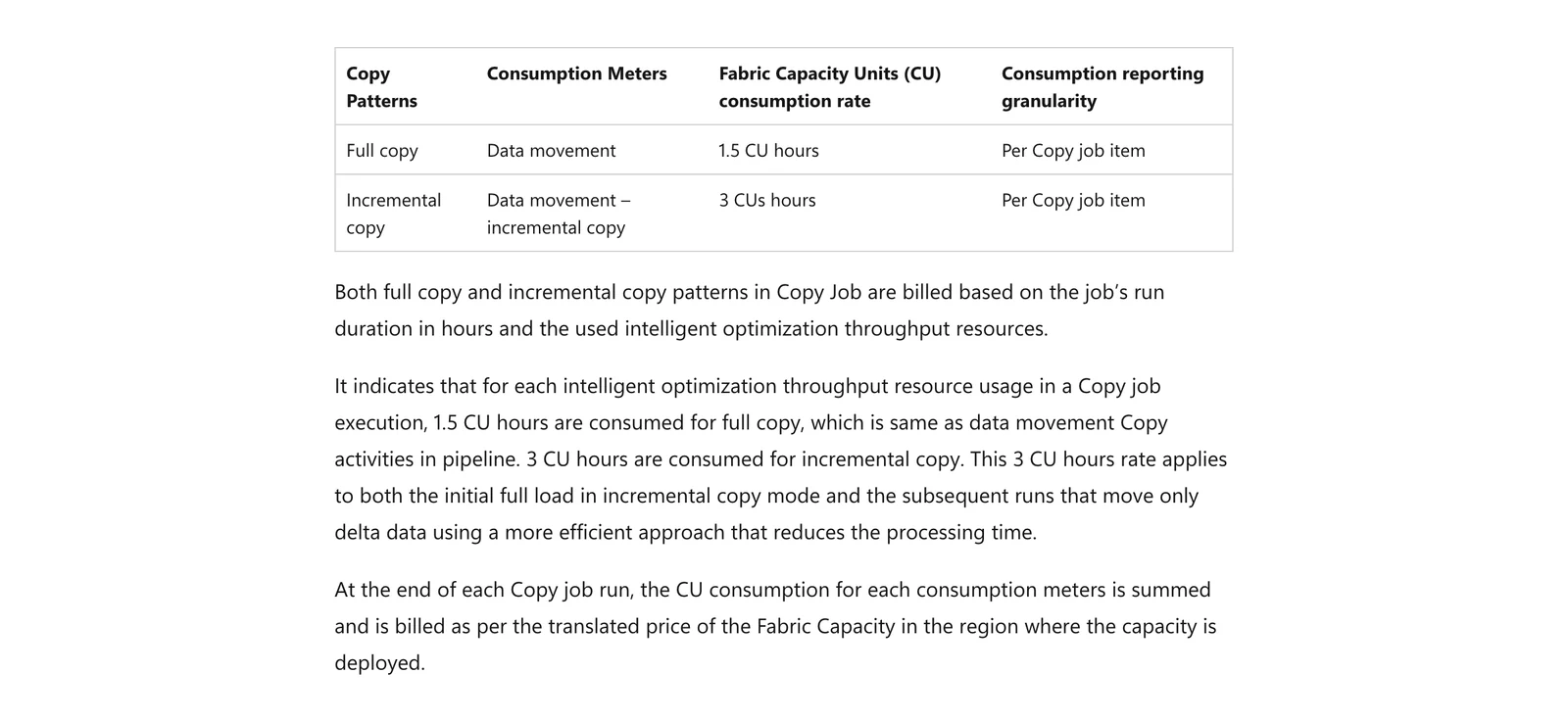
Microsoft Learn, Pricing for copy job, October 2026.
2. Azure Data Factory: hybrid pipelines and SSIS
Azure Data Factory home page, October 2026.
At a glance
- Kind: Microsoft's platform-as-a-service (PaaS) pipeline service
- Billing: $1 per 1,000 activity runs and $0.25 per data integration unit (DIU) hour for copying (East US, US dollars)
- Data flows: $0.274 per vCore-hour with an 8 vCore minimum, on Microsoft's live page
ADF is, in Microsoft's words, a managed cloud service for hybrid ETL, ELT and data integration. It runs copies, data flows and SQL Server Integration Services (SSIS) packages. A self-hosted runtime reaches data on your own network.
Where it fits
- It has a self-hosted runtime for on-premises data and runs SSIS packages, which Fabric doesn't offer yet.
- Microsoft's pricing page shows the meters, and Microsoft's retail price feed lists a one-year reservation for data flows at $1,795, about $0.205 per vCore-hour by our arithmetic.
- Integration runtime charges on the pricing page are "prorated by the minute and rounded up", so you pay by the minute rather than by the hour.
- Microsoft's change data capture page says native CDC in mapping data flow uses the database's own change capture with "no timestamp or ID columns" needed, and that "Pipelines in ADF are batch only, but the CDC resource can run continuously."
- Its Iceberg format page describes an Iceberg sink in the Copy activity (IcebergSink) that writes to Azure Data Lake Storage Gen2.
Where it falls short
- Microsoft says, "If you're new to data integration, start with Fabric Data Factory," on the Azure Data Factory Iceberg format page, and new Fabric features "aren't backported to Azure Data Factory or Azure Synapse pipelines," per the compare page.
- Native CDC covers SAP, Azure SQL, SQL Server, Cosmos DB and Snowflake. On the CDC page, MySQL and PostgreSQL appear only under auto incremental extraction, where "the incremental column is required to identify the changes," and, per the pricing page, the CDC resource is billed at General Purpose rates for four cores during the public preview of CDC.
- The Iceberg format page lists Azure Data Lake Storage Gen2 as the only connector and shows no catalog setting and no update, delete or merge setting.
- Data flows have an 8 vCore minimum and also bill for the managed disk and blob storage they use. Copying data out of an Azure datacenter adds a separate outbound transfer line, per the pricing page.
- The pricing page FAQ says an inactive pipeline, one with zero runs in a month, is charged after one month of zero runs.
- Text copies of the pricing page show "$-" until the rates load, so check your region's numbers yourself.
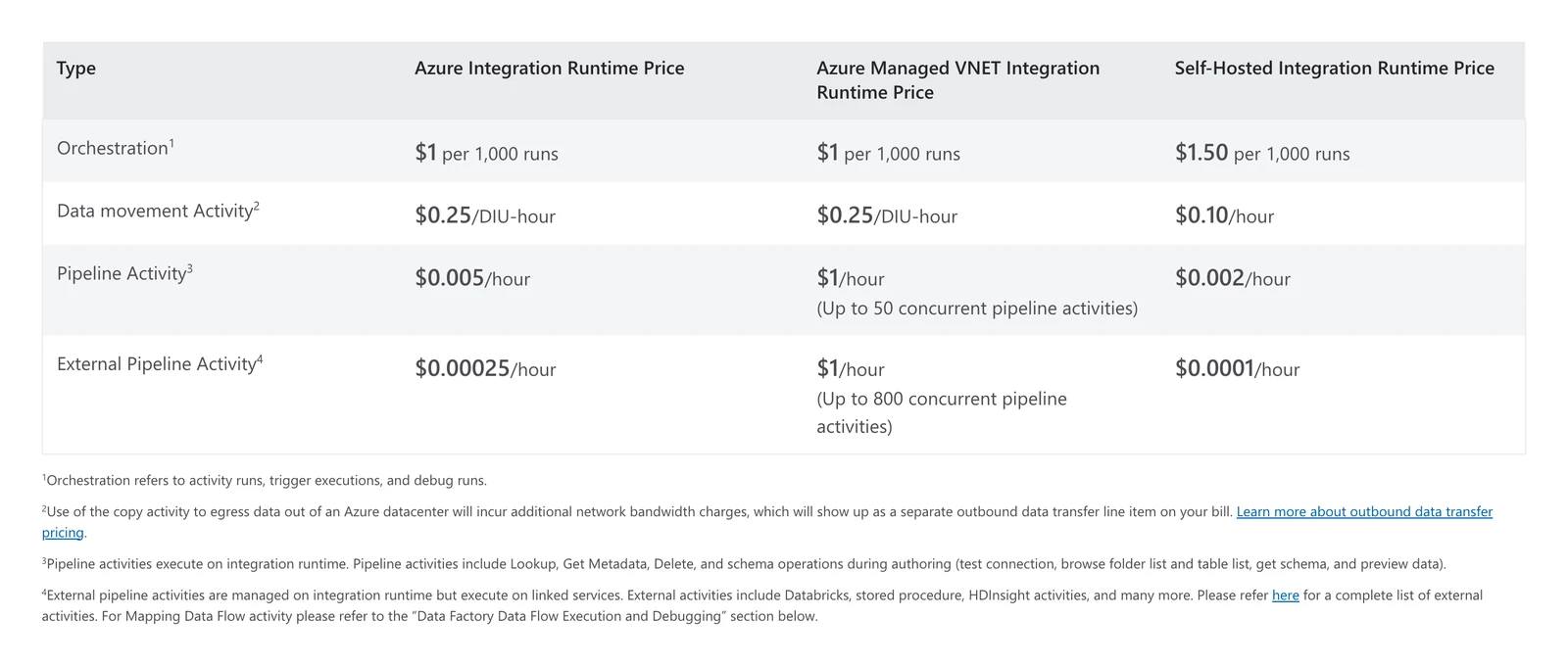
Azure Data Factory pricing page, activity run and runtime rates, captured October 2026 (the East US figures used in this post).
3. Fabric mirroring: free, read-only copies of databases
Microsoft Fabric home page, October 2026.
At a glance
- Kind: managed replication into OneLake, not a general ETL tool
- Sources listed: Azure SQL Database, Azure SQL Managed Instance, Azure Database for PostgreSQL, Azure Cosmos DB, Azure Database for MySQL (preview), SQL Server, Oracle, Snowflake and more
- Billing: replication compute is free, and storage is free up to 1 TB per capacity unit you buy
Mirroring keeps copying a database into OneLake as Delta tables, an open table format built on Parquet files. Microsoft says changes "can be published as fast as every 15 seconds," a figure we did not test. Its data movement guide calls mirroring the simplest choice for processed (gold) data you only need to report on.
Where it fits
- Microsoft's docs describe setup as a connection and a table choice, with no pipelines to build or schedule. We did not try it.
- Background replication compute "is free and doesn't consume capacity," per Microsoft's overview.
- The overview also says the free storage allowance is one terabyte for every capacity unit you buy, so an F64 capacity gets 64 free terabytes used only for mirroring.
- The overview table lists database mirroring for Azure Cosmos DB, Azure Database for PostgreSQL, Azure SQL Database, Oracle, Google BigQuery, SAP, Snowflake and SQL Server, metadata mirroring for Azure Databricks, and an open mirroring option.
- Microsoft's OneLake page says Delta Lake tables now include virtual Iceberg metadata, so Iceberg readers can open them, and that generating the metadata can take between 5 seconds and 2 minutes.
Where it falls short
- A running Fabric capacity is required, and storage beyond the free limit is billed.
- Mirroring writes to "a single, read-only destination in OneLake," per the data movement guide, and Microsoft's comparison table shows no custom scheduling or table and column management for it.
- On SQL Server 2016 to 2022, a schema change makes mirroring fail until you disable and re-enable CDC on that table, per Microsoft's SQL Server limitations page.
- SQL Server mirroring copies up to 1,000 tables and does not replicate tables above that limit, per the same page. Microsoft's Azure PostgreSQL mirroring limitations page sets the same 1,000-table cap and allows one Fabric item per database.
- On Azure Database for PostgreSQL, DDL changes and TRUNCATE TABLE on mirrored tables are not supported, and stopping mirroring and starting it again reseeds all the tables.
- The same PostgreSQL page says columns of several data types, including inet, json, jsonb and xml, cannot be mirrored, and views, materialized views and partitioned tables are not supported.
Before you rely on it, check how fresh your tables stay under load, because Microsoft's refresh figure is not a guarantee.
Microsoft Learn, Mirroring overview, October 2026.
4. Azure Synapse pipelines: teams already in a Synapse workspace
Azure Synapse Analytics product page, October 2026.
At a glance
- Kind: the pipeline feature inside Azure Synapse Analytics
- Sources: Microsoft's overview lists ingestion from 90+ data sources
- Billing: the Synapse pricing page text shows "$-" for pipeline, serverless and dedicated pool rates
Microsoft's compare page names Azure Data Factory and Azure Synapse pipelines together when it describes what Fabric changes.
Where it fits
- Microsoft's Synapse overview describes one workspace that combines SQL, Spark, Data Explorer and pipelines, with both serverless and dedicated SQL resource models.
- The same page advises creating dedicated SQL pools "for predictable performance and cost" and using the serverless SQL endpoint for unplanned or bursty workloads.
Where it falls short
- Microsoft says new Fabric Data Factory features "aren't backported to Azure Data Factory or Azure Synapse pipelines," and that Fabric replaces Azure Synapse Link with mirroring.
- We couldn't read a dollar rate for pipelines from that pricing page.
- Microsoft hasn't published a retirement notice on the pages we read, so we don't call Synapse retired. The overview page itself shows "Last updated on 2024-07-12."
- The overview names Delta Lake support for Spark, but it does not state Iceberg output or change data capture for pipelines.
Databricks on Azure
5. Azure Databricks Lakeflow Connect: databases into Databricks
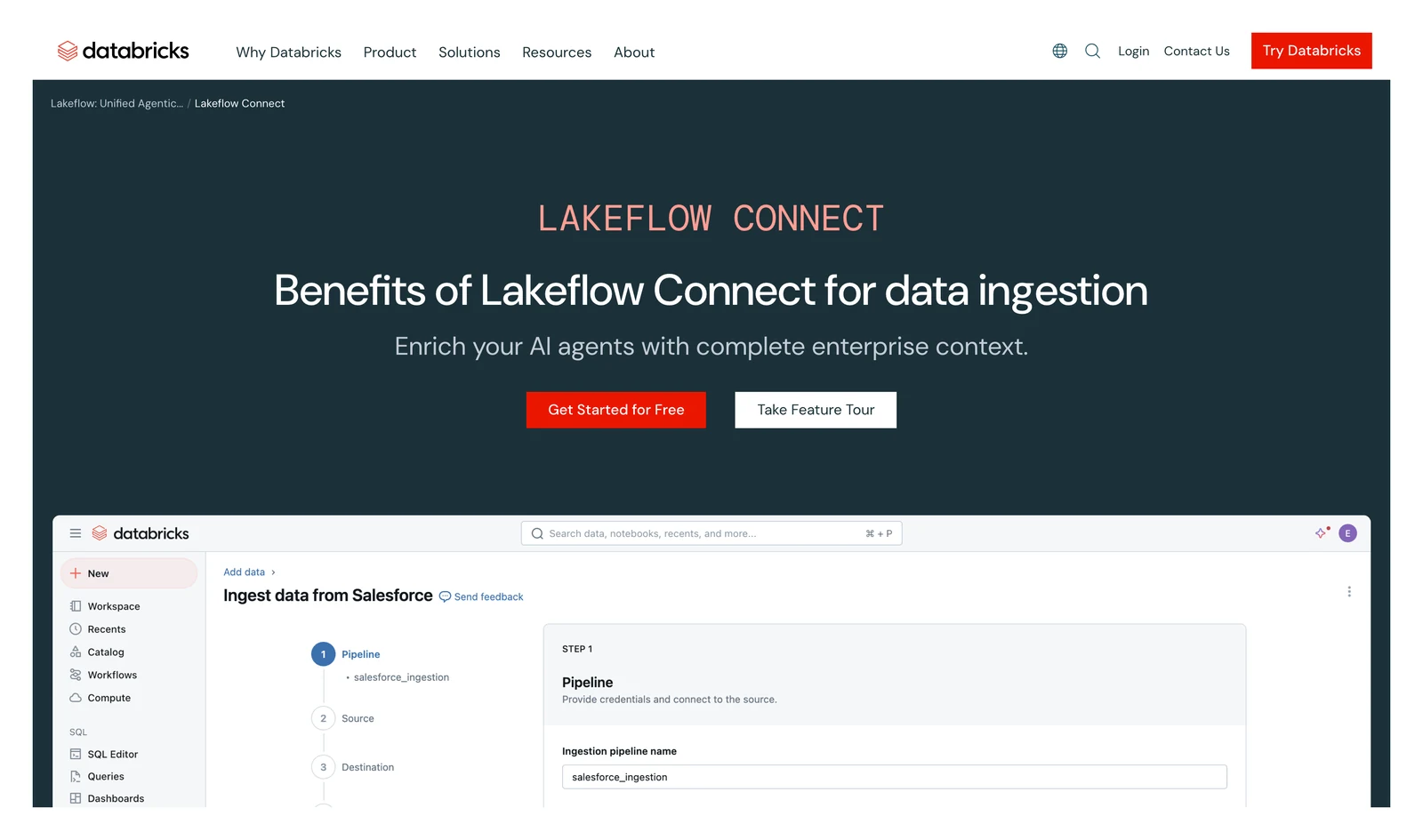
Databricks Lakeflow Connect home page, October 2026.
At a glance
- Kind: managed connectors inside Azure Databricks
- Databases with CDC: MySQL, PostgreSQL, Microsoft SQL Server, and Oracle (through LogMiner)
- Billing: Databricks Units (DBUs) per second. Azure rates were not captured for this post
Microsoft's Azure Databricks docs (last updated 2026-09-11) describe connectors that track changes and apply them to Delta tables. Other connector types cover SaaS apps, files, message buses and plain queries.
Where it fits
- One connector family lists change data capture for four popular databases. Microsoft's MySQL connector page says the MySQL connector is in Public Preview and access is by request through your Azure Databricks account team.
- Governance comes from Unity Catalog, Databricks' own catalog.
- Changes land in a staging volume first, so the docs say you can run the ingestion pipeline "at whatever schedule you'd like" while the gateway keeps capturing changes, and the pipeline itself runs on serverless compute.
- Cross-cloud connectivity is supported: the database connector page gives an Azure Databricks workspace ingesting from an AWS Aurora PostgreSQL database as an example, if the network path exists.
- The MySQL connector page lists SCD type 2, API-based column selection and automated handling of new and deleted columns as supported.
Where it falls short
- The ingestion gateway "runs continuously" on classic compute, and per the database connector page, "you provision and pay for its classic compute even when your ingestion pipeline is idle." The same page warns the initial snapshot can fail on undersized compute.
- Destination tables are streaming tables, "which are Delta tables" with extra support for incremental processing. MongoDB is not in the database connector list.
- On the MySQL page, a pipeline can hold at most 250 tables, and automated schema evolution of data type changes is not supported.
- Authentication for MySQL is username and password only. OAuth U2M, OAuth M2M and OAuth with a manual refresh token are all listed as not supported.
Outside tools that run on Azure
6. OLake Go: best for Azure databases into Iceberg on your own storage

OLake home page, October 2026.
At a glance
- Kind: open-source database replication, licensed Apache 2.0
- Azure guides: Iceberg on Azure, Azure Database for PostgreSQL and Azure Database for MySQL
- Runs: on your own infrastructure
- Support: contact the OLake team
OLake Go captures changes from Postgres, MySQL/MariaDB, MongoDB and SQL Server (connector docs), and it writes Apache Iceberg or Parquet. You run it yourself with Docker, Helm on Kubernetes or the OLake UI.
What's good
- Its Iceberg on Azure guide shows OLake Go writing Iceberg-compatible Parquet files directly to Azure Data Lake Storage (ADLS) Gen2 and updating the catalog, with Lakekeeper as the open-source REST catalog.
- Lakekeeper is one of eleven catalog types on the catalog compatibility page, so the Azure route is not tied to one catalog.
- The Azure PostgreSQL setup page covers Azure Database for PostgreSQL Flexible Server, using logical replication with the native
pgoutputplugin and a publication. - The Azure MySQL setup page covers Azure Database for MySQL Flexible Server through binary logs, and recommends a read replica so change reading stays off your production primary.
- Both setup pages say where to connect: use Flexible Server, since Single Server has limited support and is being deprecated, and for PostgreSQL connect to the primary, because Flexible Server read replicas do not support logical replication.
7. Fivetran: many connectors with no servers
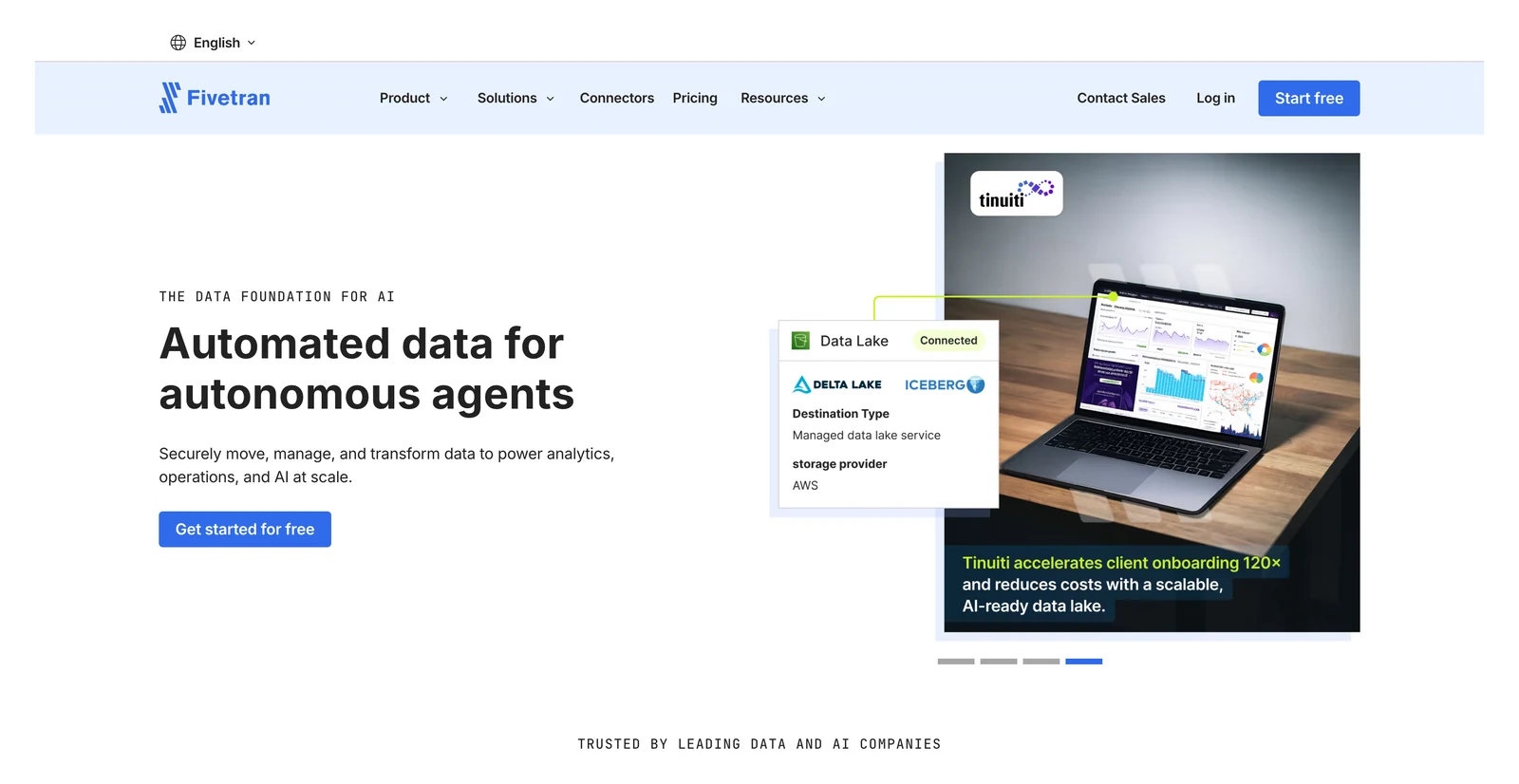
Fivetran home page, October 2026.
At a glance
- Kind: managed ELT service
- Free plan: up to 500,000 monthly active rows (MAR) for connections, per Fivetran's pricing page
- Pay as you go: $5 base charge per connection using 1 to 1M MAR
Fivetran's docs describe a Managed Data Lake Service that writes to Azure Data Lake Storage. Its database docs name SQL Server CDC and Change Tracking, MySQL binary logs and Azure Cosmos DB change feed as capture methods.
Where it fits
- Fivetran says it runs the pipelines for you (we did not test that), and its free plan covers up to the row limit.
- Per its docs, its data lake service writes Parquet files to your own storage and always creates Iceberg table metadata for them.
- Its database connector docs say database connectors sync new and modified data every 15 minutes by default, applied to the destination in batches with a merge operation. They list PostgreSQL logical replication and MongoDB change streams as further capture methods.
- Its catalog docs say Fivetran Catalog is built on Apache Polaris and implements the Iceberg OpenAPI specification, so a compatible Iceberg REST client can connect. With Delta Lake metadata turned on, Fivetran publishes the Delta metadata to OneLake.
- Its usage docs say a row is counted once a month however many times it syncs, and some re-syncs, such as historical data after you add a column, are free.
Where it falls short
- Per its data lake docs, there is no support for Iceberg position deletes, and the Azure decimal type is fixed at (38,10).
- The OneLake catalog route applies only to tables with Delta Lake metadata, which Fivetran creates only if you turn it on.
- The pricing page prints no per-row rate, but Fivetran's Service Consumption Table does. Standard starts at $495 per million MAR plus a $5 base per connection, list price before discounts (version 10, effective February 1, 2026). Deletes count as paid rows, per the usage docs.
- The database docs say schema changes in the source are "the most common trigger for a full table re-sync," and expired change logs require a full source re-sync. If large portions of a table change between syncs, Teleport Sync may be unable to find the changes and re-syncs the entire table.
- The catalog docs warn that modifying Fivetran-delivered tables directly with write credentials "can corrupt the tables and disrupt downstream workflows."
- Per Fivetran's usage docs, two connections that sync the same data count separately toward your monthly active rows, and a rollback sync "may fetch additional data from the previous month" that counts as new records.
8. Airbyte: self-hosting and connector choice
Airbyte home page, October 2026.
At a glance
- Kind: ELT with a free self-hosted Core and a paid cloud
- Core: free to self-host; you pay for servers and staff
- Cloud: Standard shows "Starting at $20 /month" with 5 credits included and extra credits at $5 each, a base and not a price for any amount of data (Airbyte's pricing page, October 2026)
Airbyte's docs list Azure Blob Storage and Azure Table as sources, and Azure Blob Storage, Microsoft SQL Server and Databricks as destinations.
Where it fits
- Its CDC docs list current support for Postgres, MySQL, Microsoft SQL Server, MongoDB, Oracle DB, SAP HANA and IBM Db2.
- Per the same page, the first CDC sync takes a snapshot of the current data with a SELECT statement, and later syncs read the logs from the previously synced position.
- Its S3 Data Lake docs say the connector writes the Iceberg table format to S3 or S3-compatible storage through a REST, AWS Glue, Nessie or Polaris catalog, with Append + Deduped and Overwrite + Deduped sync modes.
- Its credits docs publish the meter: 4 credits per GB for databases and files, 6 credits per million rows for APIs and custom sources. A Cloud trial lasts 14 days or 400 trial credits, whichever comes first.
Where it falls short
- The Azure Blob Storage destination lists CSV and JSON Lines output, with no Parquet or Iceberg on the page, and it lists no deduplicating sync mode.
- Airbyte's docs list S3 Data Lake and GCS Data Lake destinations but no Azure equivalent and no Synapse page.
- Database change capture runs as scheduled syncs, not a continuous stream. The CDC docs say changes made by TRUNCATE or ALTER "won't appear in logs and therefore in your destination," and a refresh is required after you add a new table.
- CDC incremental syncs are supported only for tables with primary keys for most sources, per the same page.
- The S3 Data Lake docs say the connector never rewrites existing Iceberg data files, so only adding or removing a column, widening a column and changing the primary key are handled as schema changes.
- If you run out of credits, the credits docs say Cloud continues your syncs as normal and bills you in arrears.
9. Hevo: small teams loading Synapse
Hevo Data home page, October 2026.
At a glance
- Kind: managed ELT service
- Free plan: $0, up to 1 million events a month
- Paid: Starter from $299 a month ($265 on annual billing), Professional from $849 a month, per Hevo's pricing page, October 2026
Hevo's docs list Azure MySQL, Azure PostgreSQL, Azure SQL Server and Azure Blob Storage as sources. An event is every record inserted, updated or deleted in the destination.
Where it fits
- Plans are tiered and posted, with a 14-day free trial and no card, per Hevo's pricing page.
- Its Synapse destination page (last updated July 24, 2026) documents setup step by step.
- On Hevo's pricing page, the price moves with an events slider: Starter runs from $299 a month at 5M events to $949 at 50M, and Professional from $849 at 20M events to $2,199 at 100M (monthly billing).
- Hevo's log-based pipeline docs list BinLog for MySQL, logical replication for PostgreSQL, Change Streams or OpLog for MongoDB, Change Tracking for SQL Server and redo logs for Oracle.
Where it falls short
- Hevo's docs name dedicated SQL pools as the Synapse destination and list a dedicated SQL pool as a prerequisite.
- We found no Fabric or Azure Data Lake Storage destination in the docs we read.
- Business Critical, the card that lists streaming (the comparison table also lists it for Professional), shows "Custom" pricing.
- The pricing page lists 1-hour scheduling and a limited connector set on the Free plan.
- Per the log-based pipeline docs, streaming pipelines since Release 2.21 exclude SQL Server and Amazon DynamoDB, and you contact the Hevo Sales team to enable streaming. For SQL Server the capture method is Change Tracking.
- Its Edge docs list a Snowflake Iceberg destination that is "currently available for Early Access" and needs an Amazon S3 bucket. We found no Iceberg destination for Azure Data Lake Storage or your own catalog.
10. Matillion: visual pipelines
Matillion home page, October 2026.
At a glance
- Kind: cloud ETL platform
- Billing: credits by task hour. Running a pipeline is 1 credit per task hour, transformation 3, and streaming CDC 1 or 2
- Price: no dollar price for an edition or a credit is printed on Matillion's pricing page
Matillion's docs (hosted at docs.maia.ai) list Azure Blob Storage as a streaming destination.
Where it fits
- Per its streaming docs, the streaming runner is a service you deploy and configure within your own cloud infrastructure.
- The same docs say streaming pipelines use change data capture from Db2 for IBM i, SQL Server, MySQL, Oracle and PostgreSQL and describe the result as "near-real-time data ingestion" into cloud storage or a warehouse.
- Its pricing page lists 1 developer user and unlimited projects on Developer, 5 developer users plus an audit log and a service level agreement on Teams, and custom SSO, hybrid cloud deployment, data lineage tracking and streaming change data capture on Scale.
- Its credit terms measure task consumption in 2 second increments and say rates are "fixed across the customer base and non-negotiable."
Where it falls short
- No plan shows a dollar price.
- Streaming change data capture is listed on the Scale card of the pricing page.
- We did not find an Azure Synapse destination page in the docs index we read.
- The streaming docs say pipelines "only currently support relational databases as sources," so the five databases above are the full list, and change records are batched into Avro files. We found no Iceberg destination in the docs index.
- Each developer user beyond those included costs 70 credits a month, and the overage rate "will be listed on the Order Form," per the credit terms.
11. Informatica: large, governed estates
At a glance
- Kind: enterprise data management suite (the cloud product is IDMC)
- Price: Microsoft's marketplace listing shows "Starting at $131,760.00/year"
- Replication targets: Azure Data Lake Storage, Synapse, Fabric Data Warehouse and OneLake, Event Hubs and Azure SQL, per its docs
Informatica's database replication docs list SQL Server (including Azure variants), MongoDB, MySQL, Oracle and PostgreSQL as sources. The Microsoft Marketplace listing is a starting price, not a dollar rate per unit.
Where it fits
- Its Database Ingestion and Replication docs list ADLS Gen2, Azure Synapse Analytics, Fabric Data Warehouse, Fabric OneLake and Azure Event Hubs (for Kafka clients) among the target types, with SQL Server Azure variants as targets too.
- The same docs have change-capture sections for Oracle, SQL Server and SAP HANA sources.
- They list SQL Server, MySQL and PostgreSQL (including Azure variants), MongoDB, Oracle, Db2 and SAP HANA as sources, with initial, incremental and combined load types (some with footnotes).
- Its Cloud and Product Description Schedule publishes consumption rates by service. For Database Ingestion and Replication change data capture it lists 6.5 IPU per million rows for the first 15 million rows, 0.55 up to 750 million, and 0.05 above that.
Where it falls short
- Microsoft's listing gives a starting price, not a dollar rate per unit. To size a real bill, you'll need a quote from Informatica.
- The schedule gives IPU rates, but we found no dollar price per IPU on Informatica's own pages, and Flex IPU overage is charged at "the applicable overage fee set forth in the Order."
- Under the IPU model, "IPUs do not carry over to the next month," and if you use more than you subscribed to you "must subscribe to additional IPUs for the remainder of the Subscription Period," per the schedule.
- When a job in one cloud service uses components of another, its Compute Units are calculated "at the highest applicable consumption rate."
- The replication docs list "Open Table" as a target type but do not say which table formats or catalogs it covers.
What each Azure ETL option bills for
Our read: the billing unit decides your bill more than any feature does.
ADF charges for activity runs and compute time. Fabric charges through a capacity you buy, and Databricks charges for compute, including a gateway that stays on.
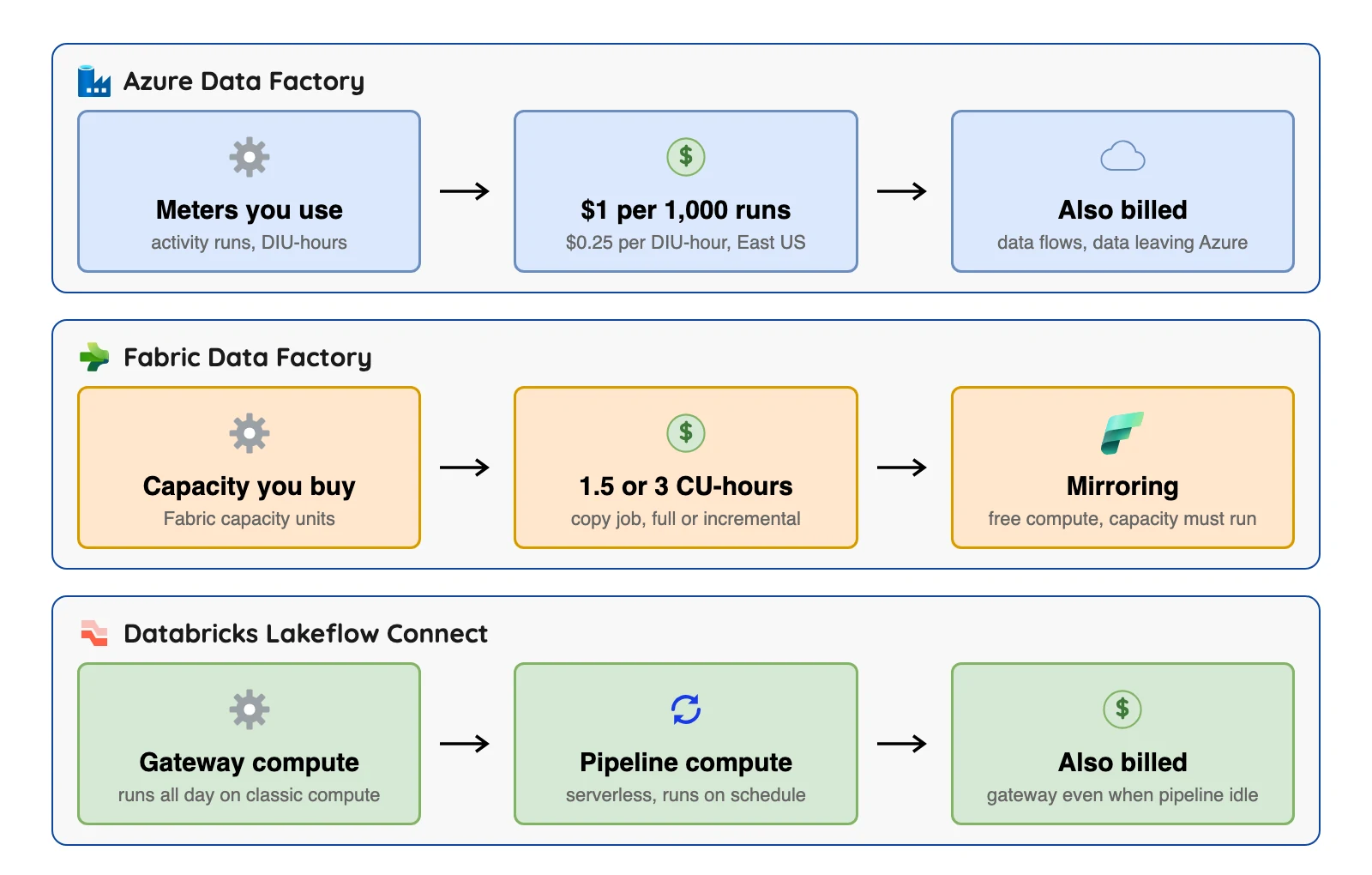
Here are two small examples. It's our own arithmetic on vendor figures, not a quote, and your data will differ.
| Example | Math | Result |
|---|---|---|
| ADF copy of 1 TB a day for 30 days, using the sizing in Microsoft's cost guide (1.2667 DIU-hours per 100 GB) | 380 DIU-hours x $0.25 | about $95 for copy time, East US |
| Fabric mirroring replication | Free compute, but the capacity must run | $0 for replication compute, plus the capacity (F2 is listed at $262.80 a month on Microsoft's Fabric pricing page) |
Sources: Microsoft cost guide, Azure Data Factory pricing page, Microsoft Fabric pricing page. Checked October 2026.
Microsoft's cost guide says its own prices there are hypothetical. Data leaving Azure, data flow compute and storage come on top.
What lands in your lake: Delta, Iceberg or CSV
Many teams now want open table formats so more than one engine can read the same data. Apache Iceberg is one such format, and Delta Lake is another, and Azure tools mostly write Delta.
| Tool | What its docs name as the output | The catch |
|---|---|---|
| Fabric mirroring and Copy job | Delta tables in OneLake | Iceberg readers get virtual metadata: Iceberg V2, Parquet only, source tables under 5,000 commits, no private links |
| Azure Data Factory | An Iceberg sink to Azure Data Lake Storage Gen2 | Catalog support is not stated on the page |
| Databricks Lakeflow Connect | Delta streaming tables | Iceberg output is not stated on the pages we read |
| Fivetran | Parquet files in ADLS with Iceberg metadata always created, Delta metadata optional | OneLake catalog route needs the Delta metadata; no Iceberg position deletes |
| Airbyte | CSV or JSON Lines in Blob Storage | No Iceberg or Parquet on the page |
| Informatica | ADLS and OneLake targets | The file format is not stated on the page we read |
| OLake Go | Iceberg-compatible Parquet files on ADLS Gen2, per its Azure guide | The guide uses the Lakekeeper REST catalog |
The Fabric and Iceberg details come from Microsoft's OneLake Iceberg page.
So which one should you pick?
| If your situation is... | Start with | Why |
|---|---|---|
| A live, read-only copy of a supported database for Fabric reports | Fabric mirroring | Free replication compute, no pipelines |
| Scheduled, incremental loads of raw tables into Fabric | Fabric Copy job | Incremental and CDC modes, no pipelines |
| SSIS packages, private networks or an existing ADF estate | Azure Data Factory | Fabric lists both as "To be determined" |
| Your warehouse is already a Synapse workspace | Synapse pipelines | Sits beside the warehouse |
| CDC from MySQL, PostgreSQL, SQL Server or Oracle into Databricks | Lakeflow Connect | Built-in, Delta output |
| Hundreds of SaaS connectors and no servers | Fivetran or Hevo | Managed connector libraries |
| A free tool you host yourself | Airbyte Core | Free to self-host, per its docs |
| Analysts building pipelines visually | Matillion | Visual design |
| A big, governed estate | Informatica | Its docs list ADLS Gen2, Synapse and OneLake as replication targets |
| Iceberg tables on ADLS Gen2 from one tool | ADF Iceberg sink | Check catalog support first |
| Postgres or MySQL on Azure into Iceberg on ADLS Gen2 you run | OLake Go | Its Azure guide writes Iceberg through Lakekeeper |
Which Azure ETL tool fits you?
Question 1 of 5
Where should the data land?
This one answer removes about half the list.
Tools that often appear on these lists but are not here
These two are left out.
- Azure Database Migration Service. It is a database migration service rather than a general ETL tool.
- Talend Open Studio. We left it out because we could not source it from a current vendor page.
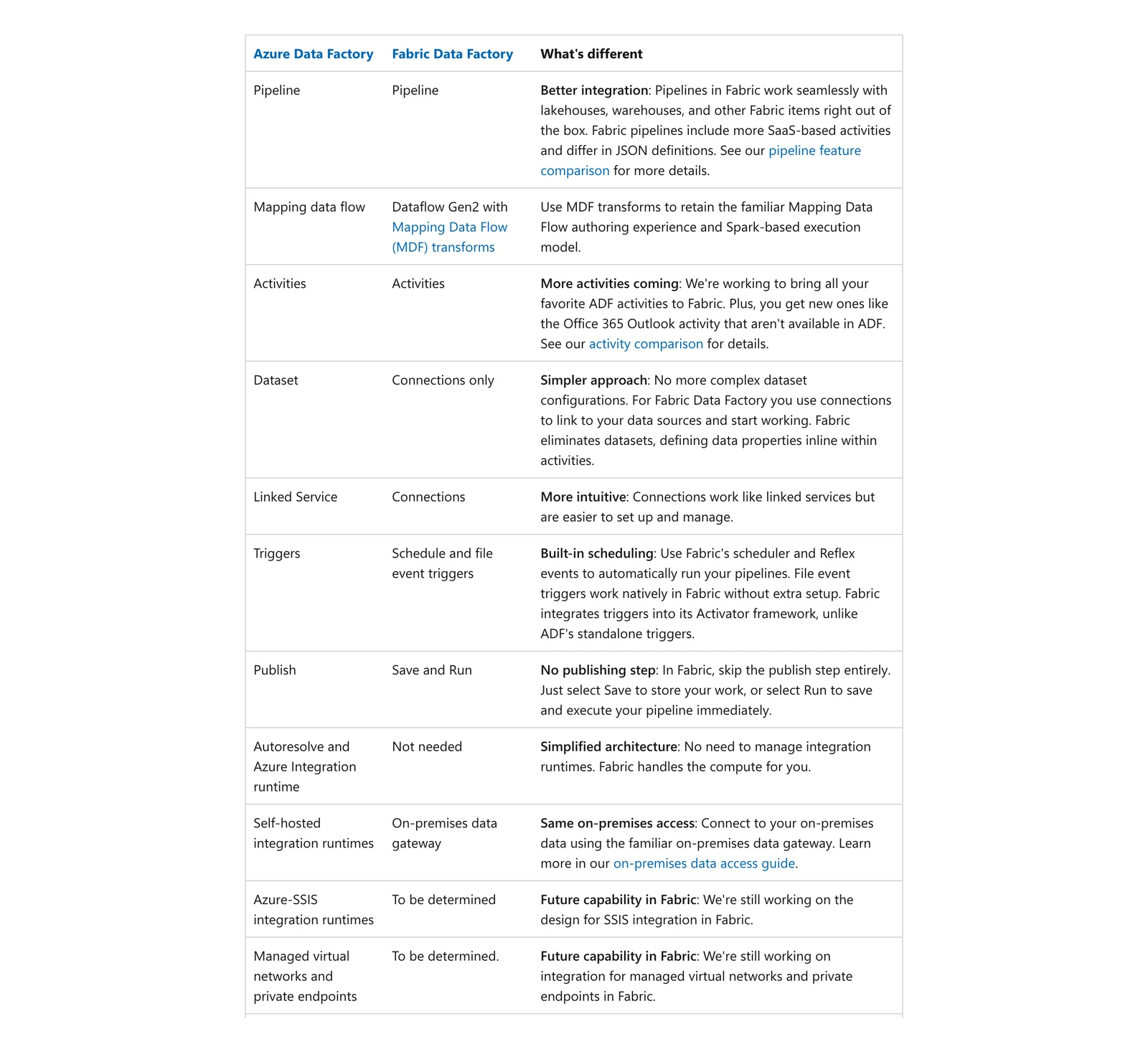
Microsoft Learn, Differences between Data Factory in Fabric and Azure, October 2026.
Conclusion
The right tool depends on where your data lands. Before you commit, run one real table through two finalists, then confirm the rates on the vendor's page.
| Test | What to check | Why it matters |
|---|---|---|
| Change a column | Does the pipeline adapt, fail or ignore it? | Mirroring on SQL Server 2016 to 2022 fails until CDC is re-enabled on that table |
| Delete a row | Does the target remove it, mark it, or keep it? | Fivetran counts deletes as paid rows, and its lake service has no Iceberg position deletes |
| Leave it idle for a day | What does the bill show? | Lakeflow Connect's gateway is paid even when idle, and a Fabric capacity must keep running for mirroring |
| Read the output with a second engine | Can another tool open the files? | Fabric and Databricks write Delta, and only ADF, Fivetran and OLake Go document Iceberg on ADLS |