Best Data Ingestion Tools in 2026, Compared
39 min read
Key takeaways
Short answer: there's no single best data ingestion tool, because these tools do different jobs. If you'd rather a vendor ran the pipeline, look at Fivetran, Hevo and Skyvia. If you're happy running open-source code yourself, look at Airbyte, dlt and Meltano.
For database changes into Apache Iceberg on storage you control, start with OLake Go (tool 8 below), and look at Debezium if you want the changes in Kafka. Estuary does streaming and batch, and AWS Glue, Azure Data Factory and Google Datastream fit teams that live inside one cloud. Two questions cut the list down fast: how does the tool bill you, and where does your data have to land?
- The billing meter decides your bill. Fivetran counts changed rows, Hevo events, Skyvia records, Airbyte credits and Estuary gigabytes. Open-source tools have no meter, but you still pay for servers and people (the bill moves, it doesn't vanish).
- Fresher data means more work to run. Many reports only need a sync every 15 to 60 minutes.
- Where the data lands narrows the list fast. Datastream's Iceberg output is append-only (Datastream docs), Hevo's is in early access (Hevo docs), and Estuary needs Spark on AWS (Estuary docs).
- For database changes into Iceberg, our tool is OLake Go. It is open source under Apache 2.0 (OLake on GitHub), reads the change log of PostgreSQL, MySQL and MariaDB, MongoDB and SQL Server, and writes Iceberg or Parquet to storage you choose (see our docs).
Each price below links to the vendor's own page and ends with the month it was checked (checked Oct 2026). Prices move, so confirm before you buy.
What data ingestion means, in plain words
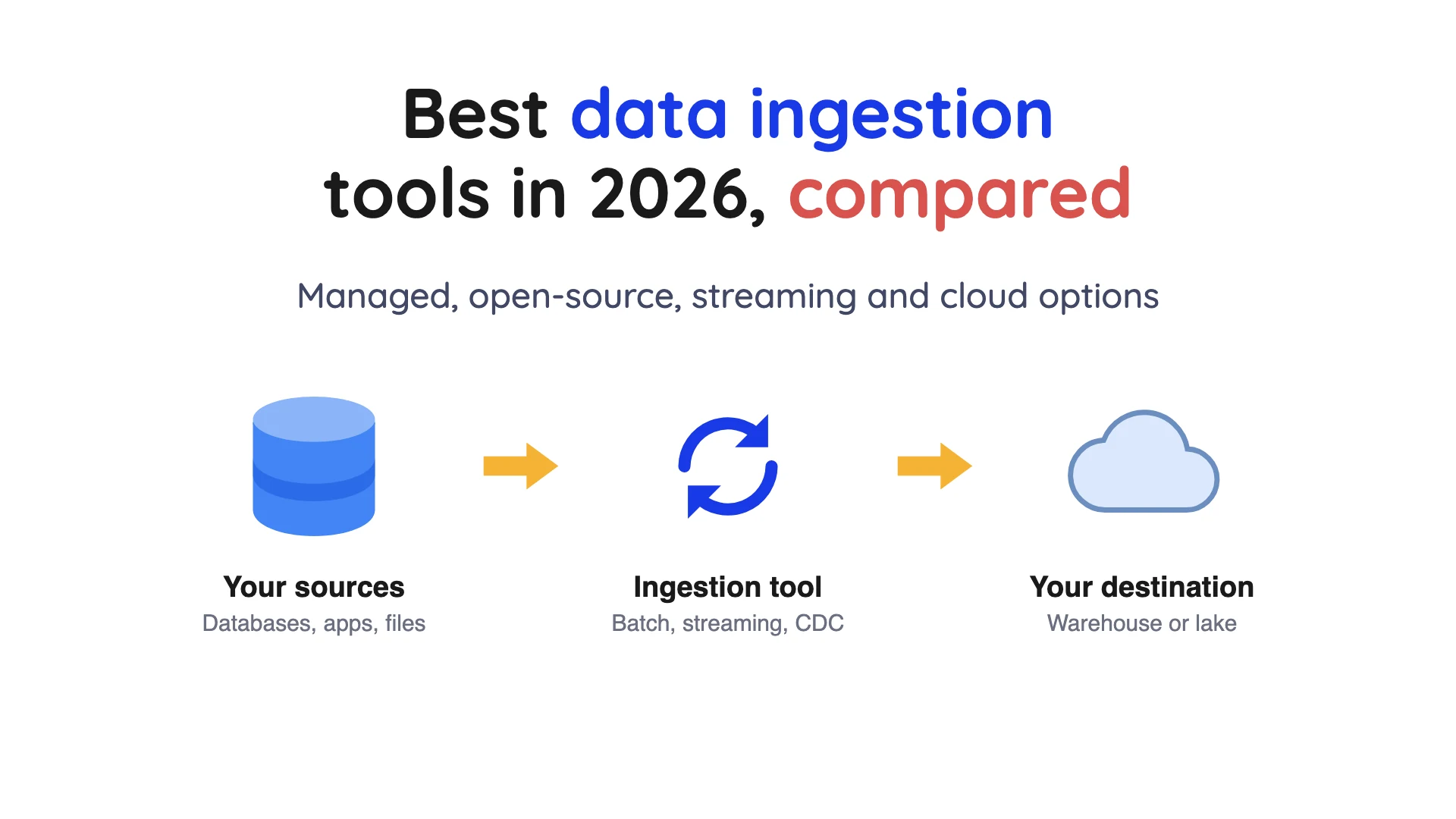
Data ingestion means collecting data from many places and copying it somewhere else. That somewhere is usually a warehouse (a database built for reports) or a data lake, which is cheap file storage that many tools can read.
Batch or streaming. Batch collects data on a schedule, such as every hour. Streaming sends data the moment it's created. The trade is simple: easier to run, or faster but harder to keep healthy.
Where reshaping happens. Extract, transform, load (ETL) reshapes data before it lands. Extract, load, transform (ELT) lands it raw and tidies it up later in the warehouse. Most tools here extract and load, so the tidying is your job.
Change data capture (CDC) finds the inserts, updates and deletes in a database and sends only those. The best-known kind reads the database's change log, the file where it writes down every change in order.
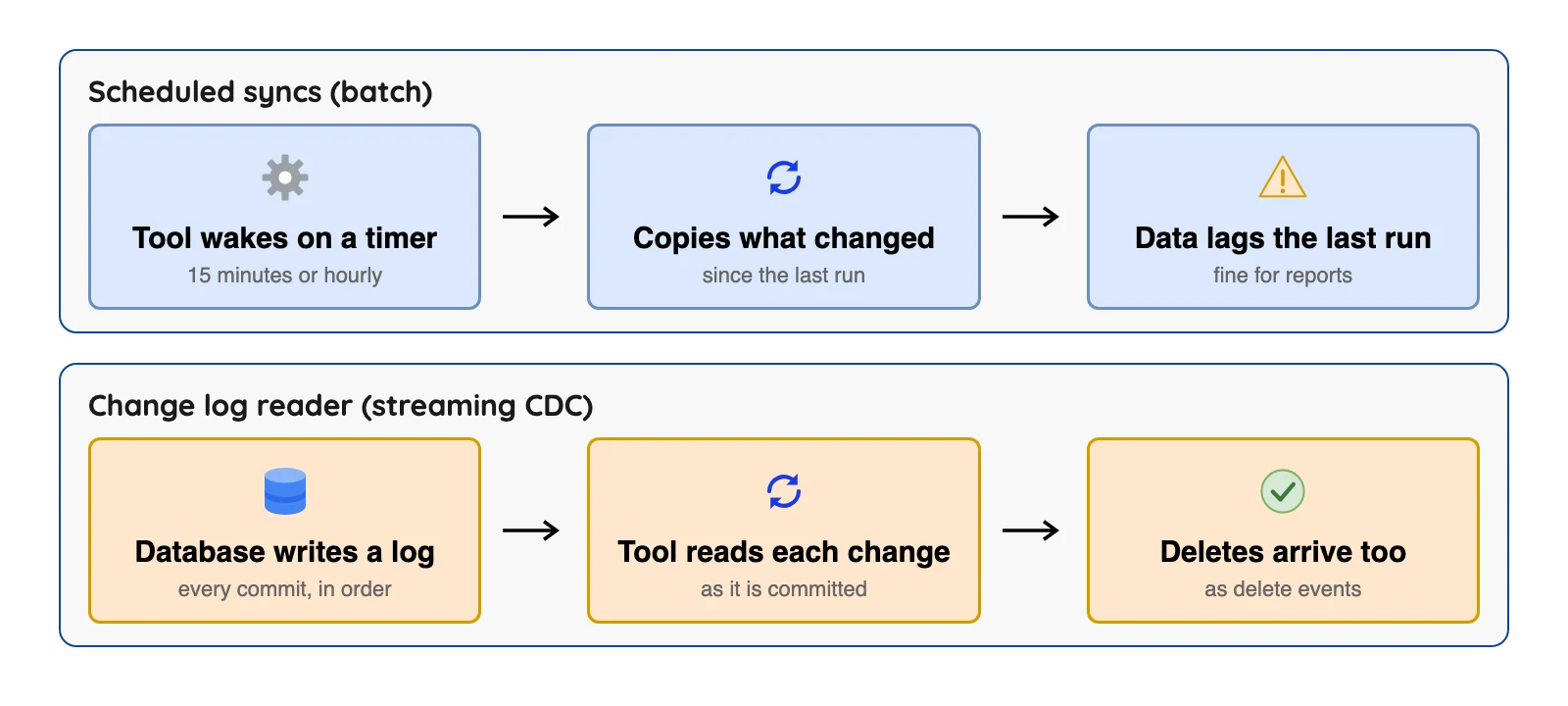
How fresh is fresh? Fivetran's pricing page lists 15-minute syncs on Standard and 1-minute syncs on Enterprise (checked Oct 2026), and Airbyte's release note lists 15-minute sync frequency on its Plus plans (checked Oct 2026). Debezium's features page describes log-based capture delays in the millisecond range for MySQL or PostgreSQL, which is a different league.
How we picked these tools
A tool made the list if it's maintained and publishes documentation we could open. The pricing and docs pages were checked in October 2026, and the page is linked beside each claim. We did not run the other tools.
Kafka and Apache NiFi are left out, because they move events and files and don't copy databases. The order inside a group is not a ranking.
Data ingestion tools at a glance
| Tool | Billing basis | Price (checked Oct 2026) | Apache Iceberg (from each tool's own docs) |
|---|---|---|---|
| Fivetran | Monthly active rows (MAR) per connection | Free to 500,000 MAR; paid rates in its Service Consumption Table | Yes, on S3, Azure and Google storage; no position deletes |
| Hevo | Events | Free to 1M events; Starter $265 a month on annual billing | Early Access, Snowflake-managed only |
| Skyvia | Records per month | Free plan; Basic $79 a month on annual billing | Not listed in its docs |
| Airbyte | Credits | Core free; Cloud Standard $20 a month with 5 credits | Yes, S3 and Google Cloud Storage |
| Meltano | None | Meltano Open is free (self-hosted); Cloud plans list no dollar price | No official loader on its hub |
| dlt | None | Library free; dltHub plan $12,000 a month | Yes, through PyIceberg and a catalog you supply |
| Debezium | None | Free; you pay for infrastructure | Sink is community-maintained |
 OLake Go | None | Free; you pay for infrastructure | Yes, native; Iceberg and Parquet output |
| Estuary | Gigabytes moved plus connector instances | Free to 10 GB a month; Cloud $0.50 per GB plus $100 per instance | Yes, with a REST catalog, Spark and S3 |
| AWS Glue | Compute time (DPU-hours) | $0.44 per DPU-hour for ETL jobs, or $0.308 for Glue 6.0 and above, US East (Ohio); varies by region | Yes, read and write in Spark jobs |
| Azure Data Factory | Activity runs plus runtime hours | Rate set by region | Sink for Data Lake Storage Gen2 only |
| Google Datastream | GiB processed | Per GiB; backfill $0.40 after 500 free GiB, CDC is tiered | Iceberg tables, append-only |
Sources: Fivetran Service Consumption Table, Hevo pricing, Skyvia pricing, Airbyte pricing, dltHub pricing, Estuary pricing, AWS Glue price list, Datastream pricing (checked Oct 2026).
Iceberg column sources, from each tool's own docs: Fivetran, Skyvia replication docs, Airbyte, Meltano Hub loaders, dlt, Debezium Server, OLake compatibility page, AWS Glue, Azure Data Factory (checked Oct 2026).
"Rate set by region" means the vendor page names the unit but shows no flat price.
How each tool bills: the meter that changes your bill
Two tools can move the exact same data and send very different invoices, because each counts something different. Rows, events and records rise when your data changes a lot, and gigabytes rise when your data is big.
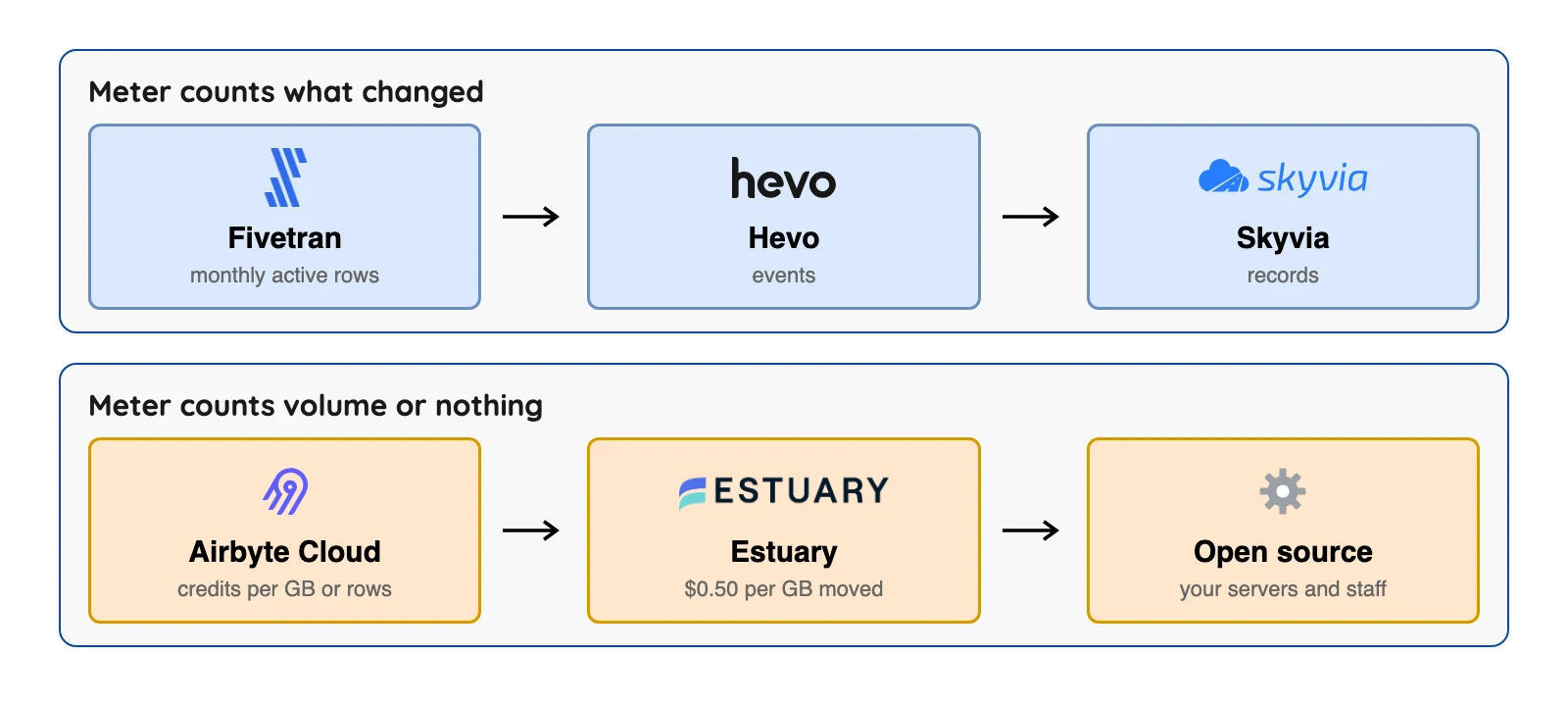
Here is the maths with published numbers. Say a database sends 10 GB a month to Airbyte Cloud, which counts database data at 4 credits per GB. That's 40 credits.
On Standard, $20 a month includes 5 credits and each extra credit costs $5 (checked Oct 2026). So you pay for 35 extra credits at $175, and the total is $195.
Airbyte's September 15, 2026 release note and the pricing page also list a Plus tier at $189 for 40 credits (checked Oct 2026), so for this load the higher plan costs less.
Estuary bills differently, but the same method works on its published rates. Its free tier covers 10 GB a month and 2 connector instances, and Cloud adds $0.50 per GB plus $100 a month for each of the first six instances (checked Oct 2026). One source and one destination makes two instances.
| Monthly volume (database data) | Airbyte Cloud Standard | Estuary Cloud |
|---|---|---|
| 10 GB | $195 (40 credits) | $0 if counted once, inside the free tier |
| 50 GB | $995 (200 credits: $20 plus 195 extra at $5) | $225 if counted once ($25 for data plus $200 for two instances); $250 if counted at both ends |
Treat both columns as untested arithmetic on published rates, with one source and one destination. Airbyte's credits depend on data type, and Estuary's pricing page says data is counted at both capture and delivery, so a gigabyte can be counted twice (checked Oct 2026). Our read: ask each vendor to price your real month.
Fivetran and Hevo can't be priced this way, because their meters count rows and events, not gigabytes. Fivetran prints its per-row list rates in a separate Service Consumption Table (checked Oct 2026).
To use them you need your distinct monthly active rows for each connection, and we have not assumed those.
What actually lands in the table: one row's life
When you delete a row in your database, does it disappear from your lake? How a tool handles deletes decides that. Follow one row, id 7, that is inserted, updated and then deleted at the source.
| Step at the source | Change events (Debezium) | Append-only (Datastream to Iceberg) | Applied changes (upsert) |
|---|---|---|---|
| Insert id 7 | Event with op c | A row is added | A row is added |
| Update id 7 | Event with op u | Another row is added | The old row is replaced |
| Delete id 7 | Event with op d | Rows are only added, never removed | The row is deleted |
| Result | Your code decides | Table holds history, not the current state | Table matches the source |
Debezium's PostgreSQL connector docs describe the op codes c, u and d. Google's Datastream docs say streaming to Iceberg tables is supported only in append-only write mode (checked Oct 2026).
Airbyte's S3 Data Lake docs describe an upsert as an equality delete (a delete by key value) plus an insert.
Log-based tools also share a nasty failure: the change log expires before the tool catches up. The FAQ below covers PostgreSQL, MongoDB and SQL Server.
The 12 Best Data Ingestion Tools
Vendor-run ELT
1. Fivetran: best for hands-off loading from many sources
At a glance
- Price: Free up to 500,000 monthly active rows (MAR, the rows changed in a month); paid rates in its Service Consumption Table, not on the pricing page. Standard starts at $495 per million MAR plus a $5 base per connection, list price before discounts (checked Oct 2026)
Fivetran's pricing page lists 700+ connectors (checked Oct 2026). Its database connectors use each source's own change log or a Fivetran method.
What's good
- Fivetran says it runs the pipeline for you, and its pages list a free plan and a long connector list.
- Its database connector docs say database connectors sync new and modified data every 15 minutes by default and merge the changes into the destination in batches. The same page says most initial syncs finish within a day.
- The pricing page lists 15-minute syncs on Standard and 1-minute syncs on Enterprise, and Enterprise also lists a Hybrid deployment option (checked Oct 2026).
- Managed Data Lake Service keeps data in your own Amazon S3, Azure Data Lake Storage or Google Cloud Storage account. Its docs say Fivetran always creates the Iceberg table metadata and manages the catalogs and maintenance operations (checked Oct 2026).
- The same Managed Data Lake Service docs say snapshot clean-up runs once daily and always keeps at least the last 2 snapshots of each table. Orphan files move to a separate folder on the second and fourth Saturdays of each month (checked Oct 2026).
Where it falls short
- Paid per-row list rates sit in the Service Consumption Table, not on the pricing page, and each connection is priced on its own (checked Oct 2026).
- The pricing page says a $5 base charge applies to each standard connection with 1 to 1M MAR, and that billable usage includes modifications to existing rows, deletes included (checked Oct 2026).
- The Iceberg service has no position deletes (a way of marking removed rows) and does not support the S3 Glacier Flexible Retrieval, Glacier Deep Archive or Intelligent-Tiering Archive tiers, and it supports only the SaaS deployment model for that destination, per the Managed Data Lake Service docs (checked Oct 2026).
- The same docs recommend against deleting any metadata files and say never to modify or delete the orphans folder, because doing so can corrupt or permanently damage the tables. Columns named
_deleted,_file,_partition,_pos,_spec_id,file_path,posorrowget a#prefix in Iceberg tables. - Hybrid deployment is listed under Enterprise, and the pricing page FAQ says Enterprise database connectors include the Oracle and High-Volume Agent (HVA) connectors (checked Oct 2026).
- The database connector docs say schema changes in the source are the most common trigger for a full table re-sync, and expired change logs require a full source re-sync.
2. Hevo: best for small teams that want no-code pipelines into a warehouse
At a glance
- Price: Free up to 1M events a month (each insert, update or delete in the destination is one event); Starter $265 a month on annual billing, or $299 monthly, from 5M events (checked Oct 2026)
Hevo lists 170+ connectors on its pricing page. Streaming pipelines show up on the custom Business Critical card, and its comparison table also lists them for Professional (checked Oct 2026).
What's good
- Hevo describes setup as point and click, and it has a free plan to try: $0, up to 1M events a month and up to 5 users, with limited connectors (checked Oct 2026).
- It publishes its prices. Starter is $265 a month on annual billing ($299 monthly) from 5M events, and Professional is $750 annually ($849 monthly) from 20M, each with an events slider (checked Oct 2026).
- Hevo's billing docs say plans from Release 1.48 onwards get a grace period to buy more events when the quota runs out, during which pipelines keep running (checked Oct 2026).
- The Business Critical card on the pricing page (custom price) adds role-based access control, single sign-on, multiple workspaces and VPC peering on top of Professional (checked Oct 2026).
- Its Snowflake Iceberg destination docs say table data and metadata files sit in your own Amazon S3 bucket, and external engines such as Apache Spark and Trino can read the tables through the Horizon Iceberg REST Catalog API (checked Oct 2026).
Where it falls short
- Every update is an event, so a busy table can chew through your quota fast. The billing docs say events deleted at the source are billable as updates, and that Hevo charges the selected plan price whether or not you use the full capacity.
- Per Hevo's frequency docs, the minimum ingestion frequency is 30 minutes for teams created after Release 2.21. Defaults are 6 hours for table-mode pipelines and 30 minutes for log-based ones, and the maximums are 24 and 12 hours.
- The pricing page shows 1-hour scheduling on Free and Starter, and "Streaming Pipelines" only from Professional. Add-ons are not available on Free or Starter (checked Oct 2026).
- The pricing page lists no self-hosted Hevo edition, and its only Iceberg option is in Early Access and tied to Snowflake. The destination docs say Snowflake manages the Iceberg catalog and table lifecycle, and that you ask a Hevo account executive or Support to enable it.
3. Skyvia: best for no-code loads and syncs for small teams
At a glance
- Price: Free plan; Basic $79 a month on annual billing, which the page shows as 20% off (checked Oct 2026)
Skyvia's home page says 200+ connectors across cloud apps, files, databases and warehouses. Its SQL Server page says it supports true CDC for SQL Server, and we found no other database named for it, so treat other database syncs as scheduled copies (checked Oct 2026).
What's good
- Skyvia's pages aim it at people who don't write code, and it has a free plan: 10k records a month, 2 scheduled integrations and daily scheduling (checked Oct 2026).
- Its pricing comparison lists unlimited connections and users on all four plans. Standard schedules as often as hourly and Professional as often as every minute, with unlimited scheduled integrations on Professional (checked Oct 2026).
- Its replication docs say replication reads any supported cloud app, plus SQL Server, MySQL, PostgreSQL, Oracle and BigQuery databases, and writes to supported databases and cloud data warehouses.
- Its records article shows how counting works: importing 500 source rows where 480 are created and 20 are skipped by filters counts 480 records, so skipped rows are not billed (checked Oct 2026).
Where it falls short
- Its records article says a record counts on Import and Replication even when an update changes no field, so repeated syncs of unchanged data still eat your allowance (checked Oct 2026).
- The pricing comparison shows a maximum run frequency of once a day on Free and Basic, once an hour on Standard and once a minute on Professional (checked Oct 2026).
- Incremental replication needs the object's key fields, its creation and modification time fields, and its deleted-flag fields, per the replication docs. A new field added to a replicated source object is not replicated, and an on-premise database used directly must be reachable from the Internet.
- Its pricing page describes a cloud service with no self-hosted option, and its connector list shows no Iceberg destination (checked Oct 2026).
Open source
4. Airbyte: best for a long connector list with a free self-hosted core
At a glance
- Price: Core free (Elastic License 2.0); Cloud Standard $20 a month with 5 credits and $5 per extra credit; Plus from $189 for 40 credits (Airbyte pricing and release notes) (checked Oct 2026)
Airbyte's platform docs say it has over 600 connectors. On CDC, its CDC documentation describes log-based incremental replication, but says syncs are scheduled and that CDC sources are not treated as infinite streaming sources.
What's good
- Core is free to run, and per the S3 Data Lake docs it writes Apache Iceberg to Amazon S3 and Google Cloud Storage, with REST, Glue, Nessie, Polaris and BigLake catalogs.
- The S3 Data Lake docs list five sync modes: Full Refresh Overwrite, Append and Overwrite + Deduped, plus Incremental Append and Append + Deduped. Deduping maps the stream's primary keys to Iceberg identifier columns.
- Its CDC docs list current CDC support for Postgres, MySQL, Microsoft SQL Server, MongoDB, Oracle DB, SAP HANA and IBM Db2.
- Trials last 14 days or 400 credits, whichever comes first (checked Oct 2026). If you run out of credits, the credits docs say Cloud keeps your syncs running and bills you in arrears, and does not pause scheduled ones (checked Oct 2026).
- Airbyte's September 15, 2026 release note says all Plus plans include 15-minute sync frequency, two workspaces, single sign-on and premium support, and its pricing page lists a 24-hour response SLA on Plus (checked Oct 2026).
Where it falls short
- Its Elastic License 2.0 bars you from offering it to others as a hosted service (licence FAQ) (checked Oct 2026). That makes it source-available and not open source in the strict sense.
- CDC runs on a schedule. The CDC docs say the first CDC sync takes a snapshot with a SELECT statement, which is effectively a Full Refresh, and that CDC incremental is supported only for tables with primary keys for most sources.
- The same CDC docs say changes made by TRUNCATE or ALTER do not appear in the logs and so never reach the destination, and a refresh is required after any new table or collection is added to a CDC connection.
- The S3 Data Lake docs say the connector never rewrites existing Iceberg data files, so it handles only these source schema changes: adding or removing a column, widening a column, and changing the primary key. Compaction appears there only as a caution, because running it during a truncate refresh sync deletes files from the current generation and causes data loss.
- Credits are metered by source type: databases and files use 4 credits per GB, and APIs and custom sources use 6 credits per million rows. On Full Refresh syncs every row synced is charged (checked Oct 2026). The September 15 release note raised the price of extra Standard credits from $2.50 to $5.00.
- The same release note says SSO is no longer available on Standard, though existing SSO users can keep it as long as they keep their plan (checked Oct 2026).
5. Meltano: best for teams that standardise on Singer taps
At a glance
- Price: Meltano Open is self-hosted and free; Meltano Cloud plans list no dollar price (Meltano pricing page) (checked Oct 2026)
Meltano is a code-first tool built on Singer taps and targets (small connector programs), and its pricing page markets 600+ connectors.
What's good
- It's free, and pipelines are defined in code, so they can sit in version control. Meltano's pricing page calls Meltano Open "Git-native" and says it comes with 600+ connectors (checked Oct 2026).
- The Meltano pricing page says every plan, Open included, gets the full library of 600+ connectors (checked Oct 2026).
- Meltano Cloud plans are metered in compute hours: Starter has 200 a month and 25 workspaces, Growth 2,000 and 100 workspaces, and Scale 5,000 with unlimited workspaces. Starter lists unlimited users (checked Oct 2026).
- The pricing page defines a compute hour as the time the managed infrastructure spends actively running your pipelines (extracting, loading or transforming).
- Enterprise lists unlimited compute hours, custom connectors and a custom SLA (checked Oct 2026).
Where it falls short
- Many taps on Meltano Hub are community-built, and one connector can have several variants, so check which variant you pick.
- Log-based CDC depends on which tap variant you pick, and the plugin hub's loader list shows S3 Avro, CSV and Parquet, S3Tables and others, but no loader named Iceberg.
- Meltano's own pricing page says Meltano Open is "not really suited for production teams unless you have a dedicated DevOps crew", and that you manage your own infrastructure, monitoring and uptime.
- The pricing page shows no dollar price on any Meltano Cloud plan, so you have to ask for a quote (checked Oct 2026).
6. dlt: best for Python teams that want ingestion as code
At a glance
- Price: Apache 2.0 library free; dltHub $12,000 a month with a 12-month minimum (checked Oct 2026)
You install dlt with pip and write your pipelines in Python. Per the Iceberg destination docs, Iceberg tables are written through the PyIceberg library, to a catalog you supply, and only in Parquet. Its open-source log-based CDC source covers PostgreSQL through logical replication (pg_replication docs) (checked Oct 2026).
What's good
- Pipelines live in your own repository, and dlt's docs list many destinations. The pricing page says the dlt library "stays Apache 2.0, always" (checked Oct 2026).
- Per the Iceberg destination docs, dlt uses PyIceberg's
load_catalog, so it works with the catalogs PyIceberg supports, including REST and SQL catalogs. - The same docs list the upsert and insert-only merge strategies for Iceberg, and partitioning through
iceberg_adapter(year, month, day, hour, bucket and truncate transformations). - The dltHub plan lists 5,000 credits a month, and the pricing FAQ says 1 USD of credit covers one hour of runtime at the standard rate, for both batch and interactive jobs. New accounts get a 14-day trial with $30 in credits (checked Oct 2026).
- Past the included credits, the pricing FAQ lists volume tiers that start at $1.00 per credit and fall to $0.80, and annual commitments take a further 5% off (checked Oct 2026).
Where it falls short
- You write and maintain the code, and the free tier lists only a limited set of verified open-source connectors ("Limited verified OSS connectors" on the pricing page) (checked Oct 2026).
- The paid dltHub plan is a flat monthly fee, and the free library does not include it (checked Oct 2026).
- The Iceberg docs list limits: schema evolution is not supported with the upsert strategy on pyiceberg 0.10.0, partition evolution is not supported, and upserts run in chunks of 1,000 rows until a pyiceberg release after 0.9.1. Parquet is the only file format, and the
azscheme is not supported (useabfss). - If no catalog is configured, dlt falls back to an in-memory SQLite catalog, and the Iceberg docs describe writing through PyIceberg to a catalog you supply.
- The pricing FAQ says a paid dltHub subscription includes a licence for the source-available capabilities, which it lists as the AI workbench, CDC, Apache Iceberg support and in-pipeline transformations. The open-source Iceberg docs page does not say which of its features need that licence (checked Oct 2026).
7. Debezium: best for teams that already run Kafka
At a glance
- Price: Free under Apache 2.0 (Debezium on GitHub), with no hosted service; you pay for infrastructure and staff (checked Oct 2026)
Debezium reads database change logs and emits each change as an event. You can run it inside Kafka Connect, as Debezium Server, or embedded in a Java app. The project site lists eight main source connectors, plus several still in incubation.
What's good
- Its features page says it captures every change, deletes included, and one stream can feed many consumers.
- The PostgreSQL connector docs say it reads changes through logical decoding with the
pgoutputordecoderbufsplug-in.pgoutputis always present on PostgreSQL 10 and later, so no extra libraries are needed. - On first start the connector takes a consistent snapshot and then streams from the exact point where the snapshot was made. The same page describes on-demand blocking snapshots, and each change event carries an
opcode (c,u,d,r, andtfor truncate). - Debezium Server lists sinks including Kinesis, Google Cloud Pub/Sub, Apache Pulsar, Azure Event Hubs, Redis Streams, NATS, Apache Kafka and RabbitMQ Stream, per the Debezium Server docs.
- The same Debezium Server page also lists an Iceberg sink with upsert and append modes, offset and schema history storage in Iceberg, and automatic schema evolution. Deleted rows are kept and marked
__deleted=trueby default, or physically deleted if you setupsert-keep-deletesto false.
Where it falls short
- It is an engine you build a pipeline around: you still build the path to a warehouse or lake, and the Iceberg sink is community-maintained in a separate repository.
- You run it, so somebody has to watch it.
- On PostgreSQL with the default
REPLICA IDENTITY, the PostgreSQL connector docs say update events carry only the primary key inbefore. A table with no primary key gets only create events, with no UPDATE or DELETE events, until you setREPLICA IDENTITYtoFULL. - The same docs say unchanged TOAST (large) column values are left out of update events and replaced by a placeholder, logical decoding does not support DDL changes so the connector cannot report them, and
pgoutputdoes not capture values for generated columns. - The Debezium Server page says the Iceberg sink's upsert is off by default (append-only mode), and it does not list which catalog types are supported.
8. OLake Go: best for database changes into Iceberg on your own storage

At a glance
- Price: Free under Apache 2.0; you pay for infrastructure and staff. For support or enterprise terms, contact the OLake team.
OLake Go copies database, S3 and Kafka sources into Apache Iceberg or Parquet. You run it with Docker or Helm on Kubernetes (see the introduction), and log-based CDC covers four sources: PostgreSQL, MySQL, MongoDB and SQL Server.
What's good
- It writes Iceberg tables (format version 2 by default) to storage and a catalog you control, with eleven Iceberg catalog types supported. For the four CDC sources, one job does the first copy and the ongoing changes.
- Deleted rows are handled with equality and positional deletes, and with deletion vectors since v0.11.0 (see the terminology page).
- Apache 2.0 code, with a quickstart and Docker, Helm and UI installs. It also reads Kafka topics and S3 files, and the docs publish ingestion benchmarks.
- It writes partitioned Iceberg tables with all of Iceberg's built-in partition transformations (see partitioning). Schema discovery picks up added, dropped and renamed columns, and type widening such as INT to LONG applies automatically (see schema evolution).
- A Prometheus-compatible
/metricsendpoint reports sync status, duration, records ingested, bytes read, CPU and memory for each run (see metrics). - Compaction and Iceberg table maintenance come from the companion product OLake Fusion (see the compaction types). Release notes for every version are in our docs.
Good to know
- Oracle, Db2 and S3 load by full refresh or incremental, and Kafka is a source without database CDC.
- Output is Apache Iceberg and Parquet on storage you choose, and Snowflake, BigQuery and Redshift can query the Iceberg tables it writes (see the compatibility page). A Snowflake database can receive the Iceberg tables through the Horizon Catalog from v0.11.0 (see the REST catalog docs).
Bottom line: Pick OLake Go when you run PostgreSQL, MySQL, MongoDB or SQL Server and want database changes in Iceberg tables on storage you run, under an Apache 2.0 licence.
Streaming and batch in one platform
9. Estuary: best for one vendor-run platform for streaming and batch
At a glance
- Price: Free to 10 GB a month and 2 instances; Cloud $0.50 per GB moved plus $100 a month per connector instance (the first six; further ones are $50), where an instance is one capture or one destination (checked Oct 2026)
Estuary captures database changes from PostgreSQL, MySQL, MariaDB, SQL Server, Oracle and others. Its Cloud plan on the pricing page promises "millisecond latency or batch, no extra charge" (checked Oct 2026).
What's good
- Estuary describes one platform for streaming, change capture and batch. Ask it to show the delay on your own data.
- The pricing page FAQ says the free tier allows indefinite use up to 10 GB a month and 2 connector instances, and the Cloud plan starts with a 30-day free trial (checked Oct 2026).
- The same FAQ says that when a pipeline starts, Estuary does a historical backfill and then switches to real-time CDC. The backfill is configurable and can be disabled or scoped.
- The pricing page FAQ says adding a new target means paying only for the added target and the data sent to it, with no need to re-extract from each source.
- The Iceberg connector docs say AWS Glue catalogs work through the Glue Iceberg REST endpoint, and that with a Glue catalog you can set Glue Table Optimizers for compaction, snapshot retention and orphan file deletion. S3 table buckets are also supported (checked Oct 2026).
- The same Iceberg connector docs describe a schedule setting for sync frequency, and a Hard Delete option that removes rows deleted at the source from the destination.
Where it falls short
- Each source and each destination is a billed instance, so your cost grows with every pipeline you add. The pricing page counts data at both capture and delivery, so its calculator example of 100 GB from Postgres to Snowflake counts as 200 GB and comes to $300 a month with two instances (checked Oct 2026).
- The Iceberg connector docs say it needs an Iceberg REST catalog (a catalog with a standard web API) on Amazon S3, an AWS EMR Serverless Spark application and an S3 staging bucket, plus IAM roles for running and submitting jobs.
- The Iceberg connector docs say that "only REST catalogs that use Amazon S3 for external cloud storage are supported" for now, with GCP and Azure planned. A Beta label sits in the same section of that page.
- Hard Delete is off by default, so deleted rows are soft-deleted unless you turn it on, and array and object fields are written as string columns.
- The Cloud plan lists "Standard support via community Slack and email" on the pricing page (checked Oct 2026).
Cloud services
10. AWS Glue: best for teams that already write Spark jobs on AWS
At a glance
- Price: Billed by DPU-hours, a unit of compute, by the second; $0.44 per DPU-hour for ETL jobs and $0.308 on Glue 6.0 and above in US East (Ohio), and rates vary by region (checked Oct 2026)
AWS describes Glue as a serverless data integration service built on Apache Spark. You write or generate jobs that read, shape and write data. Glue 3.0 and later can read and write Iceberg tables on S3.
What's good
- It sits inside AWS, right next to S3 and the Glue Data Catalog, and it handles transformation too.
- Per the Glue pricing page, crawlers and ETL jobs are billed at an hourly rate by the second, and the Data Catalog lets you store the first million metadata objects and make a million requests a month for free (checked Oct 2026).
- The AWS price list for US East (Ohio) shows ETL job runs on Glue 6.0 and above at $0.308 per DPU-hour against $0.44 for the standard rate, and Flex jobs at $0.29 ($0.203 on Glue 6.0 and above) (checked Oct 2026).
- The Glue Iceberg docs list the Iceberg version bundled with each release: Glue 5.1 has 1.10.0, Glue 5.0 has 1.7.1, Glue 4.0 has 1.0.0 and Glue 3.0 has 0.13.1. You turn Iceberg on with the
--datalake-formatsjob parameter. - For zero-ETL integrations the pricing page says AWS charges no additional fee, and you pay for the source and target resources. Its zero-ETL page lists DynamoDB, Oracle Database@AWS and SaaS apps such as Salesforce, SAP and Zendesk as sources, and Amazon S3 and S3 Tables among the targets.
Where it falls short
- AWS's zero-ETL page says self-managed database sources (it lists Oracle, SQL Server, MySQL and PostgreSQL) can replicate only to Amazon Redshift, and we found no log-based CDC engine in its Glue docs.
- It needs Spark jobs, and it runs on AWS only.
- The pricing page lists no free ETL DPU-hours. Its free items are the Data Catalog's first million objects and requests, and Iceberg table optimization in the catalog is billed at $0.44 per DPU-hour (checked Oct 2026).
- Zero-ETL data from applications is priced at $1.50 per GB, and compute for S3 targets at $0.44 per DPU-hour, on the AWS price list (checked Oct 2026). Rates vary by region.
- Temporary files, data quality results and shuffle files are stored in an S3 bucket of your choice and billed at standard S3 rates, per the pricing page (checked Oct 2026).
11. Azure Data Factory: best for Microsoft-centred batch pipelines
At a glance
- Price: Per activity run plus integration runtime hours; rates vary by region (Azure pricing page) (checked Oct 2026)
Microsoft's docs say pipelines in Azure Data Factory (ADF) are batch only. A separate Change Data Capture resource can run continuously, though. Its native capture covers SAP (business software), Azure SQL Database, SQL Server, Azure Cosmos DB and Snowflake.
What's good
- It has a visual builder, and it documents an Iceberg sink in the Copy activity for Azure Data Lake Storage Gen2.
- The pricing page says you pay for orchestration by activity run and for execution by integration runtime hours. Charges are prorated by the minute and rounded up, so a 2 minute 20 second operation bills as 3 minutes (checked Oct 2026).
- Microsoft describes the integration runtime as serverless in Azure and self-hosted in hybrid scenarios.
- The native Change Data Capture resource uses each database's own change capture, with no timestamp or ID columns required, per the CDC docs. Auto incremental extraction manages a checkpoint for each activity run.
- Data flow compute on the pricing page lists $0.274 per vCore-hour pay as you go for General Purpose, $0.205 with a 1-year reservation (about 25% savings) and $0.178 with a 3-year one (about 35%) (checked Oct 2026).
Where it falls short
- Log-based capture for PostgreSQL, MySQL, MongoDB or Oracle isn't listed on the Change Data Capture docs page.
- For auto incremental extraction from databases, the CDC docs say an incremental column is required to identify the changes, and the CDC resource bills four cores of General Purpose data flow while data is processed.
- Heads up: Microsoft's docs call Data Factory in Microsoft Fabric the next generation and tell new users to start there.
- The Iceberg format page shows only a location in Azure Data Lake Storage Gen2 and does not describe catalog support.
- Per the pricing page, the minimum cluster size for a data flow is 8 vCores, and using the Copy activity to move data out of an Azure datacenter adds a separate outbound data transfer line on the bill (checked Oct 2026).
- A pipeline with no trigger and zero runs in a month is charged after that month (checked Oct 2026).
12. Google Datastream: best for CDC from databases into BigQuery
At a glance
- Price: Per GiB processed; backfill $0.40 per GiB after 500 free GiB a month; CDC starts at $2.00 per GiB for the first 2,500 GiB a month in US regions, then falls in tiers to $0.80 (checked Oct 2026)
Google calls Datastream a serverless change data capture and replication service. It reads MySQL, Oracle, SQL Server, PostgreSQL and MongoDB, and writes to BigQuery, Cloud Storage and Iceberg tables. One catch: the pricing page says the free CDC tier covers only AlloyDB and Spanner sources (checked Oct 2026).
What's good
- There are no servers to run, and BigQuery gets both merge and append-only modes.
- The pricing page says usage is billed in per-byte increments with no costs beyond data processed, an idle stream costs nothing, and events that Datastream reads but does not write to the destination are not counted (checked Oct 2026).
- The same page lists a free 500 GiB backfill allowance (it calls it monthly in the table and a one-time credit per billing account in a footnote, so check which applies) and says CDC prices fall in tiers as usage grows (checked Oct 2026).
- Its Iceberg destination docs say Iceberg tables in BigQuery keep data in customer-owned Cloud Storage buckets, in the Apache Iceberg table format with Parquet files.
- For SQL Server, the source docs offer a choice of two methods: change tables (lower throughput, fewer limitations) or transaction logs (fewer resources and faster retrieval, more limitations).
Where it falls short
- The Iceberg destination is append-only: the Datastream Iceberg docs say streaming to Iceberg tables is supported only in append-only write mode (checked Oct 2026).
- It runs on Google Cloud only, so it's no help if you're elsewhere.
- The Iceberg setup needs the Cloud Storage bucket, BigQuery dataset and Datastream connection in the same region, and a Cloud resource connection whose service account holds the
storage.adminpermission on the bucket. - A "processed byte" is an internal representation that the pricing page says can be 2 to 5 times larger than your actual data. The CDC free tier of up to 100 GiB a month applies only to AlloyDB and Spanner streams to BigQuery (checked Oct 2026).
- On the SQL Server transaction logs method, the source docs say Transparent Data Encryption is not supported, Column Level Encryption columns arrive as NULL, and columns added after the stream is created are not replicated. Streams are limited to 10,000 tables.
- The same source docs say a table with more than 500 million rows cannot be backfilled unless it has a unique index with no nullable index column, and databases with delayed durability or accelerated database recovery are not supported.
Other data ingestion tools worth knowing
-
ingestr is a command-line app from Bruin that copies data between sources and destinations using simple flags. Its GitHub page lists CDC for SQL Server, MongoDB, MySQL, PlanetScale, Postgres and Vitess, marks Iceberg as a destination only, and says it uses the Functional Source License 1.1, which is source-available.
-
Sling is a data movement tool, with both a command-line app and a platform. Its CDC docs list log-based CDC for MySQL, MariaDB, PostgreSQL, SQL Server, Oracle and MongoDB, and say CDC needs a CLI Pro Max token or an Advanced Platform Plan.
-
Stitch says it is now part of Qlik (Stitch home page) (checked Oct 2026). Striim (Striim), Qlik Replicate (Qlik Replicate) and AWS DMS (AWS DMS) are further change-capture tools to look up on their own pages.
Which data ingestion tool for which job?
| Your job | Look at first | Where that pick loses |
|---|---|---|
| Many SaaS apps into a warehouse, vendor runs it | Fivetran, Hevo | Meter grows with data changes; self-hosting is limited or not published |
| Small, no-code loads between apps and databases | Skyvia | Records meter; no Iceberg |
| Many connectors, free self-hosted core | Airbyte | Scheduled syncs, not streaming |
| Ingestion as Python code | dlt | You write the code; platform is $12,000 a month |
| Singer-based code-first pipelines | Meltano | Many community-built taps with several variants; no official Iceberg loader |
| Database changes into Kafka | Debezium | You run Kafka and the pipeline around it |
| Database changes into Iceberg you control | OLake Go (our entry above), or Airbyte | Airbyte syncs on a schedule, not continuously; OLake Go's log-based capture covers four database families |
| Streaming and batch from one vendor | Estuary | Instance fees; Iceberg needs Spark on AWS |
| Everything already on AWS | AWS Glue | Self-managed databases replicate only to Redshift |
| Everything already on Azure | Azure Data Factory | Batch pipelines; limited CDC sources |
| Database changes into BigQuery | Google Datastream | Google only; Iceberg append-only |
Which data ingestion tool fits you?
Question 1 of 5
Who should run the pipeline?
Vendor-run tools charge by a meter. Open-source tools ask for your time.
How to Choose in Five Steps
- List your sources. Mostly SaaS apps? Look at Fivetran, Hevo or Airbyte. Mostly databases? Look at OLake Go, Debezium, Estuary or Datastream.
- Pick a freshness target. If a report can be 15 to 60 minutes old, scheduled syncs are enough. If you need changes within seconds, you need log-based CDC. Latency figures on vendor pages are claims, so ask each vendor to measure yours.
- Decide who runs it. Vendor-run tools cost money, and open-source tools cost staff time. Check the licence too: Airbyte's licence is source-available, and Estuary's Flow repository carries a Business Source License file, which its text calls not an open-source licence (checked Oct 2026).
- Check where the data must land. For Iceberg, look at catalogs, deletes and compaction. OLake Go writes to eleven Iceberg catalog types (see the catalog compatibility page).
- Price and test a real month. Run each meter on your busiest tables. Then try a one-table test: insert, update and delete one row, restart the pipeline mid-run, and check that the destination matches the source.