16 Best Data Integration Tools in 2026, Compared
48 min read
Key takeaways
- The best data integration tools depend on who runs them, what you load and how you get billed, so no single tool wins.
- Change capture and Apache Iceberg support differ a lot. Some tools keep change data capture (CDC) for higher plans, and only some write Iceberg tables, so check how it bills, whether it reads database change logs, and where it can write.
Prices come from each vendor's own pages. We checked them on October 8, 2026. Plans change often, so confirm before you decide.
Best data integration tools by use case
The table matches a job to a short list, plus the thing to check before you sign.
| If you need | Look first at | Check before you commit |
|---|---|---|
| Many SaaS apps into a warehouse, no one to run it | Fivetran, Hevo, Airbyte Cloud | The meter on your busiest table |
| A free start for a small, steady load | Hevo, Fivetran, Skyvia or Estuary free plans | The monthly limit and what is left out |
| Database changes within minutes | Estuary, Fivetran Enterprise, Qlik Talend Cloud | Which plan includes change capture and what sync interval it allows |
| Governance and old systems such as mainframes | Informatica, Qlik Talend Cloud | A written quote that states your volume |
| Cloud data integration inside one cloud | AWS Glue, or Azure Data Factory and Fabric | Version, region rate and which product is current |
| Pipelines as code | Meltano, dlt, Airbyte Core | Who owns upgrades and on-call work |
| Writing Iceberg tables | Qlik Talend Cloud, Fivetran, Airbyte, Estuary, Informatica, AWS Glue, dlt, OLake Go (Azure Data Factory and Hevo are narrower) | Catalog, deletes and file upkeep in the docs |
One narrow case: if you only want Postgres, MySQL, MongoDB or SQL Server changes in Iceberg or Parquet files you own, OLake Go is built for that.
What data integration means, in plain words
Data integration means getting data out of the systems where it's created, such as databases, apps like Salesforce and files, and putting it in a warehouse (a database built for reports) or a data lake (cheap file storage many tools can read).
ETL (extract, transform, load) reshapes data before it lands, and ELT (extract, load, transform) lands it first. Change data capture (CDC) reads a database's log of changes and sends only what changed.
How we picked
A tool had to be still sold and updated, publish pricing or billing documents we could open, and move data rather than only schedule jobs. We left out iPaaS tools (platforms that link apps through workflows) such as MuleSoft or Zapier. This is a reading of documents, not a lab test.
Two entries have a "What users say" line, copied word for word from a linked public page with the site and month. Read each as a single voice, not a verdict. Inside each group, the order is not a ranking.
Data integration tools at a glance
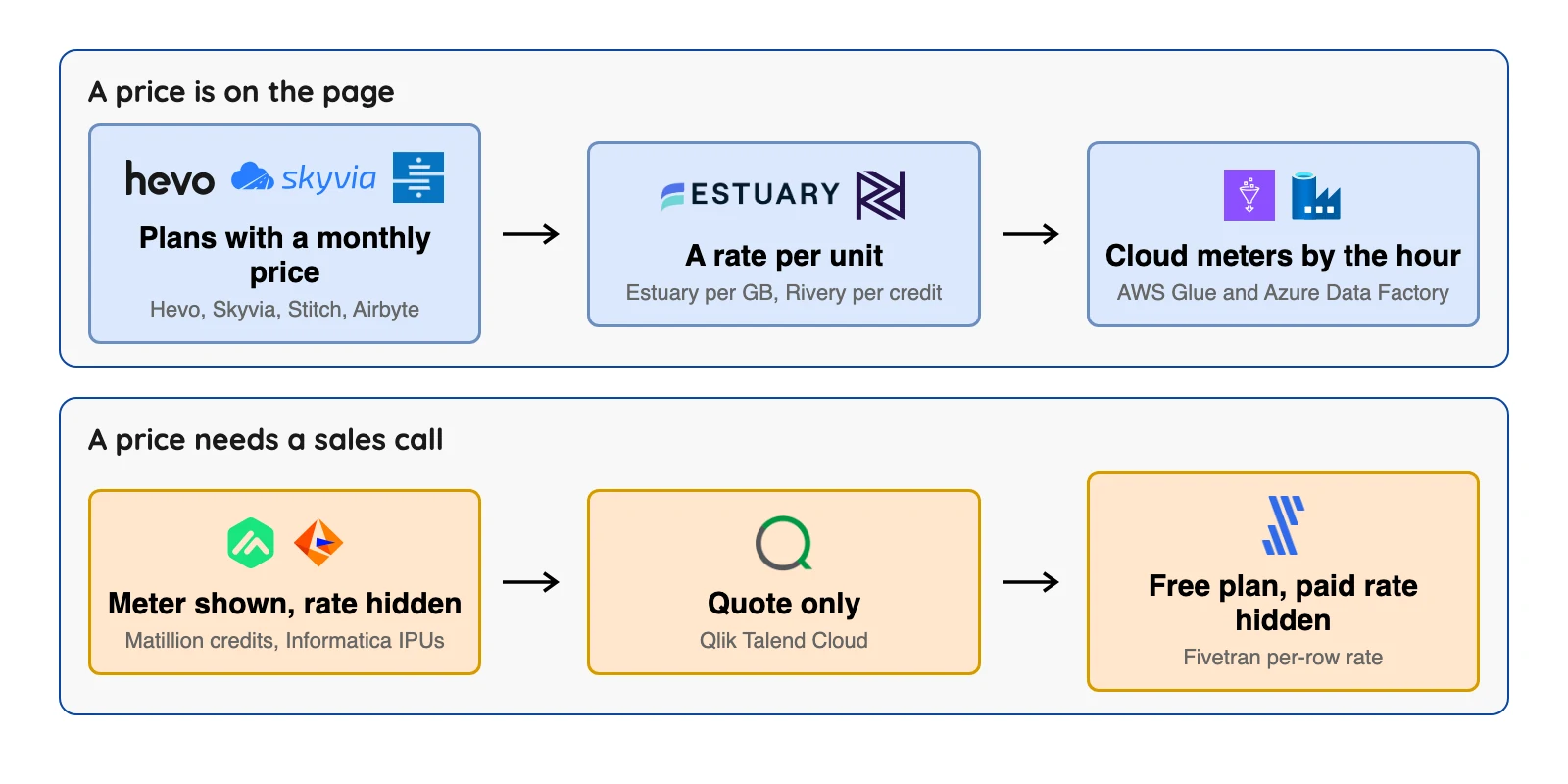
Every figure below comes from the vendor's own pricing page, linked in its entry further down. "Not published" means the vendor's page shows no figure. It doesn't mean no figure exists.
| Tool | Who runs it | Billing meter | Free option | Price shown on the vendor's own page, October 2026 |
|---|---|---|---|---|
| Fivetran | Vendor | Monthly active rows (MAR) per connection | Free to 500,000 MAR | $5 base charge per connection (1 to 1M MAR); $12,000 annual minimum; per-row rates in its Service Consumption Table |
| Airbyte | Both | Credits | Core is free software | Cloud Standard $20 a month with 5 credits; Plus from $189 a month for 40 credits |
| Hevo | Vendor | Events | Free to 1M events | Starter $265 a month billed annually ($299 billed monthly); Professional $750 a month billed annually ($849 billed monthly) |
| Skyvia | Vendor | Records per month | Free, 10k records a month | Basic $79 a month billed annually ($99 billed monthly) |
| Stitch | Vendor | Replicated rows | None, 14-day trial | Standard from $100 a month; Advanced $1,500 a month and Premium $3,000 a month, both billed annually |
| Estuary | Both | Gigabytes plus connector instances | Free to 10 GB a month | $0.50 per GB, plus connector instances at $100 a month each for the first six, then $50 |
| Integrate.io | Vendor | Flat fee | 14-day trial | Core $1,999 a month, billing period not stated on the card |
| Rivery (Boomi) | Vendor | Credits | 14-day or 1,000-credit trial | $0.9 per credit, Base edition pay as you go |
| Meltano | You | None for the software | Free, open source | Meltano Cloud dollar prices not published |
 OLake Go OLake Go | You | None for the software | Free, Apache 2.0 | Open source, no software fee; you pay for your own servers and storage |
| dlt | You | None for the library | Free, Apache 2.0 | dltHub platform $12,000 a month, 12-month minimum |
| Matillion | Both | Credits per task hour | Trial only | No dollar price shown |
| Informatica | Both | Informatica Processing Units (IPU) | Free to 20M rows or 10 compute hours a month | No dollar price per IPU; one AWS Marketplace bundle is $131,760 for 12 months |
| Qlik Talend Cloud | Both | Capacity band | Not stated on the pricing page | Not published |
| AWS Glue | Cloud service | Data processing unit (DPU) hours | None for ETL jobs | $0.44 per DPU-hour, or $0.308 on Glue 6.0 and above (US East, Ohio) |
| Azure Data Factory | Cloud service | Activity runs, copy hours, data flow hours | None listed for activity runs or copying | $1 per 1,000 activity runs; $0.25 per Data Integration Unit (DIU) hour of copying (US East) |
Sources: Fivetran billing docs, Fivetran Service Consumption Table, Airbyte pricing, Hevo pricing, Skyvia pricing.
More sources: Stitch pricing, Estuary pricing, Integrate.io pricing, Rivery pricing, AWS Glue pricing.
Also: Informatica's free plan, Matillion pricing, Qlik pricing and Meltano pricing.
Last sources: Azure Data Factory pricing and dltHub pricing. Informatica's figure is from its AWS Marketplace listing, shown in the screenshot below, and the $0.308 Glue rate is from AWS's published US East (Ohio) price list. Checked October 2026.
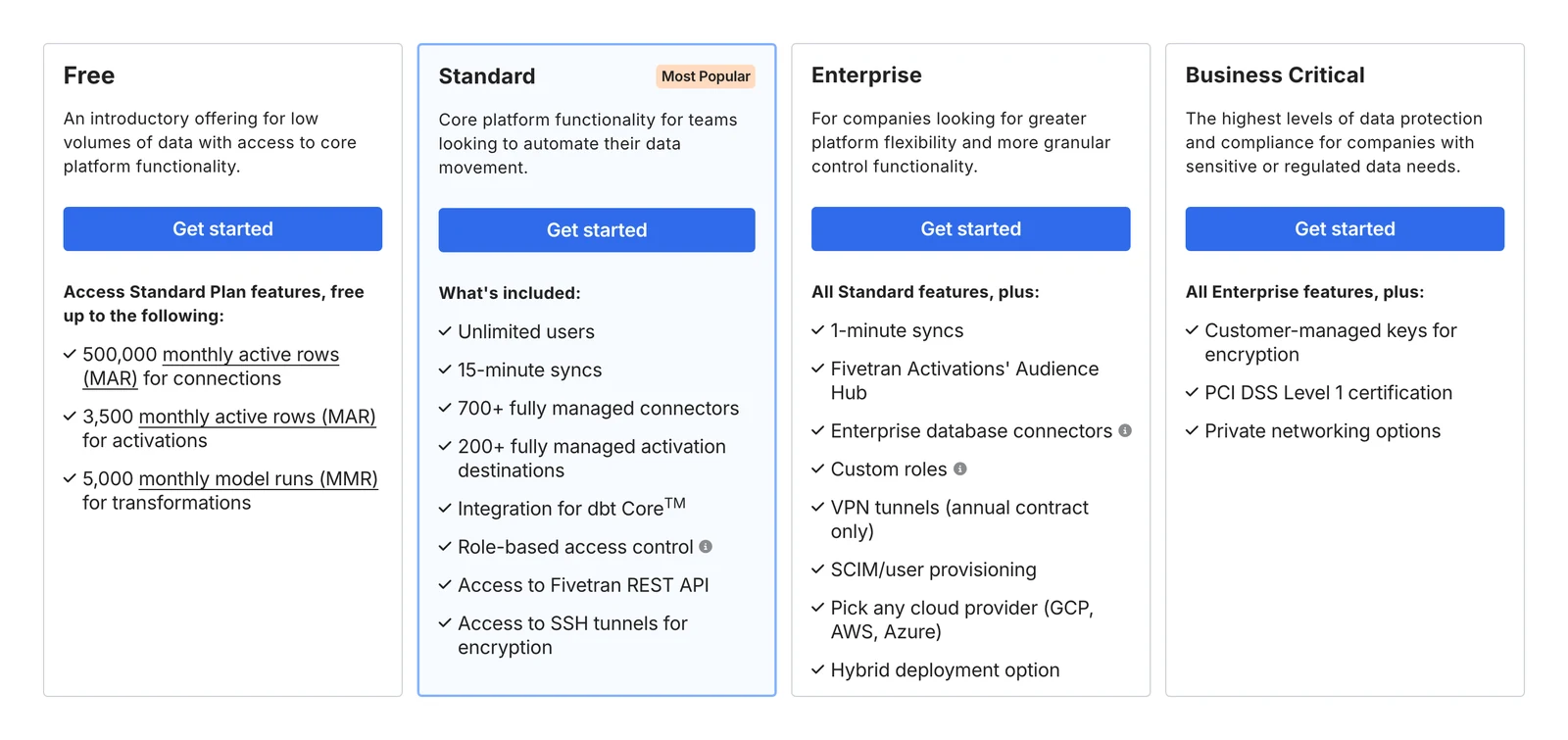
Fivetran's pricing page, October 2026.
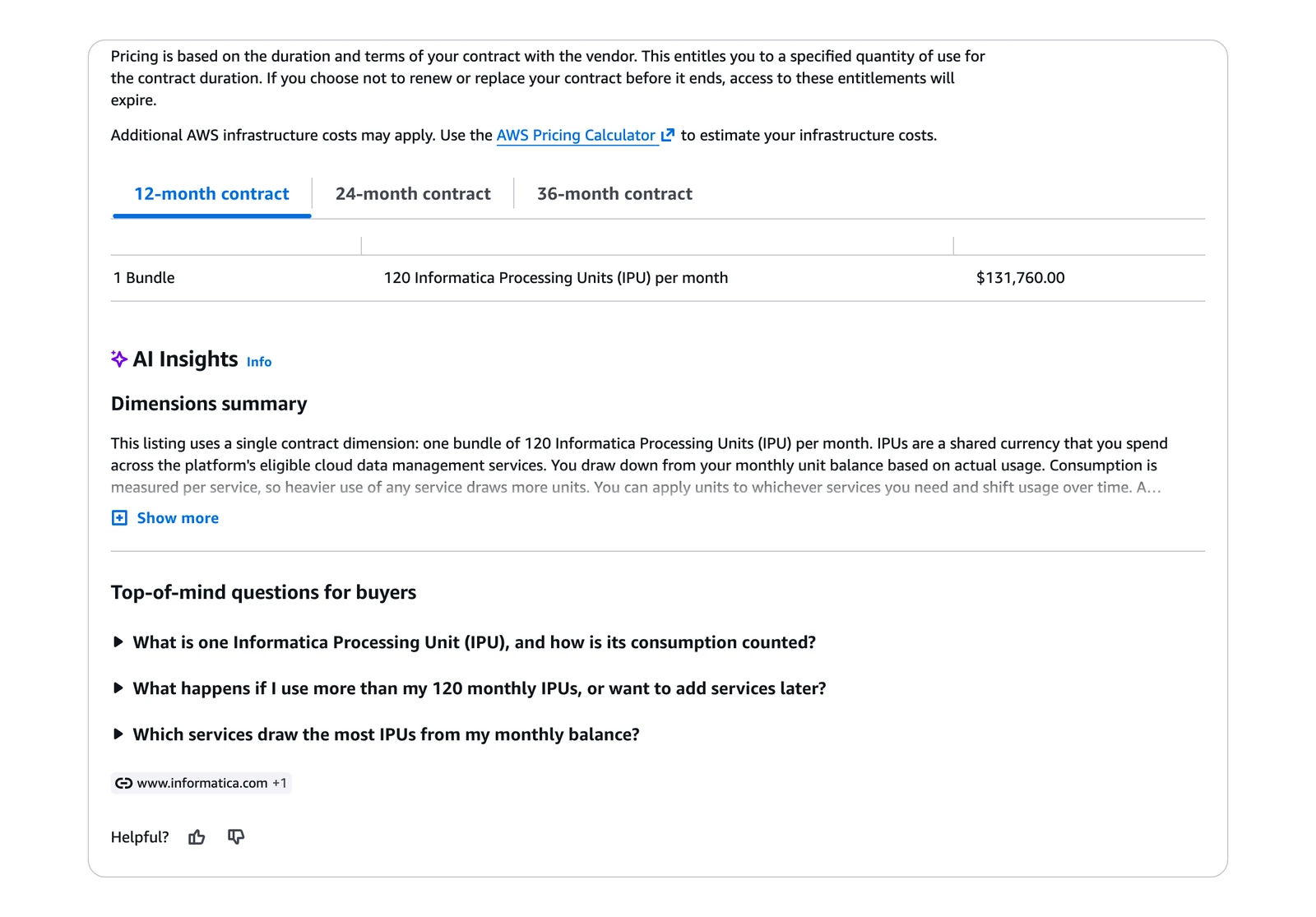
Informatica listing on AWS Marketplace, October 2026.
What each tool does with databases and Iceberg
This second table covers the two limits that surprise buyers most. Apache Iceberg is an open table format that lets many query engines read the same files in a data lake. Each cell comes from the vendor's docs, linked in the tool's entry or in the cell.
| Tool | Database change capture, per its docs | Writes Apache Iceberg, per its docs |
|---|---|---|
| Fivetran | Change data capture for SQL Server (its docs); Oracle, SAP and Db2 (Beta) sources need higher plans (billing docs) | Yes, through its Managed Data Lake Service; no position deletes (a type of row-level delete) |
| Airbyte | Log-based on a schedule, not continuous | Yes, S3 Data Lake destination |
| Hevo | Log-based; streaming must be enabled by sales (docs) | Early Access, Snowflake-managed only |
| Skyvia | We found true CDC named only for SQL Server | Not listed |
| Stitch | Log-based, scheduled | Not listed |
| Estuary | Change capture for Postgres, MySQL, MongoDB, Oracle and SQL Server, per its pricing page | Yes, needs AWS EMR Serverless and S3 |
| Integrate.io | Lists CDC among its products (pricing page) | Not listed |
| Rivery (Boomi) | Oracle CDC on the Enterprise edition, per its pricing page | Not listed |
| Meltano | Depends on the tap (connector) variant | No official loader |
| OLake Go | Postgres, MySQL/MariaDB, MongoDB and SQL Server, per its docs (not tested by us) | Yes, Iceberg tables or Parquet files are its only outputs |
| dlt | Postgres replication source is the only log-based option we found in its open-source docs | Yes, through PyIceberg |
| Matillion | Streaming CDC listed on the Scale edition (pricing page) | Not listed |
| Informatica | Yes for many database sources, per its database ingestion docs | Describes Snowflake-managed Iceberg tables for database ingestion; the formats behind its "Open Table" target are not stated |
| Qlik Talend Cloud | Log-based from the Standard edition | Yes, Qlik Open Lakehouse |
| AWS Glue | Zero-ETL from self-managed Oracle, SQL Server, MySQL and PostgreSQL goes to Redshift only | Yes, read and write |
| Azure Data Factory | Native CDC for a short list of sources | Copy activity can write Iceberg to Azure Data Lake Storage Gen2 only |
"Not listed" means we did not find it in the vendor's docs, which is not proof it is missing. Check the docs for your catalog, delete handling and who runs file cleanup.
What one month costs, where the page lets you work it out
Only some vendors let you work out a monthly number from public pages. The workloads below are invented illustrations, so swap in your own, and don't read the rows as a ranking.
| Tool | Example month (invented) | Sum at list price | Result |
|---|---|---|---|
| Hevo Starter | 5M events, billed monthly | Price shown on the pricing page | $299 ($265 on annual billing) |
| Estuary Cloud | 50 GB moved, 2 connector instances | 100 x $0.50 + 2 x $100 | $250, before any free-tier credit |
| AWS Glue | 6 DPUs for 15 minutes a day, 30 days | 45 DPU-hours x $0.44, or x $0.308 on Glue 6.0 and above | $19.80, or $13.86 |
| Integrate.io Core | Unlimited data volume, per its pricing page | Flat fee | $1,999 a month, but the billing period and node-hour terms above are unresolved |
| Informatica | 120 IPUs a month, AWS Marketplace bundle | $131,760 / 12 | $10,980 |
| dltHub platform | 5,000 credits included, per its pricing page | Flat fee, 12-month minimum | $12,000 a month |
| Fivetran | Needs an input we do not have | Rows per connection x the Service Consumption Table tiers | Not worked: we would need your distinct monthly active rows for each connection |
| Qlik Talend Cloud, Matillion | Not possible | Capacity or credit rate not published | Ask for a quote |
Sources: Hevo pricing, Estuary pricing, Integrate.io pricing, dltHub pricing, AWS Glue pricing and the Service Consumption Table.
The Informatica bundle is from its AWS Marketplace listing, and $0.308 is from AWS's US East (Ohio) price list. Checked October 2026.
Estuary's row counts the 50 GB twice, once in and once out, because Estuary's own pricing example does: 800 GB and 2 connector instances show as $1,000 a month. On Fivetran, the Service Consumption Table says Standard starts at $495 per million monthly active rows (MAR) plus a $5 base charge for the first tier.
These sums cover each vendor's own meter and nothing else. Glue jobs also need storage and a catalog, and Estuary's Iceberg connector needs a Spark application on AWS and an S3 bucket, which AWS bills separately. Airbyte Core, Meltano, dlt and OLake Go have no software fee, but you pay for servers and staff time.
How to choose
Four questions, asked in order. Stop as soon as you're down to two or three tools.
- Who will run it? If nobody on your team can, look at the vendor-run tools. If you have engineers who will, add Airbyte Core, Meltano, dlt and OLake Go.
- What are the sources? Mostly SaaS apps? Look at Fivetran, Hevo or Airbyte. Databases that need fresh data point to Estuary, Qlik Talend Cloud or Fivetran Enterprise.
- Where must the data land? A warehouse is easy almost everywhere. Iceberg tables on your own catalog shrink the field to the second table above, and each tool there has limits.
- Can you price it? If the meter counts rows, events or credits, price your busiest month, not your average one. If the vendor won't print a rate, ask for a written quote that states your volume.
If your sources include databases, put three more questions to each vendor and ask them to point at a docs page:
- What happens if the change log is gone before the tool reads it? Databases keep change records for a limited time. Fivetran's SQL Server page says the default window is 3 days and recommends 7.
- Does it run continuously or on a schedule? Airbyte's CDC docs say syncs are scheduled, and Hevo's docs say streaming must be enabled through its sales team. Both are linked in their entries below.
- Which Iceberg features does the writer skip? Fivetran's Managed Data Lake Service page (linked in the table above) says it does not support position deletes for Iceberg tables. Other tools list their own limits, so read the destination page before you sign.
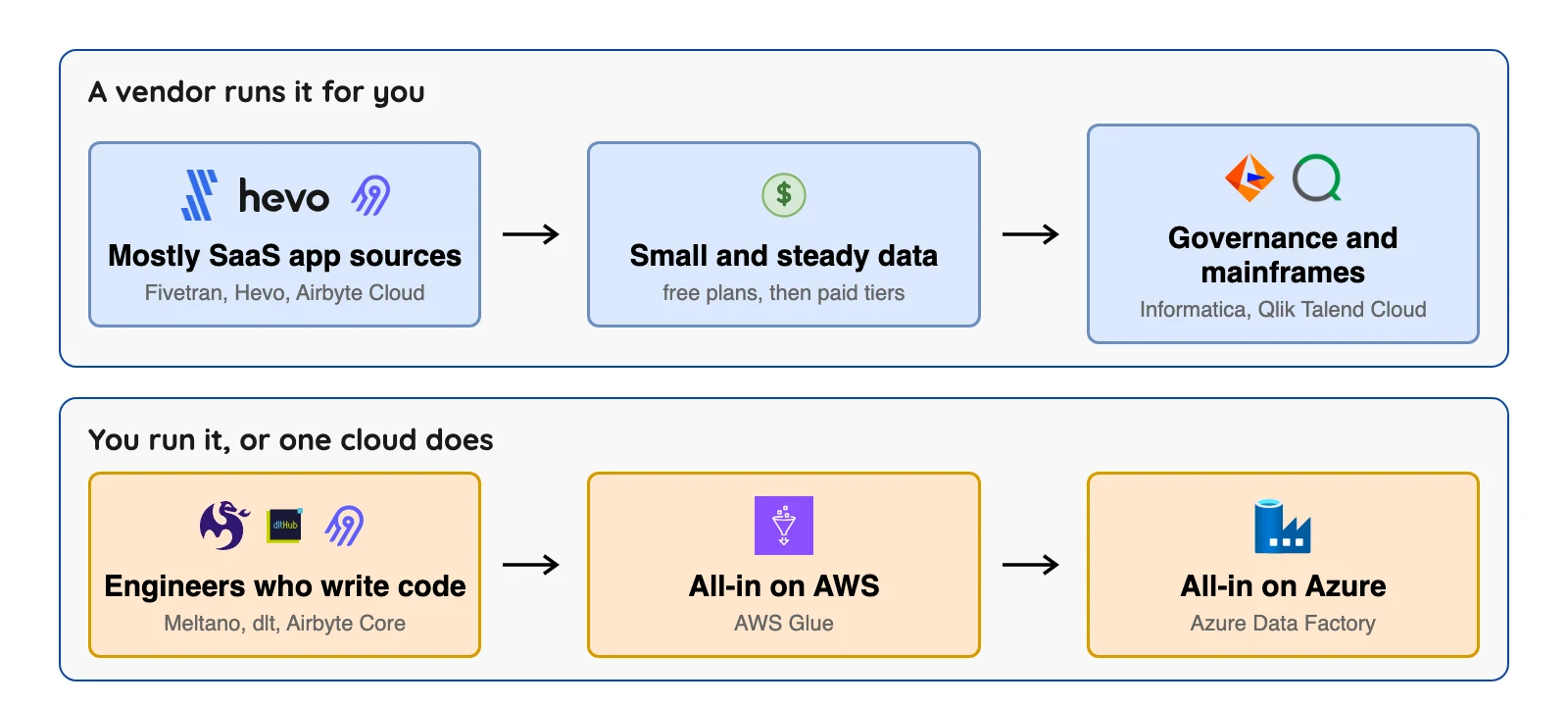
Which data integration tool fits you?
Question 1 of 5
Who will run it?
The post's trade: a vendor-run tool costs money and saves staff time, while a self-run tool costs staff time.
The 16 best data integration tools
Vendor-run tools for databases and apps
1. Fivetran: best for SaaS sources and a hands-off setup
Fivetran home page, October 2026.
At a glance
- Billing: monthly active rows (MAR) per connection
- Free option: Free plan up to 500,000 MAR
Fivetran runs pre-built connectors that copy data from apps, databases and files into a warehouse or lake. We did not test any of it.
Fivetran's billing docs say pay-as-you-go adds a $5 base charge to each connection that uses 1 to 1M rows, with a $12,000 minimum for annual contracts. Per-row list rates are in its Service Consumption Table: Standard starts at $495 per million MAR, then falls to $170 per extra million from 1 million MAR, before discounts.
What's good
- Its pricing page claims 700+ connectors and 200+ activation destinations (reverse ETL), with 15-minute syncs on Standard and 1-minute syncs on Enterprise. We did not count the connectors or test the sync times, so ask for a trial on your own sources.
- Per its billing docs, the Free plan has all Standard features up to 500,000 connector MAR, 3,500 activation MAR and 5,000 model runs a month, and annual contracts carry a built-in 5% discount.
- Its Service Consumption Table puts each connection on its own volume curve. Standard list rates run from $495 per million MAR for the smallest connections to $170 per million from 1M MAR, $58 from 4M and $19.70 from 16M, before discounts.
- Its SQL Server page lists four incremental sync methods: change tracking, change data capture, Binary Log Reader and Teleport Sync. Teleport Sync compares row hashes between syncs instead of reading the transaction log, and the page suggests it when enabling change tracking or CDC is not feasible.
- Its Managed Data Lake Service docs say your data stays in your own cloud storage account (Amazon S3, Azure Data Lake Storage or Google Cloud Storage), and that Fivetran always creates Iceberg table metadata and manages the catalogs and maintenance, with snapshot cleanup once a day.
Where it falls short
- Per its billing docs, Oracle, SAP and Db2 (Beta) database sources are only on Enterprise and Business Critical, so the free plan can't use them, and its High-Volume Agent connectors for Oracle and SQL Server are listed for those two plans as well.
- The pricing page prints no per-row rate (the list rates are in the Service Consumption Table), and since January 1, 2026 deleted rows count as paid MAR, per Fivetran's pricing update.
- The Service Consumption Table says you cannot combine MAR across connections for a better rate, so each connection pays its own base spend, such as the $500.00 the table lists at the 1M MAR tier on Standard.
- On SQL Server, the same page gives a default CDC retention window of 3 days (7 recommended). With CDC on, column type changes carry over, but renamed columns, new tables and new columns do not, and new ones need a new CDC instance.
- Its Managed Data Lake Service page lists no support for position deletes on Iceberg tables, and on AWS lakes none for the S3 Glacier Flexible Retrieval, Glacier Deep Archive and Intelligent-Tiering archive tiers (docs).
- The same docs say orphan files are moved to an
orphansfolder on the second and fourth Saturday of each month, and that deleting or editing that folder can permanently damage your tables.
What users say: A commenter on a Hacker News thread about the Fivetran and dbt Labs merger wrote in October 2025, "Fivetran is convenient but absurdly expensive."
2. Airbyte: best for a big connector list you can self-host or rent
Airbyte home page, October 2026.
At a glance
- Billing: credits on Cloud, nothing for Core
- Free option: Core is free; Cloud has a 14-day free trial
Airbyte is one product wearing several hats: Core (self-run), Cloud (Standard, Plus and Pro) and Enterprise Flex (hybrid). On its pricing page, Cloud has a 14-day free trial, Standard starts at $20 a month with 5 credits and extra credits at $5 each, and Plus starts at $189 a month for 40 credits. Pro and Enterprise Flex show "Custom".
What's good
- Core has no credit meter, so you pay for servers and staff time instead. Cloud is the rented option, billed in credits.
- Per its licence FAQ, anyone can use Airbyte free of charge and run it at scale on their own infrastructure, with "no limitations exist on volume, number of users, number of connections, etc." for open source users.
- Its pricing page lists 700+ connectors on all four plans, with a maximum sync frequency of 1 hour on Standard, 15 minutes on Plus and 5 minutes on Pro and Enterprise Flex.
- Its CDC docs list current support for Postgres, MySQL, SQL Server, MongoDB, Oracle, SAP HANA and IBM Db2.
- Its S3 Data Lake docs say the connector writes Iceberg tables to S3 or S3-compatible storage through a REST, AWS Glue, Nessie or Polaris catalog, and its Append + Deduped mode is merge-on-read on the stream's primary keys.
Where it falls short
- Airbyte's CDC docs say "We do not treat CDC sources as infinite streaming sources", so syncs run on a schedule. Its sync schedules page lists hourly as the shortest, bar 15 minutes on Cloud Plus.
- The same CDC docs say CDC incremental needs primary keys for most sources, changes made by TRUNCATE or ALTER do not appear in the logs and so not in the destination, and a refresh is required after you add a table to a CDC connection.
- Core uses the Elastic License 2.0, which its licence FAQ says bars selling a hosted Airbyte service.
- Its S3 Data Lake docs say the connector never rewrites existing Iceberg data files, so it handles only adding or removing a column, widening a column and changing the primary key. Objects and unions are written as serialized JSON strings.
- The same page does not say who handles compaction or snapshot expiry, and it cautions that compaction running during a truncate refresh sync deletes files from the current generation and causes data loss.
- It also warns that Snowflake does not recognize native Iceberg row-level deletes for tables in external catalogs such as Glue, so queries there return all versions of a record.
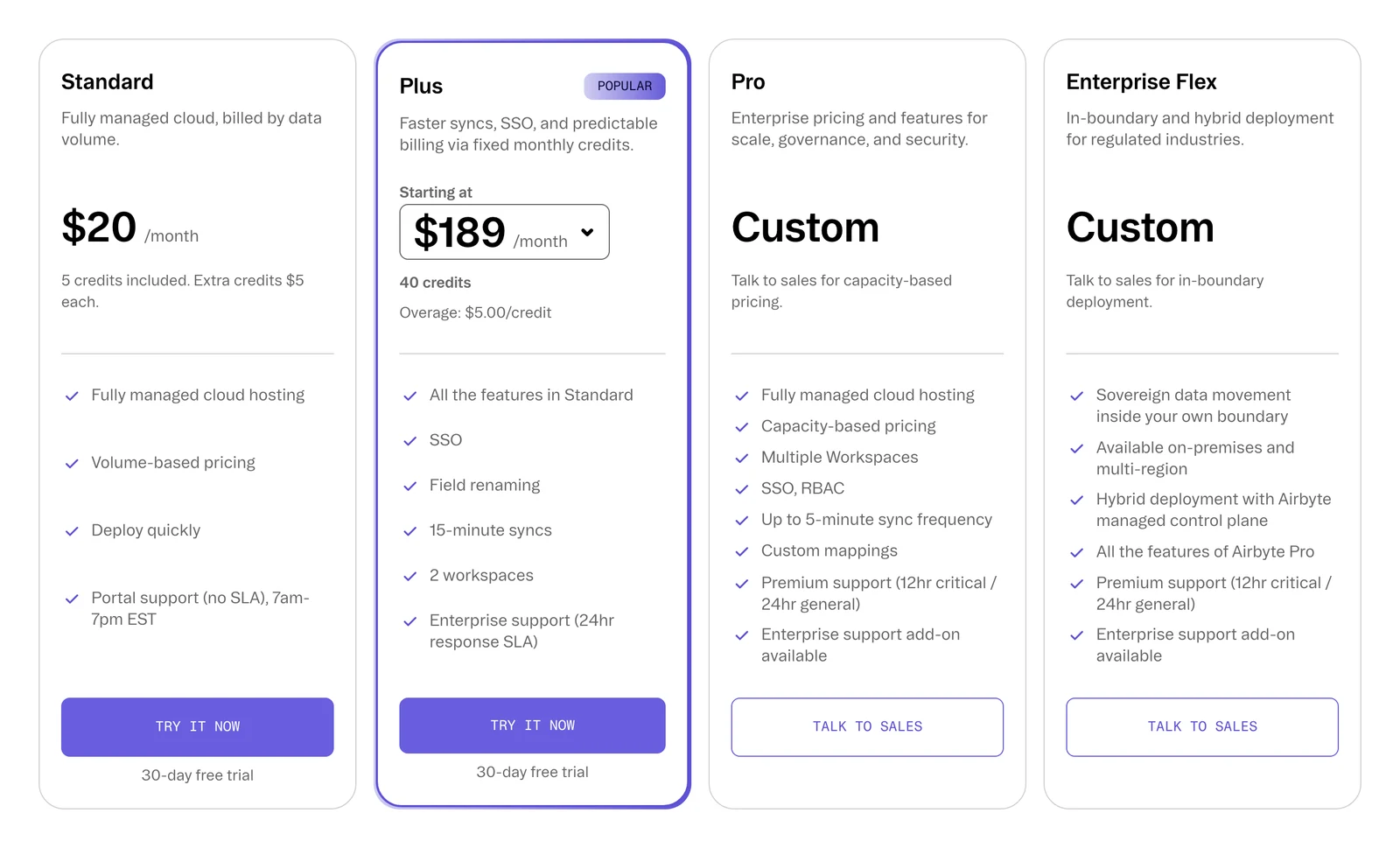
Airbyte's pricing page, October 2026.
3. Hevo: best for a low entry price and a free plan
Hevo Data home page, October 2026.
At a glance
- Billing: events (each record inserted, updated or deleted)
- Free option: Free, up to 1M events a month and 5 users
Hevo is a managed service for ETL and ELT pipelines, and it's one of the few that shows entry prices up front. On its pricing page, Starter shows $265 a month billed annually, or $299 a month billed monthly, for 5M events. Professional shows $750 a month billed annually, or $849 a month billed monthly, for 20M events.
What's good
- Its page shows a free plan (labelled "free forever for limited connectors") and entry prices up front. The 24/7 support and 150+ connector figures on the Starter card are Hevo's claims, which we did not test.
- Per its docs, log-based pipelines read BinLog (MySQL), logical replication (PostgreSQL), Streams (DynamoDB), change streams or OpLog (MongoDB), Change Tracking (SQL Server) and redo logs (Oracle).
- Its pricing page shows the Free plan with up to 5 users, and Starter adding up to 10 users, a dbt integration and SSH/SSL.
- Its Snowflake Iceberg docs say the table data and metadata files are stored in your Amazon S3 bucket, and that external engines such as Spark and Trino can read the tables through the Horizon Iceberg REST Catalog API.
Where it falls short
- Hevo's docs say streaming pipelines must be enabled through its sales team and are not available for SQL Server or DynamoDB.
- Its pricing page shows 1-hour scheduling on the Free and Starter plans, and "limited connectors" on Free against all connectors on Starter and above.
- Usage above your plan's event quota is billed on-demand on top of the plan, and the page shows no rate for it (pricing FAQ).
- Its Iceberg option is Early Access and Snowflake-managed only, per its docs. It must be enabled through a Hevo account executive or Support, and needs a Snowflake account, warehouse and database, an S3 bucket with an IAM policy, and a Snowflake external volume.
- The log-based docs list troubleshooting pages for "Pipeline failure due to BinLog expiry" (MySQL) and "Redo Log expiry" (Oracle), so log retention on your source matters (docs).
- We also found no self-hosted edition.
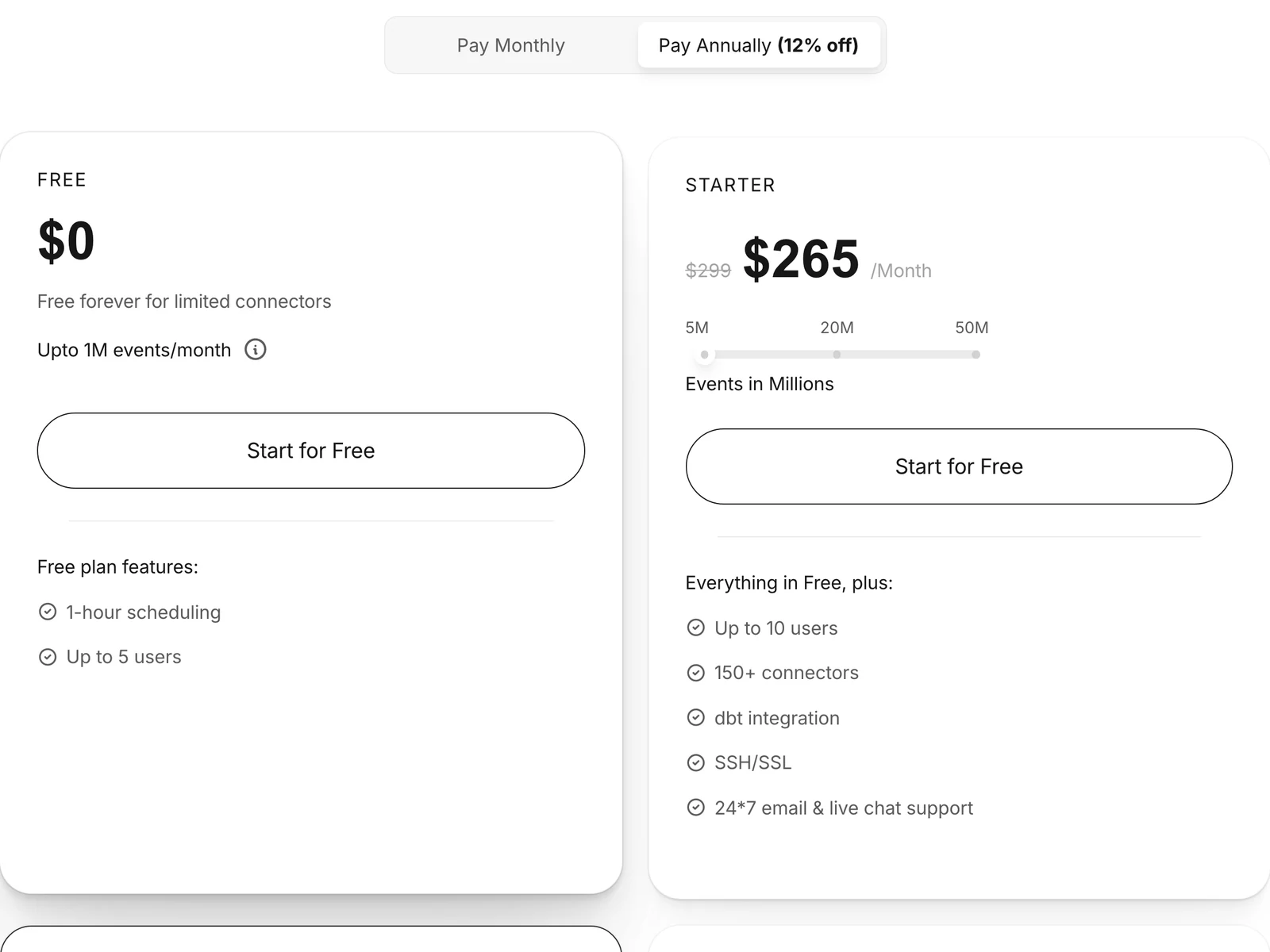
Hevo's pricing page, October 2026.
4. Skyvia: best for small teams that want a no-code tool
Skyvia home page, October 2026.
At a glance
- Billing: records per month
- Free option: Free plan, 10k records a month, once a day
Skyvia is a no-code cloud service from Devart, so you click rather than code. Its pricing page shows Basic at $79 a month with the annual toggle and $99 monthly.
What's good
- A low entry price and a no-code builder.
- Its pricing page shows unlimited connections and users on all four plans, with the maximum run frequency at once a day on Free and Basic, once an hour on Standard and once a minute on Professional.
- Scheduled integrations run 2 on Free, 5 on Basic, 50 on Standard and unlimited on Professional, and schedules expire after 30 days on Free only.
- The page has a Monthly/Annually toggle labelled 20% off above the plan cards.
- Enterprise is a custom annual package with a dedicated virtual machine, unlimited record volume and priority support, with a quote on request.
Where it falls short
- We found true CDC named only for SQL Server in its docs, and no log-based CDC for other databases.
- We found no Iceberg destination in its docs.
- Per the pricing page, the Free and Basic plans run at most once a day and list simple mapping features, with advanced mapping starting at Standard.
- Free allows 2 scheduled integrations and Basic 5, while Standard allows 50 (pricing page).
- Additional records are billed beyond each plan's allowance at $0.06 and $0.02 per 1,000 records, but the page text does not label which plan each rate belongs to.
5. Stitch: best for simple row-based loading, with an owner change to know
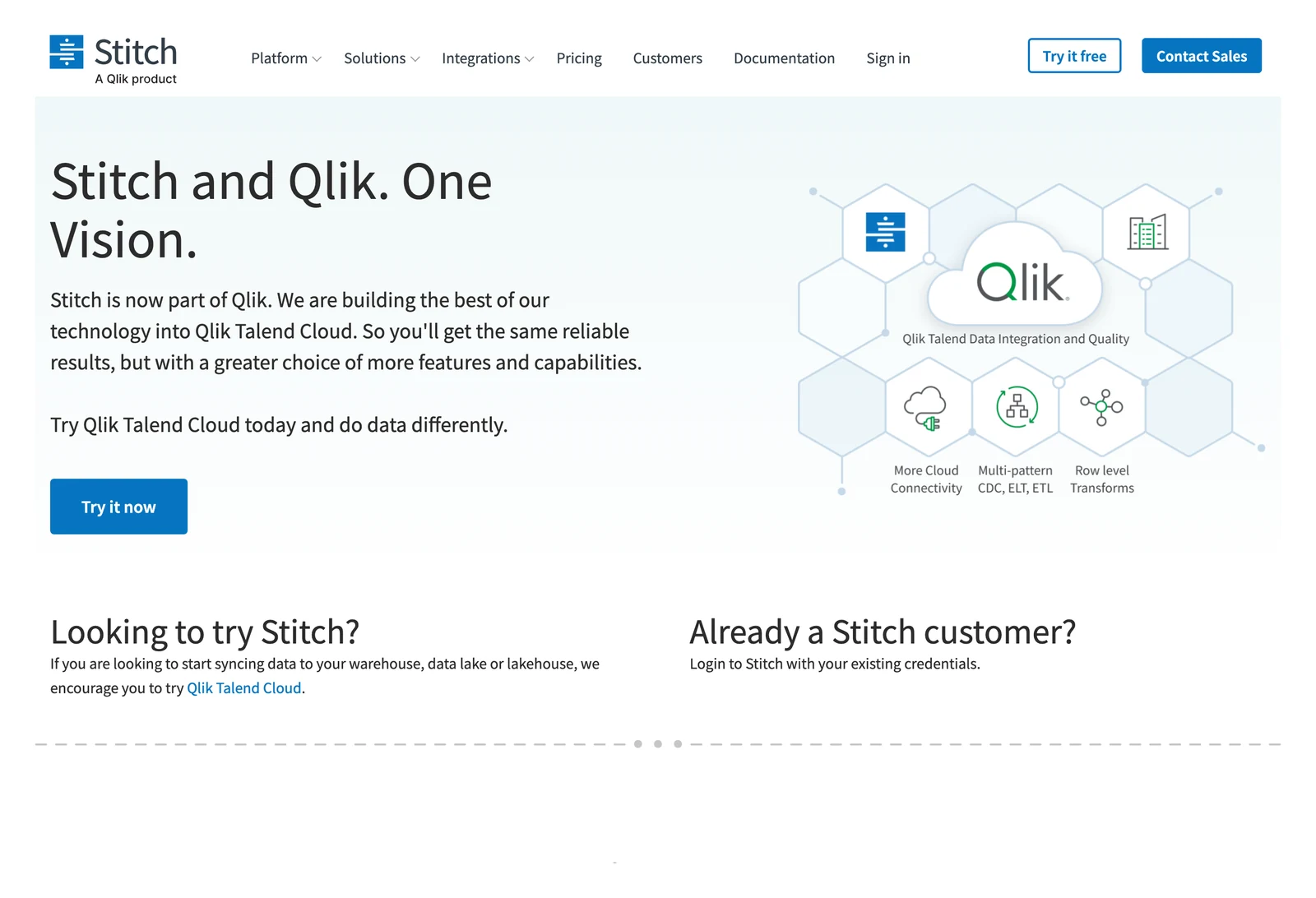
Stitch home page, October 2026.
At a glance
- Billing: replicated rows per month
- Free option: none, 14-day trial
Its home page says Stitch is now part of Qlik and tells new users to try Qlik Talend Cloud. Its pricing page shows Standard from $100 a month for 5M rows, Advanced at $1,500 a month billed annually, and Premium at $3,000 a month billed annually.
What's good
- Its log-based replication docs name MySQL, PostgreSQL, MongoDB, SQL Server, Oracle and DynamoDB.
- Its pricing FAQ says you set the replication frequency for each integration, from minutes to hours, and every user can use cron-expression scheduling.
- The Standard card lists 5 to 300 million rows a month, 5 users and 7-day extraction log retention, and Premium lists 1 billion rows a month and 5 destinations.
- Its home page advertises 130+ data sources, a vendor claim we did not count.
Where it falls short
- We found no Iceberg in its destination list.
- The home page says Stitch is now part of Qlik and points new users to Qlik Talend Cloud, and it publishes no end-of-life date.
- Per its log-based docs, log-based replication on PostgreSQL works only with a master instance, some cloud versions of the supported databases may not support it, and changes made by event types the database does not write to its log are not detected.
- The pricing page lists 1 destination and 10 standard sources on Standard, and "Unlimited (Enterprise sources)" on Advanced, so connectors marked Enterprise sit in a higher tier.
- The page shows no overage rate per row beyond a plan's allowance, and Advanced and Premium are billed annually, so you commit for a year at a time.
- Support is chat and email during regional business hours (8 a.m. to 8 p.m. Eastern, Monday to Friday), per the same FAQ.
6. Estuary: best for streaming and batch from one tool
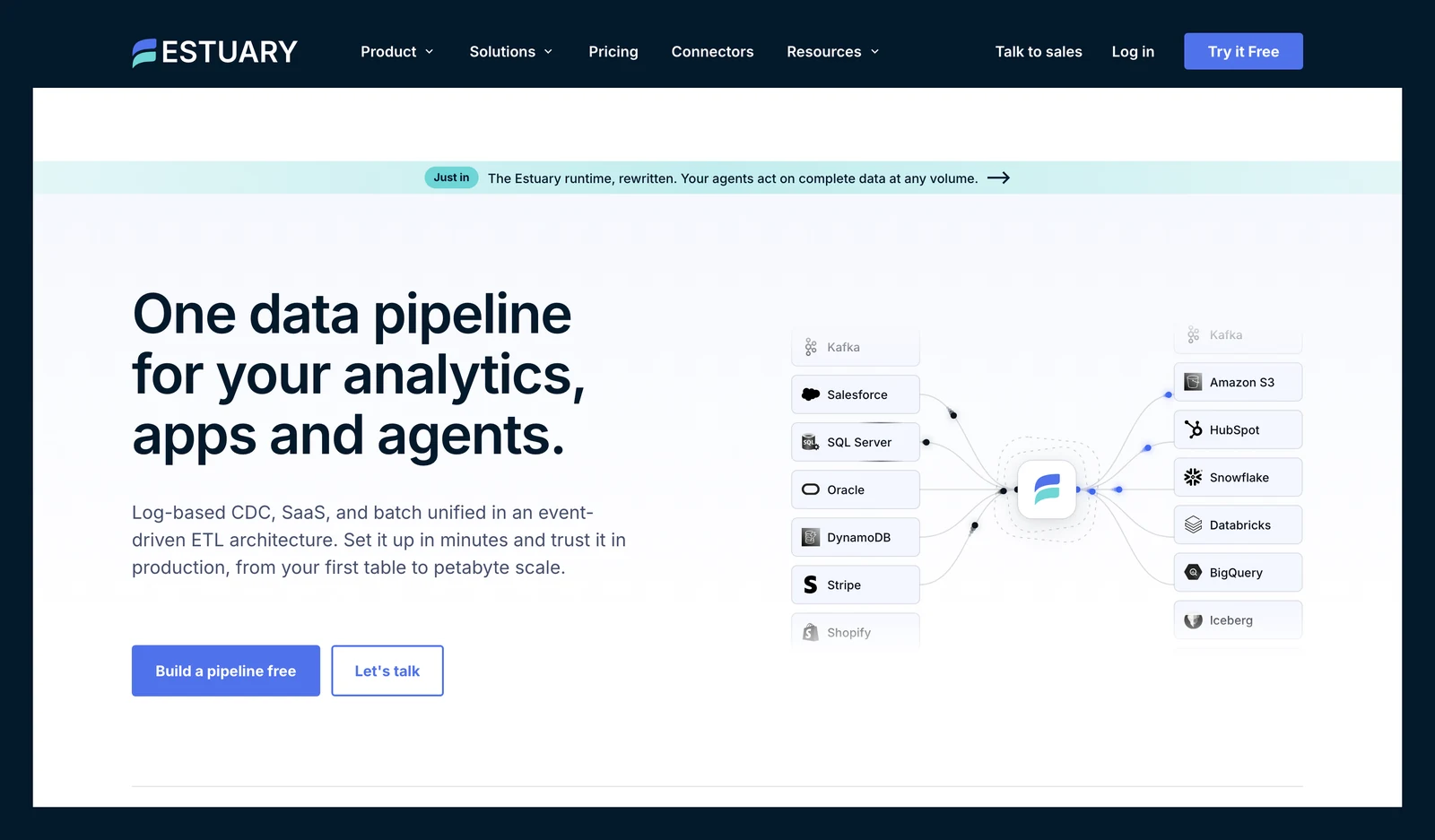
Estuary Flow home page, October 2026.
At a glance
- Billing: $0.50 per GB plus connector instances
- Free option: 10 GB a month and 2 connector instances
Estuary captures data into collections and sends it on to destinations, with real-time and batch modes. The fee structure has a quirk. On the Cloud plan the first six connector instances are $100 a month each, then $50 each, according to its pricing page.
What's good
- Its pricing page FAQ lists Postgres, MySQL, MongoDB, Oracle and SQL Server among supported databases and says change capture streams changes in real time.
- The same FAQ says a pipeline starts with a historical backfill and then switches to real-time CDC, and that you can disable or scope the backfill.
- The Cloud plan lists "Millisecond latency or batch, no extra charge" and a 30-day free trial that starts on its own when you pass the free tier, with no credit card.
- Adding a target means paying only for that target and the data sent to it, with no need to re-extract from each source (pricing FAQ).
- Its Iceberg docs support AWS Glue catalogs and S3 table buckets, and let you set Glue Table Optimizers for compaction, snapshot retention and orphan file deletion.
Where it falls short
- Its Iceberg connector (docs linked in the table above) runs Spark jobs on a compute system you configure, and the docs list an AWS EMR Serverless Spark application (release emr-7.7.0), an S3 bucket and dedicated IAM roles as prerequisites.
- Each connector instance adds a monthly fee on top of the per-GB charge, and those fees add up.
- The Iceberg docs label the section for REST catalogs other than AWS Glue as Beta, and say only REST catalogs that use Amazon S3 storage are supported, with GCP and Azure planned.
- The same page says nested types are not currently supported, and array and object fields are written as string columns.
- Compaction through the Glue optimizer defaults to off, and Hard Delete is off by default, so deletes in the source stay as soft deletes unless you change it.
- The Cloud plan lists standard support through community Slack and email, and custom SLA terms appear only in the Enterprise column (pricing page).
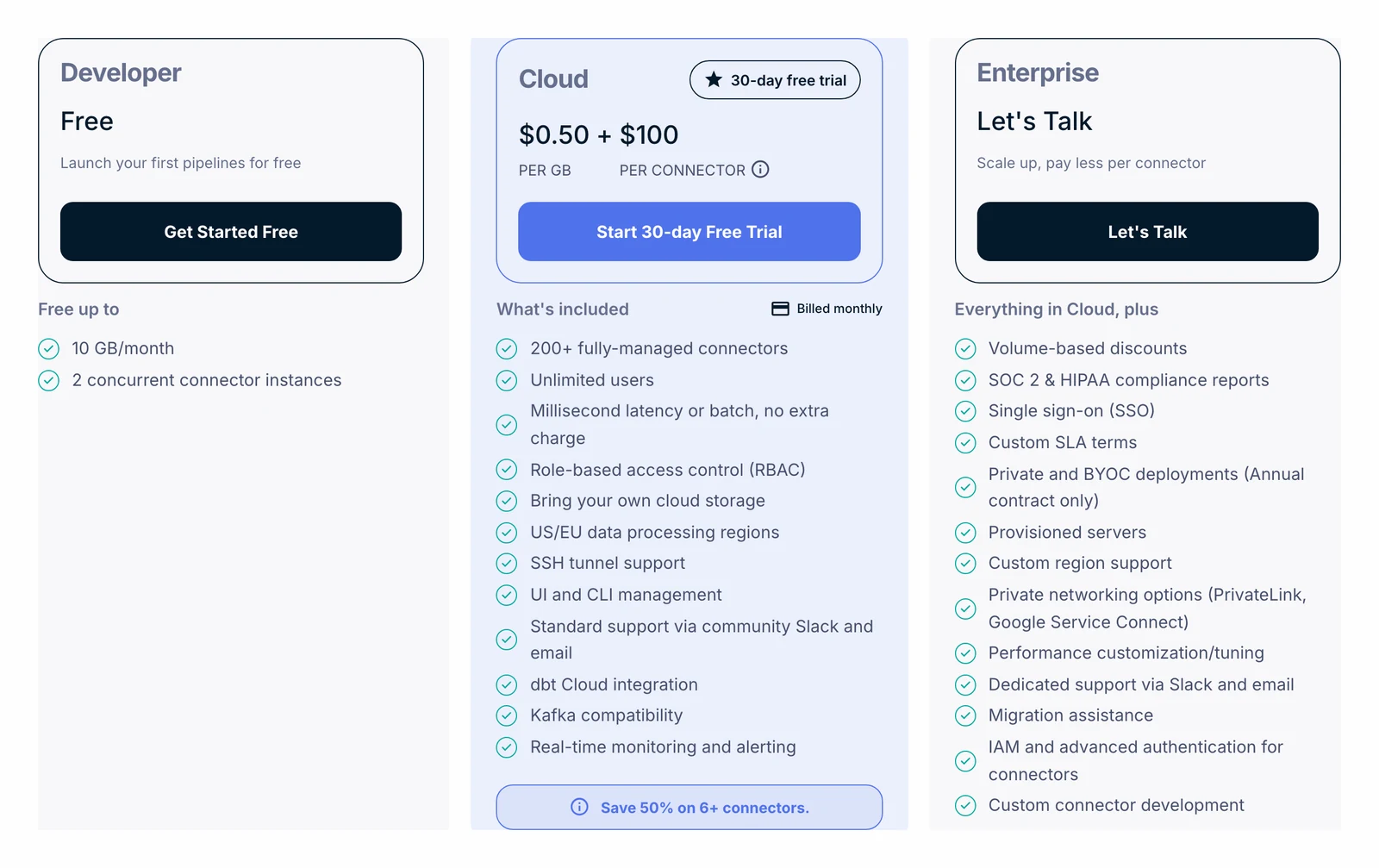
Estuary's pricing page, October 2026.
7. Integrate.io: best for a flat fee and visual pipelines
Integrate.io home page, October 2026.
At a glance
- Billing: flat fee, "unlimited data volumes" on the pricing page
- Free option: 14-day trial
Per its pricing page, Integrate.io sells ETL, ELT, CDC and reverse ETL (sending warehouse data back to apps). The page lists Core at $1,999 a month with a 60-second pipeline frequency, and the card shows only "/mo" with no billing period. Its terms describe paid plans with prepaid node hours that are "monthly and billed annually", so ask in writing what Core includes.
What's good
- A flat list price, so there is no per-row meter on the pricing page.
- Per its pricing page, the Core card lists unlimited data volumes, pipelines and connectors, full platform access, 60-second pipeline frequency and 30-day onboarding.
- Its FAQ says it covers 150+ sources and destinations, including Salesforce, HubSpot, Shopify, Stripe, MySQL, PostgreSQL, MongoDB, Snowflake, BigQuery and Redshift.
- The FAQ also says every plan includes 24/7 support with a 2-minute average first response, a vendor claim we did not test.
Where it falls short
- We found no Iceberg destination in its docs.
- Its terms say subscription periods are monthly and billed annually and renew automatically for a year unless you give notice, that fees are non-refundable, and that you pay the whole subscription period even if you stop using the service.
- The same terms have a fair usage policy: usage far above its norms may be reviewed, with remedies that include service limitations or pricing changes, which sits beside the pricing page's "No limits on data volume" header.
- The terms also allow overage fees if you exceed the node hours in your plan, and let the company revise fees with at least 7 days' notice on a paid plan.
- After the free trial, an account with no paid plan is downgraded to a free plan that cannot run jobs, and the terms say you may lose access to stored packages and schedules.
- The "Design Your Plan" card on the pricing page shows no price.
8. Rivery (Boomi Data Integration): best for credit-based ELT
Rivery (Boomi Data Integration) home page, October 2026.
At a glance
- Billing: credits
- Free option: 14 days or 1,000 credits
Rivery now carries the Boomi Data Integration name. Its pricing page counts in Boomi Data Unit credits and lists $0.9 per credit pay as you go on the Base edition, with database sources charged by bytes moved.
What's good
- It publishes a credit price on its pricing page.
- Per its pricing page, database, file and webhook sources are charged only on data transferred, at 1 credit per 100MB regardless of how often you run. Its example of 1,725MB a month from Postgres to a warehouse is 17.25 credits.
- The same page says it does not charge per connector or per user, and every data source is available on every edition.
- The Base edition lists one environment, two users and unlimited connections, and the maximum sync frequency is 60 minutes on Base, 15 on Professional and Pro Plus, and 5 on Enterprise.
Where it falls short
- Its pricing page puts Oracle CDC on the Enterprise edition only.
- We found no Apache Iceberg destination in its docs.
- Log-based CDC is charged 2 credits per 100MB, double the 1 credit per 100MB for standard database replication (pricing page).
- API sources are charged by run: 0.5 credit each time data is ingested from a single output table, 0.5 credit per 50MB above 50MB per run, and 0.5 credit for a run that finds no data.
- Professional shows only "Start for free", and Pro Plus and Enterprise show "Contact Sales", so only the Base edition has a printed price.
- The $0.9 per credit rate is for monthly billing, the page says annual billing saves more but prints no annual price, and Base is limited to 2 users and 1 environment.
Open-source tools you run yourself
9. Meltano: best for pipelines kept as code
Meltano home page, October 2026.
At a glance
- Billing: none for the software
- Licence: open source
- Owner: Matatika (its pricing page calls it "an open source project by Matatika")
Meltano is the option that lives in Git. Its pricing page says it is "Open source and free to use, with paid support options". It runs Singer taps, small programs that pull data from a source, and keeps settings in Git files.
What's good
- No software fee, so you pay for servers and staff time instead.
- Per its pricing page, every plan, including the open-source one, gets the full library of 600+ connectors, and pipelines are Git-native.
- The Meltano Cloud plans list 200 compute hours a month on Starter (25 workspaces, unlimited users, reverse ETL included), 2,000 on Growth and 5,000 on Scale, with 8 and 15 hours of engineering on demand on Growth and Scale.
- Paid support options are listed beside the free software.
Where it falls short
- CDC depends on the tap variant, and its Hub lists no official Iceberg loader.
- The same page says self-hosted Meltano is "not really suited for production teams unless you have a dedicated DevOps crew."
- Its FAQ says that with Meltano Open you manage your own infrastructure, monitoring and uptime.
- No dollar price is shown on any Meltano Cloud plan, and Enterprise is custom, so budgeting a hosted plan needs a quote.
10. OLake Go: best for database changes into Iceberg or Parquet on your own storage

OLake home page, October 2026.
At a glance
- Billing: none for the software
- Free option: open source under Apache 2.0, you pay for your own servers and storage
- Runs on: your own infrastructure
OLake Go is an open-source tool, Apache 2.0 on GitHub, that copies database tables into Apache Iceberg tables or Parquet files. You run it yourself with Docker, Helm on Kubernetes, the OLake UI or the command line.
Docs: Postgres, MySQL, MongoDB, SQL Server. We did not test any connector.
What's good
- Its docs list change data capture for Postgres, MySQL (including MariaDB), MongoDB and SQL Server, and Oracle, Db2, S3 and Kafka sources without it.
- It writes Iceberg tables or Parquet files to Amazon S3, MinIO or Google Cloud Storage, and its catalogs page lists the Iceberg catalogs.
- The docs list four sync modes: Full Refresh, Full Refresh + Incremental, Full Refresh + CDC and CDC Only. For its database sources, one tool does the first load and then the change capture.
- Syncs split large tables into chunks that are read in parallel, and they resume automatically from the last checkpoint after an interruption (docs).
- For the Iceberg destination, it uses a two-phase commit during full refresh, incremental and CDC (MongoDB, Postgres, MySQL, SQL Server), tracking per-chunk commit status so syncs avoid duplicate writes (docs).
- In Upsert mode it can write equality deletes, positional deletes or Iceberg v3 deletion vectors (docs), and its partitioning guide covers identity, year, month, day, hour, bucket and truncate transforms.
Good to know
- It reads databases, Kafka and S3 only: there are no SaaS-app sources and no transformations.
Bottom line: Pick it if you run Postgres, MySQL, MongoDB or SQL Server and want the data in Iceberg or Parquet on storage you own. For support or enterprise terms, contact the OLake team.
11. dlt: best for Python teams that want a library
dlt / dltHub home page, October 2026.
At a glance
- Billing: none for the library
- Licence: Apache 2.0
dlt (data load tool) is a Python library you add to a script, so there's no server to sign up for. Its pricing page says the library stays Apache 2.0 and lists the dltHub platform at $12,000 a month with a 12-month minimum. One line in its FAQ says $11,900, so we quote the headline figure.
What's good
- Sources cover SQL databases, REST APIs and files, and its Iceberg docs say Iceberg tables are written through PyIceberg.
- The same docs say dlt uses PyIceberg's catalog loading, so it works with the catalogs PyIceberg supports, including REST and SQL catalogs, and supports upsert and insert-only merge strategies.
- Iceberg partitioning is set with an
iceberg_adapterthat offers year, month, day, hour, bucket and truncate transforms. - Its Postgres replication docs say it reads changes through logical decoding with the built-in pgoutput plugin, and describe Debezium as a route for CDC from other databases.
- Its pricing page says "The dlt library stays Apache 2.0, always".
Where it falls short
- Iceberg needs a catalog setting, and without one dlt falls back to an in-memory SQLite catalog.
- Its Postgres replication source is the log-based option we found in the open-source docs, and it does not support the scd2 merge strategy.
- Per the Iceberg docs, partition evolution is not supported, upsert runs in chunks of 1000 rows until a later PyIceberg release, and schema changes are not supported with upsert on PyIceberg 0.10.0.
- The same docs do not support the
azscheme with Iceberg (useabfss), and on Google Cloud Storage they mark service accounts as not supported. - The pricing FAQ says every paid dltHub subscription includes a licence for source-available capabilities including CDC and Apache Iceberg support, and the open-source Iceberg page does not say which features need a subscription (pricing FAQ).
What users say: In a July 2026 newsletter post about moving one pipeline off Fivetran, the author wrote "The pipeline does not reproduce Fivetran's soft-delete behavior for physical source deletes". Keep in mind that's one person's test.
Enterprise suites
12. Matillion: best for transformations inside a cloud warehouse
Matillion home page, October 2026.
At a glance
- Billing: credits per task hour
- Free option: trial only
Matillion's product is now called Maia, which its credit terms say was previously Data Productivity Cloud (so older articles use the old name). Its credit terms set 1 credit per task hour for pipelines that run jobs, 3 for transformation pipelines, and 1 or 2 for streaming CDC.
What's good
- Its credit terms name Snowflake, Amazon Redshift, Google BigQuery and Databricks as example cloud data platforms, and price transformation pipelines on their own meter.
- Per its credit terms, Task Hours are charged only while a pipeline runs, in 2-second increments, and validation and sampling do not count.
- Its pricing page shows Developer with 1 developer user, unlimited projects, a low-code canvas with SQL or Python and a built-in Git repository, and Teams with 5 developer users, an audit log and a service level agreement.
- Scale adds custom SSO, hybrid cloud deployment, data lineage and streaming change data capture, with 180+ days of log retention.
- Its FAQ says you can contract directly or pay through your AWS, Azure or Snowflake account.
Where it falls short
- Its pricing page lists streaming change data capture on the Scale card, and we found no dollar price shown there.
- We found no Iceberg target in its docs.
- The credit terms put Developer Users at 70 credits per user a month, and the terms state no dollar price per credit, so cost cannot be worked out from public pages.
- The terms price an essential CDC pipeline at 1 credit per task hour and a premium one at 2, but do not define the two types.
- Under Pay-Go, the period cannot exceed 60 days after the contracted term, you lose access to all products unless you sign a new term, and the overage rate is on the Order Form.
- The comparison table shows community support on Developer, and the service level agreement as "Included with Annual subscription".
13. Informatica: best for governance and large, mixed estates
At a glance
- Billing: Informatica Processing Units (IPU)
- Free option: Free Cloud Data Integration to 20M rows or 10 compute hours a month
Its Cloud and Product Description Schedule, version 39.2 from September 11, 2026, prints Informatica Processing Unit (IPU) rates per service, such as 0.1 IPU per GB for the first 2 TB of database ingestion.
What's good
- Its database ingestion docs list many sources, including Db2, SAP HANA, Teradata (initial load only) and Oracle. We did not test any connector.
- The same docs mark SQL Server, MongoDB, MySQL, PostgreSQL, Oracle, Db2 and SAP HANA as supported for initial, incremental and combined loads, and list targets such as Amazon S3, Databricks, Google BigQuery and Snowflake.
- Its Cloud and Product Description Schedule prints the meter: database ingestion change capture is 6.5 IPU per million rows for the first 15M, 0.55 from 15M to 750M and 0.05 above that.
- The same document says Database Ingestion and Replication jobs run on a Secure Agent that you install in your own environment, or serverless on an Informatica-managed environment on Azure, subject to applicable functionality.
- Its docs have separate pages on Oracle log access methods for CDC, log-based CDC for SAP HANA and change capture mechanisms for SQL Server.
Where it falls short
- We found no dollar price per IPU on Informatica's site, so you'll need a quote. The AWS Marketplace listing shows 120 IPUs a month for $131,760 over 12 months, with 12, 24 and 36 month contract tabs.
- Its database ingestion docs describe Iceberg only as Snowflake-managed Iceberg tables, and they do not say which formats its "Open Table" target covers.
- Under the monthly IPU model, IPUs do not carry over to the next month, and going over means you must subscribe to more IPUs for the rest of the period (schedule).
- The schedule does not say whether a volume tier applies to the whole quantity or only the units inside each band.
- For Azure SQL Database sources, the docs say log-based capture with a transaction log is not supported, and incremental loads use query-based and CDC Tables capture.
- IPU and Flex IPU must be provisioned separately and cannot be deployed in the same Org.
14. Qlik Talend Cloud: best for CDC plus Iceberg from one vendor
Qlik Talend Cloud home page, October 2026.
At a glance
- Billing: a capacity band based on data volume, job runs and run time
- Free option: not stated on its pricing page
Qlik's pitch is CDC and Iceberg from one vendor. Its pricing page puts log-based CDC and Qlik Open Lakehouse for Apache Iceberg in the Standard edition. We did not test either, and the page prints no price, so ask for a written quote that states your volume.
What's good
- Log-based CDC and Qlik Open Lakehouse for Apache Iceberg, both from the Standard edition.
- Its pricing page lists "Cloud, client managed, or hybrid deployment" under Standard.
- Enterprise lists SAP application and Mainframe connectivity, as everything in Premium plus that.
- Qlik says usage is measured by data volume moved, job executions and execution duration, and customers can watch it in a self-serve telemetry dashboard.
Where it falls short
- No dollar price is published, and the Starter edition has no CDC.
- Starter, Standard, Premium and Enterprise all show "Contact Us" on the pricing page, and prices for Talend Data Fabric are not published either.
- Because usage combines three measures (volume, job runs and run time), predicting a bill needs figures from all three.
- The page lists SAP and Mainframe connectivity only under Enterprise, and states no free option.
Cloud-provider services
15. AWS Glue: best for Spark jobs inside AWS
AWS Glue home page, October 2026.
At a glance
- Billing: data processing unit (DPU) hours, per second
- Free option: none for ETL jobs
AWS Glue is a serverless service for finding, preparing and moving data (serverless means you don't manage the servers). AWS's pricing page lists $0.44 per data processing unit (DPU) hour for ETL jobs and $0.308 on Glue 6.0 and above, in US East (Ohio), per AWS's price list.
What's good
- You do not manage servers, and its docs say it can read and write Iceberg tables in S3 (Glue 3.0 and later).
- Per the same docs, Glue 6.0 supports Iceberg table format versions 2 and 3 (v2 by default), and Glue 4.0 and later use optimistic locking for Iceberg by default.
- AWS's pricing page bills per second with a 1-minute minimum, and the FAQ says you pay for the time your job runs, not for environment provisioning or shutdown.
- The Data Catalog's first million objects and first million requests a month are free, and Flex jobs cost $0.29 per DPU-hour ($0.203 on Glue 6.0 and above) in the US East (Ohio) price list.
- Its zero-ETL docs list DynamoDB, Oracle Database@AWS and SaaS apps such as Salesforce, SAP and Zendesk as sources, with S3 and S3 Tables among the targets, and AWS charges no extra fee for the integration itself.
Where it falls short
- Its zero-ETL docs list self-managed Oracle, SQL Server, MySQL and PostgreSQL sources, and add that for those sources you can replicate "only to an Amazon Redshift data warehouse." We found no log-based CDC engine documented for Glue ETL jobs themselves.
- An ETL job needs at least 2 DPUs, and by default Glue gives each job 10, per its FAQ.
- The Iceberg page says "Update is not supported for Iceberg tables", and ALTER TABLE RENAME is not available on Glue 3.0 with Iceberg 0.13.1 (docs).
- Glue 3.0 with Iceberg 0.13.1 also needs a DynamoDB lock manager configuration, and moving a table from Iceberg v2 to v3 cannot be reversed.
- Costs sit outside DPU-hours: temporary, shuffle and data quality files in S3 are billed at S3 rates, and Data Catalog objects past the first million cost $1 per 100,000 a month (pricing page).
16. Azure Data Factory: best for pipelines inside Azure
Azure Data Factory home page, October 2026.
At a glance
- Billing: activity runs, copy hours and data flow hours
- Free option: none listed for activity runs or copying
Azure Data Factory is Microsoft's managed ETL and ELT service.
Azure's price list for US East shows $1 per 1,000 activity runs and $0.25 per Data Integration Unit (DIU) hour for copying, with data flows billed separately.
What's good
- A self-hosted integration runtime for on-premises data, priced per hour.
- Its CDC docs page say "Pipelines in ADF are batch only, but the CDC resource can run continuously", and that native CDC uses the database's own change data capture with no timestamp or ID columns needed.
- The same page lists auto incremental extraction for sources including SQL Server, Azure Database for MySQL and Azure Database for PostgreSQL, and says ADF manages the checkpoint for each activity run.
- The pricing page describes the integration runtime as serverless in Azure and self-hosted in hybrid scenarios, with charges prorated by the minute.
- Its Iceberg format page covers an Iceberg sink in the Copy activity, with
IcebergSinkandIcebergWriteSettings(docs).
Where it falls short
- Its CDC docs page lists native CDC for SAP, Azure SQL, SQL Server, Cosmos DB and Snowflake, and not for PostgreSQL, MySQL, MongoDB or Oracle.
- Its Copy activity can write Iceberg only to Azure Data Lake Storage Gen2, per its Iceberg format page, which shows a dataset type and folder location but no catalog setting and no update, delete or merge setting.
- For auto incremental extraction from databases, the CDC page says an incremental column is required to identify the changes.
- The CDC resource is billed for four cores of General Purpose data flows while data is processed, and the pricing page ties that rate to the period "during public preview of CDC".
- Data flows have an 8 vCore minimum cluster and also bill for managed disk and blob storage, and copying data out of an Azure datacenter adds a separate outbound transfer line.