Best Data Pipeline Tools in 2026, by Job
39 min read
Key takeaways
Short version: there's no single best data pipeline tool, because a pipeline has four jobs and most tools only do one. Fivetran, Airbyte, Hevo, OLake Go and Debezium load your data. Kafka and Flink handle streams, dbt reshapes data once it has landed, and Airflow, Dagster and Prefect run the steps in order.
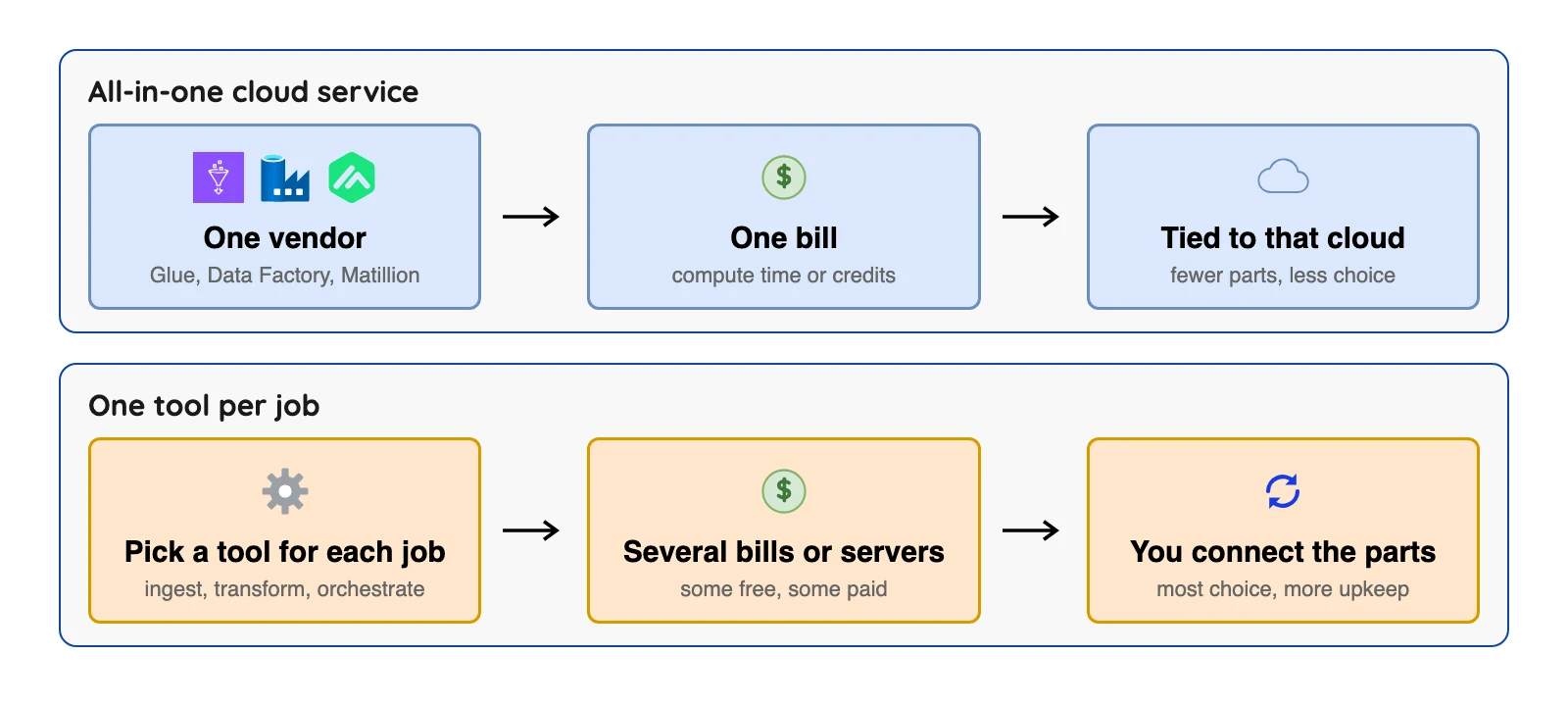
Matillion, AWS Glue and Azure Data Factory bundle several jobs inside one vendor's cloud, so pick one tool per job (or one bundle) and check how each one bills.
- Don't compare unlike tools. Airflow won't copy your database, dbt doesn't load anything, and Kafka itself doesn't reshape warehouse tables. They sit side by side in a stack.
- Billing meters differ a lot. Fivetran counts changed rows, Hevo counts events, Airbyte and Dagster count credits, dbt counts models built, and AWS Glue counts compute time.
- Free isn't zero. Most of the 14 tools have free software or a free plan, each with a ceiling, and open-source tools still cost servers and people.
We checked prices on October 8, 2026 against each vendor's own pages.
So what is a "data pipeline tool", anyway?
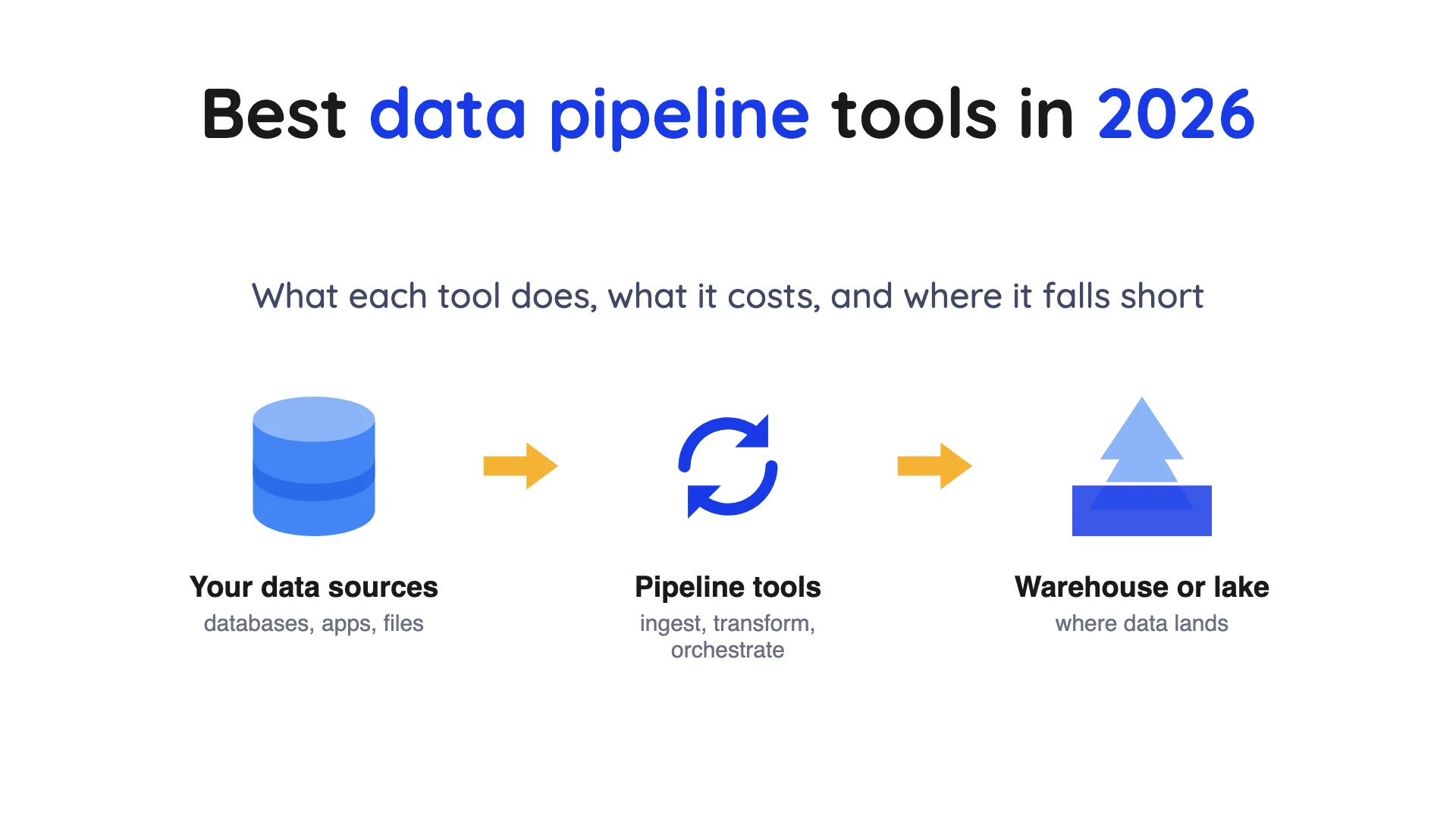
A data pipeline is a series of processing steps that prepare enterprise data for analysis, which is broad enough to cover almost anything. A pipeline has four jobs, and a tool built for one usually isn't built for the others.
- Ingest: copy data from where it lives, such as a database or an app, to a new place.
- Store: keep it in a warehouse (a database built for reports) or a data lake (cheap file storage many tools can read).
- Transform: clean, join and reshape the data so people can use it.
- Orchestrate: run the other steps on a schedule, in the right order, and retry or alert when one fails.
Reshape data before it lands and that's called extract, transform, load (ETL). Reshape it after and it's extract, load, transform (ELT). Streaming is a way of doing the first and third jobs: instead of moving data in batches every hour, a streaming tool handles each change as it happens.
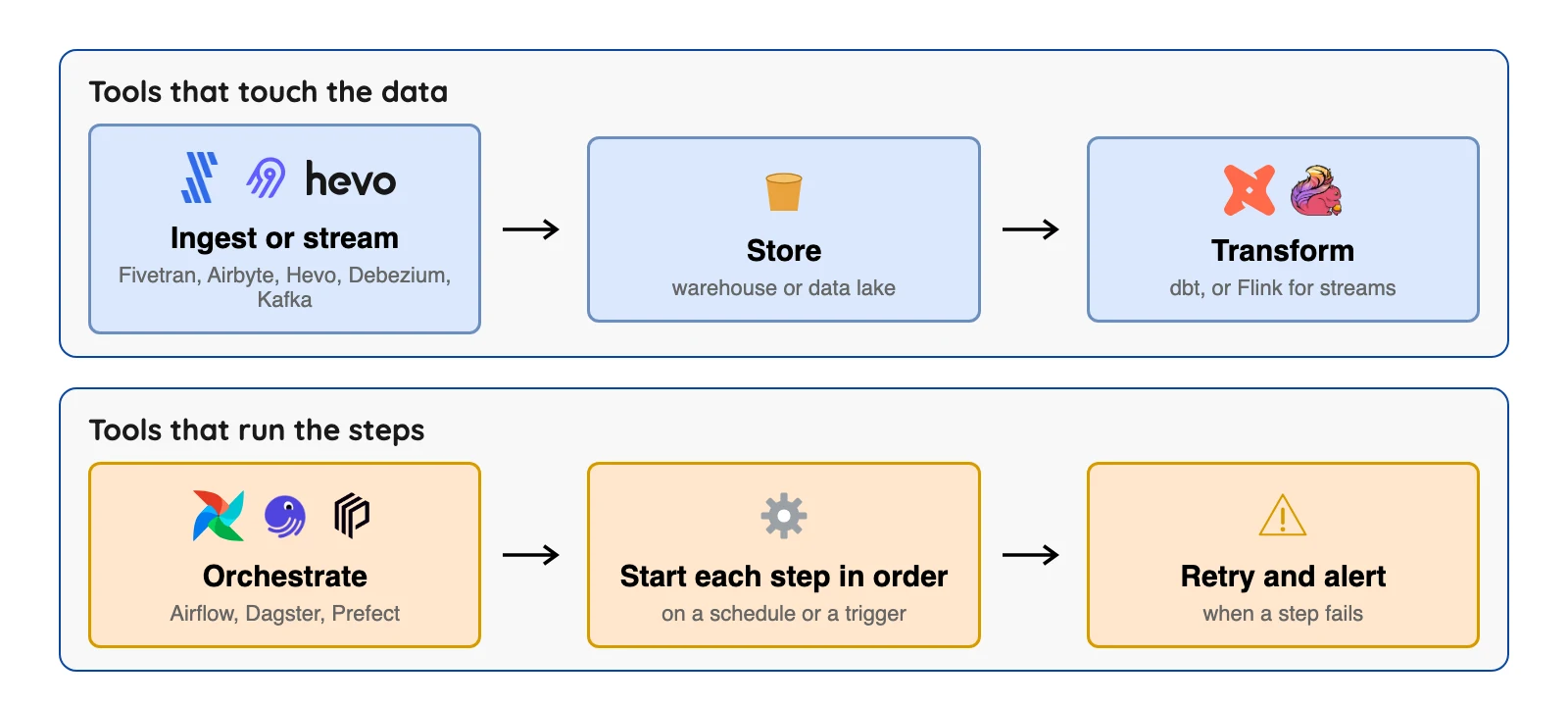
A scheduler doesn't move or reshape a single row. It starts the other tools in the right order and alerts you when one fails.
How we picked
We picked 14 tools that are actively maintained, publish documentation we could open, and between them cover all four jobs. Vendor facts come from each vendor's own pages, read on October 8, 2026. We did not run the other tools.
Estuary, Stitch, Skyvia, Informatica, Talend and others are not on this list, and the order inside each group is not a ranking.
The 14 best data pipeline tools, at a glance
| Tool | Main job | Open source? | What it bills, checked October 2026 |
|---|---|---|---|
| Fivetran | Ingest (managed) | No | Monthly active rows; free to 500,000; paid rates in its Service Consumption Table |
| Airbyte | Ingest | Core uses the Elastic License 2.0 | Credits; Cloud Standard $20 a month with 5 credits |
| Hevo | Ingest (managed) | No | Events; free to 1M a month; Starter $265 a month on annual billing |
 OLake Go OLake Go | Ingest (database changes into Iceberg or Parquet) | Yes, Apache 2.0 | Open source; you run it on your own infrastructure (install docs) |
| Debezium | Ingest (database changes) | Open source, per its docs | Free; you pay for servers and staff |
| Apache Kafka | Stream storage and transport | Open-source project | Free; managed Kafka is priced by each vendor |
| Apache Flink | Stream processing | Open-source project | Free; you pay for servers and staff |
| Matillion | Bundle: load, transform, schedule | No | Credits by task hour; dollar price not shown |
| AWS Glue | Bundle on AWS | No | Compute time, in data processing unit (DPU) hours; $0.44 or $0.308 per DPU-hour in US East (Ohio) |
| Azure Data Factory | Bundle on Azure | No | Activity runs plus integration runtime hours |
| dbt | Transform | Core is Apache 2.0 | Free seat; Starter $100 per user a month |
| Apache Airflow | Orchestrate | Open-source project | Free; you pay for servers and staff |
| Dagster | Orchestrate | Open-source project; Dagster+ is paid | Solo $10 a month, Starter $100 a month, plus credits |
| Prefect | Orchestrate | Open-source project; Prefect Cloud is paid | Free Hobby plan; Starter $100 a month |
Sources: Airbyte release notes, Hevo pricing, AWS Glue price list, dbt pricing, Dagster pricing, Prefect pricing. Checked October 2026.
"Not published" means the vendor's page doesn't show the number.
Ingestion tools: get your data into one place
1. Fivetran: best for hands-off loading from many sources
Fivetran home page, October 2026.
At a glance
- Price: Free up to 500,000 monthly active rows (MAR, the rows that change in a month); paid rates in its Service Consumption Table, not on the pricing page. Standard starts at $495 per million MAR plus a $5 base per connection, list price before discounts (October 2026)
Fivetran's pricing page lists 700+ connectors, 15-minute syncs on Standard and 1-minute syncs on Enterprise. Fivetran says it runs the pipeline for you, a claim we did not test.
One 2026 change matters. Fivetran announced that its merger with dbt Labs closed on June 1, 2026, so a managed loader and a transform tool now share an owner. If you use both, ask whether pricing or packaging will change.
What's good
- The Free plan includes Standard plan features, with up to 500,000 monthly active rows free for connections, 3,500 for activations and 5,000 monthly model runs for transformations (pricing page, October 2026).
- Standard lists unlimited users, 15-minute syncs, 700+ fully managed connectors and a dbt Core integration. Enterprise adds 1-minute syncs, custom roles, SCIM and a Hybrid deployment option, and Business Critical adds customer-managed encryption keys and PCI DSS Level 1 certification (pricing page).
- For database sources, its docs say it captures changes with the source's native change data capture mechanism or a Fivetran proprietary method, depending on the database. They also say database connectors sync new and modified data every 15 minutes by default (Fivetran's database connector docs).
- Each connection is billed on its own volume curve, so the per-row rate falls as one connection grows. On Standard it goes from $495 per million rows at the start to $170 per million past 1M rows and $58 per million past 4M (Service Consumption Table, version
V.10, effective February 1, 2026). - Transformations get 5,000 model runs a month free, then $0.01 per run up to 30,000, $0.007 up to 100,000 and $0.002 beyond that (Service Consumption Table).
Where it falls short
- Paid list rates live in a separate table, and each connection has its own curve, so you need rows per connection to predict a bill. The table also says you cannot combine rows across connections to get a better rate.
- Our read: the $5 base per connection is the easiest line to miss (pricing page). By the consumption table formula, 20 connections of 2,000 rows each come to $119.80 a month (our arithmetic).
- Deleted rows also count as paid rows: the pricing page counts updates as modifications to existing rows in your destination, including deletes.
- Teleport Sync is its option when you cannot or do not want to give Fivetran access to your database's change logs. The docs say that if you update large portions of a table between syncs it may be unable to find the changes, and the connection then re-syncs the entire table (database connector docs).
- The pricing page calls Oracle and High-Volume Agent connectors "enterprise database connectors", and the Enterprise plan card lists them where Standard lists plain database connectors (pricing page).
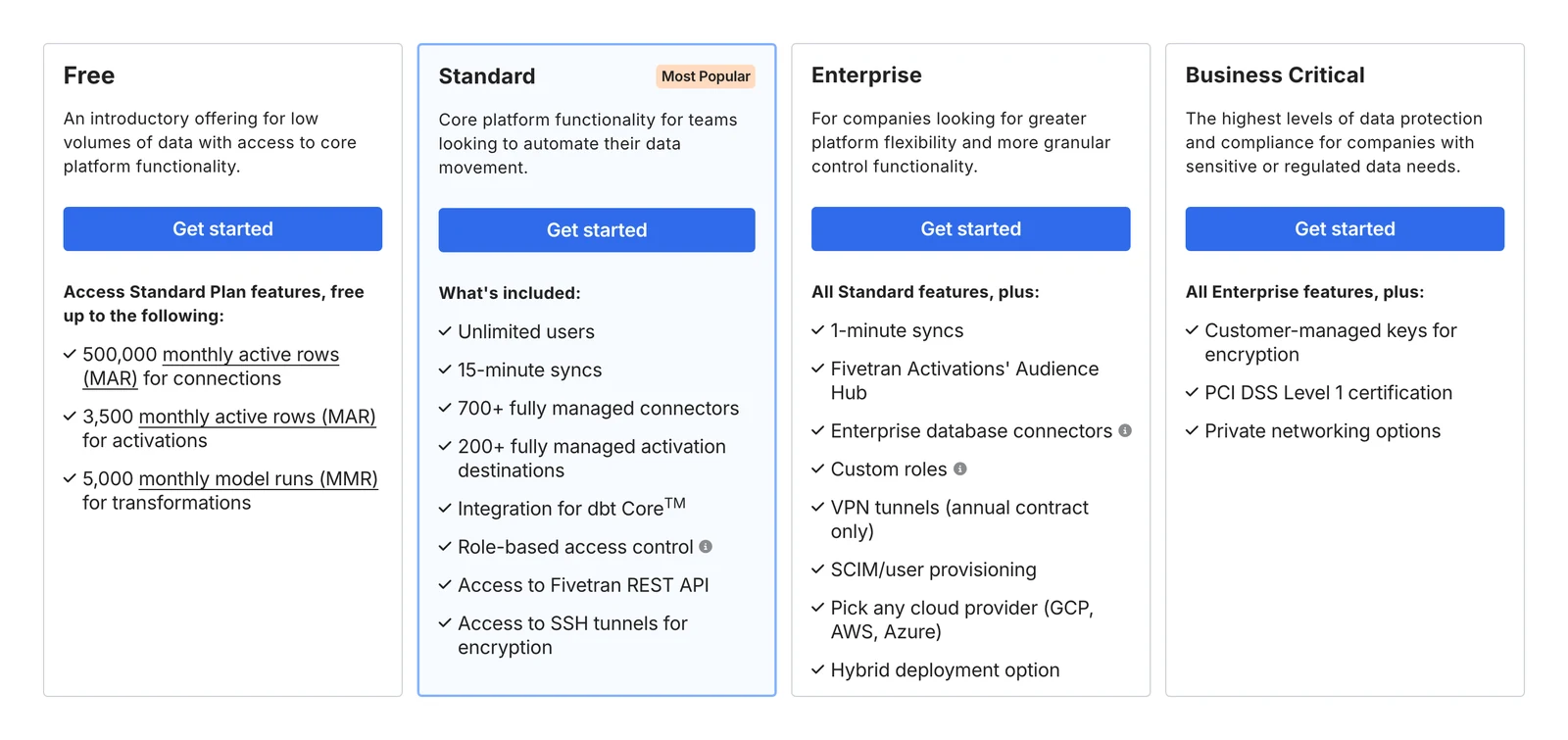
Fivetran's pricing page, October 2026.
2. Airbyte: best for a long connector list with a free self-hosted core
Airbyte home page, October 2026.
At a glance
- Price: Core is free; Cloud Standard $20 a month with 5 credits and $5 per extra credit; Plus from $189 for 40 credits (Airbyte release notes, September 15, 2026)
Airbyte's docs say it has over 600 pre-built connectors, so check the current status of the connector you actually need.
Its CDC (change data capture) docs describe log-based replication, but they also say syncs are scheduled and CDC sources aren't treated as infinite streams.
What's good
- Per its docs, you can self-host the free core or pay for the cloud, and build connectors with a no-code builder or a Python kit. We did not test how well any of these work.
- Plus runs from 40 credits for $189 ($4.75 a credit) up to 2,000 credits for $4,999, and overage credits fall from $5 to $2.50 on the top tier. All Plus plans include 15-minute syncs, two workspaces, single sign-on and premium support (release notes, September 15, 2026).
- Unused Cloud credits now roll over for 3 months, up from 2, and Cloud free trials last 14 days (release notes, September and October 2026).
- Its CDC docs list Postgres, MySQL, Microsoft SQL Server, MongoDB, Oracle, SAP HANA and IBM Db2 under current support. They name no plan or connector support level for Oracle, SAP HANA or Db2 (Airbyte's CDC docs).
Where it falls short
- It isn't a continuous streaming tool: CDC syncs are launched on a sync interval, and the CDC docs say "We do not treat CDC sources as infinite streaming sources."
- For most sources, CDC incremental sync works only for tables with primary keys, and a refresh is required after any new table or collection is added to a CDC connection (CDC docs).
- Changes made by
TRUNCATEorALTERwon't appear in the logs, so they don't reach the destination (CDC docs). - On Cloud Standard, scheduled or cron syncs can run at most every 60 minutes and an organization gets 1 workspace; Plus allows every 15 minutes (Airbyte's Cloud limits docs). SSO is no longer available on Standard, except for existing users who keep their plan (Airbyte's Cloud release notes).
- Standard got dearer in September 2026: the base price rose from $10 to $20 a month, free credits from 4 to 5 and extra credits from $2.50 to $5.00 (release notes).
- The core uses the Elastic License 2.0, and Airbyte's license FAQ says it stops you providing the products to others as a managed service.
3. Hevo: best for small teams that want no-code pipelines into a warehouse
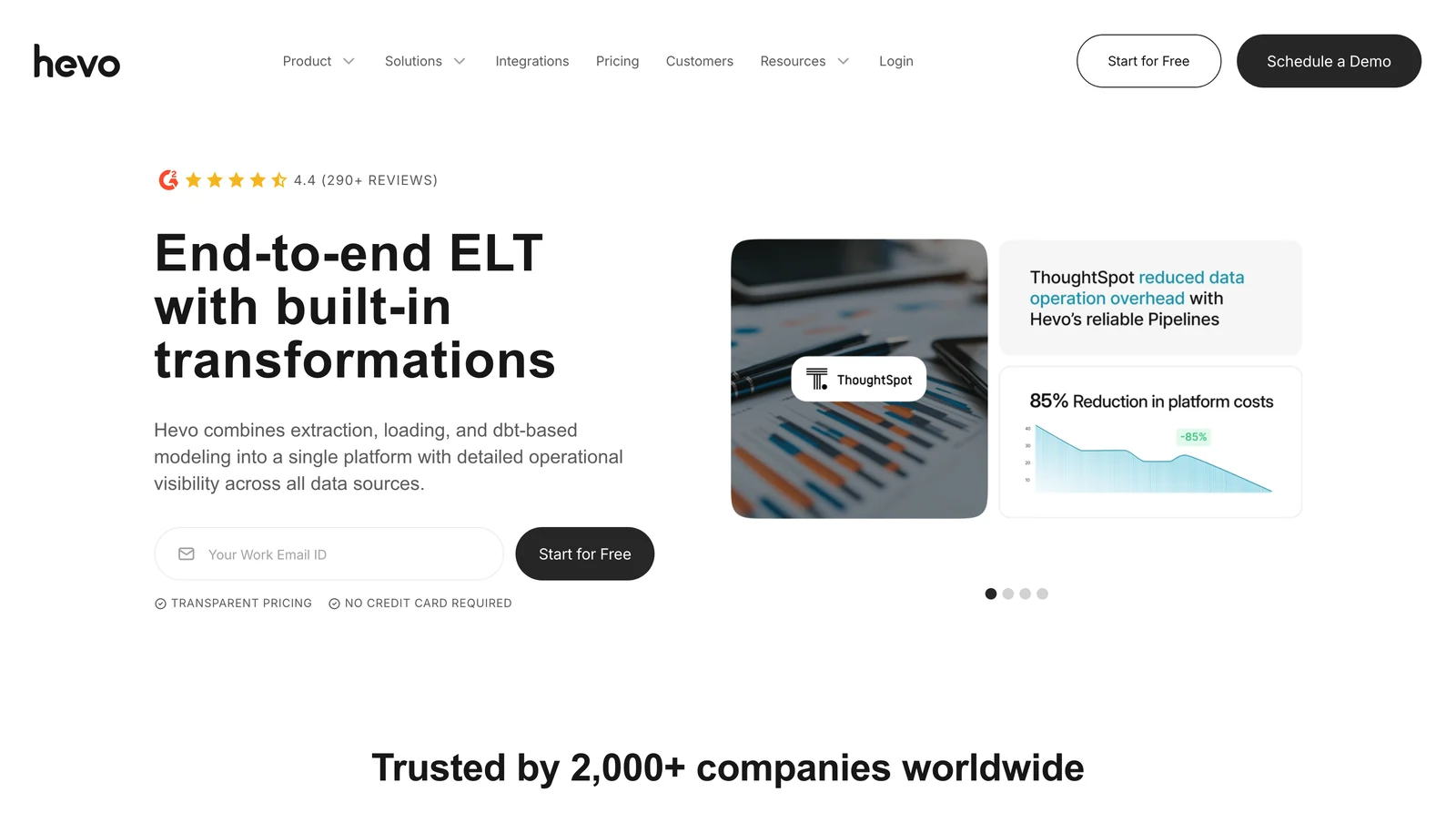
Hevo Data home page, October 2026.
At a glance
- Price: Free up to 1M events a month (each insert, update or delete in the destination is one event); Starter $265 a month on annual billing, or $299 monthly, from 5M events (Hevo pricing page, October 2026)
Hevo's pricing page lists 150+ connectors. Streaming pipelines show up on the custom Business Critical card, and its comparison table also lists them for Professional.
What's good
- Its free plan lets you try it with real data before you pay (pricing page).
- The Free plan is $0 forever with up to 1M events a month and up to 5 users. Starter adds up to 10 users, 150+ connectors, a dbt integration and SSH/SSL (pricing page, October 2026).
- Professional is $849 a month, or $750 on annual billing, from 20M events (pricing page).
- Its docs list the log read for each log-based source: BinLog for MySQL, logical replication for PostgreSQL, Streams for DynamoDB, Change Streams or OpLog for MongoDB, Change Tracking for SQL Server and Redo Logs for Oracle (Hevo's log-based pipelines docs).
Where it falls short
- Every update is an event, so busy tables eat a quota fast. The pricing page counts each insert, update or delete in the destination as one event.
- Usage above your plan's quota is on-demand and charged on top of the plan, and the page shows no rate for it (pricing page).
- Its docs say streaming pipelines cover those log-based sources except SQL Server and DynamoDB, and you must contact Hevo Sales to enable them (Hevo's log-based pipelines docs).
- The comparison table gives a 1-hour sync frequency on Free and Starter (pricing page).
- Its connector list is also smaller than Fivetran's or Airbyte's: Hevo lists 150+, Fivetran 700+ and Airbyte's docs over 600.
- The Free card says "Free forever for limited connectors", while all available connectors start at Starter (pricing page).
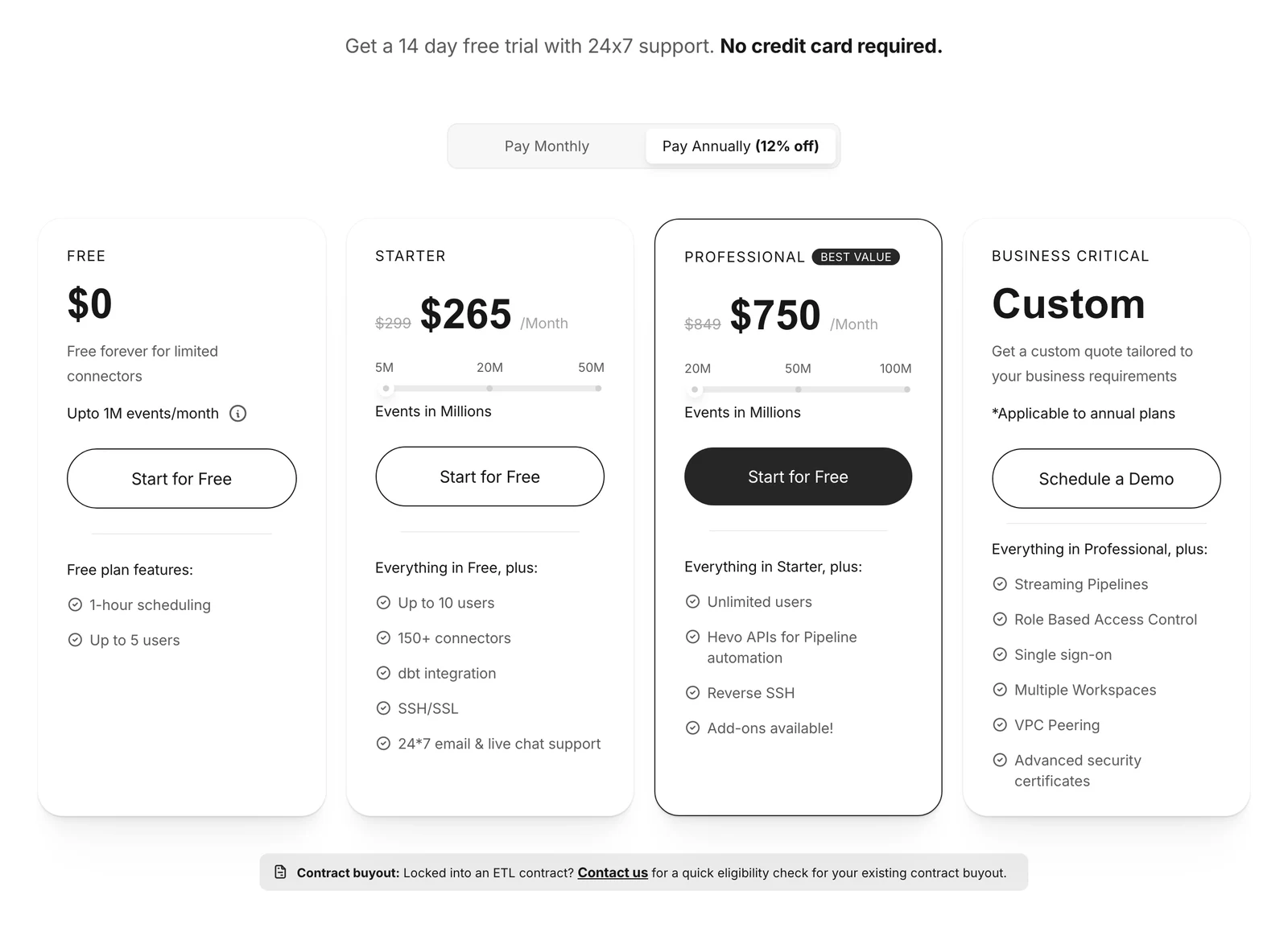
Hevo's pricing page, October 2026.
4. OLake Go: best for copying Postgres, MySQL, MongoDB or SQL Server into Iceberg

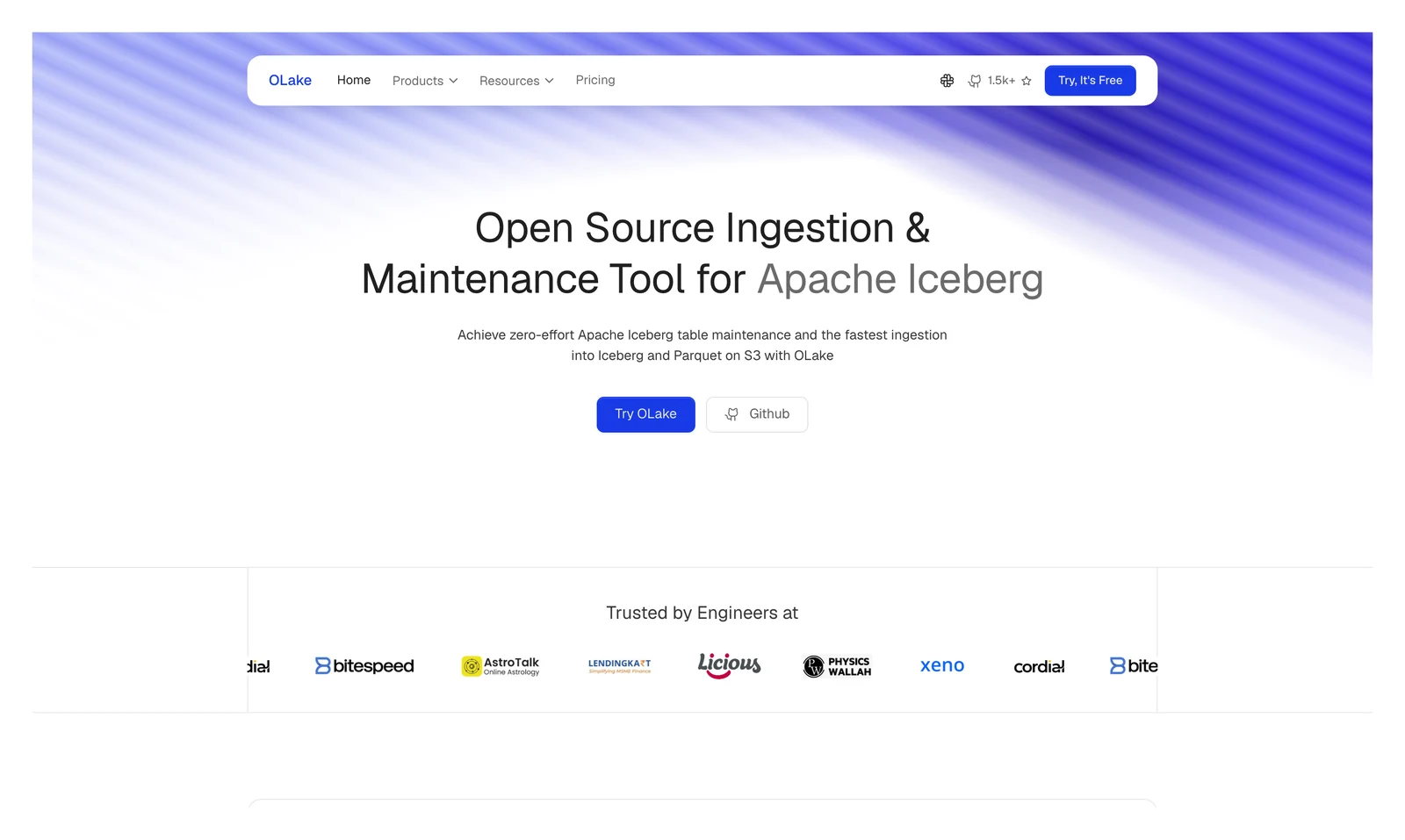
OLake home page, October 2026.
At a glance
- Price: Open source under Apache 2.0; you run it on your own infrastructure with Docker, Helm on Kubernetes or the OLake UI
OLake Go copies PostgreSQL, MySQL and MariaDB, MongoDB and SQL Server with a full load plus change data capture, and writes Apache Iceberg tables or Parquet files on storage you control. Oracle, Db2, S3 and Kafka also work as sources, without database change capture.
What's good
- One tool does the first load and then the change capture, with Full Refresh, Full Refresh + Incremental, Full Refresh + CDC and CDC Only sync modes (docs).
- It writes Iceberg tables to catalogs such as AWS Glue, with eleven catalog types listed on the catalog compatibility page.
- Those catalogs include Snowflake Horizon (OLake Go v0.11.0 and later), so OLake Go can create Iceberg tables in a Snowflake database. They also include BigLake for Google Cloud and Unity Catalog for Databricks.
- Engines such as Athena, Spark, Flink and Trino can read the Iceberg tables it writes (query engine compatibility).
- Syncs are stateful and resumable: after a crash, a network failure or a pause they resume from the last checkpoint instead of starting over (docs).
- Parallel chunking splits large tables into chunks that are read in parallel, in the Full Refresh, Full Refresh + CDC and Full Refresh + Incremental modes (docs).
- Schema discovery runs at the start of every sync, and a new source column is added to the Iceberg schema automatically (schema evolution docs).
- Jobs run on a schedule, from every minute to a cron expression you write (job settings docs).
- OLake Fusion, a companion product, compacts the Iceberg tables OLake Go writes (Fusion docs).
5. Debezium: best for engineers who need every database change as an event
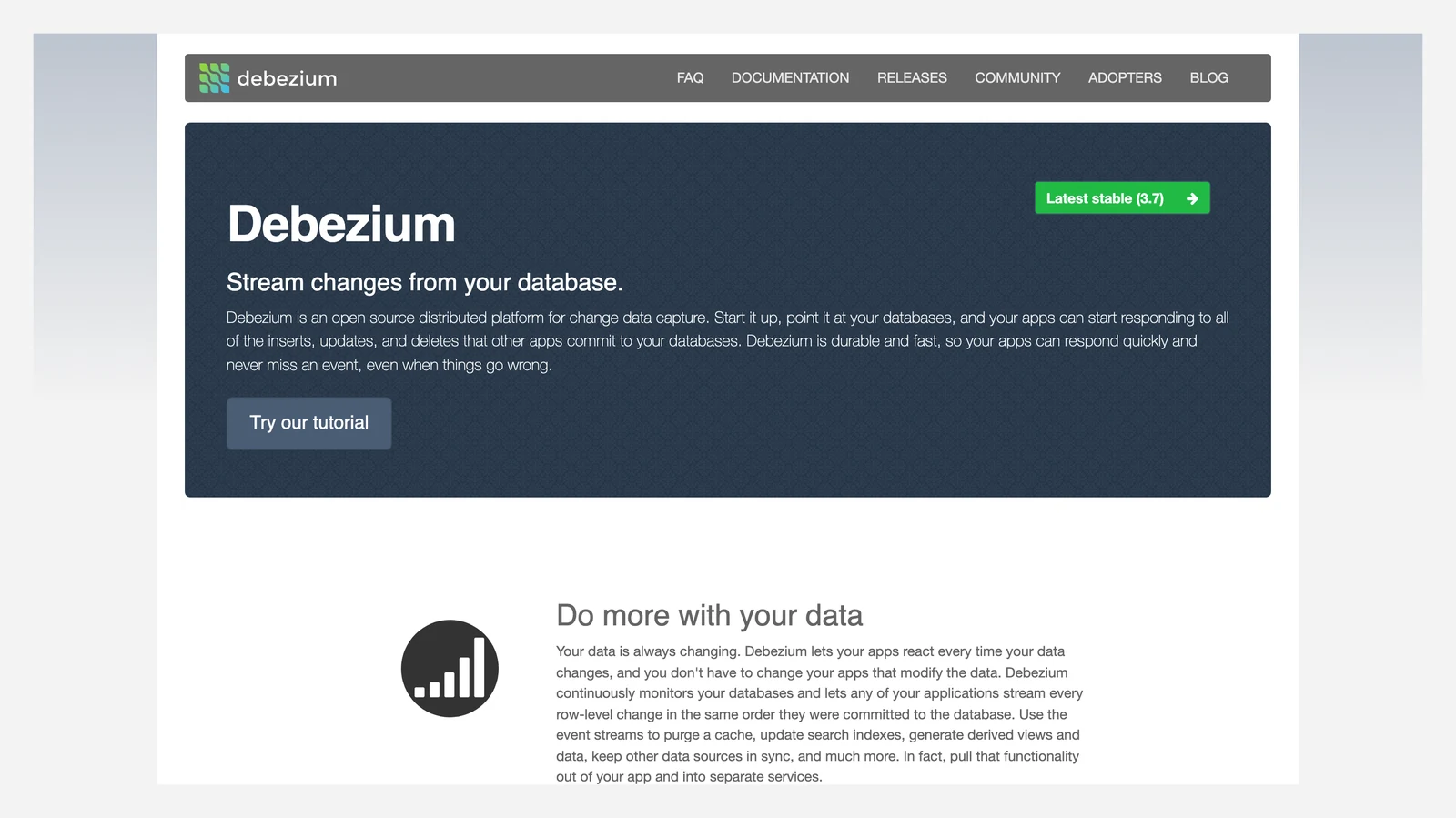
Debezium home page, October 2026.
At a glance
- Price: Free; you run it yourself; you pay for servers and staff
Its FAQ says Debezium records all row-level changes committed to each database table, so applications can react to insert, update and delete events, though after a failure they can see an event more than once. The docs list eight main source connectors, including PostgreSQL, MySQL, MongoDB, SQL Server and Oracle.
What's good
- It's free, and its docs describe delay in the millisecond range for MySQL and PostgreSQL. That is the project's own claim, so test it on your own load (Debezium's features page).
- The connector index lists eight main source connectors: MongoDB, MariaDB, MySQL, PostgreSQL, SQL Server, Oracle, Db2 and Cassandra. Seven more are marked incubating: Vitess, Spanner, Informix, CockroachDB, YashanDB, Ingres and Milvus (Debezium's connector index).
- Beyond Kafka Connect, the same docs list Debezium Server, a Debezium Operator, a Debezium Management Platform and guides for running on Kubernetes and OpenShift (connector index).
- The FAQ says all events within a topic are totally ordered, and that even if events are duplicated during failures the end result after applying them all stays the same (FAQ).
- The FAQ also says Debezium connectors do not store any information inside the upstream databases (FAQ).
Where it falls short
- It captures changes and nothing more. You still need a place to send them, a way to run it and someone to keep it healthy.
- The FAQ says consumers see every event exactly once only when systems run nominally or shut down gracefully; when things go wrong they can see events at least once, so the destination has to cope with repeats (FAQ).
- Running a connector may place additional load on the source database (FAQ).
- On MySQL, the FAQ says delete events can be missing when
CASCADE DELETEstatements are used, because those deletions are not part of the binlog (FAQ). - On Amazon RDS for MySQL,
log_binis managed by AWS and off by default, and the FAQ's fix is to turn on read replicas or automated backups (FAQ). - Incubating connectors are released for preview and are subject to changes that may not always be backward compatible (connector index).
Streaming tools: react to each change as it happens
6. Apache Kafka: best for moving event streams between many systems
Apache Kafka home page, October 2026.
At a glance
- Price: Free; managed Kafka is priced by each vendor
Kafka's own introduction calls it an event streaming platform that publishes, stores and processes streams of events. Its Kafka Connect part continuously imports and exports data from systems such as relational databases.
What's good
- It's free, and its docs say it stores streams of events durably, which we did not test.
- Events are not deleted after consumption, so a topic can be read as often as needed. How long they are kept is a per-topic setting (Kafka intro).
- Any consumer of a topic-partition reads that partition's events in the order they were written, and a common production setting is a replication factor of
3, meaning three copies of the data (Kafka intro). - It can run on bare-metal hardware, virtual machines and containers, on-premises or in the cloud, and you can self-manage it or use fully managed services from a variety of vendors (Kafka intro).
- Its
4.2design docs say it supports exactly-once delivery in Kafka Streams, and in the transactional producer paired with a read-committed consumer. The producer also has an idempotent delivery option, so resending does not create duplicate log entries (Kafka's design docs).
Where it falls short
- It's a platform you run, and you build the pipeline on top of it. Kafka itself doesn't reshape warehouse tables, and it needs connectors at both ends.
- The intro describes capture as something a connector does, for example a PostgreSQL connector capturing every change to a set of tables. It describes no Iceberg writer.
- The intro says the Kafka community provides hundreds of ready-to-use connectors, and the Apache project publishes no exact count (Kafka intro).
- Exactly-once is not the default: the
4.2design docs say Kafka guarantees at-least-once delivery by default.
7. Apache Flink: best for reshaping streams as they flow
Apache Flink home page, October 2026.
At a glance
- Price: Free; you pay for servers and staff
Flink's site describes it as "stateful computations over data streams", and it shows 2.3 as the current stable release. The Apache Iceberg docs say the Flink sink for Iceberg guarantees exactly-once semantics.
What's good
- Its site describes stateful computations on streams and, per the Iceberg docs, it can write batch and streaming data to Iceberg tables. We did not test either.
- The Flink home page lists low latency, high throughput and in-memory computing as features.
- The Iceberg docs say it supports
UPSERTbased on the primary key when writing to av2table (Iceberg Flink writes). - The same docs say
IcebergSinkcan run table maintenance after each commit: compacting small data files, expiring old snapshots and removing orphan files, so a separate maintenance job is not required (Iceberg Flink writes).
Where it falls short
- It's a framework you program and operate, and it's overkill for hourly batch jobs.
- Streaming jobs do not support
INSERT OVERWRITE; overwrite works in batch jobs (Iceberg Flink writes). UPSERTneeds thev2table format and a primary key or identifier fields, andOVERWRITEandUPSERTcannot be enabled at the same time (Iceberg Flink writes).- The Iceberg docs call the newer
SinkV2-basedIcebergSink"currently an experimental feature so use it with caution" (Iceberg Flink writes). - Iceberg commits happen after a successful Flink checkpoint, in the
notifyCheckpointCompletecallback, so the job needs checkpointing set up (Iceberg Flink writes).
All-in-one cloud services: several jobs, one vendor
8. Matillion: best for teams that load and transform inside a cloud warehouse
Matillion home page, October 2026.
At a glance
- Price: Credits used by task hours; the pricing page shows no dollar price (Matillion pricing page, October 2026)
Matillion's pricing page lists Developer, Teams and Scale editions. Its credit terms charge 1 credit per task hour for scheduling work and transformation 3 credits per task hour.
Matillion's own comparison blog says Maia generates native SQL that runs inside Snowflake, Databricks or AWS Redshift.
What's good
- Matillion's pages describe one product for loading, transforming and scheduling, so there are fewer parts to join. We did not test it.
- Developer lists 1 developer user, unlimited projects, pre-built connectors, a low-code canvas with SQL/Python and a built-in Git repository. Teams adds 5 developer users, an audit log and a Service Level Agreement, and Scale adds custom SSO, hybrid cloud deployment, data lineage tracking and streaming change data capture (pricing page).
- Credits cover task hours and extra developer users, and the pricing FAQ says you can contract directly with Matillion or pay through your AWS, Azure or Snowflake account (pricing page).
- Task hours are charged only while a pipeline runs, in 2-second increments, and validation or sampling does not count towards them (credit terms).
- Log retention is 90 days on Developer and Teams and 180 days on Scale, with 365 days available (pricing page).
- Its streaming docs say streaming pipelines can adapt to source schema changes and propagate them to the destination, which they call "self-healing" pipelines (Maia's streaming docs).
Where it falls short
- No dollar price is shown, so ask for a quote before you plan around it. The credit terms state no price per credit, say the overage rate "will be listed on the Order Form", and call consumption rates "fixed across the customer base and non-negotiable" (credit terms).
- Streaming CDC is limited to five relational databases (Db2 for IBM i, SQL Server, MySQL, Oracle and PostgreSQL), sits on the Scale edition, and the docs say it is only available to customers on specific Maia plans (Maia's streaming docs).
- The streaming docs list Amazon S3, Azure Blob Storage, Google Cloud Storage and Snowflake as destinations and say change records are batched into Avro files. We found no Apache Iceberg destination in its docs.
- Extra developer users cost credits: the credit terms list 70 credits per Developer User a month. Customer support on the Developer edition is community support, with Standard on Teams (credit terms, pricing page).
- If a contracted term ends, the Pay-Go period cannot exceed 60 days, after which you lose access to all products unless a new term is signed, and Pay-Go includes no support (credit terms).
- Streaming schema changes are driven by data rather than DDL, so a change to a source table is not reflected in the target until the data changes. A column dropped at the source stays in the destination, with later values inserted as
NULL(Maia's streaming docs).
9. AWS Glue: best for teams that already write Spark jobs on AWS
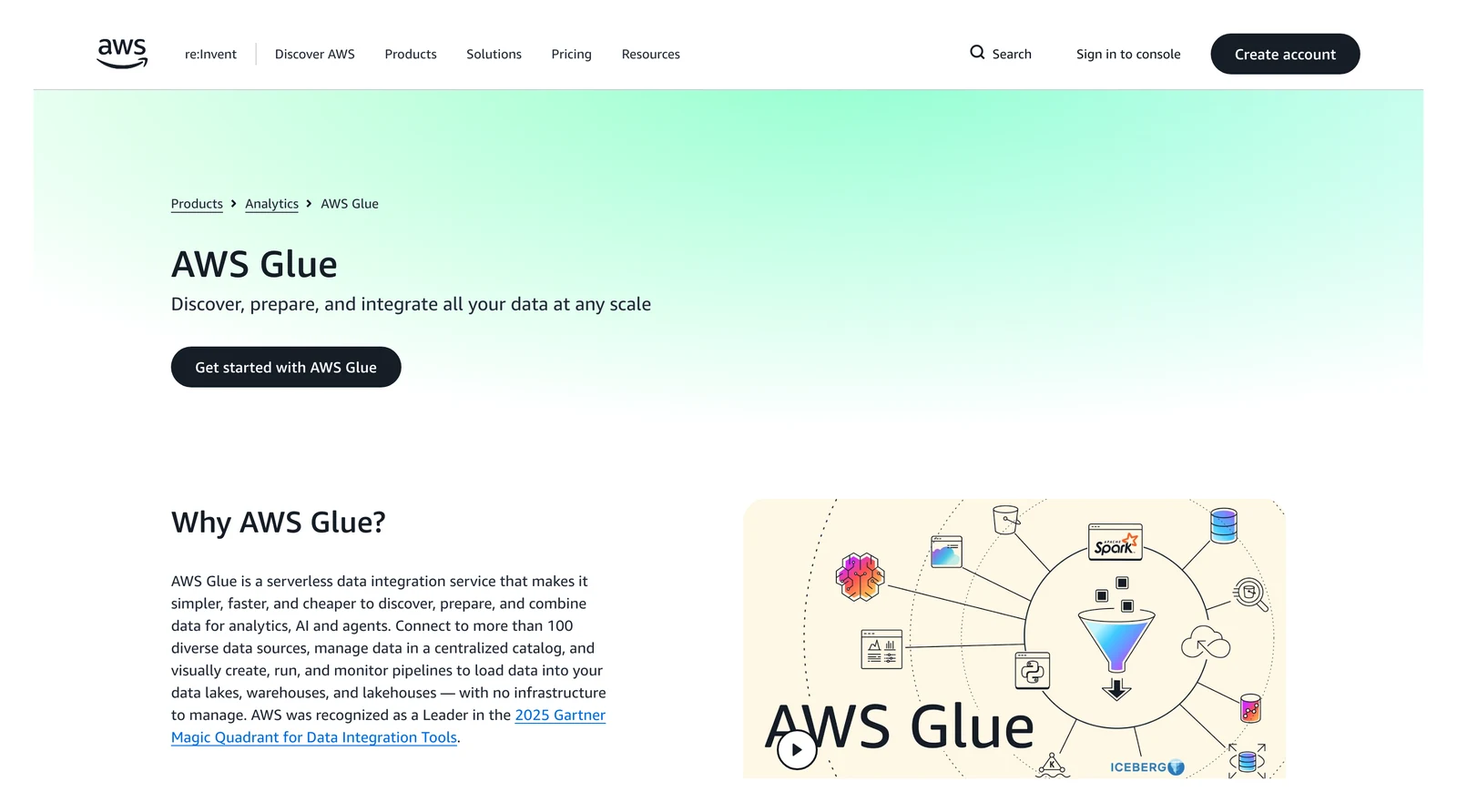
AWS Glue home page, October 2026.
At a glance
- Price: $0.44 per data processing unit (DPU) hour, a unit of compute, for ETL jobs, and $0.308 for Glue
6.0and above, both in US East (Ohio) (AWS Glue price list, October 2026)
AWS lists Glue pricing per Region and bills by the second. Glue 6.0 charges $0.308 an hour per unit against $0.44 for Glue 5.1, per the price list above.
The Glue docs say jobs created without a version default to 5.1, the higher rate.
What's good
- AWS describes Glue as serverless, with a built-in data catalog and support for reading and writing Apache Iceberg tables. We did not test these.
- The docs call it a serverless data integration service with no infrastructure to manage, and say you can connect to more than 70 data sources (AWS Glue docs).
- Flex jobs for non-urgent work are $0.29 per DPU-hour in US East (Ohio) against $0.44 for standard ETL jobs, and $0.203 on Glue
6.0and above (AWS price list). - On the Data Catalog, the first million objects stored and the first million requests a month are free, and above that storage is $1.00 per 100,000 objects (pricing page).
- Glue
3.0and later supports Iceberg: its docs say you can read and write Iceberg tables in Amazon S3 or work with them through the Data Catalog, and Glue5.1bundles Iceberg1.10.0(AWS Glue Iceberg docs). Catalog optimization of Iceberg tables is billed at $0.44 per DPU-hour (pricing page).
Where it falls short
- You write Spark code or compose jobs in Glue's visual editor, and it runs only on AWS (AWS Glue docs).
- Glue's own zero-ETL feature (copying without a separate load step) lists Oracle, SQL Server, MySQL and PostgreSQL as self-managed sources, and the docs say those can replicate only to an Amazon Redshift data warehouse (zero-ETL docs).
- Zero-ETL has no extra integration fee, but you pay for the resources behind it. The price list shows $1.50 per GB for application data ingestion and $0.44 per DPU-hour of compute for data written to S3 (price list).
- The Iceberg page says "Update is not supported for Iceberg tables" and does not mention
MERGE INTO, so test the exact operation on your Glue version (AWS Glue Iceberg docs).
10. Azure Data Factory: best for Microsoft-centred batch pipelines
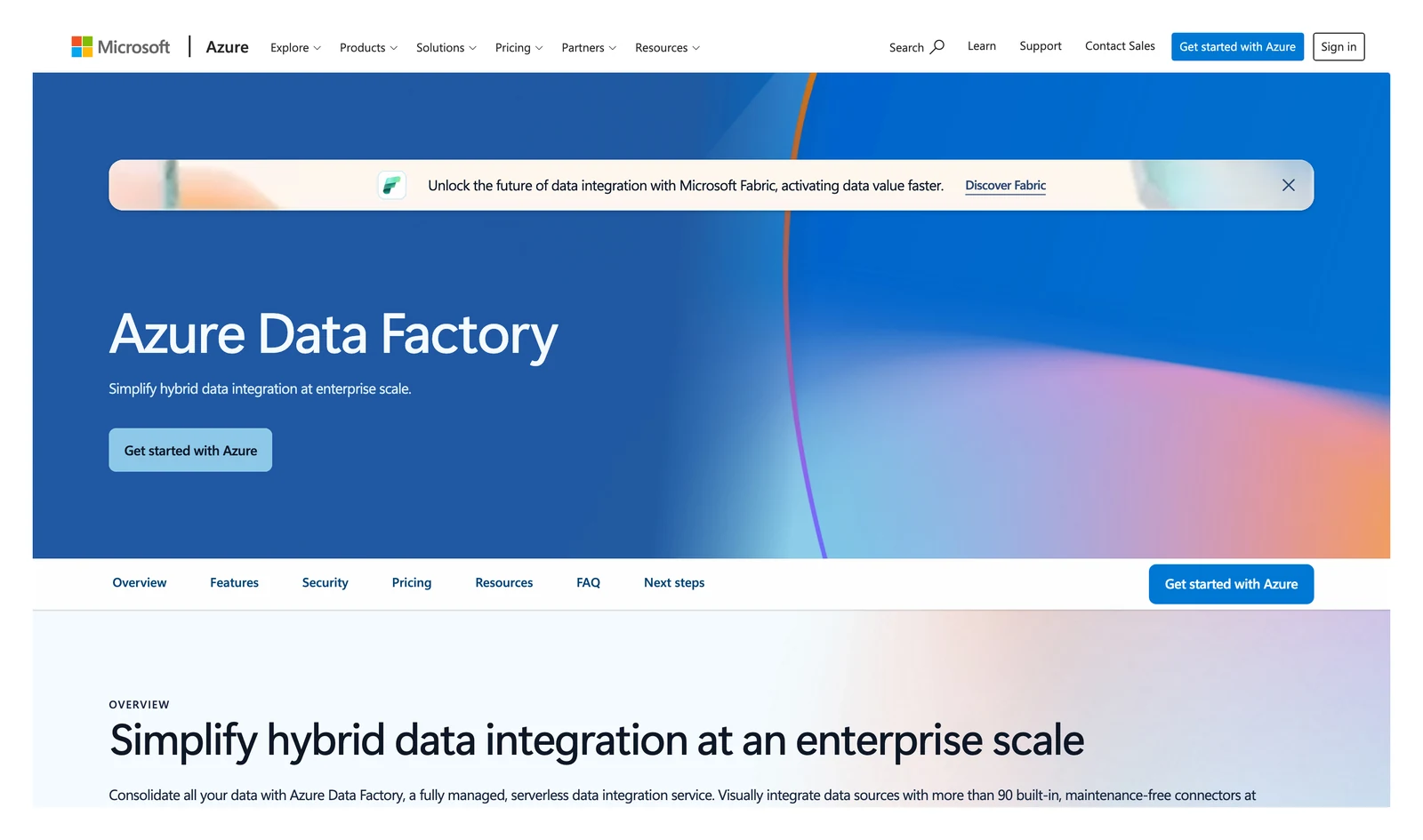
Azure Data Factory home page, October 2026.
At a glance
- Price: Per activity run plus integration runtime hours; Microsoft's retail price feed shows $1.00 per 1,000 activity runs and $0.25 per data integration unit (DIU) hour of data movement in US East (Azure Retail Prices feed, October 2026)
Microsoft's pricing page says you pay for running pipelines by activity run and for execution by integration runtime hours. The page loads rates dynamically, so the run and data movement figures above come from the Azure Retail Prices feed, and the data flow rates below come from the page's own tab table.
Microsoft's docs say that if you're new to data integration you should start with Fabric Data Factory, which it calls the next generation.
What's good
- Microsoft's docs call it a managed service for ETL, ELT and data integration projects, so loading and running pipelines sit in one place.
- The pricing page describes the integration runtime as "serverless in Azure and self-hosted in hybrid scenarios", and charges are prorated by the minute and rounded up, so 2 minutes 20 seconds bills as 3 minutes (pricing page).
- Data flows on General Purpose compute list $0.274 per vCore-hour pay as you go, $0.205 with a 1-year reservation (about 25% savings) and $0.178 with a 3-year reservation (about 35%) (pricing page tab table).
- It has a change data capture resource that can run continuously. Native CDC in mapping data flows needs no timestamp or ID columns and lists SAP CDC, Azure SQL Database, SQL Server, Azure SQL Managed Instance, Azure Cosmos DB and Snowflake as connectors (Azure Data Factory's CDC docs).
- The Copy activity can write Iceberg format through an
IcebergSink(Azure Data Factory's Iceberg format docs).
Where it falls short
- Pipelines are batch only. The CDC docs say "Pipelines in ADF are batch only, but the CDC resource can run continuously."
- The Iceberg sink supports only Azure Data Lake Storage Gen2, and the page names no Iceberg catalog such as Glue, REST, Polaris or Unity (Azure Data Factory's Iceberg format docs).
- The self-hosted runtime runs only on Windows (Azure Data Factory's integration runtime docs).
- Native log-based CDC for PostgreSQL, MySQL, MongoDB or Oracle is not on the CDC page's connector list, and auto incremental extraction from databases needs an incremental column to find changes (CDC docs).
- Data flows start at a minimum cluster of 8 vCores and also bill for the managed disk and blob storage they need (pricing page).
- Copying data out of an Azure datacenter adds a separate outbound data transfer line item (pricing page).
Transformation: reshape data once it has landed
11. dbt: best for SQL-first teams that model data in a warehouse
dbt home page, October 2026.
At a glance
- Price: Developer plan free (1 seat, 3,000 models built a month); Starter $100 per user a month (5 developer seats, 15,000 models); Enterprise custom (dbt pricing page, October 2026)
dbt's docs say it transforms data that is already in your warehouse using SQL select statements, and that it works alongside your ingestion tools. It doesn't extract or load data. The free dbt Core code is under the Apache 2.0 licence.
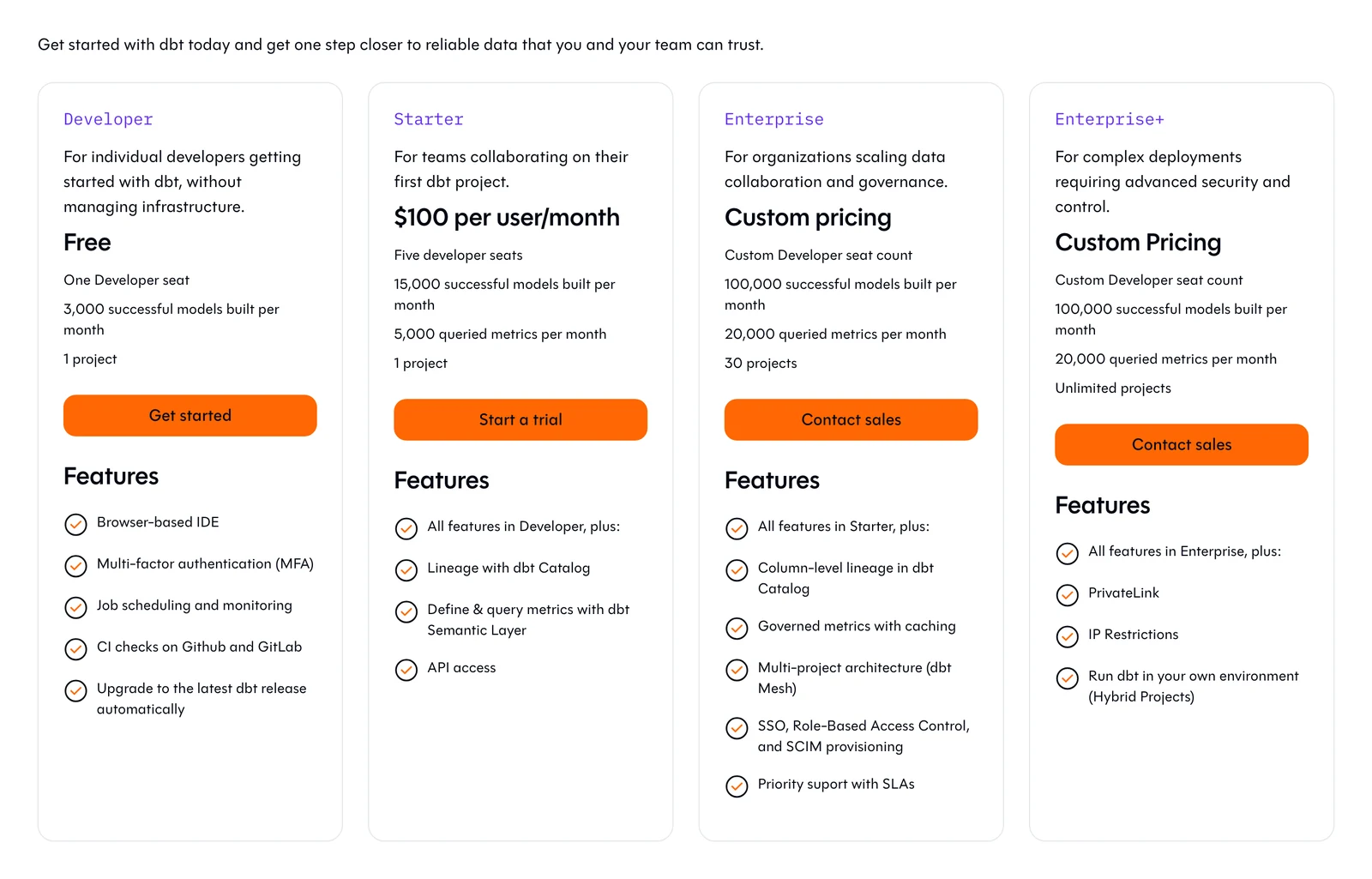
dbt's pricing page, October 2026.
What's good
- dbt's docs say SQL
selectstatements are enough to define models, and the free plan or open-source core lets you try it before paying. - The docs say dbt is free to use, with some capabilities unlocked when you sign in with any dbt platform account, and that dbt OSS is the free, fully open-source (Apache 2.0) distribution of its Rust-based engine (dbt docs).
- Starter at $100 per user a month includes five developer seats, 15,000 successful models built a month and 5,000 queried metrics. Enterprise raises that to 100,000 models, 20,000 queried metrics and 30 projects (pricing page).
- The June 1, 2026 merger press release lists dbt State (preview), a caching layer that only builds what has changed, and dbt Wizard (beta) for model authoring and debugging. The 30% infrastructure saving it claims for dbt State is the vendor's own figure (the Fivetran and dbt Labs merger press release).
Where it falls short
- Nothing happens until data is already in the warehouse, so you have to add a loader. The docs say dbt works alongside your ingestion tools.
- The free Developer plan allows only one seat, one project and 3,000 successful models built a month (pricing page).
- Billing counts models that build successfully even if the overall run later fails: a job of 100 models that fails after 51 are built counts as 51 (dbt's billing docs).
- The dbt State add-on is priced on its own, at $0.094 per daily active target table pay as you go (pricing page).
- Starter allows 1 project, against 30 on Enterprise (pricing page).
Scheduling tools: make the steps run in order
12. Apache Airflow: best for teams that want a code-first scheduler
Apache Airflow home page, October 2026.
At a glance
- Price: Free; you pay for servers and staff, or for a managed host
The Airflow docs call it a platform for developing, scheduling and monitoring workflows, such as batch-oriented data pipelines. The docs showed version 3.3.2 on October 8, 2026.
What's good
- It's free, and workflows are defined as code, so you control every step.
- The docs say it runs from a single process on your laptop to a distributed system, you can backfill Dag runs to process historical data, and you can rerun only failed tasks to minimize cost and time (Airflow docs).
- Each Dag states when the workflow should run, its tasks and the order and conditions under which they execute (Airflow docs).
- On AWS, the managed host bills environments by the hour at one-second resolution with "no minimum fees or upfront commitments", plus any auto-scaling for extra worker or web server capacity (MWAA pricing).
Where it falls short
- The docs say "if you prefer clicking over coding, Airflow might not be the best fit". It's built for batch workflows with a clear start and end, not streaming, and it doesn't copy data itself.
- A minimal install needs a scheduler, a metadata database (usually PostgreSQL or MySQL) and an API server, and workers and a triggerer are optional extras (Airflow's core concepts docs).
- The docs index names no connector or provider count and does not mention change data capture or Apache Iceberg (Airflow docs).
- Managed Airflow keeps charging while the environment is on: the Small environment rate in the meter table below works out to $357.70 for a 730-hour month before extra workers (MWAA pricing).
If you don't want to run Airflow yourself, Amazon's managed host, Managed Workflows for Apache Airflow (MWAA), is billed by the hour, and its pricing page lists $0.49 an hour for a Small environment and $0.99 for a Large one in US East (N. Virginia), the region its worked examples use.
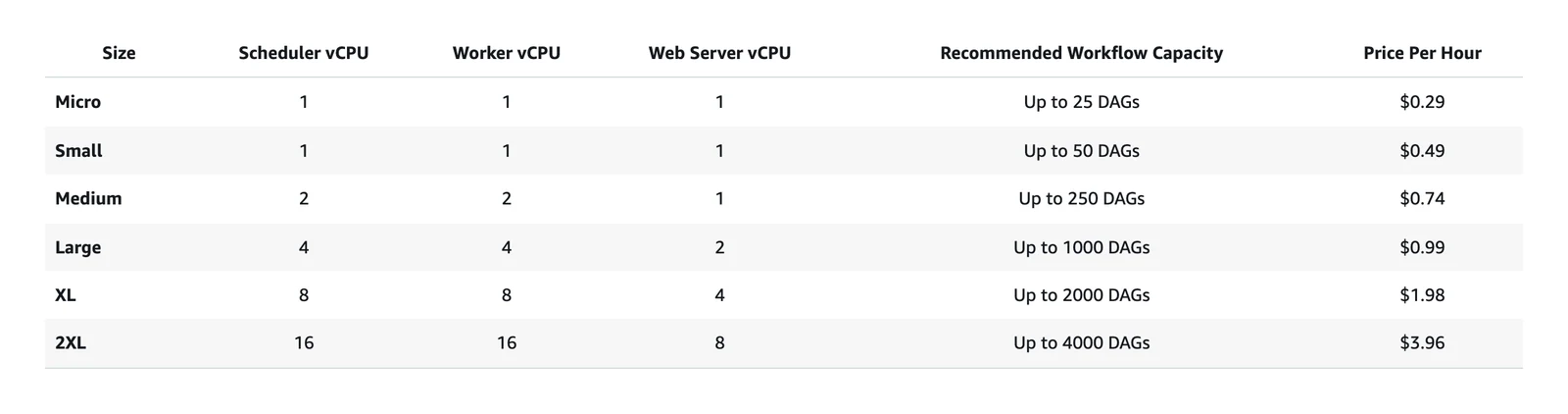
Amazon MWAA pricing page, October 2026. Rates change, so check the MWAA pricing page linked above.
13. Dagster: best for teams that think in tables and assets rather than tasks
Dagster home page, October 2026.
At a glance
- Price: Solo $10 a month, Starter $100 a month, Pro by quote; pay-as-you-go $0.040 per credit on Solo and $0.035 on Starter; 30-day free trial (Dagster pricing page, October 2026)
Dagster's docs call it "a data orchestrator built for data engineers". A credit on its pricing page is the sum of asset materializations and ops run. Dagster coordinates other tools and doesn't copy data itself.
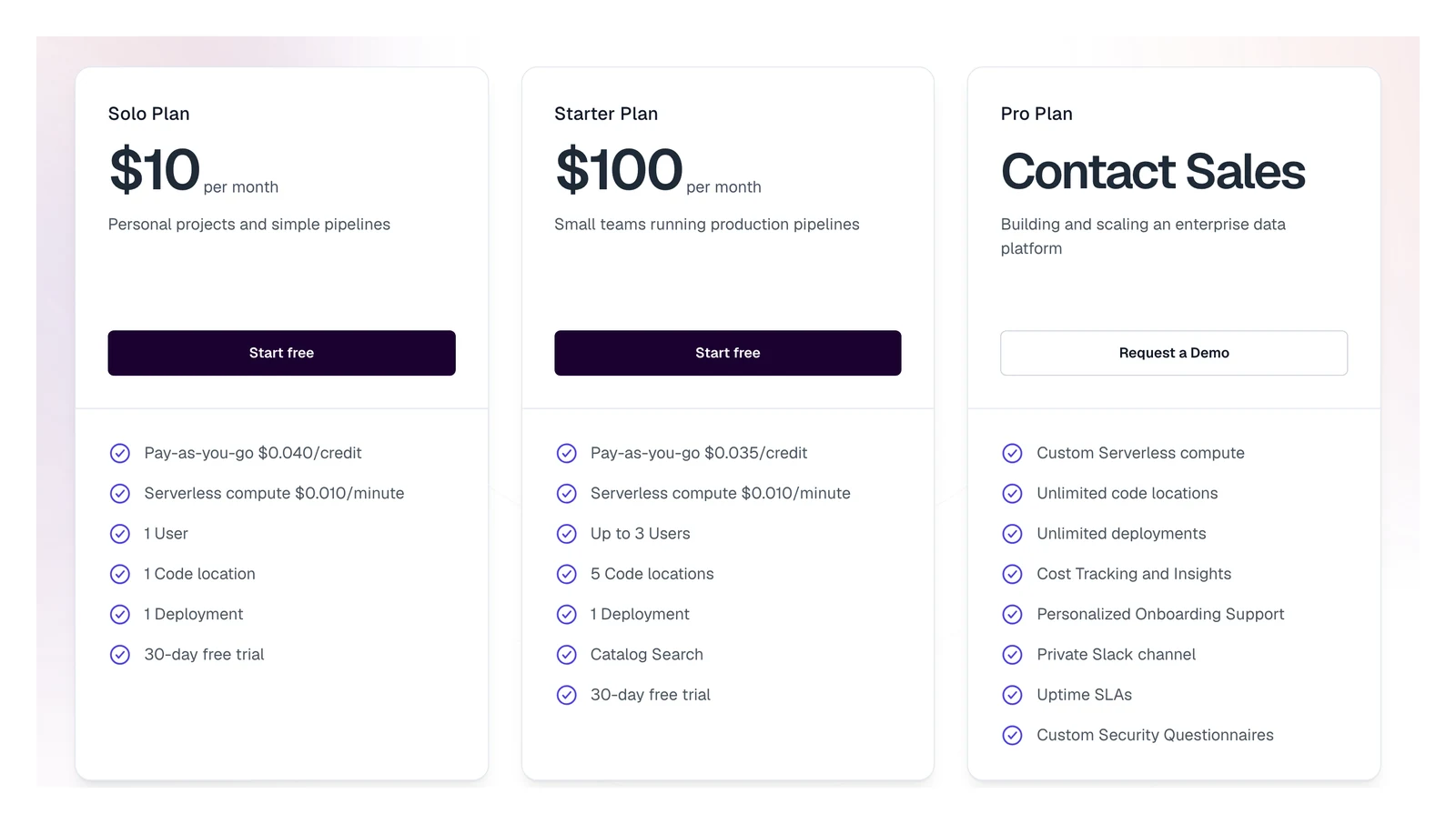
Dagster's pricing page, October 2026.
What's good
- Its docs list built-in lineage (a record of where data came from) and observability.
- The docs also name a declarative programming model and testability, and describe Dagster+ as the managed offering with a hosted Dagster instance (Dagster docs).
- Solo includes 1 user, 1 code location and 1 deployment, and Starter includes up to 3 users, 5 code locations and 1 deployment. Pro is priced by contacting sales (pricing page).
- With the Hybrid option there is no compute charge from Dagster (pricing page).
Where it falls short
- Each asset materialization or op run is a credit, so lots of small runs add up quickly. The cheap plans also allow just 1 or 3 users.
- Dagster+ Serverless compute is billed at $0.010 per minute on top of the plan and credits (pricing page).
- Both cheap plans include a single deployment, and Solo has a single code location (pricing page).
- Dagster's pricing page says "Dagster is now part of Prefect", so confirm what that means for plans and support before you buy.
14. Prefect: best for Python teams that want to start with ordinary functions
Prefect home page, October 2026.
At a glance
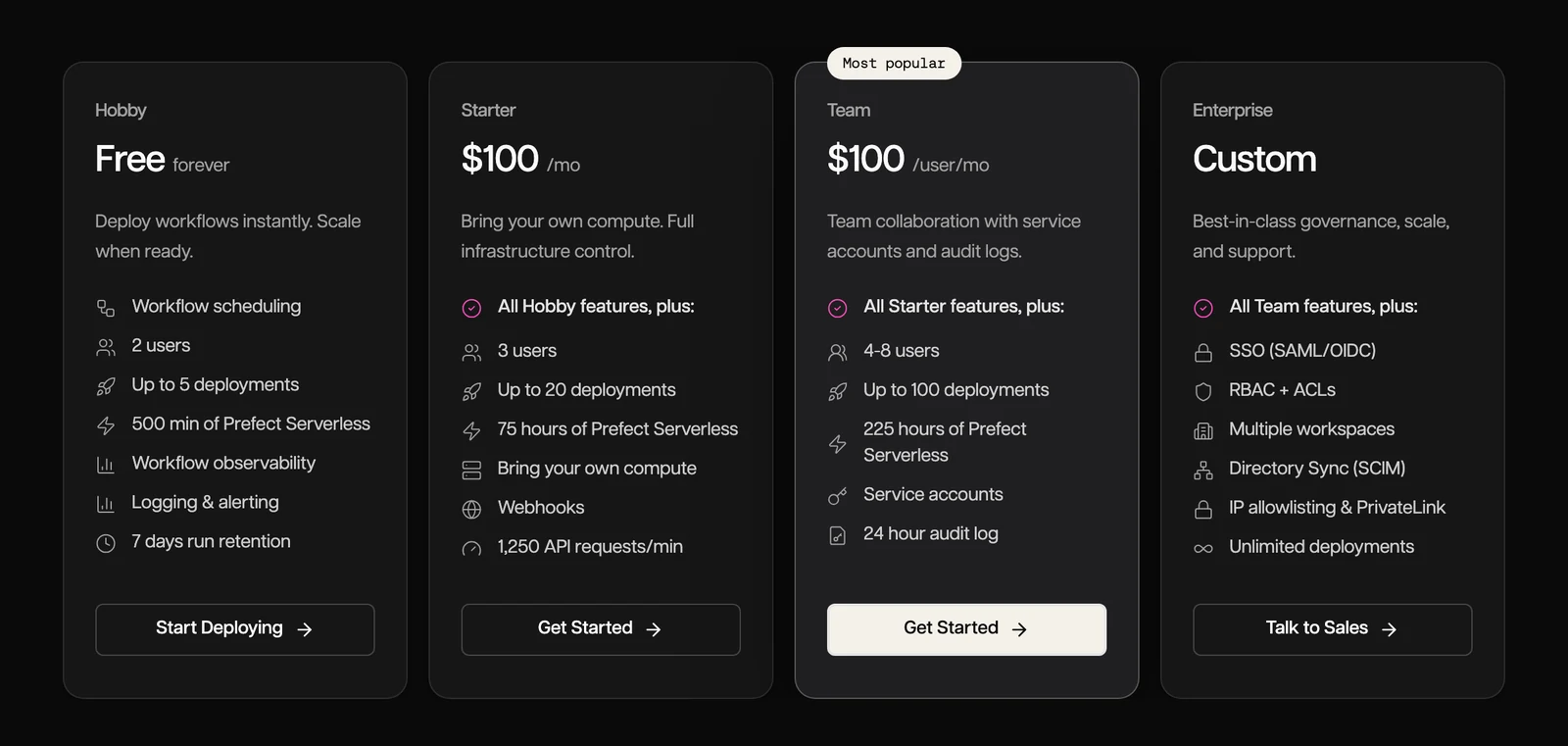
- Price: Hobby free forever; Starter $100 a month; Team $100 per user a month; Enterprise custom (Prefect pricing page, October 2026)
Prefect's docs call it an open-source engine that turns Python functions into pipelines, and say you build workflows in pure Python with no DSLs or complex config files. The free Hobby plan allows 2 users, up to 5 deployments and 7 days of run history.
Prefect's pricing page, October 2026.
What's good
- Workflows are ordinary Python functions, per its docs, and the free plan covers 2 users, which is enough for a first try.
- Its docs say you can resume interrupted runs from the last successful point, trigger flows on schedules, external events or the API, pause a flow for human approval, and create tasks at runtime based on actual data or conditions (Prefect docs).
- Hobby also includes 500 minutes of Prefect Serverless, and Starter at $100 a month adds 3 users, up to 20 deployments and 75 hours of Serverless on your own compute (pricing page).
- Team at $100 per user a month covers 4 to 8 users, up to 100 deployments and 225 hours of Serverless (pricing page).
- Enterprise adds SSO (SAML/OIDC), RBAC and ACLs, multiple workspaces, directory sync (SCIM), IP allowlisting and PrivateLink, and unlimited deployments (pricing page).
Where it falls short
- It's code only, and the free plan's caps (5 deployments, 7 days of history) start to bite as you grow.
- Run history is kept for 7 days on Hobby and Starter and 14 days on Team (pricing page).
- The comparison table shows no uptime SLA on Hobby, Starter or Team; 99.9% appears only on Enterprise (pricing page).
- Support is community on Hobby and Starter and email on Team, and audit log retention is none on Hobby and Starter and 24 hours on Team (pricing page).
- Team is billed per user, so a full 8-person team comes to $800 a month at list price (our arithmetic).
- The get-started docs do not mention change data capture, so a loader is a separate tool.
How to choose, in five questions
Answer these in order. The first answer usually knocks out half the list.
- Which job is missing? If data isn't landing anywhere yet, start with the ingestion group. If it lands but it's messy, look at dbt. If someone runs steps by hand, look at the schedulers.
- How fast must changes show up? Hourly or slower points to a loader or a batch tool. Seconds points to Debezium, Kafka and Flink, which you run yourself.
- Who runs it? If nobody wants to touch servers, choose a managed tool or a cloud bundle. If you have engineers, free software drops the licence bill and adds the work.
- Which cloud are you on? Inside AWS or Azure, the bundles save you from joining parts.
- How does the tool count? Rows, events, credits, models and compute hours grow in different ways. Work out your own number before you sign anything.
Worked examples of the meters
Plain arithmetic on the published rates above.
| Meter | Published rate | Example | Result |
|---|---|---|---|
| Hevo events | Free to 1M events a month; an insert, update or delete is one event | 100,000 existing rows each updated 10 times in a month | 1,000,000 update events, exactly the free ceiling, before any new inserts |
| AWS Glue | $0.44 per DPU-hour for Glue 5.1, $0.308 for Glue 6.0 (US East, Ohio) | A 10-DPU job running 1 hour | $4.40 on Glue 5.1, $3.08 on Glue 6.0 |
| Amazon MWAA | $0.49 an hour, Small environment (US East, N. Virginia) | One Small environment left on for 730 hours | $357.70 a month before extra workers |
| dbt Starter | $100 per user a month, 5 developer seats | 3 developers | $300 a month; 5 seats is $500 |
Sources: AWS Glue price list, Amazon MWAA pricing, dbt pricing. Checked October 2026.
An hourly meter keeps charging while you sit idle, and an event or row meter charges you for churn.
Check before you rely on a claim
Speed, uptime, ease and savings claims on vendor pages are the vendor's own. Before you sign, ask for the status of the exact connector you need, a bill estimate from your own volumes in writing, and what the next price step is past the free limit.
Building a pipeline from parts: a decision table
Most real pipelines combine one tool per job. This table shows common combinations, built only from what each vendor's page says the tool does.
| Your situation | Ingest | Transform | Orchestrate | Watch out for |
|---|---|---|---|---|
| Small team, no engineer, apps and databases into a warehouse | Fivetran or Hevo | dbt | The ingestion tool's own schedule, plus dbt's job scheduling | Row and event meters rise with change |
| Python team that wants open source | Airbyte Core | dbt Core | Airflow, Dagster or Prefect | You run servers and upgrades |
| Everything on AWS | Glue jobs | Glue or dbt | Managed Airflow on MWAA | Spark skills; no self-hosting |
| Everything on Microsoft | Data Factory | Data Factory mapping data flows | Data Factory triggers | Batch only; look at Fabric |
| Changes needed in seconds | Debezium | Flink | A scheduler for any batch jobs | You run Kafka and Flink |
| Postgres, MySQL, MongoDB or SQL Server changes into Iceberg you run | OLake Go | A query engine that reads Iceberg, such as Spark, Trino or Snowflake (compatibility) | Your own scheduler | You run the servers and upgrades |
| One vendor for load and transform on a warehouse | Matillion | Matillion | Matillion | No public dollar price |
Which pipeline tool fits you?
Question 1 of 5
Which job in your pipeline is missing?
A pipeline has four jobs: ingest, store, transform and orchestrate. Most tools only do one.
FAQs
Q1. What is a data pipeline tool?
Q2. Is Airflow a data pipeline tool?
Q3. Do I need both Fivetran or Airbyte and dbt?
Q4. Which of these tools are free?
Q5. Which tools handle streaming?
Q6. What is the cheapest way to start?
Q7. Can one tool do everything?
Q8. What does it cost to run Airflow myself or on a managed host?
Conclusion
Start from the job. Then check the billing meter, because that's the part that changes your invoice.