Best Reverse ETL Tools, Compared and Sourced (2026)
30 min read
Key takeaways
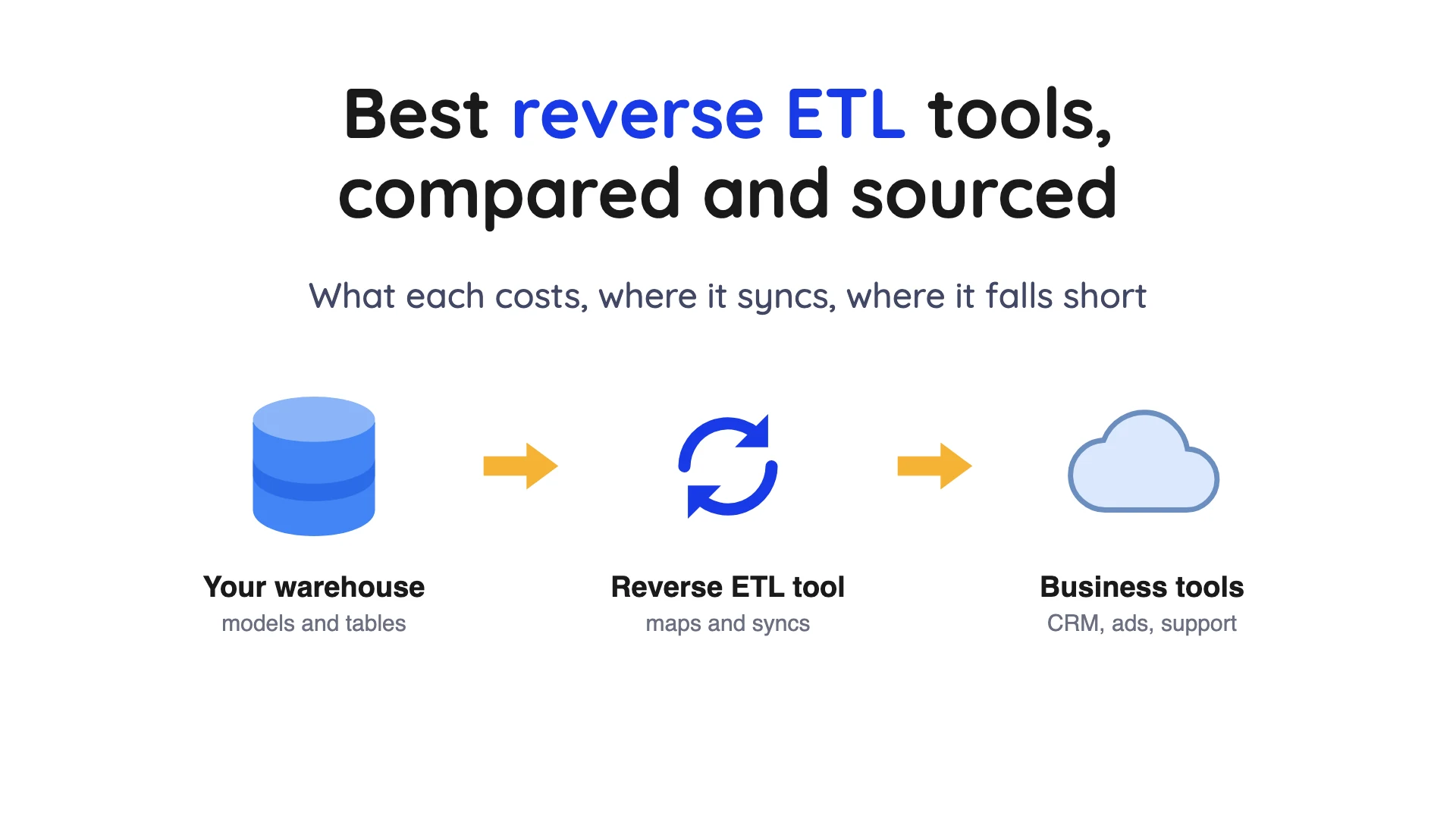
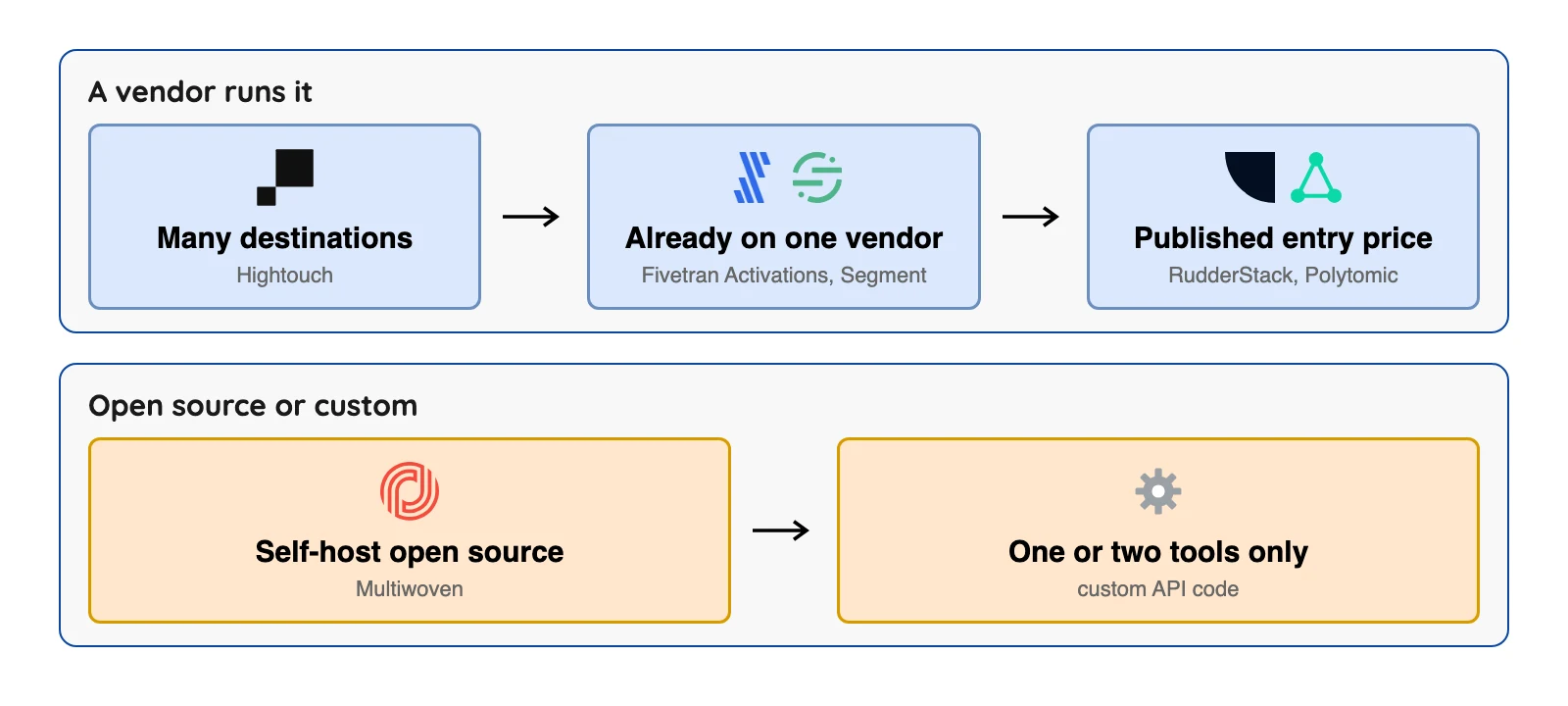
Reverse ETL, short for reverse extract, transform, load, copies cleaned data from your data warehouse into the tools your team lives in, like a customer relationship management (CRM) system or an ad platform. So who should pick what? Go with Hightouch if marketing will own the syncs, and Fivetran Activations or Segment if you already pay that vendor.
Want a printed starting price? Look at RudderStack or Polytomic. Multiwoven is the open-source one you run yourself, and Hevo Activate is still in early access.
Before you sign anything, check how each tool bills and where it keeps its sync state. And if you only feed one or two destinations, a short script may be all you need.
- Reverse ETL moves data out of the warehouse. It sends your modeled tables to the CRMs, ad tools and support desks where teams work, usually on a schedule and not in real time.
- The bill follows a meter, and the meters differ. Hightouch counts active syncs, Fivetran Activations counts changed rows, Segment counts records sent to each destination, and RudderStack counts events.
- Several tools write to your warehouse. Segment, RudderStack and the Fivetran Advanced engine keep sync state in your warehouse, so they need write access and may use your compute.
- Some prices are not published. Hightouch self-serve, Segment and Hevo Activate show no dollar figure on the pages we read.
- You may not need one. Got one or two destinations? A short script is often cheaper.
We checked prices and limits in October 2026 against each vendor's own pages. Plans change often, so confirm on the vendor's page before you decide.
What reverse ETL is, in plain words
Let's start with the boring bit. ETL stands for extract, transform, load: you pull data from apps and databases, reshape it, and drop it into a warehouse where analysts work. Reverse ETL just runs the other way.
In Fivetran's words, reverse ETL pushes enriched, modeled data back into CRMs, marketing platforms, support desks and ad networks. dbt Labs paints the same picture: transformed data goes out to end platforms to build ad audiences, personalize email or add fields to sales records.
Per Fivetran, a typical setup has four parts.
A source holds the data, usually a warehouse. A model says what to sync, as a SQL query, a dbt model or a visual picker.
A sync maps fields and sets a schedule. A destination is the tool that receives the rows.
Most syncs run on a batch schedule, such as every hour or every day. dbt Labs adds a caution: weigh how often you hit your warehouse against what you gain, and move with care on real time. So find out what the business really needs before you chase real time.
Do you need a reverse ETL tool at all?
Honest question, and worth asking before you open a pricing page. Fivetran's own guide names three other ways to get warehouse data into business tools, and each fits a different case.
| Option | Where it fits | Where it hurts (Fivetran's view) |
|---|---|---|
| Custom API code | One or two destinations and an engineer to own it | Every API change, schema change and new destination means more work |
| iPaaS tools (Zapier, Workato, Tray) | Simple app-to-app automations | Not designed to use a warehouse as the source |
| Customer data platform (CDP) | Event-based use cases | Creates a second copy of your data outside the warehouse |
One catch: Fivetran sells a reverse ETL product, so read its list with that in mind.
dbt Labs adds a caution from the modeling side: the models you sync out should not do the heavy lifting that fact and dimensional models already do, so keep them thin.
How we picked
We kept the rules simple. A tool had to sync data from a warehouse or database into business tools, be maintained, and publish docs or pricing pages we could open. Then we compared the billing meter, published prices, free options, named warehouse sources, sync limits and what each tool needs inside your warehouse.
Fair warning: we did not run these tools. This is a careful reading of vendor pages, not a lab test.
Where we found no substantive public discussion of a tool's reverse ETL product, we say so and don't invent praise.
The order is by type of tool and is not a ranking.
We did not check the reverse ETL docs of Skyvia, Integrate.io, Rivery, Dataddo or Workato, so they are not listed. Census is covered under Fivetran, because Fivetran says it acquired Census in May 2025 and now sells it as Fivetran Activations.
Reverse ETL tools at a glance
| Tool | Who runs it | Warehouse sources named | How it bills | Free option |
|---|---|---|---|---|
| Hightouch | Vendor | Snowflake, Databricks, BigQuery, Redshift, Azure | Active syncs; self-serve price not published | 2 active syncs |
| Fivetran Activations | Vendor | Warehouses, streaming, SaaS apps, CSV | Monthly Active Rows (MAR); rates in its Service Consumption Table (Standard activations start at $19,426.76 per million MAR for the first 10,000 MAR, plus a $5 base) | 3,500 MAR a month on the free plan |
| Polytomic | Vendor; on-premises on Enterprise | Databases and warehouses, not named on the page | "Begins at $500/month" | None shown |
| Segment | Vendor | BigQuery, Databricks, Db2, Postgres, Redshift, Snowflake, Azure | Records sent to each destination; no dollar price found | Free trial; length not stated |
| RudderStack | Vendor | Nine, including Postgres, MySQL, S3, Trino | Events; Growth $265 a month | Free, 250K events and 10 connections |
| Hevo Activate | Vendor | Redshift and Snowflake in the overview; the docs menu also lists BigQuery and PostgreSQL | Not published (early access) | Not published |
| Airbyte | You (Core) or Airbyte Cloud | Snowflake, BigQuery and Redshift named as examples | Credits; no reverse ETL price found | Airbyte's docs call Core its free and open-source version |
| Multiwoven | You | Databricks, Redshift, BigQuery and more | Free (AGPL-3.0 licence) | The software is free |
Sources: Hightouch pricing, Fivetran Service Consumption Table, Fivetran pricing, Polytomic pricing page, Twilio Segment setup docs, Segment pricing.
More sources: RudderStack pricing page, Hevo Activate docs, Airbyte docs, Airbyte pricing, Multiwoven on GitHub. Checked October 2026.
The table hides one thing: sync limits differ more than it shows. So each entry below gives what the vendor publishes.
The 8 best reverse ETL tools
Built for business teams
1. Hightouch: best for marketing-led teams that want many destinations

Hightouch home page, October 2026.
At a glance
- Billing: Active syncs, meaning syncs that ran at least once last month
- Free option: Up to 2 active syncs, unlimited destinations and seats
- Price: Self-serve dollar price not published on the pages we read
Hightouch's pricing page lists Snowflake, Databricks, Google BigQuery, AWS Redshift and Azure as popular sources. Its Reverse ETL Platform sits beside a Composable customer data platform (CDP) and a marketing platform, and they're sold as separate products.
What's good
- Hightouch's pricing docs say self-serve plans have no limits on destinations, destination types, user seats or sync runs. You pay by active syncs, not by rows, so check how many syncs you would really run.
- The pricing page says Hightouch integrates with 300+ tools, and its popular destinations include Salesforce, HubSpot, Google Ads, Facebook Ads and The Trade Desk.
- The docs menu on the self-serve pricing page lists guides for triggering a sync from dbt Cloud, Fivetran, Airflow, Dagster, Prefect or the API.
- Under the features it lists for its Customer Data Platform and AI Decisioning plans, the pricing page names three places to run sync planning and caching: Hightouch, your warehouse or your custom storage.
- That section also lists ISO 27001, SOC 2 and SOC 3, HIPAA and GDPR compliance, so check which plan carries them before you rely on them.
Where it falls short
- Free and Self-serve plans are limited to hourly syncs, per the pricing docs.
- Free allows 2 active syncs and Self-serve 10, and Self-serve is limited to one workspace per organization, per the same docs.
- Both plans carry an operations cap of 100,000,000 a month. The docs say most workspaces fall under it and ask you to get in touch if you are concerned.
- An active sync is any sync that ran at least once in the previous calendar month, including syncs later deleted or disabled. Trimming syncs mid-month does not lower that month's count.
- Business pricing is a platform fee, which could include consumption pricing on active syncs, plus optional add-ons, quoted on request, per Hightouch's Business tier docs.
- The Self-serve dollar price is not shown on the pricing pages we read.
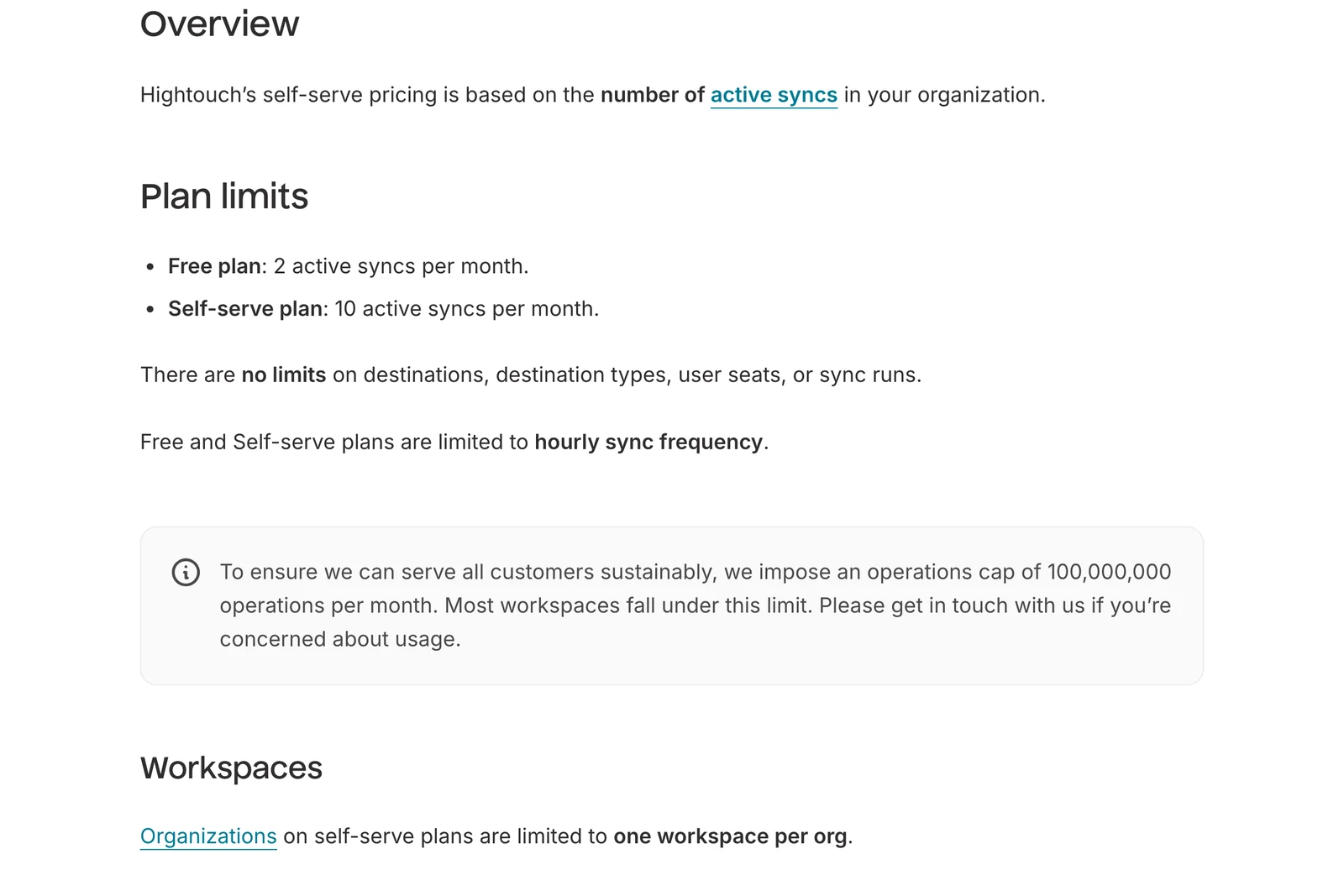
Hightouch's self-serve pricing docs, October 2026.
2. Fivetran Activations: best for teams already on Fivetran
Fivetran home page, October 2026.
At a glance
- Billing: Monthly Active Rows (MAR), for inserted and updated data, including deletes
- Free option: 3,500 MAR a month on the free plan, plus a 14-day trial for each new activation
- Price: Per-MAR rate falls as usage rises; no flat rate in the docs we read
Per Fivetran's blog (read October 2026), it acquired Census in May 2025 and now sells it as Activations, so one vendor covers loading data in and sending it back out.
What's good
- Fivetran pitches one vendor for both directions; we have not tested how well the two fit together.
- Fivetran's Activations docs say you can connect and transform data from warehouses, streaming platforms, SaaS apps and CSV files to power your syncs.
- The pricing page lists 200+ fully managed activation destinations on the Standard plan.
- You get a choice of two engines. Fivetran's Activations sources docs say Basic keeps state on Fivetran's side with read-only warehouse access, while Advanced keeps it in your warehouse with read and write access and is faster. They also say your experience of the product is identical either way.
- Fivetran's usage-based pricing docs say a row that is active is counted only once per month, however many updates it gets, and that each new activation gets a 14-day free trial.
- Per the sources docs, activation sources can reuse existing Fivetran private networking, including Azure Private Link and AWS PrivateLink.
Where it falls short
- Basic is the slower engine, and the docs list the upgrade from Basic to Advanced as coming soon. Moving from Advanced back to Basic is not possible.
- Advanced needs read and write access to your warehouse. The sources docs also say Activations runs automated queries on your warehouse even when a sync is not running, though they call the impact generally very minor.
- Fivetran's usage-based pricing docs say that on the free plan the limit for Activations is 3,500 MAR a month, and that it applies to account-wide usage.
- MAR is counted separately for each activation and activation sync, and the Service Consumption Table says you cannot combine MAR across activations for a better rate. Fivetran's Support Policy defines an activation as syncs from a single source to a single destination.
- By the table's formula, a Standard activation costs $333.99 a month at 100,000 MAR and $841.50 at 1 million MAR (our reading of the table, list prices).
- On the free plan the Support Policy gives a 48-hour first response for an urgent (Severity 1) request, against 4 hours on Standard and 1 hour on Enterprise. Fivetran's SLA page states the 99.5% on-schedule guarantee for Activation Delivery Services for Enterprise and Business Critical customers.
What users say: Independent talk about Activations is thin. We found no substantive public discussion of it, and we're not going to invent praise.
Its rates are published, but they fall as volume rises.
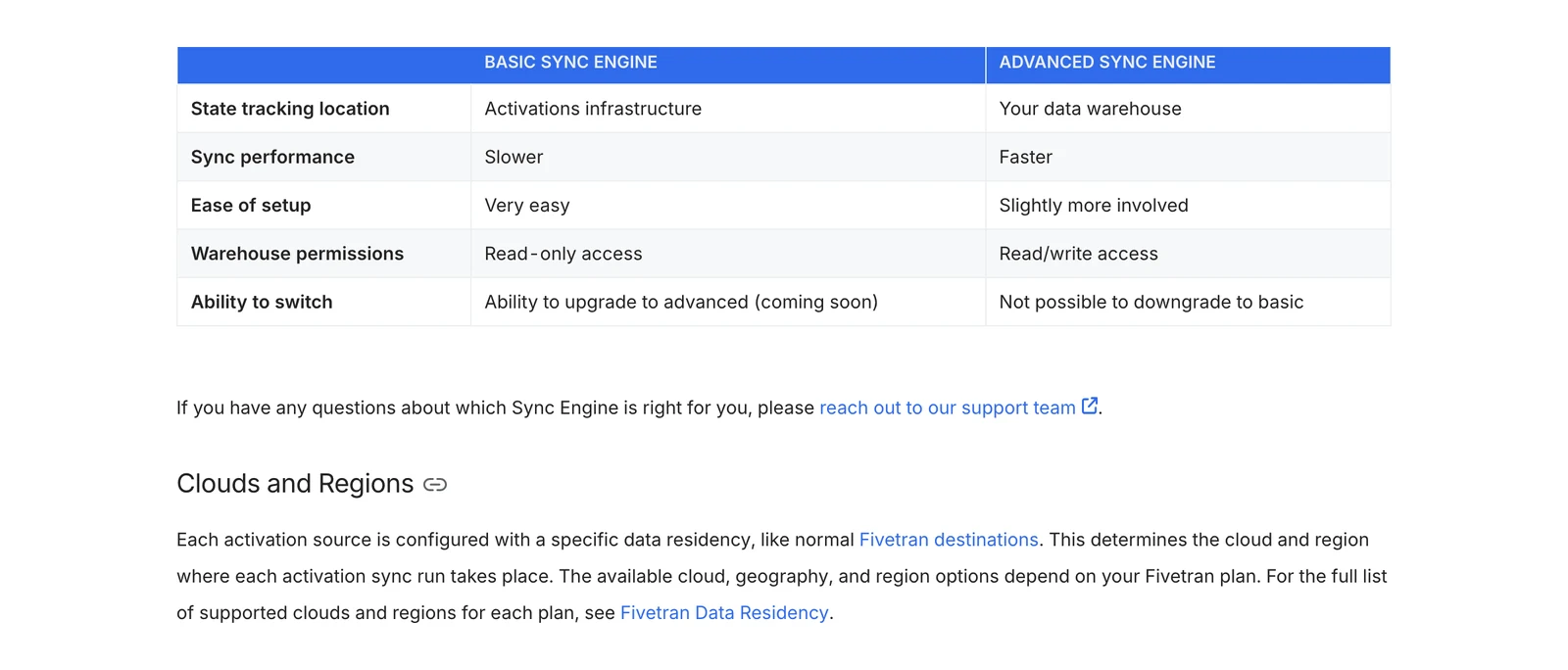
Fivetran Activations sources documentation, October 2026.
3. Polytomic: best for a published starting price
Polytomic home page, October 2026.
At a glance
- Billing: Not stated on the pricing page
- Free option: None shown
- Price: "Pricing begins at $500/month"; Standard and Enterprise say "Let's chat"
Polytomic's pricing page says its Standard plan syncs to and from databases, warehouses, spreadsheets, apps and APIs, with multiple sync destinations.
What's good
- The starting price is printed right on the pricing page, so you can tell if you're in range before any sales call.
- The same page says the Standard plan syncs to and from databases, warehouses, spreadsheets, apps and APIs, with multiple sync destinations and live chat support.
- Polytomic's docs menu lists two kinds of sync, model syncs and bulk syncs. Under bulk syncs it lists table filters, multiple schedules and incremental syncing from databases.
- The same menu lists CDC replication pages under the MySQL, Microsoft SQL Server and PostgreSQL integrations.
- The Enterprise plan adds on-premises deployment, single sign-on, a dedicated engineer and phone support, per the pricing page. The docs menu lists on-premises setup, sizing and infrastructure requirements, and Prometheus metrics.
- The docs menu also lists API docs, an MCP server, a Terraform provider and custom user roles.
Where it falls short
- The billing unit is not published. So the $500 tells you where the price starts, not how it grows.
- Standard and Enterprise both read "Let's chat" with a Book call button, per the pricing page. Only the starting price is printed.
- We found no free tier or free trial on the page.
- The Standard card says "Everything in Basic, plus", but the page text we read shows no Basic card, so we cannot tell what Basic includes or costs.
- On-premises deployment, single sign-on, a dedicated engineer and phone support appear only under Enterprise on the same page.
- Sync frequency limits were not stated on the docs home page, so ask for the shortest sync gap on the plan you would buy.
Part of a bigger platform
4. Segment (Twilio): best for teams already on Segment
At a glance
- Billing: Records successfully sent to each destination
- Free option: a free trial, per Segment's pricing page; length not stated
- Price: No dollar figure readable for Reverse ETL; CDP plans say contact sales
Twilio's setup docs say Segment Reverse ETL pulls rows with a query you provide, and the source setup guides cover Azure, BigQuery, Databricks, Db2, Postgres, Redshift and Snowflake. Models can be SQL or dbt.
What's good
- The limits are printed in the system reference. A sync handles up to 150 million records, and extra rows roll into the next scheduled or manual sync.
- The same page says Segment does not limit how many Reverse ETL records you can process in one monthly billing cycle. Records that are processed but not delivered do not count toward your record limits.
- It computes changes inside your warehouse and uses the unique identifier column to detect new, updated and deleted records.
- The setup guide says BigQuery, Databricks, Postgres, Redshift and Snowflake sources can use Segment's dbt extension for model management, versioning and CI checks. A source can have multiple models.
- Per Segment's FAQ, you can switch on alerts for failed or partially successful syncs, and Segment sends a notification for every sync failure.
Where it falls short
- The shortest gap between syncs is 15 minutes.
- The setup guide warns that you need a user with both read and write access to the warehouse. Segment keeps its state tables in a dedicated schema, for example
_segment_reverse_etl. - The system reference warns that there may be cost implications to having Segment query your warehouse tables.
- Usage counts each destination separately: 50K records to Braze plus 50K to Mixpanel is 100K.
- Per the FAQ, functions are not supported, and the query builder takes one query.
- A sync is capped at 512 columns, 512 KiB per record and 128 KiB per column value (system reference).
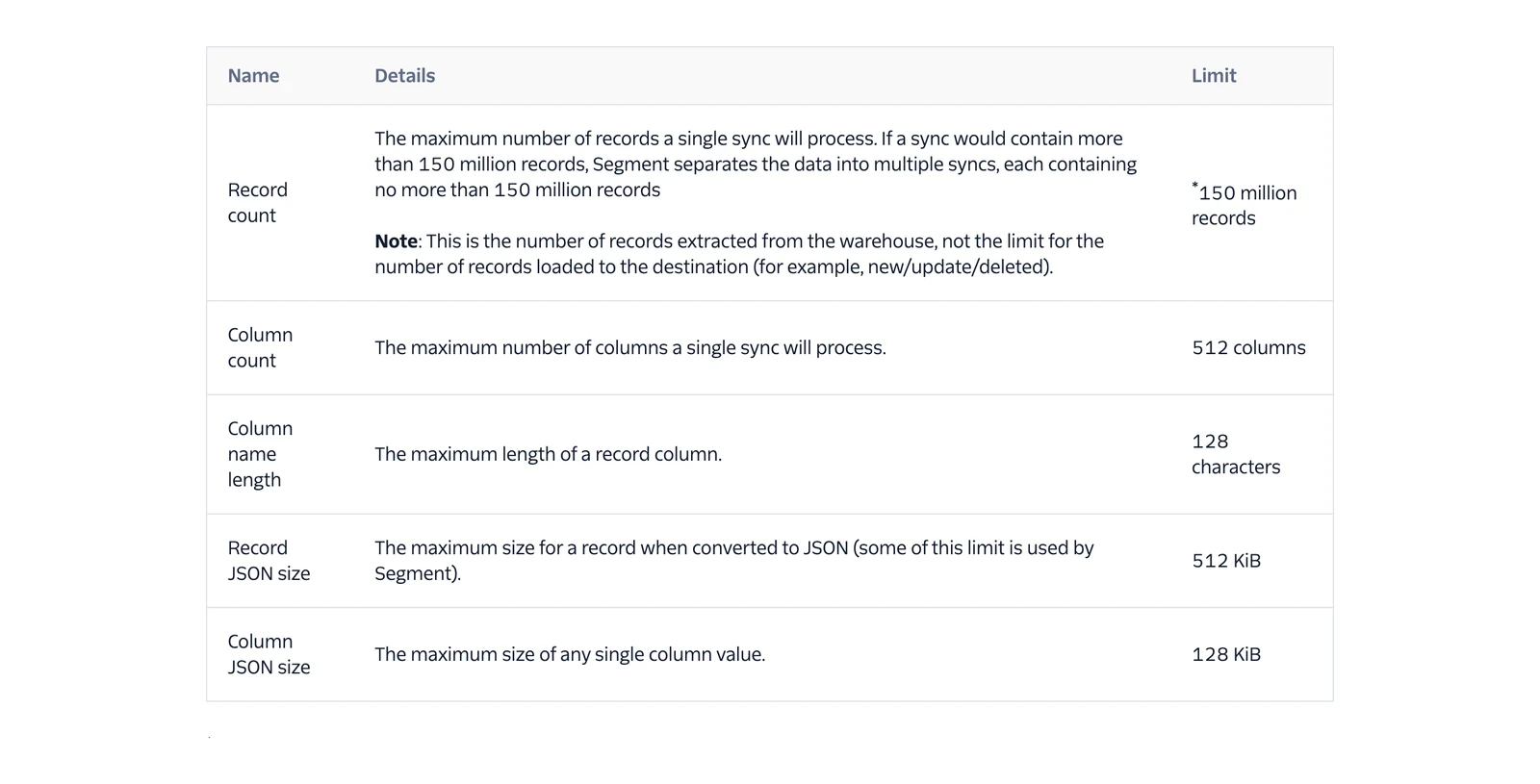
Twilio Segment Reverse ETL system reference, October 2026.
5. RudderStack: best for a free start with reverse ETL included
RudderStack home page, October 2026.
At a glance
- Billing: Events; the FAQ says each record sent to each destination is charged separately
- Free option: $0, 250K events a month, 10 reverse ETL connections
- Price: Growth is $265 a month at 1 million events, with 15% off annual billing
RudderStack's pricing page lists reverse ETL on every plan: 10 connections on Free, 25 on Growth and unlimited on Enterprise. Its reverse ETL source docs name nine sources: Redshift, S3, Databricks, BigQuery, MySQL, PostgreSQL, Snowflake, Trino and SFTP (beta).
What's good
- The pricing page lists Growth volume steps from 1 million up to 25 million events a month, with a 30-day free trial. Above 25 million the page says to talk to sales.
- It reads from PostgreSQL, MySQL and S3, not only from warehouses, per the source docs.
- RudderStack's FAQ lists two sync modes. Upsert inserts new records and updates existing ones, while Mirror keeps the destination the same as the source, including deletions.
- It lists Incremental and Full sync types, and schedules that are Basic (a time and interval), CRON or Manual, per the same FAQ.
- The FAQ says synced data reaches the destination in around a couple of minutes in most cases, and longer for some destination types.
- The docs menu lists how-to guides on cursor columns, triggering syncs from dbt Cloud and managing SQL models with the Rudder CLI (beta).
Where it falls short
- Per the FAQ, reverse ETL does not support streaming data from the warehouse, and failed syncs cannot be replayed.
- It stores sync state in the
_RUDDERSTACKschema in your warehouse, which you must create before you set up a source and must not rename. - A source cannot be sent to a warehouse destination, per the same FAQ.
- Sending one source to several destinations is charged per connection.
- Sync metrics can take around 10 minutes to show in the dashboard (FAQ).
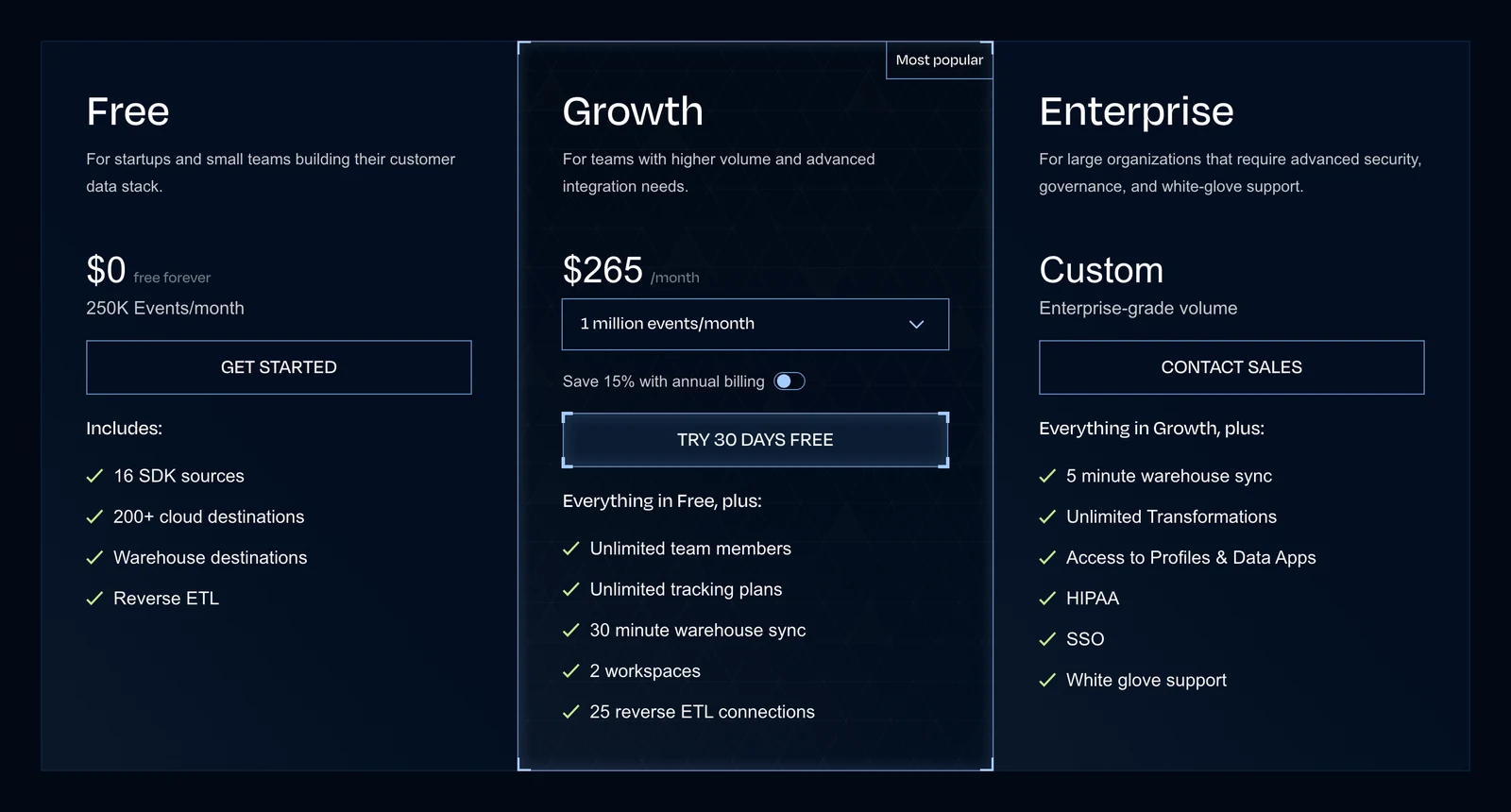
RudderStack's pricing page, October 2026.
6. Hevo Activate: best for Hevo users willing to join early access
Hevo Data home page, October 2026.
At a glance
- Billing: Not published
- Free option: Not published
- Price: Not published; available by request only
Hevo's docs, last updated September 22, 2026, say Activate is in Early Access and is enabled on request through your Hevo account team. It sends data from a warehouse to business apps using a SQL query or a table.
What's good
- Per Hevo's docs, you define a dataset with an SQL query or a table selection, and SQL lets you filter rows, rename columns and join tables before sending.
- The docs say a dataset is not tied to one Activation, so you can reuse it across several Activations.
- Hevo's docs say that after the first sync it sends only rows that changed, and that you can resync everything.
- The docs also say each run reports how many records synced, failed or were skipped, with a downloadable error report. We have not tested either.
- They say an Activation can sync as often as every five minutes, with predefined intervals up to once a day or a custom cron schedule.
- Depending on the target object, an Activation can create records, update them, do both, delete matching records or keep the object in sync with the dataset.
Where it falls short
- The overview says Activate reads only from Amazon Redshift and Snowflake and writes only to HubSpot, but the docs menu on the same page also lists Google BigQuery and PostgreSQL as warehouses and Salesforce as a target. Ask Hevo which of them are live.
- The docs evaluate predefined intervals and cron expressions in UTC. Predefined intervals stop at once a day, and cron is evaluated to the minute.
- A column you map that has no value is sent as an empty value, which clears that field in the target object, per the same docs.
- We found no price for Activate on Hevo's pages.
What users say: Activate is in early access, so independent discussion is thin. We found no substantive public thread, and we're not going to invent praise for it.
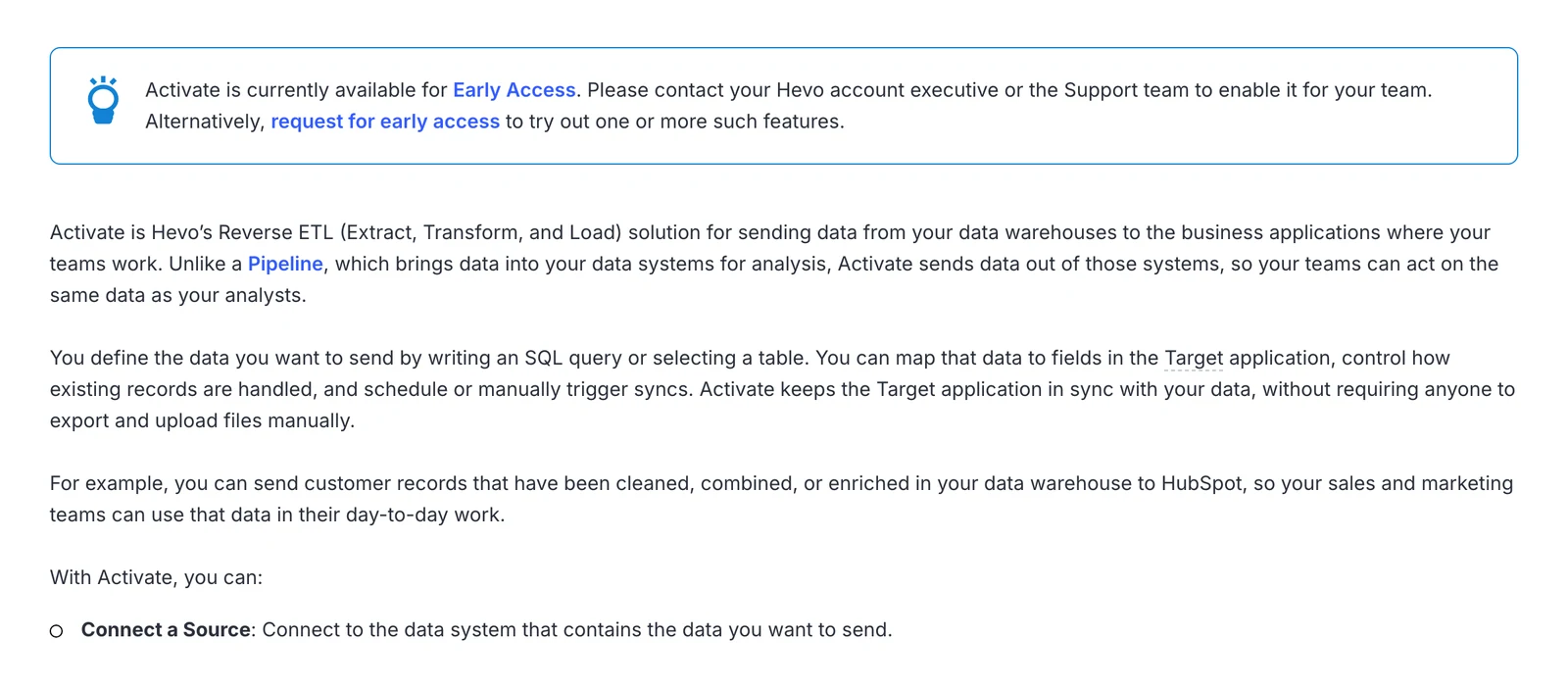
Hevo's Activate documentation, October 2026.
Open source and general tools
7. Airbyte: best for teams already on Airbyte
Airbyte home page, October 2026.
At a glance
- Billing: Credits on Cloud; Airbyte's docs call Core its free and open-source version
- Free option: Core, which its docs say you deploy locally or in your own infrastructure
- Price: No reverse ETL specific price found
Airbyte's docs call the platform a data replication platform that also moves data into operational tools like CRMs, marketing platforms and support systems. Its data activation page says the terms data activation and reverse ETL are sometimes used interchangeably, and that Airbyte prefers data activation.
What's good
- Airbyte's v2.0 release notes say data activation is now generally available.
- The data activation page says it works like any other sync, in three stages: ingest into your warehouse, model with dbt or SQL, then sync to operational tools. It names HubSpot, Customer.io, Marketo and Zendesk as example destinations.
- The same page says declarative mappings let you define how data fields map and transform between the warehouse and the destination. It names Snowflake, BigQuery and Redshift as example warehouses.
- The platform docs put the connector catalog at over 600 pre-built connectors, and say the platform is available as self-managed, hybrid or fully managed cloud.
- Airbyte's docs call Core the free and open-source version of Airbyte, to deploy locally or in your own infrastructure.
- The pricing page shows a 14-day Cloud trial with 400 credits included ($2,000 of usage). Cloud bills in credits: Standard starts at $20 a month with 5 credits included and extra credits at $5 each.
Where it falls short
- We did not find a dedicated page that lists the supported warehouse sources, destinations or sync limits for data activation, so we can't compare it on those. The page above gives examples only.
- We found no reverse ETL specific price.
- On Cloud Standard, scheduled or cron syncs can run at most every 60 minutes, per the Cloud limits page. The pricing page lists 15 minutes on Plus and 5 minutes on Pro. These are limits on syncs in general, and the docs say data activation works like any other sync.
- The pricing page shows the Standard card with portal support and no SLA, 7am to 7pm EST. Plus lists a 24-hour response SLA, per the pricing page.
- The same Cloud limits page says Standard allows one workspace per organization and does not offer single sign-on.
- Core runs in your own infrastructure, per Airbyte's docs, so you host and run it yourself.
8. Multiwoven: best open-source option you run yourself
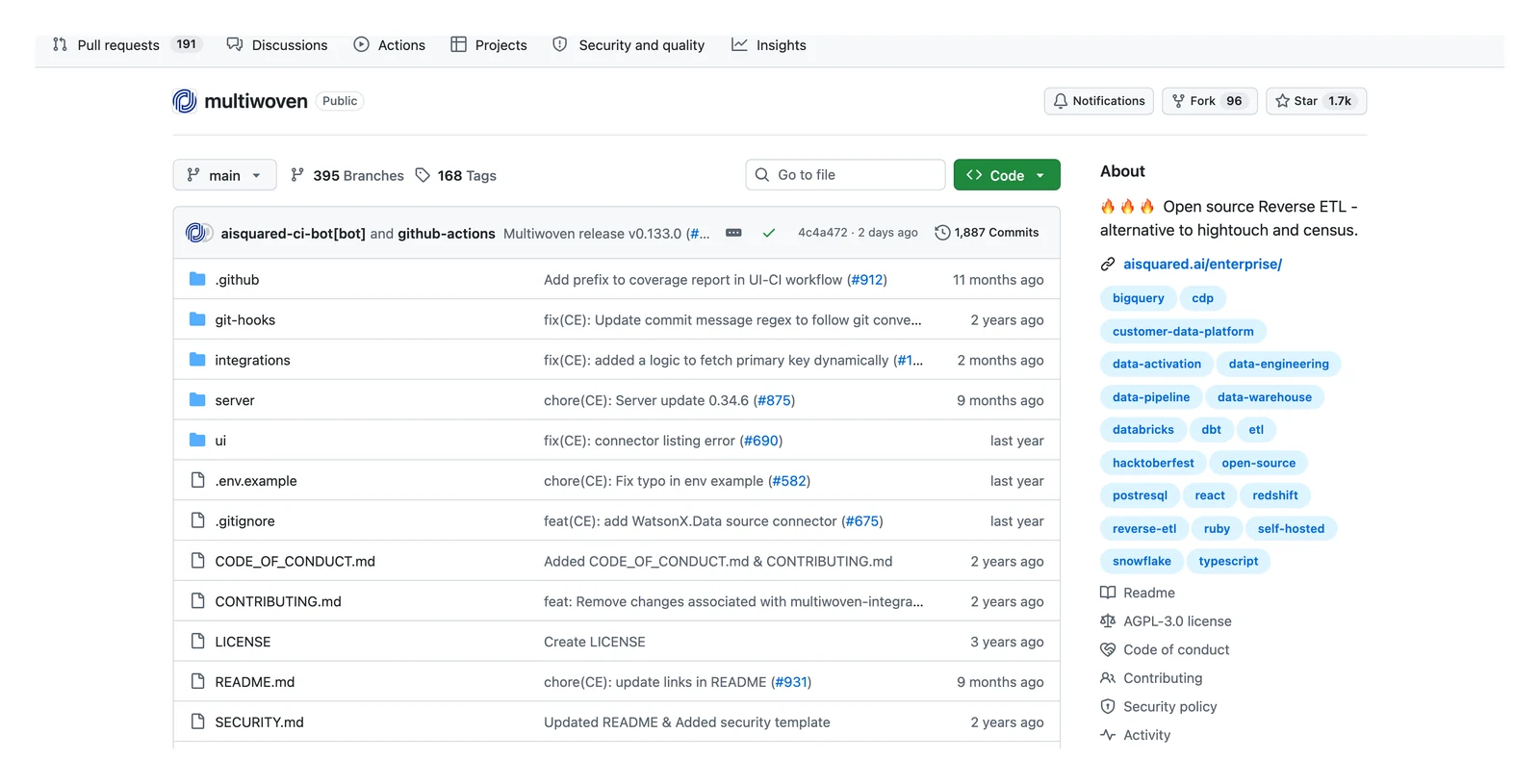
Multiwoven home page, October 2026.
At a glance
- Billing: No meter named in the README; the software is free under the AGPL-3.0 licence
- Free option: The software, with your own hosting costs
- Price: Free to run; the maker's paid offer was not checked
The project's GitHub page calls it an open-source reverse ETL and data activation platform, and an alternative to Hightouch, Census and RudderStack. It names Databricks, Redshift and BigQuery as sources. GitHub marks version 0.133.0 as the latest release (October 6, 2026); 0.132.0 was released on September 29, 2026.
What's good
- The README names no usage meter, so the cost we can see is your hosting and your time. The maker's paid offer was not checked.
- The README says you can run the whole stack locally with Docker Compose, and its self-hosted table links deployment guides for Docker, Helm Charts, AWS EC2, Azure VMs, Azure AKS and Google Cloud Compute Engine.
- The README Connectors section names Amazon Redshift, Google BigQuery, Snowflake, Databricks and PostgreSQL as sources.
- Its destinations are grouped as CRM, marketing automation, customer support and advertising, with Salesforce, HubSpot, Braze, Zendesk, Google Ads and Facebook Ads named.
- The README says the integrations folder is a Ruby Gem that provides a framework to build connectors, so you can add your own.
- The Multiwoven releases page on GitHub lists version 0.133.0 as the latest (dated 06 Oct, which we read as 2026), after 0.132.0 on 29 Sep. That is activity, not a quality guarantee, and we did not run the software.
Where it falls short
- You deploy, secure and upgrade it, and its GitHub page labels it "Under Active Development".
- The README says that while the project is stabilized you might encounter some bugs or incomplete features.
- Its deployment table marks AWS ECS and AWS EKS (Kubernetes) as "Coming soon", per the README.
- That source list has five entries, so confirm your warehouse is among them before you commit.
- AGPL-3.0 is a strong copyleft licence. Have someone read it before you build a product on top of it.
Others we checked and left out
You may still spot Grouparoo in some lists.
Its GitHub repository was archived by its owner on April 12, 2022, and Grouparoo's own site says it has been acquired by Airbyte. So we did not list it as an option.
Hidden costs and limits to check before you buy
The sticker price is only half the story. Three checks save the most pain.
Where does sync state live? Tools that track what changed need somewhere to keep the record. Segment and RudderStack create tables in your warehouse. Fivetran's Advanced engine keeps state in your warehouse too, and its Basic engine keeps it on Fivetran's side.
In-warehouse state means write access and your own compute, so ask your security team first. (They'll thank you for asking early.)
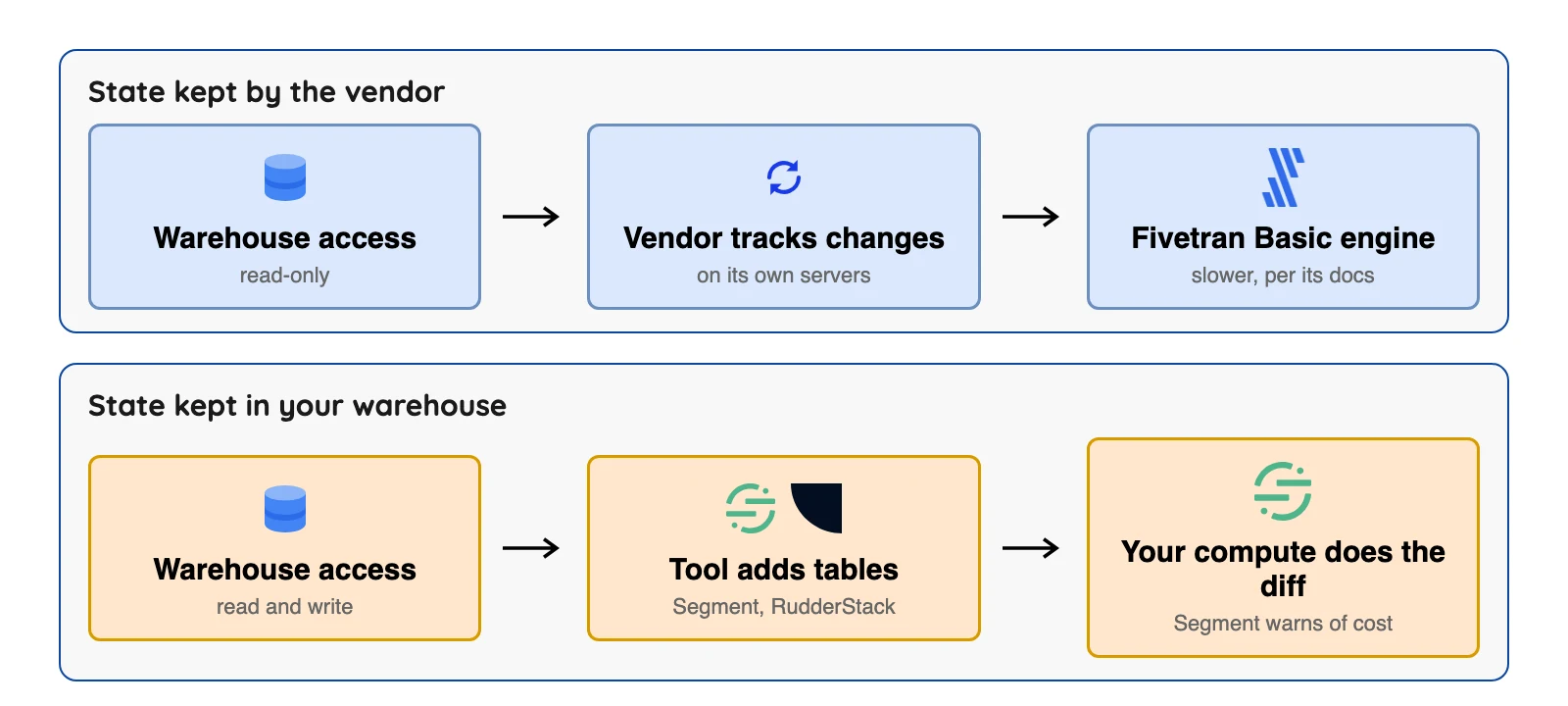
What is counted? Active syncs, changed rows, records per destination and events are four different meters.
The worked example below shows how one job reads on each meter. Do the sums for your own numbers before you commit.
How fast is fast enough? Published floors range from hourly (Hightouch Free and Self-serve) to 15 minutes (Segment). Hevo Activate says 5 minutes, but it is in early access. dbt Labs says to weigh how often you hit your warehouse against the benefit and to move with caution on real time, so ask what the business needs before you pay for speed.
A worked example: same data, four meters
Picture one table of 50,000 changed customer rows that you send to two tools, Braze and Mixpanel. We use the vendors' own counting rules and the prices the vendors print.
| Tool | What is counted | What the bill sees |
|---|---|---|
| Segment | Records sent to each destination | 100,000 records (50K to each tool) |
| RudderStack | Events; each record to each destination is charged separately | 100,000 events by our reading, against a Free cap of 250K a month |
| Fivetran Activations | Monthly Active Rows for inserted and updated data | Up to 50,000 active rows a month, above the 3,500 free cap. On Standard list rates that is about $259.14 if it counts once ($199.25 base from 10,000 MAR plus 0.04 x $1,497.16), or about $518.27 if each destination counts separately. Our arithmetic on list prices from the Service Consumption Table; the docs count rows separately for each activation, and the Support Policy defines an activation as one source to one destination, so we read the higher figure as the likelier one |
| Hightouch | Active syncs | 2 syncs, which fits the free plan, though the free plan runs hourly at most |
Sources: Twilio Segment system reference, RudderStack FAQ, RudderStack pricing, Hightouch pricing docs. Fivetran figures are our arithmetic on the Service Consumption Table above.
Here's the thing: the point is not which row is cheapest, because Segment and Hightouch print no per-unit price on the pages we read, while Fivetran prints its rates in a separate table. The point is that the same job looks very different on each meter. So ask each vendor to price your own row counts.
Published limits side by side
| Tool | Shortest sync gap published | Other limit published |
|---|---|---|
| Hightouch Free and Self-serve | Hourly | 2 or 10 active syncs; 100,000,000 operations a month |
| Segment | 15 minutes | 150 million records, 512 columns per sync |
| Fivetran Activations Basic | Not stated | Not stated |
| Airbyte Cloud Standard | 60 minutes | Plus 15 minutes, Pro 5 minutes; limits on syncs in general |
| RudderStack | Not stated | 10 connections on Free, 25 on Growth |
| Hevo Activate | 5 minutes (early access) | Overview: Redshift and Snowflake in, HubSpot out; the docs menu lists more |
Sources: Hightouch pricing docs, Twilio Segment system reference, Airbyte Cloud limits, Airbyte pricing, RudderStack pricing, Hevo Activate docs.
Questions to ask before you sign
- Which meter do you bill on, and what is my monthly count with my own tables?
- Where is sync state stored, and does the tool need write access to my warehouse?
- What is the shortest sync gap on the plan I would buy?
- What happens to a failed sync: is it retried, replayed or lost?
- Which of my destinations are supported natively, and which need custom code?
- What does the vendor cost at 10 times my volume?
How to choose in five minutes
Short on time? Find your row, then go and try that tool.
| If you are... | Start with | Because |
|---|---|---|
| A marketing or revenue team with many destinations | Hightouch | No cap on destinations and a free plan to test |
| Already loading data with Fivetran | Fivetran Activations | One vendor for both directions |
| Wanting a printed starting price | Polytomic or RudderStack | $500 a month and $265 a month, respectively |
| Already on Segment | Segment Reverse ETL | Same vendor, with documented limits |
| Able to run software yourself | Multiwoven | Free licence (AGPL-3.0), you host it |
| Sending to one or two tools | A short script or iPaaS | A whole product may be more than you need |
Sources: Polytomic pricing page, RudderStack pricing page. Checked October 2026.
Want a quicker answer? Try this short quiz.
Which reverse ETL tool fits you?
Question 1 of 6
Who should run the sync tool?
Free software still costs hosting and your team's time.
FAQ
Q1. What is reverse ETL in simple terms?
Q2. What is the difference between ETL and reverse ETL?
Q3. Is reverse ETL real time?
Q4. How much do reverse ETL tools cost?
Q5. Do reverse ETL tools need write access to my warehouse?
Q6. Is there an open-source reverse ETL tool?
Q7. Do I need a reverse ETL tool?
Conclusion
Reverse ETL is a simple idea: take the tables your team already trusts and put them where people work. Picking a tool is the hard part. The meters, the sync floors and the access each one needs all differ, and several prices aren't public.
So start from your own situation.
Already on Fivetran or Segment? Test their own product first. Want a free start?
Try Hightouch or RudderStack, and if you'd rather host the software yourself, look at Multiwoven. Whatever you pick, ask where sync state is kept before anyone signs.