Best Big Data Tools in 2026, Sorted by Job
42 min read
Key takeaways
There is no single best big data tool. Big data work has four jobs, and most tools only do one of them. Hadoop (HDFS), Amazon S3, Cassandra and MongoDB store data, Kafka moves streams, Spark and Flink process data, and Trino, BigQuery, Snowflake and Databricks answer queries.
Pick one tool per job, or one cloud platform that bundles several. Then check how each one bills before you commit.
A small team that only needs reports can start with S3 files and one managed warehouse. Jump to which tool for which situation for a quick pick.
- Big data tools aren't rivals. A storage tool, a streaming tool and a query tool sit side by side in one stack, so one ranked list of all three misleads you.
- The open-source projects here are still shipping. Hadoop
3.5.0came out April 2, 2026, Kafka4.3.1on June 25, Flink2.3.0on June 25, Spark4.2.0on July 14 and Trino483on July 17. Yes, Hadoop is still maintained. - Kafka no longer needs ZooKeeper. Kafka
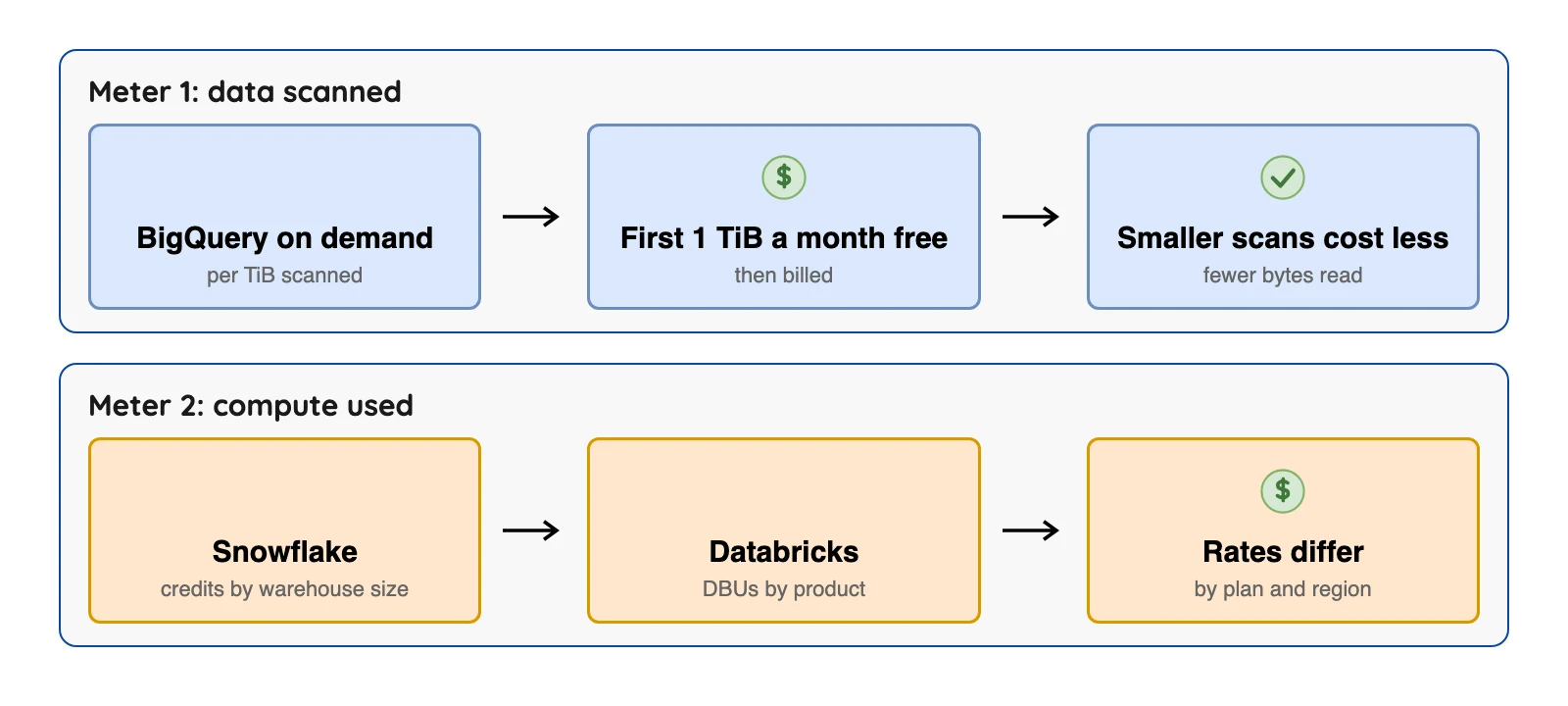
4.0removed it, so any list that names ZooKeeper as a requirement is out of date. - Cloud bills follow different meters. BigQuery bills by data scanned, Snowflake by credits and Databricks by DBUs. So you can't line the dollar figures up side by side.
- Free software still costs money to run. Hadoop, Spark, Flink, Kafka, Cassandra and Trino cost nothing to download. Self-hosting moves the bill to servers and the person who gets paged at 2 a.m.
We checked prices and release dates on October 8, 2026 against each vendor's or project's own pages. Plans change often, so double-check the vendor's page before you decide.
So what does "big data" mean?
AWS's "What is big data?" page describes big data as data management problems, caused by growing volume, velocity and variety of data, that traditional databases cannot solve. Volume means terabytes to petabytes, velocity means how fast data arrives and answers are needed, and variety means many sources and formats.
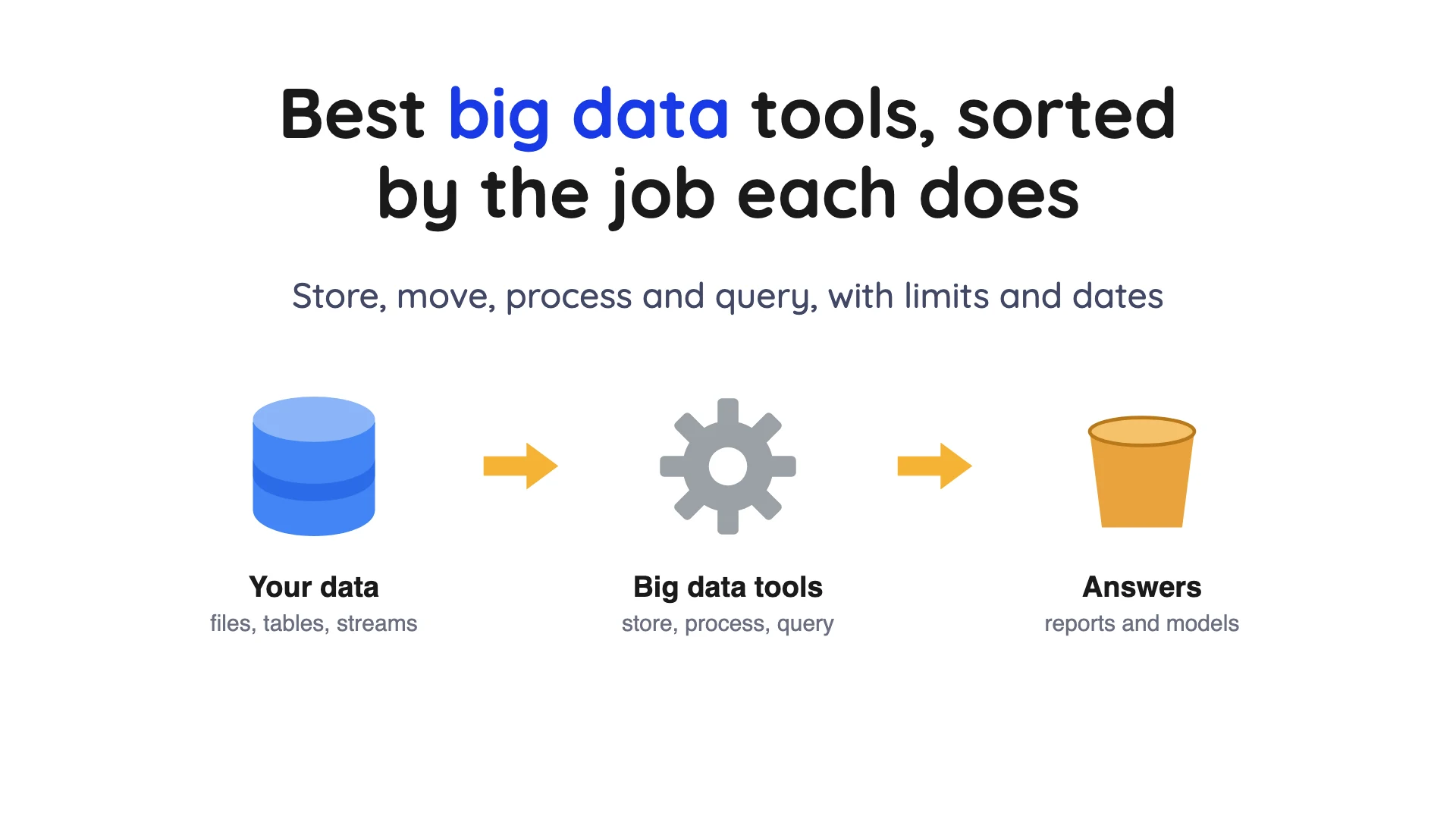
A "big data tool" is any software that helps with one of those problems. That's a very wide net, so one ranked list would mix wildly different products. Here, we sort them by the job each one does.
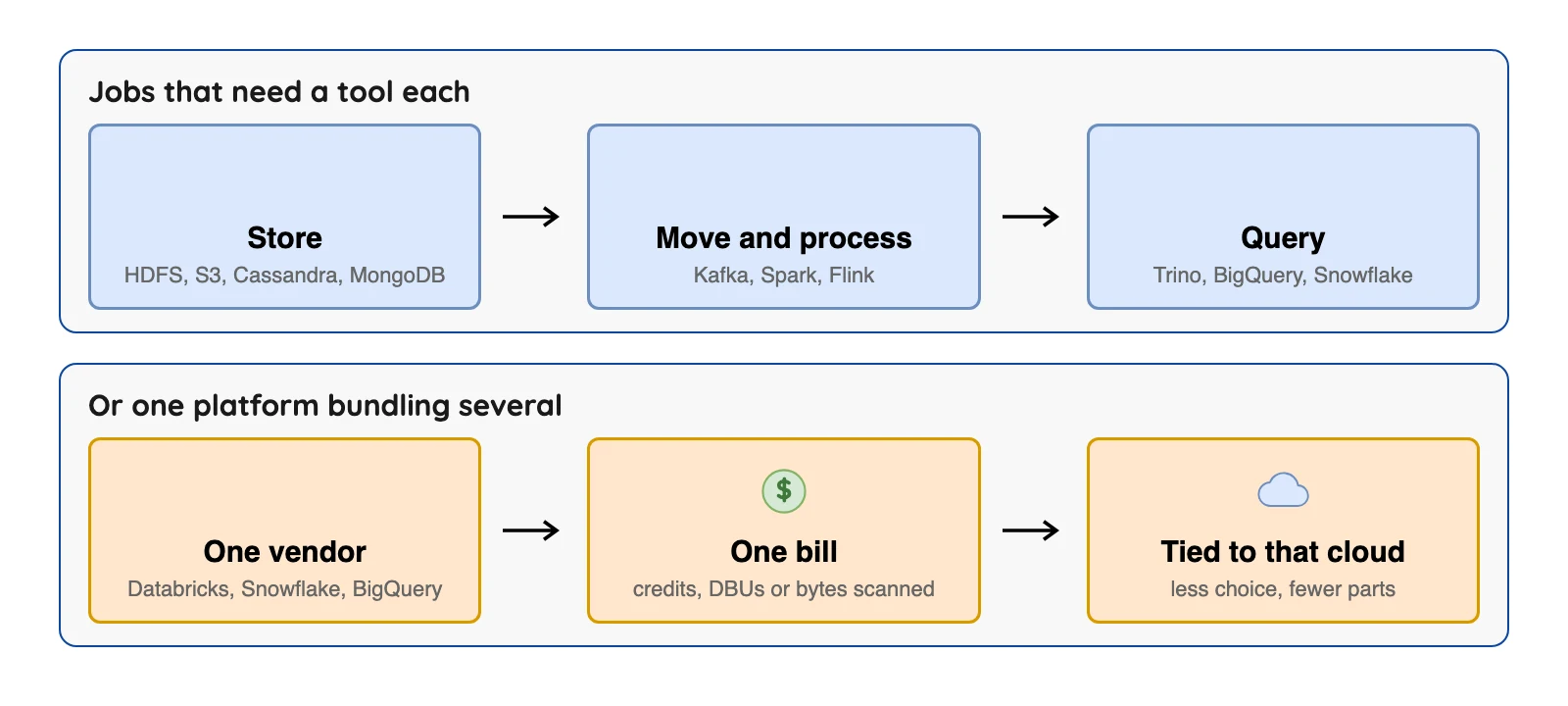
The four jobs, in plain words:
- Store: keep the data, either in files or in a database built to spread across many machines.
- Move: carry data between systems, often as a stream of events (see what a data pipeline is).
- Process: clean, join and calculate over the data, in batches or as it arrives.
- Query: let people ask questions in SQL (the standard database query language) and get answers fast.
How we picked the 11
Each of the 11 tools has a current primary page we could open: the project's own site, docs or pricing page, checked on October 8, 2026. Each claim names its source, so you can check us.
Vendor facts come from each vendor's own pages, read on October 8, 2026. We did not run the other tools.
User opinions come from named public sources only (Hacker News, PeerSpot, GitHub and BARC (an analyst firm)), opened and checked on October 8, 2026. Where a page shows a date, the quote shows its month and year. These are individual opinions and prices; one person's view, with its date and link.
Dashboard tools such as Tableau and Microsoft Power BI (business intelligence software) are out of scope. They chart data that already sits somewhere.
Same for any tool whose current status we couldn't confirm from a primary page.
The order inside each group is not a ranking.
The 11 tools at a glance
| Tool | Job | Open source? | Latest release we found | What it bills |
|---|---|---|---|---|
| Apache Hadoop | Store (HDFS) and batch process | Yes, Apache project | 3.5.0, April 2, 2026 | Free software; servers and staff |
| Amazon S3 | Store files | No | Not applicable | GB stored, plus requests and transfer |
| Apache Cassandra | Store (database) | Yes, Apache 2.0 | 5.0.9, August 7, 2026 | Free software; servers and staff |
| MongoDB | Store (database) | SSPL licence, not Apache 2.0 | Not checked | Not covered here |
| Apache Kafka | Move streams | Yes, Apache 2.0 | 4.3.1, June 25, 2026 | Free software; servers and staff |
| Apache Spark | Process | Yes, Apache 2.0 | 4.2.0, July 14, 2026 | Free software; servers and staff |
| Apache Flink | Process streams | Yes, Apache 2.0 | 2.3.0, June 25, 2026 | Free software; servers and staff |
| Trino | Query | Yes, Apache 2.0 | 483, July 17, 2026 | Free software; servers and staff |
| Google BigQuery | Query and store (cloud) | No | Not applicable | TiB scanned, or reserved capacity |
| Snowflake | Query and store (cloud) | No | Not applicable | Credits, plus storage |
| Databricks | Process and query (cloud) | Platform is proprietary | Not applicable | DBUs, plus cloud compute |
Sources, each the project's or vendor's own page (checked Oct 2026): Hadoop releases, Cassandra downloads, MongoDB licence file, Kafka downloads, Spark news. Also Flink downloads, Trino release index and the licence files linked in each block below.
"Not covered here" means we didn't read a price page for it. Where a cell names a plan or version, the detail and its source are in that tool's block below.
Storage tools: where your data lives
1. Apache Hadoop: best for storing and batch processing huge files on your own servers
At a glance
- Price: Free under Apache 2.0 (checked Oct 2026); you pay for servers and staff
- Latest: Hadoop
3.5.0, April 2, 2026, the first stable release of the Hadoop3.5line (Hadoop site)
Hadoop is really four parts in a trench coat. The first, Hadoop Common, holds shared utilities, and HDFS (the Hadoop Distributed File System) stores files across many machines. YARN (the job scheduler) shares cluster resources, and MapReduce is a system for parallel processing.
If a list calls Hadoop outdated, check its date. We found no primary source that says so, and the project shipped 3.4.3 on February 24, 2026 and 3.5.0 on April 2, 2026 (Hadoop releases).
What's good
- It's free, and you control the machines and the data.
- The Hadoop site says the library is designed to scale from single servers to thousands of machines, each offering local computation and storage.
- The same site says it handles failures at the application layer instead of relying on hardware for high availability, so a cluster of machines that may fail can still serve data.
- Per the HDFS design page (checked Oct 2026), the blocks of a file are replicated for fault tolerance, and block size and replication factor can be set per file. A typical block is
128 MB. - It keeps shipping. The Hadoop site (checked Oct 2026) says release
3.5.0(April 2, 2026) holds 485 bug fixes, improvements and enhancements since3.4.
Where it falls short
- The HDFS design page (checked Oct 2026) says a typical file is gigabytes to terabytes and that the emphasis is on high throughput of data access rather than low latency of data access. It adds that HDFS is designed more for batch processing than for interactive use.
- The same HDFS design page (checked Oct 2026) says files are write-once (appends and truncates aside) and have strictly one writer at any time, so it is not a place for many writers to edit one file.
- The HDFS design page (checked Oct 2026) says a cluster has a single NameNode that manages the file system namespace. Uber's engineering blog on its big data platform says HDFS is bottlenecked by NameNode capacity, a limit that usually occurs when data grows beyond ten petabytes and becomes a real issue beyond 50 to 100 petabytes.
- The
3.4.3release does not include thebundle.jarwith the AWS SDK that thes3aconnector (the part that reads S3) needs. The Hadoop site (checked Oct 2026) tells you to download it from Maven Central yourself.
What users say: PeerSpot reviewers say, in a March 2025 review, "It scaled well" and, in a December 2023 review, "You have to create and maintain servers on your own, which can be hectic."
Better choice if you run your own cluster and your jobs are large batch jobs. If people want quick, interactive answers, look elsewhere.
2. Amazon S3: best for file storage with no cluster to run
At a glance
- Price: in US East (N. Virginia), S3 Standard storage is $0.023 per GB a month for the first 50 TB, $0.022 for the next 450 TB and $0.021 over 500 TB, per the AWS S3 price list for US East (checked Oct 2026)
S3 is AWS object storage, so you pay for the objects you store, at a rate that depends on object size, time stored and storage class.
The same price list has lower rates for other storage classes, for example $0.0125 per GB for S3 Standard Infrequent Access (checked Oct 2026).
What's good
- You pay for what you store, and AWS runs the machines. No cluster to babysit.
- AWS's storage classes page (checked Oct 2026) says S3 is designed to exceed 99.999999999% (11 nines) data durability. That is a design target, not a guarantee.
- The S3 user guide says S3 gives strong read-after-write consistency for
PUTandDELETErequests in all AWS Regions, and that updates to a single key are atomic. - The S3 user guide's upload page (checked Oct 2026) says one object can be up to
50 TBwhen you upload it in parts with the multipart upload API. - For Iceberg tables, AWS's S3 pricing page says S3 Tables bills on storage, requests and a monitoring fee per object stored in table buckets. That page's worked example is a daily ETL job updating an Apache Iceberg table in a table bucket (checked Oct 2026).
Where it falls short
- It stores objects and does not process or query them.
- Requests are billed by type and quantity. S3 Standard
PUT,COPY,POSTandLISTrequests are $0.005 per 1,000 andGETrequests are $0.0004 per 1,000 on the US East price list (checked Oct 2026). - AWS's S3 pricing page says you pay for all bandwidth into and out of S3, except data coming in from the internet and the first 100 GB a month going out to the internet (counted across AWS services and Regions, China and GovCloud excluded) (checked Oct 2026).
- The same user guide (checked Oct 2026) says there is no way to make atomic updates across keys, so a change that touches several objects is not all-or-nothing.
- The upload page (checked Oct 2026) says a single
PUTuploads up to5 GB, and the S3 console tops out at160 GBper file. - Rates depend on region and storage class, and the pricing page examples each name a Region (checked Oct 2026). Check the Region before you budget.
What users say: In an April 2026 Hacker News thread on S3 versus Cloudflare R2, one commenter put it this way: "S3 if you're already in the AWS ecosystem. R2 if egress costs are killing you." (Egress just means data transfer out.)
Better choice if you want storage you don't operate yourself. HDFS is better if you must keep everything on your own hardware.
3. Apache Cassandra: best as an always-on database for application data
At a glance
- Price: Free under Apache 2.0 (checked Oct 2026); you pay for servers and staff
- Latest: Cassandra
5.0.9, August 7, 2026; the4.1line is maintained until the7.0release (Cassandra downloads page)
Cassandra is an open-source NoSQL distributed database. NoSQL loosely means a database outside the classic relational model.
What's good
- The project describes itself as built for scalability and high availability, with data spread across many machines. That is the project's own claim.
- Its architecture docs describe multi-master replication with tunable consistency. Consistency levels run from
ONE(a single replica must respond) throughQUORUM(a majority) toALL. - You choose how many copies to keep. With a replication factor (RF) of
3, the architecture docs (checked Oct 2026) say data is written to three distinct replicas. - The download page (checked Oct 2026) lists
5.0as the latest GA line (5.0.9, August 7, 2026), maintained until the8.0release. The4.1line (4.1.12) is maintained until7.0.
Where it falls short
- Its change data capture (CDC) feature, which copies changes out, rejects writes to a flagged table (checked Oct 2026) once the CDC log reaches its configured size. So whatever reads that log has to keep draining it, or writes stop. The docs say not to enable CDC without a consumption process in place.
- The Cassandra data modeling docs (checked Oct 2026) say joins are not supported, so all required fields must sit in a single table. Because each query is backed by a table, data is duplicated across tables (denormalization).
- The same page (checked Oct 2026) gives a general guideline of under
100,000values and under100MBof disk space per partition, though it says requirements vary by application. - Concurrent updates to a key are settled by last-write-wins. The architecture docs (checked Oct 2026) say every mutation is timestamped, deletes included, and the latest version is the winning value.
What users say: In an August 2026 Hacker News thread about ACID (safe, all-or-nothing updates) in Cassandra 6, one commenter said it has "demonstrably better cost and availability" than anything else they tried. Their condition: "as long as you have a competent team".
Better choice if you need a database that keeps taking writes across many machines. It is not a reporting tool.
4. MongoDB: best for JSON-shaped application data
At a glance
- Price: Not covered here. The licence file for the server code in MongoDB's GitHub repository is the Server Side Public License (SSPL), which is not an Apache licence: MongoDB licence file (checked Oct 2026)
MongoDB stores data as flexible, JSON-like documents. Think of a document as one record, like a row, except it can hold nested fields.
What's good
- Its change streams let applications follow data changes in real time without tailing the oplog, the database's own change log, by hand.
- Applications can subscribe to all data changes on a single collection, a database or an entire deployment.
- Change streams are resumable. You pass a resume token to
resumeAfterorstartAfterwhen you open the cursor, and the_idfield of each change event acts as that token. - Change streams only notify on changes that have persisted to a majority of the data-bearing members in the replica set.
- By default an update event carries only the changed fields (the delta). A stream can be configured to return the most current majority-committed version of the updated document.
Where it falls short
- The change streams docs (checked Oct 2026) say change streams are restricted to database events. The same page says Atlas Stream Processing has extended functionality.
- The same change streams page (checked Oct 2026) lists replica sets and sharded clusters, and says they must use the WiredTiger storage engine and replica set protocol version
1. - Per the change streams docs (checked Oct 2026), time series collections do not support change streams, because they use an optimized storage format instead of tracking changes at the document level.
- Per the change streams docs (checked Oct 2026), resuming needs enough oplog history to find the token. Also,
resumeAftercannot resume after aninvalidateevent such as a collection drop or rename, althoughstartAftercan start a new stream. - By default MongoDB sets no minimum oplog retention period and truncates the oldest entries to hold the configured size. The MongoDB oplog docs (checked Oct 2026) put the WiredTiger default at 5% of free disk space, with a
990 MBminimum and a50 GBmaximum.
What users say: PeerSpot reviews cover MongoDB Atlas, the managed service. One says "MongoDB Atlas is our primary database, and we prefer this because of the reliability of MongoDB Atlas". Another (November 2025) says "I would say pricing is an area where MongoDB Atlas could improve".
Better choice if your data is naturally nested, such as product catalogs or user profiles. For reports across many tables, a warehouse is the better home.
Moving and processing: Kafka, Spark and Flink
5. Apache Kafka: best for sharing one stream of events between many systems
At a glance
- Price: Free under Apache 2.0 (checked Oct 2026); the Kafka intro says fully managed services are offered by a variety of vendors
- Latest: Kafka
4.3.1, June 25, 2026 (Kafka downloads page)
Kafka is an event streaming platform. Programs publish events to it, it stores them durably, and other programs read them back. It's a broker, which means a middle layer between the programs that write events and the ones that read them.
One stale claim is worth fixing. Kafka's upgrade notes say "Apache Kafka 4.0 only supports KRaft mode - ZooKeeper mode has been removed", so lists that name ZooKeeper as a Kafka requirement are out of date.
What's good
- Many programs can read the same stream without ever knowing about each other.
- The Kafka intro says events in a topic can be read as often as needed, because they are not deleted after consumption. Retention is a per-topic setting, and a consumer reads a partition's events in the order they were written.
- Copies are built in. The intro (checked Oct 2026) calls a replication factor of
3a common production setting, and says a topic can be replicated even across geo-regions or datacenters. - Kafka Connect imports and exports data as event streams, and the intro says the community already provides hundreds of ready-to-use connectors.
- Per Kafka's design docs, Kafka supports exactly-once delivery in Kafka Streams. The transactional producer plus a read-committed consumer can provide it when you read, process and write data on Kafka topics.
Where it falls short
- The Kafka intro (checked Oct 2026) describes Kafka Connect, not the brokers, as the part that imports data from existing systems such as relational databases. For tools that capture database changes, see our change data capture comparison.
- The design docs (checked Oct 2026) say Kafka guarantees at-least-once delivery by default. At-most-once means disabling producer retries and committing offsets before processing.
- For exactly-once into outside systems, the same design page (checked Oct 2026) notes that many output systems will not support a two-phase commit. The workaround is to store the consumer's offset in the same place as its output.
- Check Kafka's broker defaults (checked Oct 2026): automatically created topics get a replication factor of
1, and the largest record batch allowed is1048588bytes (message.max.bytes), about1 MB. - The Kafka downloads page (checked Oct 2026) says Kafka
4.3.1fixed a critical Kafka Streams RocksDB native memory leak along with about 15 other issues. The project aims for 3 releases a year, one every 4 months.
What users say: A July 2025 Hacker News thread about Ursa, a Kafka alternative, has a commenter calling Kafka "one of the pieces of software that has been rock solid for me". In the October 2025 Hacker News thread "Kafka is Fast", another says "Managed hosting is expensive to operate and self-managing kafka is a job in of itself."
Better choice if several systems must publish and read the same events. If hourly data is fine, a scheduled copy job is simpler.
6. Apache Spark: best for large batch jobs and mixed workloads on one engine
At a glance
- Price: Free under Apache 2.0 (checked Oct 2026); you pay for servers and staff
- Latest: Spark
4.2.0, July 14, 2026; also4.1.3and4.0.4on July 15 and3.5.9on July 16 (Spark news page)
Spark is a distributed engine for data engineering, data science and machine learning. It runs on one machine or on a cluster.
What's good
- Spark's docs list batch work, SQL and machine learning on one engine, so there may be fewer tools to learn.
- Spark's streaming docs say micro-batch processing, the default for Structured Streaming, achieves end-to-end latencies as low as 100 milliseconds with exactly-once fault-tolerance guarantees.
- The Structured Streaming guide (checked Oct 2026) lists three types of time windows: tumbling (fixed), sliding and session. Since Spark
4.0it encourages thetransformWithStateoperator for complex stateful applications. - Feature releases arrive steadily:
4.0.0on May 23, 2025,4.1.0on December 16, 2025 and4.2.0on July 14, 2026, per the Spark news page (checked Oct 2026).
Where it falls short
- The Spark news page (checked Oct 2026) lists releases in July 2026 for four lines (
4.2,4.1,4.0and3.5). Check which line your connectors and cloud service support before you upgrade. - The Spark downloads page (checked Oct 2026) says Spark
4is pre-built with Scala2.13and support for Scala2.12has been officially dropped. Check your Scala version before moving to Spark4. - The Structured Streaming guide (checked Oct 2026) says streaming Datasets do not support
limitor taking the first N rows, ordistinctoperations. Sorting works only after an aggregation inCompleteoutput mode. - Late data needs care. In the guide's (checked Oct 2026) 2-hour watermark example, the guarantee is strict in only one direction: data delayed by more than 2 hours is not guaranteed to be dropped, and may or may not get aggregated.
- For stream-stream joins, the guide (checked Oct 2026) says you have to define extra join conditions so that indefinitely old inputs cannot match future inputs. Without them the state grows without bound.
What users say: PeerSpot reviewers say "As it uses in-memory data processing, Spark is very fast" and also "Apache Spark is very difficult to use. It would require a data engineer."
Better choice if you have large batch jobs, or you want SQL and machine learning in one place. For stateful streams that need low delay, look at Flink.
7. Apache Flink: best for stateful, low-delay stream processing
At a glance
- Price: Free under Apache 2.0 (checked Oct 2026); you pay for servers and staff
- Latest: Flink
2.3.0, June 25, 2026;1.20.5is the long-term support line, dated June 3, 2026 (Flink downloads page)
Flink describes itself as a distributed engine for stateful computations over unbounded and bounded data streams. "Stateful" means it remembers earlier events, such as a running total, while new ones arrive.
What's good
- The project's own site lists low latency and high throughput among its features.
- Flink's Kafka connector docs say Flink reads from and writes to Kafka topics with exactly-once guarantees.
- Big state is allowed. The Flink state backends docs say that with
EmbeddedRocksDBStateBackendthe state you can keep is limited only by disk space, and that it is currently the only backend with incremental checkpoints. - There is a long-term support line. The Flink site labels the
1.20line as LTS, and the downloads page (checked Oct 2026) dates1.20.5as June 3, 2026, while2.3.0(June 25, 2026) is the latest stable release and2.2.1came out May 15, 2026.
Where it falls short
- The downloads page (checked Oct 2026) says the community supports the current and previous minor release with bugfixes, so you upgrade on the project's schedule.
- The Kafka connector docs (checked Oct 2026) say there is no connector (yet) available for Flink version
2.3, and that Flink's streaming connectors are not part of the binary distribution. - The default in-memory option has a ceiling. The state backends docs (checked Oct 2026) say
HashMapStateBackendis very fast, but its state size is limited by the available memory within the cluster. - The disk-based option is slower. The same page (checked Oct 2026) says RocksDB access leads to average performance about an order of magnitude slower than the memory state backends.
- The newer
ForStStateBackendis, per the docs (checked Oct 2026), still experimental and not fully available for production.
What users say: PeerSpot reviews of Apache Flink include "Apache Flink makes it easy to write on-the-fly transformations on streaming data". Another reviewer says "We also need to simplify operational procedures, such as developing tools and tuning Flink clusters, as these processes can be quite complex."
Better choice if results must update within moments of an event. If batches every few minutes are enough, Spark is simpler.
Query tools and cloud platforms: answers, on demand
8. Trino: best for asking SQL questions across data that lives in many places
At a glance
- Price: Free under Apache 2.0 (checked Oct 2026); you pay for servers and staff
- Latest: Trino
483, July 17, 2026 (Trino release index)
Trino is a distributed SQL query engine. It reads data where it already sits, in files or other databases, and doesn't keep the data itself.
What's good
- Per its docs, one SQL query can reach several systems. The use cases page says Trino can be, and has been, extended to traditional relational databases and sources such as Cassandra.
- The same use cases page says it was designed as an alternative to tools that query HDFS with pipelines of MapReduce jobs, such as Hive or Pig, though it is not limited to HDFS.
- It was designed for data warehousing and analytics, meaning aggregating large amounts of data and producing reports.
- Its Iceberg connector (checked Oct 2026) supports Iceberg table spec versions
1and2and data files in Parquet, ORC or Avro. Catalogs can be a Hive metastore, AWS Glue, JDBC, REST, Nessie or Snowflake. - The same connector supports
INSERT,UPDATE,DELETE,TRUNCATEandMERGEstatements on Iceberg tables.
Where it falls short
- The use cases page (checked Oct 2026) says Trino "is not a general-purpose relational database" and "was not designed to handle Online Transaction Processing (OLTP)", meaning many small app-style reads and writes.
- Per the Iceberg connector docs (checked Oct 2026), support for Iceberg format version
3is experimental, and row-level updates, deletes andOPTIMIZEare not supported on version3tables. - Writing to encrypted Iceberg tables is not supported, per the Iceberg connector docs (checked Oct 2026).
- The
table_changesfunction, which reads row-level changes between two versions of an Iceberg table, does not support tables with delete files, per the Iceberg connector docs (checked Oct 2026).
What users say: A Hacker News commenter in the May 2025 thread "Databricks acquires Neon", who used Trino through AWS Athena, wrote "I really can't speak highly enough of Trino". A September 2025 GitHub issue on the Trino project reports that queries on Iceberg tables were "taking more than 1 minutes and up to 10 minutes to complete the planning stage".
Better choice if your data is already in files and you want SQL over it without loading it elsewhere. A managed warehouse is better if you'd rather not run servers.
9. Google BigQuery: best for a serverless warehouse on Google Cloud
At a glance
- Price: On-demand queries bill per TiB scanned, and "the first 1 TiB of query data processed per month is free", per BigQuery pricing (checked Oct 2026)
BigQuery is a managed, serverless data warehouse. Serverless means Google runs the machines, so there is no cluster to run.
It also sells reserved capacity under three editions: Standard, Enterprise and Enterprise Plus. The pricing page says on-demand queries generally get up to 2,000 concurrent slots, shared among all queries in a project. It also says the older flat-rate model is no longer offered as of July 5, 2023, so older cost guides may be out of date (checked Oct 2026).
What's good
- Google runs the servers, and the free monthly tier covers the first 1 TiB of queries.
- Standard edition slots need no commitment. The pricing page default column lists $0.04 per slot-hour (Enterprise is $0.06), billed per second with a 1-minute minimum. The rendered table does not state its region (checked Oct 2026).
- You can check cost before you pay. Google's cost best practices docs say a dry run estimates the bytes a query will read, and with a
maximum bytes billedsetting a query over the limit fails without a charge. - Storage gets cheaper on its own. A table or partition not modified for 90 consecutive days drops to long-term storage, which cuts its price by approximately 50%, and the first 10 GiB of storage each month is free, per the pricing page (checked Oct 2026).
- Enterprise and Enterprise Plus can take a 1-year commitment at a 20% discount or a 3-year commitment at 40%, per Google's editions page (checked Oct 2026).
Where it falls short
- The on-demand bill follows how much data each query scans, so a query that reads a huge table in full costs real money. We found no self-hosted option in Google's docs (checked Oct 2026).
- A
LIMITclause does not cut the bill. The pricing page says you are charged for the data processed in the columns you select even with an explicitLIMIT, and the cost best practices add that on non-clustered tables aLIMITwon't reduce compute costs (checked Oct 2026). - On-demand charges are rounded up to the nearest MB, with a minimum of
10 MBprocessed per table a query references and per query, per the pricing page (checked Oct 2026). - The editions page shows the Standard edition has no access to capacity commitments, fine-grained security controls (column-level access, row-level security, data masking), BigQuery ML or VPC Service Controls (checked Oct 2026).
- Capacity (slot) pricing does not apply to streaming inserts or to using the BigQuery Storage API, per the pricing page (checked Oct 2026).
The pricing page's table lists $6.25 per TiB on demand and states no region (checked Oct 2026). At that rate, scanning 10 TiB in a month bills 9 TiB after the free first TiB, so 9 x $6.25 = $56.25. Scanning 100 TiB bills 99 x $6.25 = $618.75.
The bill follows what queries read, not how long anything runs, and the pricing page's own advice is to use partitioning and clustering to read less.
What users say: A respondent to the BARC panel survey (April 2025) wrote "I love using it as a product, but it can get pricey if you handle large datasets."
Better choice if you already live in Google Cloud and want no cluster to manage.
10. Snowflake: best for a managed warehouse with published per-credit prices
At a glance
- Price: $2.00 per credit on Standard, $3.00 on Enterprise and $4.00 on Business Critical, on demand, AWS US East, per the Snowflake Service Consumption Table, effective October 15, 2026 (checked Oct 2026)
In Snowflake, a warehouse is a block of compute, and it uses credits at an hourly rate. For Standard warehouses: Extra Small uses 1, Small 2, Medium 4 and Large 8, according to the Service Consumption Table (checked Oct 2026). On-demand storage on AWS US East is $23.00 per terabyte per month, per the same table (checked Oct 2026).
From those published rates: a Medium warehouse (4 credits an hour) running 2 hours a day for 30 days uses 240 credits, or $480 on Standard at $2.00 a credit.
That is compute only. Storage and other charges are extra.
What's good
- Prices per credit, by edition and region, are published in one table (checked Oct 2026). So you can work out compute cost in advance.
- Per Snowflake's compute cost docs, credits are billed per second with a 60-second minimum, and a suspended warehouse does not use any credits.
- Sizes double in cost at each step. The same table lists Standard warehouses at 1 credit an hour for Extra Small, then 2, 4, 8, 16, 32, 64, 128, 256 and 512 for the 6XL size (checked Oct 2026).
- Ingestion has published rates too. The table lists Snowpipe at 0.0037 credits per GB, and Snowpipe Streaming (high-performance architecture) at 0.0037 credits per uncompressed GB (checked Oct 2026).
- Snowflake's Time Travel docs (checked Oct 2026) say a 1-day (24-hour) retention period is automatic for all accounts. On Enterprise Edition and higher, permanent tables can be set from 0 up to 90 days.
Where it falls short
- Credit prices vary by region. For example, AWS EU Frankfurt is $2.60 on Standard and $3.90 on Enterprise on the same table (checked Oct 2026).
- A Time Travel period longer than 1 day requires Enterprise Edition or higher, and the docs (checked Oct 2026) say extended retention needs extra storage that shows up in your monthly storage charges.
- Cloud services usage is charged only when daily cloud services consumption exceeds 10% of the daily usage of virtual warehouses, per the compute cost docs (checked Oct 2026). So an account that leans on cloud services can see a charge beyond warehouse hours.
- Gen 2 warehouses list more credits per hour than the standard-warehouse table. It shows Extra Small at 1.35 on AWS and 1.25 on Azure, against 1 for a standard Extra Small (checked Oct 2026).
- Ingestion charges depend on file type. A footnote on the table says text files such as CSV, XML and JSON are charged at uncompressed size, while binary files such as Parquet, Avro and ORC are charged at their observed size regardless of compression (checked Oct 2026).
Better choice if you want one managed warehouse and can estimate your hours of compute. If you're fully on Google Cloud, BigQuery is simpler.
11. Databricks: best for teams that want managed Spark-style jobs and SQL in one paid platform
At a glance
- Price: On AWS, US East, Premium plan: SQL Serverless $0.70, SQL Pro $0.55 and SQL Classic $0.22 per Databricks Unit (DBU), per Databricks SQL pricing (checked Oct 2026)
Databricks meters compute in DBUs, its own unit. The warehouse types doc says Classic and Pro warehouses keep their compute layer in your own cloud account. On the pricing page, the SQL Serverless price includes cloud instance cost (checked Oct 2026).
What's good
- SQL warehouses and jobs are both priced in DBUs on Databricks' pricing pages, so one unit covers both (checked Oct 2026).
- Serverless SQL warehouses start quickly. The SQL warehouse types doc puts startup typically between 2 and 6 seconds.
- Its Iceberg docs (checked Oct 2026) say Databricks supports Iceberg tables that use Parquet and versions
1,2and3of the Iceberg specification. They can be managed by Unity Catalog or by foreign catalogs such as AWS Glue, Hive metastore or Snowflake Horizon Catalog. - The same page says managed Iceberg tables can also be created from outside engines that support the Iceberg REST Catalog API, such as Apache Spark, Flink, Trino or Kafka.
Where it falls short
- You can't total a monthly bill from the page alone. DBUs per hour for each warehouse size weren't on the pricing pages we read (checked Oct 2026), so use the vendor's calculator.
- Pro and Classic warehouses are slower to start. The warehouse types doc (checked Oct 2026) says each takes several minutes, typically about 4, and a Classic warehouse's compute layer lives in your own AWS account.
- Plan names shift by cloud. The SQL pricing page notes that the Premium tier on Azure Databricks corresponds to the Enterprise tier on AWS and GCP, so check the tier before comparing numbers (checked Oct 2026).
- Iceberg has conditions. The Iceberg docs (checked Oct 2026) say foreign Iceberg tables are read-only in Databricks, branching and tagging are not supported, and the external access page says external Iceberg engines can't read views.
- Managed Iceberg tables can only be created if predictive optimization is enabled for table maintenance, and the docs (checked Oct 2026) ask for Databricks Runtime
16.4LTS or above.
Better choice if you want managed jobs and SQL together. If SQL reports are most of your work, compare it with Snowflake, whose pricing table lists credit rates by warehouse size.
Other names you'll meet
You'll bump into a few more names. Apache HBase and Apache Storm are open-source projects for random-access storage and real-time streams. ClickHouse is a column database for analytics, and Apache Airflow schedules the steps of a pipeline.
Open table formats such as Apache Iceberg, Delta Lake and Apache Hudi sit between files and query engines. Several engines can read the same tables. For those lake layers in more depth, see our best data lake tools comparison.
How to choose: four questions
- Is the work batch or real time? Big batch jobs point to Spark or Hadoop. If results must update within moments of an event, think Kafka with Flink.
- Do you want to run servers? Hadoop, Cassandra, Kafka, Spark, Flink and Trino are free to download but need staff to run. S3, BigQuery, Snowflake and Databricks are run for you, and you pay by meter.
- Which cloud are you on? BigQuery runs on Google Cloud and S3 on AWS. Snowflake and Databricks publish prices by cloud and region, so the same workload can cost different amounts in different places.
- Can you estimate the meter? If you know your hours of compute, credits and DBUs are predictable. If you know the bytes your queries read, the per-TiB model is easier to forecast.
If you can't answer question 4 yet, start on a free tier or a small open-source setup, and don't sign a commitment on a rate you can't turn into a monthly figure.
Which tool for which situation?
| If you need to... | Start with | Why | Watch out for |
|---|---|---|---|
| Keep files on your own hardware | Hadoop (HDFS) | You control the machines | Built for large batch files, not quick answers |
| Store files without running servers | Amazon S3 | AWS runs it | Requests and transfer bill separately |
| Run an always-on app database | Cassandra or MongoDB | Built for application data | CDC log limit (Cassandra); change streams limits (MongoDB) |
| Share one event stream | Kafka | Many readers, one stream | Database import goes through Kafka Connect |
| Crunch large batches | Spark | One engine for SQL and machine learning | Releases on four lines in July 2026 |
| React to events in moments | Flink | Stateful stream processing | Upgrade on its support schedule |
| Query files in place | Trino | No loading step | Not for app-style reads and writes |
| Run a managed warehouse | BigQuery, Snowflake or Databricks | No cluster to run | Three different bill meters |
| Copy database tables into Iceberg or Parquet |  OLake Go OLake Go | Open source loader you run yourself | Pair it with a catalog and a query engine |
Most real stacks mix three or four of these. Think files in S3 or HDFS, a stream in Kafka, processing in Spark or Flink, and a query tool on top.
For a quicker pick, answer the five short questions below.
Which big data tool fits you?
Question 1 of 5
What is the main job you need done?
Big data has four jobs: store, move, process and query. Pick the one that hurts most.
Where OLake Go fits
The tools above store, process and query data that already sits somewhere. Getting database data into a lake in the first place is a separate job, and it is the one OLake Go handles. It is our open-source tool, licensed Apache 2.0 (OLake on GitHub).
It runs a full load of your tables, and change data capture is available for PostgreSQL, MySQL and MariaDB, MongoDB and SQL Server. It also reads Oracle and Db2 tables, Kafka topics and S3 files. It writes Apache Iceberg tables or Parquet files to storage you control, with many Iceberg catalogs to choose from, including AWS Glue, Unity Catalog (Databricks), BigLake (Google) and S3 Tables.
Our compatibility page lists Spark, Flink and Trino among the engines that read those Iceberg tables. For Snowflake, OLake Go can write Iceberg tables into a Snowflake database through the Snowflake Horizon Catalog from v0.11.0, and Snowflake reads tables in other catalogs as read-only. You run OLake Go yourself with Docker or Helm; the quickstart walks through it, and the sources and sync modes are in the OLake docs.
FAQs
Q1. What are big data tools?
Q2. Is Hadoop still maintained?
3.5.0, released April 2, 2026, and 3.4.3, released February 24, 2026. HDFS is built for large files and batch work, so it suits some jobs better than others.Q3. Should I pick Spark or Flink?
Q4. Does Kafka still need ZooKeeper?
4.0 only supports KRaft mode and that ZooKeeper mode has been removed. If a list calls ZooKeeper a requirement, it's out of date.Q5. How do BigQuery, Snowflake and Databricks bill?
Q6. Which big data tools are free?
Q7. Is Spark a replacement for Hadoop?
Q8. Do I need all of these tools?
Q9. How do I get database data into a lake for Spark, Flink or Trino to read?
Conclusion
Big data tools work as a kit. Figure out whether your problem is storing, moving, processing or querying, then pick one tool for that job, or one platform that bundles several. Read the bill meter as closely as the feature list.