Best Cloud Migration Tools in 2026, by What You Move
33 min read
Key takeaways
"Cloud migration" is really four different jobs wearing one name, so no single tool wins. Moving servers? Start with your target cloud's own tool: AWS Transform MGN (which AWS's Migration Hub docs still call Application Migration Service), Azure Migrate or Google Migrate to Virtual Machines.
Databases go through that cloud's Database Migration Service (DMS), and files go through AWS DataSync or Google Storage Transfer Service. Data you'll keep syncing for analysis is a different job again: Fivetran or Airbyte for a cloud warehouse, and OLake Go for database changes into Iceberg on storage you control.
- Pick by what you move first. Servers, databases, files and analytics data need different tools, and most "best cloud migration tools" lists happily mix them up.
- The big three clouds list their server tools as free, for a while. You still pay for the cloud resources they create. AWS lists the first 90 days of replication per server as free (AWS pricing page), Azure Migrate lists server migration as free for the first 180 days per machine (Azure pricing page), and Google says its service is provided at no charge (Google pricing page) (checked Oct 2026).
- Check for retirements before you fall in love. AWS Migration Hub closed to new customers on 7 November 2025, AWS ends Snowball support on 31 December 2026 (AWS notice), and Microsoft's notice says DMS (classic) for SQL Server scenarios was not supported after 15 March 2026 (retirement notice) (checked Oct 2026).
Prices were last read from each vendor's own page in October 2026, so confirm there before you decide.
So, what are cloud migration tools?
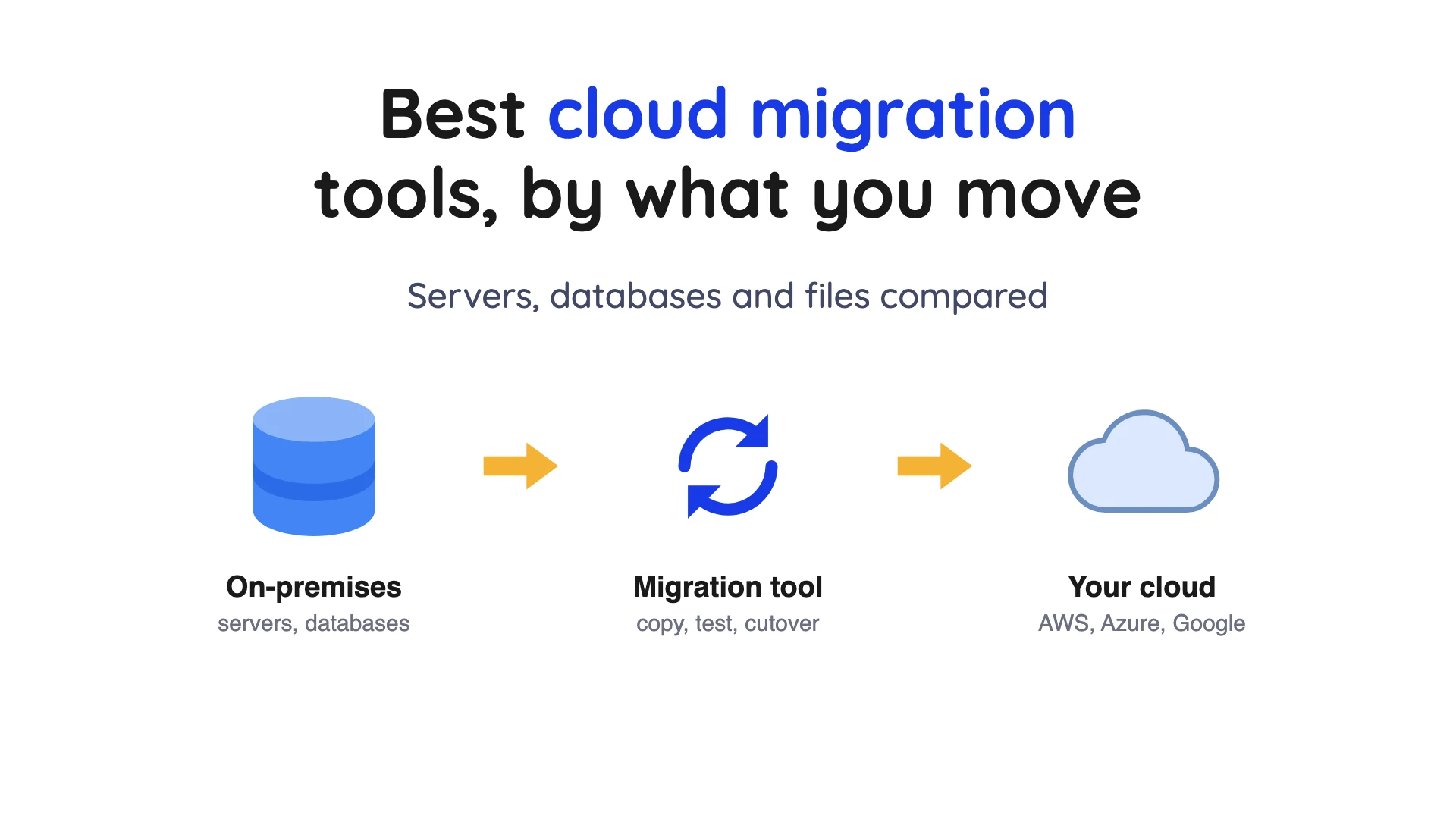
Cloud migration means moving computing work or data into a cloud, or from one cloud to another. Microsoft describes Azure Migrate as a service that helps you decide on, plan and carry out a move to Azure. The "source" is where things start, and the "target" is where they end up.
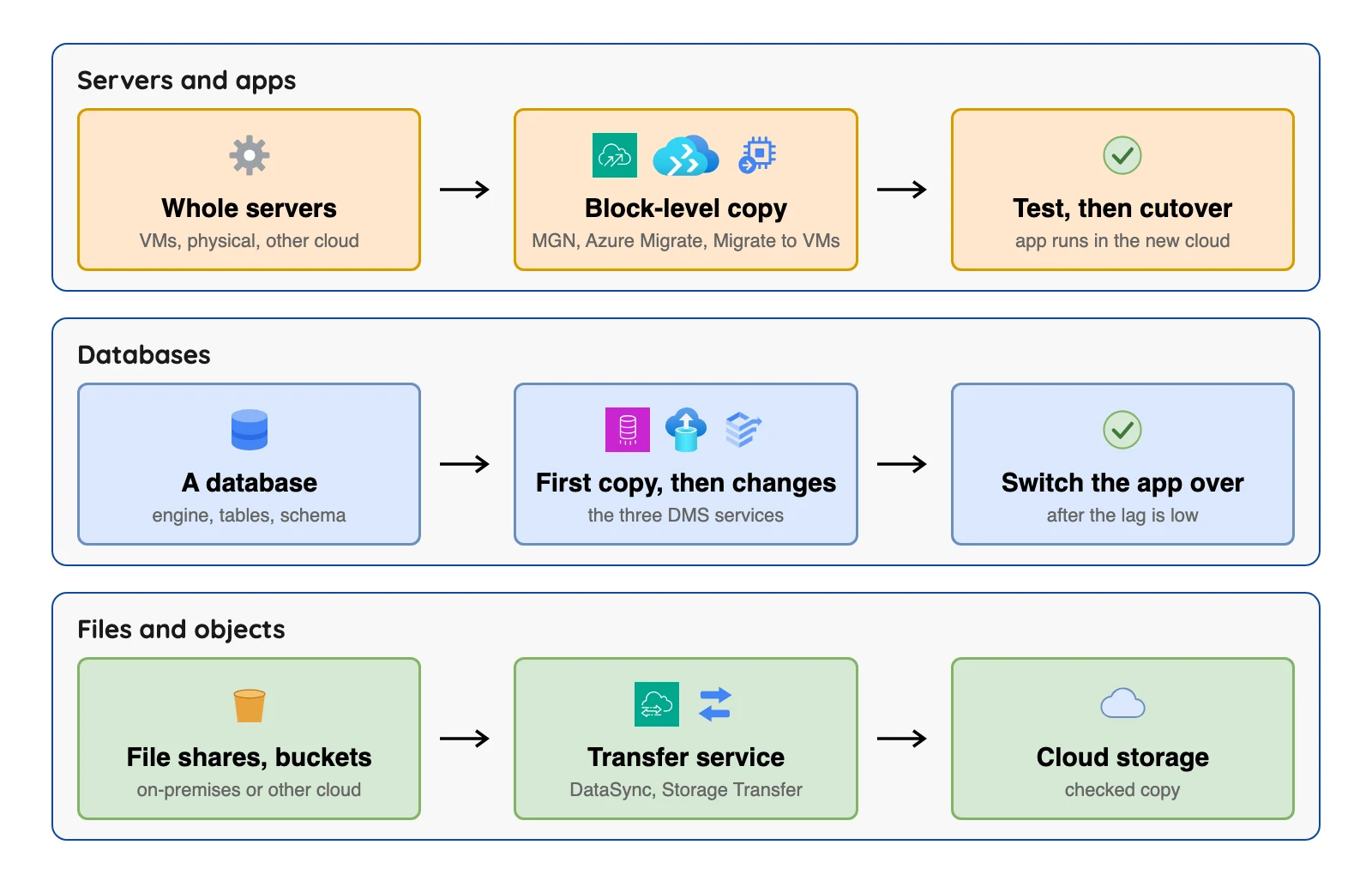
The tools fall into four groups, and each group copies something different. For the planning side, see our data migration tools post, and for cloud-specific pipeline tools, see our posts on pipeline tools for AWS and for Azure.
| Job | What gets copied | Ends when | Tools in this post |
|---|---|---|---|
| Servers and apps | Whole machines, disk by disk | You switch the app to the cloud copy | AWS Transform MGN, Azure Migrate, Google Migrate to Virtual Machines |
| Databases | Tables and rows, then ongoing changes | You switch the app to the new database | AWS DMS, Azure DMS, Google DMS |
| Files and objects | File shares and storage buckets | The copy is checked | AWS DataSync, Google Storage Transfer Service |
| Data for analysis | Tables from databases and apps, on a schedule | You stop the pipeline, often years later | Fivetran, Airbyte |
The 7 Rs, in plain words
Before any tool, you pick an approach for each application. AWS's prescriptive guidance names seven of them, known as the 7 Rs.
| Strategy | Plain meaning (AWS's wording, shortened) | Tools here that help |
|---|---|---|
| Retire | Switch the application off | None; discovery tools show what is unused |
| Retain | Keep it where it is for now | None |
| Rehost | "Lift and shift": move it with no changes | MGN, Azure Migrate, Migrate to Virtual Machines |
| Relocate | Move many servers to the cloud version of the same platform | VMware HCX, which Google lists for VMware moves |
| Repurchase | Replace it with a different product, often a service | None; AWS lists moving your data to the new product as a later step |
| Replatform | Move it and change a little, such as a database to a managed one | The three DMS services |
| Refactor | Redesign it for the cloud | No tool here; AWS does not recommend this for large migrations |
Where the tools sit in a large move
AWS's large migration guide splits the work into three phases: assess, mobilize, and migrate and modernize. The tools in this post belong to the third phase, and the first two cover the business case, the landing zone and the portfolio assessment.
AWS says migration runs in batches called waves. The first stage, setting up runbooks and people, takes 1 to 3 months (checked Oct 2026). Our read: a free window that starts at first replication should be timed to the migrate phase, not to your first meeting.
- Data you keep syncing is a separate job. OLake Go copies PostgreSQL, MySQL and MariaDB, MongoDB and SQL Server (full load, then change capture) into Apache Iceberg or Parquet (see our docs).
How we picked
The list covers tools that move something into a cloud and publish documentation and a price page we could open. We read each vendor's own pages in October 2026 for what it moves, what it costs, and where it stops, and each claim links its page. Entry 5 has a retirement note.
The short list, at a glance
| Tool | Moves | Main limit | Price shape |
|---|---|---|---|
| AWS Transform MGN | Servers to AWS | AWS targets only; OS support ends for some old versions in 2026 | Free 90 days per server, then $0.042 an hour |
| Azure Migrate | Servers, SQL Server, web apps to Azure | Azure targets only | Free 180 days per machine, then $25 a month |
| Google Migrate to Virtual Machines | VMs from four sources to Google Cloud | Physical servers not listed | Service at no charge |
| AWS DMS | Databases to AWS | No latency guarantee on changes | Instance hours or capacity hours |
| Azure DMS | SQL Server to Azure SQL | Azure SQL targets only | Standard tier free (classic pricing page) |
| Google DMS | Databases to Cloud SQL or AlloyDB | Google databases only | No extra charge for MySQL and PostgreSQL native moves |
| AWS DataSync | Files and objects to AWS storage | No databases named | $0.0125 per GB in Basic mode |
| Google Storage Transfer Service | Files and objects to Cloud Storage | Docs list Cloud Storage and file system sinks | Agentless: no charge |
| Fivetran | Database and app data to warehouses and lakes | Not built for a one-time cutover | Free to 500,000 monthly active rows |
| Airbyte | Database and app data to warehouses and lakes | Syncs run on a schedule | Core free to self-run |
| OLake Go (ours) | PostgreSQL, MySQL and MariaDB, MongoDB and SQL Server into Apache Iceberg or Parquet | Runs on your own infrastructure | Open source (Apache 2.0), free to self-run |
Sources: AWS DMS pricing, Azure DMS pricing, Google DMS pricing, AWS DataSync pricing, Google Storage Transfer Service pricing, Fivetran pricing, Airbyte pricing. Limits in the table come from the linked docs in each entry below (checked Oct 2026). OLake Go is our own tool and is not one of the ten profiled below; the pick table explains where it fits.
The 10 best cloud migration tools
Servers and apps
1. AWS Transform MGN: best for moving servers into AWS
At a glance
- Job: Rehosts physical, virtual and cloud servers on AWS
- Price: First 90 days (2,160 hours) of replication per server free, then $0.042 per server per hour, about $30 a month (checked Oct 2026)
AWS's MGN docs call this AWS Transform MGN, while its Migration Hub docs still use the name AWS Application Migration Service. The MGN docs say it does continuous block-level replication, meaning it copies the disk contents as they change, and that cutover windows are typically minutes. You can group servers into applications, and applications into waves (batches that move together).
What's good
- AWS says MGN pricing is the same in all supported AWS Regions.
- Sources can be physical servers, VMware vSphere, Microsoft Hyper-V, Amazon EC2, Amazon VPC and other clouds, and AWS calls MGN its recommended service for rehosting (AWS's "when to choose" page) (checked Oct 2026).
- Windows and Linux source servers can be physical, virtual or cloud-based (supported operating systems).
- Launch, cutover and archival actions can run at the server, application or wave level.
- Replication can go into standard Availability Zones or AWS Local Zones without special configuration.
Where it falls short
- AWS says you pay for the AWS infrastructure MGN provisions for replication, even during the free period, and for test and cutover instances (checked Oct 2026).
- Support has ended or ends for older systems: Windows 2003 on 15 February 2026, CentOS 7 and Amazon Linux 1 on 20 November 2026, and Windows 2008, Windows 7 and RHEL 6.x on 30 December 2026 (checked Oct 2026).
- MGN does not support 32-bit Linux or kernel versions earlier than 2.6.18-164, and agent installation fails on kernel 4.9.256 (checked Oct 2026).
- Windows source servers need at least 2 GB of free disk space to launch a test or cutover instance (checked Oct 2026).
- For migrations to AWS Outposts, AWS says to consider AWS Elastic Disaster Recovery instead (checked Oct 2026).
2. Azure Migrate: best for Microsoft estates with SQL Server and web apps
At a glance
- Job: Finds, assesses and migrates servers, SQL Server databases and web apps to Azure
- Price: Free to use; server migration is free for the first 180 days per machine, then $25 a month per replicated instance (checked Oct 2026)
Microsoft says Azure Migrate covers servers, databases, web apps, virtual desktops and large offline moves with Azure Data Box devices. It starts with discovery, using a small virtual appliance in your datacenter, and then hands you readiness, sizing and cost estimates.
What's good
- Microsoft calls it a free service to identify your inventory of workloads, assess them for Azure infrastructure and platform targets, and develop a migration plan (checked Oct 2026).
- Built-in planning steps: Microsoft lists a business case, dependency analysis and right-sizing for Azure.
- It can migrate VMware VMs (agentless or agent-based), Hyper-V VMs, physical servers and VMs from other public clouds, which it treats as physical servers.
- It assesses on-premises SQL Server instances and databases for SQL Server on an Azure VM, Azure SQL Managed Instance or Azure SQL Database.
- Large offline moves can use Azure Data Box.
Where it falls short
- Microsoft's support matrix says software inventory on VMware VMs is limited to discovery only, with assessment at the server level (support matrix) (checked Oct 2026).
- One project can assess up to 35,000 VMware VMs, and up to 35,000 Hyper-V VMs (checked Oct 2026).
- Web app migration covers
ASP.NETweb apps (Microsoft's web framework) on Windows, in a VMware environment, and database assessment targets SQL Server, so other stacks need other tools (checked Oct 2026). - The free window covers licensing only: during the first 180 days you might still pay for Azure Storage, storage transactions and data transfer during replication (checked Oct 2026).
- Microsoft says partner tools inside Azure Migrate might charge for their services (checked Oct 2026).
- With agent-based dependency analysis, standard Log Analytics charges apply for dependency visualization, and Microsoft suggests agentless analysis instead (checked Oct 2026).
3. Google Migrate to Virtual Machines: best for VMware, AWS or Azure VMs going to Compute Engine
At a glance
- Job: Migrates VMs and their disks to Google Cloud
- Price: Google says the service is provided at no charge for migrations into Google Cloud (checked Oct 2026)
Google's overview names four sources: vSphere data centers, AWS, Azure and Google Cloud VMware Engine. Things land on a Compute Engine instance or a Persistent Disk volume.
What's good
- Google says the service itself is provided at no charge (checked Oct 2026).
- It migrates VMs and the disks of VMs, and the four sources include AWS and Azure, so it works as a cloud-to-cloud path (architecture page) (checked Oct 2026).
- Google's migration tools page lists it under "Lift and shift" for on-premises VMware VMs and VMs from other cloud environments, landing on Compute Engine (migration tools).
- The same page pairs VMware HCX with moves to Google Cloud VMware Engine.
Where it falls short
- Physical servers are not among the four sources on the architecture page (checked Oct 2026).
- For physical servers and non-vSphere virtualization, Google points to third-party tools: RackWare for physical and virtual servers from any data center or public cloud, and SUREedge for environments where Migrate to Virtual Machines might not fit (checked Oct 2026).
- Google Cloud charges for resources such as Compute Engine instances, storage and networking if they are consumed for testing or validation (checked Oct 2026).
- We found no cutover steps, downtime figures or quotas on the overview pages, so check the full guides.
- Database change capture is a separate tool: Google's migration tools page lists Datastream for change data capture and replication (checked Oct 2026).
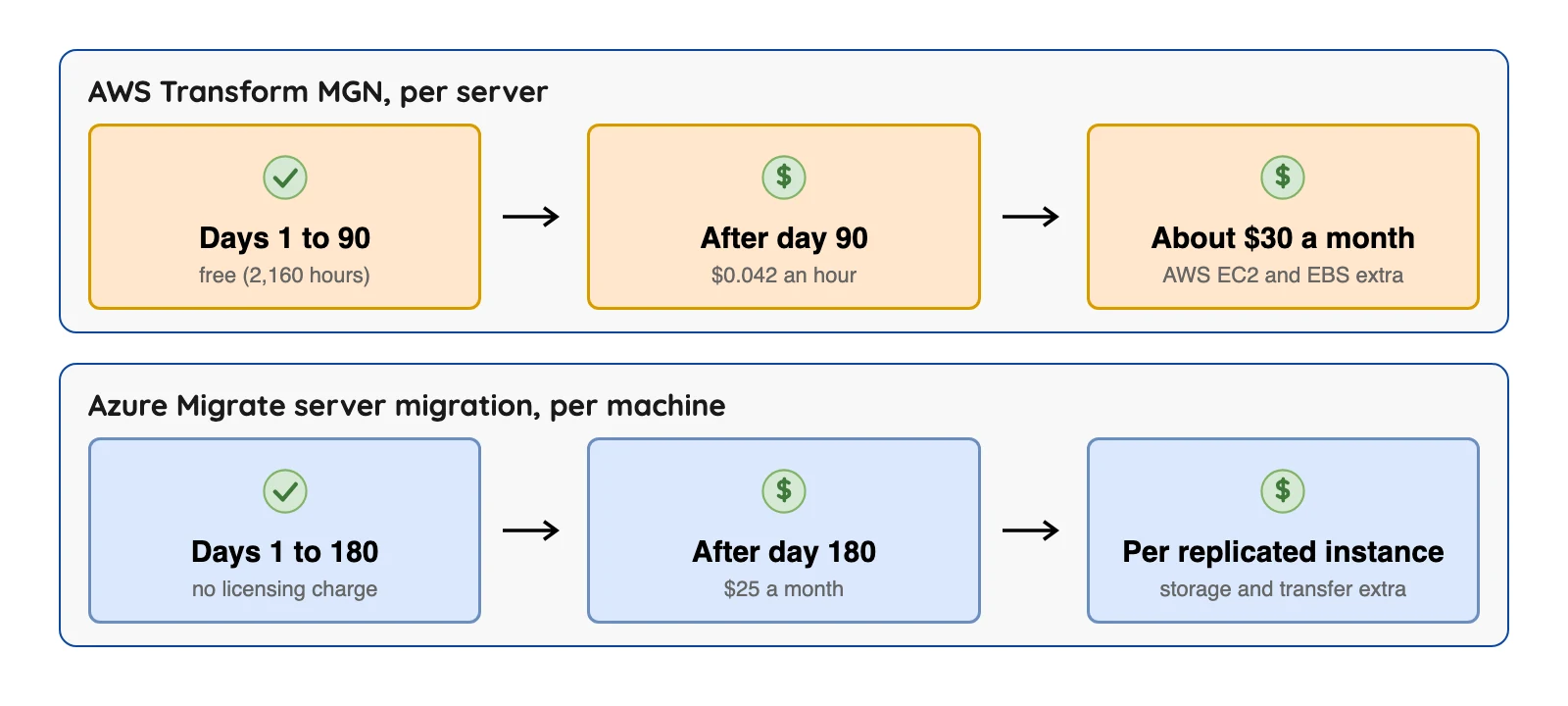
If your move runs past the free window, you pay the per-server rate. AWS lists $0.042 per server per hour after day 90 and Azure lists $25 a month per replicated instance after day 180 (checked Oct 2026).
Databases
4. AWS Database Migration Service: best for moving databases into AWS
At a glance
- Job: One-time moves or ongoing replication between databases
- Price: Replication instance hours or Serverless capacity hours, plus storage (checked Oct 2026)
AWS describes DMS as a server in the AWS cloud that runs replication software. A task can do a full load first and then capture changes. The docs list sources such as Oracle, SQL Server, MySQL, MariaDB, PostgreSQL, MongoDB and Db2.
What's good
- The source list covers Oracle, SQL Server (2008 to 2022), MySQL (5.5 to 8.4), MariaDB, PostgreSQL (9.4 and up through 18.x), MongoDB (3.x to 8.0) and SAP ASE (sources page) (checked Oct 2026).
- Targets include Amazon RDS databases, Redshift, DynamoDB, S3, OpenSearch Service, Kinesis Data Streams, DocumentDB, Neptune and Kafka (targets page) (checked Oct 2026).
- DMS Schema Conversion and a separate homogeneous data migration feature each have their own source lists; the homogeneous list includes MySQL 5.7 and 8.0, PostgreSQL 10.4 to 17.x and MongoDB 4.x to 8.0 (checked Oct 2026).
- Billing comes in three options, on-demand, serverless and Database Savings Plans, and data transfer into DMS is free (checked Oct 2026).
Where it falls short
- AWS's page on change data capture (CDC), which copies new changes after the first load, says "There are no SLAs for CDC latency" and that latency can increase to several minutes or longer (CDC page) (checked Oct 2026).
- SQL Server Express is not supported as a source (checked Oct 2026).
- The targets page does not list Apache Iceberg. The S3 target writes .csv files by default, with Apache Parquet as an option (S3 target docs) (checked Oct 2026).
- On the S3 target, no ALTER statement is recorded when a source column is added, dropped or renamed, and BatchApply is not supported and might lose data (checked Oct 2026).
- Data validation does not cover views, cannot validate rows that are continuously modified during validation, and stops if it detects more than 10,000 failed or suspended records (validation docs) (checked Oct 2026).
- Standard AWS data transfer rates apply when the target is in a different AZ, Region or outside AWS (checked Oct 2026).
5. Azure Database Migration Service: best for SQL Server into Azure SQL
At a glance
- Job: Moves SQL Server databases to Azure SQL targets
- Price: On the pricing page for the classic service, the Standard tier is free for offline moves and Premium 4-vCore is $0.37 an hour, free for the first 6 months (Central US, Microsoft's pricing page) (checked Oct 2026)
Microsoft's overview names three targets: Azure SQL Database, Azure SQL Managed Instance and SQL Server on an Azure virtual machine. Offline moves are a point-in-time copy. Online moves do the first copy and then keep following ongoing changes.
What's good
- Microsoft says it is a fully managed service for migrations from multiple database sources to Azure data platforms, with minimal downtime for online migrations.
- Schema migration, private endpoints and automation through PowerShell and the Azure CLI are listed as supported.
- On the classic pricing page, the Standard tier (1-, 2- and 4-vCore options) supports offline moves and is free, while the Premium tier supports offline and online moves (checked Oct 2026).
- The comparison table marks offline migration as supported for Azure SQL Database, Azure SQL Managed Instance and SQL Server on Azure Virtual Machines, and online migration for Managed Instance and SQL Server on Azure Virtual Machines.
Where it falls short
- Microsoft's overview lists gaps in the portal version: no assessment or SKU recommendation, no login migration, and no support for databases encrypted with Transparent Data Encryption (checked Oct 2026).
- The pricing page says "classic", and Microsoft's retirement notice says DMS (classic) for SQL Server scenarios was not supported after 15 March 2026, with no new classic resources for SQL Server scenarios from 1 August 2023 (checked Oct 2026).
- The notice names the replacements as DMS from the Azure portal, the Azure SQL Migration extension in Azure Data Studio, or PowerShell or CLI, and says classic scenarios for MySQL, PostgreSQL and MongoDB are out of scope of the retirement (checked Oct 2026).
- The pricing page is titled "Azure Database Migration Service (classic) pricing" and does not say whether the same rates apply to the portal service (checked Oct 2026).
- Standard-tier compute supports offline migration only (checked Oct 2026).
- A full source list and the change-capture method for online moves are not on the overview page (checked Oct 2026).
6. Google Database Migration Service: best for moving into Cloud SQL or AlloyDB
At a glance
- Job: One-time or continuous moves into Google Cloud databases
- Price: No additional charge for native same-engine moves to Cloud SQL or AlloyDB for PostgreSQL; per GiB processed for different-engine moves (checked Oct 2026)
Google lists same-engine moves into Cloud SQL for MySQL, PostgreSQL and SQL Server, and into AlloyDB. It also lists different-engine moves from Oracle and SQL Server to Cloud SQL for PostgreSQL or AlloyDB. A continuous move does the first copy and then keeps streaming changes.
What's good
- Google defines a one-time migration as a single point-in-time snapshot, and a continuous migration as a flow of changes that follows the first full dump and load, based on change data capture (overview).
- The pricing page lists "No additional charge" rows for MySQL-native moves to Cloud SQL for MySQL and for PostgreSQL-native moves to Cloud SQL for PostgreSQL or AlloyDB for PostgreSQL (checked Oct 2026).
- The pricing page says per-GiB billing counts raw, uncompressed bytes, so you can estimate from your database size.
Where it falls short
- Destinations are Google Cloud databases only, with no lake or warehouse listed (checked Oct 2026).
- Google says that in a one-time migration, dependent applications can see downtime because there can be no new writes to the source while it runs (checked Oct 2026).
- Cloud SQL for SQL Server is not listed as a no-additional-charge row on the pricing page (checked Oct 2026).
- For different-engine moves, CDC is billed per GiB per account per month: the page's table starts at $2.00 per GiB for the first 2,500 GiB and falls to $0.80 above 10,000 GiB, and Google says to contact sales beyond 10 TiB. The page does not show which region the table is for, and its worked example uses Iowa (checked Oct 2026).
- Google's pricing page states the free backfill allowance two different ways, so we quote neither (checked Oct 2026).
Files and objects
7. AWS DataSync: best for moving file shares and buckets into AWS storage
At a glance
- Job: Online transfer of files and objects, with end-to-end checks
- Price: Basic mode $0.0125 per GB; Enhanced mode $0.015 per GB plus $0.55 per task execution (US East (Ohio), AWS DataSync pricing) (checked Oct 2026)
AWS says DataSync moves data from on-premises storage, other clouds and AWS storage to Amazon S3, Amazon Elastic File System and Amazon FSx. Its own Basic mode pricing example (AWS's own arithmetic) moves 50 TB of 16 MB files into an empty S3 bucket for $640 in DataSync fees plus $16.38 in S3 requests, $656.38 in all.
What's good
- A flat per-GB fee with no upfront cost and no minimum charge.
- It works with on-premises NFS, SMB and HDFS and with object storage, and with other clouds including Google Cloud Storage, Azure Blob Storage, Azure Files, Wasabi, DigitalOcean Spaces, Oracle Cloud Infrastructure Object Storage, Cloudflare R2 and Backblaze B2 (DataSync docs) (checked Oct 2026).
- AWS targets include S3, EFS and four Amazon FSx variants: Windows File Server, Lustre, OpenZFS and NetApp ONTAP (checked Oct 2026).
- AWS docs list encryption and data integrity validation, and support for VPC endpoints so data can move without traversing the public internet.
Where it falls short
- The pages we read name file and object storage only, with no database, change capture or table-format (such as Apache Iceberg) destination (checked Oct 2026).
- Regular S3, EFS and FSx charges apply on top, and data transfer charges apply between regions (checked Oct 2026).
- Enhanced mode is limited to the paths the pricing page lists: between S3 locations, between other clouds and S3, and between on-premises NFS or SMB file servers and S3 (checked Oct 2026).
- AWS's own Enhanced mode example, 50 TB from one S3 bucket to another in the same Region, totals $797.58, against $656.38 for its Basic mode example; the two examples move different data, so they are not a like-for-like price test (checked Oct 2026).
8. Google Storage Transfer Service: best for bulk copies into Cloud Storage
At a glance
- Job: Large transfers from S3, Azure Blob, file systems and HDFS into Cloud Storage, plus a shipped hardware option
- Price: Agentless transfers no charge; agent-based transfers to or from file systems $0.0125 per gibibyte (checked Oct 2026)
Google's migration tools page also lists Transfer Appliance, a device you fill and ship to Google for large volumes of data (checked Oct 2026). Google recommends it for data above 20 TB. Reading S3 over a managed private network costs $0.03 per gibibyte within North America and $0.08 within Asia Pacific (checked Oct 2026).
What's good
- Agent-based transfers from S3-compatible storage and HDFS carry no service charge (checked Oct 2026).
- Sources include Amazon S3, S3-compatible storage, Azure Blob Storage, URL lists, file systems and HDFS (overview) (checked Oct 2026).
- Google calls the service fully managed, with a choice of Google-managed transfers for simplicity or self-hosted agents for control over network routing and bandwidth.
- The shipped-device route fits data that is too big to send over your network: Google's migration tools page recommends Transfer Appliance for data above 20 TB and up to 1 petabyte (checked Oct 2026).
Where it falls short
- Google says its fee comes on top of network use, operations at both ends, Cloud Storage charges and any other cloud's costs (checked Oct 2026).
- The overview lists Cloud Storage and file systems as sinks, and it copies files without reading table formats (checked Oct 2026).
- Google says Storage Transfer Service does not provide an SLA, including for transfer performance or latency (checked Oct 2026).
- Google says it is optimized for transfers involving more than 1 TiB of data (checked Oct 2026).
Data for analysis
9. Fivetran: best for a vendor-run, ongoing copy into a warehouse
At a glance
- Job: Managed pipelines from databases, apps and files into warehouses and lakes
- Price: Monthly Active Rows (MAR, the rows added or changed in a month) per connection; Free up to 500,000 MAR; Standard from $495 per million MAR for the first million, per connection, in its Service Consumption Table and pricing page (checked Oct 2026)
Fivetran runs a first historical sync, then switches to incremental syncs. Its docs say database connectors use the source's native change capture or a method of its own (database connectors).
What's good
- A vendor runs it, and its pricing page lists 700+ fully managed connectors on the Standard plan and a Hybrid deployment option on Enterprise (checked Oct 2026).
- Its docs say database connectors capture changes with the source's native change data capture or a Fivetran method, and sync new and modified data every 15 minutes by default; the same page says Teleport Sync, its alternative to reading change logs, re-syncs a whole table when large parts of it change between syncs (checked Oct 2026).
- Its sync docs offer fixed-interval schedules from 1 minute to 24 hours depending on plan, and manual syncs through the REST API. Cron schedules are in Beta on Enterprise and Business Critical (sync overview) (checked Oct 2026).
- Its usage docs say initial syncs don't incur a cost for the historical data they sync, new connections get 14 days of free usage, and a row is counted once a month however often it syncs; later incremental updates can count toward paid MAR (usage docs) (checked Oct 2026).
- For lakes, its docs say the Managed Data Lake Service writes Parquet files to S3, ADLS or GCS with Iceberg metadata, and the same page says position deletes for Iceberg tables are not supported (lake docs) (checked Oct 2026).
Where it falls short
- Its docs describe a first sync followed by incremental syncs, so it suits a copy that keeps running better than a one-time cutover (checked Oct 2026).
- The pricing page lists 15-minute syncs on Standard (checked Oct 2026), so it is not a live cutover tool.
- Per the sync overview, the 1-minute option needs Enterprise or Business Critical and is not supported for Lite connectors (checked Oct 2026).
- Database connectors need a full re-sync when you move to another database provider, because the progress cursor and change log are not carried over, which matters in a cloud move (checked Oct 2026).
- Its pricing FAQ counts Oracle and High-Volume Agent connectors as enterprise database connectors, which the Enterprise plan lists and Standard does not (checked Oct 2026).
- A $5 base charge applies to standard connections with monthly usage between 1 MAR and 1M MAR, and usage counts updates, including deletes (checked Oct 2026).
- The lake service does not support the S3 Glacier Flexible Retrieval, S3 Glacier Deep Archive or S3 Intelligent-Tiering archive tiers (checked Oct 2026).
10. Airbyte: best for a long connector list you can run yourself
At a glance
- Job: Syncs from many sources into warehouses, databases and lakes
- Price: Core is free to self-run; Cloud Standard starts at $20 a month with 5 credits and $5 per extra credit (Airbyte pricing page, Cloud release note) (checked Oct 2026)
Airbyte Core is self-managed, and its repository licence is the Elastic License 2.0, which forbids offering it to others as a hosted service (LICENSE file) (checked Oct 2026).
What's good
- A self-run edition and a hosted Cloud edition. Its S3 Data Lake docs list an Iceberg destination for S3 (see the limits below) (S3 Data Lake docs) (checked Oct 2026).
- Its S3 Data Lake docs say the connector writes the Iceberg table format to S3 or S3-compatible storage through a REST, AWS Glue, Nessie or Polaris catalog, and that it never rewrites existing Iceberg data files, so only adding or removing a column, widening a column and changing the primary key are handled as schema changes (checked Oct 2026).
- Its CDC docs list Postgres, MySQL, SQL Server, MongoDB, Oracle, SAP HANA and Db2 as current support, and say CDC syncs run on a chosen interval rather than as infinite streams; the page does not say which plans include Oracle, SAP HANA and Db2 (CDC docs) (checked Oct 2026).
- Its pricing page lists a maximum sync frequency of 15 minutes on Plus and 5 minutes on Pro and Enterprise Flex (checked Oct 2026).
- Cloud bills databases and files at 4 credits per GB; if you run out of credits it keeps syncing and bills in arrears (credits docs) (checked Oct 2026).
Where it falls short
- Its CDC docs say views are not supported and that TRUNCATE and table-structure changes do not show up in the logs (checked Oct 2026).
- Cloud Standard syncs at most hourly, so it is not a live cutover tool (checked Oct 2026).
- The first CDC sync is a snapshot taken with a SELECT statement, which is effectively a Full Refresh, and a refresh is required after any new table is added (checked Oct 2026).
- CDC incremental is only supported for tables with primary keys for most sources (checked Oct 2026).
- Marketplace connectors are community maintained, are not covered by Airbyte support SLAs, should be tested before production, and may have breaking changes with no notice (support levels) (checked Oct 2026).
- The S3 Data Lake connector assumes the source never emits the same primary key twice in one sync attempt; Airbyte says Stripe and Monday are known not to meet this (checked Oct 2026).
Others you'll see in other lists
- Server partners. Microsoft lists Carbonite, Zerto and RackWare as server migration tools inside Azure Migrate, and Google lists RackWare and SUREedge. We did not read their prices.
- AWS Migration Hub is no longer open to new customers as of 7 November 2025, and AWS points to AWS Transform instead (checked Oct 2026).
- AWS Snowball is a shipped storage device. AWS's notice says support ends on 31 December 2026 in all commercial Regions (checked Oct 2026), so skip it for new work.
Which one should you pick?
| Your job | Look at first | Rule out when |
|---|---|---|
| Servers to AWS | AWS Transform MGN | The server runs an unsupported operating system |
| Windows and SQL Server to Azure | Azure Migrate | The web apps use other stacks or the target is not Azure |
| VMware, AWS or Azure VMs to Google Cloud | Migrate to Virtual Machines | The servers are physical |
| Database to AWS | AWS DMS | You need a guaranteed delay on changes |
| SQL Server to Azure SQL | Azure DMS | The source is another engine |
| Database to Cloud SQL or AlloyDB | Google DMS | The destination is a lake or warehouse |
| File shares and buckets | DataSync (AWS) or Storage Transfer Service (Google) | The data is a live database |
| Data you will keep syncing for analysis | Fivetran, Airbyte or OLake Go | You need a one-time cutover |
OLake Go is our own open-source tool, licensed Apache 2.0. It runs a full copy and then change capture for PostgreSQL, MySQL (including MariaDB), MongoDB and SQL Server into Apache Iceberg or Parquet on your own storage (our docs), and our docs include an ingestion benchmarks page. It is an extract-and-load tool for database-to-lakehouse copies, so it fits the "data for analysis" job.
Not sure which row is yours? Try this short quiz.
Which cloud migration tool fits you?
Question 1 of 5
What are you moving?
Cloud migration is four different jobs. Pick the one that is biggest for you.
When a cloud's own tool is not the right call
Each provider's tool is built for one target, which is a limit if you don't know where you're going.
- You use more than one cloud. The cloud providers' own tools above send data to their own cloud only. Microsoft's and Google's partner lists show server tools from other vendors (Azure Migrate overview, Google migration tools), though we did not check their targets.
- You need a vendor to run the pipeline for years. Fivetran or a similar service fits better than a migration service that stops when you switch.
- You're on an unsupported system. AWS's MGN notes show old Windows and Linux versions losing support in 2026 (checked Oct 2026), so an old server may need an upgrade before it can move.
What a 180-day move could cost
These figures are list prices from the vendor pages above, and they leave out the cloud resources you run, network transfer and your own time.
| Tool | Rate on the vendor page | One server over 180 days | 20 servers over 180 days |
|---|---|---|---|
| AWS Transform MGN | Free to day 90, then $0.042 an hour | $90.72 (2,160 billable hours) | $1,814.40 |
| Azure Migrate server migration | Free for 180 days per machine | $0 licensing | $0 licensing |
| Google Migrate to Virtual Machines | Service at no charge | $0 service fee | $0 service fee |
The MGN row is our own arithmetic: 2,160 hours times $0.042. AWS doesn't print this total, and AWS says you also pay for replication infrastructure and test or cutover instances. The Azure and Google rows leave out storage and transfer charges.
What to check before you choose
1. The downtime you can accept. Offline copies are a one-time snapshot, while online copies keep following changes until a short cutover. For databases, AWS gives no latency guarantee on the ongoing changes.
2. The source. Check your operating system or database version against the vendor's list. AWS and Microsoft both publish limits and retirement dates.
3. How long the move will take. A free window of 90 or 180 days can run out before a big estate is done.
4. Where the data lands. The three DMS services do not list Apache Iceberg, so a lake with table support needs a different class of tool.
5. How the copy is checked. AWS says DataSync validates data end to end. For the others, ask how they prove both sides match.
A scorecard for your shortlist
This is our own worksheet, not a vendor method. Score each finalist 0 (fails), 1 (partly) or 2 (fits) on the five checks above, then add them up. One rule: drop any tool that scores 0 on the source or the target, whatever its total.
| Check | AWS option | Azure option | Google option |
|---|---|---|---|
| Downtime you can accept | |||
| Source version supported | |||
| Free window covers your timeline | |||
| Target is where you want data to end up | |||
| Copy can be checked |
A small test for any finalist
Run this acceptance test on your own shortlist before you commit.
- Pick one non-critical server or table (not the one your boss watches) and start the migration.
- While it runs, make a change on the source, such as adding a file or updating a row.
- Run the cutover in a test environment, then compare file counts or row counts and a checksum on both sides.
- Expected result: the change you made appears once, nothing is missing and nothing is duplicated.