Best Data Movement Tools in 2026, Compared
35 min read
Key takeaways
"Data movement tools" is a very wide label, so the best pick depends on what you're moving. Got files and objects? Start with your cloud's own copier (AWS DataSync, Google Storage Transfer Service or Azure Storage Mover) or the free rclone.
Moving a whole database? Try the cloud's migration service, such as AWS Database Migration Service (DMS). For app and database data headed into a warehouse or lake, look at Fivetran, Airbyte, Hevo, Estuary or, for Iceberg, OLake Go, and for event streams, look at Apache Kafka and Debezium.
Whatever you choose, check the billing meter and the named limit first.
- Start with what you move. Files and objects, whole databases, database changes, app data and event streams each get a different short list of tools.
- The billing meter matters more than the headline price. File tools charge per gigabyte. Most pipeline tools charge per changed row, event, credit or hour.
- Free is rarely zero. Azure Storage Mover is free as a service, but target storage, transactions and network traffic still show up on the bill.
Every price below links to the vendor's own page and ends with the month it was checked (checked Oct 2026).
What "data movement" means, in plain words
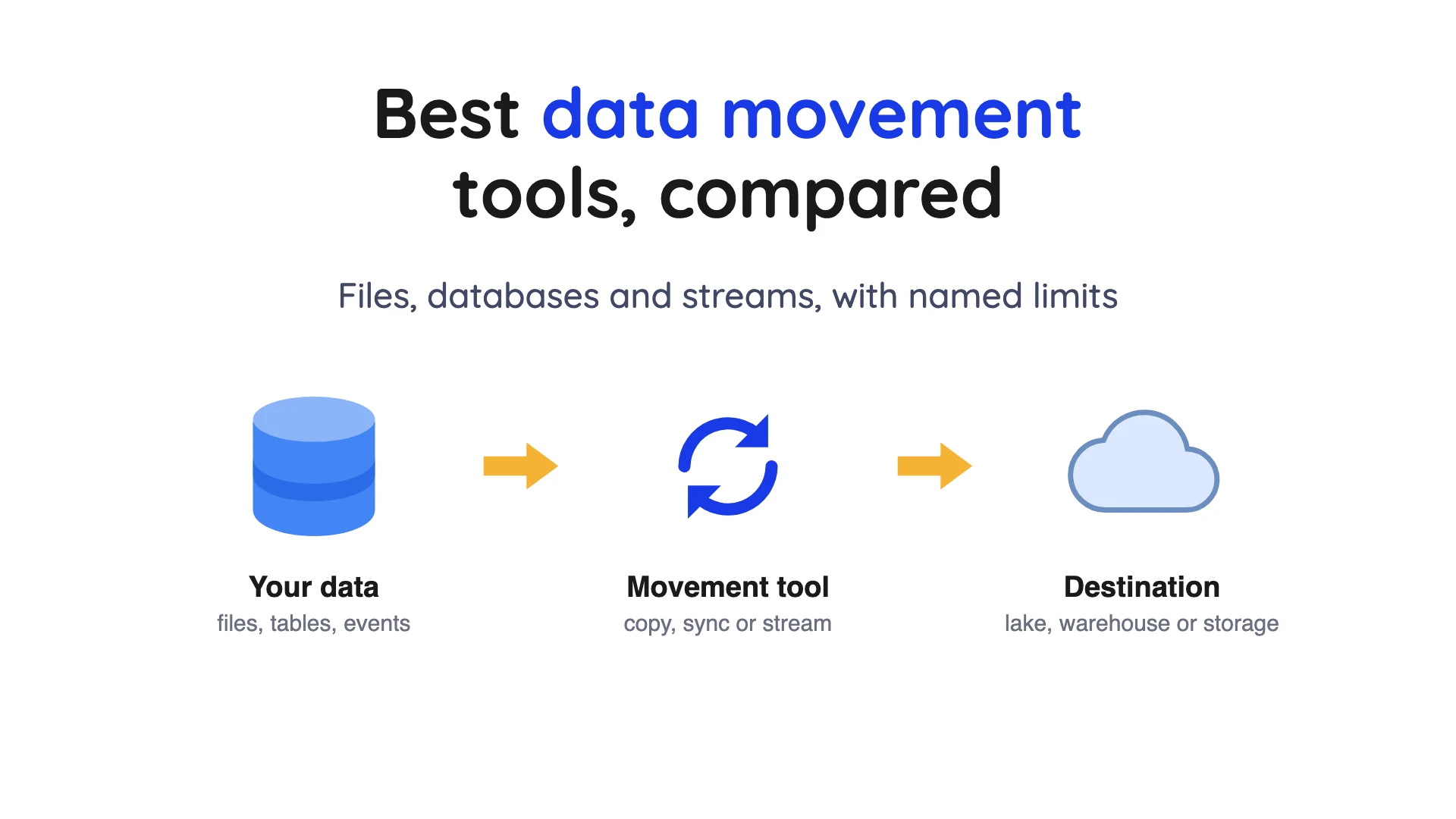
Data movement is copying data from one place to another. A "place" can be a file server, a database, a cloud app, a warehouse (a database built for reports), or a data lake (cheap file storage that many tools can read).
The tools split into two families, and mixing them up is the classic mistake. File copiers carry files exactly as they are, with the same bytes and names. Pipeline tools read rows from databases and apps, then load them as tables or events.
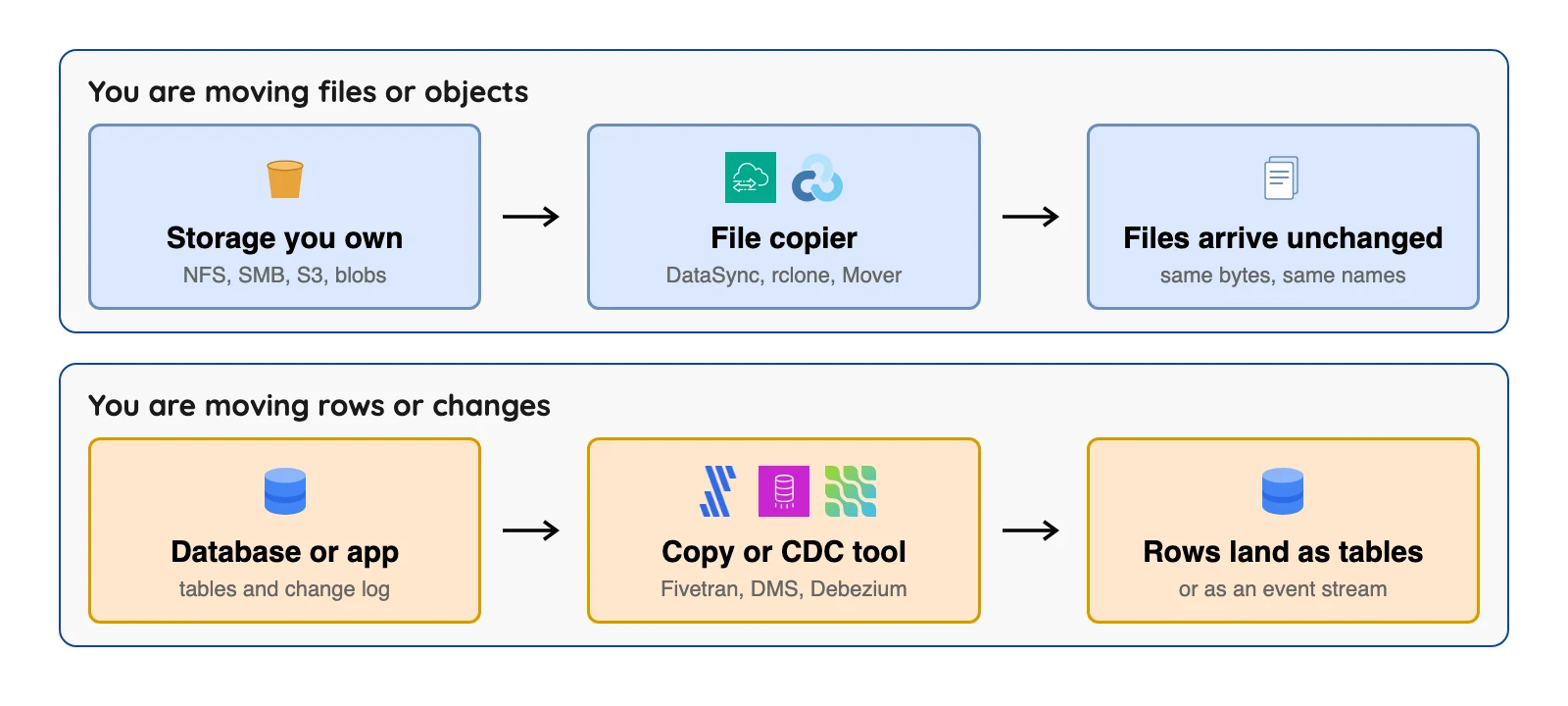
A one-time migration moves everything once (see data migration tools), and replication keeps a copy up to date. Change data capture (CDC) (see what is change data capture) reads the database's own change log and copies each insert, update and delete.
How we picked these twelve
A tool had to be maintained, run by a named vendor or project, and publish documentation we could open. We read each vendor's pricing and docs pages in October 2026. This is a reading of documents, not a lab test, and the order inside a group is not a ranking.
One entry carries a "What users say" line: a public blog post, quoted word for word with its site, month and link. It is one person's view, not a survey, and we label sources that sell migration services.
Data Movement Tools at a Glance
| Tool | What it moves | Billing basis | Price (checked Oct 2026) | Named limit |
|---|---|---|---|---|
| AWS DataSync | Files and objects | Per GB copied | Basic $0.0125 per GB (US East, Ohio) (checked Oct 2026) | Not for databases |
| Google Storage Transfer Service | Files and objects | Per GiB on some paths | Agentless transfers no charge; agent file system $0.0125 per GiB (checked Oct 2026) | No SLA |
| Azure Storage Mover | Files and folders | Service free | Storage, transactions and network are billed | Azure targets only |
| rclone | Files and objects | None | Free, MIT licence | You run it, no SLA stated |
| AWS DMS | Whole databases | Instance or DCU hours | dms.t3.medium $0.0745 an hour, us-east-1 (checked Oct 2026) | CDC has no latency SLA |
| Fivetran | App and database data | Monthly active rows | Free to 500,000 rows; Standard from $495 per million MAR, in its Service Consumption Table (checked Oct 2026) | Per-row rates are in a separate table, not on the pricing page; priced per connection |
| Airbyte | App and database data | Credits (Cloud) | Core free; Cloud Standard $20 a month with 5 credits (checked Oct 2026) | CDC runs on a schedule |
| Hevo | App and database data | Events | Free to 1M events; Starter $265 a month annual (checked Oct 2026) | No self-hosted edition |
| Azure Data Factory | Batch pipelines | Activity runs plus hours | Rate set by region | Pipelines are batch only |
| Apache Kafka | Event streams | None | Software free, Apache 2.0 | It does not capture database changes itself |
| Debezium | Database changes | None | Free, Apache 2.0 | An engine, not a full pipeline |
| OLake Go (ours) | Database and file data into Iceberg or Parquet | None | Open source (Apache 2.0), free to self-run; you pay for your own infrastructure | Output is Iceberg or Parquet |
| Estuary | Streaming and batch | Per GB plus per connector | Free to 10 GB; Cloud $0.50 per GB plus $100 per instance (checked Oct 2026) | Instance fees add up |
OLake Go is our own tool and is not one of the 12 profiled below; the pick table explains where it fits.
Sources: AWS DataSync pricing, Google Storage Transfer Service pricing, AWS DMS price list, Fivetran Service Consumption Table, Airbyte pricing, Hevo pricing and Estuary pricing (checked Oct 2026).
Two quick notes on the table. "Rate set by region" means the vendor page names the unit but shows no flat price. A GiB (gibibyte) is 1,024 MiB, a little more than a GB.
How each tool bills: the meter behind your bill
Two tools can move the same data and send you very different bills. File tools count the volume copied, while pipeline tools count changes, credits or time.
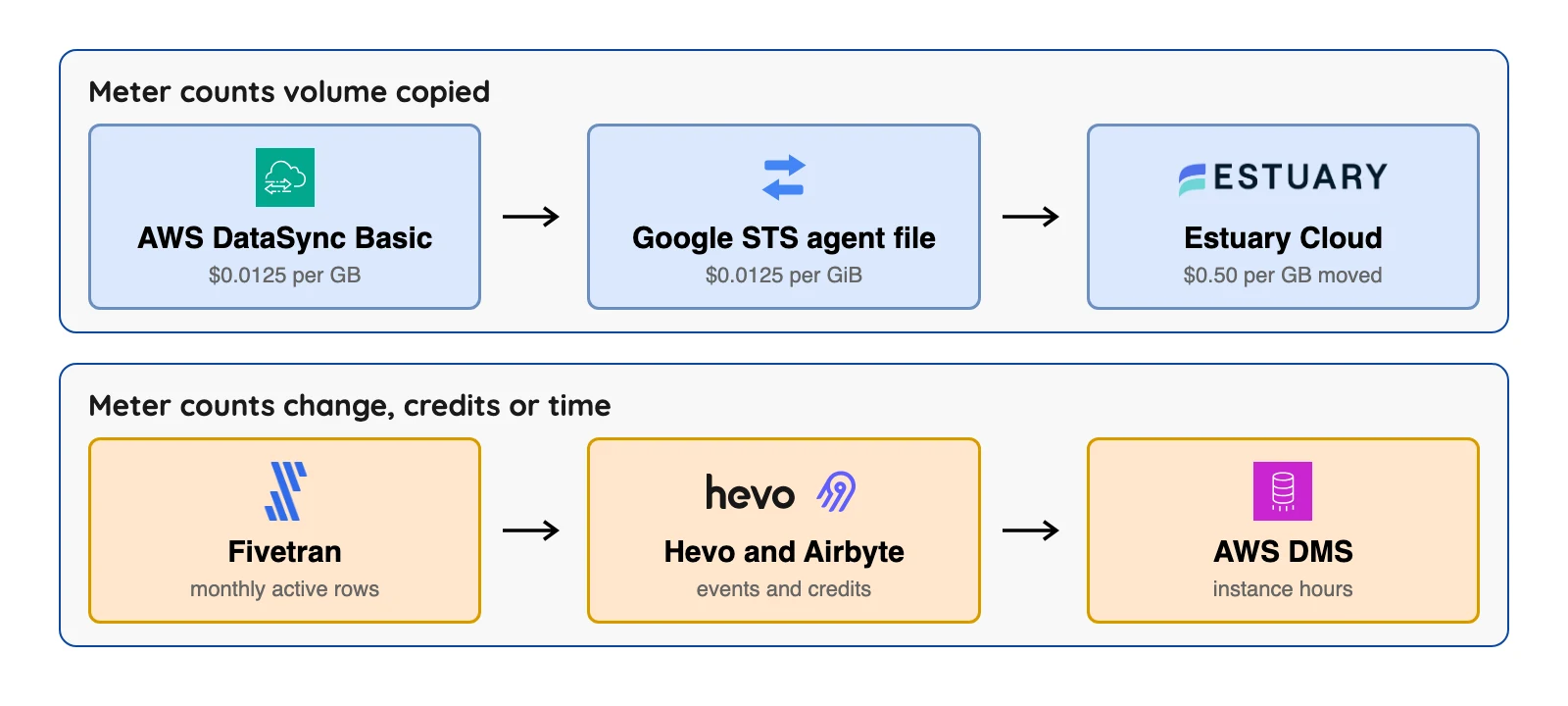
Worked example: copying 50 TB of files
AWS's own pricing example moves 50 TB of 16 MB files into an empty S3 bucket with DataSync Basic mode. The fee is $640 for DataSync plus $16.38 in S3 requests, or $656.38 in total (AWS DataSync pricing page) (checked Oct 2026).
The other clouds price the same job differently (published rates and our arithmetic, not a test).
| Copying 50 TB of files | Service fee | What else is billed |
|---|---|---|
| AWS DataSync Basic mode | $640 plus $16.38 in S3 requests (AWS's example) (checked Oct 2026) | Storage, and transfer out between regions |
| Google Storage Transfer Service, agent-based file system source | 50 TiB at $0.0125 per GiB is $640 (our arithmetic) (checked Oct 2026) | Network, operations and Cloud Storage fees |
| Google Storage Transfer Service, agentless S3 source | No service charge on the pricing page | Fees from the other cloud, plus network and operations |
| Azure Storage Mover | Free, per Microsoft's billing page | Storage transactions, which grow with file count, plus network |
Here's the catch with "no service charge". Google's pricing page says its fees come on top of network usage, operations and Cloud Storage charges. Microsoft's billing page says transactions scale with the number of files and folders, so 1 GiB of small files costs more than 1 GiB of large ones.
Worked example: 10 GB a month of database data into Airbyte Cloud
Airbyte's credit docs set 4 credits per GB for database data, so 10 GB is 40 credits. On Standard, $20 a month includes 5 credits and each extra credit costs $5, which gives 35 extra credits at $175, or $195 in total (checked Oct 2026).
Airbyte's September 15, 2026 release note lists a Plus tier at $189 for 40 credits (checked Oct 2026). For this load the "bigger" plan costs less, which is exactly why you should run the meter before you pick a plan.
Fivetran and Hevo can't be priced from gigabytes, since one counts rows per connection and the other counts events.
The 12 best data movement tools
Files and objects
1. AWS DataSync: best for copying files into AWS storage
At a glance
- Price: Basic mode $0.0125 per GB; Enhanced mode $0.015 per GB plus $0.55 per task execution, US East (Ohio) examples on the AWS DataSync pricing page (checked Oct 2026)
AWS's docs call DataSync a file transfer service for moving file or object data to, from and between AWS storage services. On the read side you get on-premises Network File System (NFS) and Server Message Block (SMB) file servers, Hadoop Distributed File System (HDFS) storage, and other clouds such as Google Cloud Storage and Azure Blob Storage. Writes go to S3, Amazon Elastic File System (EFS) and FSx.
What's good
- AWS's docs say DataSync provides end-to-end security, including encryption and data integrity validation, and that it supports virtual private cloud (VPC) endpoints so data can move without crossing the public internet.
- Per the DataSync docs, it works with on-premises NFS, SMB and HDFS file systems and object storage, and with storage in other clouds: Google Cloud Storage, Azure Blob Storage, Azure Files, Wasabi, DigitalOcean Spaces, Oracle Cloud Infrastructure Object Storage, Cloudflare R2 and Backblaze B2.
- On the AWS side the same docs list S3, EFS and four FSx services: Windows File Server, Lustre, OpenZFS and NetApp ONTAP.
- Basic mode is a flat per-gigabyte fee, and the pricing page says there are no upfront costs and no minimum charges.
Where it falls short
- It moves files, not databases. The DataSync docs name no database change capture and no Apache Iceberg destination.
- Enhanced mode is limited to the paths the pricing page lists: between S3 locations, between other clouds and S3, and between on-premises NFS or SMB file servers and S3.
- Enhanced mode adds a per-task fee. AWS's example uses $0.015 per GB plus $0.55 per task execution, and its 50 TB S3-to-S3 example in one Region totals $797.58 (pricing page) (checked Oct 2026).
- Other services bill on top: AWS says you pay standard request, storage and data transfer rates to read from and write to S3, EFS and FSx.
- Copying between Regions is billed as Data Transfer OUT from the source Region to the destination Region, per the same pricing page.
2. Google Storage Transfer Service: best for bulk copies into Cloud Storage
At a glance
- Price: Agentless transfers no charge; agent-based file system transfers $0.0125 per GiB; transfers from S3 over a managed private network $0.03 per GiB in North America (Google pricing page) (checked Oct 2026)
Google's overview says it moves data from Amazon S3, Azure Blob Storage, on-premises systems, HDFS and public URLs into Cloud Storage. Self-hosted agents handle on-premises sources.
What users say
- Cloudwerx, a Google Cloud consultancy that sells migration services, calls it the "Best choice for multi-TB multi-bucket transfers with minimal operational overhead" in an August 2025 blog post. The same post warns that "Sometimes restrictive ACLs block reads even if IAM permissions look correct", meaning access control lists (ACLs) and Google's identity and access management (IAM) settings.
What's good
- Google's overview says you can choose between Google-managed transfers for simplicity or self-hosted agents for granular control over network routing and bandwidth consumption.
- The overview lists end-to-end encryption in transit with TLS 1.3 for all HTTPS communication, data integrity validation, and automatic retries and load balancing.
- Google calls it fully managed, with "No need to manage infrastructure or write code" (overview).
- The pricing page lists no charge for agentless transfers, or for agent-based transfers from S3-compatible storage and from HDFS.
- Google's migration tools page points to a hardware option, Transfer Appliance, for data above 20 TB and up to 1 petabyte.
Where it falls short
- Google's overview says the service does not provide a service level agreement (SLA) for transfer performance or latency, and that it is optimized for transfers above 1 TiB.
- Agent-based file system transfers cost $0.0125 per GiB, and transfers from S3 over a managed private network cost $0.03 per GiB in North America, $0.04 within the EU and $0.08 within APAC (pricing page) (checked Oct 2026).
- Network, operations and storage fees apply on top, so "no charge" does not mean "free". The pricing page adds that external cloud providers' costs may apply.
- The overview describes movement across object and file storage systems and does not mention database change capture or Apache Iceberg.
3. Azure Storage Mover: best for file shares moving into Azure
At a glance
- Price: Service free; target storage, transactions and network are billed (Microsoft billing page) (checked Oct 2026)
Microsoft calls it a fully managed migration service for files and folders from on-premises or AWS S3 buckets to Azure Storage. It handles SMB and NFS shares as well as S3.
What's good
- Microsoft calls it a fully managed migration service and says it suits lift-and-shift as well as migrations that have to be repeated regularly.
- Listed pairs include AWS S3 to an Azure blob container, SMB 2.x and 3.x mounts to an Azure file share or blob container, NFS 3 and 4 mounts to an Azure file share (NFS 4.1), and blob container to blob container within the same tenant (overview).
- For SMB sources it supports the same file fidelity as the underlying Azure file share, so folder structure, timestamps, ACLs and file attributes are maintained (overview).
- Microsoft's billing page says all current features of the service are free of charge, and that upload bandwidth carries the same charge as any other Azure-bound traffic, with no Storage Mover premium.
- It can pair with Azure Data Box for a first bulk load and an online catch-up, per the overview.
Where it falls short
- Targets are Azure only, and a few pairs are in Preview: AWS FSx SMB to Azure Files SMB, and GCS S3 to an Azure blob container (overview).
- S3 buckets in the Glacier or Glacier Deep Archive storage classes can't be migrated until they are restored (overview).
- Microsoft says future features may carry a charge (billing page).
- Storage transactions caused by the service are billed, and their number scales with the count of files and folders rather than their size, so 1 GiB of small files needs more transactions than 1 GiB of larger files (billing page).
- The AzCopy command-line tool does not support a source or destination that changes during the transfer.
4. rclone: best for a free, scriptable file copier across many storage services
At a glance
- Price: Free under the MIT licence (rclone's GitHub page) (checked Oct 2026); you pay your own servers and any cloud transfer fees
The rclone site calls it a command-line program to manage files on cloud storage, and says over 70 cloud storage products support it. Syncing can go one way, and a two-way mode called Bisync exists. The site also says rclone checks file checksums, which are fingerprints that show a file copied intact.
What's good
- The rclone site says over 70 cloud storage products support it, including S3 object stores, business and consumer file storage services, and standard transfer protocols such as WebDAV.
- It says MD5 and SHA1 hashes are checked at all times, timestamps are preserved, and operations can be restarted at any time (rclone site).
- Commands include one-way sync, two-way Bisync, Move (which deletes the local copy after verification) and Check, which compares hashes and looks for missing or extra files (rclone site).
- It can mount storage as a disk or serve files over HTTP, WebDAV, FTP, SFTP and DLNA, and uses server-side transfers where possible to cut local bandwidth (rclone site).
- It's free under the MIT licence, so it suits mixed-cloud setups with no licence bill.
Where it falls short
- There's no hosted service. You run it on your own machine or server (rclone site).
- The home page lists no SLA, support contract or built-in scheduler, so you add cron or something similar.
- It copies files only. The home page names no database change capture and no table formats such as Apache Iceberg.
Whole databases
5. AWS DMS: best for moving a database into AWS
At a glance
- Price: Billed by replication instance hours or DCU-hours (a Serverless compute unit); dms.t3.medium is $0.0745 an hour Single-AZ and $0.149 Multi-AZ in us-east-1 on demand, per AWS's price list published September 11, 2026 (checked Oct 2026)
AWS's docs say DMS migrates databases, data warehouses and NoSQL stores, with one-time moves or ongoing replication. It supports Oracle, SQL Server, MySQL, MariaDB, PostgreSQL and MongoDB sources, among others. A task can be a full load plus CDC.
What's good
- AWS's docs say you can perform one-time migrations or replicate ongoing changes, and a task can be a full load plus CDC, or CDC only (CDC page).
- The source list covers self-managed Oracle, SQL Server (2008 to 2022), MySQL (5.5 to 8.4), MariaDB, PostgreSQL (9.4 to 18.x), MongoDB (3.x to 8.0) and SAP ASE.
- Its S3 target writes .csv by default, but the S3 target docs say you can have full load and CDC data written to Apache Parquet instead.
- On AWS's price list (US East, N. Virginia, on demand), dms.t3.micro is $0.0186 per instance hour Single-AZ, and DMS Serverless is $0.0819 an hour at 1 DCU and $0.3277 at 4 DCU (checked Oct 2026).
Where it falls short
- AWS's CDC page says there are no SLAs for CDC latency, that latency can reach several minutes or longer depending on source workload and network, and that CDC does not provide real-time replication.
- Apache Iceberg is not a target in the target list, and the S3 target docs publish no native Iceberg catalog or writer setting.
- On the S3 target, when a column is added, dropped or renamed at the source, no ALTER statement is recorded and DMS does not alter previously created records (S3 target docs).
- The S3 target docs also say BatchApply is not supported and might result in loss of data, and that full LOB mode is not supported.
- SQL Server Express is not supported as a source, and SQL Server CDC covers the Enterprise, Standard (2016 and higher) and Developer editions (source docs).
- AWS says DMS is "a server in the AWS Cloud that runs replication software", so you size it and you watch it.
One more for completeness. Google Database Migration Service charges nothing extra for native same-engine moves, and its destinations are Google Cloud databases only.
App and database data into a warehouse or lake
6. Fivetran: best for hands-off loading from many sources
At a glance
- Price: Free up to 500,000 monthly active rows (MAR, the rows changed in a month); paid per-row rates in its Service Consumption Table, not on the pricing page: Standard is $495 per million MAR for the first million, then $170 per extra million, per connection (checked Oct 2026)
Fivetran's connector docs say 700+ connectors. Standard syncs every 15 minutes, and Enterprise adds 1-minute syncs, per its pricing page.
What's good
- Fivetran says it runs the pipeline for you (we have not tested that). Its billing docs say the Free plan gives all the features of the Standard plan up to 500,000 connector MAR, 3,500 activation MAR and 5,000 model runs a month.
- The pricing page lists REST API access, SSH tunnels and a dbt Core integration among the Standard plan features.
- Its Managed Data Lake Service docs say Fivetran always creates Apache Iceberg metadata and writes Parquet files to Amazon S3, Azure Data Lake Storage or Google Cloud Storage, while managing the catalogs and maintenance.
- The same docs describe automatic upkeep: snapshots older than the retention period are deleted once a day (the last 2 are always kept), and orphan files move to a separate folder on the second and fourth Saturdays of each month.
Where it falls short
- Paid per-row rates aren't on the pricing page, and usage counts updates, including deletes.
- A $5 base charge applies to standard connections with 1 to 1M MAR, per the same page (checked Oct 2026).
- The billing docs set a $12,000 minimum on annual contracts, compared with a $5 minimum charge per connection on monthly pay-as-you-go (checked Oct 2026).
- Oracle, SAP ERP on HANA and Db2 (Beta) database sources can be synced only on the Enterprise or Business Critical plans, per the billing docs.
- The Iceberg service has no support for position deletes (a way of marking removed rows), and it does not support the S3 Glacier Flexible Retrieval, Glacier Deep Archive and Intelligent-Tiering archive tiers (lake docs).
- The lake docs recommend against deleting any metadata files because that can corrupt the Iceberg tables, and say never to modify or delete the orphans folder.
7. Airbyte: best for a long connector list with a free self-hosted core
At a glance
- Price: Core free (Elastic License 2.0); Cloud Standard $20 a month with 5 credits and $5 per extra credit; Plus from $189 for 40 credits (Airbyte pricing page) (checked Oct 2026)
Airbyte's docs say it has over 600 pre-built connectors. Its CDC page describes log-based incremental replication.
What's good
- Its CDC docs list Postgres, MySQL, Microsoft SQL Server, MongoDB, Oracle DB, SAP HANA and IBM Db2 under current CDC support.
- The credits docs say a Cloud trial lasts 14 days or 400 trial credits, whichever comes first, and that if you run out of credits Cloud keeps your syncs running and bills you in arrears.
- Its pricing page matrix lists a maximum sync frequency of 1 hour on Standard, 15 minutes on Plus and 5 minutes on Pro and Enterprise Flex.
- The S3 Data Lake docs say the connector writes the Iceberg table format to S3 or an S3-compatible backend through a supported catalog (REST, AWS Glue, Nessie or Polaris), and the same destination list includes GCS Data Lake.
- Per the Cloud release notes, unused credits now roll over for 3 months, up from 2.
Where it falls short
- The CDC page says syncs are scheduled, and it does not treat CDC sources as infinite streaming sources.
- The same page says CDC incremental sync is supported only for tables with primary keys for most sources, and that changes made by TRUNCATE or ALTER do not appear in the logs, so they don't reach the destination.
- After any new table or collection is added to a CDC connection a refresh is required, and the first CDC sync takes a snapshot that is effectively a Full Refresh (CDC docs).
- The S3 Data Lake connector never rewrites existing Iceberg data files, so it handles only specific schema changes: adding or removing a column, widening a column and changing the primary key. Its docs also warn that compaction running during a truncate refresh sync deletes files from the current generation and causes data loss (S3 Data Lake docs).
- The release notes say SSO is no longer available on Standard (existing users may keep it) and that extra Standard credits rose from $2.50 to $5.00 (checked Oct 2026).
- The Elastic License 2.0 is source-available, which is not the same as an open-source licence in the strict sense.
8. Hevo: best for small teams that want no-code pipelines into a warehouse
At a glance
- Price: Free up to 1M events a month; Starter $265 a month on annual billing, or $299 monthly, from 5M events (Hevo pricing page) (checked Oct 2026)
Hevo's pricing page lists 150+ connectors. The Free plan has 1-hour scheduling and up to 5 users.
What's good
- Hevo describes setup as no-code, which we have not tested.
- The pricing page shows Starter at $265 a month on annual billing ($299 monthly) from 5M events, with a slider up to 50M events, and it includes up to 10 users, dbt integration and 24x7 email and live chat support. Professional starts at $750 a month on annual billing ($849 monthly) for 20M events (checked Oct 2026).
- Hevo offers a 14 day free trial with 24x7 support, no credit card required.
- Per its events usage docs, exceeding the events quota on plans from Release 1.48 onwards gives a grace period to buy more events while pipelines keep running.
Where it falls short
- Every update is an event, so busy tables burn through a quota quickly, and the events usage docs say events deleted at the source are billable as updates.
- The same docs say Hevo charges the selected plan price whether or not you use the plan's full capacity.
- For teams created after Release 2.21 the minimum ingestion frequency is 30 minutes for all sources. Defaults are 6 hours for table-mode and 30 minutes for log-based pipelines, and maximums are 24 hours and 12 hours.
- The pricing page sync frequency row reads 1 hour for Free and Starter, and "Streaming Pipelines" for Professional and Business Critical. Add-ons are available on Professional and Business Critical, not on Free or Starter.
- Hevo's docs show no self-hosted edition, and its only Iceberg option is in Early Access and tied to Snowflake.
9. Azure Data Factory: best for scheduled batch pipelines on Azure
At a glance
- Price: Per activity run plus integration runtime hours; Copy activity is billed as DIUs (data integration units) times copy duration times a unit price, with rates by region (Microsoft docs) (checked Oct 2026)
Microsoft's docs say pipelines in Azure Data Factory are batch only, but a separate Change Data Capture resource can run continuously. The Iceberg format page documents an Iceberg sink for Azure Data Lake Storage Gen2.
What's good
- Microsoft's introduction calls it a managed cloud service for hybrid extract-transform-load (ETL), extract-load-transform (ELT) and data integration projects, and says you can transform data visually with data flows.
- A separate Change Data Capture resource uses the source database's own change capture, with no timestamp or ID columns, for the connectors the CDC page lists: SAP CDC, Azure SQL Database, SQL Server, Azure SQL Managed Instance, Azure Cosmos DB and Snowflake.
- With the CDC resource you don't need to design pipelines or data flow activities, and you can set a preferred latency (CDC page).
- Auto incremental extraction builds a dynamic query for delta loading and manages the checkpoint for each activity run, for stores including Azure Blob Storage, ADLS Gen2, Azure SQL Database, SQL Server, Azure Database for MySQL and Azure Database for PostgreSQL (CDC page).
Where it falls short
- Microsoft's introduction calls Data Factory in Microsoft Fabric the next generation and tells new users to start there.
- Pipelines in ADF are batch only. Only the separate CDC resource can run continuously, and you're billed for four cores of General Purpose data flows while it processes data (CDC page).
- PostgreSQL, MySQL, MongoDB and Oracle are not on the native CDC connector list. PostgreSQL and MySQL appear only under auto incremental extraction, which needs an incremental column to identify the changes (CDC page).
- The Iceberg page shows only Data Lake Storage Gen2 and names no catalog.
Streams and changes
10. Apache Kafka: best for moving events between many systems
At a glance
- Price: Free under Apache License 2.0; newest supported release listed 4.3.1, June 25, 2026 (Apache Kafka downloads page) (checked Oct 2026)
The Kafka intro page calls it an event streaming platform that stores and moves streams of events. Kafka Connect, which is part of Kafka, imports and exports data as event streams to systems such as relational databases.
What's good
- Events in a topic can be read as often as needed, because they are not deleted after consumption, and retention is a per-topic setting.
- Kafka guarantees that any consumer of a topic-partition reads its events in the order they were written (intro).
- A common production setting is a replication factor of 3, and topics can be replicated across geo-regions or datacenters (intro).
- It runs on bare metal, virtual machines and containers, on premises or in the cloud, and you can self-manage or use managed services from various vendors (intro). The software has no licence fee.
- The intro says the Kafka community already provides hundreds of ready-to-use Kafka Connect connectors (intro).
Where it falls short
- Kafka doesn't capture database changes itself. The intro describes a Kafka Connect connector doing that part, and Debezium is one such connector.
- The intro page describes no Iceberg writer, so lake output comes from other components.
- You run brokers, or pay a vendor to (intro), and someone has to watch them.
- Events stay after they are read, so retention is yours to set for every topic (intro).
11. Debezium: best for streaming database changes you want as events
At a glance
- Price: Free under Apache 2.0, no hosted service and no vendor price (Debezium docs) (checked Oct 2026)
Debezium reads database change logs and turns each change into an event. Its docs list eight main source connectors: MongoDB, MariaDB, MySQL, PostgreSQL, SQL Server, Oracle, Db2 and Cassandra. It runs through Kafka Connect, as Debezium Server or as an embedded library.
What's good
- Its features page says log-based capture requires no changes to your data model, such as a Last Updated column, can capture deletes and ensures that all data changes are captured.
- The same page describes delays in the millisecond range for MySQL or PostgreSQL. That is the project's own description, and we have not tested it.
- Debezium Server is described as a ready-to-use application that streams change events from a source database directly to messaging and storage systems without requiring Apache Kafka.
- Debezium Server's sink list includes Kinesis, Pub/Sub, Pulsar, Redis, Kafka, RabbitMQ, Event Hubs and Iceberg (Server docs).
- Its Iceberg sink supports upsert and append modes, creates destination tables automatically when schema information is enabled, and can add new columns as fields appear (Server docs).
Where it falls short
- It's an engine, not a finished pipeline. You build the path to a warehouse or lake yourself, and each Debezium Server instance runs exactly one connector (Server docs).
- The Iceberg sink is a community-maintained project in a separate repository.
- In the Iceberg sink, upsert is off by default (append-only), and with upsert on, deleted rows are kept and marked
__deleted=trueunless upsert-keep-deletes is set to false (Server docs). - The Server docs give a catalog-name and warehouse property but no list of supported catalog types.
- On PostgreSQL with the default replica identity, a table without a primary key gets only create events, not UPDATE or DELETE events (PostgreSQL docs).
- The PostgreSQL docs also say logical decoding does not support DDL changes, and that in abnormal situations Debezium provides at least once delivery, so duplicate change events can occur.
12. Estuary: best for one vendor-run platform for streaming and batch
At a glance
- Price: Free to 10 GB a month and 2 connector instances; Cloud $0.50 per GB moved plus $100 a month per instance for the first six (Estuary pricing page) (checked Oct 2026)
Estuary's pricing page says its bill covers the data sourced, transformed and delivered. An "instance" is one capture or one destination, and that word matters for the bill.
What's good
- Estuary says one platform covers streaming, change capture and batch. Its pricing page FAQ says the free tier allows indefinite use up to 10 GB a month and 2 connector instances.
- The same FAQ says that when a pipeline starts, Estuary does a historical backfill and then switches to real-time CDC, and backfilling can be disabled or scoped.
- Per the FAQ, adding a new target means paying only for the added target and the data sent to it, with no need to re-extract from each source.
- Its Iceberg materialization docs say AWS Glue catalogs work through the Glue Iceberg REST endpoint, and they give setups for Snowflake Open Catalog and Dremio Cloud.
- With a Glue catalog you can configure Glue Table Optimizers for compaction, snapshot retention and orphan file deletion, and a Hard Delete setting controls whether deleted source rows are also deleted in Iceberg (Iceberg docs).
Where it falls short
- Each source and destination is a billed instance: the first 6 cost $100 a month each and additional ones $50 (pricing page) (checked Oct 2026), so cost grows with every pipeline you add.
- Data usage is billed on top at $0.50 per GB, based on the volume of data sourced, transformed and delivered (pricing page) (checked Oct 2026).
- Its Iceberg connector needs an Iceberg REST catalog, an AWS EMR Serverless Spark application and an S3 staging bucket, plus IAM roles for running and submitting jobs (Iceberg docs).
- The docs say only REST catalogs that use Amazon S3 are supported today, with support for GCP or Azure planned, and the section carries a Beta label (Iceberg docs).
- Automatic compaction through Glue Table Optimizers is a setting that defaults to false (Iceberg docs).
- The platform uses the Business Source License 1.1, which its own text says is not an Open Source license, and its additional use grant bars use as a "Data Processing Service".
Offline devices and other tools worth knowing
If the data is too big for your internet connection, note that AWS says on its Snowball page that it ends support for Snowball devices in all commercial Regions on December 31, 2026. Google's Transfer Appliance and Azure Data Box are the shipped-device options elsewhere.
A few more names that show up on other lists: Skyvia, Informatica, Matillion and AWS Glue.
Which data movement tool for which job?
Find your job, look at the first pick, and read the right-hand column before you commit.
| Your job | Look at first | Where that pick loses |
|---|---|---|
| Copy files into AWS storage | AWS DataSync | Not for databases; AWS-side storage |
| Copy files into Google Cloud Storage | Google Storage Transfer Service | No SLA; best above 1 TiB |
| Move file shares into Azure | Azure Storage Mover | Azure targets only |
| One command-line tool across many clouds | rclone | You run it; no SLA stated |
| Move a database into AWS | AWS DMS | No CDC latency SLA; no Iceberg target |
| App data into a warehouse, vendor-run | Fivetran, Hevo | Meter grows with changes; Fivetran lists a Hybrid deployment option on Enterprise (pricing page, checked Oct 2026) |
| Many connectors, free self-hosted core | Airbyte | Scheduled syncs, not streaming |
| Scheduled batch pipelines on Azure | Azure Data Factory | Batch pipelines; Fabric is the new path |
| Same events to many systems | Apache Kafka | You run it; no database capture alone |
| Database changes into Iceberg or Parquet | OLake Go | You run it; output is Iceberg or Parquet |
| Log-based database changes as events | Debezium | You build the rest of the pipeline |
| Streaming and batch from one vendor | Estuary | Instance fees; Iceberg needs Spark |
Which data movement tool fits you?
Question 1 of 5
What are you moving?
This one choice cuts the list down fast.
How to choose in five steps
- Name what you move. Files go to a file copier. Rows and changes go to a pipeline tool.
- Pick a freshness target. Reports that can be an hour old need only scheduled syncs. Changes within seconds need log-based CDC.
- Decide who runs it. Vendor-run tools cost money. Open-source tools cost staff time.
- Check where the data must land. For Iceberg, check the catalog, deletes and maintenance in the tool's docs.
- Price one real month. Run each vendor's meter on your busiest tables and your largest folders.
How fresh will the data be?
What each vendor's own page documents, not a measurement.
| Tool | Freshness the vendor documents | Source |
|---|---|---|
| Fivetran | Sync every 15 minutes on Standard; 1 minute on Enterprise | Fivetran pricing page |
| Hevo | 1-hour scheduling on the Free plan | Hevo pricing page |
| Airbyte | CDC syncs run on a schedule, not as an infinite stream | Airbyte CDC docs |
| AWS DMS | No SLA for CDC latency; not real-time replication | AWS DMS CDC docs |
| Debezium | Delays in the millisecond range for MySQL or PostgreSQL | Debezium features page |
| Estuary | Streaming or scheduled batch included on each plan | Estuary pricing page (checked Oct 2026) |
| OLake Go | CDC runs as a job and stops; schedules run from every minute to weekly or on a cron, so near real time needs frequent runs or an orchestrator | Our docs |
If a row gives no latency figure, treat freshness as unknown until you test it.
A small test for any finalist
Before you sign anything, move one folder or one table and check the result. For files, compare the file count and a checksum on both sides.
For tables, insert, update and delete one row, restart the job mid-run, and confirm the target matches the source. We haven't run this test on these tools, so treat it as a plan, not a result.
One note on Iceberg (the OLake line)
OLake Go, our own open-source tool, copies PostgreSQL, MySQL, MongoDB, SQL Server, Oracle, Db2, S3 and Kafka sources into Apache Iceberg or Parquet on storage you control.
It has no warehouse writer. Which engines read its Iceberg tables depends on the catalog and delete format: Athena works with the Glue and S3 Tables catalogs only. BigQuery works through BigLake, Unity or Glue. Snowflake reads external tables in a REST (web API) catalog read-only (see the engine compatibility page). Upsert is the default write mode and full refresh always appends. If that fits your job, see the OLake docs.
FAQs
Q1. What are data movement tools?
Q2. What is the difference between data movement and data migration?
Q3. What are the best free data movement tools?
Q4. Which tool should I use to transfer large files to the cloud?
Q5. Is Google Storage Transfer Service really free?
Q6. Do data movement tools capture database changes?
Q7. How do I compare prices across data movement tools?
Q8. Is my data safe while it moves?
Q9. What is the difference between ETL, ELT and data movement?
So, where do you start?
Decide what you're moving before you compare a single tool; that cuts twelve down to two or three. Then read the named limit, price it on your own volumes, and run the small test on your own data. If the job is database or file data into Iceberg or Parquet, OLake Go is free to self-run.