Best Data Orchestration Tools in 2026, Compared
43 min read
Key takeaways
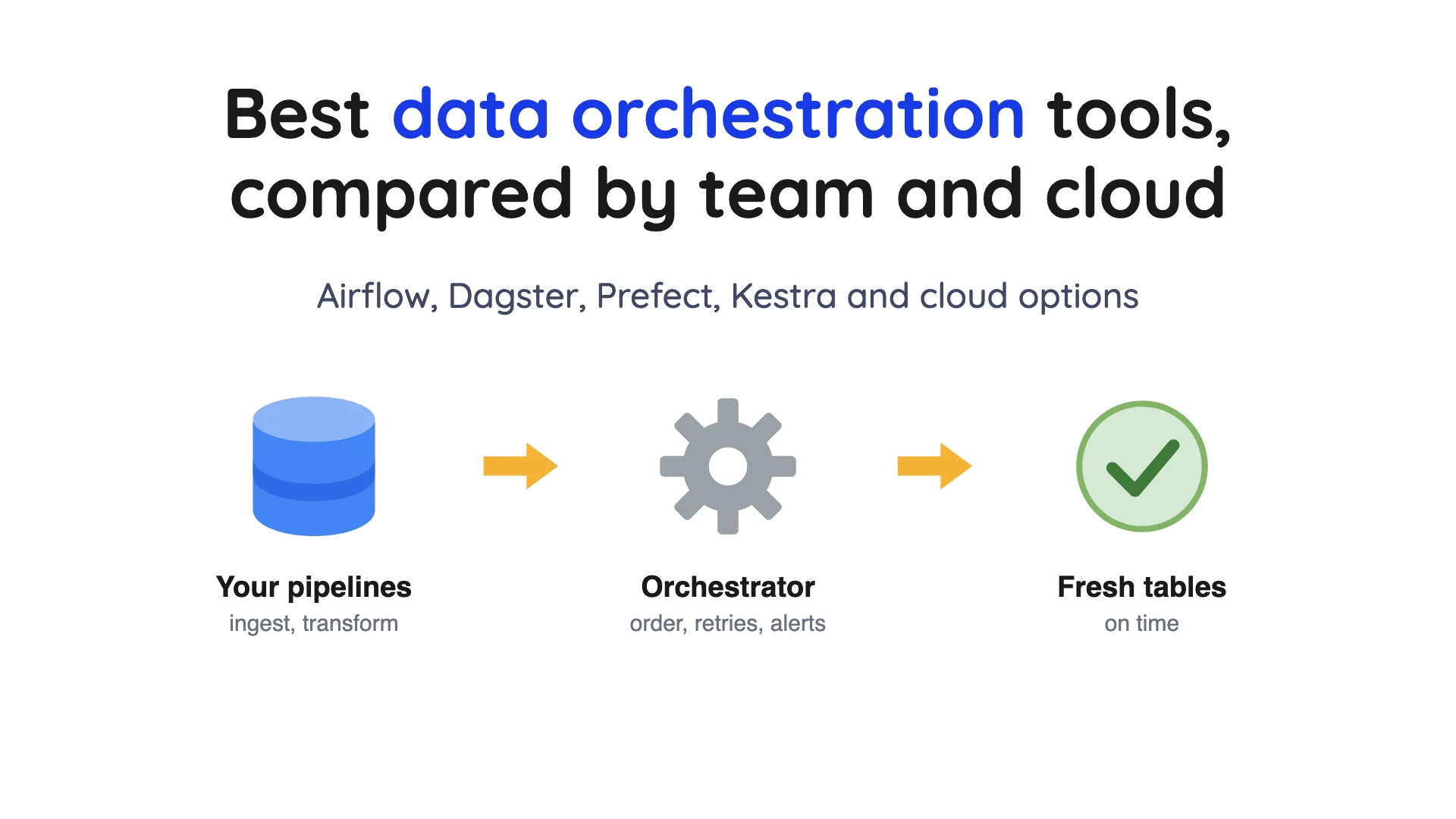
An orchestrator is the thing that runs your data jobs in the right order, on time, and yells when one fails. It doesn't copy or reshape the data itself. If your team writes Python, start with Prefect or Dagster.
Apache Airflow is free and open source, and you can host it yourself or rent it from Astronomer, Amazon or Google. Already living inside one cloud? Its own service (Step Functions, Data Factory or Databricks Lakeflow Jobs) is often the shortest path.
- The billing meters differ more than the prices. One tool charges per hour of a running server. Another charges per step, another per credit and another per seat. The same daily job can cost $0 on one meter and more than $250 a month on another (worked example below).
- Free software still has a cost. Airflow, Dagster, Prefect and Kestra all have a free open-source version, but you run the servers and carry the pager.
- Some prices are not published. Kestra Cloud and Enterprise, and Astronomer's Business plan, show no price (checked Oct 2026).
We checked prices on October 1, 2026 against each vendor's own pages.
What is data orchestration?
IBM (the computer company), in its explainer on this topic, defines the idea as the management and coordination of data flows across different systems, processes and tools.
IBM adds that tasks often start on a clock (every night at 2 a.m.), a dependency (when the earlier task finishes) or an event (a real-world signal, such as an API call). It also says this isn't the same as data integration. Integration, such as extract, transform, load (ETL, which copies data and reshapes it on the way), is one of the jobs an orchestrator coordinates.
Most tools here describe a workflow as a DAG, short for directed acyclic graph. It's a set of steps with arrows showing which step must finish before another starts, and no loops back.
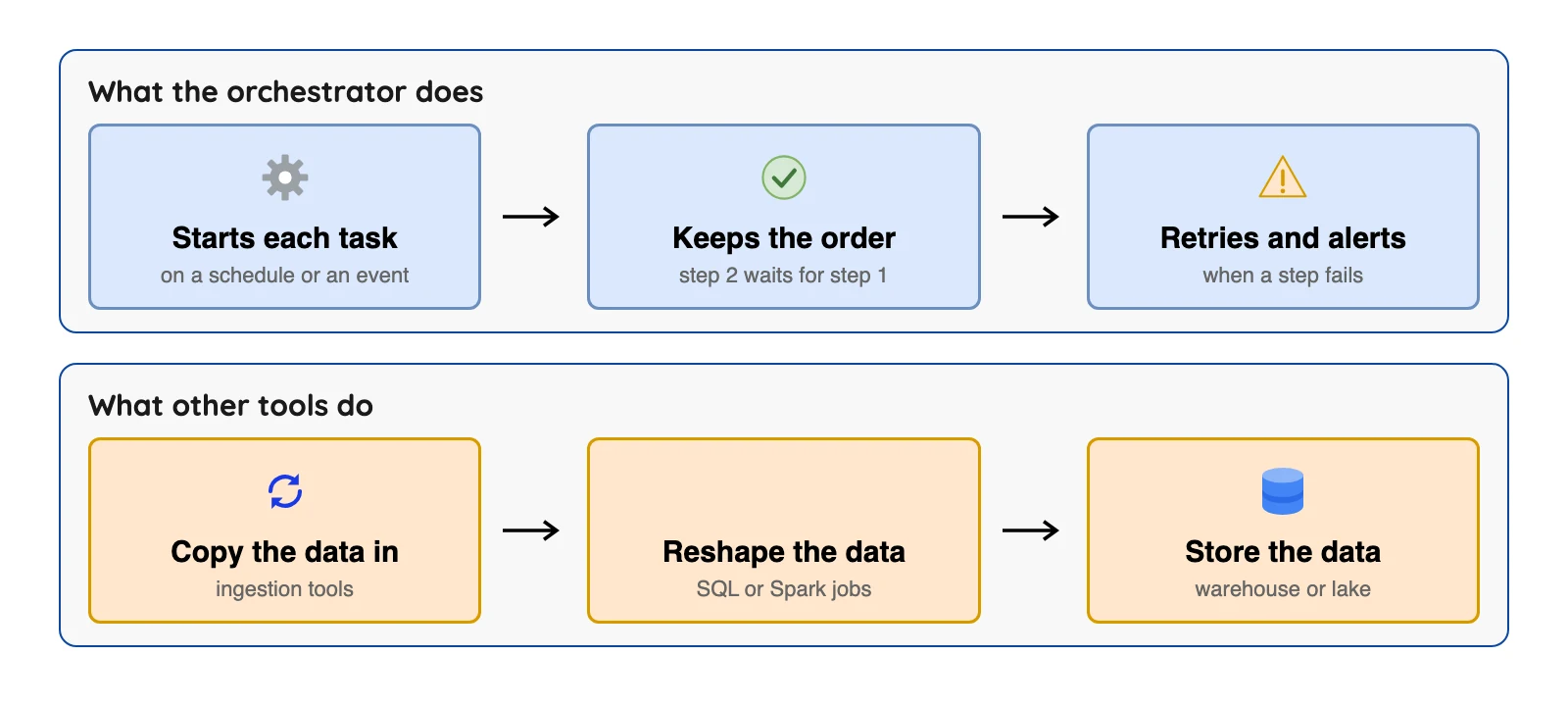
Airflow won't copy your database, and an ingestion tool won't decide that the report job must wait for the load job. If you are choosing the copying tool, see our best data pipeline tools comparison.
How we picked (and what we didn't do)
A tool had to be actively maintained, publish its own documentation, and be built to run data workflows on a schedule or an event. Vendor facts come from each vendor's own pages, read on October 1, 2026. We did not run the other tools.
Some tools get a "What users say" line. It is a real public comment or review that we re-opened on October 1, 2026, with its site and month. The sites include Hacker News (HN, a tech discussion site), PeerSpot (a software review site) and DEV (a blog site for developers). We kept opinions and first-hand cost experience only, and a tool gets a quote line only when we found both a positive and a critical comment for it. These are individual opinions and prices; one person's view, with its date and link.
One bit of news matters here. In July 2026, Prefect announced that it is acquiring Dagster Labs. Prefect's announcement page says Dagster and Dagster+ stay, and nothing changes for current users (checked Oct 2026).
We left out Matillion and Informatica because they're bundled data platforms. The order below is by group, not a ranking.
The 10 tools at a glance
| Tool | Type | Free version? | What it bills |
|---|---|---|---|
| Apache Airflow | Open source, self-run | Yes, Apache 2.0 (checked Oct 2026) | Free software; you pay for servers and people |
| Dagster | Open source plus paid cloud | Yes | Cloud: Solo $10 a month, Starter $100 a month, plus credits. Dagster pricing (checked Oct 2026) |
| Prefect | Open source plus paid cloud | Yes, free Hobby plan | Starter $100 a month; Team $100 per user a month. Prefect pricing (checked Oct 2026) |
| Kestra | Open source plus paid cloud | Yes, Open Source edition (Apache-2.0) (checked Oct 2026) | Cloud and Enterprise prices not published. Kestra pricing (checked Oct 2026) |
| Astronomer (Astro) | Hosted Airflow | Free trial | Deployments from $0.35 an hour (Developer). Astronomer pricing (checked Oct 2026) |
| Amazon MWAA | Hosted Airflow on AWS | Not shown | Environment per hour: Small $0.49, Large $0.99. MWAA pricing (checked Oct 2026) |
| Google Managed Airflow (Cloud Composer) | Hosted Airflow on Google Cloud | Not shown | $0.06 per compute unit hour, plus storage. Google Cloud pricing (checked Oct 2026) |
| AWS Step Functions | AWS workflow service | Yes, 4,000 steps a month | $0.000025 per step (Standard). AWS pricing (checked Oct 2026) |
| Azure Data Factory | Azure pipeline service | Not shown | Per activity run plus runtime hours. Azure pricing (checked Oct 2026) |
| Databricks Lakeflow Jobs | Databricks workflow service | 14-day trial | Jobs Classic $0.15 and Jobs Serverless $0.35 per DBU on Premium, $0.20 and $0.45 on Enterprise (AWS, US East; the page has plan, cloud and region selectors). Databricks pricing (checked Oct 2026) |
"Not shown" means the pricing page we opened didn't display a free tier.
What to check before you pick
Every tool below can start a job on a schedule, so the details are what separate them. This table sticks to what the vendors' own docs and pages say, and a gap means we didn't find it stated.
| Check | What the docs say | Why it matters |
|---|---|---|
| Re-run only what failed | Airflow: "rerun only failed tasks to minimize cost and time"; Prefect: "resume interrupted runs from the last successful point" | A failed 5-step job should not redo the 4 steps that worked |
| Fill in past dates (backfill) | Airflow: "backfill Dag runs to process historical data" | You will need it the first time a source was down for a day |
| Event triggers | Prefect: trigger flows "on schedules, external events, or via API"; Kestra lists "Event-Driven Scheduling" | A file arriving can start the job instead of a clock |
| Pause for a person | Prefect: "pause flows for human intervention or approval"; Step Functions suits long jobs with human approvals | Some jobs need a manual yes before they go on |
| Who writes workflows | Airflow and Prefect: Python code; Kestra: YAML with "Code & No-Code Editors" | Decides who on your team can change a job |
| Do retries cost money | Step Functions: AWS charges each retry as one more state transition. AWS pricing (checked Oct 2026) | A flaky job can raise a per-step bill |
The open-source orchestrators
1. Apache Airflow: best for Python teams that want free software and many hosting choices
At a glance
- Price: free software under Apache 2.0 (checked Oct 2026); managed hosting is sold separately (see the three hosted options below)
Airflow is the name you'll hear first. According to the Airflow documentation, it's an open-source platform for developing, scheduling and monitoring workflows, such as batch data pipelines.
The docs showed version 3.3.2 (checked Oct 2026). You write each workflow as Python code. Its docs say workflows with a clear start and end that run on a schedule are the best fit.
What's good
- It's a free, open-source project. The apache/airflow GitHub page shows the Apache-2.0 licence (checked Oct 2026), so there's no licence fee and you can move between hosts.
- The docs say you can run it from a single process on a laptop up to a distributed system, so the same code can start small and grow.
- The docs say you can backfill Dag runs to process historical data, or rerun only failed tasks to minimize cost and time.
- Retries are configurable in the task docs:
retry_delay,retry_exponential_backoffandmax_retry_delay, plus anexecution_timeoutthat caps how long a task may run. - The docs describe time-based or event-triggered batch pipelines, machine learning, model training and agentic or LLM-based workloads as the use cases.
- Astronomer, Amazon and Google each sell a hosted version, so you can start self-run and hand off the servers later.
Where it falls short
- The docs (checked Oct 2026) say plainly that "if you prefer clicking over coding, Airflow might not be the best fit," because workflows are code.
- It's built for batch work. The docs (checked Oct 2026) call it "a platform for orchestrating batch workflows."
- A minimal install has several parts to run. The core concepts page (checked Oct 2026) lists a scheduler, a metadata database (usually PostgreSQL or MySQL) and an API server, with workers and a triggerer as optional extras.
- Tasks must be safe to repeat. The best practices page (checked Oct 2026) says "Do not use INSERT during a task re-run" because it can duplicate rows, so use
UPSERTinstead, and never read the latest available data inside a task. - The task docs say the SLA feature from Airflow
2was removed in3.0and replaced in3.1with Deadline Alerts (checked Oct 2026), so teams moving between major versions have a feature to rework.
2. Dagster: best for teams that think in tables and datasets
At a glance
- Price: free open-source project; Dagster+ Solo $10 a month, Starter $100 a month, Pro by quote, from the Dagster pricing page (checked Oct 2026)
Its pricing page (checked Oct 2026) shows Solo at $10 a month (one user, one code location). Starter costs $100 a month (up to three users, five code locations). Credits cost $0.040 on Solo and $0.035 on Starter.
The page defines a credit as "the sum of asset materializations and ops executed." An asset is a table or file that a job produces. So Dagster counts the things your jobs build and run.
What's good
- Its docs describe Dagster as built around assets, with "integrated lineage, observability, a declarative programming model, and best-in-class testability." That is Dagster's own claim, and we did not test it.
- Asset checks are tests on a data asset, such as a column that must have no nulls, and the docs say they do not count toward Dagster+ credit usage.
- Sensors react to events such as a file appearing in an S3 bucket or a run failing. A run key makes Dagster skip a request it has already seen, so duplicate runs are not created.
- The concurrency guide lists run queue limits, concurrency pools (to protect a shared database or API), run executor limits and run tag limits.
- Dagster+ Hybrid has no compute charge because you run the compute, and the pricing page offers a 30-day free trial of everything in Dagster+ (checked Oct 2026).
Where it falls short
- Every asset materialized and every op executed is 1 credit, at $0.040 on Solo and $0.035 on Starter (Dagster pricing) (checked Oct 2026). We did not find how many credits each plan includes, so ask Dagster what a typical month costs for jobs like yours.
- If you use Dagster+ Serverless, compute is billed on top of the credits at $0.010 a minute (Dagster pricing) (checked Oct 2026). The entry plan is $10 a month before any credits.
- Plan ceilings are small. Solo has 1 user, 1 code location and 1 deployment, and Starter has up to 3 users, 5 code locations and 1 deployment. Unlimited code locations and deployments are listed under Pro, which is contact-sales (Dagster pricing) (checked Oct 2026).
- Cards are accepted on Solo and Starter, while custom invoicing and ACH are for Pro customers. The page says there is no self-enrollment discount for not-for-profits (checked Oct 2026).
- Sensors poll. The sensor docs (checked Oct 2026) say the sensor interval is a minimum between evaluations and not the exact frequency, so a slow check delays the next one.
- Dagster is an orchestrator (docs), so other tools it runs do the copying.
3. Prefect: best for Python teams that want a free plan to start on
At a glance
- Price: free Hobby plan; Starter $100 a month; Team $100 per user a month; Enterprise custom, from the Prefect pricing page (checked Oct 2026)
Prefect's own docs describe it as an open-source engine for running workflows that turns Python functions into production pipelines. A workflow is a Python function marked with @flow or @task, and it can run in containers, on Kubernetes or in a single process. The pricing page (checked Oct 2026) lists the free Hobby plan with 2 users and up to 5 deployments. Starter has 3 users and up to 20 deployments.
What's good
- Prefect's docs say plain Python control flow (
if, loops) works inside a workflow and tasks can be created while it runs, which we did not test. They also list type hints,async/awaitand your existing IDE, debugger and testing tools. - On failure, the docs say you can resume interrupted runs from the last successful point and cache expensive computations. The retries guide covers a
retriescount,retry_delay_seconds, anexponential_backoffhelper and aretry_jitter_factor. - Flows can be triggered on schedules, external events or via API, and paused for human intervention or approval. The docs (checked Oct 2026) add that Prefect
3.0open-sourced its events and automations backend. - The docs say workflows run from a single process to containers, Kubernetes or cloud services.
- The free plan has a stated ceiling. The pricing page lists 500 minutes of Prefect Serverless on Hobby, 75 hours on Starter and 225 hours on Team (checked Oct 2026).
- Eligible startups get credits toward the Team plan through the Prefect Startup Program, the pricing page says (checked Oct 2026).
Where it falls short
- The free Hobby plan keeps run history for only 7 days, and the plan comparison shows 7 days on Starter and 14 days on Team (Prefect pricing) (checked Oct 2026).
- Team costs $100 per user a month for 4 to 8 users (Prefect pricing) (checked Oct 2026), so by our arithmetic four people pay $400 a month.
- Uptime SLA is None on Hobby, Starter and Team, and 99.9% on Enterprise. Support is Community on Hobby and Starter and Email on Team (Prefect pricing) (checked Oct 2026).
- Audit log retention is None on Hobby and Starter and 24 hrs on Team. API rate limits are
625a minute on Hobby,1,250on Starter and2,500on Team (Prefect pricing) (checked Oct 2026). - SSO (SAML/OIDC) and RBAC with ACLs are listed under Enterprise, which is custom-priced. Automations are capped at
5on Hobby,10on Starter and50on Team (Prefect pricing) (checked Oct 2026). - Prefect is a scheduling engine (docs), so other tools do the copying, as with Dagster.
What users say: A July 2026 PeerSpot review on the AWS Marketplace page for Prefect Cloud covers cost. It says "Pricing is based on how much computing you use" and that once set up, "It doesn't cost a lot." The same review says "There's a lot of mental and engineering cost involved to set it up."
4. Kestra: best for teams that prefer YAML files to Python
At a glance
- Price: Open Source edition under Apache-2.0 (checked Oct 2026); Kestra Cloud and Enterprise Edition not published on the Kestra pricing page (checked Oct 2026)
Its pricing page (checked Oct 2026) lists an Open Source edition with declarative workflows, "2,100+ Plugins" and "Unlimited Flows & Executions". Its GitHub page shows an Apache-2.0 licence. YAML is a plain text format for settings, so you describe a workflow in a text file instead of writing code.
Kestra Cloud is pay-as-you-go. The Enterprise Edition is an annual per-instance subscription. Neither shows a dollar price on the pricing page (checked Oct 2026). The page calls the open-source edition production-ready by default. That is Kestra's own claim, and we did not test it.
What's good
- Workflows live in plain files. The pricing page lists a code editor and a guided form editor, and says "both stay in sync".
- Both editions include scheduling and event triggers, Git integration and versioning, and air-gapped deployment, the pricing page says.
- The pricing page says most of the 2,100+ plugins are in both editions, and one workflow can orchestrate SQL, Python, shell, APIs, Terraform, dbt, Spark or custom tools.
- The open-source edition has no flow or execution cap, and it runs its queue and repository on PostgreSQL or MySQL, "with nothing else to operate" (Kestra pricing) (checked Oct 2026).
- Upgrading from Open Source to Enterprise means adding the licence key to the configuration file and restarting the server, according to the pricing FAQ (checked Oct 2026).
Where it falls short
- Single sign-on (SSO), LDAP, SCIM, role-based access control and audit logs are listed under the Enterprise Edition (Kestra pricing) (checked Oct 2026). If your team needs them, you'll be asking for a quote.
- Cloud and Enterprise prices are not published. Enterprise shows Contact Sales and is an annual subscription per instance, and Cloud shows Request Access (Kestra pricing) (checked Oct 2026).
- Human-in-the-loop approvals (pausing an execution until someone approves it) sit under the Enterprise Platform part of the feature table (Kestra pricing) (checked Oct 2026).
- So do queues on Kafka, Redis or AMQP and worker groups. The open-source queue runs on PostgreSQL or MySQL (Kestra pricing) (checked Oct 2026).
- Plugins differ by edition: the pricing page says most of the 2,100+ are in both, and it lists Enterprise Plugins separately (checked Oct 2026).
- Support terms are an Enterprise item. The
P0response target is 24 hours on Standard, 6 hours on Premium and 1 hour on Platinum, with 24x7 coverage on Platinum only (Kestra pricing) (checked Oct 2026).
What users say: A DEV post about Kestra said Kestra "fills a gap that I didn't realize existed" (July 2025). A Procycons guide to Kestra, Temporal and Prefect warns "it's still YAML" and that "you're fundamentally limited by what you can express declaratively" (2025, month not shown).
Hosted Airflow: let someone else babysit the servers
Three vendors in this list sell open-source Airflow with the servers handled for you, and they differ in what they bill. The Airflow docs cited above cover the shared software, so each block below is about the host.
5. Astronomer (Astro): best for teams that want Airflow help, on any cloud
At a glance
- Price: Developer from $0.35 an hour, Team from $0.42 an hour, Business and above by quote, from the Astronomer pricing page (checked Oct 2026)
Astronomer's pricing page (checked Oct 2026) shows five plans. The two lower ones, Developer and Team, show hourly "deployments starting at" prices and a "Try for Free" button. Business, Enterprise and Enterprise Business Critical say "Contact us for pricing" with annual agreements, and workers start at $0.13 an hour and dedicated clusters at $2.40 an hour on Team and above.
What's good
- Developer and Team prices are on the pricing page, and support tiers are listed (24x5 on Team, 24x7 with a 1-hour response on Business) (checked Oct 2026). The support claims are Astronomer's own.
- Workers are billed only while tasks run and scale to zero when idle. There are 7 worker sizes (
A5toA160) starting at $0.13 an hour (Astronomer pricing) (checked Oct 2026). - Each deployment includes the scheduler, webserver and triggerer, and the Team plan adds network isolation with dedicated clusters and high availability deployments (Astronomer pricing) (checked Oct 2026).
- Worker queues let a few heavy tasks use a bigger worker, and the pricing page says you are charged for the larger size only when a task that needs it runs (checked Oct 2026).
- You can buy Astro through the AWS, Azure or Google Cloud marketplaces, and the pricing page says existing marketplace commitments apply.
- Astro Private Cloud runs Airflow in your own environment, and its listing on the pricing page includes air-gapped deployment support.
Where it falls short
- "Starting at" prices are a floor. The pricing page lists workers and dedicated clusters as separate charges (checked Oct 2026), so ask Astronomer for a full-bill example.
- Deployments run continuously at a fixed hourly price per size, so the deployment charge does not fall when no tasks are running (Astronomer pricing) (checked Oct 2026).
- Other meters are on top: dedicated clusters from $2.40 an hour, Astro Observe priced as a percentage of compute, AI token usage and extra worker storage at $0.0002 per GiB per hour. Networking costs are passed through from the cloud provider (Astronomer pricing) (checked Oct 2026).
- The top three plans are quote-only, so no price tag there (Astronomer pricing) (checked Oct 2026).
- Controls arrive by tier. SSO enforcement, 90-day audit logs and the 1-hour SLA start at Business, custom RBAC and SCIM at Enterprise, and Team has 7-day audit logs (Astronomer pricing) (checked Oct 2026).
- The pricing page (checked Oct 2026) text we read does not say how long the "Try for Free" trial lasts or what credit it includes.
What users say: The Hacker News comments are older and split. One, in Lessons learned from running Apache Airflow at scale, said "it's dirt cheap considering what you get" (May 2022). Another, in Ask HN: Companies of one, what is your tech stack?, said "Astronomer is too expensive for this project" (September 2022).
6. Amazon MWAA: best for teams already on AWS
At a glance
- Price: environment per hour in US East: Small $0.49, Large $0.99, plus extra workers, from the Amazon MWAA pricing page (checked Oct 2026)
Amazon Managed Workflows for Apache Airflow (MWAA) bills each environment by the hour, at one-second resolution. AWS says there are no minimum fees or upfront commitments (checked Oct 2026).
The pricing page (checked Oct 2026) lists these hourly rates for one environment (the table we read was for US East (Ohio)):
| Size | Recommended workflow capacity | Price per hour |
|---|---|---|
| Micro | Up to 25 DAGs | $0.29 |
| Small | Up to 50 DAGs | $0.49 |
| Medium | Up to 250 DAGs | $0.74 |
| Large | Up to 1000 DAGs | $0.99 |
| XL | Up to 2000 DAGs | $1.98 |
| 2XL | Up to 4000 DAGs | $3.96 |
Extra workers cost $0.055 an hour on Small, and metadata storage is $0.10 per GB-month (Amazon MWAA pricing) (checked Oct 2026).
What's good
- A full public rate table by size, with the DAG capacity AWS recommends for each. The environment class page (checked Oct 2026) gives the default concurrent tasks too:
5onmw1.smalland20onmw1.large. - AWS says MWAA scales workers between a minimum and maximum you set, and that the MWAA team updates and patches the images for new Airflow versions (see the MWAA docs).
- Access to the Airflow webserver is controlled with IAM policies (MWAA docs), data is encrypted with AWS Key Management Service, and the webserver can use a public or a private access mode.
- Airflow logs and metrics go to Amazon CloudWatch, so task delays and workflow errors can be found without third-party tools (MWAA docs).
- The docs list integrations with Athena, Glue, EMR, Redshift, Lambda and more, plus hundreds of built-in and community operators and sensors. We did not test them.
- AWS says there are no minimum fees or upfront commitments, with billing at one-second resolution. The pricing page (checked Oct 2026) also lists MWAA Serverless, which charges per task for its duration, with a 1-minute minimum.
Where it falls short
- AWS bills an environment by the hour, so a Small one costs $0.49 an hour however many jobs run on it, even zero (Amazon MWAA pricing) (checked Oct 2026).
- Extra workers, additional schedulers, additional web servers and metadata storage ($0.10 per GB-month) are separate meters. AWS's own example for a Small environment with a one-hour spike of 50 workers a day totals $449.11 a month, against $364.56 for the environment alone. Its Large example, with scaled workers, schedulers and web servers plus 40 GB of storage, totals $1047.46 (Amazon MWAA pricing) (checked Oct 2026).
- Size sets the ceiling:
mw1.microdoes not support auto-scaling, andmw1.smallis rated for up to50DAGs and5concurrent tasks by default (environment class docs) (checked Oct 2026). - CloudWatch, S3, SQS and KMS are separate services that must be reachable from the schedulers and workers, per the MWAA docs (checked Oct 2026).
- Free tier terms were not shown on the pricing page (checked Oct 2026) we read.
- It's Airflow, so the same code-first limits apply.
7. Google Managed Airflow (Cloud Composer): best for teams already on Google Cloud
At a glance
- Price: Gen 3 standard rate $0.06 per DCU-hour, plus database storage, from the Google Cloud pricing page (checked Oct 2026)
Google's pricing page (checked Oct 2026) is now titled "Managed Service for Apache Airflow," although the price lines still say Cloud Composer. It bills in Data Compute Units (DCU), which Google calls "an abstract metering unit" for the vCPU, memory and storage an environment has set aside. The Gen 3 table shows $0.06 per 1,000 milli-DCU hours, which is $0.06 per DCU-hour, and $0.000232877 per GiB hour of database storage.
Committed-use discounts apply to Gen 3. They are $0.054 for one year and $0.048 for three years per 1,000 milli-DCU hours (Google Cloud pricing) (checked Oct 2026).
What's good
- Billing follows the actual time an environment ran, and committed-use discounts apply to Gen 3 (rates above). The pricing page's example: an environment that runs 6 hours 30 minutes is billed for 6.5 hours (checked Oct 2026).
- Google's overview calls it a fully managed orchestration service for pipelines that span clouds and on-premises data centers.
- Besides schedules, DAGs can be triggered manually or in response to events such as changes in a Cloud Storage bucket, the overview says.
- Environments can be created (overview) through the Google Cloud console, the
gcloudCLI, the API or Terraform, and you can install custom Airflow plugins such as in-house operators, hooks and sensors. - Worker costs follow the number of autoscaled workers, so the bill moves with load. The pricing page says resources used by your own workloads in the cluster (for example with
KubernetesPodOperator) also count as DCU-hours.
Where it falls short
- The price depends on how many DCUs your environment uses, so the pricing page can't give you one monthly figure. Region changes the rate too (checked Oct 2026).
- Google says highly resilient mode roughly doubles the database storage cost (Google Cloud pricing) (checked Oct 2026).
- The database disk grows with demand and, per the pricing page, does not shrink if the Airflow database gets smaller later (checked Oct 2026).
- Network data transfer is its own SKU group, and the pricing page says an environment has additional costs that are not part of the Airflow pricing (checked Oct 2026).
- The overview (checked Oct 2026) says some Airflow configuration options are blocked and you cannot change their values.
- Gen 3 has committed-use discounts, but the pricing page says none apply to Gen 2 (checked Oct 2026), so check which generation you are on.
What users say: Tasrie IT Services sells its own managed Airflow and wrote "Best-in-class BigQuery integration. The operators just work" (June 2026, "Managed Airflow Services Compared"). A DEV case study says Composer 3 "bills for compute units every hour the environment is alive" (September 2026, "Moving Your Local Airflow to GCP for under $150 a month").
Cloud-Built Workflow Services
8. AWS Step Functions: best for step-by-step workflows inside AWS
At a glance
- Price: Standard $0.000025 per state transition; 4,000 free a month; Express $1.00 per million requests plus duration, from the AWS pricing page (checked Oct 2026)
Step Functions is the odd one out here, because it isn't only for data. AWS's documentation says it lets you build workflows, also called state machines, for applications, microservices and data pipelines. It can control AWS Glue to create extract, transform, load workflows.
The pricing page (checked Oct 2026) lists $0.000025 per state transition (one step moving to the next) on Standard workflows in US East. A free tier of 4,000 transitions a month doesn't expire, and each retry is charged as one more state transition.
What's good
- AWS bills per step, so a workflow that rarely runs costs little, and the first 4,000 transitions a month are free and do not expire. Retries count as steps, so a flaky job costs more (AWS pricing) (checked Oct 2026).
- Standard workflows can run up to a year, which suits long jobs with human approvals (AWS docs). AWS says the free tier is available to new and existing accounts indefinitely (AWS pricing) (checked Oct 2026).
- The workflow type guide (checked Oct 2026) says Standard workflows are exactly-once, which suits non-idempotent actions such as starting an Amazon EMR cluster, and the full execution history can be retrieved through the API for up to 90 days after a run ends.
- The docs list AWS SDK integrations with "over two hundred services," and optimized integrations that include Athena, AWS Batch, AWS Glue and EMR.
- Express workflows can start from events such as API Gateway requests, IoT rules and over 140 other EventBridge event sources, and are billed by executions, duration and memory (AWS docs).
Where it falls short
- It's built around AWS services. The docs describe AWS SDK integrations, so check the fit before you connect systems outside AWS.
- AWS describes it for applications and microservices as well as data pipelines, so it's a general workflow tool.
- Express workflows run for up to five minutes, use an at-least-once model, and do not support the Job-run (
.sync) or Callback (.waitForTaskToken) patterns. The workflow type cannot be changed after you create a state machine (AWS docs) (checked Oct 2026). - The quotas page (checked Oct 2026) says new AWS accounts have reduced state transition quotas, which AWS raises based on usage.
- A state machine definition is capped at
1 MB, a hard quota (AWS quotas page) (checked Oct 2026). - Services the workflow calls bill separately, the pricing page says (checked Oct 2026), so the per-step price is not the whole bill.
9. Azure Data Factory: best for Microsoft shops with copy-heavy pipelines
At a glance
- Price: per activity run plus integration runtime hours; most rates on Microsoft's pricing page load dynamically (checked Oct 2026)
Microsoft's introduction calls Azure Data Factory a managed cloud service for hybrid ETL, extract, load, transform (ELT, load first and reshape after) and data integration projects. A pipeline is a group of activities, and triggers decide when it starts. The same page carries a note that Data Factory in Microsoft Fabric is "the next generation". It says new users should start with Fabric Data Factory (checked Oct 2026).
What's good
- Microsoft describes it as doing the copying and the scheduling in one product, with triggers for events such as files landing in storage. We did not test it.
- The triggers page lists three trigger types: schedule, tumbling window (which fires at a set interval while retaining state) and event-based.
- A storage event trigger can run a pipeline when a file arrives in Azure Blob Storage (triggers page), and a tumbling window trigger run waits for the pipeline run to finish and takes on its state.
- The integration runtime that does the work is, per Microsoft's pricing page, "serverless in Azure and self-hosted in hybrid scenarios".
- The pricing page's data flow table lists General Purpose at $0.274 per vCore-hour pay as you go, with about 25% savings on a 1-year reservation and about 35% on a 3-year one (checked Oct 2026). Most other rates on that page load dynamically.
Where it falls short
- Microsoft points new users to Fabric Data Factory, so check which one your plan targets before you commit. Microsoft's Fabric comparison page says new Fabric features "aren't backported to Azure Data Factory or Azure Synapse pipelines" and the two keep separate roadmaps (checked Oct 2026).
- Microsoft's CDC page says "Pipelines in ADF are batch only, but the CDC resource can run continuously," and its native-CDC connector list names SAP CDC, Azure SQL Database, SQL Server, Azure SQL Managed Instance, Azure Cosmos DB and Snowflake (checked Oct 2026).
- The self-hosted integration runtime is, in Microsoft's integration runtime docs (checked Oct 2026), "only supported on a Windows operating system."
- Stopping and restarting an event-based trigger resumes the old trigger pattern, which Microsoft says may start the pipeline unexpectedly. The fix it gives is to delete the trigger and create a new one (triggers page) (checked Oct 2026).
- The bill has several meters: orchestration (activity runs, trigger executions and debug runs), integration runtime hours, and data flow vCore hours. An inactive pipeline, one with no trigger and zero runs in a month, is charged after that month (Azure pricing) (checked Oct 2026).
- The pricing page still says CDC artifacts are billed at General Purpose rates for 4-vCore clusters "during public preview of CDC" (checked Oct 2026).
10. Databricks Lakeflow Jobs: best for teams that already run on Databricks
At a glance
- Price: serverless or classic compute billed per DBU, with a 14-day free trial; on AWS in US East, Jobs Classic is $0.15 and Jobs Serverless $0.35 per DBU on Premium, and $0.20 and $0.45 on Enterprise (Databricks pricing page) (checked Oct 2026)
Databricks' documentation describes Lakeflow Jobs as workflow automation for Databricks that coordinates and runs multiple tasks. Tasks include notebooks, pipelines and Python scripts, and triggers are time-based or event-based, such as new files arriving in cloud storage.
The docs list limits of 1000 tasks per job, 12,000 saved jobs and 2000 concurrent task runs per workspace (checked Oct 2026).
What's good
- Databricks documents it as workflow automation for Databricks, so it runs inside the platform if your data work is already there.
- The limits are written down in the docs, which makes planning easier.
- A repair run re-runs only the unsuccessful tasks and their dependents, and you can change job or task settings first. Tasks that succeeded are not re-run.
- File arrival triggers, per the Databricks file arrival docs, have a "Minimum time between triggers" setting (a cooldown of at most one run per interval) and a "Wait after last change" setting (a debounce for files that land in batches).
- The pricing page (checked Oct 2026) says pay as you go with a 14-day free trial, or contact Databricks for committed-use discounts or custom requirements.
Where it falls short
- It runs work inside Databricks (docs) (checked Oct 2026), so check the task-type list before you count on it for tools outside.
- The rate depends on plan, cloud and region, and the pricing page has a selector for each. For AWS in US East it shows Jobs Classic at $0.15 and Serverless at $0.35 per DBU on Premium, and $0.20 and $0.45 on Enterprise (Databricks pricing) (checked Oct 2026). Check the rate for your own plan, cloud and region.
- On that page, the Classic rates are "plus underlying compute costs billed by cloud provider," so the DBU price is only part of the Classic bill. Serverless rates say they include underlying compute (checked Oct 2026).
- A repair re-runs each unsuccessful task from the beginning. The docs (checked Oct 2026) say Lakeflow Jobs "doesn't make tasks idempotent," so a task that wrote part of its output before failing can duplicate data.
- Repair is supported only for jobs with two or more tasks. A failed single-task job is triggered again with Run now (Databricks docs) (checked Oct 2026).
- File arrival triggers require a workspace with Unity Catalog enabled, plus a volume or external location in Unity Catalog (Databricks docs) (checked Oct 2026).
What users say: Independent talk about Lakeflow Jobs alone is thin. Most public comments are about the whole Databricks platform. For the platform, PeerSpot reviewers wrote "Databricks tech support has been great every time I've dealt with them" and "It is an expensive tool" (page read October 2026, quotes undated).
Others Worth Knowing
A quick nod to one more. Argo Workflows is the Kubernetes-native choice. Its docs call it "an open source container-native workflow engine for orchestrating parallel jobs on Kubernetes," where each step is a container.
Argo fits teams that already run Kubernetes and want every step in a container. If nobody on your team runs Kubernetes, it's a poor fit. We did not review Luigi, Flyte or Mage.
What's good
- The docs say Argo is a Cloud Native Computing Foundation (CNCF) graduated project, that about 200+ organizations officially use it, and that it can run on any Kubernetes cluster.
- A workflow can be a sequence of tasks or a directed acyclic graph (DAG), and each step is a container (docs).
- Its feature list includes scheduled workflows using cron, retries at step and workflow level, suspend and resume, and artifact support for S3, GCS, Azure Blob Storage and others.
- It lists single sign-on (OAuth2/OIDC) and SDKs for Java, Golang, Python (Hera) and Typescript (Juno) (docs).
Where it falls short
- It is implemented as a Kubernetes custom resource (CRD), so you need a Kubernetes cluster to run it (Argo docs) (checked Oct 2026).
- The cron workflows page (checked Oct 2026) lists
startingDeadlineSecondswith a default of0. It also says that when you set it to recover missed schedules, only a single instance is run. - With a timezone set, daylight saving means a schedule may run once, twice or not at all when the clock changes, the same page (checked Oct 2026) says.
- Argo is open source under Apache-2.0 (checked Oct 2026), so hosting and staff costs are yours.
How the bills differ: a worked example
Each tool counts something different, so the same small setup costs very different amounts. This example uses our own simple assumptions: one daily job of 5 steps, 730 hours in a month, and no extra workers or storage.
| Meter | Tool | Arithmetic | Monthly result |
|---|---|---|---|
| Per hour the server exists | Amazon MWAA Small | $0.49 x 730 hours | $357.70 |
| Per hour the server exists | Astro Developer (starting rate) | $0.35 x 730 hours | $255.50 |
| Per step | Step Functions Standard | 5 steps x 30 days = 150 transitions (assuming one transition per step), well under the 4,000 free | $0 |
| Per plan, plus credits | Dagster Solo | $10 plan + 150 credits (5 steps x 30 days, assuming each step counts as one op) x $0.040 | $16 at most (the page shows no included credits) |
| Flat plan | Prefect Starter | $100 a month flat, 3 users | $100 |
Sources: Amazon Managed Workflows for Apache Airflow pricing, Astronomer pricing, AWS Step Functions pricing, Dagster pricing and Prefect pricing (checked Oct 2026)
A free row doesn't make Step Functions the best pick. Always-on hosts like MWAA and Astro charge for being ready, which makes sense when you have many jobs. Per-step billing is cheap for rare jobs but grows with every step and retry, so redo the arithmetic at your real volume.
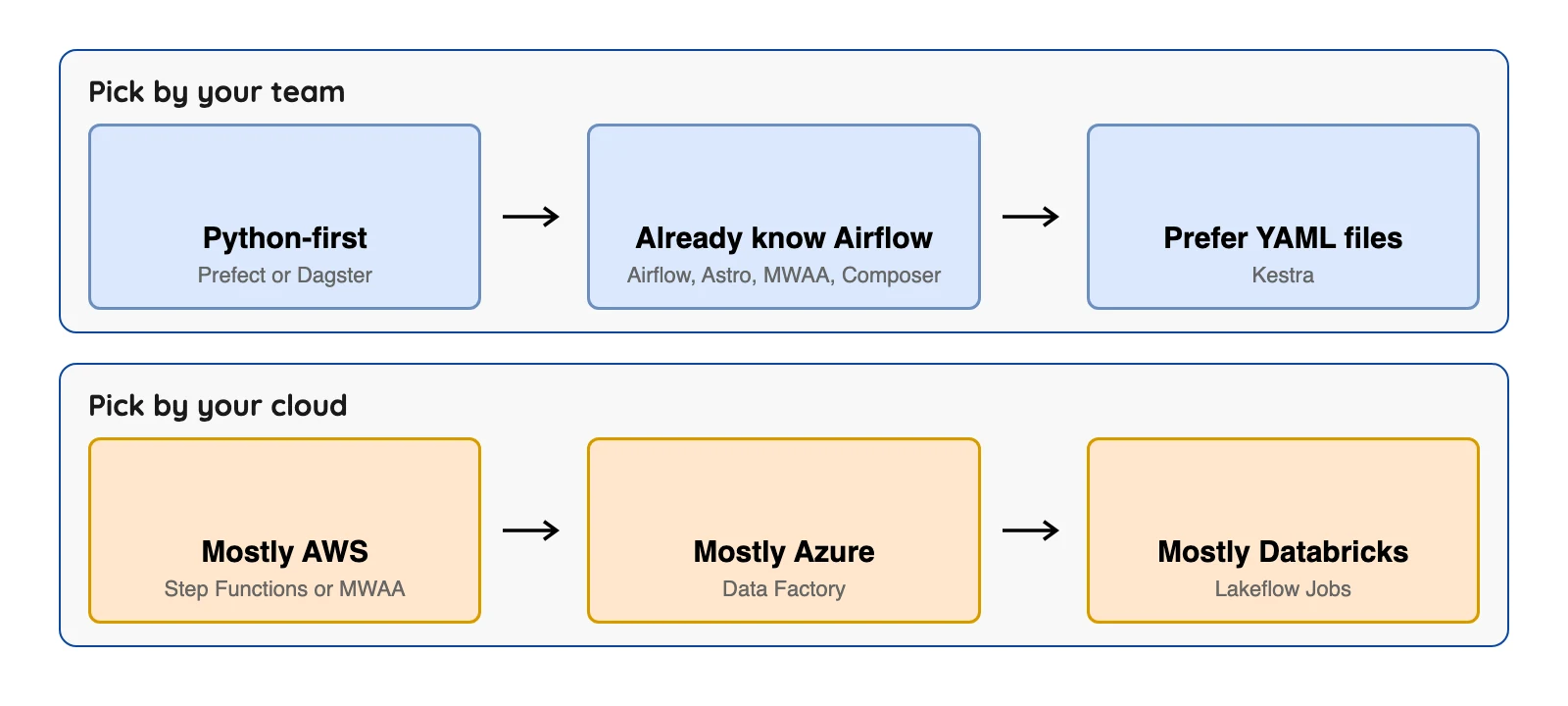
How to choose in 5 minutes
| Your situation | Start with | Why |
|---|---|---|
| Team writes Python, wants a free plan to try | Prefect | Python functions are workflows; free Hobby plan (Prefect pricing) (checked Oct 2026) |
| Want lineage between tables and jobs | Dagster | Assets are the main concept |
| Already know Airflow, want no servers | Astro, Amazon MWAA or Google Managed Airflow | Hosted Airflow; pick the host that matches your cloud |
| Want workflows as YAML files | Kestra | Declarative files, open-source edition |
| All-in on AWS, few or irregular jobs | AWS Step Functions | Per-step billing with a free tier (AWS pricing) (checked Oct 2026) |
| All-in on Azure | Azure Data Factory (or Fabric Data Factory) | Copy and schedule in one product |
| All-in on Databricks | Lakeflow Jobs | Runs inside your workspace |
| Only job is copying databases into Iceberg or Parquet | OLake Go's own schedule | Frequency or cron in the OLake UI |
| No one to run servers or write code | A hosted option above, or a cloud service | Open-source software needs people |
Which orchestration tool fits you?
Question 1 of 6
Where does your data work mostly live?
Cloud services often win inside their own cloud.
Where OLake Go fits
An orchestrator decides when and in what order jobs run, and something else does the copying. OLake Go can be the copying step. It replicates Postgres, MySQL/MariaDB, MongoDB, SQL Server, Oracle and Db2, plus S3 and Kafka, into Apache Iceberg or Parquet (the driver list is on our Docker CLI page). Change capture (CDC) covers Postgres, MySQL/MariaDB, MongoDB and SQL Server.
OLake Go also schedules its own jobs. In the OLake UI you set a frequency of every minute, hourly, daily or weekly, or a cron expression, and Sync Now runs a job on demand (our job settings page). For one copy job that can be all you need. It does not run other tools' jobs, so it is not a general orchestrator: add one from this list when other steps must run before or after the copy. The Docker CLI runs a sync as a command, so an orchestrator can start it, and our team has written guides for doing that from Airflow on Kubernetes and on EC2. You run OLake Go with the OLake UI on Docker Compose, the Docker CLI or Kubernetes with Helm.
So, which one?
The best orchestrator is the one that matches your team's skills and your cloud. Check the billing meter before you compare prices. An hourly host, a per-step service and a per-credit plan each count a different unit.
Last reviewed October 2026.