Databricks vs Snowflake: How to Choose
22 min read
Key takeaways
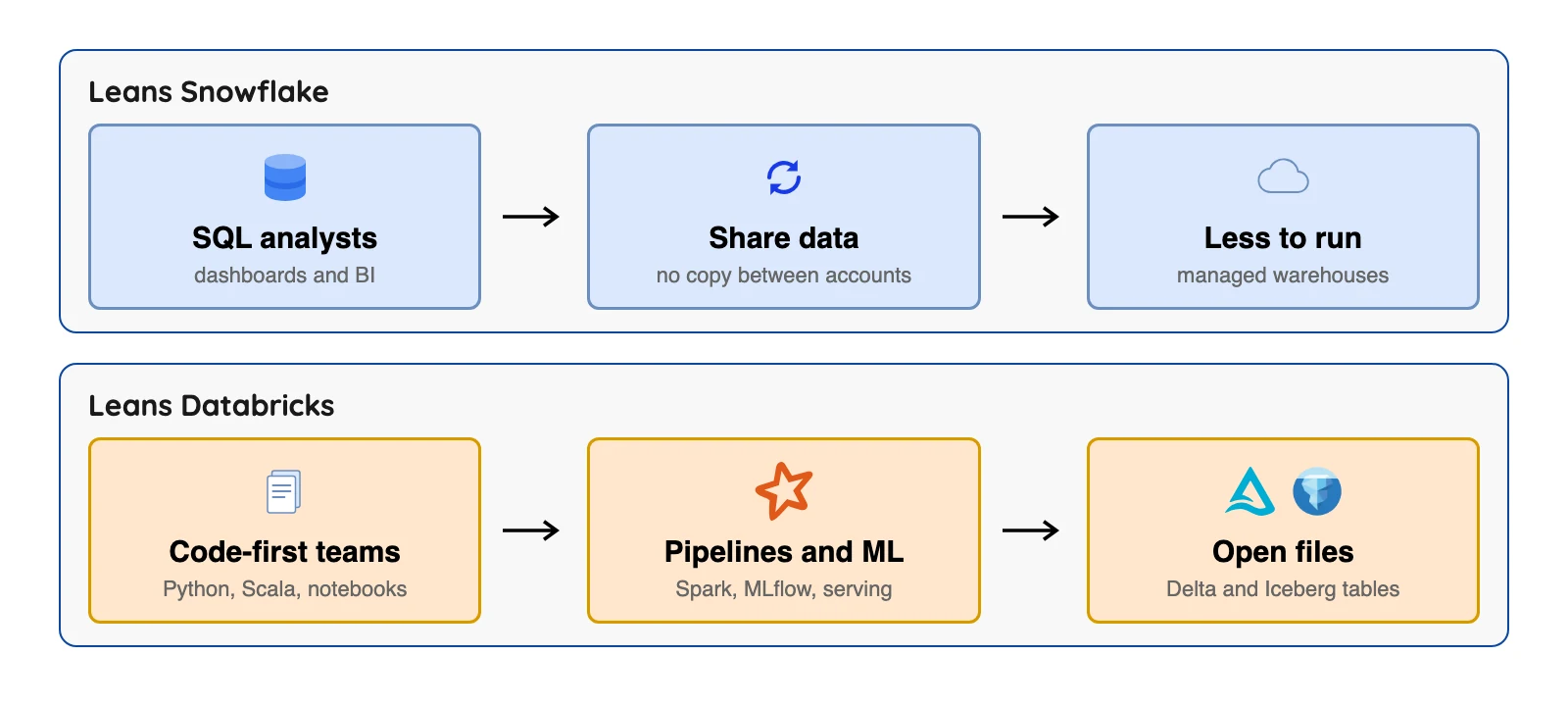
Snowflake's pages centre on SQL, dashboards and reports. Databricks' pages centre on code (Python, Scala, notebooks), data pipelines, machine learning models and open file formats. The two overlap more than you'd think, since both run SQL, both document Apache Iceberg support, and both sell AI features.
Their prices use different units (credits and Databricks Units (DBU)), so you can't set one headline price beside the other. If you also copy your own databases into either platform, OLake Go writes Apache Iceberg tables that both are listed as able to query (see the compatibility page in our docs).
- Snowflake is built around SQL warehouses (systems made to answer SQL questions fast). Databricks calls itself a "lakehouse" platform, which is a data lake (cheap file storage) with warehouse features bolted on.
- Snowflake bills in credits. On AWS US East, a credit costs $2.00, $3.00 or $4.00 depending on edition (Service Consumption Table, effective October 15, 2026) (checked Oct 2026).
- Databricks bills in Databricks Units (DBU). On its Premium plan on AWS US East, SQL compute runs from $0.22 to $0.70 per DBU (SQL pricing page) (checked Oct 2026), and some compute types leave the cloud machine bill to you (more on that below).
- Both document Apache Iceberg support. Databricks lists Snowflake's catalog as one it can read, and Snowflake can use an external catalog. Each has documented limits (Snowflake, Databricks) (checked Oct 2026).
Every fact below comes from Snowflake's and Databricks' own pages, with the page linked right where the claim sits and the month we checked it. If a vendor doesn't publish a number, we say so and don't guess.
We did not run either platform. Last reviewed October 2026.
Databricks vs Snowflake at a glance
| Snowflake | Databricks | |
|---|---|---|
| What it is | Cloud data platform sold as a service, built around SQL warehouses | "Unified, open analytics platform" for data, analytics and AI |
| Clouds | AWS, Azure, Google Cloud | AWS, Azure, Google Cloud |
| Billing unit | Platform Credits, per second after a 1-minute minimum | DBUs, per second |
| Price, AWS US East | $2.00 / $3.00 / $4.00 per credit (Standard / Enterprise / Business Critical) | SQL Classic $0.22, SQL Pro $0.55, SQL Serverless $0.70 per DBU (Premium plan) |
| Storage price | $23.00 per TB per month on demand | Not on the pages we read |
| Cloud machines | Included in the credit price | Included in Serverless; extra on Classic and Pro |
| Languages | SQL, plus Snowpark for Java, Python and Scala | SQL, plus notebooks in several languages |
| Table formats | Snowflake tables, Iceberg tables | Delta Lake tables, Iceberg tables |
| Free option | Trial (terms not checked) | Free Edition for learning, serverless-only and quota-limited |
| Source code | Proprietary | Proprietary platform; Delta Lake, Apache Spark, MLflow and Unity Catalog are open source |
Sources: Snowflake compute billing docs, Databricks Free Edition docs, Databricks introduction (checked Oct 2026).
Prices come from each vendor's own page. Plans change often, so confirm on the vendor's page before you decide.
How each platform is built
Snowflake first. According to its key concepts page, it has three layers. Database storage holds your data, and virtual warehouses are clusters of compute that run your queries.
The third layer, cloud services, handles security, metadata and query planning.
Storage and compute are separate. That means you can run several warehouses on the same data and switch each one off when it's idle. (A warehouse is just a named block of compute that you size and start.)
Databricks says it's built from open source parts, and its introduction lists them.
Delta Lake is a table format that adds reliable updates to files in cloud storage. Apache Spark is an engine that spreads data work across many machines. MLflow keeps track of machine learning experiments, and Unity Catalog handles governance and access control.
Databricks says it integrates with cloud storage and security in your cloud account. The intro page doesn't say all your data stays in your own storage, so check where each table lives. The same page lists Lakebase, a managed Postgres database for application data, so the platform now reaches well beyond analytics.
Where the two now overlap
Older comparison pages draw a clean line, with warehouse on one side and lakehouse on the other. Tidy, but the vendors' own docs blur that line today.
- Apache Iceberg. Iceberg is an open table format for big tables kept as files. Snowflake's Iceberg docs say its Iceberg tables "combine the performance and query semantics of typical Snowflake tables with external cloud storage that you manage." Databricks' Iceberg docs say it supports Iceberg versions 1, 2 and 3 and tables managed by Unity Catalog.
- SQL and Python. Snowflake offers Snowpark libraries for Java, Python and Scala. Databricks gives you SQL warehouses plus notebooks in several languages.
- AI in SQL. Snowflake's Cortex AI Functions give access to models from OpenAI, Anthropic, Meta, Mistral AI, DeepSeek and xAI, and Snowflake says they run inside its service perimeter. Databricks lists model training, MLflow tracking, Model Serving and agent building in its machine learning docs.
- Sharing. Snowflake says that with Secure Data Sharing "no actual data is copied or transferred between accounts" (Snowflake docs). Databricks lists secure data sharing under Unity Catalog.
So the old question, "warehouse or lake?", isn't that useful anymore. Ask this instead: who will use it, and in what language?
Job by job: what each one offers
Same jobs, different names. This table lines up the closest pairs, using each vendor's own one-line description.
| Job | Snowflake | Databricks |
|---|---|---|
| Keep a derived table fresh | Dynamic tables: "materializes the results of a SELECT query and keeps them up to date," with a target lag you set | Lakeflow pipelines and Jobs scheduling |
| Load new files as they arrive | Snowpipe Streaming (listed in the release notes) | Auto Loader: "incrementally and efficiently processes new data files as they arrive in cloud storage" |
| Govern data and AI assets | Horizon Catalog, described as open and "compatible with any engine, any data, and any cloud" | Unity Catalog: "the unified governance layer for data and AI built into Databricks" |
| Build apps on the data | Streamlit in Snowflake, to build, deploy and share Streamlit apps | Databricks Apps, with Streamlit, Dash, Gradio, React, Angular, Svelte and Express |
Sources: Snowflake dynamic tables, Snowflake Horizon, Streamlit in Snowflake, Databricks Auto Loader, Unity Catalog, Databricks Apps (checked Oct 2026).
The pairs are close but differ in depth, and a one-line description can't show that. Test the one your team will use most.
How each one charges you
These two meters count different things, so a price per unit from one can't sit beside the other.
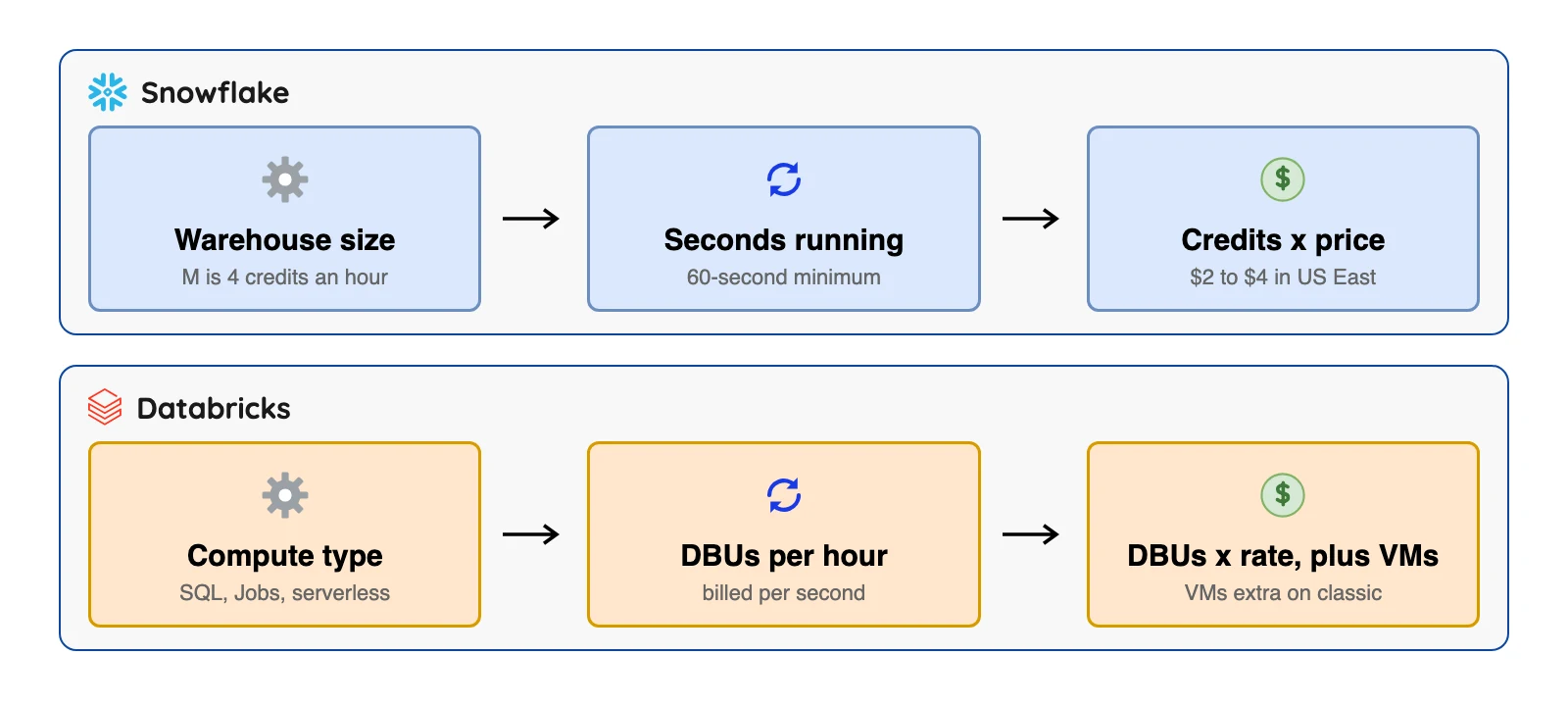
Snowflake charges Platform Credits whenever a virtual warehouse runs. Per its compute billing docs (checked Oct 2026), "Credits are billed per-second, with a 60-second (i.e. 1-minute) minimum," and a suspended warehouse uses no credits. Each step up in warehouse size roughly doubles the credits per hour.
Databricks charges in DBUs. Its glossary defines a DBU as "a normalized unit of processing power on the Databricks Data + AI Platform used for measurement and pricing purposes."
Its pricing page says you pay "per second granularity" (checked Oct 2026), and every compute type has its own DBU rate.
Snowflake prices, from its own table
Snowflake's Service Consumption Table, effective October 15, 2026, lists credits per hour for a standard warehouse. An extra small (XS) uses 1, small uses 2, medium (M) uses 4, large uses 8, and extra large uses 16. It doubles with each size, all the way up to 512 for the biggest (checked Oct 2026).
The same table prices a credit on AWS US East (Northern Virginia) at $2.00 on Standard, $3.00 on Enterprise and $4.00 on Business Critical. Virtual Private Snowflake, a fully separate environment sold by order form, is $6.00. Region matters too, since AWS EU Frankfurt is $2.60 on Standard and $3.90 on Enterprise (checked Oct 2026).
Storage on demand in AWS US East is $23.00 per terabyte (TB) per month, based on the monthly average of compressed data. Gen 2 warehouses, a newer type, use more credits per hour at the same size (1.35 for an XS on AWS, for example) (checked Oct 2026).
Databricks prices, from its own page
With the Premium plan, AWS and the US East (N. Virginia) region selected, the Databricks SQL pricing page shows SQL Classic at $0.22 per DBU, SQL Pro at $0.55 and SQL Serverless at $0.70. It says Serverless "includes cloud instance cost" (checked Oct 2026).
Classic and Pro run in your own cloud account, so your cloud provider bills those machines on top (warehouse types docs) (checked Oct 2026).
On the Premium plan on AWS, the Lakeflow Jobs pricing page lists Jobs Classic at $0.15 per DBU and Jobs Serverless at $0.35. After selecting the Enterprise plan it lists $0.20 and $0.45 (checked Oct 2026).
The SQL pricing page also says the Premium tier on Azure Databricks matches the Enterprise tier on AWS and Google Cloud (checked Oct 2026). Rates change by region and cloud too.
A worked example (and where it stops)
Take a Snowflake Medium warehouse (4 credits an hour) that runs 2 hours a day for 30 days. That's 60 hours, or 240 credits, so $480 a month on Standard at $2.00 and $720 on Enterprise at $3.00.
Add 5 TB of stored data at $23.00 and storage is $115. These use the AWS US East rates from the Service Consumption Table (checked Oct 2026) and ignore discounts.
Every start or resume bills at least one minute, so a warehouse that wakes 20 times a day for 10-second queries is billed for 20 minutes, not about 3.
We can't build the matching Databricks example from public pages. The sizing docs we read list machine types per SQL warehouse size but not DBUs per hour, so the number to multiply by $0.22, $0.55 or $0.70 is missing.
Use Databricks' pricing calculator with your own sizes. Purely as arithmetic with a made-up figure, 10 DBUs in an hour on SQL Classic would be $2.20, plus your cloud bill for the machines.
What a third-party test found
One public test is worth reading with care. Select (select.dev) published it on April 10, 2026, using a standard test data set at 1,000 scale, which has about 6 billion rows in its largest table.
According to Select's write-up, with 22 sequential queries Snowflake at $2 a credit was 34% faster and 17% cheaper than Databricks at $0.70 a DBU. At $3 a credit, Databricks came out 20% cheaper. Select also reported that Databricks was faster on a create-table-as-select test.
Treat that as one test with one setup. The same workload gave a different winner once the edition changed the credit price.
SQL, dashboards and reports
Snowflake's model is a warehouse you size, start and stop.
Per its editions page (checked Oct 2026), the Enterprise edition adds multi-cluster warehouses for more users at once. It also stretches Time Travel (querying older versions of a table) to up to 90 days, against 1 day on Standard.
Databricks competes here too, with SQL warehouses in three kinds. Its warehouse types docs (checked Oct 2026) say Serverless starts in "typically between 2 and 6 seconds". Pro and Classic warehouses take about 4 minutes, and their compute runs in your own cloud account.
If your analysts live in SQL, Snowflake's model (a warehouse you size and start) looks simpler on paper, though we did not run either. If your team already runs Databricks for pipelines, a Databricks SQL warehouse saves you from adding a second platform.
Data pipelines, streaming and machine learning
Databricks' docs centre on this work. It's built on Apache Spark and lists Structured Streaming, Auto Loader for loading files, Lakeflow pipelines and Jobs scheduling in its docs. For machine learning its docs list the full cycle, "from data preparation to production monitoring."
Snowflake also lists tools for this work. Snowpark runs Java, Python and Scala code next to the data, and its release notes list Snowpipe Streaming support for partitioned Iceberg tables (generally available September 24, 2026) (checked Oct 2026).
If your team trains its own models, writes Spark jobs or wants notebooks as the main tool, Databricks fits more naturally. If you mostly call models from SQL, as Cortex AI Functions do, Snowflake may be all you need.
Open formats, lock-in and Iceberg limits
Both document Iceberg support, which may lower the cost of leaving, with the conditions shown in the table.
| Snowflake | Databricks | |
|---|---|---|
| Iceberg versions | Externally managed writes for versions 2 and 3 | Versions 1, 2 and 3 |
| Catalog options | Snowflake as catalog, an external catalog, or Snowflake Open Catalog | Unity Catalog, or foreign catalogs such as AWS Glue, Hive metastore or Snowflake Horizon Catalog |
| Documented limits | Cross-cloud or cross-region use can add egress charges (data transfer fees); streams are not supported for Iceberg tables made from Delta files with partition columns | Managed Iceberg tables need Unity Catalog, Databricks Runtime 16.4 LTS or above, and serverless compute |
| Recent change | Partition evolution generally available September 18, 2026 | Iceberg docs page last updated October 27, 2026 |
Sources: Snowflake release notes (checked Oct 2026).
Snowflake stores JSON-like data in its variant, object and array types and imports JSON, Avro, Parquet, XML and other file formats, per its semi-structured data docs (checked Oct 2026). Unstructured files such as documents sit in stages with directory tables. Databricks works with files in cloud storage, so the format question is mostly about how each engine reads them.
A catalog is the service that tracks which tables exist and where their files are. Because Databricks can read a Snowflake catalog and Snowflake can use an external one, some teams keep one copy of a table and query it from both. That takes setup and testing, and we haven't tested it.
A note on the word "open." Delta Lake, Apache Spark and MLflow are open source, but the Databricks platform itself is proprietary, and so is Snowflake. Our read: open file formats lower the exit cost for your data. Your queries, jobs and permissions still need rework.
Security, compliance and governance
Both vendors gate the stricter controls behind a higher tier or an add-on (Snowflake editions, Databricks security profile) (checked Oct 2026).
| Snowflake | Databricks | |
|---|---|---|
| Where the strict controls sit | Enterprise edition and higher: column-level security with masking policies, row-level security. Business Critical and higher: customer-managed keys (Tri-Secret Secure) | Unity Catalog: access control with row and column filters, lineage, audit log, data classification |
| Regulated data | Business Critical and higher: PHI (HIPAA and HITRUST), PCI DSS, FedRAMP and ITAR | Compliance security profile, "required" for regulated data such as HIPAA, PCI-DSS and FedRAMP |
| Extra charge | Higher edition means a higher credit price | The profile is charged as the Enhanced Security and Compliance add-on |
| Baseline | SOC 2 Type II listed for all editions | Not stated on the pages we read |
The practical point is the same on both sides. If you handle health or card data, price the regulated tier or add-on from day one, not the base rate.
What changed lately
| Date | Vendor | Change |
|---|---|---|
| September 18, 2026 | Snowflake | Iceberg partition evolution reached general availability |
| September 24, 2026 | Snowflake | Snowpipe Streaming supports partitioned Iceberg tables (general availability) |
| October 15, 2026 | Snowflake | Service Consumption Table effective date |
| Through January 31, 2027 | Databricks | Lakehouse RT (beta) shows a 30% promotion on its page |
The cost that's not on either price list
Both bills leave out your own people. A platform that needs Spark skills costs more if your team knows only SQL. A platform that handles tuning for you costs more if your workloads need hands-on control.
Neither vendor publishes a figure for this, so we won't invent one. Count who will write and maintain the jobs, then price the training and hiring that follows.
- To feed either one from your own databases, OLake Go writes Iceberg. It copies PostgreSQL, MySQL and MariaDB, MongoDB and SQL Server (log-based change capture) into Iceberg tables on storage you control, and both platforms are on our query-engine compatibility page.
Where Snowflake fits
Choose Snowflake if you need:
- Warehouses sized by T-shirt size, from XS up (checked Oct 2026).
- Time Travel and multi-cluster warehouses on Enterprise (checked Oct 2026).
- One bill in credits (checked Oct 2026).
Where Databricks fits
Choose Databricks if you need:
- Spark pipelines, streaming, model training and notebooks, with Delta Lake and Iceberg (checked Oct 2026).
- A compute type per job, such as Jobs Classic at $0.15 per DBU on Premium (checked Oct 2026), with your cloud machines on top.
- Serverless SQL warehouses that, Databricks says, typically start in 2 to 6 seconds (checked Oct 2026).
Could you run both?
Each vendor's docs show a route to the other's tables through an Iceberg catalog.
Databricks lists Snowflake Horizon Catalog as a foreign catalog (checked Oct 2026). Snowflake lists external catalogs through a catalog integration.
Databricks' Lakehouse Federation docs (checked Oct 2026) say it can run federated queries on Snowflake data that Databricks does not manage. It needs Unity Catalog, Databricks Runtime 13.3 or above, and pro or serverless SQL warehouses. That lets you try Databricks on Snowflake data before you move anything.
The price you pay is two bills, two permission models and two sets of skills. So run both only when each has a clear job, such as Databricks for pipelines and Snowflake for the reporting layer.
What the community says
We read public threads and one company blog, and we quote only what we could open and check. Each quote is one person's view, with its date and link.
A Hacker News commenter in a November 2025 thread about Pg_lake (Postgres with Iceberg) argued that open stacks have their own costs and wrote: "With snowflake I alone could provide an entire production ready bi stack to a company" (thread).
New Relic's engineering blog (April 2026), written by a customer that moved off Snowflake, says "the cost curve was moving in the wrong direction". It also says the team was locked into one vendor's storage, compute and query model (article).
Which should you pick?
| Your situation | Lean toward |
|---|---|
| Mostly SQL analysts, dashboards and reports | Snowflake |
| Data engineers who write Spark or Python every day | Databricks |
| You train your own machine learning models | Databricks |
| You call language models from SQL on warehouse data | Snowflake (Cortex AI Functions) |
| You want the fewest compute types to choose from | Probably Snowflake; we did not compare the options in depth |
| You want data in open table formats | Databricks (Delta Lake, Iceberg), or Iceberg tables on either |
| You copy PostgreSQL, MySQL, MongoDB or SQL Server data into the platform | Either; OLake Go writes Iceberg tables that both can query |
| You need to share data with outside organizations | Either; both document secure sharing |
| You must process HIPAA, PCI or FedRAMP data | Either; price Business Critical on Snowflake or the compliance add-on on Databricks |
| You want a free place to learn | Databricks Free Edition |
| You need a firm monthly price before you start | Neither; test with your own workload first |
Not sure which row is you? Answer five quick questions.
Which platform fits you?
Question 1 of 5
Who will use the platform most?
A fair way to test both
Don't trust anyone's benchmark, including the one above. Run your own on one real job, and keep the rules the same on both sides.
- Pick your slowest dashboard query and your heaviest nightly job.
- Load the same data into both, with the same file format where you can.
- Run each at least three times, once from a cold start and twice warm.
- Record seconds, plus the credits or DBUs used, from each platform's usage view.
- Multiply by your own price, in your own region and edition or plan.
- Add the cloud machine bill on Databricks Classic and Pro compute.
Cost depends on your data size.
Questions to put to each vendor
Ask both vendors in writing. For Snowflake:
- Which edition do I need, and what is my credit price in my cloud and region?
- How much will my warehouses cost if they start and stop all day, given the 1-minute minimum?
- What do cross-cloud or cross-region Iceberg tables cost me in egress?
And for Databricks:
- How many DBUs per hour will my SQL warehouse and job sizes use?
- Which cloud machines do I pay for on Classic and Pro compute?
- Which Iceberg features need Unity Catalog or serverless in my setup?
Q1. Is Databricks better than Snowflake?
Q2. Is Databricks cheaper than Snowflake?
Q3. What does Snowflake cost per credit?
Q4. What is a DBU?
Q5. Is Databricks a data lakehouse and Snowflake a data warehouse?
Q6. Can Snowflake and Databricks both use Apache Iceberg?
Q7. Can I use both Snowflake and Databricks together?
Q8. Which is better for machine learning?
Q9. Which is more secure, Snowflake or Databricks?
Q10. Which has better data governance?
Conclusion
Pick by who will use it.
Don't choose on a headline price. Snowflake publishes its credit prices and Databricks publishes its DBU rates, but no public page tells you how many credits or DBUs your workload will use. Run a trial on your heaviest job, write down the credits or DBUs it eats, and compare real numbers. If the data starts in your own databases, OLake Go can land it as Iceberg tables for whichever platform you choose.