Best MongoDB Change Data Capture Tools in 2026
35 min read
Key takeaways
Almost every MongoDB change data capture (CDC) tool does the same trick under the hood: it reads MongoDB's change streams. So the choice comes down to who runs the reader and where the changes land.
If you already run Kafka, Debezium and the MongoDB Kafka connector fit, and if you want someone else to run it, look at Airbyte, Fivetran, Estuary, Artie and AWS Database Migration Service (DMS). To land the changes in Apache Iceberg tables you run yourself, without Kafka, see OLake Go. Either way, MongoDB must run as a replica set or sharded cluster, and three limits bite hardest: the oplog window, the 16 MB limit and deletes.
- Change streams are the main method. They let apps read changes without manually tailing the oplog (the log MongoDB keeps of recent writes).
- You need a replica set or sharded cluster. MongoDB's manual says change streams are available only on those, and each tool below reads them or the oplog.
- The oplog window is a documented failure mode. A tool that stays offline longer than the oplog holds can lose its place, and then it has to copy the data all over again.
- Deletes carry only the document key by default. To see what was deleted you need pre-images, which need MongoDB
6.0or later and extra storage.
Vendor facts come from each vendor's own pages, read in September and October 2026. We did not run the other tools. Quotes from users carry their source and date. We quote no prices here.
How MongoDB CDC actually works
Change data capture means spotting the inserts, updates and deletes in a database and sending only those to another system. MongoDB's own tool for it is the change stream, an API that gives your app a live feed of changes. The MongoDB manual says it works without "the prior complexity and risk of manually tailing the oplog".
Change streams run on replica sets and sharded clusters, not on a standalone server. The manual also lists WiredTiger storage and replica set protocol version 1. On a sharded cluster you open the stream from the mongos router, which makes one stream per shard and merges the results.
Each event carries a resume token in its _id field, which works like a bookmark. A tool saves the latest token, and after a restart it asks MongoDB to pick up from there. The manual adds a condition: the oplog "must have enough history to locate the operation associated with the token".
Tools read changes in one of three ways. The table sticks to what MongoDB and the vendors document.
| Way to read changes | What the docs say | Deletes |
|---|---|---|
| Change streams | MongoDB's supported API. Debezium, Airbyte, Fivetran, Estuary and Artie all use it | Yes, key only unless pre-images are on |
| Reading the oplog directly | Striim does this before MongoDB 4.2. AWS DMS has an endpoint setting, useOplog, which is off by default | Yes |
| Scheduled full or batch copies | Airbyte's Full Refresh mode and Estuary's Batch Snapshot and Batch Incremental modes | Estuary says only its change stream mode captures deletes |
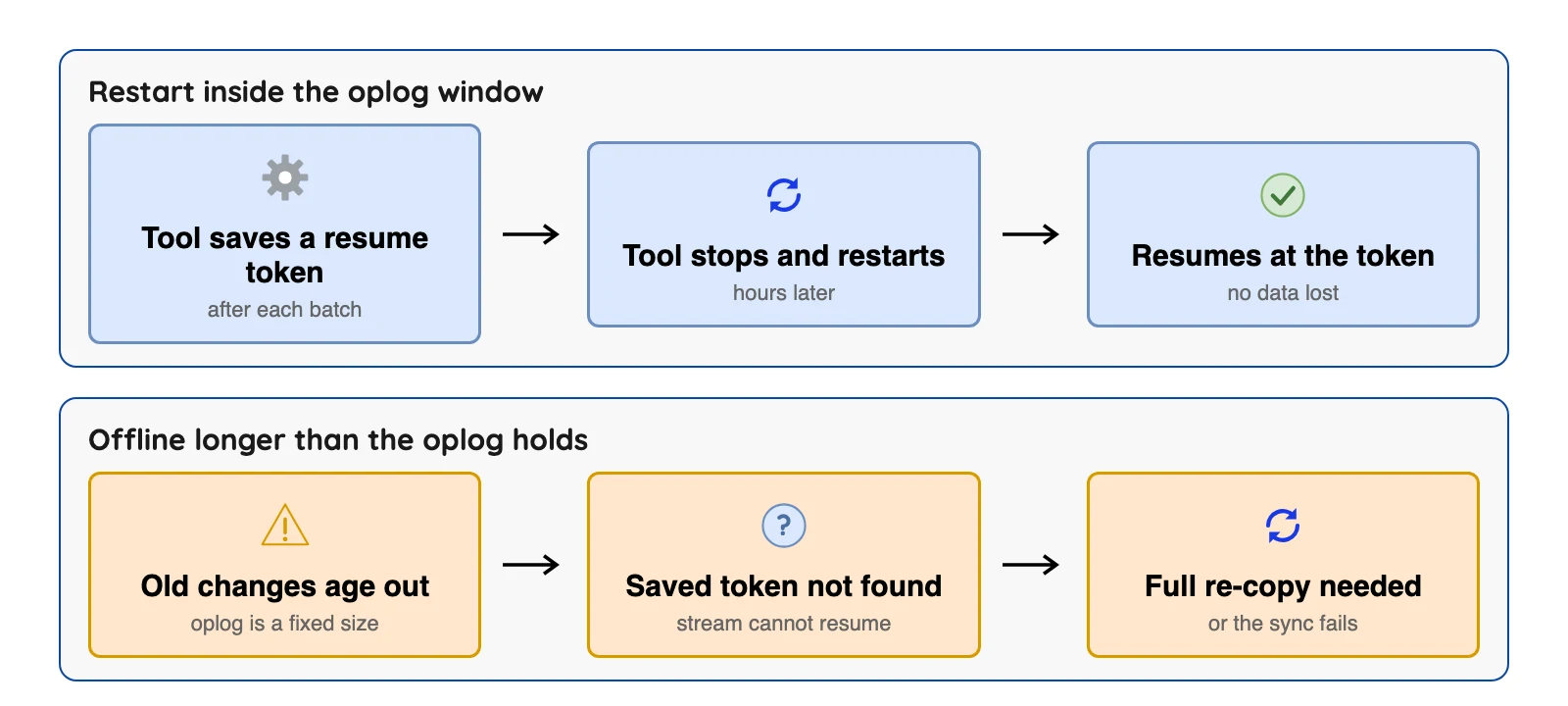
That bookmark rule is behind a documented failure mode. Airbyte's troubleshooting page says a first import longer than the oplog retention can leave an invalid resume token that needs a re-import.
Size the oplog first
Check your oplog size before you pick a tool. Airbyte, Fivetran, Estuary and AWS DMS all say in their own docs to keep at least 24 hours of changes in the oplog, and Airbyte and Fivetran add that a week is better.
MongoDB's own docs show how to check and change the size, on self-managed replica sets.
use local
db.oplog.rs.stats().maxSize
rs.printReplicationInfo()
db.adminCommand({replSetResizeOplog: 1, size: Double(16000)})
Line one shows the oplog size in bytes. MongoDB's reference page says rs.printReplicationInfo() prints the configured size and the "log length start to end", which is your window in hours. Resizing takes a size above 990 MB, and the example sets 16 GB.
Here is our own arithmetic. MongoDB's sample output shows a window of 18.17 hours.
If your tool could be down over a 60 hour weekend, that oplog is about 3.3 times too small (60 divided by 18.17). You'd need roughly 3.3 times the size, plus room to catch up. Read your own window first.
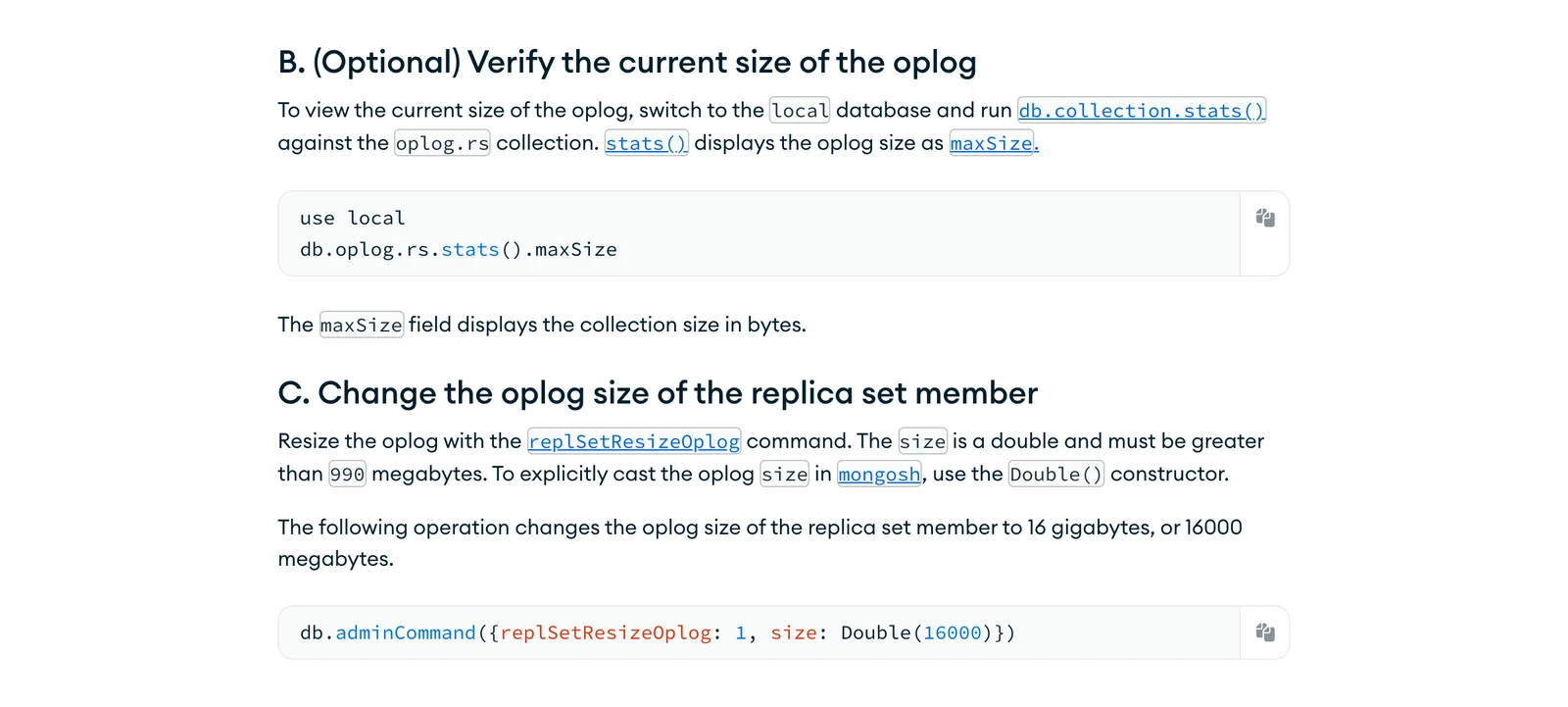
MongoDB's change-oplog-size tutorial, October 2026.
Three limits that decide whether a tool works
The 16 MB limit applies to change events as well as documents. MongoDB's production recommendations say change stream responses must stay within the 16 MB limit for a BSON (binary JSON) document. An update that returns the full document, or a large insert, can push an event over the line, and then the notification fails.
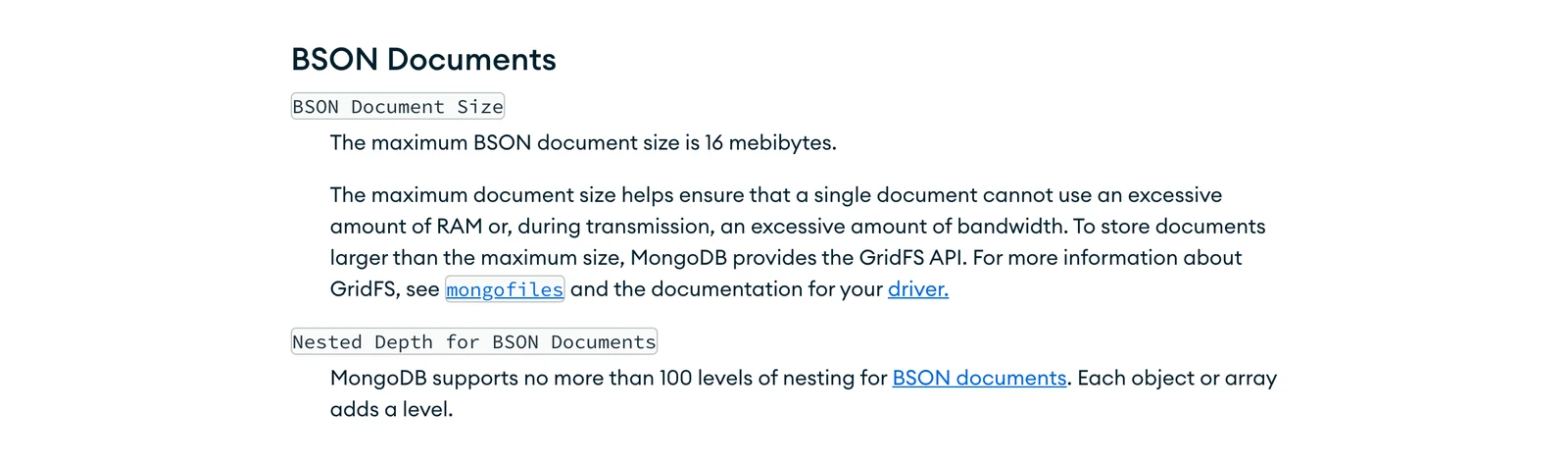
MongoDB limits page, October 2026.
Updates show only the changed fields by default. If a tool wants the whole document, it either asks MongoDB to look it up later (updateLookup) or uses post-images. The manual warns that updateLookup with a filter can cause "Resume Token Not Found" errors during rapid deletions, and suggests pre- and post-images instead.
Deletes are thin. MongoDB's delete event leaves out the full document because it no longer exists. Pre-images fix that (more below).
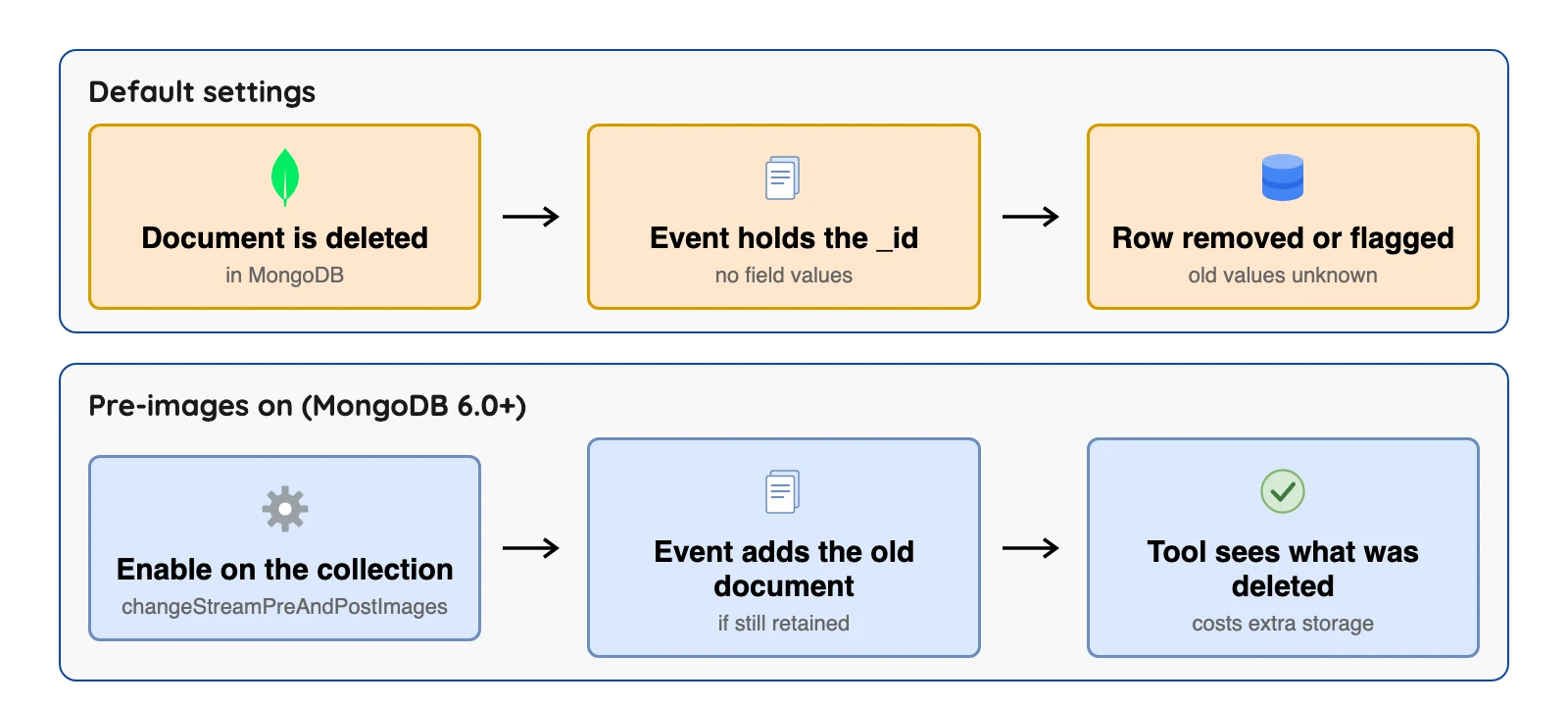
Pre-images arrived in MongoDB 6.0. You switch them on per collection with changeStreamPreAndPostImages, and MongoDB's collMod page says they use storage and processing time.
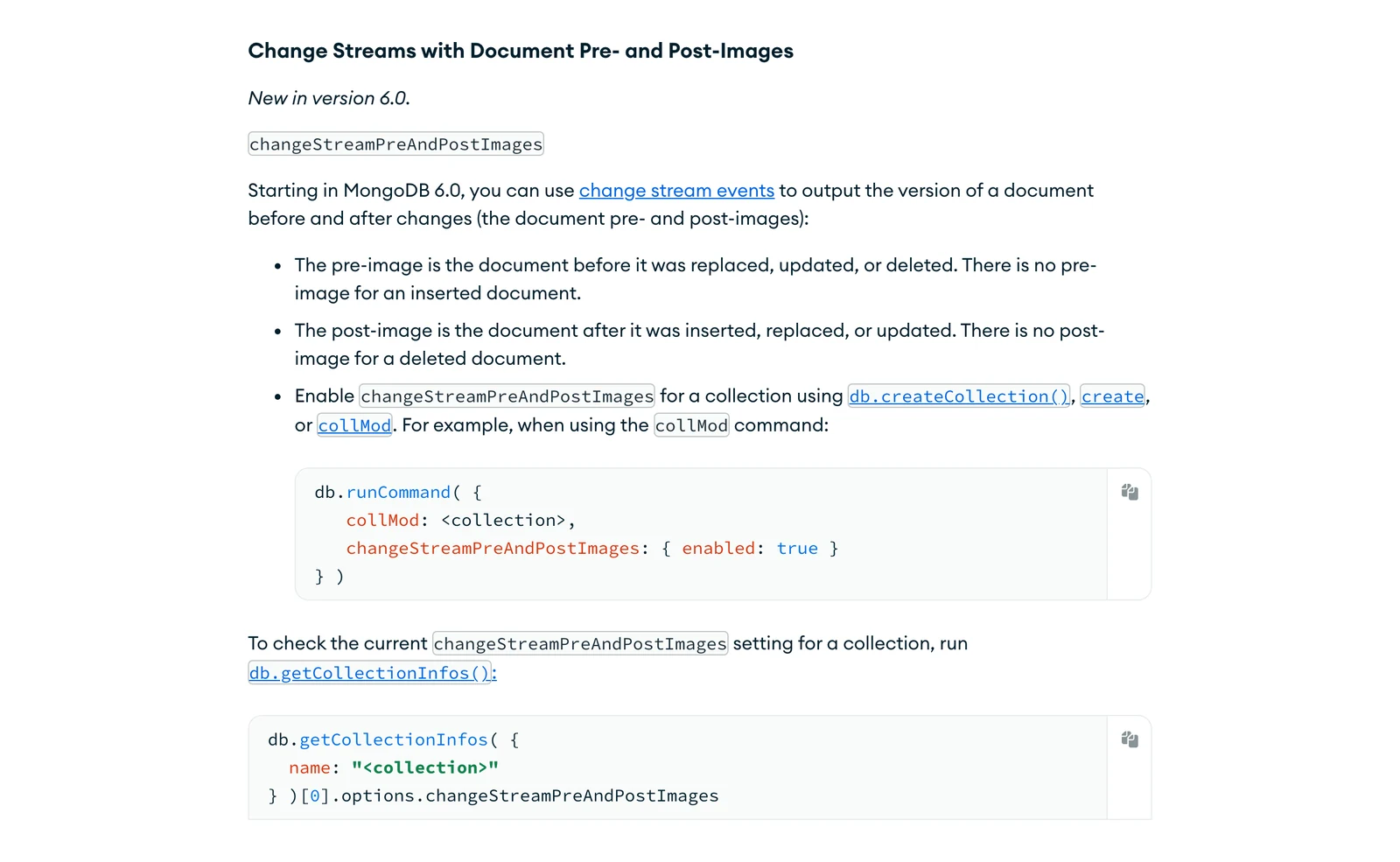
MongoDB's collMod documentation, October 2026.
A worked example: two quick updates, then a delete
Take order number 7. In one minute it's inserted as "new", updated to "packed", updated to "shipped", then deleted.
The table shows what each documented setting records, reasoned from the vendors' docs.
| Setting | Insert | The two updates | The delete |
|---|---|---|---|
| Default change stream | Full document | Changed fields only | Key only |
Lookup (updateLookup, Airbyte's default) | Full document | The latest version at processing time, which MongoDB says is null if the document is gone | Key only |
Post-images (MongoDB 6.0+) | Full document | The document right after each update | Key only |
| Post- and pre-images | Full document | After each update | The document as it was before the delete |
Per Airbyte's docs, with Lookup the "packed" state may be lost, while post-images can keep it if they were on before the update.
A Kafka topic holds all four events. A tool that mirrors the latest state, such as Fivetran, ends with one row for order 7, flagged as deleted.
An audit trail needs every state. A daily report on current orders doesn't.
How we picked
We included maintained tools whose own documentation shows they read MongoDB changes. Tools with no MongoDB CDC page we could read didn't make the cut.
For the same question on other databases, see our SQL Server CDC tools comparison and the wider best change data capture tools list.
The tools are grouped by how you run them, and the numbers are not a ranking. Kafka Connect is the framework that runs connectors against Apache Kafka, a system that stores event streams as topics.
MongoDB CDC tools at a glance
Apache Iceberg is an open table format for data lakes. "Supports Iceberg" can mean a direct writer or a separate route, so the last column says which.
| Tool | Runs as | Kafka needed? | Iceberg route, per the vendor's docs |
|---|---|---|---|
| Native change streams | Your own app | No | You write it |
| Debezium | Kafka Connect, or Debezium Server | Kafka Connect mode, yes; Debezium Server, no | Community-maintained Debezium Server sink, in a separate repository |
| MongoDB Kafka connector | Kafka Connect | Yes | No Iceberg writer found in its docs |
| Airbyte | Core self-hosted, or Cloud | No | S3 Data Lake and GCS Data Lake destinations; objects and unions become JSON strings |
| Fivetran | Vendor-run, or Hybrid on Enterprise and Business Critical plans | No | Managed Data Lake Service, which creates Iceberg metadata by default |
 OLake Go OLake Go | You run it yourself (install) | No | Writes Iceberg or Parquet directly (our docs) |
| Estuary | Vendor-run; private and bring-your-own-cloud on Enterprise | No | Two Iceberg destinations: one merges with serverless Spark jobs on AWS Elastic MapReduce, the other appends delta updates through AWS Glue or a REST catalog |
| Artie | Vendor-run; bring-your-own-cloud on Enterprise | No | Iceberg destination through Iceberg REST catalogs (services that track tables over an open API) and S3 Tables, per its changelog; its pricing page lists Iceberg only under Enterprise |
| AWS DMS | Vendor-run service in your AWS account | No | Iceberg is not in its list of target endpoints |
| Striim | Self-managed or cloud | Reader docs do not mention it | Iceberg Writer (Google Cloud Storage) or S3 Tables Writer (Amazon S3 Tables), with a compute engine and catalog |
Sources for the Iceberg column: AWS DMS's Targets page, Estuary's Iceberg and delta updates connector pages, Striim's Iceberg Writer page, the S3 Data Lake and GCS Data Lake pages at Airbyte, the Managed Data Lake Service page at Fivetran, and the changelog at Artie.
The ten tools, one by one
Build it yourself
1. Native change streams: best for small apps that react to changes
At a glance
- Method: MongoDB's own change stream API
- Price: Included with MongoDB; you write and run the reader
This is the API most other tools here wrap. Your app opens a stream on a collection, a database or the whole deployment.
What's good
- No extra software to install, and you can filter events with an aggregation pipeline.
- A stream can cover a single collection, a database or an entire deployment, per the manual.
- Streams are resumable: you pass the saved resume token to
resumeAfterorstartAfterwhen you open the cursor, andstartAftercan open a new stream after an invalidate event such as a collection drop or rename. - Change streams only notify on changes that have persisted to a majority of the data-bearing members of the replica set.
- On a sharded cluster,
mongosopens a change stream on each shard and then sorts and filters the results. - From MongoDB
6.0a stream can output a document before and after a change, switched on per collection withchangeStreamPreAndPostImages.
Where it falls short
- You're on the hook for storing resume tokens, handling retries and coping with schema changes yourself.
- The manual says time series collections do not support change streams.
- Pre- and post-images are not available for an event if they were not enabled on the collection when the update or delete happened, or if they were removed after the
expireAfterSecondsretention time (collModpage). An inserted document has no pre-image and a deleted one has no post-image. - Pre-images are written to the
config.system.preimagescollection, which the docs say "may become large", and they add processing time. - If you drop or rename a collection or database with a stream open against it, the stream cursors close when they reach that point in the oplog (MongoDB's production recommendations page).
- By default MongoDB sets no minimum oplog retention period and truncates the oldest entries to hold the configured maximum size (oplog page). The default size on WiredTiger is 5% of free disk space, with a
990 MBfloor and a50 GBcap.
What users say: This is MongoDB's own API and has no product reviews, so we found no review-site or forum thread to quote.
Run it with Kafka
2. Debezium: best for teams that already run Kafka
Debezium home page, October 2026.
At a glance
- Method: Change streams, wrapped by a Debezium connector
- Price: Free licence, you pay for infrastructure and staff
Debezium has a MongoDB connector in its current stable 3.7 release series. Its MongoDB docs say the connector tracks a replica set or a sharded cluster and "does not read the oplog directly". Change streams do that job instead.
What's good
- On MongoDB
6.0or later you can fill thebeforefield by turning on pre-images and settingcapture.modeto a*_with_pre_imageoption. - Version
3.7lists MongoDB6.0,7.0and8.0as tested, per its3.7release page. That page dates3.7.0.Finalto 29 September 2026, with a new dedicated transform (SMT) that converts MongoDB events into relational-style structs. - Its docs say a snapshot copies collections in parallel, using as many threads as possible up to
snapshot.max.threads. Incremental snapshots default to chunks of1024rows and track progress with watermarks. - By default it streams from the replica set's primary, and you can stream from a secondary by setting the read preference in the connection string. For a sharded cluster you set
mongodb.connection.stringto the sharded cluster connection string. - Its
snapshot.modeoptionwhen_neededtakes a new snapshot only if it finds no topic offsets or a recorded offset points to a log position the server no longer has. - Its exactly-once page lists the MongoDB connector among the source connectors that can take part in Kafka Connect's exactly-once delivery.
Where it falls short
- An update event carries an
aftervalue only ifcapture.modeischange_streams_update_fullor its pre-image variant. Theaftervalue is always a string holding a JSON representation of the document. - You run it yourself, and the Apache Iceberg sink for Debezium Server is community-maintained in a separate repository.
- The pages of that community sink that we read describe replication from "any database" and do not name MongoDB (project docs). The Debezium Server page shows no MongoDB example.
- The connector cannot monitor a standalone MongoDB server, because standalone servers have no oplog. The docs say it works if you convert the server to a replica set with one member.
- A MongoDB change stream event is limited to
16 megabytes, and the docs say pre-images raise the chance of exceeding it, "which can lead to failures". - If the last stream position was removed from the oplog, the connector might fail to start with an invalid resume token error, depending on
snapshot.mode. The docs say you then must create a new connector to continue.
What users say: Debezium's own April 2026 survey says "65.2% of respondents gave Debezium a 5 out of 5" on how likely they are to recommend it, though the project ran it itself and the page gives no count of responses. On Hacker News in November 2025, one commenter wrote "Even with Debezium I have run into myriad issues" while still recommending it. Neither is about MongoDB.
3. MongoDB Kafka connector: best for MongoDB shops that want the official connector
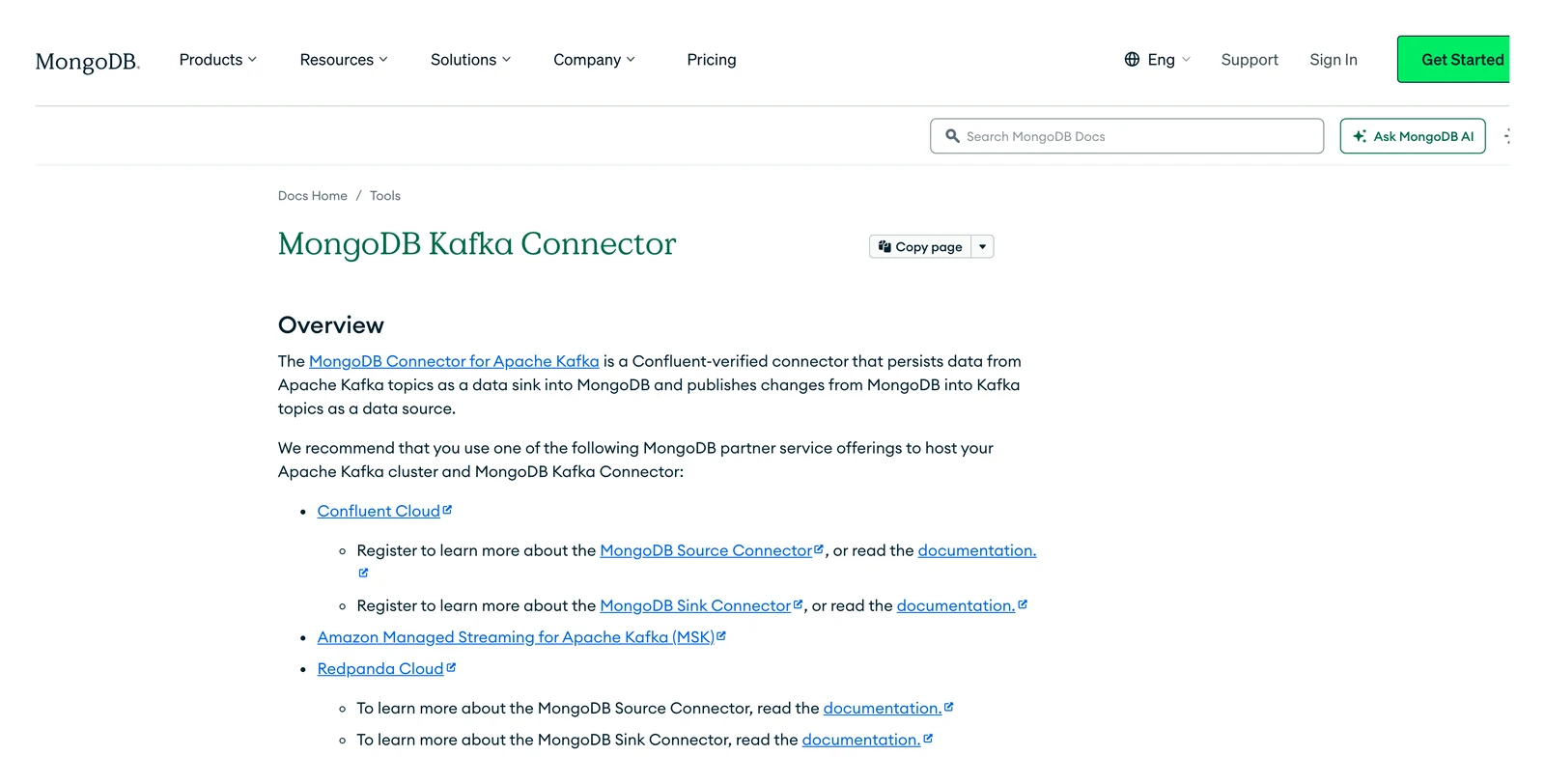
MongoDB Kafka Connector home page, October 2026.
At a glance
- Method: One change stream per source connector
- Price: Not published on the docs pages we read
MongoDB's Kafka connector docs call it a Confluent-verified connector. Per its change streams page, the source connector opens one change stream and stores the resume token as its offset in a Kafka topic.
What's good
- It's MongoDB's own connector, and the compatibility page says the source needs MongoDB
3.6or later (4.0or later to watch a whole database or deployment). - MongoDB's integration page says it is "developed and supported by MongoDB and verified by Confluent", and that the connector is open source.
- The compatibility page says it works with any Apache Kafka platform that supports Kafka Connect. The overview lists Confluent Cloud, Amazon MSK and Redpanda Cloud as partner hosting offerings.
- The change stream settings let you pick how updates look:
updateLookup, orwhenAvailable/requiredfor the full document and for the pre-image. - Its troubleshooting page documents two ways to recover from an invalid resume token and says to turn on heartbeats with
heartbeat.interval.msto help prevent one. - A setting can send tombstone events for deletes, holding the key of the deleted document with a null value.
Where it falls short
- It needs a Kafka Connect cluster, and we found no Iceberg writer in its docs.
- Pre-images aren't available for rows copied during the initial copy. The
copy_existingstart mode can create duplicate events, so delivery is "at-least-once" (you may see the same change twice). - It requires Confluent Kafka Connect
v2.1.0or later and is tested against Apache Kafkav2.3and later. - The resume token is stored as an offset in a Kafka topic. If the oplog entry for it is deleted while the connector is paused, or the source namespace sees no update before MongoDB rotates that event out of the oplog, the token becomes invalid.
- Recovery is manual: set
errors.tolerance=alland make a change so the token updates, or changeoffset.partition.nameto reset the offset data. - The tombstone setting applies only when
publish.full.document.onlyistrue.
What users say: We found no substantive 2025 or 2026 thread from users.
Packaged or vendor-run
4. Airbyte: best for scheduled syncs with a self-hosted option
Airbyte home page, October 2026.
At a glance
- Method: Change streams, run as scheduled syncs
- Price: Core is free to self-manage; Cloud is billed in credits, per Airbyte's pricing page, read on 8 October 2026
Airbyte's MongoDB source is listed as a certified connector in its docs, with CDC through change streams and a full refresh mode too.
What's good
- A setting called
Invalid CDC position behaviorlets you choose: fail the sync, or re-sync automatically when the saved position is stale. - Its docs say the certified connector offers CDC through change streams, checkpointing and chunking of data reads, and full refresh syncing of collections.
- Schema enforcement is optional. When it is off, each document becomes a record with an
_idand adatafield holding a JSON of all the fields in the document. - The connector changelog lists version
2.1.0(2 September 2026) as adding support for sharded clusters and object-type_idfields.
Where it falls short
- The default update mode, Lookup, fetches the latest document, so several quick updates can show the same final version and the steps in between vanish.
- The Post Image mode needs MongoDB
6.0or later with images turned on, and Airbyte's page says failing to set that up "may lead to data loss". - Syncs run on a schedule, not all the time.
- If you pick Re-sync data for a stale position, Airbyte triggers a full refresh. Its docs say this increases cloud costs and may miss incremental changes made while the cursor was invalid, and the default is Fail sync.
- During CDC syncs, change events can exceed the
16 MBBSON limit and raise aBSONObjectTooLargeerror (Airbyte's troubleshooting page). The suggested fix is to switch that stream to Full Refresh, which does not use change streams. - The docs disagree on sharded clusters: the changelog says
2.1.0supports them, while the troubleshooting page still says "Only supports replica set cluster type".
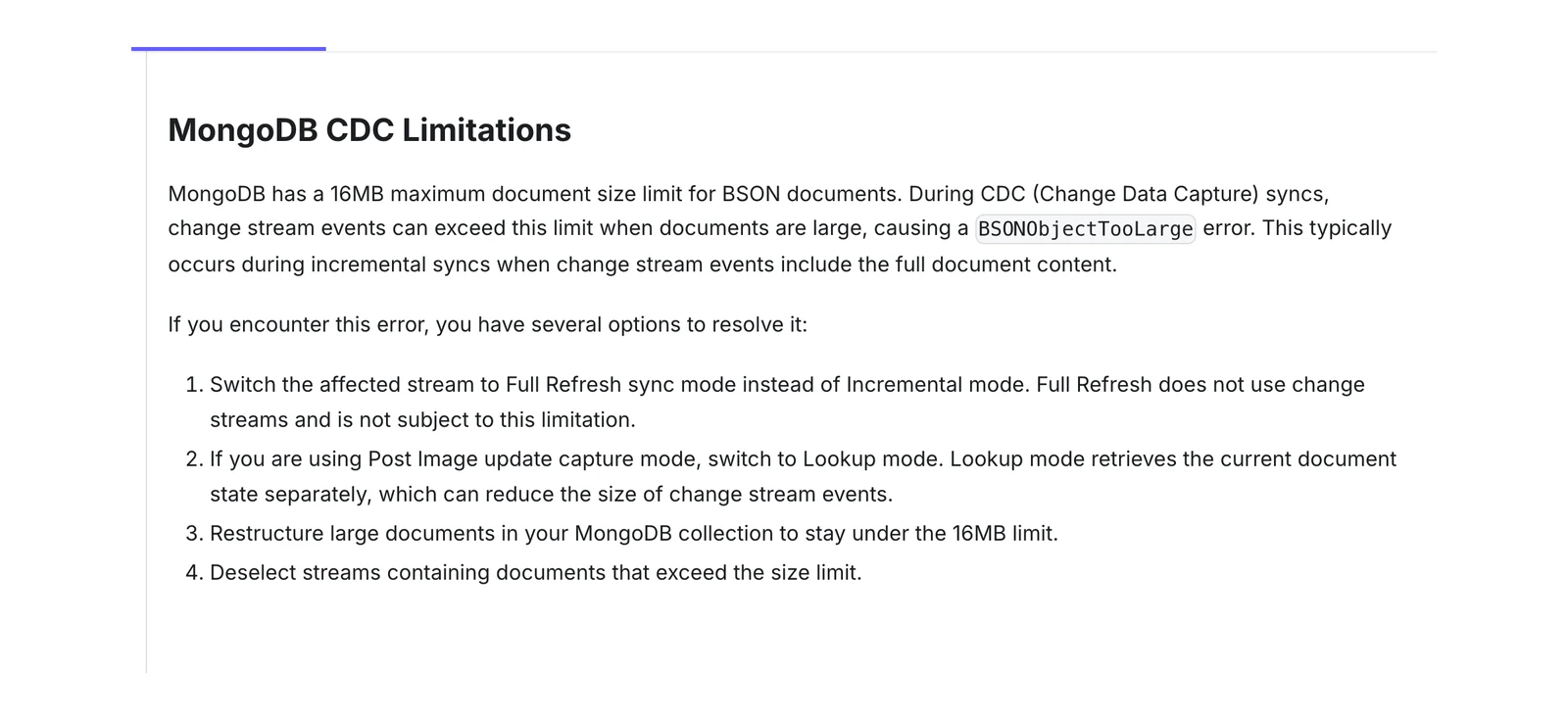
Airbyte's MongoDB troubleshooting page, October 2026.
What users say: In August 2026, an AWS Marketplace reviewer (a G2 review shown there) liked that "The open-source nature means we're not locked into a vendor". In a June 2026 Airbyte GitHub discussion, one user on a busy shared oplog wrote "Catch-up runs at ~50 events/min and falls further behind in real time". It is one user's report.
5. Fivetran: best for vendor-run loading into a warehouse
Fivetran home page, October 2026.
At a glance
- Method: Change streams, after a first copy with
find() - Price: Billed per monthly active row, per Fivetran's pricing page, read on 8 October 2026
Fivetran's MongoDB page says it supports replica sets and sharded clusters, versions 4.0 and above, but not MongoDB Serverless. It copies existing data with a find() call, then switches to change streams, opening one against each selected collection.
What's good
- Fivetran uses
_idas the key, and when you delete a document, it stays in the destination with_fivetran_deletedset totrue. - For large collections, its docs say the first copy takes a limited amount of data at a time, so a lost connection does not restart the sync from the beginning.
- When a change stream cursor expires, its docs say Fivetran reschedules the sync, triggers an automatic re-sync and shows a warning in the dashboard.
- It maps all first-level fields of your documents to columns, and recommends packed mode (no unpacking) because syncs are faster.
- Its docs say it supports the SaaS and Hybrid deployment models for all MongoDB implementations, and replica sets and sharded clusters on MongoDB
4.0and above with WiredTiger and protocol version1.
Where it falls short
- Your queries have to filter on the deleted flag, because rows are never removed.
- Nested objects and arrays stay as JSON, and Fivetran does not unpack them into separate tables beyond one layer in unpacked mode. Further layers need a transformation in your destination, and unpacked syncs tend to be slower than packed ones.
- Self-run is limited to its Hybrid deployment, which needs an Enterprise or Business Critical plan, and its docs list a limit of
3connections per database. - Its docs say it does not support MongoDB Serverless databases.
- Cursors expire when syncs are too infrequent or the oplog is too small to hold the changes, and the automatic re-sync that follows means copying the data again.
- Its setup guide asks for an oplog that keeps at least 24 hours of changes and recommends seven days.
What users say: On Hacker News in October 2025, one commenter in a thread on the Fivetran and dbt Labs merger wrote "Fivetran is convenient but absurdly expensive." It's one comment about Fivetran in general, not about MongoDB.
6. OLake Go: best for MongoDB into Apache Iceberg on your own storage

OLake home page, October 2026.
At a glance
- Method: Change streams with the oplog on; replica set or sharded cluster
- Price: Free licence (Apache 2.0), you pay for infrastructure and staff
OLake Go is open source under Apache 2.0. Its MongoDB connector has four sync modes: Full Refresh, Full Refresh plus Incremental, Full Refresh plus CDC, and CDC only. CDC needs MongoDB 4.0 or higher running as a replica set with the oplog on. The connector docs include a CDC setup guide for self-hosted MongoDB and Atlas. Its connection test checks that change streams are available and warns if the oplog window is too short for expected pauses.
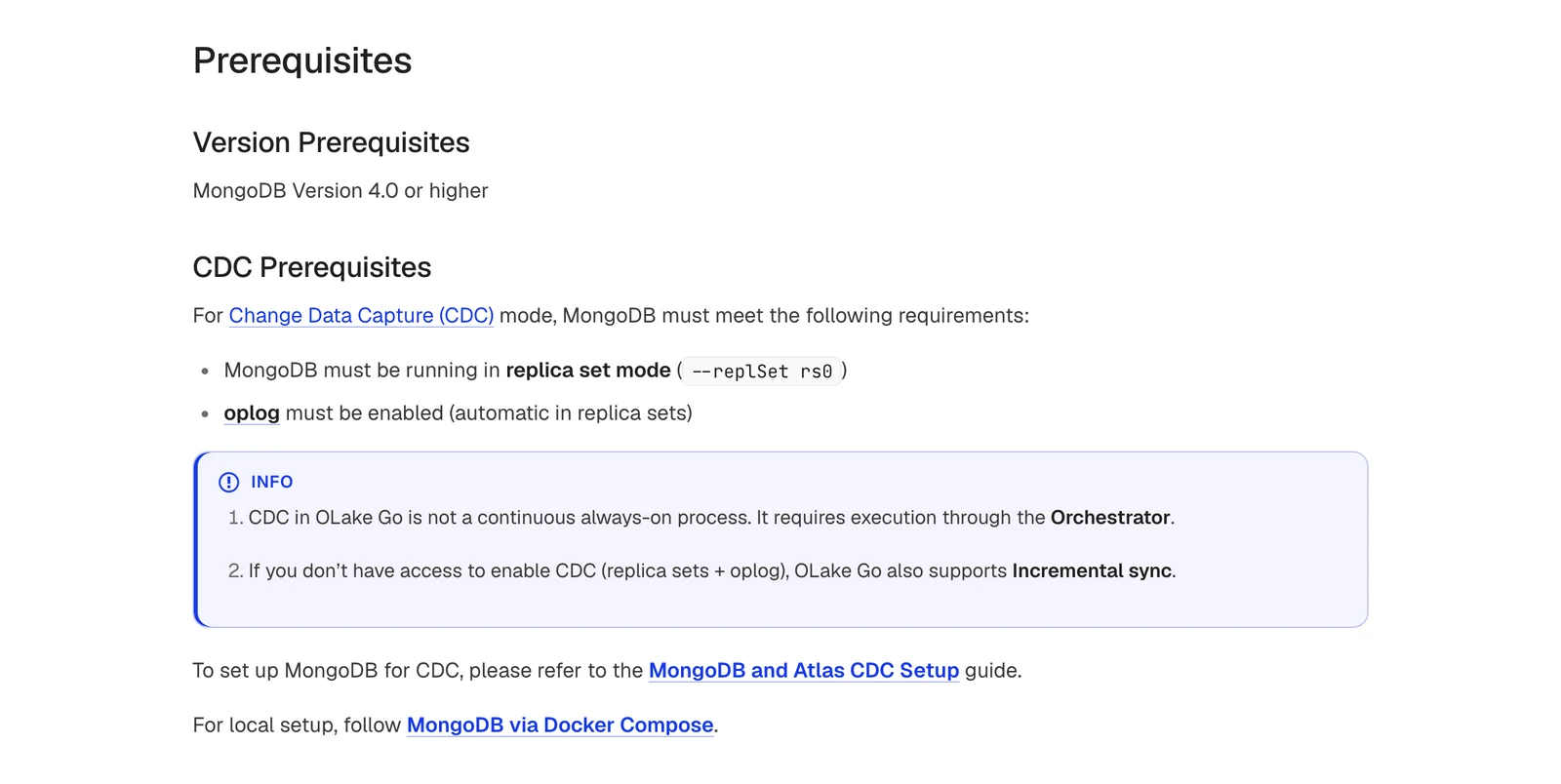
OLake Go's MongoDB connector docs, October 2026.
What's good
- It writes Iceberg or Parquet with no Kafka in the path, using equality deletes, positional deletes or deletion vectors (see our docs; deletion vectors need OLake Go
0.11.0or later, per the release notes). - Without access to a replica set, Incremental sync still works (MongoDB connector docs).
- On deletes, the
v0.7.4release (pull request 964) returns the full document by using pre-images on MongoDB6.0or later with pre-images on. - It works with eleven catalog types, including AWS Glue, REST, Nessie, Polaris, Unity, Lakekeeper, S3 Tables, JDBC, Hive Metastore, BigLake and Horizon (see the catalog compatibility page).
- Large collections are read in parallel chunks. You choose the chunking strategy,
splitVector(the default) ortimestamp, and theMax Threadssetting caps the parallel threads. Our MongoDB connector docs describe checkpointing and automatic resume for failed full loads. - Sharded clusters are covered: the v0.2.5 release notes describe resume-token handling for each shard's stream after a failover or shard migration.
- A data filter can limit which rows a stream replicates, including in CDC and incremental syncs (see our docs and the v0.6.0 release notes). New source columns are added to the Iceberg schema automatically (schema evolution).
- The connector takes a read preference such as
secondaryPreferred, DNS SRV connection strings, SSL modes (require,verify-ca,verify-fullordisable), an SSH tunnel, IAM authentication, and a retry count with exponential backoff.
Scope: output goes to Iceberg or Parquet on storage you choose, and CDC runs when your orchestrator starts a job. Our engine compatibility page lists Athena, BigQuery (BigLake) and Snowflake among the engines that query the Iceberg tables it writes. With the Horizon catalog (OLake Go 0.11.0 or later), OLake Go can also create those Iceberg tables inside a Snowflake database (Horizon setup).
Bottom line: Pick it for MongoDB changes in Iceberg tables you control, without Kafka.
7. Estuary: best for continuous capture with batch fallbacks
Estuary Flow home page, October 2026.
At a glance
- Method: Change streams, with two batch modes
- Price: Not covered here; see Estuary's pricing page
Estuary's MongoDB connector uses change streams when available. Each collection runs in one of three modes: Change Stream Incremental, Batch Snapshot or Batch Incremental.
What's good
- Only the change stream mode captures deletes. The batch modes cover views and time series collections that change streams can't.
- Its docs say that during the first snapshot the connector keeps reading change streams while it scans collections to backfill existing documents.
- Captured update events always include a full post-image, because the change stream is set up with
fullDocument: updateLookup. - Pre-images for update, replace and delete operations are captured if they are available, and an advanced setting called
Disable Pre-Imagesturns the request off. - Batch modes also work on deployments that do not support change streams at all.
Where it falls short
- If a pause outlasts the oplog, you may have to redo the backfill, which is why Estuary's MongoDB capture page recommends at least 24 hours of retention.
- Batch Snapshot rescans the entire collection on a set schedule, and Batch Incremental captures only documents with a higher cursor field value than previously observed.
- Pre-images are captured only when the source collection has
changeStreamPreAndPostImagesenabled. - For Apache Iceberg, the merging connector needs an AWS EMR Serverless application with the Spark runtime, an S3 staging bucket and an Iceberg REST catalog (Iceberg connector page). The page shows a Beta label, and says only REST catalogs that use Amazon S3 are supported for now.
What users say: A G2 review on AWS Marketplace (December 2025) said the reviewer could "connect my MongoDB to Snowflake for analytics purposes within just a few hours". The same reviewer wrote "Setting up the tool does demand a certain amount of data engineering work."
8. Artie: best for a vendor-run MongoDB pipeline with typed columns
Artie home page, October 2026.
At a glance
- Method: Change streams
- Price: Not covered here; see Artie's pricing page
Artie's MongoDB page says it reads change streams for inserts, updates and deletes. The server must be a replica set, and its docs say a standalone server can be turned into one with a single member.
What's good
- Its docs describe how it handles schema-less data: it types each column from the first non-null value, unions the fields it sees, and writes missing fields as
NULL. - Full document before change works with MongoDB
6.0or later, and Artie says it helps deletes when the destination table is partitioned. - Its changelog says that in July 2026 MongoDB pipelines gained an opt-in
collectionScopedModefor tighter isolation between collections. - The same changelog entry says database-wide change streams now apply your database and collection filters before Artie decodes events.
Where it falls short
- A field with mixed types (a number in one document, text in another) lands as a string.
- Nested documents and arrays are kept as JSON objects. Artie's docs say it does not flatten or unfurl nested structures into separate columns.
- Each column's type comes from the BSON type of the first non-null value Artie sees for that field.
- Fields missing from a document are written as
NULLin the destination. - Artie's pricing page lists the Iceberg destination only under Enterprise, and Enterprise pricing is custom.
What users say: We found no substantive 2025 or 2026 thread from users, only the vendor's own customer stories, which we don't treat as peer opinion.
9. AWS Database Migration Service: best for moves inside AWS
AWS DMS home page, October 2026.
At a glance
- Method: Reads the oplog or change streams, depending on an endpoint setting
- Price: Not covered here; see AWS's pricing page
AWS DMS's MongoDB source page says CDC needs access to the oplog, so a replica set is required, and you can read from the primary or a secondary. DMS 3.5.4 and later support MongoDB 7.0 and 8.0.
What's good
- There are two modes: document mode keeps each document in one
_doccolumn, and table mode makes a column for each top-level field. - In table mode, deleting a document is "fully supported", and the docs describe parallel full load for large collections.
- CDC can use either the primary or a secondary node of the replica set as the source endpoint.
- In table mode, nested values are flattened into columns with dot-separated names. To build the target columns DMS scans a number of documents you can set,
1000by default. - The self-managed source list names MongoDB
3.x,4.0,4.2,4.4,5.0,6.0,7.0and8.0. - An endpoint setting,
useOplog, makes the task read the oplog directly instead of using the change stream. It is off by default.
Where it falls short
- If MongoDB flushes oplog records before DMS reads them, the task fails.
- Table mode needs the same data type for the same field in every document, and it doesn't support time series collection migration or live resharding.
- Apache Iceberg is not in DMS's list of target endpoints, per its Targets page.
- In table mode, when you add a document to an existing collection, fields that do not exist in the target are not replicated.
- Source filters are not supported for MongoDB, documents nested deeper than
97levels are not supported, and UTF-8 encoded source data is required for non-DocumentDB targets. - MongoDB is among the endpoints that do not support the CDC native start point feature (CDC task page). Client-side field level encryption is also unsupported.
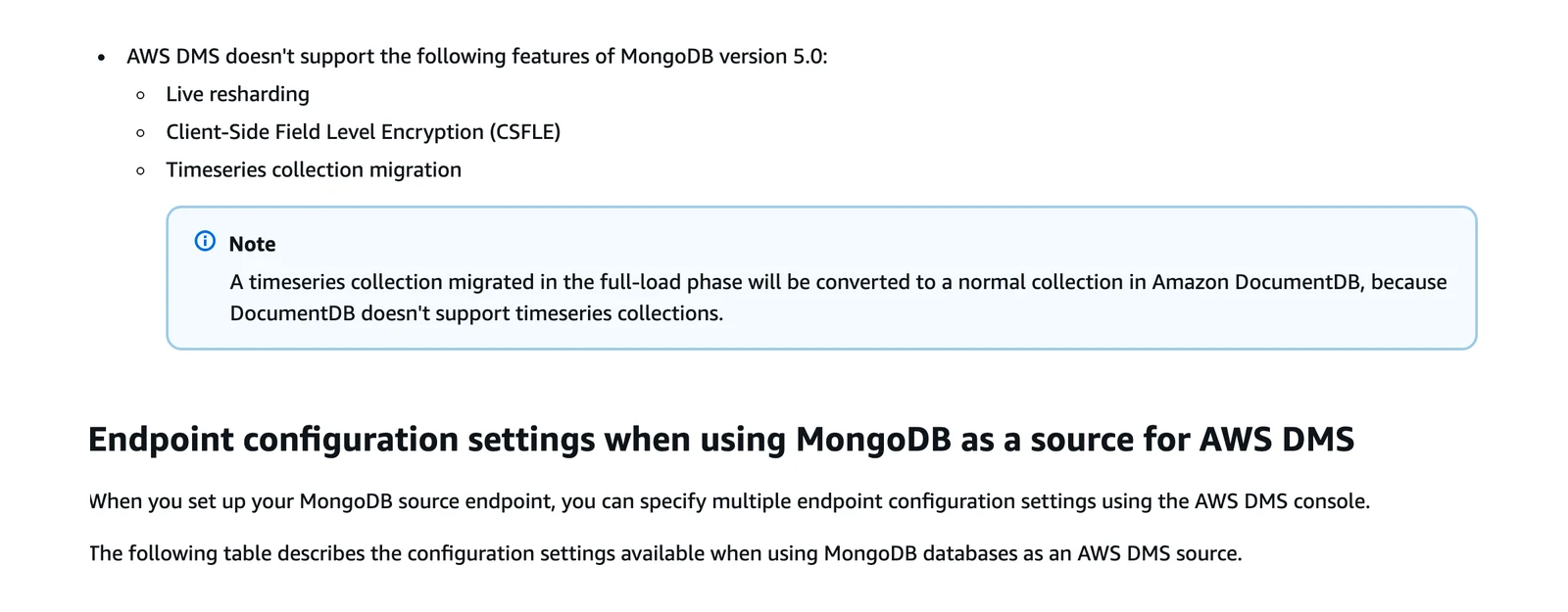
AWS DMS MongoDB source documentation, October 2026.
What users say: On Hacker News in January 2024, one commenter in a thread about a PostgreSQL migration with 11 seconds of downtime wrote "it's always been more than up to the task". On PeerSpot, a reviewer in September 2024 wrote "the error messages from DMS are very ambiguous and sometimes misleading." Neither is about MongoDB.
10. Striim: best for large enterprise estates
Striim home page, October 2026.
At a glance
- Method: Change streams on MongoDB
4.2and later, oplog before that - Price: Not covered here; see Striim's pricing page
Striim's MongoDB Reader guide says Incremental mode reads change streams on 4.2 or later and the oplog on earlier versions.
What's good
- It covers MongoDB before
4.2through the oplog path. - When it reads change streams (MongoDB
4.2or later), its CDC guide says the reader can read from multiple shards and supports transactions, providing transaction metadata. With4.1or earlier, a separate reader is needed for each shard. - Its recovery page says the MongoDB Reader is recoverable when reading from change streams or when not using transactions.
- Its BigQuery Writer docs name MongoDB among the NoSQL databases it can write from (BigQuery Writer).
Where it falls short
- The default mode only loads existing data and stops, so you must set Incremental to get CDC (easy to miss).
- If it gets no messages for a whole oplog retention period, it halts on restart with a
ChangeStreamHistoryLosterror (per its operational considerations page). - Its Iceberg Writer is Google Cloud Storage only; S3 Tables has its own writer.
- The reader reads only collections that exist when the application starts. Collections added later are ignored until you restart the application.
- When it uses transactions and reads the oplog, the MongoDB Reader is not recoverable.
What users say: On PeerSpot in August 2026, a reviewer describing use from 2019 to 2022 wrote "I did interact with support, and it was very positive". The same reviewer wrote "Striim would not intuitively tell me the culprit table or database behind the lag". This is older experience and not about MongoDB.
What happens to deletes, and to schema-less documents
MongoDB collections have no fixed schema, so two documents in one collection can hold the same field with different types. A table needs a fixed type per column, and each tool answers that clash differently.
| Tool | Deletes | Nested objects and arrays | Mixed types |
|---|---|---|---|
| Fivetran | Row kept, _fivetran_deleted set | Kept as JSON | Not documented on the page we read |
| Airbyte | Captured by CDC | Iceberg writer stores objects and unions as JSON strings | Not documented on the page we read |
| OLake Go | Full document with pre-images on 6.0+, else _id only (PR 964) | Written as a string | Each BSON type maps to one type (type mapping) |
| Estuary | Captured in change stream mode only | Not documented on the page we read | Not documented on the page we read |
| Artie | Captured, pre-image for partitioned tables | Kept as JSON, not flattened | Lands as a string |
| AWS DMS | Table mode: "fully supported" | Table mode flattens nested values into dot-named columns; arrays map to CLOB | Table mode needs one type per field |
Where a cell says "not documented", the vendor's page was silent, and we don't guess. Run a test with a sample collection that mixes types.
Which MongoDB CDC tool should you pick?
| Your situation | Look at first | Why, from the docs |
|---|---|---|
| You already run Kafka and want many consumers | Debezium, or the MongoDB Kafka connector | Both publish to Kafka topics |
| You want MongoDB's own connector on Confluent, MSK or Redpanda | MongoDB Kafka connector | It runs on Kafka Connect |
| App reacts to events, no pipeline | Native change streams | No extra software |
| Vendor-run load into a warehouse | Fivetran | Vendor-run, soft deletes |
| Views or time series collections too | Estuary | Batch modes exist |
| You need old MongoDB versions or many enterprise sources | Striim | Oplog path before 4.2 |
| MongoDB into Iceberg, run by you, no Kafka | OLake Go (our docs), or Debezium Server | OLake Go writes Iceberg or Parquet directly; Debezium Server relies on a community sink |
| Scheduled syncs, self-host option | Airbyte | Core plus Cloud |
| Already on AWS, want a managed task | AWS DMS | Source, task and many targets in one service |
If two tools look equal, decide by what the destination must hold. A history of every change needs events kept (a Kafka topic, or a table with one row per change), while a table that matches MongoDB today needs a tool that applies updates and deletes.
Which MongoDB CDC tool fits you?
Question 1 of 5
Who should run the change reader?
Almost every tool here reads MongoDB's change streams, so the choice is who runs the reader.
Check this before you choose
- Replica set or sharded cluster.
rs.status()shows a replica set's state. A standalone server can't give you change stream CDC, and the fallbacks are weaker: Estuary's batch modes can't capture deletes. - Oplog window. Compare the hours it holds with your longest outage and your first-copy time.
- Large documents. Find your biggest documents. Anything near
16 MBcan break change events. - Delete needs. Decide whether you need the deleted document's contents. If yes, you need MongoDB
6.0or later and pre-images, and the tool must use them. - Landing format. Check whether nested data stays as JSON or strings, and whether you can query it where it lands.
- Recovery test. Stop the tool, restart it inside the oplog window, and confirm it resumes. Then test an expired position: Airbyte can fail or re-sync by setting, Fivetran re-syncs automatically, and Estuary may redo the backfill.
- Delete test. Delete a document in MongoDB, then go look at the destination. Is the row gone, flagged, or still there as a history row?
Then ask each vendor in writing what happens when the oplog window is missed, and what a full re-copy costs on your plan.