Best ETL Tools for Snowflake: 10 Options, Real Costs
44 min read
Key takeaways
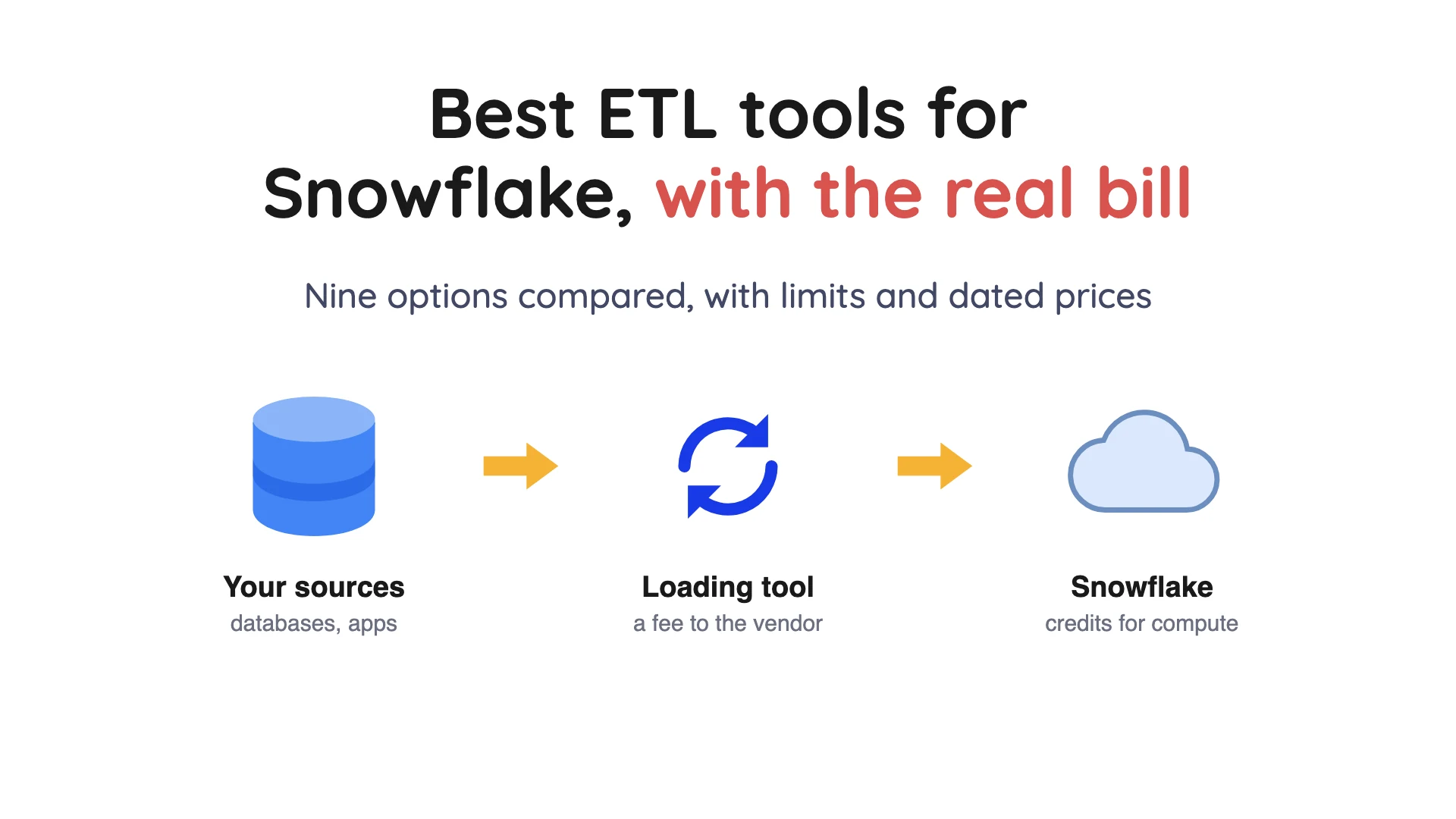
The best ETL (extract, transform, load) tool for Snowflake depends on where your data starts. Every load sends you two bills, one from the tool vendor and one from Snowflake for the compute the load uses. If your data already lands as files or rows, Snowflake's own loading features (Snowpipe, Snowpipe Streaming) add no second vendor fee, so price them first.
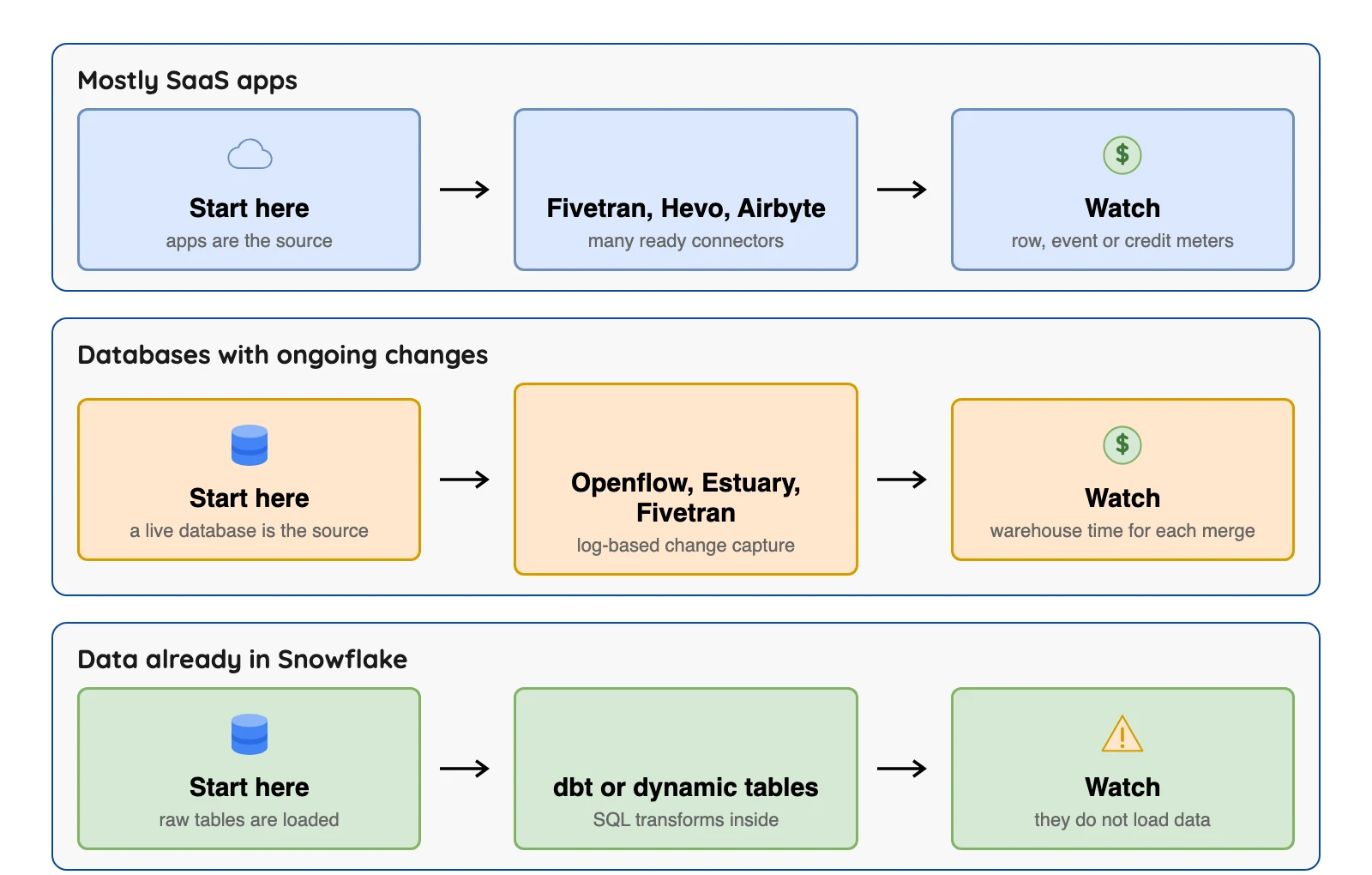
For lots of SaaS apps, look at Fivetran, Hevo or Airbyte.
For live database changes, look at Estuary, Fivetran or Snowflake's Openflow. For open-source database replication into Iceberg tables in Snowflake, look at OLake Go.
For the transform step, think dbt, Matillion or dynamic tables.
- Two bills. The tool vendor bills by rows, events, credits or gigabytes. Then Snowflake bills you separately for the warehouse time or loading service the data uses.
- Freshness costs real money on the Snowflake side. In our worked example below, syncing every 5 minutes uses 12 times the warehouse credits of syncing every hour. Same tool, same data.
- Snowflake already loads data.
COPY INTO(a command that loads files from cloud storage), Snowpipe, Snowpipe Streaming, a Kafka connector and Openflow are all built in, so a third-party tool is optional. - Transform tools don't load data. dbt and Snowflake dynamic tables transform data that is already in Snowflake.
- For Iceberg, check early. Several options below document Iceberg tables that Snowflake reads or hosts, and some are Beta, Preview or Early Access. OLake Go (v0.11.0+) creates them in Snowflake through the Horizon Catalog.
Every price below comes from the vendor's own page, checked in October 2026 and quoted with the date. Plans change often, so double-check before you decide.
Where a vendor does not publish a price, we say "not published".
This is the third guide in our series, after AWS ETL tools and Azure ETL tools.
How we picked these ten
The rules were simple. Each tool had to load data into Snowflake or transform it there, and have a public pricing or documentation page.
Vendor facts come from each vendor's own pricing and documentation pages. We did not run the other tools.
The two user opinions come from PeerSpot reviews of dbt, opened in October 2026 and quoted word for word with a month.
The ten entries are grouped by what they do, and the order inside a group means nothing.
ETL, ELT and Snowflake, in plain words
ETL means extract, transform, load: copy data out of a source, reshape it, then store it. ELT (extract, load, transform) flips the last two steps, so the raw data lands first and gets reshaped inside the warehouse with SQL (the standard database query language).
Snowflake can run that reshaping itself, so ELT is a common fit. Most tools below are loaders (the "E" and "L"), and a smaller group does the "T" inside Snowflake. A full pipeline is usually one tool from each group, or one tool that does both.
For a longer walk-through, see our ETL pipelines guide.
Snowflake ETL tools at a glance
| Tool | Kind | Billed by | Price signal, October 2026 | Free way to start | Iceberg for Snowflake |
|---|---|---|---|---|---|
Snowflake loading (COPY, Snowpipe, Snowpipe Streaming) | Built in | Credits per GB, plus warehouse time for COPY | 0.0037 credits per GB for Snowpipe | Snowflake trial account | Snowflake's docs say Snowpipe Streaming can write Snowflake-managed Iceberg tables (checked Oct 2026) |
| Snowflake Openflow | Built-in connector service (Apache NiFi) | Credits per vCPU-hour on BYOC | 0.0225 credits per vCPU-hour, plus your cloud bill | Not in trial accounts by default | Connector pages mention Iceberg table destinations |
| Fivetran | Managed ELT | Monthly active rows | From $495 per million rows on Standard, in its Service Consumption Table | Free plan, 500,000 rows | Lakehouse tables, Beta |
| Airbyte | Source-available core and cloud | Credits | Cloud from $20 a month | Core is free to self-host | Separate S3 Data Lake destination |
| Hevo | Managed ELT | Events | $299 a month, $265 billed yearly | Free plan, 1M events | Early Access only |
| Matillion | Cloud ETL | Credits | Not published | Time-bound free Maia trial | Not published |
| Estuary | Managed streaming | Gigabytes plus connectors | $0.50 per GB plus connector fees | Free plan, 10 GB | Separate Iceberg connector |
 OLake Go OLake Go | Open-source replication | Nothing, you run the servers | Free, Apache 2.0 | Open source, run it yourself | Creates Iceberg tables in Snowflake through Horizon, v0.11.0+ |
| Informatica | Enterprise suite | Processing units | Marketplace bundle $131,760 a year | Not covered here | Snowflake-managed Iceberg listed |
| dbt | Transform only | Developer seats, models built | Starter $100 per user per month | Free Developer plan | Not covered here |
Sources: Fivetran Service Consumption Table, Airbyte Cloud release notes, Hevo pricing, Estuary pricing. Also the Informatica listing on AWS Marketplace, dbt pricing, and our Horizon docs for OLake Go (checked Oct 2026).
Credit rates are from the Snowflake Service Consumption Table, effective October 15, 2026 (checked Oct 2026).
The two bills (and why they matter)
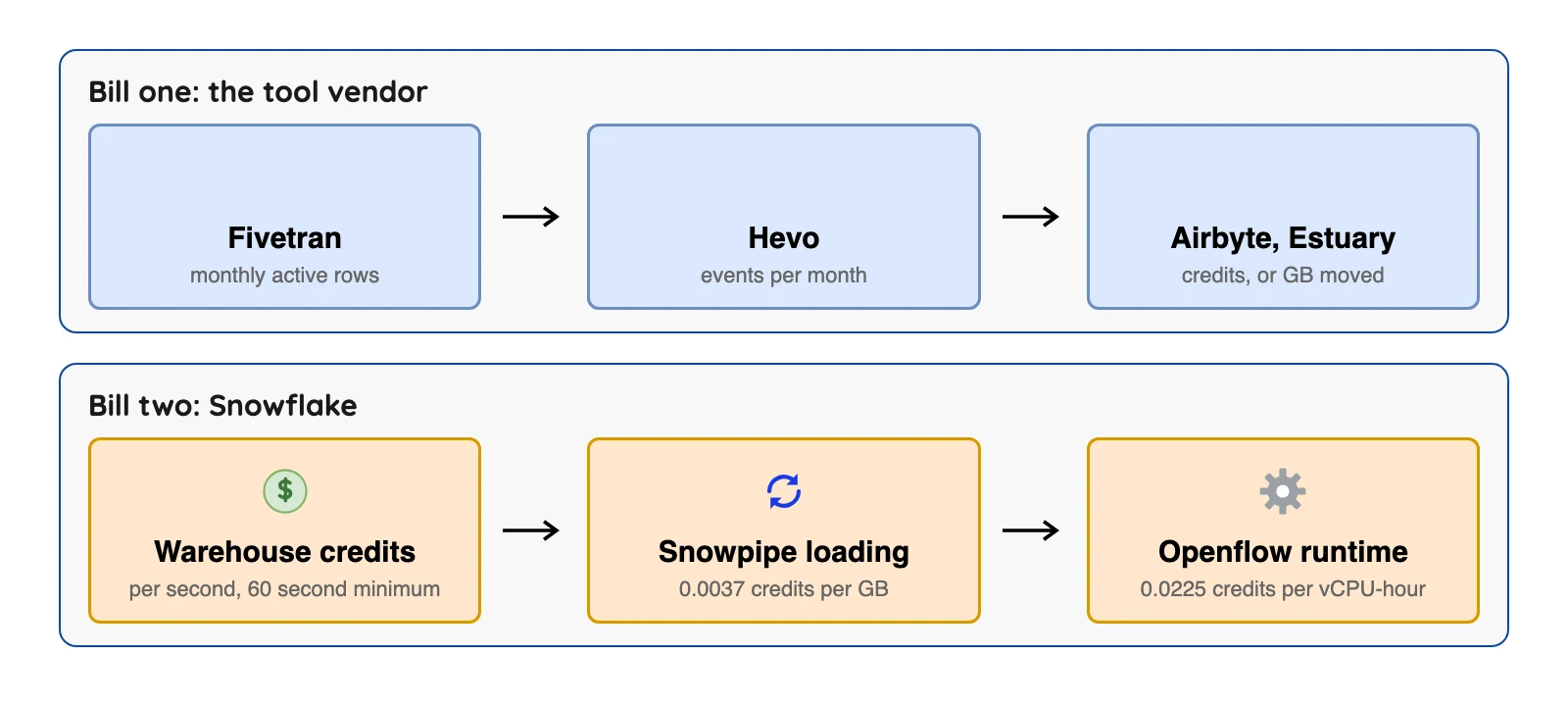
Snowflake sells compute as credits.
In Snowflake's Service Consumption Table (checked Oct 2026), an X-Small warehouse uses 1 credit per hour. One credit costs $2.00 on the Standard edition in AWS US East (Northern Virginia). Other editions and regions cost more. Enterprise is $3.00 in the same region, and AWS EU Frankfurt is $2.60 on Standard.
A loader that runs often keeps a warehouse awake, and Snowflake bills you for that time, not the tool. So a tool with a cheap sticker price can still add up to a big Snowflake bill.
Worked example: what a faster sync does to your Snowflake bill
This example uses only the documented rates above, plus one assumption of ours: each sync keeps an X-Small warehouse awake for 3 minutes, including the minute before it suspends.
Fivetran's Snowflake documentation says Snowflake bills compute per second, and recommends an X-Small warehouse with one-minute auto-suspend. Our 3-minute figure is an assumption for illustration.
| Sync every | Syncs a day | Warehouse minutes a day | Credits a day | Cost a day at $2.00 | Cost over 30 days |
|---|---|---|---|---|---|
| 60 minutes | 24 | 72 | 1.2 | $2.40 | $72 |
| 15 minutes | 96 | 288 | 4.8 | $9.60 | $288 |
| 5 minutes | 288 | 864 | 14.4 | $28.80 | $864 |
Sources: the $2.00 and $3.00 credit prices are from the Snowflake Service Consumption Table (checked Oct 2026). The sync counts and minutes are our own assumptions.
The tool fee stayed put, and only the Snowflake side changed, by a factor of 12 between hourly and every 5 minutes. On Enterprise at $3.00 a credit, multiply every cost by 1.5.
Ask how fresh your data needs to be. A dashboard that someone reads once a morning doesn't need a 5-minute sync.
The 10 best ETL tools for Snowflake
Built into Snowflake
1. Snowflake loading (COPY INTO, Snowpipe, Snowpipe Streaming): for data that already lands as files or rows
At a glance
- Billed by: Snowflake credits. Snowpipe is 0.0037 credits per GB, with text files such as CSV and JSON counted at uncompressed size, per the Snowflake Service Consumption Table (checked Oct 2026)
- Price: Snowpipe Streaming (high-performance architecture) is also 0.0037 credits per uncompressed GB, so about $0.0074 per GB at $2.00 a credit, per the same table (checked Oct 2026)
- Status: active, part of Snowflake
Snowflake's data loading overview lists four ways in. COPY INTO (a command that loads files already in cloud storage) handles batches. Snowpipe loads small batches and makes them available within minutes after files reach a stage.
Snowpipe Streaming writes rows straight to tables without staged files. A Kafka connector reads topics from an Apache Kafka server.
What's good
- Snowflake says Snowpipe Streaming is designed for ingest speeds of up to 20 GB/s per table, with ingest-to-queryable latency as low as 5 seconds. It adds that results depend on workload shape and configuration (Snowpipe Streaming overview).
- The same page gives a plain rule for picking a path. Use Snowpipe Streaming when data arrives as rows from applications, devices or services and you need low latency. Use Snowpipe when your pipeline already produces files in cloud storage and batch-style loading is fine.
- Snowflake's docs say Snowpipe Streaming can stream rows into Snowflake tables or into Snowflake-managed Apache Iceberg tables (checked Oct 2026), so the Iceberg column in the table above needs no second vendor here.
- Snowflake's Service Consumption Table says binary files such as Parquet, Avro and ORC are charged for their observed size whatever the compression. Classic Snowpipe Streaming is 0.01 credits per client instance per hour (checked Oct 2026).
- Warehouse time is billed per second after a 60-second minimum, and a suspended warehouse does not use any credits per the Snowflake compute cost docs (checked Oct 2026). That is the rule behind the worked example above.
Choose it if your applications or an upstream tool already produce files in cloud storage or rows in a stream, and you'd rather not add another vendor.
Where it falls short
- These are loading features, not source connectors. Something else has to read your database or SaaS app and produce the files or rows.
COPY INTOplus your own scripts means you write and run the scheduling, retries and schema handling yourself.- Snowflake's Snowpipe docs (checked Oct 2026) say it is very difficult for Snowflake to estimate Snowpipe latency. They also say that while Snowpipe generally loads older files first, there is no guarantee files load in the order they were staged.
- Snowpipe keeps each loaded file's path and name and will not load a file with the same name again, even if the file was changed afterwards (Snowpipe docs) (checked Oct 2026).
- Snowflake recommends data files of roughly
100to250 MBcompressed, or larger. Snowpipe's cost includes an overhead for managing queued files that grows with the number of files waiting, so many small files raise the cost (file preparation guide) (checked Oct 2026).
2. Snowflake Openflow: for teams who want Snowflake to run the connector
At a glance
- Billed by: vCPUs used by connector runtimes, per second with a 60-second minimum, for active runtimes only, per Snowflake's Openflow cost page (checked Oct 2026)
- Price: 0.0225 credits per vCPU-hour on BYOC (bring your own cloud), plus your cloud provider bill and Snowpipe charges for the data (Openflow cost page) (checked Oct 2026)
- Status: generally available. Snowflake's Openflow overview (checked Oct 2026) says Snowflake-run deployments are open to all accounts in AWS, Azure and Google Cloud Commercial regions, and BYOC deployments to AWS Commercial regions only. Its connectors page lists AWS Commercial regions only.
Openflow is "built on Apache NiFi", an open-source dataflow tool, and its connectors are curated NiFi flow definitions. Snowflake's Openflow cost page (checked Oct 2026) says database change data capture (CDC, reading a database's change log) connectors need a Snowflake warehouse. That covers both the first copy and the ongoing changes.
Connector families include MySQL, PostgreSQL, Oracle, SQL Server and MongoDB, plus SaaS apps and Kafka (connectors page).
Snowflake's own cost example adds up 84 vCPU-hours. That is 84 × 0.0225 = 1.89 credits, or about $3.78 at $2.00 a credit (checked Oct 2026). That is before the cloud bill for the servers.
What's good
- Two deployment types. In BYOC the data plane runs in your own cloud while Snowflake manages the service and control plane. The Snowflake deployment uses Snowpark Container Services (Openflow overview).
- The connectors page lists SQL Server twice: a change tracking (CT) connector and a CDC connector that captures every row-level change. It also lists BigQuery with incremental change capture, Kafka and Kinesis Data Streams, and Salesforce Bulk API with incremental change detection.
- Snowflake's cost page says database CDC connectors need a warehouse for both the first snapshot and ongoing changes, and that you can schedule
MERGEoperations to manage that compute cost. - Snowflake's docs say the PostgreSQL connector can write Snowflake-managed Apache Iceberg tables as an opt-in format. Iceberg
v2andv3are both supported, and storage can be Snowflake storage or an external volume in your own cloud storage (PostgreSQL Iceberg page, a Preview feature). - The MongoDB connector copies each selected collection in full once, then follows MongoDB change streams on a schedule (MongoDB connector page).
Choose it if you already pay Snowflake, run on AWS (or use a Snowflake-run deployment elsewhere), and like the idea of database CDC with one vendor and one contract.
Where it falls short
- Most connectors on the connectors page (checked Oct 2026) bring data into Snowflake, which is our reading of the list, so Openflow fits best when Snowflake is where your data ends up.
- The Oracle connector has its own licence in the credit table: $70 per licensed core per month on a 36-month commitment, plus support (checked Oct 2026).
- The overview page (checked Oct 2026) says any new deployment is gen 2, and that gen 2 connector configuration remains in Public Preview.
- Openflow is not automatically available in trial accounts. The overview page (checked Oct 2026) says to contact your Snowflake account team to enable it.
- The PostgreSQL Iceberg page (checked Oct 2026) carries a Preview Feature banner. Snowflake says not to change the
Table Storage Formator theIceberg Versionafter the connector starts. - The MongoDB connector page (checked Oct 2026) carries a Preview label. It does not support standalone MongoDB instances and relies on the
oplog. It needs MongoDB4.4or later and supports username and password authentication only. Each document's whole payload lands in onedatacolumn next to itsid.
Managed ELT services you pay a vendor to run
3. Fivetran: for vendor-run connectors
At a glance
- Billed by: monthly active rows (MAR), meaning rows that changed in a month, counted per connection
- Price: Free up to 500,000 MAR; $5 base charge for 1 to 1M MAR; Standard from $495 per million MAR, Enterprise $661.67, Business Critical $1,061.67 (per connection, list price, from its Service Consumption Table) (checked Oct 2026)
- Status: active; merged with dbt Labs on June 1, 2026
Fivetran counts rows that changed, and it counts them per connection. Fivetran's pricing page lists Free, Standard, Enterprise and Business Critical plans (checked Oct 2026).
Its Snowflake destination docs cover native tables, or Lakehouse tables (Beta), which are Iceberg tables that Fivetran manages in its own data lake service and Snowflake reads. The merger with dbt Labs is in Fivetran's press release.
What's good
- Its sync overview lists sync frequencies from 1 minute to 24 hours. The default is every 6 hours in fixed interval mode, and cron schedules are also offered.
- Its database connectors docs say incremental changes come from the source's own change mechanism where one exists (MySQL and MariaDB binary log, PostgreSQL logical replication, MongoDB change streams, SQL Server CDC or change tracking), or from a Fivetran method such as Teleport Sync.
- The same database connectors page says database connectors sync new and modified data every 15 minutes by default, update the destination in batches with a merge operation, and that most initial syncs finish within a day.
- Fivetran's pricing page lists unlimited users, 700+ fully managed connectors and an Integration for dbt Core on Standard (checked Oct 2026).
- The same pricing page lists 1-minute syncs, custom roles, SCIM and a Hybrid deployment option on Enterprise. Business Critical adds customer-managed keys, PCI DSS Level 1 certification and private networking options (checked Oct 2026).
Choose it if you want a vendor to own connector upkeep (Fivetran's pitch, not tested by us) for many SaaS apps and databases, and you'd rather pay a meter than hire an engineer.
Where it falls short
- The meter counts changed rows. Our read: a busy table nobody looks at can cost more than the summary table your dashboards actually use.
- Lakehouse tables are Beta, per Fivetran's Snowflake destination docs (checked Oct 2026).
- The same docs (checked Oct 2026) say the maximum length for
VARIANTandVARCHARcolumns is128 MB, and Fivetran truncates values that exceed it. - The pricing page lists 15-minute syncs for Standard. The sync overview says 1-minute syncs need an Enterprise or Business Critical plan and are not supported for any Lite connector (checked Oct 2026).
- The pricing page FAQ counts Oracle and High-Volume Agent connectors as enterprise database connectors. The Enterprise plan lists that group, and Standard lists plain database connectors (checked Oct 2026).
- The database connectors page (checked Oct 2026) says schema changes in the source are the most common trigger for a full table re-sync. It also says expired change logs require a full source re-sync, and that Teleport Sync may re-sync a whole table if you update large portions of it between syncs.
4. Hevo: for small teams that want a free plan
At a glance
- Billed by: events, which count records inserted, updated or deleted at the source
- Price: Free is $0 for 1M events a month; Starter is $299 monthly or $265 billed yearly from 5M events, per Hevo's pricing page (checked Oct 2026)
- Status: active
Hevo's pricing page shows a free plan, a 14-day trial with no card, and Starter and Professional tiers (checked Oct 2026).
Hevo's docs list Snowflake as a standard destination. A separate Snowflake Iceberg destination (checked Oct 2026) is described as loading into Snowflake-managed Iceberg tables with files in your S3 bucket, and it's in Early Access.
The same page warns that Snowflake is deprecating password sign-in and enforcing multi-factor authentication, so Hevo recommends key pair authentication. Plan for it with any loader.
What's good
- Hevo's log-based pipelines page lists the change source for each database: BinLog for MySQL, logical replication for PostgreSQL, Change Streams or OpLog for MongoDB, Change Tracking for SQL Server and redo logs for Oracle.
- Per Hevo's pricing page (checked Oct 2026), Free covers limited connectors, up to 5 users and 1-hour scheduling. Starter, Professional and Business Critical list all available connectors.
- Hevo's events usage docs say that on plans from Release
1.48onwards, going over the events quota starts a grace period to buy more events while pipelines keep running. - Its Snowflake Iceberg (Edge) docs say the table data and metadata files sit in your own S3 bucket. They also say external engines such as Apache Spark and Trino can read the tables through the Horizon Iceberg REST Catalog API.
Choose it if you're a small team with common sources and want a free start.
Where it falls short
- Hevo's events usage docs (checked Oct 2026) say inserted and updated events at the source are billable, so a busy table costs more (a row changed five times is five events, our reading). They add that events deleted at the source are billable as updates.
- The same docs (checked Oct 2026) say Hevo charges the selected plan price whether or not you use the full capacity of the plan.
- The log-based pipelines page (checked Oct 2026) says streaming pipelines, available from Release
2.21, cover those source types except SQL Server and DynamoDB, and that you must contact Hevo Sales to enable streaming. - The Iceberg docs (checked Oct 2026) say the destination is currently available for Early Access and is enabled through a Hevo account executive or Support.
- The Iceberg docs (checked Oct 2026) list prerequisites of a Snowflake account on AWS, an S3 bucket with an IAM policy for Snowflake, and an external volume in Snowflake.
Open source, source-available and streaming
5. Airbyte: for a large connector catalog you can self-host
At a glance
- Billed by: credits on Cloud; nothing for Core, which you run yourself
- Price: Cloud Standard is $20 a month with 5 credits, then $5 per extra credit, per Airbyte's Cloud release notes (the September 23, 2026 entry) (checked Oct 2026)
- Status: active
Airbyte Core is free to run yourself under the Elastic License 2.0 (per Airbyte's licence FAQ). That licence does not allow offering the software to third parties as a hosted or managed service. Its Snowflake destination loads through a Snowflake stage. Airbyte's docs give the same advice as Fivetran's: a small, dedicated warehouse with a one-minute auto-suspend.
What's good
- Airbyte's CDC docs list current support for Postgres, MySQL, Microsoft SQL Server, MongoDB, Oracle DB, SAP HANA and IBM Db2. The page does not say which plan or connector support level covers Oracle, SAP HANA and Db2.
- The same docs say the first CDC sync takes a snapshot of the current data with a
SELECT, and later syncs read the logs from the previously synced position. - Cloud usage is metered in credits. Per Airbyte's credits docs (checked Oct 2026), databases and files use 4 credits per GB, and APIs and custom sources use 6 credits per million rows.
- The credits docs also say that if you run out of credits, Cloud keeps your syncs running and bills you in arrears. It does not stop in-progress syncs or pause scheduled ones. Trials last 14 days or 400 credits, whichever comes first (checked Oct 2026).
- Its Snowflake destination docs say Airbyte loads through Snowflake's internal stage and supports Full Refresh Overwrite, Overwrite + Deduped and Append, plus Incremental Append and Append + Deduped.
- The Cloud release notes list a Plus tier that starts at a 40-credit package, with a 15-minute sync frequency, two workspaces, single sign-on and premium support. They also say unused Cloud credits now roll over for 3 months (checked Oct 2026).
Choose it if you've got engineers and want a large connector catalog, with a cloud option later. Airbyte's home page says 700+ connectors and its GitHub page says 600+; we did not count.
Where it falls short
- Airbyte's CDC docs (checked Oct 2026) say CDC runs as scheduled syncs, not as a continuous stream.
- Self-hosting moves the bill to servers and staff, and Airbyte's pricing page does not publish prices for Pro and Enterprise Flex (checked Oct 2026).
- The CDC docs (checked Oct 2026) say CDC incremental sync works only for tables with primary keys for most sources. Changes made by
TRUNCATEorALTERdo not appear in the logs, so they do not reach the destination, and a refresh is required after you add a new table to a CDC connection. - Airbyte's connector support levels page (checked Oct 2026) says Marketplace connectors are maintained by community members, are not covered by Airbyte support SLAs, and may see breaking changes with no notice. Enterprise connectors are not available to Open Source or standard Cloud customers.
- Airbyte's credits docs (checked Oct 2026) say that for Full Refresh syncs of APIs and custom sources, every row synced is charged.
- The Snowflake destination docs (checked Oct 2026) say Snowflake is enforcing strong authentication on a rolling per-account basis between August and October 2026. Once it is enforced, password-only logins from Airbyte fail, and key pair authentication is the only recommended method since version
5.0.0.
6. Estuary: for real-time capture with a free tier
At a glance
- Billed by: gigabytes moved plus connector instances
- Price: $0.50 per GB; the first 6 instances are $100 a month each, then $50 each; Free is 10 GB and 2 instances, per Estuary's pricing page (checked Oct 2026)
- Status: active
Estuary's pricing page (checked Oct 2026) counts each source and each destination as one instance, so one source feeding Snowflake is two. Its Snowflake connector uploads changes to a Snowflake stage and applies them in transactions, and an option called delta updates can use Snowpipe Streaming (it's off by default).
What's good
- Update mode is set per binding on the Snowflake connector. Standard (merge) updates are the default, and
delta updatescan be switched on for a binding. Delta bindings use Snowpipe Streaming by default and need key pair authentication to do so (Estuary's Snowflake docs). - Estuary's sync schedule docs say warehouse connectors such as Snowflake support a sync schedule, and that the
Sync Frequencysetting defaults to30 minutesif unset. Syncing less often does not change what the connector costs inside Estuary but can reduce the costs in the destination. - Per Estuary's pricing page (checked Oct 2026), a new pipeline runs a historical backfill and then switches to real-time CDC, and the backfill can be disabled or scoped. Adding a new target means paying only for the added target and the data sent to it, with no re-extract from each source.
- The pricing FAQ says the 30-day free trial starts automatically once you pass the free tier limits, gives access to all Cloud plan features, and needs no credit card (checked Oct 2026).
- The Enterprise column lists SOC 2 and HIPAA compliance reports, single sign-on, custom SLA terms, and private and BYOC deployments (annual contract only) (checked Oct 2026).
Choose it if you want to test low-latency change capture into Snowflake (Estuary's claim, which we did not test) without handing over a card.
Where it falls short
- Each extra destination adds $50 to $100 a month, so count your instances before you commit (pricing page) (checked Oct 2026).
- Its licence is the Business Source License 1.1, which Estuary's repository (checked Oct 2026) says is not an open-source licence.
- Estuary's pricing docs say data movement into and out of Estuary is priced at $0.50 per GB (checked Oct 2026). The pricing page's own calculator example (800 GB, 2 connector instances) shows a higher monthly total than 800 GB at $0.50 per GB plus the two instance fees would give. Our arithmetic is that the gap matches 800 GB counted both in and out.
- The Cloud plan lists standard support via community Slack and email. The Enterprise column is where custom SLA terms are listed (checked Oct 2026).
- The pricing docs say Private and BYOC deployments need an annual plan and add fees based on the cloud infrastructure required. No figure is published (checked Oct 2026).
7. OLake Go: for database sources into Iceberg tables in a Snowflake database

At a glance
- Billed by: nothing; you run it on your own servers
- Price: free, open source under Apache 2.0
- Status: active; Snowflake Horizon Catalog support starts in OLake Go v0.11.0 (release notes)
OLake Go is not a COPY INTO style loader. It creates Apache Iceberg tables in a Snowflake database through the Snowflake Horizon Catalog, used as an Iceberg REST (web API) catalog (our Horizon docs). Change capture covers Postgres, MySQL/MariaDB, MongoDB and SQL Server (Postgres, MySQL, MongoDB, SQL Server), and our docs also list Kafka and S3 as sources.
What's good
- Authentication by programmatic access token (PAT), key pair or External OAuth.
- Our docs ask for a Snowflake database with catalog
SNOWFLAKEand external volumeSNOWFLAKE_MANAGED, or your own external volume for AWS, GCP or Azure storage. - Our compatibility page ticks positional deletes and deletion vectors for Snowflake. The Target Query Engine setting shows only the upsert types your engine reads.
Choose it if your sources are databases, Kafka topics or S3 files and you want open-source software that lands them as Iceberg tables in a Snowflake database.
Transformation and enterprise suites
8. Matillion: for visual pipelines that run inside Snowflake
At a glance
- Billed by: credits for run time, at 1 credit per task hour for orchestration and 3 for transformation, plus developer users, per Matillion's credit terms (checked Oct 2026)
- Price: not published; the pricing page shows credits and no price per credit (checked Oct 2026)
- Status: active; renamed from Data Productivity Cloud to Maia in early 2026, per its terminology changes page (checked Oct 2026)
Matillion's pricing page (checked Oct 2026) lists editions without a dollar price.
Matillion's own comparison page says transformations run as SQL pushed down into Snowflake. The work uses your Snowflake warehouse and you pay Snowflake for it.
Matillion's streaming docs say change capture is limited to specific plans and to relational sources: Db2 for i, SQL Server, MySQL, Oracle and PostgreSQL.
What's good
- Per Matillion's pricing page (checked Oct 2026), the Developer card lists 1 developer user, unlimited projects, pre-built connectors, a low-code canvas with SQL and Python, and a built-in Git repository. Maia is available to trial for free on a time-bound, fair-use basis.
- The Teams card adds 5 developer users, an audit log, standard customer support and a service level agreement. The Scale card lists custom SSO, hybrid cloud deployment, data lineage tracking, streaming change data capture, log retention of 180+ days and bring-your-own Git.
- The pricing FAQ says you can contract directly with Matillion or pay through your AWS, Azure or Snowflake account.
- Matillion's streaming pipelines docs list Amazon S3, Azure Blob Storage, Google Cloud Storage and Snowflake as destinations, and describe "near-real-time data ingestion". The streaming runner is a service you deploy in your own cloud infrastructure.
- Its credit terms put streaming pipelines at 1 credit per task hour for an essential CDC pipeline and 2 for a premium one. Task use is measured in 2-second increments (checked Oct 2026).
Choose it if your team likes a visual designer and most of the work is transformation inside Snowflake.
Where it falls short
- The price is not published on the pricing page (checked Oct 2026), so you'll need a quote before you can plan anything.
- The streaming docs (checked Oct 2026) say change records are batched into Avro files, and their source list does not include MongoDB.
- The streaming docs say the feature is only available to customers on specific Maia plans, and the pricing page lists streaming change data capture on the Scale card (checked Oct 2026).
- The credit terms (checked Oct 2026) state no dollar price per credit, and the overage rate "will be listed on the Order Form". Credit consumption rates are described as "fixed across the customer base and non-negotiable".
- Developer users who log in with Project Access use 70 credits per user a month, beyond those included with the subscription (credit terms) (checked Oct 2026).
- The streaming docs (checked Oct 2026) say there is a 1-to-1 relationship between a streaming runner and a pipeline, so each streaming pipeline gets its own runner.
9. Informatica: for large companies with older sources
At a glance
- Billed by: Informatica Processing Units (IPU), which each service uses up every month
- Price: AWS Marketplace lists a bundle of 120 IPUs a month at $131,760 for 12 months, per the listing (checked Oct 2026); the Informatica pages we read show no price per IPU
- Status: active; the product schedule carries a Salesforce, Inc. copyright notice (checked Oct 2026)
Informatica's database replication docs list sources such as Db2, Oracle, SQL Server, SAP (a business software maker), Teradata, MySQL and PostgreSQL. They also list Snowflake as a target, including Snowflake-managed Iceberg tables. Treat a marketplace price as a list price, not a quote.
What's good
- In Informatica's database ingestion and replication docs, Db2 (for i, LUW and z/OS), SQL Server, MongoDB, MySQL, Oracle, PostgreSQL and SAP HANA are each marked supported for initial, incremental and combined loads.
- The same page marks Snowflake, Databricks, Google BigQuery, Amazon Redshift, Amazon S3, ADLS Gen2 and Fabric OneLake as supported targets for all three load types. It also lists an "Open Table" target type, without saying which formats or catalogs it covers.
- Informatica's Cloud and Product Description Schedule publishes IPU rates per service. Database Ingestion and Replication is 0.1 IPU per GB for the first 2 TB and steps down through four tiers to 0.018 above 25 TB. Its CDC rate is 6.5 IPU per million rows for the first 15M rows, 0.55 up to 750M and 0.05 above (checked Oct 2026).
- The same schedule describes a Flex IPU model, where IPUs are consumed across an annual period instead of a monthly one (checked Oct 2026).
- Database Ingestion and Replication jobs run on a Secure Agent that you download and install in your environment. Serverless jobs run in an Informatica-managed environment on Azure, subject to applicable functionality (same schedule).
Choose it if you're a large company with older sources such as Db2 and Oracle, and you want one vendor contract.
Where it falls short
- Public pages give IPU rates per service (schedule) but no dollar price per IPU (checked Oct 2026), so you can't plan a budget from them alone.
- Informatica's source and target page (checked Oct 2026) marks Teradata as supported for initial load only, and Netezza too, with incremental and combined loads not marked supported.
- For Azure SQL Database sources, incremental and combined loads use query-based and CDC Tables capture. The docs (checked Oct 2026) say log-based capture with a transaction log is not supported.
- Under the monthly IPU model (schedule), IPUs do not carry over to the next month. If consumption exceeds the subscribed IPUs, the schedule says you must subscribe to additional IPUs for the rest of the subscription period (checked Oct 2026).
- The schedule (checked Oct 2026) does not say whether a volume tier applies to the whole quantity or only to the units inside each band, so the tier rates alone do not give a final bill.
10. dbt and dynamic tables: for SQL transforms after the load
At a glance
- Billed by: dbt charges developer seats and successful models built; dynamic tables use Snowflake credits
- Price: dbt Developer is free for 1 seat and
3,000models a month; Starter is $100 per user per month, per dbt's pricing page (checked Oct 2026) - Status: active; dbt Labs merged with Fivetran on June 1, 2026
dbt turns SQL select statements into tested tables, and it needs a loader to run first. Snowflake's own answer is dynamic tables, which keep the result of a query up to date with a minimum target lag of 60 seconds. They cost warehouse compute, cloud services and storage, so the more often they refresh, the more you pay.
What's good
- dbt's data tests docs list four built-in generic tests:
unique,not_null,accepted_valuesandrelationships. Singular tests are plain SQL that returns the failing rows, and open-source packages such asdbt-utilsanddbt-expectationsadd more generic tests. - Per dbt's pricing page (checked Oct 2026), Starter includes five developer seats,
15,000successful models built a month and5,000queried metrics. - dbt's billing docs say only models that build successfully are counted. If a job of 100 models fails after 51 are built, 51 count.
- Snowflake runs managed dbt Core and dbt Fusion runtimes for dbt Projects on Snowflake. Executions use a virtual warehouse and standard compute costs, with no additional Snowflake licensing or per-user fees (Snowflake's dbt Projects docs).
- Snowflake's dynamic tables docs say they suit workloads that want results to stay up to date without custom orchestration code, and multi-step pipelines with joins, aggregations or window functions. It also says you can move from batch to near-real-time freshness by changing a single parameter, the
target lag.
Choose it if your raw data is already in Snowflake and your team writes SQL. dbt suits tested, version-controlled projects, while dynamic tables suit teams that want no extra tool.
Where it falls short
- Neither one moves data into Snowflake. They sit idle until a loader has run.
- Both bring Snowflake compute cost that a loader-only price won't show you.
- Starter has 1 project, and the Enterprise and Enterprise+ plans are custom priced (dbt pricing page) (checked Oct 2026).
- Snowflake's dynamic tables page (checked Oct 2026) says they do not support workloads that need data fresher than
60 seconds(the minimumtarget lag) or strictly guaranteed refresh timing. - The same page (checked Oct 2026) says they do not support workloads that need stored procedures or external functions in the definition.
What users say: A PeerSpot reviewer on the dbt reviews page calls version control "a huge bonus or a huge plus" (March 2026). Another says "Writing the scripts requires understanding Jinja technology" (April 2026). These are individual opinions; one person's view, with its date and link.
Native Snowflake or a third-party tool?
Once your data is already in a file or a row, native loading adds no second vendor. We did not compare speed or total cost across tools. The split:
| Question | Native Snowflake can do it | You likely need another tool |
|---|---|---|
| Load files already in cloud storage | Yes, COPY INTO or Snowpipe | No |
| Load rows from your own app or Kafka | Yes, Snowpipe Streaming or the Kafka connector | No |
| Read a SaaS app or database for you | Partly, through Openflow connectors | Yes, if the connector you need is not listed |
| Keep a SQL result fresh | Yes, dynamic tables | No, unless you want tested, versioned projects (dbt) |
Freshness, as the vendor pages put it:
- Snowpipe Streaming is described as "as low as 5 seconds" from ingest to queryable, with the caveat that results depend on workload (Snowflake's Snowpipe Streaming overview docs; we did not test it).
- Snowpipe makes data available within minutes after files reach a stage (data loading overview).
- Dynamic tables have a minimum
target lagof60 seconds(Snowflake's dynamic tables docs). - Hevo Free schedules syncs every hour (Hevo's pricing page) (checked Oct 2026).
What one team says about the Snowflake bill
New Relic's engineering blog (April 2026) comes from a company that moved off Snowflake, so read it as one side of the story. It says Snowflake "had served us well early on" and let the team "move fast", but that "the cost curve was moving in the wrong direction".
This is one team's view, with its date and link. Check the Snowflake side with your own numbers.
How to choose: four questions
- Where does the data start? Files or rows you already produce point to Snowpipe. SaaS apps point to a managed loader, and a live database points to change capture (see our CDC tools comparison).
- How fresh must it be? Pick the slowest schedule your readers will accept, because every faster sync adds warehouse time (see the worked example).
- Who runs it? A vendor-run tool costs you a meter. Airbyte Core costs you servers and people.
- Do you need Iceberg? Check the Iceberg column in the table first, and note which options are Beta or Early Access. OLake Go (entry 7) creates Iceberg tables in Snowflake, and Where OLake Go fits covers Snowflake reading tables in your own storage.
Which tool for which job?
| If your situation is | Look first at | Why | Watch for |
|---|---|---|---|
| Files already land in cloud storage | Snowpipe | No extra vendor, small per-GB rate | You build the extract step |
| Your app or Kafka produces rows | Snowpipe Streaming or the Kafka connector | Rows without staged files | You run the producer |
| Many SaaS apps, small team | Hevo or Fivetran | Vendor runs the connectors | Event or row meters grow |
| You want to self-host a source-available core | Airbyte Core | Large connector catalog | Your servers and staff |
| Database changes, one vendor | Openflow | Snowflake runs it | A Snowflake warehouse for CDC |
| Database changes, vendor-run, low latency | Estuary or Fivetran | Their docs describe log-based capture | Instance fees or per-connection minimum |
| Databases into Iceberg tables in Snowflake, open source you run | OLake Go | Writes Iceberg through the Horizon Catalog (our docs) | You run it on your own servers |
| Older sources such as Db2 or Oracle | Informatica | Wide source list | No public per-unit price |
| Visual design, transforms in Snowflake | Matillion | Push-down SQL | Price not published |
| Raw data already loaded | dbt or dynamic tables | Transform in SQL | They do not load data |
Answer five questions for a shortlist.
Which Snowflake ETL tool fits you?
Question 1 of 5
Where does your data start?
This matters most. Snowflake's own loading only helps once something has produced files or rows.
What to test before you sign
- One busy table. Load it for a week and count the rows, events or credits the vendor bills. Then compare that with the vendor's estimate.
- Snowflake's side. Read your own credit use for the load warehouse during the trial. The tool's invoice won't show it.
- Deletes. Check whether deleted rows arrive and whether they count as paid usage. Fivetran counts them as paid rows from January 2026, per its pricing updates page (checked Oct 2026).
- Sign-in method. Use key pair authentication from day one. Hevo's and Airbyte's Snowflake docs both say Snowflake is moving away from password-only sign-in, so a password setup is a chore waiting to happen.
Where OLake Go fits
OLake Go (entry 7) is our open-source (Apache 2.0) tool for copying databases into Apache Iceberg or Parquet on storage you control. From v0.11.0 it can also create Iceberg tables in Snowflake through Horizon.
Snowflake is also one of the query engines on our compatibility page. It reads OLake Go's Iceberg tables from the Glue, Lakekeeper, Unity, Polaris, S3 Tables, Nessie and BigLake catalogs and from generic REST catalogs, read-only for external catalogs.
See how to load databases into Iceberg without Kafka.
Conclusion
It depends on where your data starts and how fresh it has to be. Start with Snowflake's own loading if files or rows already exist, add a managed tool once you have many sources to connect, use OLake Go for open-source database replication into Iceberg, and pick a transform layer on its own.
Whatever you choose, price both bills. Then run a one-week test on your busiest table before you commit.
FAQs
Q1. What is the best ETL tool for Snowflake?
Q2. Is Snowflake used for ETL or ELT?
Q3. Does Snowflake have built-in ETL tools?
COPY INTO, Snowpipe, Snowpipe Streaming, a Kafka connector and Openflow connectors, plus dynamic tables for transforms. What it doesn't ship is a connector for every source, so you may add Fivetran, Airbyte or Hevo for the rest.Q4. How much does it cost to load data into Snowflake?
X-Small warehouse uses 1 credit per hour, and a credit is $2.00 on Standard in AWS US East. Snowpipe is 0.0037 credits per GB on top of that rate.Q5. Do I need dbt if I use Fivetran or Airbyte?
Q6. Can these tools write Iceberg tables that Snowflake reads?
Q7. How fresh can data in Snowflake be?
target lag of 60 seconds. Hevo's Free plan uses 1-hour scheduling (checked Oct 2026). Faster refresh uses more warehouse time, so set it to what your readers actually need.