Best SQL Server CDC Tools in 2026, Compared
43 min read
Key takeaways
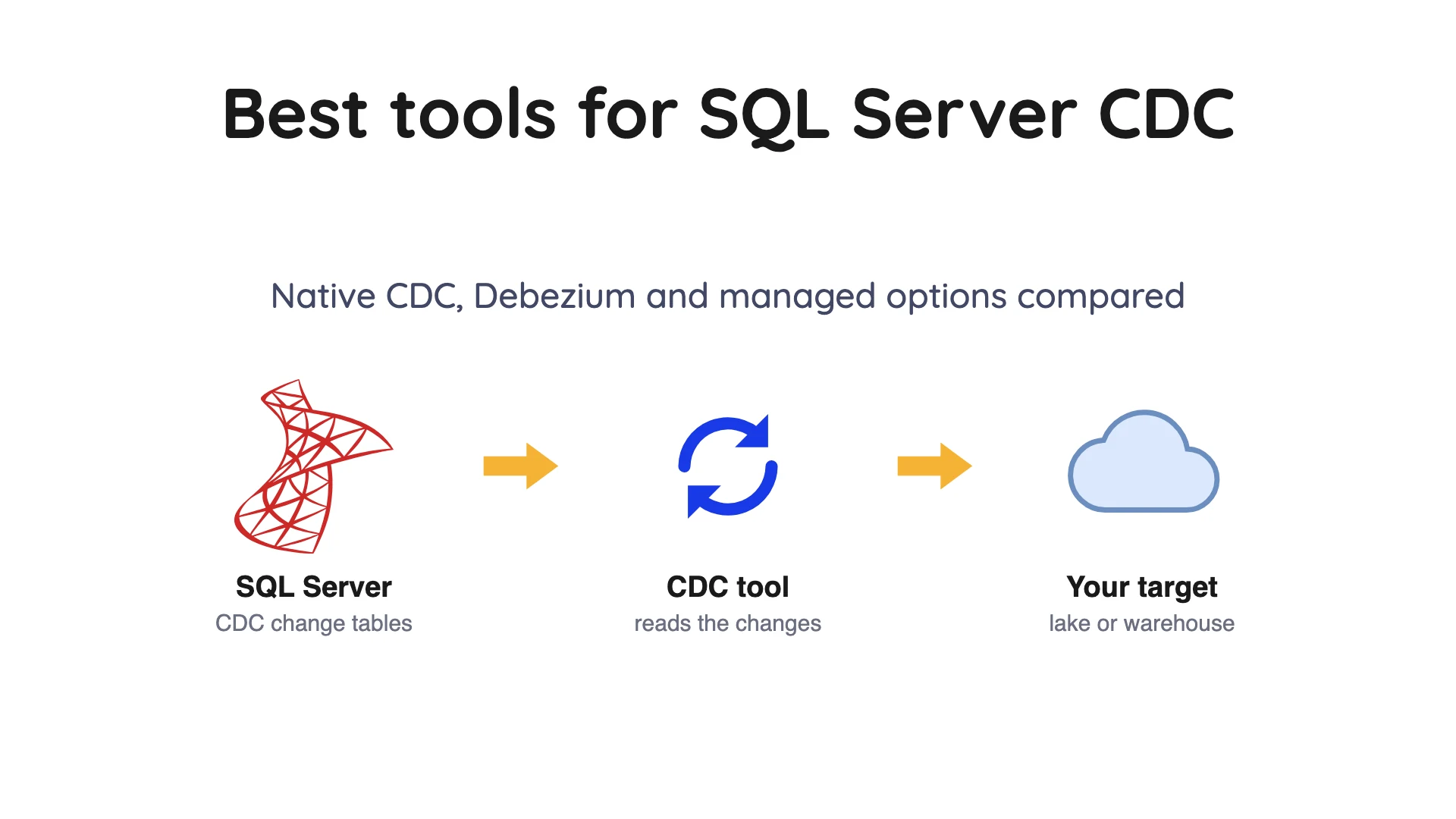
SQL Server already has change data capture (CDC) built in, and most tools below simply read from it. Microsoft's docs say native CDC needs SQL Server Agent running and keeps changes for three days by default.
Pick by where the data has to land and who will run the pipeline. Debezium suits Kafka teams, Fivetran suits vendor-run loads, and Airbyte suits scheduled loads you run yourself. Qlik Replicate and Striim suit large estates, AWS Database Migration Service (DMS) suits AWS teams, Datastream suits Google Cloud, and Fabric mirroring suits Microsoft Fabric.
- Native SQL Server CDC is a feature of the database, not a tool. SQL Server Agent jobs copy changes from the transaction log into change tables.
- Retention is the clock that breaks pipelines. Miss the three-day default window and you're starting over.
- Schema changes are the second trap. A new column isn't captured until you add a second capture instance.
We read each vendor's own documentation on 8 October 2026. We quote no prices here.
How SQL Server CDC works, in plain terms
Change data capture means spotting the inserts, updates and deletes in a database and sending only those on. In SQL Server, Microsoft's CDC docs say the source of change data is the transaction log, the file where the database records every change in order.
A job called the capture job reads that log and writes the changes into change tables. Each tracked table gets a capture instance, which is one change table plus up to two query functions. By default the instance is named schema_table, and its change table gets _CT added, per Microsoft.
Every change row carries a log sequence number (LSN) and an operation code. 1 is a delete, 2 is an insert, 3 is the row before an update and 4 is the row after. So an update adds two rows, per Microsoft's change table reference.
Two details trip up first-time readers. Don't order by __$seqval; use __$command_id, which orders changes inside a transaction. And Microsoft recommends calling the cdc.fn_cdc_get_all_changes_ and cdc.fn_cdc_get_net_changes_ functions instead of reading the change tables directly (reference).
Two SQL Server Agent jobs do the work, and their defaults matter. Microsoft's docs say the capture job runs continuously, handles up to 1,000 transactions per scan and waits 5 seconds between scans. The cleanup job runs daily at 2 A.M. and keeps entries for 4,320 minutes (3 days).
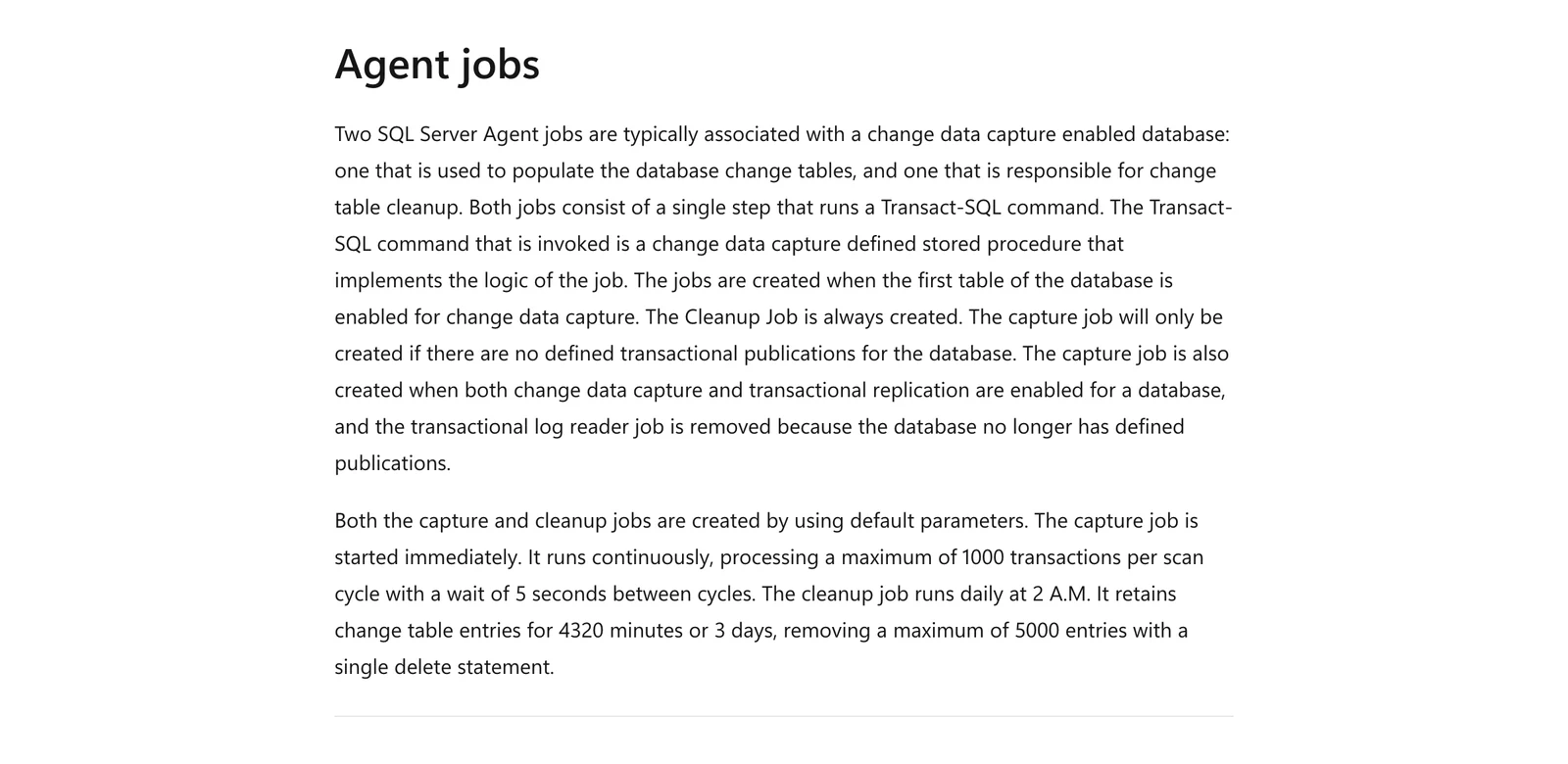
Microsoft Learn, "What is change data capture (CDC)?", Agent jobs section, October 2026.
CDC or change tracking? Your first choice
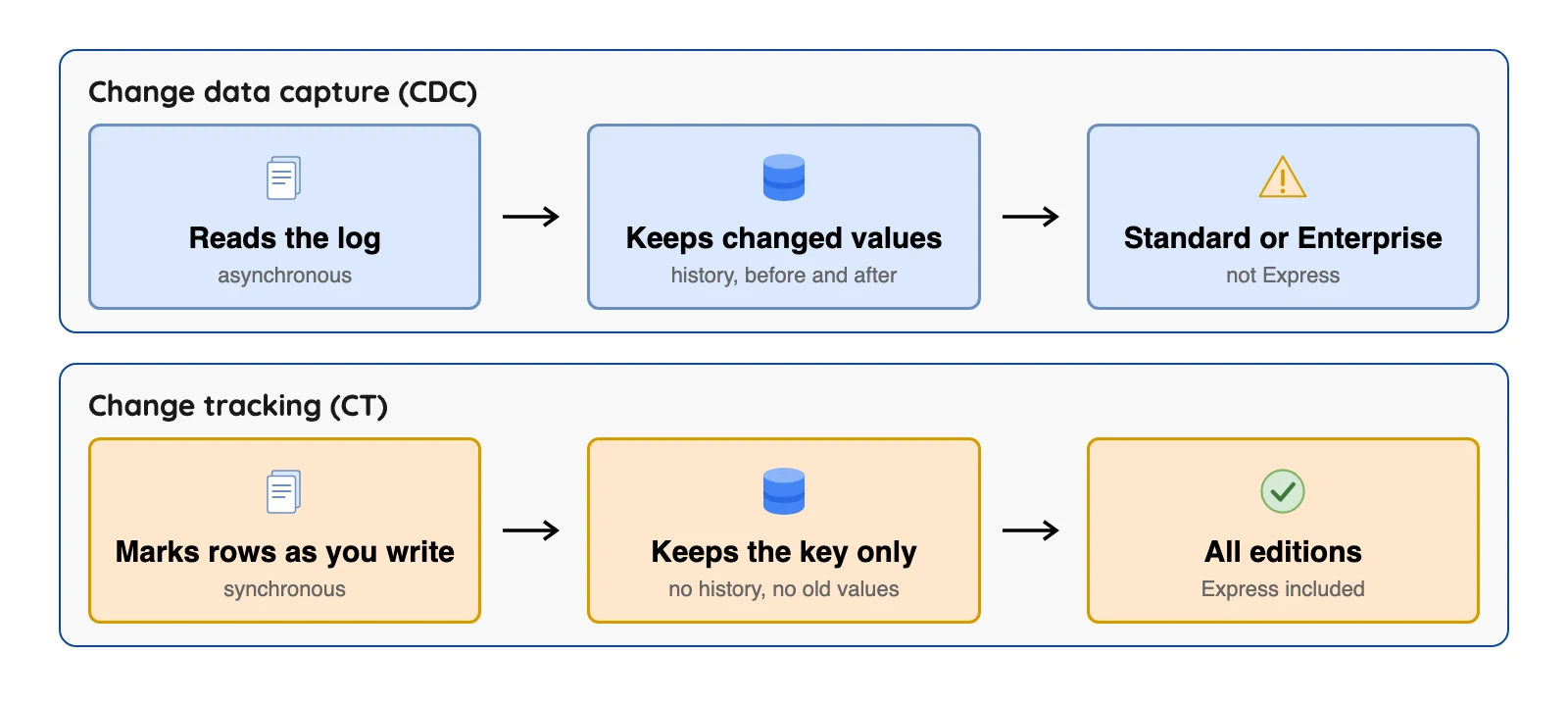
SQL Server ships two built-in ways to find changed rows. Microsoft's comparison page says change data capture reads the log after the fact and keeps history, while change tracking records changes as you write and keeps no history.
Change tracking notes that a row changed and gives its primary key (the column that uniquely identifies each row), but not the changed values. That's fine for the latest state, but no use for history.
Your edition can settle things fast. Microsoft's editions table lists change data capture as Yes for Enterprise and Standard, and No for Express. Attaching a CDC database, or restoring it with the KEEP_CDC option, on an edition without CDC is blocked (Microsoft).
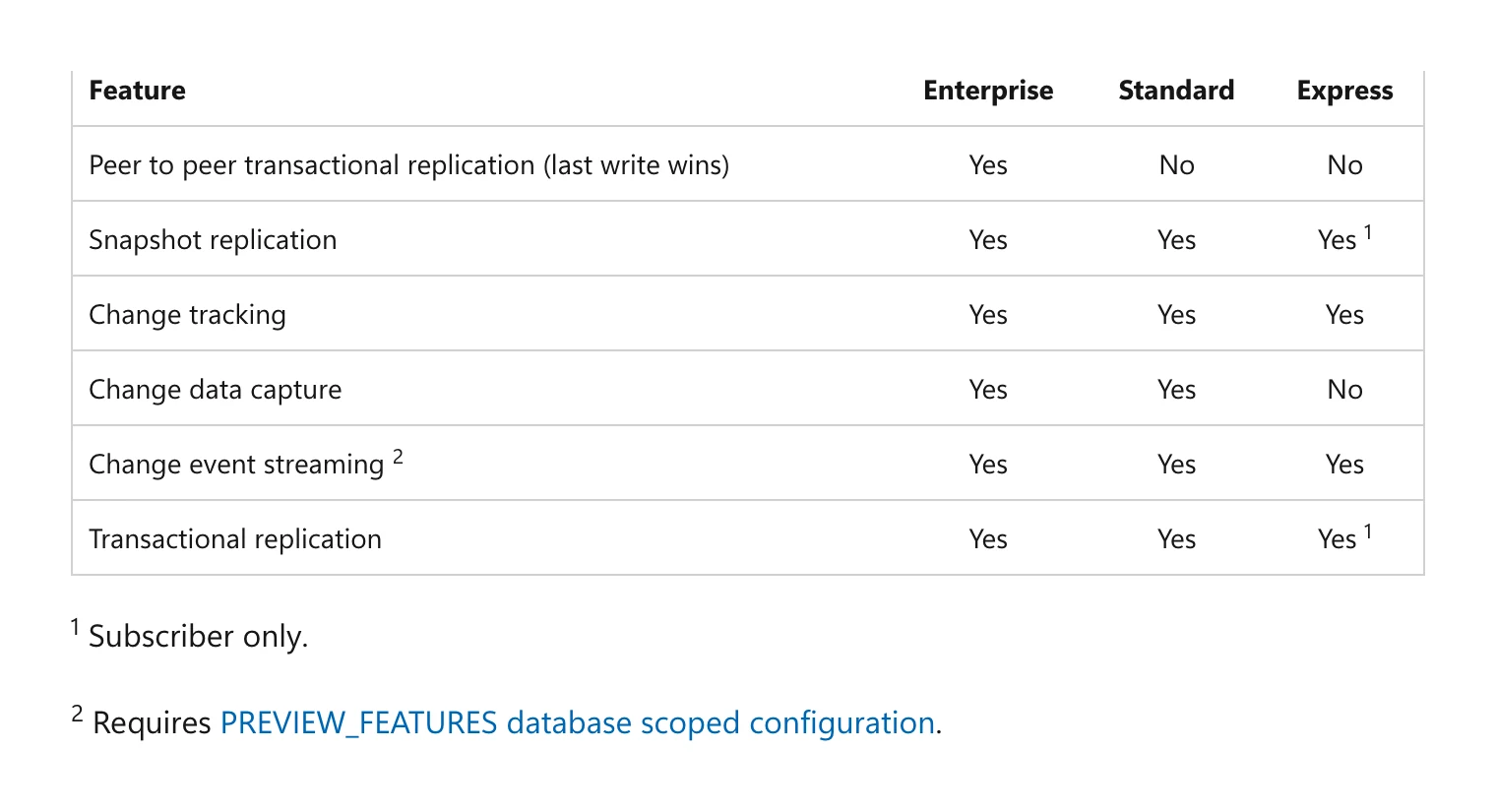
Microsoft Learn, "Editions and supported features of SQL Server 2025", Replication table, October 2026.
Azure SQL Database plays by different rules. Microsoft says a scheduler replaces the Agent jobs, and databases on the Database Transaction Unit (DTU) model need tier S3 or higher.
How to turn CDC on
It's two commands, but the permissions differ. Per Microsoft's enable guide, sysadmin is required to enable CDC for a database, and a db_owner can then enable each table.
USE MyDB;
EXEC sys.sp_cdc_enable_db;
EXEC sys.sp_cdc_enable_table
  @source_schema = N'dbo', @source_name = N'MyTable',
  @role_name = NULL, @supports_net_changes = 1;
Per the same guide, CDC needs exclusive use of a schema and a user both named cdc, so enabling fails if you already have either. Net changes queries need a primary key or unique index on the table. A @role_name of NULL (no value) turns off the access role.
On Amazon Relational Database Service (RDS), per its CDC guide, you run msdb.dbo.rds_cdc_enable_db instead. AWS also says snapshot and point-in-time restores disable CDC and remove its metadata.
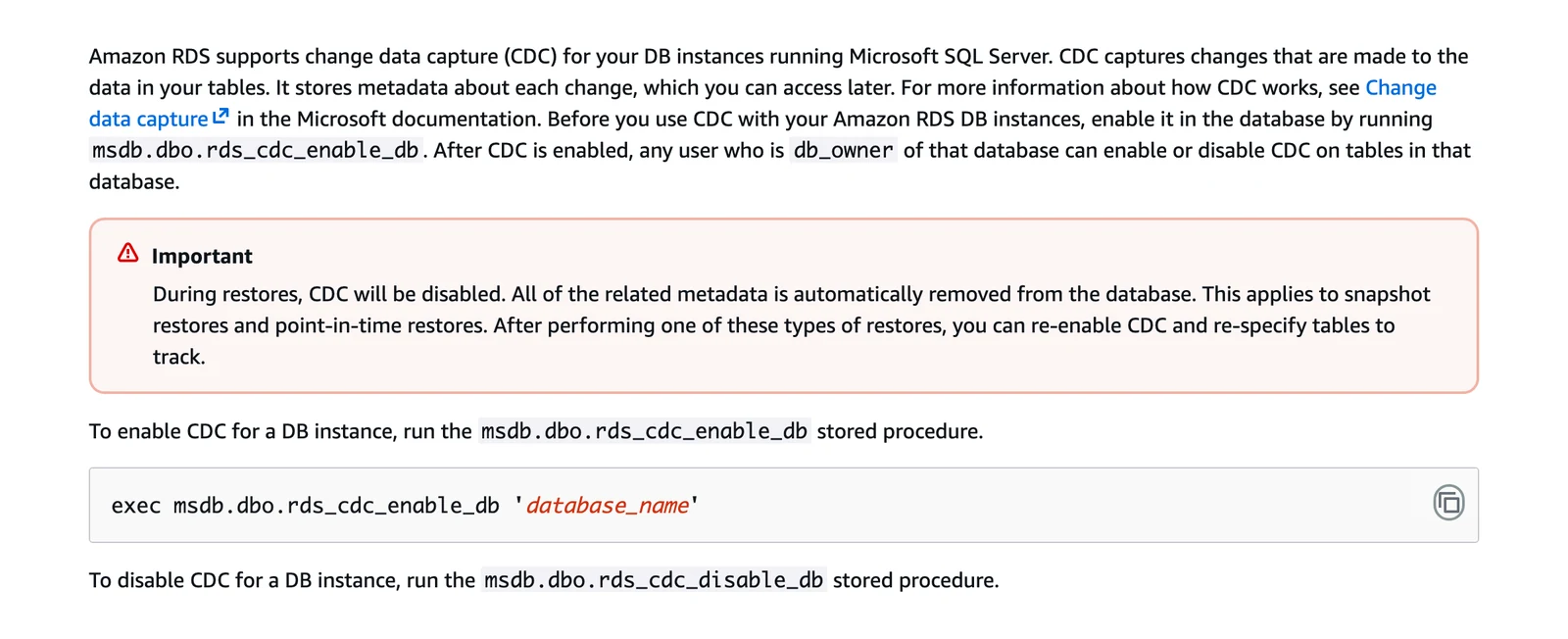
Amazon RDS User Guide, "Using change data capture for Amazon RDS for SQL Server", October 2026.
How we picked
We included maintained tools that document their SQL Server source in public, and looked at how each reads SQL Server, what the docs say about schema changes and retention, and where the data lands. We did not run these tools; this is a documentation reading, not a lab test, and speed or reliability claims on vendor pages are the vendor's.
Each entry has one "What users say" line, with short quotes from public threads and review sites that we opened on 8 October 2026. Most of that talk is about other databases, so treat it as general experience with the tool. The order inside a group isn't a ranking.
SQL Server CDC tools at a glance
| Tool | How it reads SQL Server | How you run it | Change tracking | Read replica |
|---|---|---|---|---|
| Native CDC | Agent jobs copy the log into change tables | Inside SQL Server | Separate feature | Not covered here |
| Debezium | CDC change tables, to Kafka topics | Self-hosted | Not covered here | Not covered here |
| Fivetran | Change tracking, CDC, Binary Log Reader or Teleport Sync | Managed, or Hybrid | Yes | CDC yes, change tracking no |
| Airbyte | CDC, with scheduled syncs | Core self-managed, or Cloud | Not covered here | Not covered here |
| Estuary | CDC, change tracking or batch connectors | Managed, private or BYOC | Yes | CDC yes, worker runs on the primary |
| Qlik Replicate | Two connection types: a standard endpoint and MS-CDC | Client-managed | Not covered here | Not covered here |
| Striim | MS SQL Reader (CDC tables) or MSJet (log backups) | Cloud, or self-managed | Not covered here | Not covered here |
| AWS DMS | MS-Replication and MS-CDC | Runs in the AWS Cloud | Not covered here | Read-only replica source: manual MS-CDC set-up |
| Google Datastream | Change tables or transaction logs | Google Cloud | Not covered here | Not covered here |
| Fabric mirroring | CDC (2016 to 2022) or change feed (2025) | Microsoft Fabric | Not covered here | Not covered here |
 OLake Go OLake Go | CDC capture instances | Self-hosted | Not covered here | Yes, with ApplicationIntent=ReadOnly |
MS stands for Microsoft: MS-CDC is its CDC feature, MS-Replication is its replication feature, and MS SQL Reader is a Striim reader. "Not covered here" means we didn't find the point on the pages we read, not that the tool can't do it.
The 11 best SQL Server CDC tools
Built into SQL Server
1. Native SQL Server CDC: best when the consumer is your own code
At a glance
- Reads SQL Server through: Agent jobs and change tables
- Lands data in: nowhere, you query it
- Price: part of SQL Server editions that include it
Native CDC is the base layer under most tools below, so it's worth knowing on its own. Microsoft's docs name the query functions that return changes over a range of LSNs.
What's good
- It needs no extra software and keeps history, with the values before and after each update, per Microsoft's change table reference.
- Microsoft says stopping the capture job loses no change data. It only pauses log scanning.
- Setting
@supports_net_changesto 1 also generates a net changes function for the capture instance, and Microsoft's enable guide says that needs a primary key or unique index on the table. - If an existing column changes data type, Microsoft says the change is propagated to the change table.
- On Amazon RDS, once you run
msdb.dbo.rds_cdc_enable_db, AWS says anydb_ownerof the database can enable or disable CDC on its tables.
Where it falls short
- It only fills change tables (Microsoft), so you still need something to move the rows.
- Even in simple recovery mode, Microsoft says the log truncation point doesn't advance until captured changes are gathered, and
CHECKPOINTwon't truncate the log if the capture process isn't running while changes wait to be gathered. So a stopped capture job makes the log grow. - Microsoft says both capture methods need SQL Server Agent running, and its editions table lists change data capture as Yes for Enterprise and Standard and No for Express.
- Ask for a range that starts before the oldest kept change and Microsoft says there could be missing change data from aggressive cleanup. A range outside the valid window makes the query functions fail.
- New columns are ignored until you create a second capture instance, and Microsoft says a table can have at most two at once.
- In a capture instance, Microsoft says computed columns always have a value of NULL, and by default a captured column can take at most 65,536 bytes (64 KB) in one INSERT, UPDATE, WRITETEXT or UPDATETEXT statement.
What users say: One Hacker News commenter ran SQL Server CDC into Debezium and Azure Event Hubs and reported a "5-10 second delay from source system transaction commit till update/insert" (Hacker News, "Turning the database inside-out (2015)", January 2025). We found no user write-up on log growth or Agent trouble, so those limits rest on Microsoft's docs alone.
Run it yourself
2. Debezium: best for teams that already run Kafka
Debezium home page, October 2026.
At a glance
- Reads SQL Server through: CDC change tables
- Lands data in: Kafka topics, one per table
- Price: free licence, you pay for servers and staff
Debezium is an open-source CDC engine. Its SQL Server connector docs say it is based on the CDC feature in SQL Server 2016 Service Pack 1 and later, Standard or Enterprise edition.
What's good
- It takes a consistent snapshot first, then streams changes and picks up from the last log position after a restart (docs).
- Incremental snapshots copy a table in chunks (1,024 rows by default), and the SQL Server docs say they run alongside streaming and can resume after an interruption without losing data.
- The docs say it can capture from an Always On read-only replica, though CDC must still be enabled on the primary node.
- The docs cover tuning the SQL Server capture job: a higher
pollingintervallowers the load on the database host and raises latency. - The docs say its schema history provides the table structure in effect when a change event occurs.
Where it falls short
- Offsets are saved on a schedule, so after an outage the docs warn of duplicate events, so your loads must cope with repeats.
- The docs say SQL Server CDC isn't designed to store a complete history of changes, so the connector takes a snapshot to set a baseline.
- A table whose schema wasn't in the initial snapshot fails with a missing schema error. The documented fix starts with removing the schema history topic and clearing Kafka Connect offsets, and the docs say removing offsets should be done only by advanced users.
- The docs say it doesn't support schema changes while an incremental snapshot is running, and changing a primary key during one can cause incorrect results.
- Incremental snapshots need the connector to have permission to write to the signaling table (docs).
tasks.maxdefaults to 1, and the docs say it can be raised to at most the number of entries indatabase.names.
What users say: One Hacker News commenter found "dealing with the kafka connect errors and fixing replication slots... ehhh was painful" (Hacker News, launch thread for the Ingestr CDC tool, July 2026).
Managed or vendor-run
3. Fivetran: best for teams that want a vendor to run SQL Server loads
Fivetran home page, October 2026.
At a glance
- Reads SQL Server through: change tracking, CDC, Binary Log Reader or Teleport Sync
- Lands data in: warehouses; Apache Iceberg through its Managed Data Lake Service
- Price: usage-based, billed on monthly active rows, so the bill moves with how many rows change
Fivetran's SQL Server connector docs list four ways to find changes. Teleport Sync is the odd one out, because it skips SQL Server's change features and instead scans tables and compares row hashes between syncs. If a table has both change tracking and CDC on, Fivetran uses CDC.
What's good
- Its docs list four SQL Server methods and point to Teleport Sync when change tracking or CDC can't be enabled.
- Its connector docs cover SQL Server 2012 to 2025, with Binary Log Reader on 2016 to 2025 only.
- Its docs say CDC data can be read from secondary replicas in an Always On availability group, but SQL Server doesn't allow CDC setup on a secondary, so all CDC setup happens on the primary node.
- With CDC, its docs say column type changes propagate automatically, and extra permissions let CDC track DDL changes without re-syncing the modified table.
- For change tracking, its docs say Fivetran detects when it couldn't process changes before they were deleted from the change table and triggers a re-sync of that table.
- Its docs say it supports the SaaS and Hybrid deployment models for all SQL Server implementations, and Hybrid needs an Enterprise or Business Critical plan.
Where it falls short
- With CDC, Fivetran syncs only tables with a single capture instance, so a new column means a new instance and removing the old one (docs).
- Change tracking can't sync tables without a primary key or run on a replica (docs).
- With CDC, its docs say column type changes propagate but renamed columns, new tables and new columns do not.
- Iceberg goes through Managed Data Lake Service, a separate destination whose docs say it supports the SaaS deployment model.
- That page also says Fivetran doesn't support position deletes for Iceberg tables, and on AWS the Glue catalog supports only one table per combination of schema and table names within a Region.
- Under usage-based pricing, rollback syncs may fetch data from the previous month, and those past records count as new unique records toward monthly active rows for the current month.
What users say: A Hacker News commenter (thread on the Fivetran and dbt Labs merger, October 2025) says "Fivetran is convenient but absurdly expensive."
4. Airbyte: best for open-source SQL Server loads on a schedule
Airbyte home page, October 2026.
At a glance
- Reads SQL Server through: CDC, in scheduled syncs
- Lands data in: warehouses and lakes; Apache Iceberg on S3 through its S3 Data Lake destination
- Price: Core is free, Cloud is paid
Airbyte's SQL Server docs say the connector uses SQL Server CDC with the transaction log, and CDC setup needs db_owner rights. Its CDC sync runs on a schedule, and Airbyte's CDC docs say it doesn't treat CDC sources as infinite streaming sources.
What's good
- Core is free to self-run, and Airbyte calls it open source (its licence is Elastic License 2.0). Beside CDC, the connector also has full refresh and incremental modes.
- Its SQL Server docs say the certified connector offers CDC using SQL Server's own CDC feature, for SQL Server 2016 Service Pack 1 and later.
- Its S3 Data Lake docs say the connector writes Iceberg tables to S3 or S3-compatible storage using a REST, AWS Glue, Nessie or Polaris catalog, and that deduping is merge-on-read.
- The same S3 Data Lake page says it handles adding or removing a column, widening a column and changing the primary key. Because it never rewrites existing Iceberg data files, other schema changes are not handled.
- For truncate refreshes the S3 Data Lake connector writes to a staging branch and swaps it in at the end, so queries read the old version until then. It keeps the staging branch after a failed sync so a retry can recover.
- Its CDC docs say Airbyte adds metadata columns that begin with
_ab_cdc_for CDC sources.
Where it falls short
- Incremental CDC needs a primary key, so tables without one get full refresh only (docs).
- Delivery is at least once (docs). CDC can't be enabled on tables with a clustered columnstore index (a storage layout built for analytics), and
hierarchyidandsql_variantare not processed. - Its CDC docs say changes made by TRUNCATE or ALTER will not appear in the logs and so not in the destination, and a refresh is required after any new table is added to a CDC connection.
- CDC syncs launch on a sync interval and read the logs up to the sync's start time (CDC docs). The first CDC sync takes a snapshot with a SELECT statement, which is effectively a full refresh.
- On the S3 Data Lake page, a Number-type primary key is stored as an Iceberg string, so ordering on it is lexicographic, and objects and unions are written as JSON strings.
- The same page cautions that if compaction runs at the same time as a truncate refresh sync, it deletes files from the current generation and causes data loss. It does not say who handles compaction.
What users say: A GitHub issue from February 2026 (since closed) says a connector update broke SQL Server CDC on Azure SQL geo-replicas for connections "running successfully for many months".
5. Estuary: best when you need to choose between CDC and change tracking
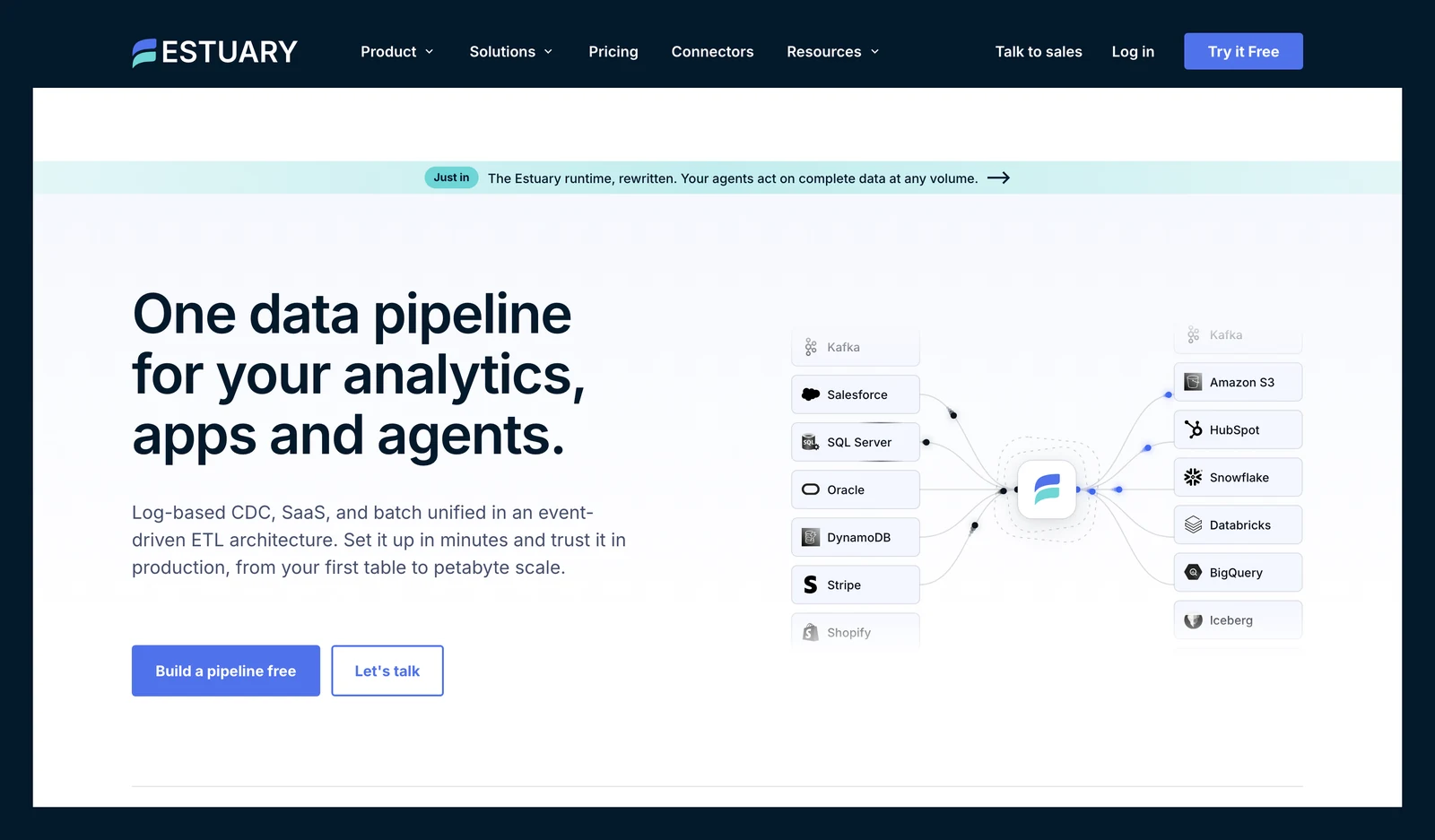
Estuary Flow home page, October 2026.
At a glance
- Reads SQL Server through: three connectors, CDC, change tracking or batch
- Lands data in: the destinations you choose, such as warehouses and lakes
- Price: not covered here
Estuary's SQL Server docs include a table of its three connectors. CDC is log-based and real time, and it handles tables without a primary key. Change tracking is real time too, stores only primary keys, and can capture computed columns, which CDC can't.
What's good
- Its docs set out the CDC versus change tracking tradeoff in a table, and say to use the batch connector for views or custom queries.
- The docs list three SQL Server connectors plus variants for Azure SQL Database, Amazon RDS and Google Cloud SQL, with setup steps for each platform. They say it is regularly tested against SQL Server 2017 and up.
- The docs describe the CDC connector as log-based and real time, suited to full audit history and to tables without a primary key, but for those tables you set a key by hand in the collection definition.
- Change tracking is real time too, stores only primary keys for lower storage overhead on the source, and can capture computed columns, which CDC can't (docs).
- After a schema change, its docs say the connector detects a second capture instance and switches over once both are valid. An optional "Automatic Capture Instance Management" setting manages the instances for you.
Where it falls short
- CDC can read a replica, but the CDC worker must run on the primary. Change tracking doesn't support read replicas (docs).
- The batch connector polls, so expect latency of minutes to hours (docs).
- Its docs say a captured table should have a primary key, and without one you must specify a key manually in the Estuary collection definition.
- The docs say CDC cannot capture computed columns or computed primary keys, and change tracking may combine intermediate changes that happen in rapid succession.
- Automatic Capture Instance Management needs additional permissions (docs).
- Private and BYOC deployments need an annual plan and add fees based on the cloud infrastructure required. Its pricing docs publish no figure for those fees.
What users say: A G2 reviewer, seen on AWS Marketplace (August 2026), says "The logs are also pretty noisy and hard to follow, especially when I'm troubleshooting."
Enterprise platforms
6. OLake Go: best for SQL Server changes into Iceberg or Parquet on your own storage

OLake home page, October 2026.
At a glance
- Reads SQL Server through: CDC capture instances, SQL Server 2017 or later
- Lands data in: Apache Iceberg or Parquet only
- Price: free licence, you pay for servers and staff
OLake Go is open source under Apache 2.0 and reads SQL Server in four sync modes: full refresh, full refresh plus CDC, CDC only, and full refresh plus incremental (see the SQL Server connector guide).
What's good
- The SQL Server connector guide lists parallel chunking, checkpointing and automatic resume for failed full loads. An optional
VIEW DATABASE STATEgrant (VIEW DATABASE PERFORMANCE STATEon SQL Server 2022 or later) gives faster chunking for tables without a primary key. - A "Manage Capture Instance" option creates new capture instances when schemas change, if the user has
db_owner(see the guide). - It can read from a read-only secondary replica with
ApplicationIntent=ReadOnly, while CDC stays enabled on the primary. With Manage Capture Instance on, it asks for the primary's credentials so it can manage capture instances there (see the guide). - It writes Iceberg tables to eleven catalog types, such as AWS Glue, REST, Polaris, Nessie and Unity (see the catalogs page), or Parquet files if you prefer.
- For Iceberg, a two-phase commit tracks per-chunk commit status in destination state, covering full refresh, incremental and CDC for MSSQL, to avoid inconsistencies and duplicate writes (see the v0.5.0 release notes).
- The guide gives the CDC enable commands for Amazon RDS and Google Cloud SQL, and the source supports SSL modes and SSH tunnels.
Good to know
- OLake Go is built for Iceberg and Parquet output, and you run it on your own infrastructure.
- Keep it reading inside the three-day change table window. Computed columns come through as
NULL, and a clustered columnstore index blocks CDC, as it does in SQL Server itself.
Bottom line: Pick it if you want SQL Server changes in Iceberg tables on storage you own and can run a container. Snowflake, BigQuery and Redshift can still query the Iceberg tables it writes, depending on the catalog (see the compatibility page).
7. Qlik Replicate: best for large mixed estates with an existing Qlik contract
Qlik Replicate / Qlik Talend Cloud home page, October 2026.
At a glance
- Reads SQL Server through: two source connection types (endpoints), a standard SQL Server endpoint and an MS-CDC endpoint
- Lands data in: the targets Qlik supports, listed in its support matrix
- Price: not published
What's good
- Qlik's MS-CDC endpoint docs say it reads Microsoft change tables instead of the log, which Qlik says lowers the risk of data loss from short log retention or unreachable log backups.
- The replication task turns on MS-CDC for the source tables for you, unless you'd rather do it by hand.
- The same endpoint can also be used to replicate from an Amazon RDS for SQL Server source, per the endpoint docs.
- Its prerequisites page points to
sys.sp_cdc_change_joband a small@pollingintervalvalue to reduce latency. - Qlik's pricing page lists "Qlik Open Lakehouse with ingestion and adaptive optimization for Apache Iceberg" in the Standard edition of Qlik Talend Cloud.
Where it falls short
- Prices aren't published, and the product is client-managed software, so you run the server.
- The prerequisites page says the CT table names must use the default
<SchemaName>_<TableName>_CTformat and the CT table must include the listed columns. - The MS-CDC capture and cleanup jobs must be running (prerequisites).
- Microsoft ODBC Driver 18.5 must be installed on the Replicate machine, on Windows or Linux (prerequisites).
- On the pricing page, log-based CDC first appears in the Standard edition list for Qlik Talend Cloud, not in Starter.
What users say: One PeerSpot reviewer (May 2024) finds it "too costly for small businesses".
8. Striim: best for log-backup reading and low load on the source
Striim home page, October 2026.
At a glance
- Reads SQL Server through: MS SQL Reader (CDC tables) or MSJet (log backups)
- Lands data in: many targets; Iceberg on Google Cloud Storage or S3 Tables
- Price: contact sales, with a Developer tier
Striim's SQL Server page says MSJet has higher throughput and lower use of the source server's compute, memory and disk than MS SQL Reader (Striim's claim, which we did not test). MS SQL Reader supports older SQL Server versions and more cloud SQL databases.
What's good
- You can pick the reader per source: MS SQL Reader for CDC tables, or MSJet for log backups (docs).
- Its Iceberg Writer docs list two write modes, Merge and Append Only, and say it propagates DDL changes from supported sources to the Iceberg tables.
- Its S3 Tables Writer docs list APPENDONLY and MERGE modes, with an Optimized Merge option for partial-image CDC, and DDL propagation for supported source operations.
- The SQL Server docs say Striim provides wizards for creating applications that read from SQL Server and write to various targets.
- Its pricing page lists a self-managed Striim Platform with clustered deployments with HA, and Striim Cloud with dedicated compute and networking.
Where it falls short
- MSJet reads log backups on disk, and the docs say backups on tape, virtual devices, mirror backups or Azure Storage aren't supported.
- Its Iceberg Writer is Google Cloud Storage only; S3 Tables has its own writer.
- The Iceberg Writer needs a compute engine and a catalog: Google Cloud Managed Service for Apache Spark and a Lakehouse, Nessie or Polaris catalog (docs).
- With the Iceberg Writer, partitioned tables need manual table creation, and time source data types are written as strings (docs).
- The S3 Tables Writer uses Amazon EMR as the compute engine, and S3 Tables requires lowercase table, namespace and column names, which breaks wildcard mappings against uppercase-identifier sources.
- Both Iceberg writers recover on restart with at-least-once processing (Iceberg Writer, S3 Tables Writer).
What users say: A PeerSpot reviewer (August 2026) says "Striim would not intuitively tell me the culprit table or database behind the lag."
Cloud services
9. AWS Database Migration Service (DMS): best for AWS-centered teams
AWS DMS home page, October 2026.
At a glance
- Reads SQL Server through: MS-Replication and MS-CDC
- Lands data in: AWS stores such as S3 files; Apache Iceberg is not in its target list
- Price: not covered here
DMS uses two methods, per its SQL Server CDC docs. On a self-managed server, it uses MS-Replication for tables with primary keys and MS-CDC for tables without. Amazon Relational Database Service (RDS) for SQL Server doesn't support MS-Replication, so DMS uses MS-CDC for all tables there.
What's good
- AWS operates it, and the docs cover set-up with and without the sysadmin role.
- Its overview says you can run one-time migrations or replicate ongoing changes to keep sources and targets in sync.
- DMS version 3.4.7 and later can set up MS-CDC for the database and all tables automatically, if you are not using a read-only replica (CDC docs).
- Version 3.5.3 adds reading from log backups of Amazon RDS for SQL Server, per the CDC docs, and Kerberos authentication for SQL Server sources, per the source docs.
- The source docs say it supports named instances of SQL Server and can use SSL between the endpoint and the replication instance.
Where it falls short
- It has no Iceberg target in its target list, so you add a second step to build Iceberg tables from the S3 files.
- Self-managed sources need a distribution database for MS-Replication (docs). That's extra set-up work.
- The source docs say columnstore indexes, memory-optimized tables, temporal tables, sparse columns and column-level encryption are not supported, and neither is replication from databases with accelerated database recovery (ADR) turned on.
- Per the source docs, changes to computed fields aren't replicated, truncate commands aren't captured, and renaming tables or columns with
sp_renameisn't supported. - If the database is set up for neither MS-Replication nor MS-CDC, per AWS, tables without a primary key capture only INSERT and DELETE events; UPDATE and TRUNCATE events are ignored.
- The source docs say you may lose events if SQL Server archives them from the active transaction log to the backup log, or truncates them from it.
What users say: A PeerSpot reviewer (September 2024) says "the error messages from DMS are very ambiguous and sometimes misleading."
10. Google Cloud Datastream: best for Google Cloud teams that want BigQuery or Cloud Storage
Google Datastream home page, October 2026.
At a glance
- Reads SQL Server through: change tables or transaction logs, your choice per stream
- Lands data in: BigQuery, Cloud Storage, and Apache Iceberg tables in BigQuery, with the data in your own buckets
- Price: not covered here
Datastream's SQL Server page lists self-managed servers (Enterprise 2008 and later, Standard 2016 Service Pack 1 and later), Amazon RDS, Cloud SQL and Azure SQL Database. For Cloud SQL, Express is not supported.
What's good
- Datastream documents two methods per stream. Change tables have fewer limits and no risk that log truncation fails a stream for good, at lower throughput, while the transaction logs method is faster and needs fewer resources.
- The docs say the change tables method supports replication of encrypted tables, which the transaction logs method does not (it can't handle Transparent Data Encryption).
- With the
enable_ddl_support_for_ctlabel, Datastream checkscdc.ddl_historyevery five minutes and, when a column is added, creates a new capture instance, reads the old one up to the change, then reads the new one. You still delete the original instance afterwards, since SQL Server allows two per table. - Datastream replicates user-defined data types, but stores the base data type they derive from in the destination.
Where it falls short
- The transaction logs method doesn't support Transparent Data Encryption or column-level encryption (that data becomes
NULL), and doesn't replicate columns added after a stream is created (docs). - Streams are limited to 10,000 tables, and a table with more than 500 million rows can't be backfilled unless it has a unique index with no nullable columns, all included in the stream.
- Its Iceberg tables in BigQuery are append-only, and the page does not mention Amazon S3.
SQL_VARIANT,HIERARCHYID,GEOMETRYandGEOGRAPHYcolumns aren't replicated (docs).- Databases with delayed durability or accelerated database recovery (ADR) enabled aren't supported, and neither is Windows Active Directory authentication (docs).
- With the change tables method, dropping a column replaces its data with
NULL, and renaming columns isn't supported when CDC is enabled (docs).
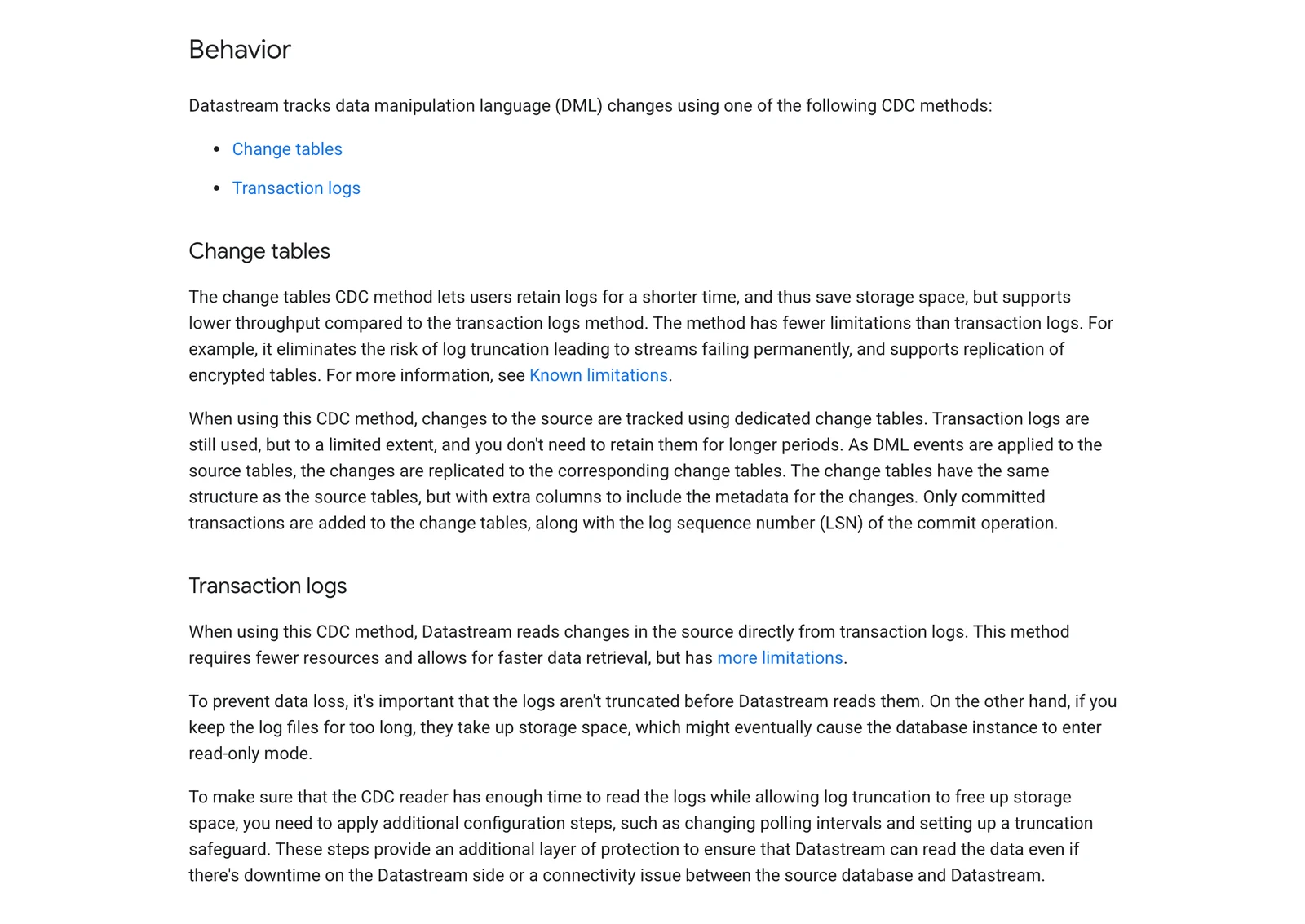
Google Cloud Datastream, SQL Server source behavior, October 2026.
11. Microsoft Fabric mirroring: best for teams whose target is Microsoft Fabric
Microsoft Fabric home page, October 2026.
At a glance
- Reads SQL Server through: CDC (SQL Server 2016 to 2022) or change feed (2025)
- Lands data in: Microsoft Fabric OneLake
- Price: replication compute is free, per Microsoft; queries use Fabric capacity, so check what that costs you
Fabric mirroring copies a SQL Server database into Fabric. Data lands in OneLake as Delta tables, which Microsoft says now include virtual Iceberg metadata. Microsoft's limits page says mirroring of SQL Server 2016 to 2022 requires CDC, while SQL Server 2025 uses a different change feed.
What's good
- Microsoft's docs say that for SQL Server 2016 to 2022 it reuses CDC if it's already on, or can set it up.
- The mirroring page lists SQL Server on Windows (Standard, Enterprise and Developer), Linux from 2017 CU18, and instances hosted on-premises, on an Azure VM or on non-Azure clouds for 2016 to 2022.
- Each mirrored database gets an autogenerated SQL analytics endpoint, a read-only copy you can query with T-SQL (docs).
- To mirror a server behind a firewall, the docs say to set up an on-premises data gateway or a virtual network data gateway.
- If CDC isn't on, the limits page says the tutorial makes
fabric_logina temporary member of the sysadmin server role to configure it.
Where it falls short
- Microsoft says you can't mirror a SQL Server 2025 database that has CDC enabled (limits page). SQL Server 2025 mirroring also needs Azure Arc and isn't supported on Linux or on an Azure VM.
- A schema change breaks mirroring on 2016 to 2022 until you re-enable CDC for the table, and it restarts a full snapshot on 2025 (limits page).
- Per the limits page, mirroring works only on a primary database of an availability group, doesn't support a failover cluster instance, and can't mirror a database already mirrored in another Fabric workspace.
- You can mirror up to 1,000 tables, and the limits page says tables above that are not replicated.
- On the limits page, clustered columnstore indexes aren't supported, tables using temporal history, Always Encrypted, in-memory, graph or external features can't be mirrored, and LOB columns over 1 MB are truncated to 1 MB.
- Active transactions hold log truncation until the mirror catches up, and Microsoft says to monitor the source transaction log so it doesn't fill.
What users say: A SQL Server blogger notes that "a process that reads the log file every 5 seconds" feeds the mirror (sqlreitse.com, April 2026), while another warns "Active transactions hold log truncation until the mirrored database catches up" (sqlfingers.com, February 2026).
What actually breaks SQL Server CDC
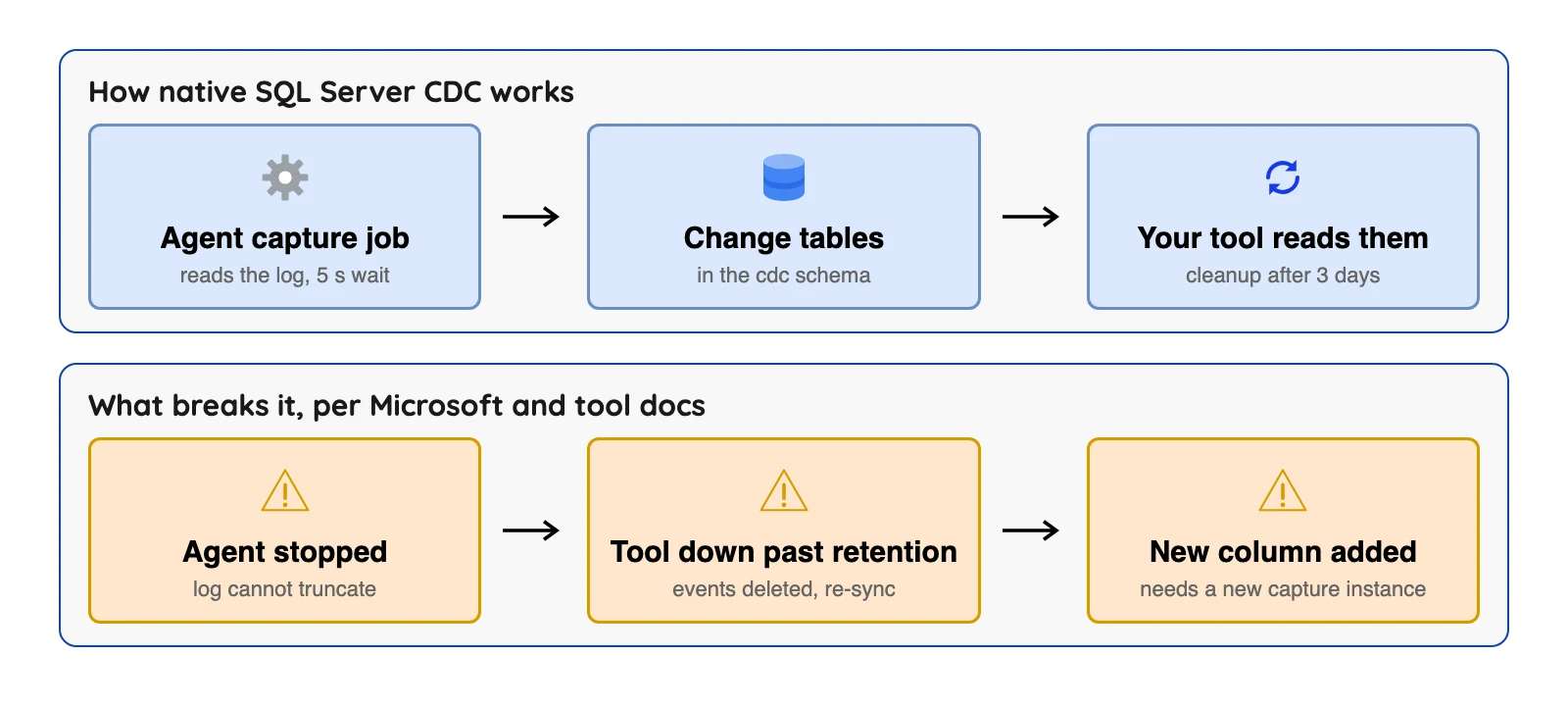
The diagram shows the three failures that stop a pipeline outright. A fourth, large columns, corrupts data quietly (we counted no real incidents, only what the docs say).
The Agent stops. Microsoft says both capture methods need SQL Server Agent running. No Agent, no changes.
The tool is down longer than retention. The default is three days, which sounds fine until a long weekend. Fivetran's docs recommend seven days and, for change tracking, say it triggers a re-sync of a table when changes were deleted before it could process them. Microsoft says a request for a range outside the valid window fails or can miss data.
A column is added. Microsoft says new columns are ignored unless you create a second capture instance. A dropped column gets NULL (no value). At most two capture instances per table are allowed.
Large columns come through empty. Microsoft says varchar(max), nvarchar(max) and varbinary(max) columns are NULL on update rows unless the column changed in that update. Columns of type text, image and ntext are NULL on delete and update rows. A loader that treats NULL as "set to empty" will overwrite good data.
A schema change, step by step
Microsoft's fix for a new column is a second capture instance, with a new name, that has the new shape.
EXEC sys.sp_cdc_enable_table @source_schema = 'dbo', @source_name = 'my_table',
  @role_name = 'my_role', @capture_instance = 'dbo_my_table_v2';
Tools that overlap instances. Estuary and OLake Go say they detect the second instance and switch when both are valid. Wait for your tool to confirm the switch before you delete the old instance.
Tools that expect one instance. Fivetran only supports tables with a single capture instance, so its docs tell you to create the new instance and delete the old one. Its feature table adds that CDC tracks schema changes by re-syncing the modified table, unless you grant extra permissions.
A check to run before every restart
Microsoft says the query functions fail if your range is outside the valid window, so compare your tool's saved position with the oldest and newest positions SQL Server still holds.
SELECT sys.fn_cdc_get_min_lsn('dbo_my_table') AS oldest_lsn,
       sys.fn_cdc_get_max_lsn()               AS newest_lsn;
Debezium keeps its position as an LSN in its offsets. If your saved position is older than oldest_lsn, cleanup has already removed changes you never read.
A worked selection case
The case below is invented to show the method, and we tested no tool.
Suppose a SQL Server 2022 Standard edition server has 300 tables. Twenty have no primary key, two have a clustered columnstore index, and the target is Apache Iceberg on Amazon S3. Schemas change about monthly.
| Requirement | Fits | Does not fit, and why |
|---|---|---|
| Twenty tables without a key | Estuary CDC, AWS DMS (MS-CDC), Fivetran CDC | Airbyte CDC copies those tables by full refresh only; Fivetran change tracking skips them |
| Two columnstore tables | Fivetran Teleport Sync, which its docs point to when CDC can't be enabled | CDC tools for those two tables, since Microsoft says CDC can't be enabled on a clustered columnstore index |
| Iceberg on S3 | Fivetran Managed Data Lake Service, Airbyte S3 Data Lake, OLake Go | Datastream (Google Cloud Storage), Striim (Google Cloud Storage or Amazon S3 Tables, not plain S3), Fabric mirroring, AWS DMS without a second step |
| Monthly schema changes | Estuary and OLake Go (switch to a second instance) | Fivetran needs a new capture instance each time |
No single tool covers every row, so each path needs a compromise.
Airbyte can do CDC for tables with keys and full refresh for the rest. OLake Go covers the ordinary tables with CDC and offers a full refresh mode too. Confirm how CDC treats the twenty keyless tables before you commit.
So which tool should you pick?
If two rows fit, shortlist both and test them.
| Your job | Look at |
|---|---|
| Kafka is already your hub | Debezium |
| A vendor runs loads to a warehouse | Fivetran or Estuary |
| Self-run loads on a schedule | Airbyte |
| Lower load on a busy source (Striim's claim) | Striim with MSJet |
| Data goes to AWS stores, Google Cloud, or Fabric | AWS DMS, Datastream, or Fabric mirroring |
| You want to choose between change tables and log reading | Datastream or Qlik Replicate |
| Self-hosted Iceberg or Parquet files | OLake Go |
| CDC is not allowed on the server | Fivetran Teleport Sync, or Estuary's batch connector (its docs say it polls) |
Which SQL Server CDC tool fits you?
Question 1 of 6
Who should run the pipeline?