What Is Airbyte? Open Source, Cloud and Limits
20 min read
Key takeaways
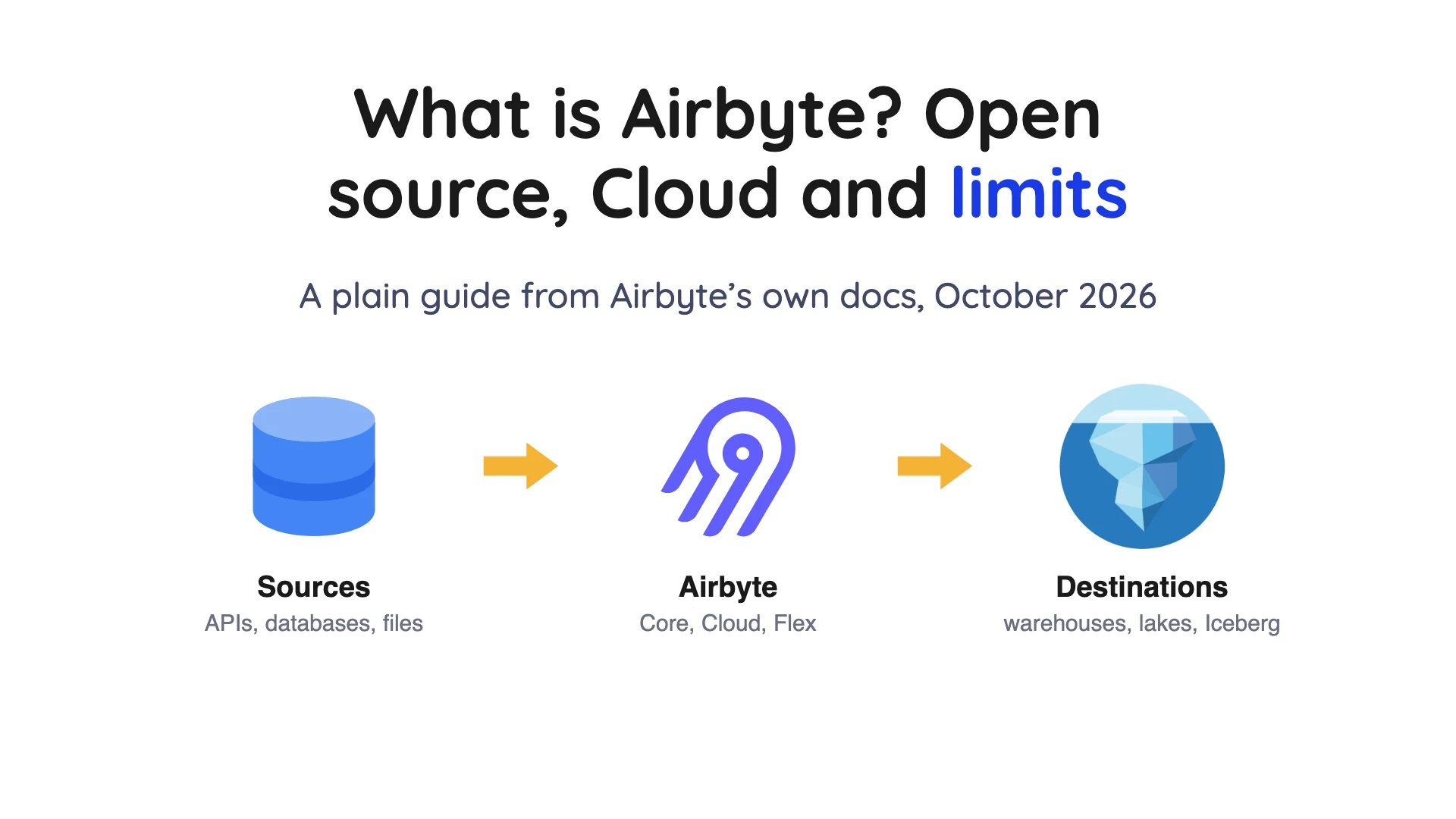
What is Airbyte? In short, it copies data from apps, databases and files into a warehouse or data lake. You can run it yourself (Core, free software under the Elastic License 2.0) or pay Airbyte to run it (Cloud, or the hybrid Enterprise Flex).
You can host it and read the source, but Elastic License 2.0 is not an Open Source Initiative (OSI) approved licence. It fits teams that want lots of connectors and control, and it's a weaker fit if you need live streaming or finished, transformed tables. For database changes into Iceberg or Parquet, OLake Go is free and open source under Apache 2.0.
- Airbyte moves data from sources (apps, databases, files) to destinations (warehouses, lakes, databases). It loads first and leaves the reshaping to you, a pattern called ELT.
- Airbyte's main repository uses the Elastic License 2.0 (ELv2). We say "self-hostable", not "open source", because ELv2 bars selling Airbyte to others as a hosted service. Only the Airbyte Protocol sits under MIT (a permissive open-source licence), per Airbyte's own list.
- Core is free software, but you run and maintain it. Cloud Standard is $20 a month with 5 credits, and Plus starts at $189, per Airbyte's pricing page (checked Oct 2026). Pro and Enterprise Flex prices are not published.
- Airbyte's change data capture (CDC) runs on a schedule, not as a live stream. Its CDC docs say CDC sources are not treated as infinite streaming sources.
- Airbyte can write Apache Iceberg tables to Amazon S3 and Google Cloud Storage. Its docs list limits on schema changes and do not describe table maintenance.
- For database tables into Iceberg or Parquet, OLake Go is free and open source and runs with Docker, Helm or the UI.
- Connector counts differ by page: 700+ on one Airbyte page and "over 600" on another. So check the support level of the exact connector you need.
Every fact below comes from Airbyte's own pages, read on October 1, 2026, with the page linked beside the claim. Where Airbyte doesn't publish something, we say so.
We did not test Airbyte, so this is a read of its documents, not a lab test. Last reviewed October 2026.
What is Airbyte?
Think of Airbyte as a data mover. Its platform docs say it consolidates data from hundreds of sources into data warehouses, data lakes and databases. It can also push data back out into tools such as customer relationship management (CRM) systems, which the docs call data activation.
Three words will come up again and again. A connector is a small piece of software that reads from one system or writes to another. One run that copies data is a sync, and each connection links one source to one destination and sets how often syncs run.
Airbyte calls its approach extract, load and transform (ELT). It pulls data out, drops it in as-is, and you tidy it up afterward in the destination. Older extract, transform, load (ETL) tools do it the other way round and reshape data on the way in.
Airbyte's "Why Open Source" page says it has built open-source data movement since 2020. It also sells a separate Agents product for AI tools. That isn't data replication, so we leave it out.
Is Airbyte open source?
Partly, depending on the piece. Airbyte's own licensing summary splits it three ways: the Airbyte Protocol uses MIT (a permissive open-source licence), the connectors and core platform are ELv2, and managed Cloud and Enterprise are commercial (checked Oct 2026).
ELv2 lets anyone use Airbyte free of charge and run it at scale on their own servers. Airbyte's licence FAQ says there are no limits on volume, users or connections for open source users (checked Oct 2026). The catch: you can't sell a cloud service that gives users direct access to Airbyte, though you can use Airbyte to bring data into your own analytics product.
ELv2 applies from version 0.30.0, on September 27, 2021, says the same FAQ. The Open Source Initiative (OSI) decides which licences count as open source, and ELv2 isn't on its list. That's why we write "self-hostable" and "source available" instead of "open source".
Fair warning: two Airbyte statements don't quite line up. The licensing summary above puts the connectors under ELv2, while the licence FAQ says Airbyte's "own connectors remain open-source" and that its connector development kit (CDK) does too. We didn't check individual connector repositories, so read the licence file of any connector you depend on.
Airbyte Packages: Core, Cloud and Enterprise Flex
Same product, several packages. The real difference is who runs the servers and how you get billed.
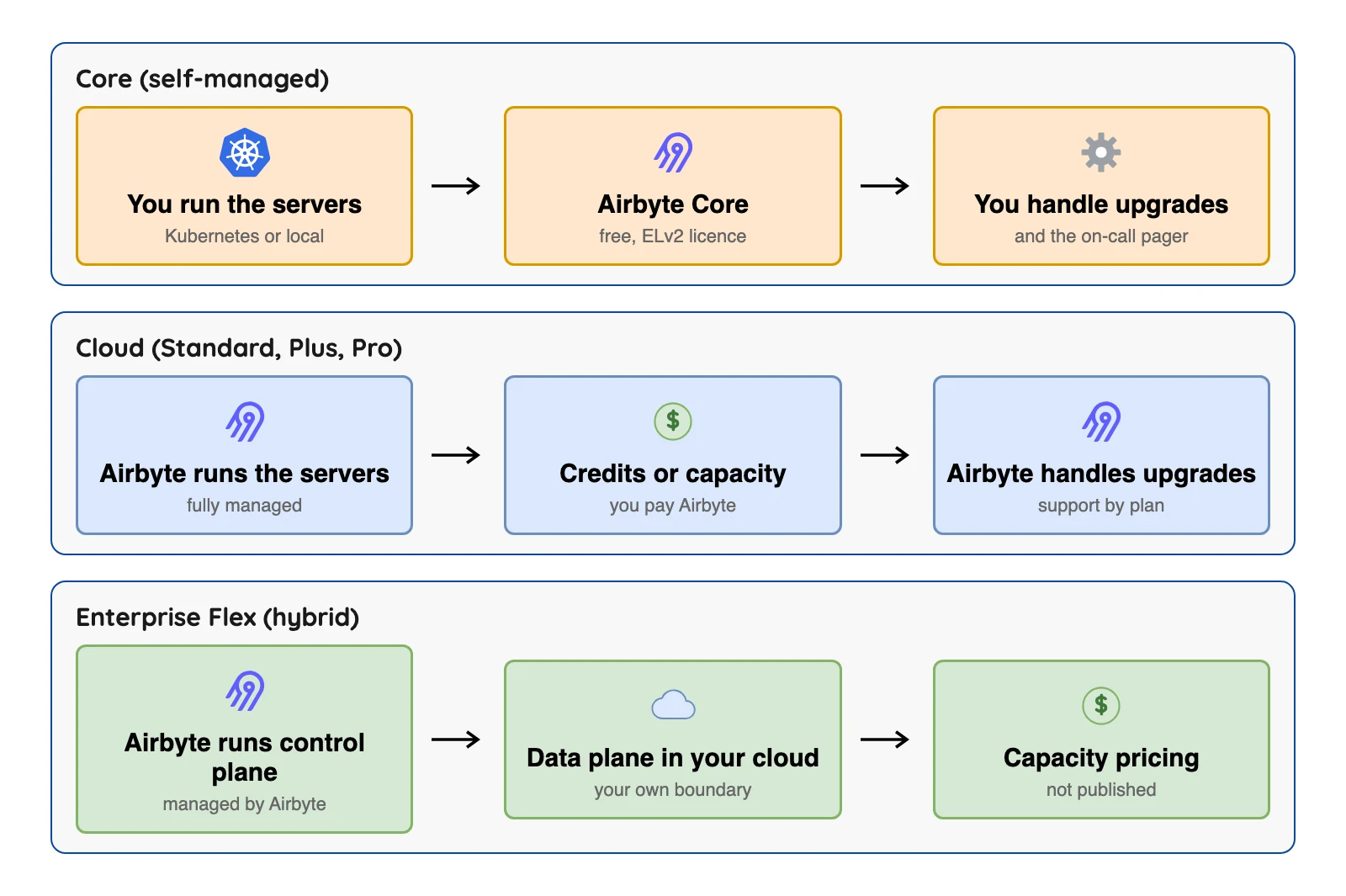
| Package | Who runs it | How you pay | Published price (checked Oct 2026) |
|---|---|---|---|
| Core | You, on your own servers | Your own server and staff costs | Free software |
| Cloud Standard | Airbyte | Credits | $20 a month with 5 credits, $5 per extra credit (checked Oct 2026) |
| Cloud Plus | Airbyte | Credits, in tiers | From $189 for 40 credits (checked Oct 2026) |
| Cloud Pro | Airbyte | Capacity (Data Workers) | Not published |
| Enterprise Flex | Airbyte control plane, data plane in your cloud | Capacity | Not published |
Sources: Airbyte Cloud release notes. Plans change often, so confirm on Airbyte's page before you decide.
The docs describe Core as the free, open-source version that you deploy locally or in your own infrastructure. Airbyte's deployment guide says the platform is built to run on Kubernetes, with a Helm chart as the recommended install. Kubernetes is software that runs and restarts containers across servers, and Helm is its package installer.
Free software isn't free to run. The bill doesn't vanish, it just moves to servers and to the people who upgrade it and fix it at night. Airbyte publishes no figure for that cost.
Cloud comes with a 14-day free trial, per Airbyte's pricing page (checked Oct 2026). Plus adds 15-minute syncs, mappings, single sign-on and a 24-hour support response promise. Pro brings role-based access control, and Enterprise Flex adds separate data planes for compliance and data sovereignty.
How do you actually drive it? Through a web page, an API, Python and Java software development kits (SDKs), a Terraform provider, or PyAirbyte, a Python library. Terraform, if you haven't met it, is a tool that manages infrastructure from code.
How many connectors does Airbyte have?
Depends which page you ask. Airbyte's "Why Open Source" page says 700+ connectors, and its platform docs say "over 600 pre-built connectors". If you quote a number, name the page and date it, as we do here.
The bigger question is who looks after a given connector. Airbyte's support levels page sorts them into four groups.
| Support level | Who maintains it | What the docs promise |
|---|---|---|
| Airbyte | Airbyte | Production readiness guaranteed |
| Enterprise | Airbyte | Guaranteed, but needs an extra licence and is for Enterprise and Pro customers at extra cost |
| Marketplace | The community, using the Connector Builder | No SLAs, may break without notice, test before production |
| Custom | You | Not guaranteed, you own upkeep |
An SLA (service level agreement) is a written promise about uptime or response time. On Core, support for Airbyte-level and Custom connectors is "Slack only", per the same page. Official SLAs need Premium Support in a contract.
Missing a connector? You can build one yourself with a no-code Connector Builder, a low-code CDK or a Python CDK. That's how Airbyte covers sources it doesn't ship itself.
How does Airbyte work inside?
You don't need this section to use Airbyte, though it explains the words you'll meet in logs.
Airbyte's architecture page says a worker reads tasks from queues and runs the schedule for each connection. Each connector runs as its own container, and Airbyte runs them as pods on Kubernetes.
Records can travel two ways. In socket mode they flow straight from the source connector to the destination connector over Unix domain sockets. In legacy mode they pass through a middleware step using standard input and output.
Airbyte picks the mode itself, and it uses socket mode only when both connectors support it. Its docs say socket mode gives "between four and ten times the performance" of legacy mode. Treat that as Airbyte's own claim about its own two modes, not a comparison with any other tool.
How Airbyte Syncs Data
Every sync mode has two halves. One says how Airbyte reads the source, and the other says how it writes the destination. Airbyte's sync modes page lists them.
| Part | Options | Plain meaning |
|---|---|---|
| Read | Full Refresh | Read everything in the source every time |
| Read | Incremental | Read only what is new since the last sync, by a cursor column or by CDC |
| Write | Overwrite | Replace what is in the destination |
| Write | Append | Add rows to the destination |
| Write | Append Deduped / Overwrite Deduped | Remove duplicates using a primary key |
A primary key is a column, or set of columns, that identifies each row. You can't pick just any pair, because the Airbyte UI offers only the combinations that both the source and the destination connector support.
Here's the money angle. On Cloud's credit billing, Full Refresh charges every row, so it can cost more than Incremental.
Does Airbyte support change data capture (CDC)?
Airbyte's docs say yes, for some databases, and on a schedule. CDC means reading a database's own change log to spot inserts, updates and deletes, instead of re-reading whole tables.
Airbyte's CDC docs list current support for Postgres, MySQL, Microsoft SQL Server, MongoDB, Oracle DB, Db2 (IBM's database) and HANA (SAP's database). The pages we read don't say which plans or connector support levels include Oracle, HANA and Db2. Ask Airbyte before you rely on them.
The part that matters most for timing is how syncing works.
In Airbyte's words, syncs are launched regularly and "we do not treat CDC sources as infinite streaming sources". The first sync takes a snapshot with a read query (SELECT) of the tables, which is effectively a full refresh. After that, each sync reads the log from the last saved position.
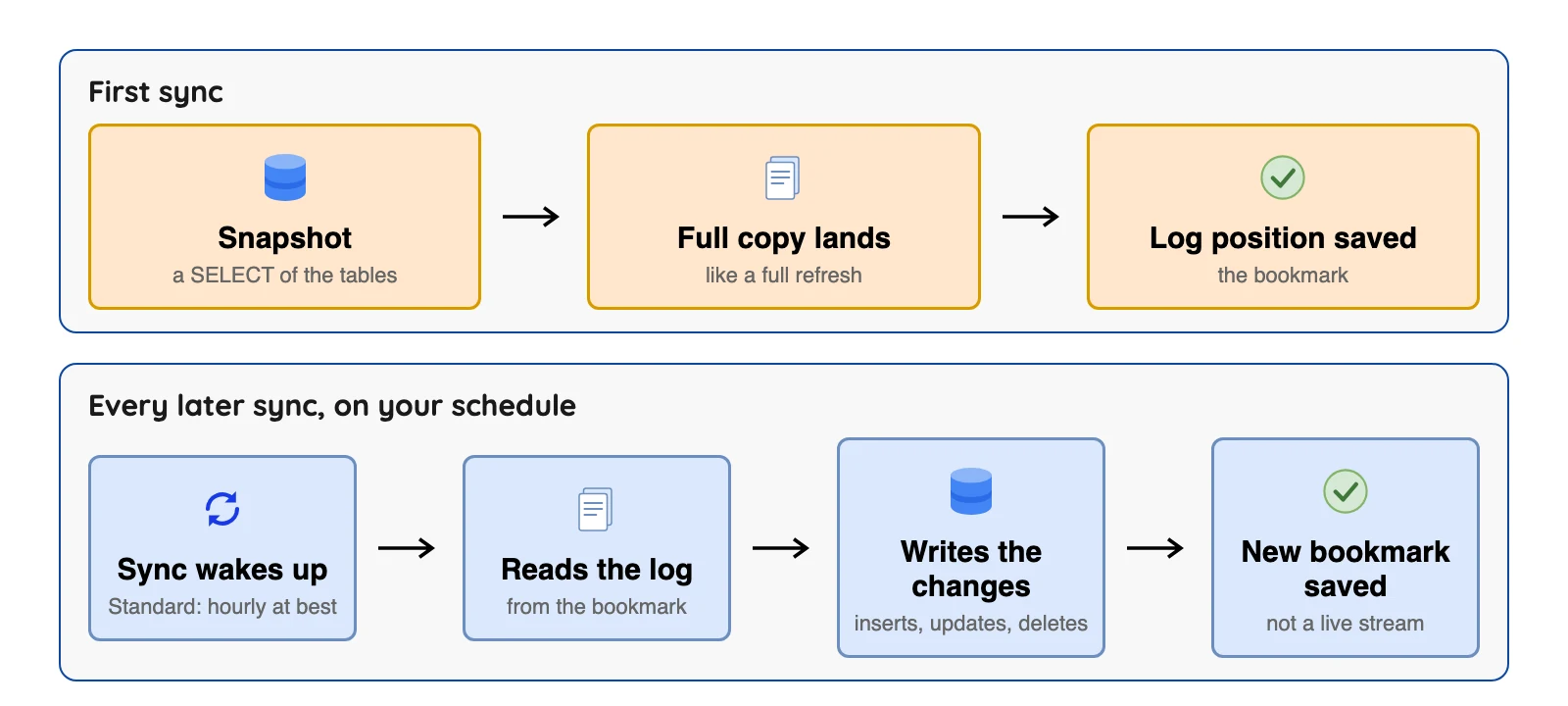
So our read: Airbyte CDC is batch in small steps, not a live stream. On Cloud, Standard syncs run at most every 60 minutes and Plus at most every 15 (checked Oct 2026). The platform docs, as we read them on October 1, 2026, added that data replication isn't ideal when you care a lot about freshness and latency.
Now the fine print. Airbyte's docs list these CDC limits:
- Most sources need a primary key on each table for CDC incremental sync.
- Data must be in tables, not views.
- Airbyte's docs say changes made with TRUNCATE or ALTER "won't appear in logs and therefore in your destination". That's a limit of the connector approach as documented, so check your own source connector's page.
- A new table or collection needs a refresh before CDC tracks it.
- CDC records carry extra columns that start with
_ab_cdc_, such as the time of the change and, for deletes, the time of the delete.
Airbyte tells you to run syncs often enough to consume the logs that are generated, so your schedule is part of the setup. Each source has its own setting for how long it keeps its log. Find that setting and keep your sync interval well inside it.
A worked example: one row, three changes
A quick walk-through makes this less abstract. It's illustrative and follows the behaviour in Airbyte's CDC and sync-mode docs.
Say a table has a primary key id, and the connection reads with CDC and writes with Incremental Append, which keeps every change as a new row. Then three things happen to row 7 between two syncs:
| Step | In the source database | New row in the destination |
|---|---|---|
| 1 | Insert id 7 with status "new" | A row with an _ab_cdc_updated_at time and no _ab_cdc_deleted_at |
| 2 | Update id 7 to status "paid" | A second row for id 7 with a newer _ab_cdc_updated_at |
| 3 | Delete id 7 | A third row with _ab_cdc_deleted_at filled in |
The docs say a sync reads the log from the last saved position up to the sync's start time. So all three changes can land in the same sync, since nothing is read in between.
Switch to Incremental Append + Deduped and Airbyte's sync-mode docs say you get a de-duplicated view that mirrors the source. The CDC docs add that the final table won't show records whose most recent entry is a delete, so id 7 would be absent.
Want to check your own setup? Change one test row three times, then confirm the destination shows what the mode promises.
Can Airbyte write Apache Iceberg?
Apache Iceberg is an open table format that lets many tools read the same files on cheap storage. Airbyte's docs say it can write it.
The S3 Data Lake destination is described as "Airbyte's official support for the Iceberg protocol on S3". The docs list REST (a standard web interface), AWS Glue, Nessie and Polaris as supported catalogs, and a Google Cloud Storage version exists as well.
A catalog is the service that tracks which tables exist and where their files live. The destination is available on Core, Standard, Plus, Pro and Enterprise Flex.
The docs state these limits, and you'll want to read them before you commit:
- The connector never rewrites existing Iceberg data files, so only some schema changes work: adding or removing a column, widening a column, and changing a primary key.
- Objects and unions are written as JSON strings, and Number primary keys become strings.
- Deduplication is merge-on-read. An upsert is written as an equality delete plus an insert.
- If a source emits the same key twice in an attempt, dedup can go wrong. The docs name Stripe and Monday as examples.
- On Cloud with the Glue catalog, IAM-role sign-in must be enabled by an Airbyte team member.
- The page does not describe compaction or snapshot expiry as features. Its only mention of compaction is a warning not to run it during a truncate refresh sync. Compaction merges many small files into fewer big ones, and snapshot expiry removes old table versions. That doesn't prove Airbyte can't do them. So ask who owns both jobs before you commit.
Because dedup writes equality deletes, check that every engine you'll read the table with handles them. And remember Airbyte also writes to warehouses such as Snowflake, BigQuery and Redshift, per its destinations list. Iceberg is one choice among many.
Where Airbyte fits and its limits
The limits, all from its own docs:
- Not real time. CDC is scheduled, and Standard syncs run at most hourly.
- Cloud limits. One connection can sync at most 1,000 streams and 20,000 fields, and a single record can be at most 20 MB, per the Cloud limits page linked above (checked Oct 2026).
- Support depends on the connector. Marketplace connectors have no SLA, and Core support for Airbyte-level connectors is Slack only.
- Cloud bills are hard to predict before a trial. Credits are counted on Airbyte's own data format, and full refresh charges every row.
- Iceberg schema changes are narrow, and compaction and snapshot expiry are not described as features.
- Not a transformation tool. It loads data and leaves the reshaping to dbt or SQL in the destination.
- ELv2 is not open source in the OSI sense. That matters if your legal team has a rule against it, so ask them early.
What Practitioners Say About Airbyte
Public talk about Airbyte is mixed, and most of it is about running it, not about what it does. We quote only text we re-opened on October 1, 2026, and keep the quotes short. These are single voices, not a survey, and some come from review sites where the vendor may invite reviews. Each is one person's view, with its date and link.
- Positive. A reviewer on a G2 review shown on the AWS Marketplace listing (August 2026) wrote that "The open-source nature means we're not locked into a vendor".
- Complaint about reliability. The AWS Marketplace review above also lists "occasional syncing issues or rate-limit errors with third-party APIs, which sometimes need manual troubleshooting", per the listing.
- Iceberg. One user filed a GitHub issue in April 2026, "Creates small files (~4-12 MB) and equality deletes in Incremental", saying both "force mandatory post-sync compaction that takes hours for large tables". The issue is now closed, and it is one report, not a finding about every setup.
The complaints are mostly about running and fixing it, which matches the limits above.
Airbyte compared with alternatives
Here's Airbyte next to seven tools people often weigh it against. Each tool name links to a vendor page that backs most of its row (checked Oct 2026).
| Tool | How you run it | Source licence | Often picked for |
|---|---|---|---|
| Airbyte | Core, Cloud or hybrid | ELv2 (protocol MIT) | Many sources, custom connectors |
| Fivetran | Managed, with Hybrid on top plans | Closed source | Vendor-run loading |
| Hevo | Managed | Closed source | Small teams, event-based tiers |
| Estuary | Public, private or bring-your-own cloud | BSL 1.1, not open source | Streaming and batch together |
| Meltano | You install it | MIT | Code-first Singer pipelines |
| dlt | A Python library, plus a managed runtime from dltHub | Apache 2.0 | Python-first teams |
| Debezium | You run it, on Kafka Connect or as Debezium Server | Apache 2.0 | Change events for developers |
| OLake Go (ours) | You run it with Docker, Helm or the UI | Apache 2.0 | Database changes into Iceberg or Parquet |
Billing differs a lot from tool to tool. Quick difference: dlt is a library you import, not a server you run.
When Replication Is a Fit, in Airbyte's Words
On October 1, 2026, Airbyte's platform page called data replication ideal when you need all your data in one place, need to join across datasets, can accept slower pipelines and want storage. It called it not ideal when you care a lot about freshness and latency, work with a small amount of data, or need side effects such as sending an email.
When we re-checked on October 8, 2026, that list was gone from Airbyte's platform page, which had been rewritten. Read this section as a record of October 1 and check the current docs.
When to pick Airbyte, and when not to
Choose Airbyte if you need:
- Many sources, including SaaS apps and files, per its connector pages.
- Self-hosting or data planes in your own cloud.
- A custom connector you build yourself.
Look at alternatives if you need:
- Changes in seconds, which a scheduled CDC sync doesn't offer.
- A vendor-owned connector, because Marketplace and Custom connectors are yours to test.
- An OSI-approved licence (OLake Go is open source under the Apache License), or Iceberg tables with maintenance the docs describe.
Run a trial on your two or three heaviest sources, read the credits it reports, and check each connector's support level before you commit.
Test your Airbyte basics
Question 1 of 5
In one line, what does Airbyte do?
Frequently asked questions
Q1. What is Airbyte used for?
Q2. Is Airbyte open source?
Q3. Is Airbyte free?
Q4. How many connectors does Airbyte have?
Q5. Does Airbyte support real-time CDC?
Q6. Can Airbyte write Apache Iceberg tables?
Q7. Should I pick Airbyte or Fivetran?
Conclusion
So, what is Airbyte? A tool for copying data into warehouses and lakes, with a long connector list by its own count and a choice between running it yourself and paying Airbyte to run it. Its limits are plain in its own docs: scheduled CDC, connector support that depends on the level, and an Iceberg destination with narrow schema-change rules.
Before you commit, check the licence against your company's rules, test your heaviest sources, and read the support level of each connector you need. Our best data ingestion tools guide compares more options, and database to Iceberg without Kafka covers routes that skip a broker.
OLake Go is free and open source and reads eight source types (Postgres, MySQL, MongoDB, SQL Server, Oracle, Db2, S3 and Kafka). It writes Apache Iceberg or Parquet to storage you control (docs), and it is built for databases, files and streams rather than SaaS apps.