What Is Kafka Connect? A Plain-Language Guide
18 min read
Key takeaways
The short version: Kafka Connect is a free tool inside Apache Kafka that moves data between Kafka and other systems, such as databases, files and search indexes. You describe a job in a settings file, and it runs the job, remembers where it stopped and retries. Fair warning, though.
It does not read database changes by itself, you still run the servers, and by default it stops at the first error. If you only want database changes in Iceberg or Parquet, OLake Go does that without Kafka.
- Kafka Connect is the part of Apache Kafka built for moving large amounts of data in and out of Kafka. The Apache docs call it "a tool for scalably and reliably streaming data between Apache Kafka and other systems".
- The work gets split into connectors (the job), tasks (the helpers that do the copying), workers (the programs that run tasks), converters (data formats) and transforms (small edits to each record).
- You get two modes. Standalone runs in one process and has no fault tolerance. Distributed spreads the work over many workers and, per the docs, adds fault tolerance, so it is the usual choice for production (our reading).
- Kafka Connect doesn't do change data capture (CDC) on its own. A source connector such as Debezium does that part.
- Gaps to plan for: errors stop the job by default, the web interface that controls it is open by default (yes, really), and source exactly-once works only in distributed mode with the right connector.
- To copy PostgreSQL, MySQL and MariaDB, MongoDB or SQL Server into Iceberg or Parquet, OLake Go is a free, open-source route that needs no Kafka.
- The software costs nothing. Running it does, whether that's servers and staff time or a managed service billed by capacity or by task-hour.
Everything below comes from the Apache Kafka 4.3 documentation, Confluent's and AWS's own pages, and a few other vendor pages, all read in October 2026. We didn't install or run Kafka Connect for this guide, so you won't find any test results here. Where a page is silent, we say so.
What is Kafka Connect?
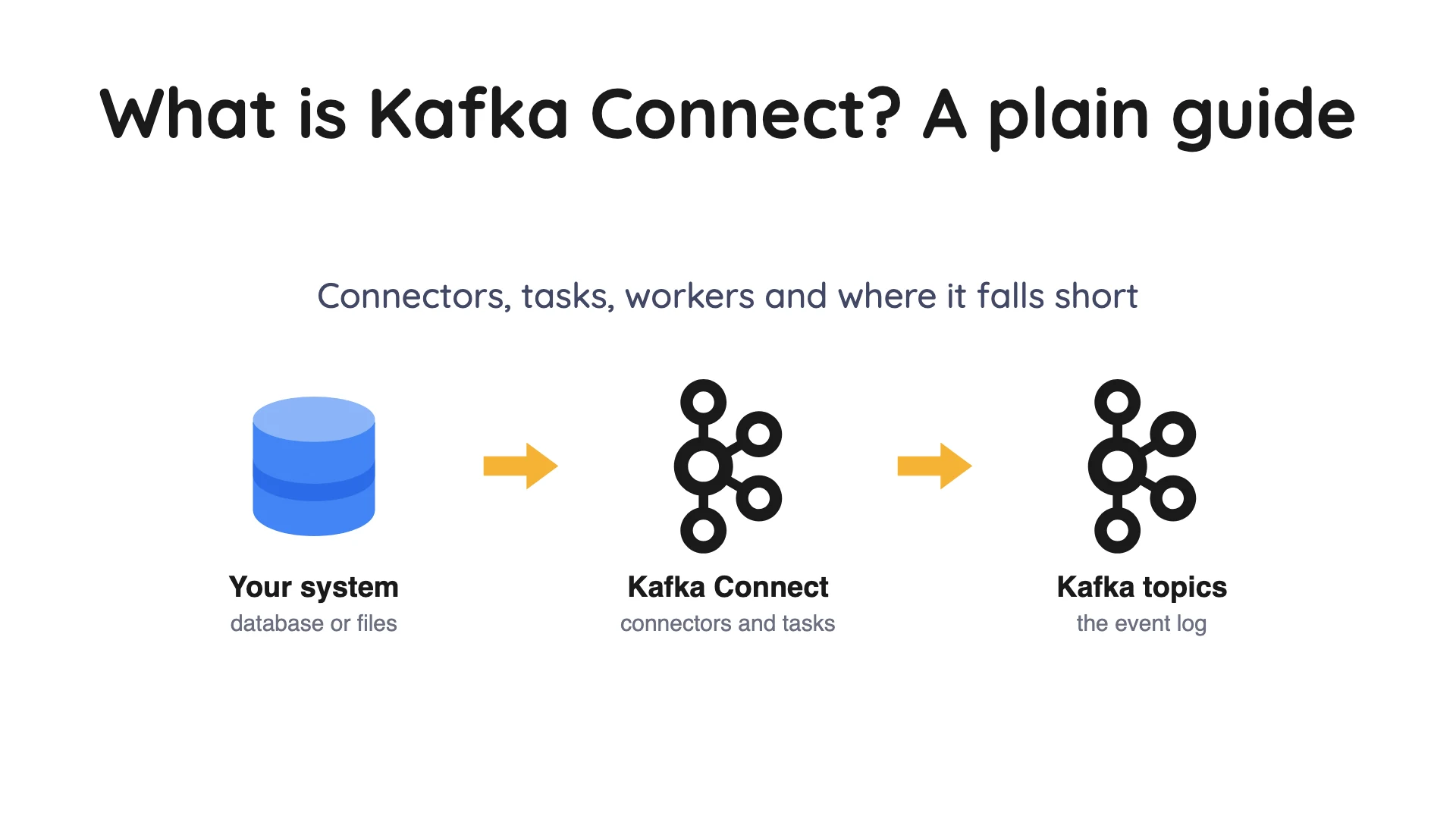
Apache Kafka stores streams of events in named channels called topics, and an event is a small record that something happened, such as an order placed or a row changed. The Kafka intro says you use Kafka Connect "to continuously import and export data as event streams" so Kafka can work with systems such as relational databases.
Picture Kafka as a busy post office. Kafka Connect is the delivery service that carries parcels between the post office and the other buildings in town. It's only an illustration, but it'll help with the parts below.
The Apache docs describe it as a tool "for scalably and reliably streaming data between Apache Kafka and other systems". Confluent, a Kafka vendor, calls it a free, open-source component of Apache Kafka. Kafka itself is licensed under Apache License 2.0 (per the project's GitHub licence file).
So what does it actually do? Two jobs. A source connector brings data into Kafka, and a sink connector sends data out of it.
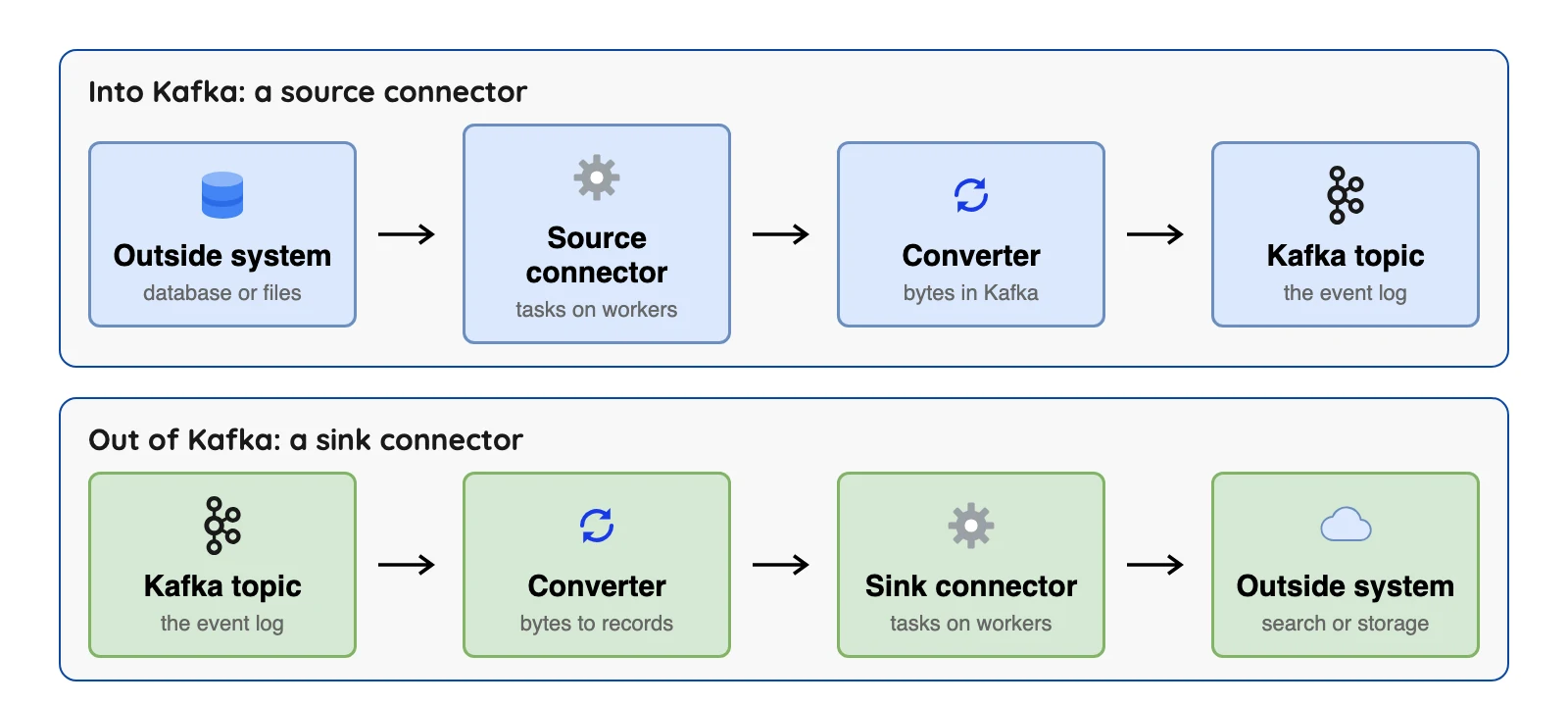
Two features stand out. First, you can submit and manage connectors over the web. REST is a common style for web requests like these, and the Apache docs call it the REST API.
Second, Kafka Connect "can manage the offset commit process automatically", per the Apache overview. An offset is just a bookmark that records how far a job has read, so it can pick up where it stopped.
Why not just write your own code?
You could. A small program that reads a database and sends rows to Kafka sounds like an afternoon's work, but Confluent's course says that to do it properly "you need to be able to account for and handle failures, restarts, logging, scaling out and back down". Kafka Connect, per Confluent, handles those chores, so you don't rebuild them.
There's a second gain. Data loaded into Kafka once can feed several other systems, so you don't write one copy job per target.
Here's the trade. A custom program can do anything, but you own every bug. Connect only does what its connector and settings allow.
How does Kafka Connect work? The six parts
Kafka Connect has a handful of terms that sound alike. This table gives each one in plain words, using Confluent's concepts documentation and the Apache user guide.
| Part | Plain meaning | What the docs say |
|---|---|---|
| Connector | The job: which system to link to Kafka and how | "The high level abstraction that coordinates data streaming by managing tasks" |
| Task | The unit that does the copying | "The implementation of how data is copied to or from Kafka" |
| Worker | The program that runs connectors and tasks | Two types: standalone and distributed |
| Converter | Turns bytes in Kafka into records Connect understands, and back | Set per worker (a connector can override it), so any connector can use JSON or Avro |
| Transform | A small edit to each record on its way through | "A simple function that accepts one record as an input and outputs a modified record" |
| Dead letter queue | A side topic for records that failed | Only for sink connectors, per Confluent |
Tasks keep no memory of their own. Confluent says a task's state lives in special Kafka topics, so a task can be restarted on another worker.
When a connector is first submitted, Confluent says the workers share the connectors and tasks out so each worker has about the same amount of work. If a worker joins or leaves, the sharing happens again.
You choose how many tasks a connector may use with the tasks.max setting. The Apache user guide says it is "the maximum number of tasks that should be created", and the connector "may create fewer tasks if it cannot achieve this level of parallelism". So more tasks don't always mean more speed.
A worked example from the Apache docs
Enough theory, so here's what a job really looks like. The Apache user guide shows a small one that reads a text file and adds a field, and we trimmed it a little. It uses the built-in file source connector and two built-in transforms.
name=local-file-source
connector.class=FileStreamSource
tasks.max=1
file=test.txt
topic=connect-test
transforms=MakeMap, InsertSource
transforms.MakeMap.type=org.apache.kafka.connect.transforms.HoistField$Value
transforms.MakeMap.field=line
transforms.InsertSource.type=org.apache.kafka.connect.transforms.InsertField$Value
transforms.InsertSource.static.field=data_source
transforms.InsertSource.static.value=test-file-source
Without the transforms, the docs show each line of the file arriving as plain text, such as "foo". With them, each line turns into {"line":"foo","data_source":"test-file-source"}.
Read it top to bottom. connector.class picks the connector, tasks.max=1 allows one task, and topic names where the records go. The transforms lines wrap each line in a field called line, then stick on a label saying where the record came from.
Notice that nobody wrote code, only settings. Confluent's course says the same: "using it requires no programming. It's completely configuration-based".
Standalone mode or distributed mode
You'll hit this choice on day one. Per the Apache user guide, Kafka Connect "currently supports two modes of execution: standalone (single process) and distributed". The differences start to matter the moment you leave a laptop.
| Standalone | Distributed | |
|---|---|---|
| Where work runs | One process | Many workers that share the work |
| Fault tolerance | "Does not benefit" from it, per the docs | Yes, "both in the active tasks and for configuration and offset commit data" |
| Scaling | Limited to the one process | Scale up or down by adding or removing workers |
| Where offsets are kept | A local file (offset.storage.file.filename) | Kafka topics |
| How connectors are created | A properties file on the command line, or the REST API | The REST API |
| Source exactly-once | Not available | Available, if the connector supports it |
| Fits (our reading) | One worker only, such as collecting log files (the docs' example) | Production use |
The right-hand cell of the last row is our reading. The docs say standalone is simpler to start and suits cases "where only one worker makes sense", and that distributed adds fault tolerance and scaling.
In distributed mode, Kafka Connect keeps its own settings, offsets and task status in three Kafka topics. The Apache docs name them config.storage.topic, offset.storage.topic and status.storage.topic, and the guide gives separate advice on partitions and compaction for each.
The REST server listens on port 8083 over HTTP by default when no listeners are set. Through it you can create, pause and delete connectors, and check a connector's status. Remember that port, because we'll come back to it.
What is Kafka Connect used for?
Confluent's course and docs describe these jobs.
| Use | How Kafka Connect does it |
|---|---|
| Load a database into Kafka | A source connector reads tables and writes records to topics |
| Capture database changes | A CDC source connector such as Debezium reads the change log |
| Send Kafka data to search or storage | A sink connector writes topics to an index, a file store or a table |
| Keep systems apart | Kafka sits between them, so each can change on its own |
| Reuse one feed | Data loaded once can go to several sinks |
Confluent's Java Database Connectivity (JDBC) source connector works by "periodically executing a SQL query". In its incrementing mode it "can only detect new rows. Updates to existing rows cannot be detected".
That's polling the table, not reading the change log. Its page also lists the Confluent Community License rather than Apache 2.0.
The change data capture (CDC) row is the one people get wrong. CDC means catching each insert, update and delete in a database as it happens. Kafka Connect only supplies the frame that runs a CDC connector.
Debezium is the CDC connector set this guide keeps coming back to. The Debezium docs describe running it on Kafka Connect as the most common of its three ways to run.
Debezium's maintainers wrote on May 22, 2026 that Kafka Connect is "one deployment model, not a requirement".
The Apache Iceberg project documents its own Kafka Connect sink for Iceberg tables.
Where Kafka Connect falls short
These come from the documentation, not from our own testing.
It stops at the first error by default
One bad record, and the whole job stops. The Apache docs say connectors by default exhibit "fail fast" behavior immediately upon an error. That means errors.tolerance=none, retries off (errors.retry.timeout=0) and no dead letter queue.
Good news, you can change it. Set errors.tolerance=all and name a topic with errors.deadletterqueue.topic.name, and failed records go there instead.
Here's the catch. Confluent says dead letter queues "are only applicable for sink connectors", so a source connector that can't read a row has no such shelf.
The REST API is open by default
This is the one most explainers skip, and it's the one we'd read twice. The Apache Security section says Connect "allows running custom plugins" that "can run arbitrary code", so you must trust them before you install them.
It also says "By default, the REST API is unsecured and allows anyone that can access it to start and stop connectors". Expose it only to trusted users, the docs warn, or it is "easy to gain arbitrary code execution on Connect workers".
There's a change coming. Since Kafka 4.2.0 the docs recommend setting connector.client.config.override.policy to Allowlist, and they say it becomes the default from Kafka 5.0.0.
Exactly-once has conditions
Exactly-once sounds simple: each record is delivered one time, with no repeats and no gaps. In practice, the Apache docs say source exactly-once "is currently only available in distributed mode".
You must also set exactly.once.source.support to enabled on every worker. An existing cluster needs two rolling upgrades to switch it on, and the connector itself must be built to support it.
For sinks, the worker's consumer must ignore records from aborted transactions (consumer.isolation.level=read_committed), and again the connector must support it. Our read: "exactly-once" depends on the connector you pick, not on Kafka Connect alone.
Transforms are light
Don't expect miracles here. The Apache docs call transforms "lightweight message-at-a-time modifications", and the user guide lists 15 built in, such as Cast, Filter, Flatten, MaskField and RegexRouter.
Because each one sees a single record, work that needs several records at once, such as joining two streams, belongs in another tool. That's our reading of "message-at-a-time", not a statement in the docs.
Connector quality and counts vary
Connectors are separate plug-ins, and the Apache docs give no count of them. Confluent's Cloud docs list "100+ fully managed Apache Kafka connectors", and its product page says 120+ pre-built connectors, which includes more kinds.
A Redpanda guide from April 2026 says there are "fewer than 20 different types of connectors". We could not reconcile that with Confluent's lists, so check the list for the exact system you need.
You still run the system
Free software, not free running. Kafka Connect needs a Kafka cluster and workers, and someone has to patch, size and watch them.
Or let someone else run it. The next section shows who can.
Who runs Kafka Connect: yourself, AWS, Confluent or Aiven
Here's a question that decides a lot: who gets the pager? You can run the workers yourself, or pay a service to run them. AWS's hosted Kafka is called Amazon Managed Streaming for Apache Kafka (MSK).
The paths below differ in who does the work and in what the bill counts.
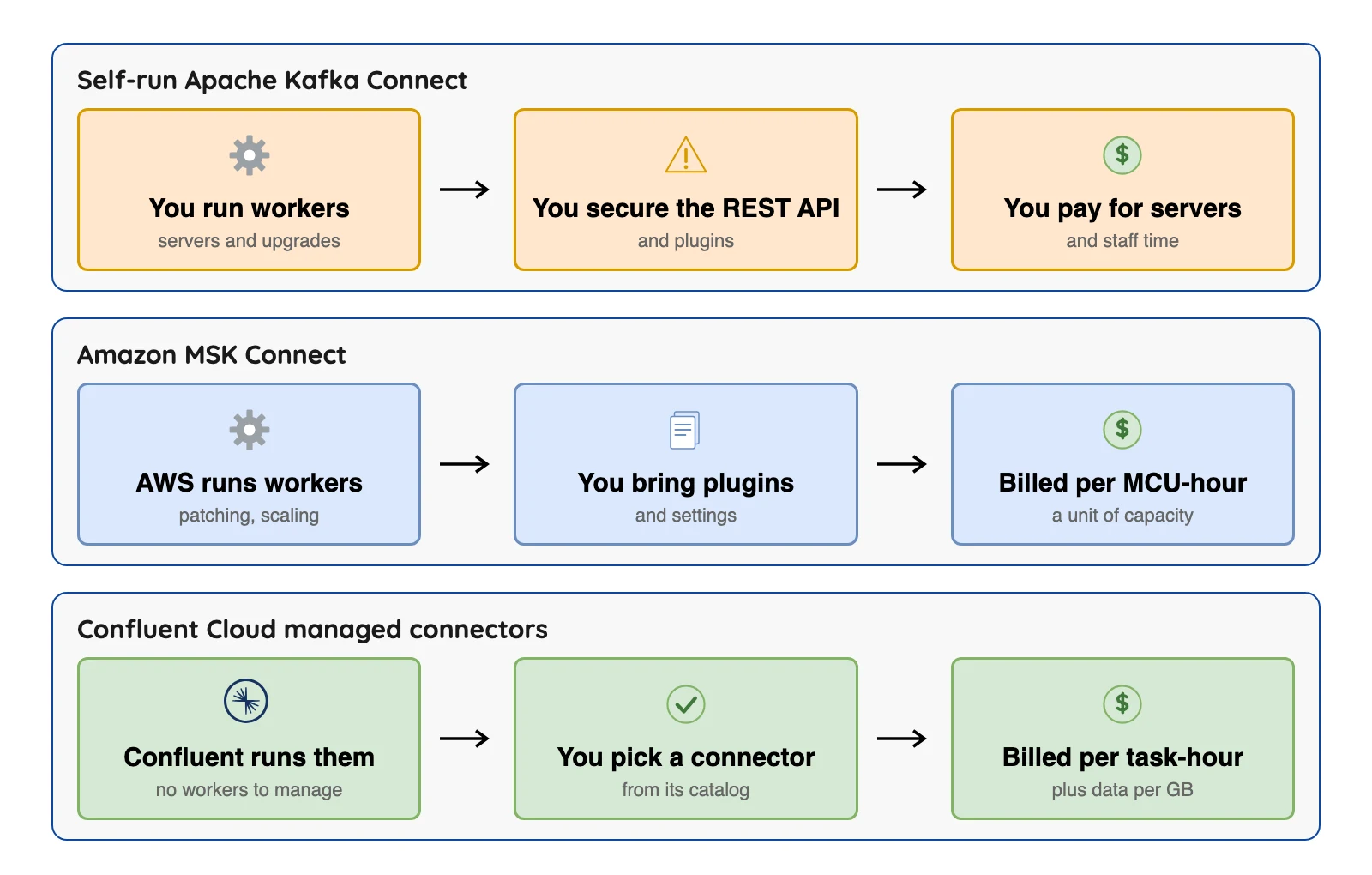
| Option | Who runs the workers | What you pay for | Price shown on the vendor's page |
|---|---|---|---|
| Self-run Apache Kafka Connect | You | Your servers and staff time | No licence fee |
| Amazon MSK Connect | AWS | MSK Connect Units (MCUs) per hour | $0.11 per MCU-hour in AWS's worked example (US East, N. Virginia; checked Oct 2026); one MCU is 1 vCPU and 4 GB of memory |
| Confluent Cloud managed connectors | Confluent | Task-hours plus data moved | $0.104 to $0.2083 per task-hour for the PostgreSQL and MySQL CDC (Debezium) connectors, $0.025 per GB (checked Oct 2026); varies by region; these original connectors are end of life, see below |
| Aiven for Apache Kafka Connect | Aiven | Not checked for this guide | Not checked |
One thing in that table needs a flag. Confluent's connector list marks the older PostgreSQL, MySQL and SQL Server change data capture connectors built on Debezium as end of life since March 31, 2026, with new connections not allowed.
That comes from its connector overview. Its price page still shows them, so check which version you'd get.
Plans change often, so confirm on the vendor's page before you decide.
AWS says MSK Connect uses Kafka Connect versions 2.7.1 or 3.7.x, can restart failed tasks and can autoscale. That's older than the 4.3 line the Apache docs now show, so check what your connector needs.
Confluent says its fully managed connectors have "no infrastructure to manage". Its price page also lists some CDC connectors as "Contact us", with no public rate.
Aiven describes its service as a managed Kafka Connect "deployable in the cloud of your choice". We didn't read its price, so we can't say how it compares.
Choose by situation:
- MSK Connect if you are already on AWS MSK and want AWS to run the workers.
- Confluent managed connectors if you want its list of 100+ connectors, by its own account.
- Self-run if you have Kafka skills and want no per-hour fee.
Where each option fits
You do not always need Kafka Connect. This table shows where it fits and where something else does.
| Your situation | Fits | Why |
|---|---|---|
| You already run Kafka and must connect many systems | Kafka Connect | Settings only, shared offsets and retries, many ready-made connectors |
| You want database changes but run no Kafka | Debezium Server or the Debezium Engine | Debezium's docs say the engine can skip Kafka brokers and Kafka Connect |
| You want database changes in Iceberg or Parquet and run no Kafka | OLake Go (ours) | Reads Postgres, MySQL and MariaDB, MongoDB or SQL Server changes after a full load |
| You must join, count or reshape streams | A stream processing tool such as Apache Flink or Kafka Streams | Connect transforms see one record at a time |
| You want a hosted pipeline and no cluster | A managed data movement service | Someone else runs and watches it |
| One odd system with no connector | A custom connector or a small consumer app | Connect has a developer guide, but you own the code |
If all you want is to copy one database, Kafka may be an extra step you don't need. OLake Go (Apache 2.0, free) reads Postgres, MySQL, MongoDB or SQL Server changes straight into Apache Iceberg or Parquet with no Kafka (our docs).
Test your Kafka Connect basics
Question 1 of 5
In the post office picture, Kafka is the post office. What is Kafka Connect?
FAQ
Q1. What is Kafka Connect in simple terms?
Q2. Is Kafka Connect free?
Q3. Is Kafka Connect the same as Debezium?
Q4. What is the difference between a connector and a task?
Q5. Do I need Kafka to use Kafka Connect?
Q6. Should I use standalone or distributed mode?
Q7. Can Kafka Connect write to Apache Iceberg?
Conclusion
Kafka Connect moves data in and out of Kafka without writing code. Before you pick it, ask three questions: who will run the workers, who can reach the REST API, and what does the connector for your system do when it hits an error? Our read: those answers decide your cost more than the software does. If the goal is database tables in Iceberg or Parquet, compare database to Iceberg without Kafka and best data ingestion tools.