
 Twitter
 LinkedIn
 Facebook
 Email
Email
Overview
In addition to MySQL, OLake also supports MariaDB flavor as CDC source. It supports multiple sync modes and offers features like parallel chunking, checkpointing, and automatic resume for failed full loads. This connector can be used within the OLake UI or run locally via Docker for open-source workflows.
Sync Modes Supported
- Full Refresh
- Full Refresh + CDC
- CDC Only
- Full Refresh + Incremental
Prerequisites
Version Prerequisites
MySQL Version: MySQL 5.7+
CDC Prerequisite
-
Binary Logging (Required):
- log_bin=ON
- binlog_format=ROW
- binlog_row_image=FULL
- binlog_row_metadata=FULL
- gtid_mode=ON
-
Server Config: Set unique server-id.
-
Access & Permissions: REPLICATION SLAVE, REPLICATION CLIENT, and SELECT privileges.
-
For detailed setup for different MySQL environments, see the guides in the section below.
Connection Prerequisites
- Read access to the tables for the MySQL user.
After initial Prerequisites are fulfilled, the configurations for MySQL can be configured.
Configuration
- Use Olake UI for MySQL
- Use OLake CLI for MySQL
1. Navigate to the Source Configuration Page
- Complete the OLake UI Setup Guide
- After logging in to the OLake UI, select the
Sourcestab from the left sidebar. - Click
Create Sourceon the top right corner. - Select MySQL from the connector dropdown
- Provide a name for this source.
2. Provide Configuration Details
-
Enter MySQL credentials.
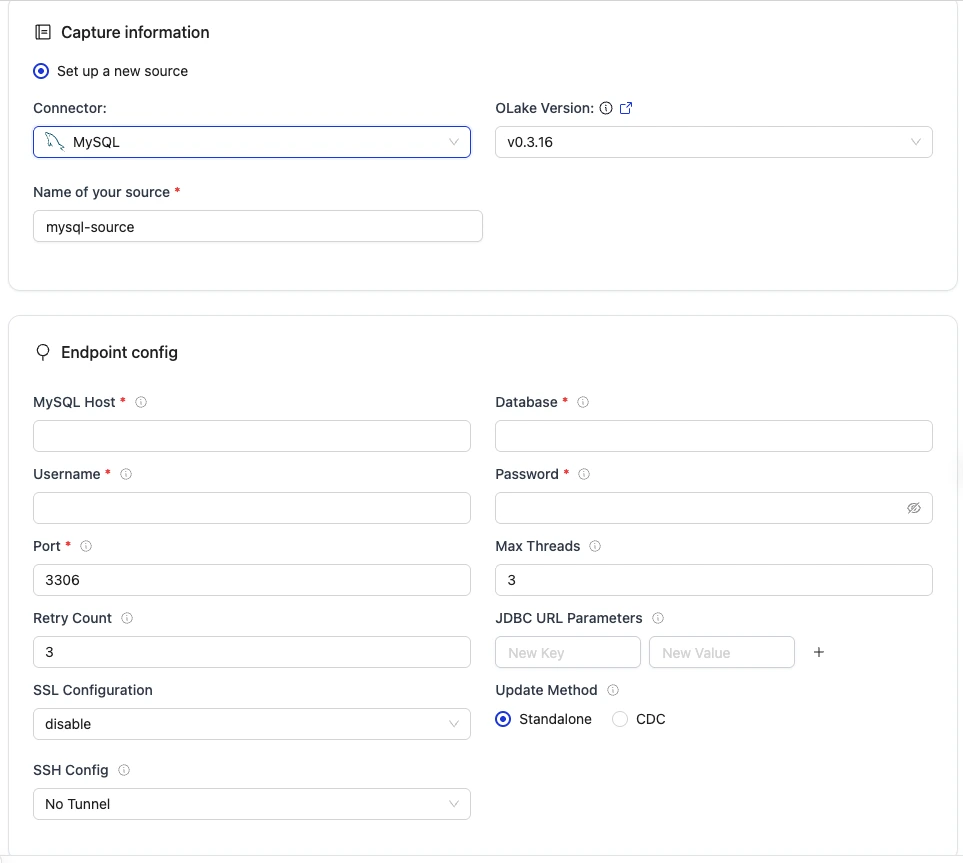
| Field | Description | Example Value |
|---|---|---|
MySQL Host required | List of database host addresses to connect to. | mysql-host |
Username required | Username for authenticating with the database. | mysql-user |
Password required | Password for the database user. | mysqlpwd |
| Database | Name of the target database to use. | mysql-db |
Port required | Port number on which the database server is listening. | 3306 |
| Update Method |
| CDC |
| Initial Wait Time | Maximum duration in seconds to wait before considering the binlog syncer idle. | 0 |
| Skip TLS Verification | Indicates whether to skip TLS certificate verification. | false |
| Max Threads | Maximum number of parallel threads for processing or syncing data. | 3 |
| Backoff Retry Count | Number of retry attempts for establishing sync with exponential backoff. | 3 |
| SSH Config | Configure OLake to connect through an SSH tunnel. See SSH Config details for the list of supported parameters. |
|
| SSL Configuration | SSL configuration for the database connection. Contains details such as the SSL mode. | disable |
| JDBC URL Parameters | Extra JDBC URL parameters for fine-tuning the connection. | {"connectTimeout":"10000"} |
3. Test Connection
-
Once the connection is validated, the MySQL source is created. Jobs can then be configured using this source.
-
In case of connection failure, refer to the Troubleshooting section.
1. Create Configuration File
- Once the OLake CLI is set up, create a folder to store configuration files such as
source.jsonanddestination.json.
The source.json file for MySQL must contain these mandatory fields.
2. Provide Configuration Details
An example source.json file will look like this:
    {
        "hosts": "mysql-host",
        "username": "mysql-user",
        "password": "mysqlpwd",
        "database": "my-db",
        "port": 3306,
        "tls_skip_verify": true,
        "update_method": {
          "initial_wait_time": 10
        },
        "max_threads": 5,
        "backoff_retry_count": 4,
        "ssh_config": {
          "host": "my-tunnel-host",
          "port": 22,
          "username": "my-tunnel-user",
          "password": "tunnel-password"
        },
        "ssl": {
          "mode": "disable"
        },
        "jdbc_url_params": {
          "connectTimeout": "10000"
        }
    }
    ```
| Field | Description | Example Value | Type |
|---|---|---|---|
hosts required | List of database host addresses to connect to. | "mysql-host" | string |
username required | Username for authenticating with the database. | "mysql-user" | string |
password required | Password for the database user. | "mysqlpwd" | string |
| database | Name of the target database to use. | "my-db" | string |
port required | Port number on which the database server is listening. | 3306 | integer |
update_method required for CDC | Required for CDC sync configuration. | {"initial_wait_time": 120} | object |
initial_wait_time required for CDC | Maximum duration in seconds to wait before considering the binlog syncer idle. | 10 | integer |
| tls_skip_verify | Indicates whether to skip TLS certificate verification. | false | bool |
| max_threads | Maximum number of parallel threads for processing or syncing data. | 3 | integer |
| backoff_retry_count | Number of retry attempts for establishing sync with exponential backoff. | 3 | integer |
| ssh_config | Configure OLake to connect through an SSH tunnel. See SSH Config details for parameter descriptions. | {"host": "my-tunnel-host", "port": 22 , "username": "my-tunnel-user", "password": "tunnel-password"} | object |
| ssl | SSL configuration for the database connection. Contains details such as the SSL mode. | {"mode": "disable"} | object |
| jdbc_url_params | Extra JDBC URL parameters for fine-tuning the connection. | {"connectTimeout":"10000"} | object |
Similarly, destination.json file can be created inside this folder. For more information, see destination documentation.
3. Check Source Connection
To verify the database connection following command needs to be run:
docker run --pull=always \
-v "[PATH_OF_CONFIG_FOLDER]:/mnt/config" \
olakego/source-mysql:latest \
check \
--config /mnt/config/source.json
-
If OLake is able to connect with MySQL
{"connectionStatus":{"status":"SUCCEEDED"},"type":"CONNECTION_STATUS"}response is returned. -
In case of connection failure, refer to the Troubleshooting section.
Data Type Mapping
| MySQL Data Types | Destination Data Type |
|---|---|
| int, int unsigned, mediumint, mediumint unsigned, smallint, smallint unsigned, tinyint, tinyint unsigned | int |
| bigint, bigint unsigned | bigint |
| float, decimal(10,2) | float |
| double, double precision, real | double |
| datetime, timestamp | timestamptz |
| char, varchar, text, tinytext, mediumtext, longtext, enum, json, bit(1), time | string |
OLake always ingests timestamp data in UTC format, independent of the source timezone.
Date and Time Handling
During transfer, values in date, time, and timestamp columns are modified to ensure valid calendar ranges and destination compatibility.
- Case I (Year 0000):
Source dates with year0000are not valid in most destinations, so we change them to the epoch start date.
Example:0000-05-10 → 1970-01-01 - Case II (Year > 9999):
Extremely large years are capped at9999. The month and date are not affected.
Examples:10000-03-12 → 9999-03-12 - Case III (Invalid month/day):
When the month or day exceeds valid ranges (i.e. month > 12 or day > 31), or the combined date is invalid, the value is replaced with the epoch start date.
Examples:2024-13-15 → 1970-01-01,2023-04-31 → 1970-01-01
These rules apply to date, time, and timestamp columns during transfer.
Troubleshooting
1. Failed to Get Current Binlog Position
Cause: Binary logging not enabled, wrong format, or insufficient privileges.
Fix:
- Ensure binary logging is enabled:
SHOW VARIABLES LIKE 'log_bin'; // Should return `ON`
- Ensure row-based logging:
SHOW VARIABLES LIKE 'binlog_format'; // Should return `ROW`.
- Grant required privileges:
GRANT REPLICATION CLIENT, REPLICATION SLAVE ON *.* TO 'your_user'@'%';
2. Idle Timeout Reached, Exiting Binlog Syncer
- Cause: No new changes within the configured
initial_wait_time. - Fix: Increase
initial_wait_timein the connector configuration or verify data changes in the source database.
3. Column Count Mismatch: Expected X, Got Y
- Cause: Table schema changed after CDC started or incomplete binlog metadata.
- Fix:
- Ensure full binlog metadata:
Should returnSHOW VARIABLES LIKE 'binlog_row_metadata';FULL. To set it:UpdateSET GLOBAL binlog_row_metadata = 'FULL';my.cnformy.inifor persistence.- Restart the connector after schema changes.
4. Failed to Get or Split Chunks
-
Cause: Table stats not populated or table contains 0 records.
-
Fix: Run the following query to populate table statistics:
ANALYZE TABLE <namespace>.<table_name>;
5. Failed to Load MySQL Timezone Location
- Cause: If you see the log message
failed to load mysql timezone location %s, falling back to UTC. Set jdbc_url_params.time_zone to override: %s, it indicates that the MySQL timezone could not be loaded properly. This often occurs when timezone abbreviations (like 'IST') are used, which can lead to inconsistencies since multiple regions share the same short name (e.g., India, Israel, Ireland). - Fix:
-
First, check the current timezone settings:
SELECT @@session.time_zone, @@global.time_zone, @@system_time_zone;If any of these returns IST or another abbreviation, this can cause inconsistency issues.
-
Option 1 (Set via JDBC using IANA timezone name):
- Use IANA timezone names (e.g.,
Asia/Kolkata) instead of abbreviations. Set this in the JDBC URL parameters:{
"jdbc_url_params": {
"time_zone": "Asia/Kolkata"
}
} - Verify that IANA timezones are available in your database:
If this returns
SELECT count(*) FROM mysql.time_zone_name;0, the timezone tables are not present. In this case you should use Option 2 instead.
- Use IANA timezone names (e.g.,
-
Option 2 (Use timezone offset):
- If IANA timezone names are not available in your environment, use a fixed offset instead:
{
  "jdbc_url_params": {
    "time_zone": "+05:30"
  }
}
- If IANA timezone names are not available in your environment, use a fixed offset instead:
-
If the issue is not listed here, post the query on Slack to get it resolved within a few hours.
Changelog
| Date of Release | Version | Description |
|---|---|---|
| 27 August 2025 | 0.1.11 | override default timeout in Discover |