Overview
In addition to MySQL, OLake Go also supports MariaDB flavor as CDC source. It supports multiple sync modes and offers features like parallel chunking, checkpointing, and automatic resume for failed full loads. This connector can be used within the OLake UI or run locally via Docker for open-source workflows.
Sync Modes Supported
- Full Refresh
- Full Refresh + CDC
- CDC Only
- Full Refresh + Incremental
Prerequisites
Version Prerequisites
MySQL Version: MySQL 5.7+
CDC Prerequisite
-
Binary Logging (Required):
-
log_bin=ON
-
binlog_format=ROW
-
binlog_row_image=FULL
-
binlog_row_metadata=FULL
-
Optional (enables microsecond precision for
_cdc_timestampcolumn generated by OLake Go, by default it is seconds-precision timestamp):- enforce_gtid_consistency=ON (must be set before
gtid_mode) - gtid_mode=ON
RequirementMySQL 8.0.1 or higher for microsecond-precision timestamp support
- enforce_gtid_consistency=ON (must be set before
-
-
Server Config: Set unique server-id.
-
Access & Permissions: REPLICATION SLAVE, REPLICATION CLIENT, and SELECT privileges.
-
For detailed setup for different MySQL environments, see the guides in the section below.
Connection Prerequisites
- Read access to the tables for the MySQL user.
After initial Prerequisites are fulfilled, the configurations for MySQL can be configured.
Configuration
- Use OLake UI for MySQL
- Use OLake CLI for MySQL
1. Navigate to the Source Configuration Page
- Complete the OLake UI Setup Guide
- After logging in to the OLake UI, select the
Sourcestab from the left sidebar. - Click
Create Sourceon the top right corner. - Select MySQL from the connector dropdown
- Provide a name for this source.
2. Provide Configuration Details
- Enter MySQL credentials.
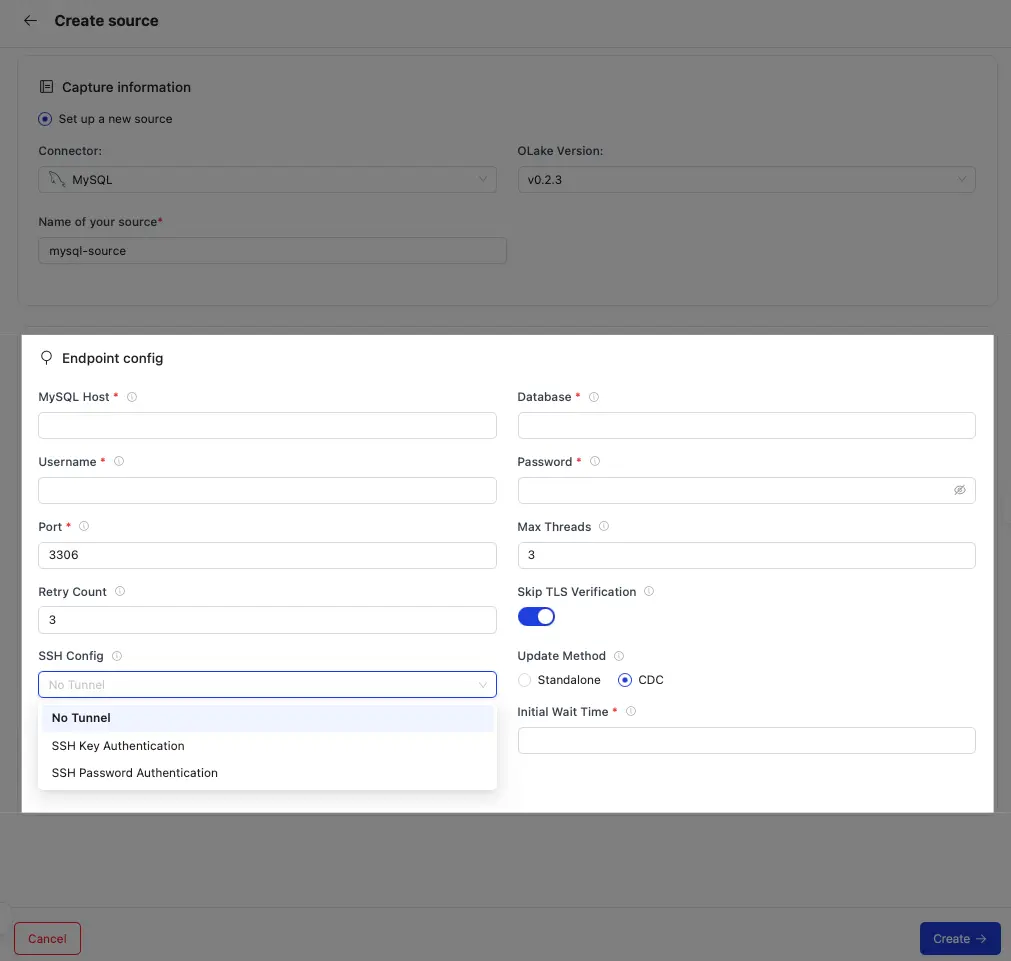
Change data capture (CDC)
| Field | Description | Example Value |
|---|---|---|
| Enable CDC | Enables change data capture to sync like inserts, updates, and deletes. When enabled, CDC-specific fields appear below. When disabled, supports only Full Refresh and Incremental sync modes. | Enabled (default) |
| Initial Wait Time | Maximum duration in seconds to wait before considering the binlog syncer idle. | 10 |
Connection details
| Field | Description | Example Value |
|---|---|---|
MySQL Host required | List of database host addresses to connect to. | mysql-host |
| Database | Name of the target database to use. | mysql-db |
Username required | Username for authenticating with the database. | mysql-user |
Password required | Password for the database user. | mysqlpwd |
Port required | Port number on which the database server is listening. | 3306 |
| JDBC URL Parameters | Extra JDBC URL parameters for fine-tuning the connection. | {"connectTimeout":"10000"} |
| SSL Configuration | Defines whether the connection to the database is encrypted over TLS/SSL. Needed to meet security requirements and connect to databases that do not allow plain-text traffic. |
|
| Skip TLS Verification | Indicates whether to skip TLS certificate verification. | false |
Additional configuration
| Field | Description | Example Value |
|---|---|---|
| Max Threads | Maximum number of parallel threads for processing or syncing data. | 3 |
| Backoff Retry Count | Number of retry attempts for establishing sync with exponential backoff. | 3 |
| SSH Config | Configure OLake Go to connect through an SSH tunnel. |
|
3. Test Connection
-
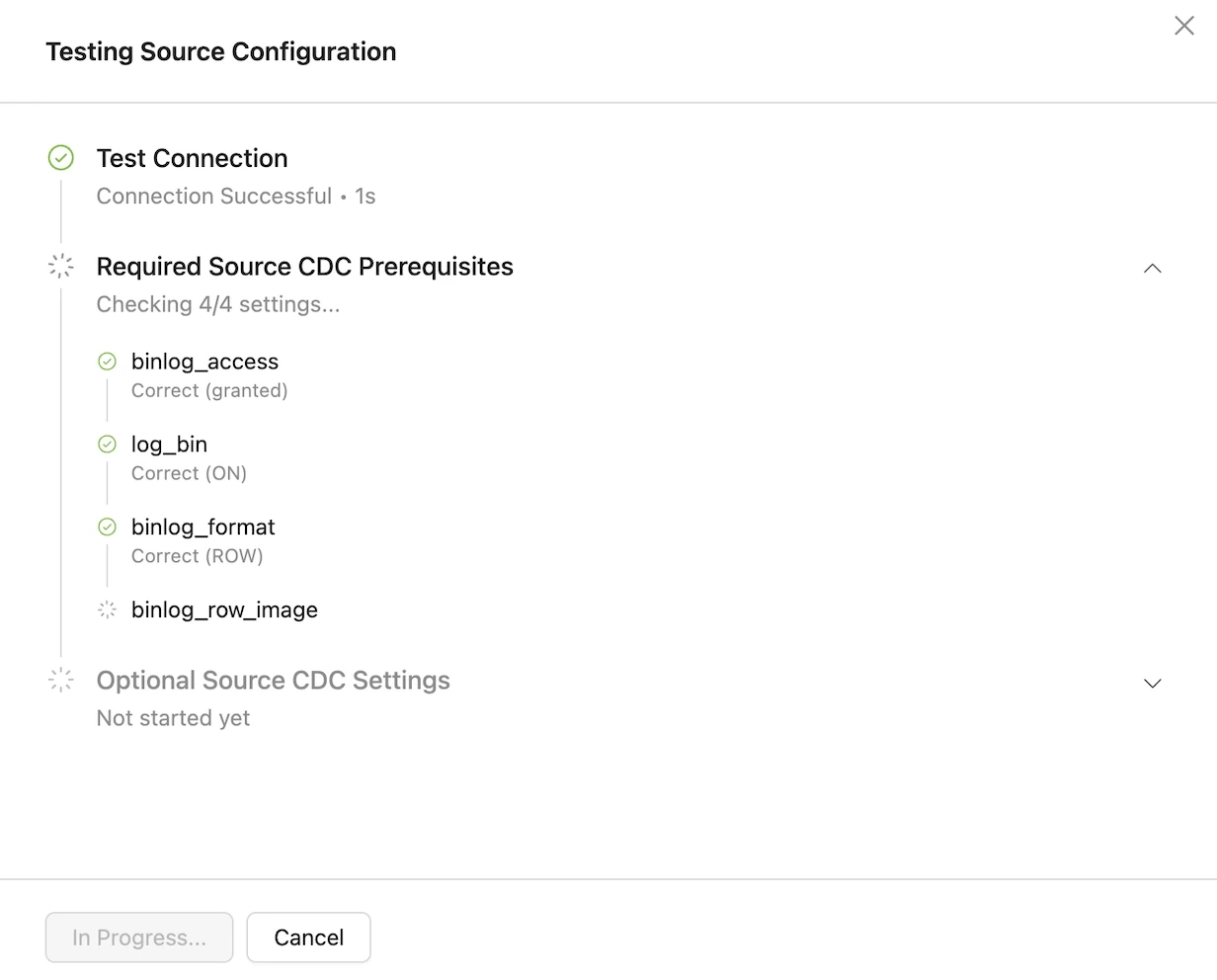
Click Set up source to validate the configuration. The test performs three checks:
-
Connection validation: Verifies that OLake Go can reach the MySQL server using the provided host, port, credentials, and SSL settings.
-
Required CDC prerequisites validation (when CDC is enabled): Evaluates required server-side settings to ensure reliable CDC operation:
binlog_access: User must have binlog read privilegeslog_bin: Binary logging must be enabledbinlog_format: Must be set toROWbinlog_row_image: Must be set toFULL
-
Optional CDC prerequisites validation (when CDC is enabled): Evaluates optional server-side settings:
binlog_row_metadata: Binlog row metadata should be set toFULLbinlog_retention: Binlog retention must be sufficient for expected sync pauses
-
-
If any required check fails, the test connection will show the current and recommended values. Fix the server-side settings and retry the connection.
-
If any optional check fails, the test connection will show the current and recommended values. You can fix the server-side settings and retry, or continue and create the source without making changes.
-
If all checks pass, the MySQL source is created successfully. Jobs can then be configured using this source.
-
In case of connection failure, refer to the Troubleshooting section.
1. Create Configuration File
- Once the OLake CLI is set up, create a folder to store configuration files such as
source.jsonanddestination.json.
The source.json file for MySQL must contain these mandatory fields.
2. Provide Configuration Details
An example source.json file will look like this:
    {
        "hosts": "mysql-host",
        "username": "mysql-user",
        "password": "mysqlpwd",
        "database": "my-db",
        "port": 3306,
        "tls_skip_verify": true,
        "update_method": {
          "initial_wait_time": 10
        },
        "max_threads": 5,
        "backoff_retry_count": 4,
        "ssh_config": {
          "host": "my-tunnel-host",
          "port": 22,
          "username": "my-tunnel-user",
          "password": "tunnel-password"
        },
        "ssl": {
          "mode": "disable"
        },
        "jdbc_url_params": {
          "connectTimeout": "10000"
        }
    }
| Field | Description | Example Value | Type |
|---|---|---|---|
hosts required | List of database host addresses to connect to. | "mysql-host" | STRING |
username required | Username for authenticating with the database. | "mysql-user" | STRING |
password required | Password for the database user. | "mysqlpwd" | STRING |
| database | Name of the target database to use. | "my-db" | STRING |
port required | Port number on which the database server is listening. | 3306 | INTEGER |
update_method required for CDC | Required for CDC sync configuration. | {"initial_wait_time": 120} | OBJECT |
initial_wait_time required for CDC | Maximum duration in seconds to wait before considering the binlog syncer idle. | 10 | INTEGER |
| tls_skip_verify | Indicates whether to skip TLS certificate verification. | false | BOOLEAN |
| max_threads | Maximum number of parallel threads for processing or syncing data. | 3 | INTEGER |
| backoff_retry_count | Number of retry attempts for establishing sync with exponential backoff. | 3 | INTEGER |
| ssh_config | Configure OLake Go to connect through an SSH tunnel. | {"host": "my-tunnel-host", "port": 22 , "username": "my-tunnel-user", "password": "tunnel-password"} | OBJECT |
| ssl* | Defines whether the connection to the database is encrypted over TLS/SSL. Needed to meet security requirements and connect to databases that do not allow plain-text traffic. |
| OBJECT |
| jdbc_url_params | Extra JDBC URL parameters for fine-tuning the connection. | {"connectTimeout":"10000"} | OBJECT |
* See SSL Mode Details below for supported modes and example configurations. The following SSL modes are supported: No TLS/SSL encryption. Suitable for databases that allow plain-text connections. Example Configuration: Encrypted connection without certificate verification. Example Configuration: Encrypted connection with CA certificate verification. Example Configuration: Encrypted connection with CA and hostname verification. Example Configuration: SSL Mode Details
SSL Mode
1. Disable
disable2. Require
require3. Verify-CA
verify-caserver_caclient_cert, client_key4. Verify-Full
verify-fullserver_caclient_cert, client_key
Similarly, destination.json file can be created inside this folder. For more information, see destination documentation.
3. Check Source Connection
To verify the database connection following command needs to be run:
docker run --pull=always \
-v "[PATH_OF_CONFIG_FOLDER]:/mnt/config" \
olakego/source-mysql:latest \
check \
--config /mnt/config/source.json
-
The
checkcommand runs three validations:-
Connection validation: Verifies that OLake Go can reach the MySQL server using the settings in
source.json(host, port, credentials, and SSL settings). -
Required CDC prerequisites validation (when CDC is configured via
update_method): Evaluates required server-side settings to ensure reliable CDC operation:binlog_access: User must have binlog read privilegeslog_bin: Binary logging must be enabledbinlog_format: Must be set toROWbinlog_row_image: Must be set toFULL
-
Optional CDC prerequisites validation (when CDC is configured via
update_method): Evaluates optional server-side settings:binlog_row_metadata: Binlog row metadata should be set toFULLbinlog_retention: Binlog retention must be sufficient for expected sync pauses
-
-
If connection validation and all required checks pass, OLake Go returns a connection status payload that includes each prerequisite check and
status: SUCCEEDED. For example:json{"connectionStatus": {"prerequisites": [{"current_value": "granted","description": "OLake cannot read the binary log, so it cannot capture any changes.","name": "binlog_access","passed": true,"recommended_value": "REPLICATION CLIENT, REPLICATION SLAVE","required": true},{"current_value": "ON","description": "Binary logging is off, so the server records no changes for OLake to read.","name": "log_bin","passed": true,"recommended_value": "ON","required": true},{"current_value": "ROW","description": "With STATEMENT or MIXED, the log stores SQL statements instead of row data, so changed rows can't be rebuilt.","name": "binlog_format","passed": true,"recommended_value": "ROW","required": true},{"current_value": "FULL","description": "With MINIMAL or NOBLOB, updates log only some columns, so synced rows would be incomplete.","name": "binlog_row_image","passed": true,"recommended_value": "FULL","required": true},{"current_value": "FULL","description": "Recommended to set to FULL so the binlog carries column metadata. Otherwise OLake reads it from information_schema, which can mis-map columns if a table is altered while a sync is catching up.","name": "binlog_row_metadata","passed": true,"recommended_value": "FULL","required": false},{"current_value": "7 days","description": "If a sync is paused longer than the retention window, the logs it needs are purged and a full resync is required.","name": "binlog_retention","passed": true,"recommended_value": ">= 7 days","required": false}],"status": "SUCCEEDED"},"type": "CONNECTION_STATUS"} -
If a required CDC prerequisite check fails, the response includes the current and recommended values for the failing settings. Update the server configuration and run
checkagain. -
If an optional CDC prerequisite check fails, the response includes the current and recommended values for the failing settings. You can update the server configuration and run
checkagain, or proceed to create the source without making changes. -
In case of connection failure, refer to the Troubleshooting section.
Data Type Mapping
| MySQL Data Types | Destination Data Type |
|---|---|
| int, int unsigned, mediumint, mediumint unsigned, smallint, smallint unsigned, tinyint, tinyint unsigned | int |
| bigint, bigint unsigned | bigint |
| float, decimal(10,2) | float |
| double, double precision, real | double |
| datetime, timestamp | timestamptz |
| char, varchar, text, tinytext, mediumtext, longtext, enum, json, bit(1), time | string |
From OLake Go version 0.4.1 and above, INT UNSIGNED maps to bigint in the destination. In versions earlier than 0.4.1, it maps to int.
OLake Go always ingests timestamp data in UTC format, independent of the source timezone.
Date and Time Handling
During transfer, values in date, time, and timestamp columns are modified to ensure valid calendar ranges and destination compatibility.
- Case I (Year 0000):
Source dates with year0000are not valid in most destinations, so we change them to the epoch start date.
Example:0000-05-10 → 1970-01-01 - Case II (Year > 9999):
Extremely large years are capped at9999. The month and date are not affected.
Examples:10000-03-12 → 9999-03-12 - Case III (Invalid month/day):
When the month or day exceeds valid ranges (i.e. month > 12 or day > 31), or the combined date is invalid, the value is replaced with the epoch start date.
Examples:2024-13-15 → 1970-01-01,2023-04-31 → 1970-01-01
These rules apply to date, time, and timestamp columns during transfer.
Troubleshooting
1. Failed to Get Current Binlog Position
Cause: Binary logging not enabled, wrong format, or insufficient privileges.
Fix:
- Ensure binary logging is enabled:
SHOW VARIABLES LIKE 'log_bin'; // Should return `ON`
- Ensure row-based logging:
SHOW VARIABLES LIKE 'binlog_format'; // Should return `ROW`.
- Grant required privileges:
GRANT REPLICATION CLIENT, REPLICATION SLAVE ON *.* TO 'your_user'@'%';
2. Idle Timeout Reached, Exiting Binlog Syncer
- Cause: During CDC sync, OLake Go saves the binlog position as state. When the next CDC sync starts, OLake Go searches for this saved position in MySQL's binlog to resume from where it left off. If this search operation takes longer than the configured
initial_wait_time(for example, ifinitial_wait_timeis set to 10 seconds but searching the binlog takes 15 seconds), the timeout is triggered and the binlog syncer exits. - Fix: Increase the
initial_wait_timevalue in your source configuration to allow sufficient time for OLake Go to locate the saved binlog position.
3. Column Count Mismatch: Expected X, Got Y
- Cause: Table schema changed after CDC started or incomplete binlog metadata.
- Fix:
- Ensure full binlog metadata:
Should returnsqlSHOW VARIABLES LIKE 'binlog_row_metadata';FULL. To set it:UpdatesqlSET GLOBAL binlog_row_metadata = 'FULL';my.cnformy.inifor persistence.- Restart the connector after schema changes.
4. Failed to Get or Split Chunks
-
Cause: Table stats not populated or table contains 0 records.
-
Fix: Run the following query to populate table statistics:
sqlANALYZE TABLE <namespace>.<table_name>;
5. Failed to Load MySQL Timezone Location
- Cause: If you see the log message
failed to load mysql timezone location %s, falling back to UTC. Set jdbc_url_params.time_zone to override: %s, it indicates that the MySQL timezone could not be loaded properly. This often occurs when timezone abbreviations (like 'IST') are used, which can lead to inconsistencies since multiple regions share the same short name (e.g., India, Israel, Ireland). - Fix:
-
First, check the current timezone settings:
sqlSELECT @@session.time_zone, @@global.time_zone, @@system_time_zone;If any of these returns IST or another abbreviation, this can cause inconsistency issues.
-
Option 1 (Set via JDBC using IANA timezone name):
- Use IANA timezone names (e.g.,
Asia/Kolkata) instead of abbreviations. Set this in the JDBC URL parameters:json{"jdbc_url_params": {"time_zone": "Asia/Kolkata"}} - Verify that IANA timezones are available in your database:
If this returnssqlSELECT count(*) FROM mysql.time_zone_name;
0, the timezone tables are not present. In this case you should use Option 2 instead.
- Use IANA timezone names (e.g.,
-
Option 2 (Use timezone offset):
- If IANA timezone names are not available in your environment, use a fixed offset instead:
json{"jdbc_url_params": {"time_zone": "+05:30"}}
- If IANA timezone names are not available in your environment, use a fixed offset instead:
-
If the issue is not listed here, post the query on Slack to get it resolved within a few hours.
Changelog
| Date of Release | Version | Description |
|---|---|---|
| 27 August 2025 | 0.1.11 | override default timeout in Discover |