
 Twitter
 LinkedIn
 Facebook
 Email
Email
OLake UI for Offline Environments (Generic)
This guide currently covers the update procedure for existing offline installations. An installation section for generic offline environments will be added to this document soon.
This document outlines the procedure for updating the OLake Stack components and connector images in offline environments (air-gapped setups) hosted on cloud providers or on-premise infrastructure.
Prerequisites
The following requirements must be satisfied prior to initiating the update process:
- Local Machine (or Laptop): A local machine (or Laptop) with active internet access and a functional Docker installation is required.
- SSH Access: SSH connectivity from the local machine to the Offline Node (On-prem/Cloud) must be established.
- Offline Node Setup: Docker and Docker Compose must be installed and operational on the Offline Node.
- Architecture Compatibility: The CPU architecture (ARM or x86) of the local machine must match that of the Offline Node.
- Operational Stack: An OLake Docker Compose stack is assumed to be currently running on the Offline Node (On-prem/Cloud).
1. Image Acquisition (Local Machine)
The required Docker images are retrieved on the internet-connected local machine.
Pulling Images
The latest versions of the OLake core components and the specific versions of the required connectors are pulled from the public registry.
# Pull Core Components
docker pull registry-1.docker.io/olakego/ui:latest
docker pull registry-1.docker.io/olakego/ui-worker:latest

# Pull Connector Images
docker pull olakego/source-mysql:<version>
docker pull olakego/source-postgres:<version>
docker pull olakego/source-mongodb:<version>
docker pull olakego/source-oracle:<version>
docker pull olakego/source-kafka:<version>
Replace <version> in the commands above with the specific tag number required for the update (e.g., v0.3.4).

Creating the Archive
Once the images are present locally, they are to be exported into separate tarballs.
# Core Components
docker save -o olake-ui.tar registry-1.docker.io/olakego/ui:latest
docker save -o olake-ui-worker.tar registry-1.docker.io/olakego/ui-worker:latest

# Connector Images
docker save -o source-mysql_<version>.tar olakego/source-mysql:<version>
docker save -o source-postgres_<version>.tar olakego/source-postgres:<version>
docker save -o source-mongodb_<version>.tar olakego/source-mongodb:<version>
docker save -o source-oracle_<version>.tar olakego/source-oracle:<version>
docker save -o source-kafka_<version>.tar olakego/source-kafka:<version>

2. Transfer to Offline Node
The generated archive files are transferred to the Offline Node using the Secure Copy Protocol (SCP).
# Transfer Core Components
# Syntax: scp <filename>.tar <remote_user>@<remote_ip>:<destination_path>
scp -i <key-pair>.pem olake-ui.tar user@offline-node-ip:/home/user/olake/
scp -i <key-pair>.pem olake-ui-worker.tar user@offline-node-ip:/home/user/olake/

# Transfer Connector Images
scp -i <key-pair>.pem source-mysql_<version>.tar user@offline-node-ip:/home/user/olake/
scp -i <key-pair>.pem source-postgres_<version>.tar user@offline-node-ip:/home/user/olake/
scp -i <key-pair>.pem source-mongodb_<version>.tar user@offline-node-ip:/home/user/olake/
scp -i <key-pair>.pem  source-oracle_<version>.tar user@offline-node-ip:/home/user/olake/
scp -i <key-pair>.pem source-kafka_<version>.tar user@offline-node-ip:/home/user/olake/

# To transfer all generated tarballs at once
# Syntax: scp *.tar <remote_user>@<remote_ip>:<destination_path>
scp -i <key-pair>.pem *.tar user@offline-node-ip:/home/user/olake/

3. Deployment (Offline Node)
The following operations are performed on the Offline Node to ingest the new images and apply the configuration updates.
Loading Images
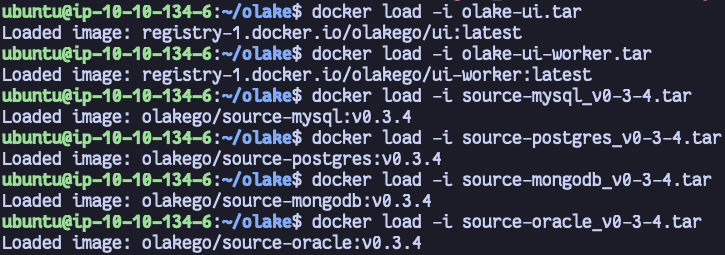
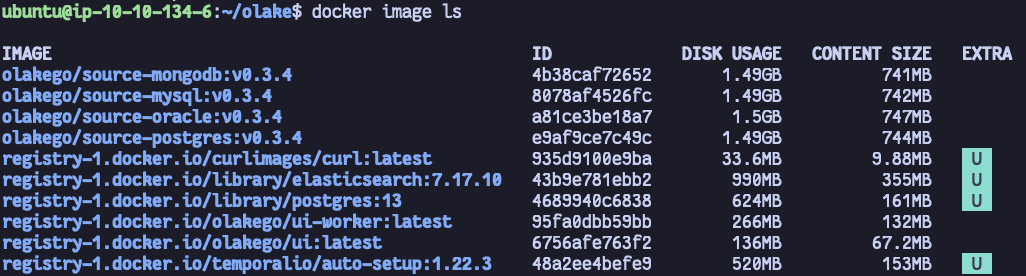
The Docker images are imported from the transferred archives into the Offline Node's local Docker registry.
# Load Core Components
docker load -i olake-ui.tar
docker load -i olake-ui-worker.tar

# Load Connector Images
docker load -i source-mysql_<version>.tar
docker load -i source-postgres_<version>.tar
docker load -i source-mongodb_<version>.tar
docker load -i source-oracle_<version>.tar
docker load -i source-kafka_<version>.tar
Applying Service Updates
If the core components (olake-ui and olake-worker) were included in the update, the Docker Compose stack must be refreshed to utilize the new latest images.
- New (after 30th Jan, 2026)
- Legacy (with ES)
curl -sSL https://raw.githubusercontent.com/datazip-inc/olake-ui/master/docker-compose-v1.yml | docker compose -f - down && \
curl -sSL https://raw.githubusercontent.com/datazip-inc/olake-ui/master/docker-compose-v1.yml | docker compose -f - up -d
curl -sSL https://raw.githubusercontent.com/datazip-inc/olake-ui/master/docker-compose.yml | docker compose -f - down && \
curl -sSL https://raw.githubusercontent.com/datazip-inc/olake-ui/master/docker-compose.yml | docker compose -f - up -d
If only connector images (source-mysql, source-postgres, etc.) were updated, the step above (starting and stopping the containers) is not required. The olake-worker service automatically scans the local registry and will display the newly loaded connector versions in the Source Create/Edit page immediately.
Troubleshooting
- No space left on device: Docker images can be significant in size. Ensure the Offline Node has sufficient disk space to hold both the compressed tarballs and the uncompressed images.
- Connectors not appearing in UI: If updated connectors do not appear in the dropdown list, perform a hard refresh of the browser page. You can verify the images were loaded correctly by running
docker image ls | grep 'olakego/source-'on the Offline Node. - "archive/tar: invalid header": This error during
docker loadusually indicates a corrupted tarball. Verify the file size on the local and offline machines matches, and transfer the file again if necessary.