DB2 to Redshift: Incremental Sync via Iceberg
Moving IBM DB2 LUW (Linux, UNIX and Windows) data to Redshift usually means an AWS Database Migration Service (DMS) task, a licensed replication product, or a nightly EXPORT and COPY. This guide does it with OLake Go. It reads the DB2 tables with a read-only user, writes them once as Apache Iceberg tables into the AWS Glue Data Catalog, and keeps them fresh on a cursor column.
The files stay in your own S3 bucket. Redshift maps the Glue database onto an external schema and queries the tables in place, and Athena and DuckDB read the same tables through the same catalog.
Key takeaways
- OLake Go replicates DB2 LUW into Iceberg tables in the Glue Data Catalog: a full historical snapshot first, then incremental syncs on a cursor column such as
UPDATED_AT, with no DMS or replication license in between. - Redshift reads the Glue database through one
CREATE EXTERNAL SCHEMAstatement, with no refresh. Every change a sync commits is visible on the next query, on Serverless and RA3 alike. - The same tables, written once by OLake Go, are also queryable from Athena and DuckDB. In the run on this page all three engines returned identical rows.
The short answer. To replicate DB2 to Redshift, run OLake Go with a read-only DB2 user as the source and the AWS Glue Data Catalog as the Iceberg destination, with Positional Deletes as the upsert type, the format Redshift reads. The first sync copies each table in full (the historical snapshot); every later sync fetches the rows whose cursor column moved and upserts them. Redshift, Athena and DuckDB then query the same Iceberg tables, with no second copy.
How DB2 data reaches Redshift here
The first sync reads the row and page counts DB2 keeps for each table, splits the table into chunks, and reads the chunks in parallel. It writes Parquet data files and records the highest cursor value it saw. Every later sync selects rows above that value, writes them as new data files, and adds a delete file that retires the old version of each updated row.
Each sync ends with one commit to Glue. OLake Go uploads the data and delete files to the bucket, then updates the table's metadata pointer in the Glue database. Redshift, Athena and DuckDB see the new snapshot on their next query; none of them keeps a copy.
The cursor is the whole contract. A row that changes without its UPDATED_AT moving is never picked up, and a deleted row stays in the Iceberg table. Set the column in every write path, and soft-delete if deletes matter.
What you need
- DB2 LUW 11.5.3 or later, with a read-only user, statistics on each table and a cursor column. The tables on this page ran on DB2 12.1.5 Community Edition in Docker.
- An amd64 host for the DB2 connector. IBM's driver has no Linux arm64 build. On an Apple silicon Mac, turn on Rosetta in Docker Desktop.
- An AWS account with an S3 bucket for the files and an IAM user or role for OLake Go with Glue and S3 permissions. The run on this page used a bucket and a scoped IAM user in
ap-southeast-1. - Amazon Redshift, Serverless or an RA3 cluster, with an IAM role attached that can read Glue and the bucket. The run on this page used a Serverless workgroup at 8 RPU.
- OLake UI from the Docker Compose install. The run on this page used OLake Go v1.1.0.
Step 1: Prepare DB2 for incremental sync
Most readers point OLake Go at tables they already have. To follow along with the exact data from this page, create these two tables first:
The two sample tables used on this page
CREATE TABLE customers (
  id INT GENERATED BY DEFAULT AS IDENTITY PRIMARY KEY,
  name VARCHAR(100), email VARCHAR(200), city VARCHAR(100), tier VARCHAR(20),
  created_at TIMESTAMP DEFAULT CURRENT TIMESTAMP,
  updated_at TIMESTAMP DEFAULT CURRENT TIMESTAMP);

CREATE TABLE orders (
  id INT GENERATED BY DEFAULT AS IDENTITY PRIMARY KEY,
  customer_id INT REFERENCES customers(id),
  product VARCHAR(100), amount DECIMAL(10,2), status VARCHAR(20),
  created_at TIMESTAMP DEFAULT CURRENT TIMESTAMP,
  updated_at TIMESTAMP DEFAULT CURRENT TIMESTAMP);

-- Then insert whatever you like. This page started with 8 customers and 40 orders.
OLake Go reads DB2 LUW (Linux, UNIX and Windows) tables through IBM's Data Server driver: a parallel full snapshot first, then incremental syncs that fetch only rows whose cursor column moved past the last value seen. The DB2 connector has no log-based change data capture (CDC), so four things must be in place before the first sync.
| Setting | Value | Why it matters |
|---|---|---|
| A read-only user | CONNECT on the database plus SELECT on each table | The snapshot and every incremental sync read the tables directly. DB2 authenticates users against the operating system or LDAP, so the account exists there first and is then granted in the database. |
| Table statistics | RUNSTATS on every table you sync | OLake Go reads the row count and page count from SYSCAT.TABLES to split the snapshot into chunks. A table that has never had statistics collected stops the sync with stats not populated. Stale statistics are fine. |
| A cursor column | a column that grows with every change, such as UPDATED_AT | Incremental syncs select WHERE cursor > last value. Rows updated without touching the cursor are not picked up. |
| A primary key | on every table | OLake Go uses it to upsert changed rows into the Iceberg table. Without one, changed rows are appended. |
-- 1. A user for OLake Go. Create the operating system account first,
--    for example: useradd -M olake && passwd olake
GRANT CONNECT ON DATABASE TO USER olake;

-- 2. Read access to the tables you sync
GRANT SELECT ON TABLE db2inst1.customers TO USER olake;
GRANT SELECT ON TABLE db2inst1.orders TO USER olake;

-- 3. Statistics on every table you sync
CALL SYSPROC.ADMIN_CMD('RUNSTATS ON TABLE db2inst1.customers AND INDEXES ALL');
CALL SYSPROC.ADMIN_CMD('RUNSTATS ON TABLE db2inst1.orders AND INDEXES ALL');

-- 4. A cursor column that your application always sets, for example
--    updated_at TIMESTAMP DEFAULT CURRENT TIMESTAMP, updated on every change
Check the result before moving on. A CARD of -1 means statistics were never collected:
SELECT tabname, card, npages FROM syscat.tables WHERE tabschema = 'DB2INST1';
Version, driver and SSL details are on the DB2 connector page.
IBM's Data Server driver has no Linux arm64 build, so olakego/source-db2 runs on amd64 hosts. On an Apple silicon Mac, turn on Rosetta in Docker Desktop and pull the image with --platform linux/amd64.
A deleted row has no cursor value to read, so it stays in the Iceberg table. If deletes matter, soft-delete in DB2 (a deleted_at column that also bumps updated_at) or schedule an occasional full refresh.
Step 2: Set up the Glue catalog
Redshift reads Iceberg tables through a catalog. AWS Glue Data Catalog is the one this page uses: OLake Go creates a Glue database per job and registers each table there. The files sit in your S3 bucket.
Redshift, Athena, Amazon Elastic MapReduce (EMR) and DuckDB all read from the same catalog. Redshift reaches it through an external schema, with the IAM role attached to the workgroup or cluster.
| Catalog | OLake Go writes | Amazon Redshift reads | Verified on this page |
|---|---|---|---|
| AWS Glue | Yes | Yes: external schema from the Glue Data Catalog | Yes, end to end |
- AWS Glue
AWS Glue Data Catalog is the default catalog in OLake Go. The tables live as Parquet and metadata files in an S3 bucket you own, and Glue holds the pointer to the current metadata file. Athena, Redshift, EMR, Spark and DuckDB read the same tables through Glue, which is why it is the catalog to pick when more than one AWS engine will read the data.
You need:
- An S3 bucket for the table files, in the region where your engines run.
- An IAM user or role for OLake Go with Glue and S3 permissions. The exact policy is on the AWS Glue catalog page.
- No Glue database in advance: OLake Go creates one per job, named after the source database and schema (for example
pg_to_snowflake_shop_public).
Glue has no built-in compaction for tables written by external engines, so plan on OLake Fusion or Spark for maintenance once the change volume grows.
The run on this page gave OLake Go a scoped IAM user with this inline policy. Redshift got a role with AmazonS3ReadOnlyAccess and read access to Glue:
{
  "Version": "2012-10-17",
  "Statement": [
    { "Effect": "Allow", "Action": ["s3:ListBucket", "s3:GetBucketLocation"], "Resource": "arn:aws:s3:::<bucket>" },
    { "Effect": "Allow", "Action": ["s3:GetObject", "s3:PutObject", "s3:DeleteObject", "s3:AbortMultipartUpload", "s3:ListMultipartUploadParts"], "Resource": "arn:aws:s3:::<bucket>/*" },
    { "Effect": "Allow",
      "Action": ["glue:GetDatabase", "glue:GetDatabases", "glue:CreateDatabase", "glue:GetTable", "glue:GetTables", "glue:CreateTable", "glue:UpdateTable", "glue:DeleteTable"],
      "Resource": ["arn:aws:glue:<region>:<account>:catalog", "arn:aws:glue:<region>:<account>:database/*", "arn:aws:glue:<region>:<account>:table/*/*"] }
  ]
}
Step 3: Connect DB2 to OLake Go
- OLake UI
- OLake CLI
- In the OLake UI, open Sources and click Create Source. Pick DB2 LUW as the connector, give the source a name and keep the OLake Go version on the latest release.
- Fill in the host, the port (
50000by default), the database name, and the username and password from step 1. The Enable CDC switch stays off: DB2 runs in incremental mode only. - Click Set up source. OLake Go tests the connection and saves the source.
Here is the source form from the run on this page. DB2 ran in another container, so the host is host.docker.internal, with database shop on port 50000. The change data capture (CDC) switch is greyed out with Not supported, which is expected for DB2.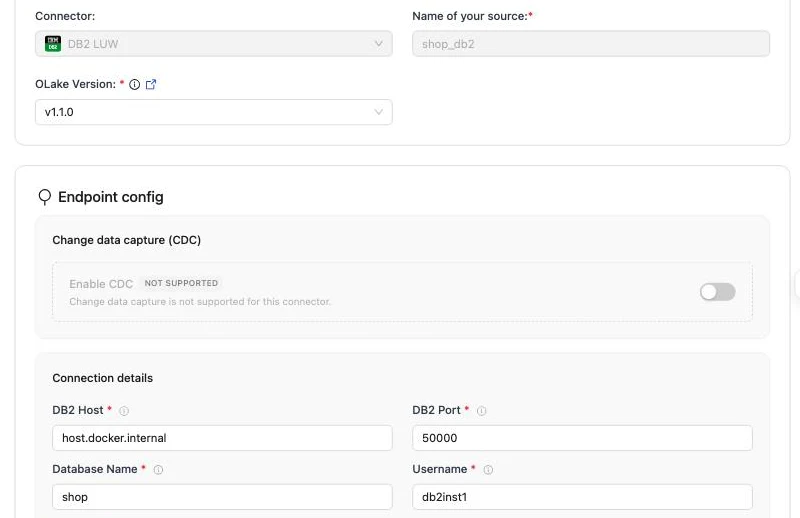
The full field reference, including SSL and SSH tunnels, is on the DB2 connector page.
Create source.json in your config folder:
{
    "host": "DB2 LUW-host",
    "port": 50000,
    "database": "DB2 LUW-DBName",
    "username": "DB2 LUW-Username",
    "password": "DB2 LUW-Password",
    "ssl": {
        "mode": "disable"
    },
    "max_threads": 30,
    "jdbc_url_params": {},
    "retry_count": 3
}
Then confirm OLake Go can reach the database. --platform linux/amd64 lets the amd64-only image run on an Apple silicon Mac and changes nothing on an amd64 host:
docker run --pull=always \
  -v "$PWD/config:/mnt/config" \
  --platform linux/amd64 \
  olakego/source-db2:latest \
  check --config /mnt/config/source.json
A working connection returns "status": "SUCCEEDED". Every field is described on the DB2 connector page.
Step 4: Configure the Iceberg destination
- AWS Glue
- OLake UI
- OLake CLI
- Open Destinations and click Create Destination.
- Pick Apache Iceberg as the connector and AWS Glue as the catalog type.
- Enter the S3 path, the AWS region and the access key pair (or leave the keys empty to use the instance role).
- Click Create.
| Parameter | Sample Value | Description |
|---|---|---|
S3 Path required | s3://<BUCKET_NAME>/ | S3 bucket path where Iceberg table data and metadata files will be stored. |
AWS Region required | ap-south-1 | AWS Region where your S3 bucket and Glue Data Catalog exist. Required so OLake Go calls the correct regional S3 and Glue endpoints. |
| AWS Access Key | XXX | AWS access key ID for authentication. Optional if using IAM roles or instance profiles. If using IAM: Docker Compose: add the required IAM environment variables under x-envs in your compose file. See Service Environment Variables for setup details.Kubernetes: set up pod IAM in Cloud Integration. |
| AWS Secret Key | XXX | AWS secret access key for authentication. Optional if using IAM roles or instance profiles. If using IAM: Docker Compose: add the required IAM environment variables under x-envs in your compose file. See Service Environment Variables for setup details.Kubernetes: set up pod IAM in Cloud Integration. |
| S3 Endpoint | https://glue.ap-south-1.amazonaws.com | S3 API endpoint for writing Iceberg data files. Optional for AWS S3 but required for S3-compatible storage like MinIO. |
| Custom Glue Endpoint Configuration | true/false | Enable custom Glue catalog configuration when Glue catalog settings differ from S3 (different credentials, region, or endpoint). Shows additional Glue configuration fields. Leave off when Glue and S3 use the same AWS setup. |
| Enable Arrow Writes | true/false | Writes data and delete files using Apache Arrow based writer and registers them in Iceberg. |
The following fields appear in the UI after Custom Glue Endpoint Configuration is turned on. Configure Glue catalog connection settings here separately from the S3 fields above.
| Parameter | Sample Value | Description |
|---|---|---|
| Glue Catalog ID | 123456789012 | AWS account ID used as the Glue Data Catalog identifier. |
| Glue Access Key | XXX | Access key for authenticating Glue catalog requests. Required when Glue credentials differ from S3 credentials. |
| Glue Secret Key | XXX | Secret key for authenticating Glue catalog requests. Required when Glue credentials differ from S3 credentials. |
| Glue Endpoint | https://glue.ap-south-1.amazonaws.com | Custom endpoint URL for AWS Glue or a Glue-compatible catalog service. |
| Glue Region | ap-south-1 | Region for the Glue catalog, if different from the S3 region. Falls back to AWS Region if not set. |
{
    "type": "ICEBERG",
    "writer": {
      "catalog_type": "glue",
      "catalog_name": "olake_iceberg",
      "iceberg_s3_path": "s3://<BUCKET_NAME>/",
      "aws_region": "<AWS_REGION>",
      "aws_access_key": "<AWS_ACCESS_KEY>",
      "aws_secret_key": "<AWS_SECRET_KEY>",
      "arrow_writes": false
    }
}
| Parameter | Sample Value | Description |
|---|---|---|
iceberg_s3_path required | s3://<BUCKET_NAME>/ | S3 bucket path where Iceberg table data and metadata files will be stored. |
aws_region required | ap-south-1 | AWS Region where your S3 bucket and Glue Data Catalog exist. Required so OLake Go calls the correct regional S3 and Glue endpoints. |
| aws_access_key | XXX | AWS access key ID for S3 authentication. Optional if using IAM roles or instance profiles. If using IAM: add the required IAM environment variables in your shell or runtime environment. |
| aws_secret_key | XXX | AWS secret access key for S3 authentication. Optional if using IAM roles or instance profiles. If using IAM: add the required IAM environment variables in your shell or runtime environment. |
| s3_endpoint | https://glue.ap-south-1.amazonaws.com | S3 API endpoint for reading/writing Iceberg data files. Optional for AWS S3 but required for S3-compatible storage like MinIO. |
| glue_additional_config | true/false | Enable custom Glue catalog configuration when Glue catalog settings differ from S3 (different credentials, region, or endpoint). Leave off when Glue and S3 use the same AWS setup. |
| arrow_writes | false | Writes data and delete files using Apache Arrow based writer and registers them in Iceberg. |
When using separate Glue catalog settings, set glue_additional_config to true in destination.json and add the fields below. These configure Glue catalog connection settings separately from the S3 fields above.
| Parameter | Sample Value | Description |
|---|---|---|
| glue_catalog_id | 123456789012 | AWS account ID used as the Glue Data Catalog identifier. |
| glue_access_key | XXX | Access key for authenticating Glue catalog requests. Required when Glue credentials differ from S3 credentials. |
| glue_secret_key | XXX | Secret key for authenticating Glue catalog requests. Required when Glue credentials differ from S3 credentials. |
| glue_endpoint | https://glue.ap-south-1.amazonaws.com | Custom endpoint URL for AWS Glue or a Glue-compatible catalog service. |
| glue_region | ap-south-1 | Region for the Glue catalog, if different from the S3 region. Falls back to AWS Region if not set. |
Here is the destination form from the run on this page. It holds the bucket path OLake Go writes under, the region of the bucket and the Glue catalog, and the access key pair of the IAM user from step 2.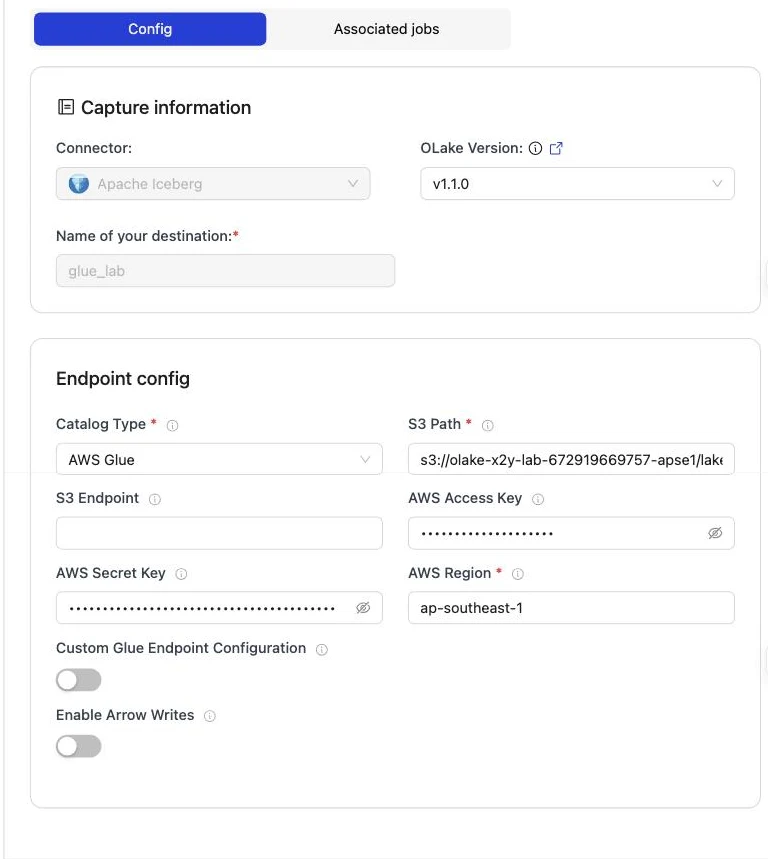
Step 5: Create the job and run the first sync
Redshift is not in OLake Go's target engine picker yet. This job therefore lists Athena and DuckDB as target engines, with Positional Deletes as the upsert type.
That is the format Redshift reads, and both listed engines read it too. Because the DB2 connector has no CDC mode, each stream runs as Full Refresh + Incremental with UPDATED_AT as the cursor.
- OLake UI
- OLake CLI
- Open Jobs and click Create Job. Give it a name and a schedule. Every Day at a fixed hour, or a cron expression, both work; the schedule is how often the change stream is drained, not how often a full copy runs.
- Select the source and the destination you created.
- Under Advanced Settings, set Target Query Engines to AWS Athena and DuckDB (Redshift is not in the list yet; it reads what Athena reads). OLake Go then resolves an Iceberg delete format every one of those engines can read, so you never pick one by hand.
- Click Next. OLake Go discovers the tables and opens the Streams page.
- Tick the tables to replicate. For each one, set the sync mode to Full Refresh + Incremental with
UPDATED_ATas the cursor column and the ingestion mode to Upsert. Leave the Upsert Type as OLake Go resolved it (Positional Deletes in the run on this page). - Click Create Job, then open the job's menu and choose Sync Now for the first run.
DB2 reports unquoted names in upper case, so the streams and columns appear that way.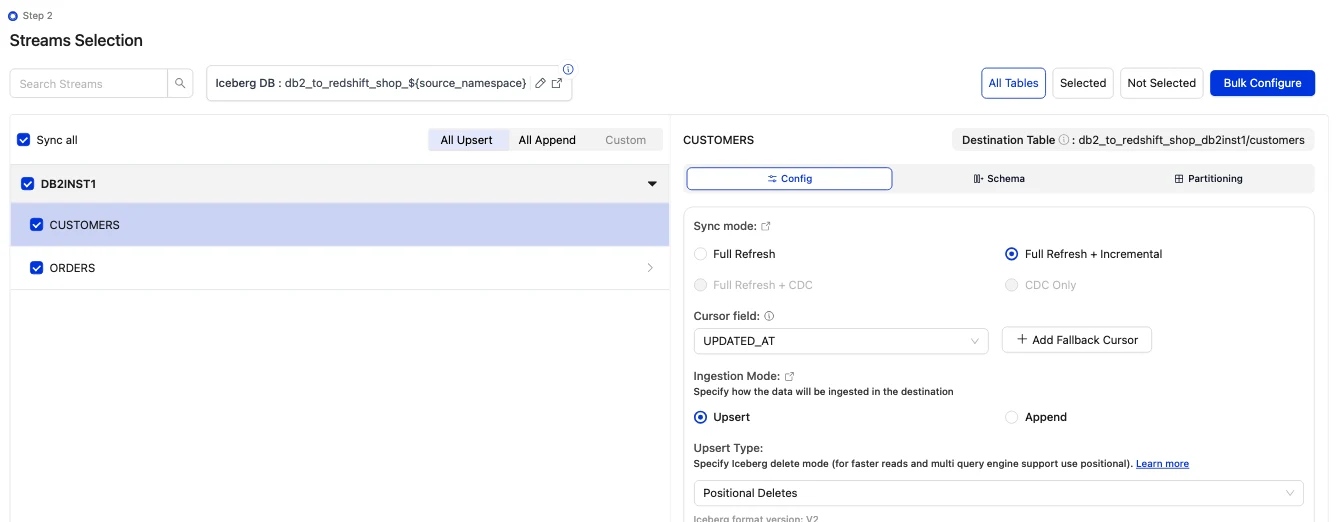

Discover the tables, choose the streams, then sync:
docker run --pull=always \
-v "$PWD/config:/mnt/config" \
--platform linux/amd64 \
olakego/source-db2:latest \
discover --config /mnt/config/source.json
discover writes two files: available_streams.json (every table it found, do not edit) and selected_streams.json (the tables you want and their settings). In selected_streams.json, set sync_mode to {props.cliSyncMode ?? 'cdc'} for each table and pick the delete format your readers can open:
{
"selected_streams": {
  "DB2INST1": [
    {
      "stream_name": "CUSTOMERS",
      "sync_mode": "incremental",
      "cursor_field": "UPDATED_AT",
      "normalization": true,
      "append_mode": false,
      "update_type": "pos"
    }
  ]
}
}
update_type accepts eq (equality deletes, the default), pos (positional deletes) and dv (deletion vectors). Positional deletes and deletion vectors keep a small index between runs, so give the container a persistent directory for it through OLAKE_INDEX_DB_DIR. The first sync runs without a state file; OLake Go writes one at the end of the run:
docker run --pull=always \
-v "$PWD/config:/mnt/config" \
-e OLAKE_INDEX_DB_DIR=/mnt/config/index-db \
--platform linux/amd64 \
olakego/source-db2:latest \
sync \
--config /mnt/config/source.json \
--selected-streams /mnt/config/selected_streams.json \
--available-streams /mnt/config/available_streams.json \
--destination /mnt/config/destination.json
Every later run adds --state /mnt/config/state.json to the same command, which is how OLake Go knows to replay only the changes since the last run. The full selected_streams.json reference is on the Docker CLI page; the index directory is described under index DB setup.
On this page the first run copied 8 customers and 40 orders (48 records, 2.38 KB) and finished in 16 seconds, container start included. OLake Go names the Glue database after the job, the database and the DB2 schema, lower-cased: db2_to_redshift on SHOP.DB2INST1 produced db2_to_redshift_shop_db2inst1. The Iceberg DB field at the top of the Streams page changes it before the first sync.
Step 6: Query the tables in Redshift
- AWS Glue
Redshift reads the Glue Data Catalog through an external schema: one statement maps a Glue database onto a schema name in your Redshift database, and every Iceberg table OLake Go commits there is queryable at once, with no refresh. Redshift Serverless and RA3 clusters both do this; the IAM role attached to the namespace or cluster needs read access to Glue and to the bucket.
-- Once: map the Glue database OLake Go created (schema = <job name>_<source database>_<source schema>)
CREATE EXTERNAL SCHEMA lakehouse
FROM DATA CATALOG
DATABASE 'db2_to_redshift_shop_db2inst1'
IAM_ROLE default;

-- Then query the Iceberg tables like any other schema
SELECT id, name, city, tier FROM lakehouse.customers ORDER BY id;
SELECT status, count(*) AS n, round(sum(amount), 2) AS total
FROM lakehouse.orders GROUP BY status ORDER BY status;
IAM_ROLE default uses the default role of the namespace (Serverless) or cluster; name a role ARN instead when you keep several. Redshift reads Iceberg v2 tables with positional deletes, which is why the job on this page uses that upsert type. The external schema is read-only: OLake Go is the writer, and INSERT or DELETE on these tables fails.
OLake Go adds four columns to every table: _olake_id (a hash of the primary key), _op_type, _olake_timestamp and _cdc_timestamp. _op_type is r for a row from the first snapshot, c for an insert, u for an update and d for a delete. Filter them out of dashboards, or use them to see when a row last changed.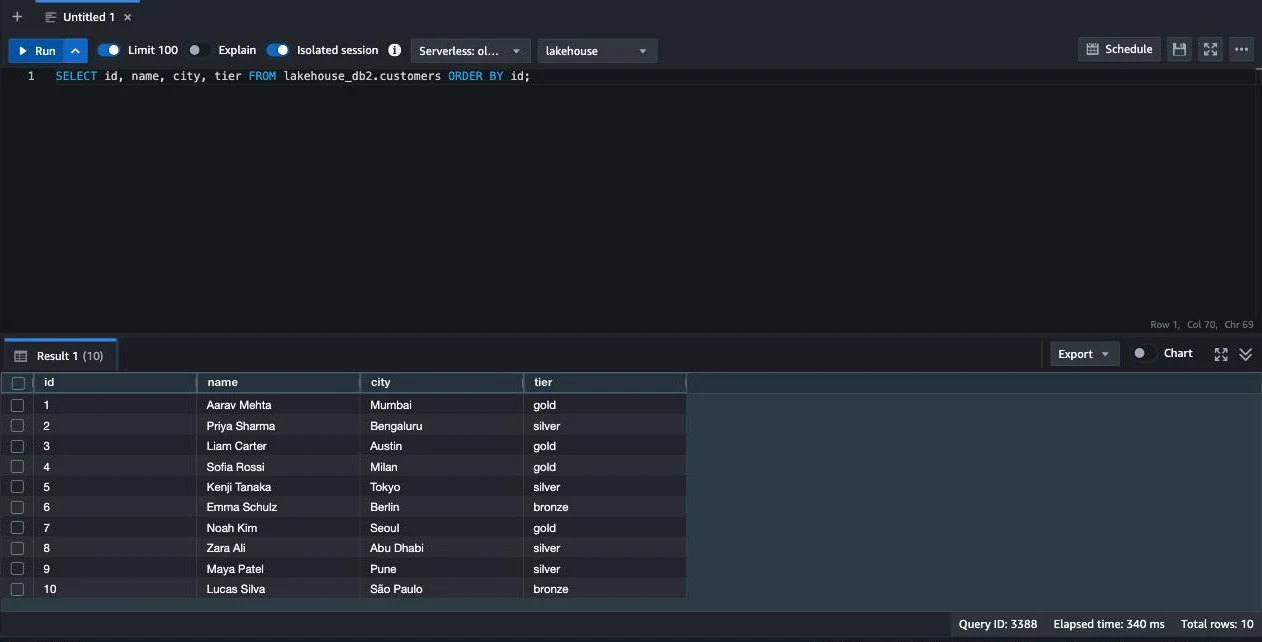
Step 7: Change rows in DB2 and sync again
To see the incremental path work, the run on this page made 12 changes in DB2 after the first sync. Every update also sets updated_at, which is what the cursor sees:
INSERT INTO customers (name, email, city, tier) VALUES ('Maya Patel', 'maya@example.com', 'Pune', 'silver');
INSERT INTO customers (name, email, city, tier) VALUES ('Lucas Silva', 'lucas@example.com', 'São Paulo', 'bronze');
INSERT INTO orders (customer_id, product, amount, status) VALUES (9, 'Laptop', 1299.00, 'placed');
INSERT INTO orders (customer_id, product, amount, status) VALUES (9, 'Mouse', 25.50, 'placed');
INSERT INTO orders (customer_id, product, amount, status) VALUES (10, 'Monitor', 349.99, 'placed');
INSERT INTO orders (customer_id, product, amount, status) VALUES (3, 'Keyboard', 89.00, 'placed');
INSERT INTO orders (customer_id, product, amount, status) VALUES (7, 'Webcam', 79.90, 'placed');
UPDATE customers SET tier = 'gold',      updated_at = CURRENT TIMESTAMP WHERE name = 'Liam Carter';
UPDATE customers SET city = 'Abu Dhabi', updated_at = CURRENT TIMESTAMP WHERE name = 'Zara Ali';
UPDATE orders    SET status = 'delivered', updated_at = CURRENT TIMESTAMP WHERE id IN (1, 4, 7);
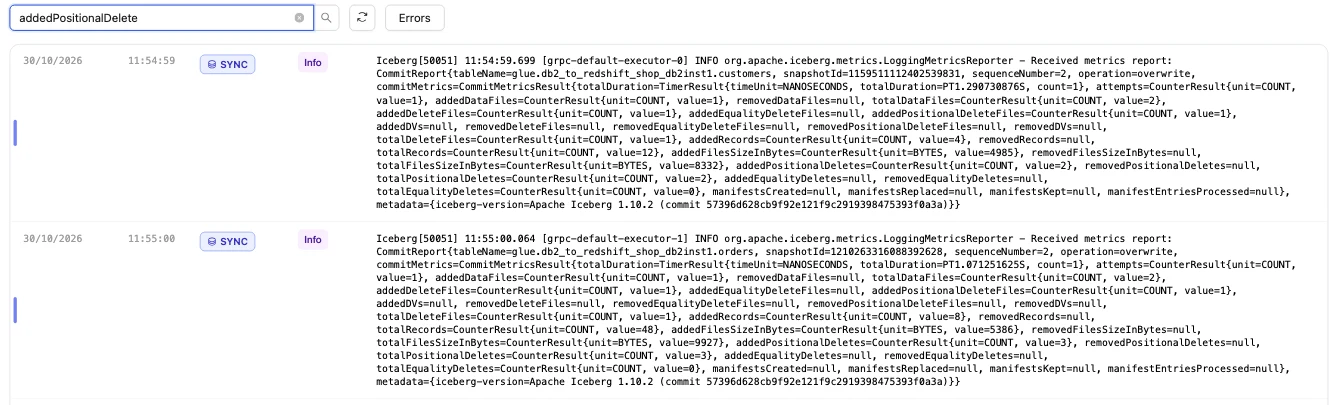
The second sync fetched 12 rows (635 bytes) above the saved cursor and finished in 16 seconds end to end. For customers that meant one new data file with 4 rows and one positional delete file retiring the 2 old versions. The commit report in the sync log shows addedDataFiles=1, addedRecords=4, addedPositionalDeleteFiles=1, addedPositionalDeletes=2, and orders the same shape with 8 rows and 3 deletes.
Redshift shows the result on the next query, with no refresh and no ALTER TABLE. Liam Carter is gold, Zara Ali moved to Abu Dhabi, and the two new customers are there. In incremental mode OLake Go cannot tell an insert from an update, so the 4 rows the second sync brought carry _op_type = u and the snapshot rows keep r.
Schema changes. When a column is added in DB2, OLake Go adds it to the Iceberg table and its Glue definition on the next sync, and Redshift shows it on the next query. DB2 itself may put the table in REORG PENDING after an ALTER TABLE; see troubleshooting below. Full rules are on the schema evolution page.
Query the same tables from Athena and DuckDB
Nothing is exported, copied or refreshed: both engines read the files OLake Go wrote, through the same Glue database.
- Amazon Athena
- DuckDB
Athena reads the Glue Data Catalog natively: the Glue database OLake Go created shows up in the query editor's database list, and the Iceberg tables in it need no registration and no refresh. Pick a workgroup with a query result location in S3, select the database, and query.
SELECT id, name, city, tier FROM db2_to_redshift_shop_db2inst1.customers ORDER BY id;
SELECT status, count(*) AS n, round(sum(amount), 2) AS total
FROM db2_to_redshift_shop_db2inst1.orders GROUP BY status ORDER BY status;
Athena engine v3 reads Iceberg v2 tables with positional and equality deletes, and cannot read v3 tables at all. Keep the job on positional or equality deletes, never deletion vectors, while Athena is a reader. From the command line, aws athena start-query-execution --work-group <workgroup> --query-execution-context Database=${props.schema ?? 'postgres_to_redshift_shop_public'} --query-string "..." runs the same queries; aws athena get-query-results returns the rows.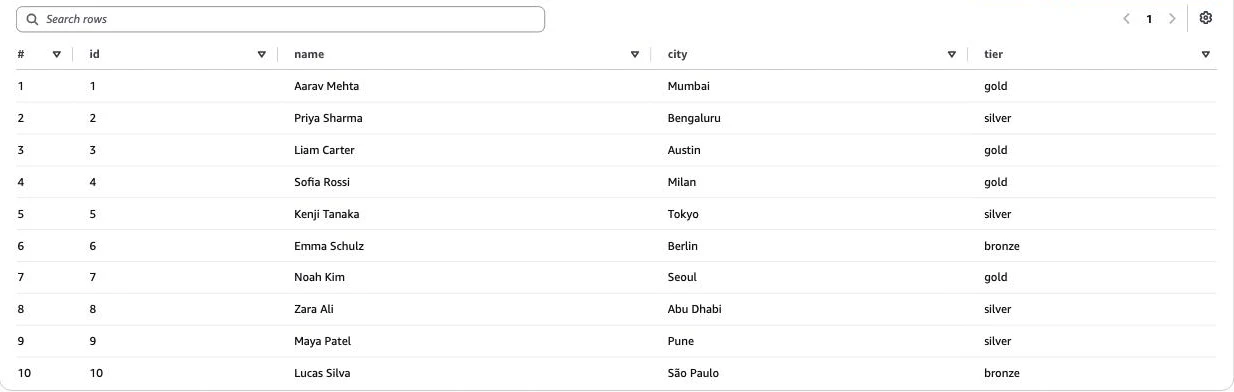
DuckDB reads an Iceberg table from its current metadata file, which Glue holds as the table's metadata_location. Ask Glue for it, then scan: no catalog to configure, and the same S3 keys you gave OLake Go are enough.
aws glue get-table --database-name <glue database> --name customers \
  --query 'Table.Parameters.metadata_location' --output text
INSTALL iceberg; LOAD iceberg;
INSTALL httpfs;  LOAD httpfs;

CREATE SECRET lake (TYPE s3, KEY_ID '<access key>', SECRET '<secret key>', REGION '<region>');

SELECT id, name, city, tier
FROM iceberg_scan('s3://<bucket>/lakehouse/db2_to_redshift_shop_db2inst1.db/customers/metadata/<latest>.metadata.json')
ORDER BY id;
Each sync writes a new metadata file, so fetch the location again before a fresh read, or wrap the two steps in a script. DuckDB can also attach the Glue Data Catalog as an Iceberg REST catalog (ATTACH '<account id>' AS glue (TYPE iceberg, ENDPOINT_TYPE 'glue')), which needs Lake Formation permissions on the catalog; that path is not covered on this page. DuckDB reads positional deletes, and deletion vectors from duckdb-iceberg 1.5.3.
DuckDB 1.5.5 returned the same 10 customers and the same orders roll-up as Redshift and Athena in the run on this page. It read the current metadata file of each table.
An orders roll-up matched DB2 to the cent in all three engines. It gave 16 delivered orders for 8659.68, 18 placed for 10522.26, 11 shipped for 6397.25.
Data types: DB2 to Iceberg to Redshift
OLake Go maps DB2 types to Iceberg types, and Redshift maps Iceberg types to its own through the external schema. Decimals and times are the ones to watch.
| DB2 | Iceberg (written by OLake Go) | Redshift shows | Notes |
|---|---|---|---|
SMALLINT, INTEGER | int | INTEGER | |
BIGINT | long | BIGINT | |
DECIMAL, NUMERIC, DECFLOAT, FLOAT, DOUBLE | double | DOUBLE PRECISION | The orders.amount sums on this page matched DB2 to the cent; round at query time when you need exact decimal arithmetic. |
REAL | float | REAL | |
BOOLEAN | boolean | BOOLEAN | |
DATE, TIMESTAMP | timestamptz (UTC) | TIMESTAMP | OLake Go writes every timestamp in UTC; Redshift shows it without a zone. |
TIME | string | VARCHAR | |
CHAR, VARCHAR, CLOB, GRAPHIC, VARGRAPHIC, DBCLOB, XML | string | VARCHAR | |
BLOB | string | VARCHAR | Binary values arrive as text; keep large binaries out of the sync. |
DB2 types in the table come from the DB2 connector reference. The Redshift side comes from the Redshift Iceberg page (checked 2026-10-30) and from svv_external_columns on the tables of this run.
Cost and maintenance
- Storage is your bucket: you pay S3 rates for the Parquet and delete files, and nothing to Glue beyond its per-object pricing for the table entries.
- Compute. OLake Go runs wherever you run Docker, on an amd64 host for the DB2 connector. Redshift Serverless bills RPU-hours only while queries run; a query over the external schema scans the Parquet files in S3 through Redshift Spectrum. Athena bills per terabyte scanned.
- DB2 load. Each incremental sync is one range scan per table on the cursor column; index
UPDATED_ATso it stays cheap as the table grows. KeepRUNSTATSin your regular maintenance window so snapshot chunks stay even. - Maintenance. Glue has no built-in compaction for tables written by external engines. A table that gets a new small file and delete file per sync wants compaction; OLake Fusion does this for the catalogs OLake Go writes to, and Spark on EMR's
rewrite_data_filesworks through the same Glue catalog. - Key rotation. The IAM user's access key is what OLake Go writes with. Rotate it on your schedule, or run OLake Go on an instance with a role and leave the key fields empty.
Troubleshooting
1. The source test fails on an Apple silicon Mac
image pull registry-1.docker.io/olakego/source-db2:v1.1.0: Error response from daemon: no matching manifest for linux/arm64/v8 in the manifest list entries
The OLake UI worker pulls connector images for the host's platform, and the DB2 image exists for amd64 only. Turn on Use Rosetta for x86_64/amd64 emulation in Docker Desktop, then pull the image yourself and tag it with the name the worker asks for:
docker pull --platform linux/amd64 olakego/source-db2:v1.1.0
docker tag olakego/source-db2:v1.1.0 registry-1.docker.io/olakego/source-db2:v1.1.0
On an amd64 Linux host, such as an EC2 instance, the error does not occur.
2. The first sync stops with "stats not populated"
stats not populated for table[DB2INST1.CUSTOMERS]. Please run CLP command: RUNSTATS ON TABLE DB2INST1.CUSTOMERS AND INDEXES ALL
DB2 has never collected statistics for the table, and OLake Go needs them to size the snapshot chunks. Run the RUNSTATS call from step 1 for every table in the job, then sync again.
3. A sync fails with SQL0668N after an ALTER TABLE
Adding, dropping or retyping a column can leave a DB2 table in REORG PENDING, and reads fail until it is reorganized. Run CALL SYSPROC.ADMIN_CMD('REORG TABLE db2inst1.customers'), then sync again. The DB2 connector page lists the operations that cause it.
4. The CLI picked the wrong cursor column
discover fills cursor_field in selected_streams.json with the first column in alphabetical order, for example CITY for CUSTOMERS. Set it to UPDATED_AT for every stream before the first sync; the OLake UI asks for it on the Streams page instead.
5. The destination test fails on a table OLake Go did not create
User: arn:aws:iam::<account>:user/<olake user> is not authorized to perform: s3:GetObject on resource: "arn:aws:s3:::<another bucket>/.../test_olake.db/test_olake/metadata/00000-....metadata.json"
OLake Go's destination test opens a probe table called test_olake.test_olake in the Glue database test_olake. An earlier run in the same account and region may have left that table behind, pointing at a bucket your user cannot read. Delete the stale table from Glue, or run OLake Go against a region whose Glue catalog does not have it.
6. Redshift cannot see the external schema's tables
ERROR: Database 'db2_to_redshift_shop_db2inst1' does not exist in the Glue Data Catalog
The external schema was created before the first sync, or in a different region from the Glue database. OLake Go creates the Glue database on the first sync; create the external schema after it, in the workgroup's region.
How this compares with other ways to move DB2 data to Redshift
| Method | Freshness | Updates and deletes | Where the data lands | What you run |
|---|---|---|---|---|
| AWS DMS with a Db2 LUW source | CDC from the DB2 log | Yes | Native Redshift tables | A DMS replication instance and task, a recoverable (archive-logging) database and a DBADM user |
| Debezium's Db2 connector, Kafka and the Redshift sink | Seconds, from SQL Replication capture tables | Yes | Kafka topics, then Redshift tables | Kafka, Kafka Connect, Debezium, tables in capture mode and, per Debezium's docs, an IBM InfoSphere Data Replication license (checked Oct 2026) |
Export (EXPORT TO ... OF DEL), then COPY into Redshift | Hours to daily | No; full reloads only | Native Redshift tables | A script, a scheduler and a staging bucket |
| OLake Go to Iceberg on Glue (this guide) | Incremental on a schedule down to one minute | Inserts and updates that move the cursor; deletes need a soft-delete column | Apache Iceberg tables that Redshift, Athena, EMR, Spark and DuckDB all read | One Docker Compose stack, open source; your bucket plus your own compute |
DMS is the simpler choice when you need deletes replicated and native Redshift tables are the only goal. Writing Iceberg once avoids paying to move and store a second copy as soon as Athena, EMR or a notebook needs the same rows.
When not to use this
- You need hard deletes replicated. Incremental sync cannot see a deleted row. Soft-delete in DB2, or use a log-based tool.
- Your DB2 runs on z/OS or IBM i. The connector covers DB2 LUW only.
- Every query must hit native Redshift speed. Spectrum reads Parquet from S3 on every query. Keep the Iceberg tables as the source and load the hot slice into a native table on a schedule.
FAQs
How do I replicate IBM DB2 to Redshift without DMS?
Run OLake Go (open source, Apache 2.0) against DB2 LUW with a read-only user, and point it at the AWS Glue Data Catalog with an S3 bucket. The first sync copies each table in parallel chunks; every later sync fetches only rows whose cursor column (for example UPDATED_AT) moved, and upserts them. Redshift reads the result through an external schema over the Glue database. No DMS task, replication license or Redshift load job is needed.
Does OLake Go do change data capture (CDC) from DB2?
No. The DB2 connector runs Full Refresh and Full Refresh + Incremental; it does not read the DB2 log or the SQL Replication capture tables. Incremental syncs select rows where a cursor column is greater than the last value seen, which captures inserts and updates that bump the cursor but not deletes.
Does Redshift read Iceberg tables with row-level deletes?
Yes. Redshift reads Iceberg v2 tables with positional deletes through Redshift Spectrum, on Serverless and RA3. The run on this page used positional deletes and Redshift returned one row per key after the updates.
Is Redshift one of OLake Go's target query engines?
Not in the picker yet. On this page the job lists Athena and DuckDB as target engines and the upsert type is Positional Deletes, which is the format Redshift reads. Redshift then reads the tables through the external schema like any other Iceberg v2 table.
Why does the first sync ask me to run RUNSTATS?
OLake Go splits each table into chunks for the parallel snapshot using the row and page counts DB2 keeps in SYSCAT.TABLES. Those counts exist only after RUNSTATS has run once on the table. Run CALL SYSPROC.ADMIN_CMD('RUNSTATS ON TABLE schema.table AND INDEXES ALL') per table; statistics that are out of date do not stop a sync.
Which DB2 data types change on the way to Redshift?
DECIMAL, NUMERIC, DECFLOAT, FLOAT and DOUBLE become Iceberg double and show up in Redshift as DOUBLE PRECISION, so round at query time when you need exact decimal arithmetic. INTEGER stays INTEGER and BIGINT stays BIGINT. DATE and TIMESTAMP become TIMESTAMP in UTC. TIME, XML, CLOB, BLOB and GRAPHIC types arrive as VARCHAR.
Related guides
Deeper reading on this site: