Kafka to Databricks: Topics as Apache Iceberg
Kafka to Databricks usually means a Structured Streaming job that runs on a cluster all day, or a Kafka Connect sink. This guide takes a different route. OLake Go reads the topics itself on a schedule, as a change data capture (CDC) stream, and keeps one row per key in an Apache Iceberg table in Unity Catalog.
The tables land as Unity Catalog managed Iceberg tables, with the files in your own cloud storage. Nothing else is in the path: no Kafka Connect, no Databricks job, no staging table. DuckDB and Spark read the same tables through the same catalog.
Key takeaways
- OLake Go turns Kafka topics into Databricks Iceberg tables with one row per key: each sync reads from the last committed offset and upserts the new messages, retiring old rows with deletion vectors.
- The tables are Unity Catalog managed Iceberg tables. You query them from the Databricks SQL editor or a notebook right away, with no external table and no refresh.
- The same tables, written once by OLake Go, are also queryable from DuckDB and Spark through Unity Catalog. In the run on this page all three engines returned identical rows.
The short answer. To stream Kafka to Databricks as Iceberg, run OLake Go with the Kafka cluster as the source and Unity Catalog as the destination, with Databricks as a target query engine. Put each topic in CDC Only mode with Upsert on a deduplication key.
OLake Go writes the upserts as deletion vectors, the one delete format Unity Catalog takes. This needs the Kafka source v1.1.1 and OLake UI v0.8.2 or later. Databricks, DuckDB and Spark then read one row per key from the same tables.
How Kafka messages reach Databricks here
There is no separate snapshot phase, because the topic is the history. The first sync runs with a new consumer group, which has no committed offset, so it reads every message the broker still holds: on this page all 48. OLake Go commits the Iceberg snapshot first and the consumer-group offsets second.
Every later sync resumes from the committed offsets and reads only what arrived since. In Upsert mode a message whose deduplication key already exists retires the old row with a deletion vector, an Iceberg v3 bitmap of deleted row positions, and writes the new one. A key seen for the first time becomes a new row.
A sync that fails mid-way re-reads its messages on the next run. In Upsert mode that is harmless, because the same key lands on the same row. Tombstones (messages with a null value) delete a row only when _kafka_key is the single deduplication key.
One thing to keep an eye on: retention is the replay window. Kafka deletes messages past retention.ms, and OLake Go cannot read what is gone. A job paused longer than the retention of its topics silently misses the expired messages.
What you need
- A Kafka cluster on version 2.4 or later that OLake Go can reach, with JSON messages (or Avro plus a schema registry) on the topics you want. Amazon Managed Streaming for Apache Kafka (MSK), Confluent Cloud, Redpanda and self-hosted Kafka all work; the run on this page used a single-node Apache Kafka 4.3.1 in KRaft mode in Docker.
- A field that identifies each entity in every message, such as
id, to use as the deduplication key for one row per key. - A Databricks workspace with Unity Catalog, a catalog with managed storage, and an admin who can turn on external data access and grant
EXTERNAL USE SCHEMA. The run on this page used a workspace on Google Cloud. - OLake UI v0.8.2 or later from the Docker Compose install, with the OLake Go Kafka source v1.1.1 or later. Older versions offer only Append for Kafka with Databricks. The run on this page used UI v0.8.2 and source v1.1.1.
- Docker, and about 30 minutes.
Step 1: Prepare the Kafka topics
Most readers point OLake Go at topics they already have. If you want to follow along with the exact data from this page, produce messages shaped like these first:
The two sample topics used on this page
Both topics have one partition and carry JSON values keyed by the entity id. The scripts ship with Apache Kafka under bin/; with Redpanda, rpk topic create and rpk topic produce -f '%k\t%v\n' do the same.
kafka-topics.sh --bootstrap-server localhost:9092 --create --topic customers --partitions 1
kafka-topics.sh --bootstrap-server localhost:9092 --create --topic orders --partitions 1

# key<TAB>value, one message per line
printf '1\t{"id":1,"name":"Aarav Mehta","email":"aarav@example.com","city":"Mumbai","tier":"gold","created_at":"2026-10-29T15:22:04+00:00","updated_at":"2026-10-29T15:22:04+00:00"}\n' \
  | kafka-console-producer.sh --bootstrap-server localhost:9092 --topic customers --property parse.key=true --property key.separator=$'\t'

printf '1\t{"id":1,"customer_id":2,"product":"Headphones","amount":99.19,"status":"shipped","created_at":"2026-10-29T15:22:04+00:00","updated_at":"2026-10-29T15:22:04+00:00"}\n' \
  | kafka-console-producer.sh --bootstrap-server localhost:9092 --topic orders --property parse.key=true --property key.separator=$'\t'

# Then produce whatever you like. This page started with 8 customers and 40 orders.
Kafka is already a change stream, so there is no log to switch on. OLake Go reads each topic from its retained offsets and commits the position it reached in a consumer group. Four things must be in place before the first sync.
| Requirement | Value | Why it matters |
|---|---|---|
| Message format | JSON values, or Avro with a schema registry | OLake Go turns each message into a row. Anything else (Protobuf, plain text) cannot be mapped to columns. |
| A stable field per entity | For example id in the payload, or the message key | Upsert mode needs a deduplication key to know which earlier row a message replaces. Keep it in every message and never change it. |
| A consumer group for OLake Go only | One group per job | OLake Go stores its offsets there. Sharing the group with another consumer, or between two jobs, moves offsets under its feet. |
| Retention longer than your longest pause | For example 7 days | Kafka deletes messages past the retention limit. A job paused longer than that cannot read them, and they are gone. |
If the cluster enforces access control lists (ACLs), the user OLake Go connects with needs Read and Describe on the topics and Read on its consumer group. This is what the setup looked like for the run on this page, with the scripts that ship with Apache Kafka; Redpanda's rpk topic create and rpk security acl create do the same:
# 1. The topics, with retention long enough to cover a pause
kafka-topics.sh --bootstrap-server localhost:9092 --create --topic customers --partitions 1 --config retention.ms=604800000
kafka-topics.sh --bootstrap-server localhost:9092 --create --topic orders --partitions 1 --config retention.ms=604800000

# 2. If ACLs are on: a principal for OLake Go (one command per resource type)
kafka-acls.sh --bootstrap-server localhost:9092 --add --allow-principal User:olake \
--operation Read --operation Describe --topic customers --topic orders
kafka-acls.sh --bootstrap-server localhost:9092 --add --allow-principal User:olake \
--operation Read --group olake_<job_name>
Each message needs the entity's identifier in its value, and the key is the natural place to repeat it. A record for the sample customers topic looks like this, with _kafka_key set to the same id:
{"id": 3, "name": "Liam Carter", "email": "liam@example.com", "city": "Austin", "tier": "gold",
 "created_at": "2026-10-29T15:22:04+00:00", "updated_at": "2026-10-29T15:22:04+00:00"}
A topic with retention.ms of one day keeps one day of messages. If the job is paused for two, the first day is gone before OLake Go reads it, and nothing in the destination tells you. Set retention from the longest pause you can tolerate, and alert when a job has not run for a good fraction of it.
Step 2: Set up Unity Catalog in Databricks
Databricks reads Iceberg tables through Unity Catalog, the catalog built into every Databricks workspace. OLake Go writes straight into it, so the tables become Unity Catalog managed Iceberg tables. They show up in Catalog Explorer and the SQL editor the moment a sync commits.
The files sit in the catalog's managed storage, which is backed by an external location in your own cloud account. DuckDB and Spark reach the same tables through the same Unity Catalog endpoint.
| Catalog | OLake Go writes | Databricks reads | Verified on this page |
|---|---|---|---|
| Unity Catalog | Yes | Yes: native: Unity Catalog managed Iceberg tables | Yes, end to end |
- Unity Catalog
Unity Catalog is the catalog built into every Databricks workspace. OLake Go writes to it through Unity Catalog's Iceberg REST (representational state transfer) endpoint at https://<workspace-url>/api/2.1/unity-catalog/iceberg-rest, and the tables it creates are Unity Catalog managed Iceberg tables. Databricks allows writes through this endpoint for managed Iceberg tables only (Databricks: access tables from Iceberg clients, checked 2026-10-30).
Four things must be in place in the workspace, once:
| Setting | Where | Why it matters |
|---|---|---|
| External data access on the metastore | Catalog, the gear icon, Metastore, then External data access | Without it the Iceberg REST endpoint refuses every client that is not Databricks itself. |
| A catalog with managed storage | Catalog, Create catalog, with a storage location backed by an external location | OLake Go creates one schema per job inside it. The catalog name is the warehouse value every client uses. |
EXTERNAL USE SCHEMA for the writing principal | On the catalog, so it covers the schemas OLake Go creates | Unity Catalog checks this privilege, on top of the usual ones, before it serves a table to an outside engine. |
| A personal access token or a service principal | Settings, Developer, Access tokens | OLake Go sends it as a bearer token on every catalog call. |
-- The catalog OLake Go writes into. Its managed storage holds the Iceberg files.
CREATE CATALOG IF NOT EXISTS lakehouse MANAGED LOCATION '<external location URL>/lakehouse';

-- What the writing principal needs: browse and create schemas, then read and write tables in them
GRANT USE CATALOG, CREATE SCHEMA ON CATALOG lakehouse TO `olake@example.com`;
GRANT USE SCHEMA, CREATE TABLE, SELECT, MODIFY ON CATALOG lakehouse TO `olake@example.com`;
GRANT EXTERNAL USE SCHEMA ON CATALOG lakehouse TO `olake@example.com`;
Granting on the catalog makes the privileges inherit to every schema OLake Go creates later. EXTERNAL USE SCHEMA is not part of ALL PRIVILEGES, and only the catalog owner can grant it (Databricks: Unity Catalog privileges, checked 2026-10-30). A service principal with OAuth machine-to-machine credentials is the better choice in production. The other authentication methods are on the Unity Catalog destination page.
Unity Catalog accepts updates to a managed Iceberg table only as copy-on-write files or as Iceberg v3 deletion vectors. It rejects equality delete files with Can not create a Path from a null string [ErrorCode: 2015]. Set Databricks as a target query engine on the job, and OLake Go writes deletion vectors from the first sync.
Step 3: Connect Kafka to OLake Go
- OLake UI
- OLake CLI
- In the OLake UI, open Sources and click Create Source. Pick Kafka as the connector, give the source a name and keep the OLake Go version on the latest release.
- The Enable CDC toggle under Change data capture (CDC) reads not supported for Kafka and stays off. That is expected: the topic is the change stream, and the job's CDC Only sync mode reads it.
- Under Connection details, fill in Bootstrap Servers (
host:port, comma-separated for several brokers), a Consumer Group ID for this job only, and a Topic Pattern regular expression that matches only the topics you want. Pick the Security Protocol the cluster uses:PLAINTEXT,SASL_PLAINTEXTorSASL_SSL, with the SASL mechanism and credentials when needed. Turn on Use Schema Registry only for Avro topics. - Leave Additional configuration at its defaults, or set Max Threads to the number of partitions you want read in parallel.
- Click Set up source. OLake Go pings the brokers. Topics are matched against the pattern at discovery, when the job is created; if the pattern matches nothing, the Streams page comes up empty and the sync log names every topic it skipped.
Here is the source form from the run on this page. Kafka ran in another container, so the bootstrap server is host.docker.internal:19092; the topic pattern ^(customers|orders)$ keeps discovery to the two sample topics.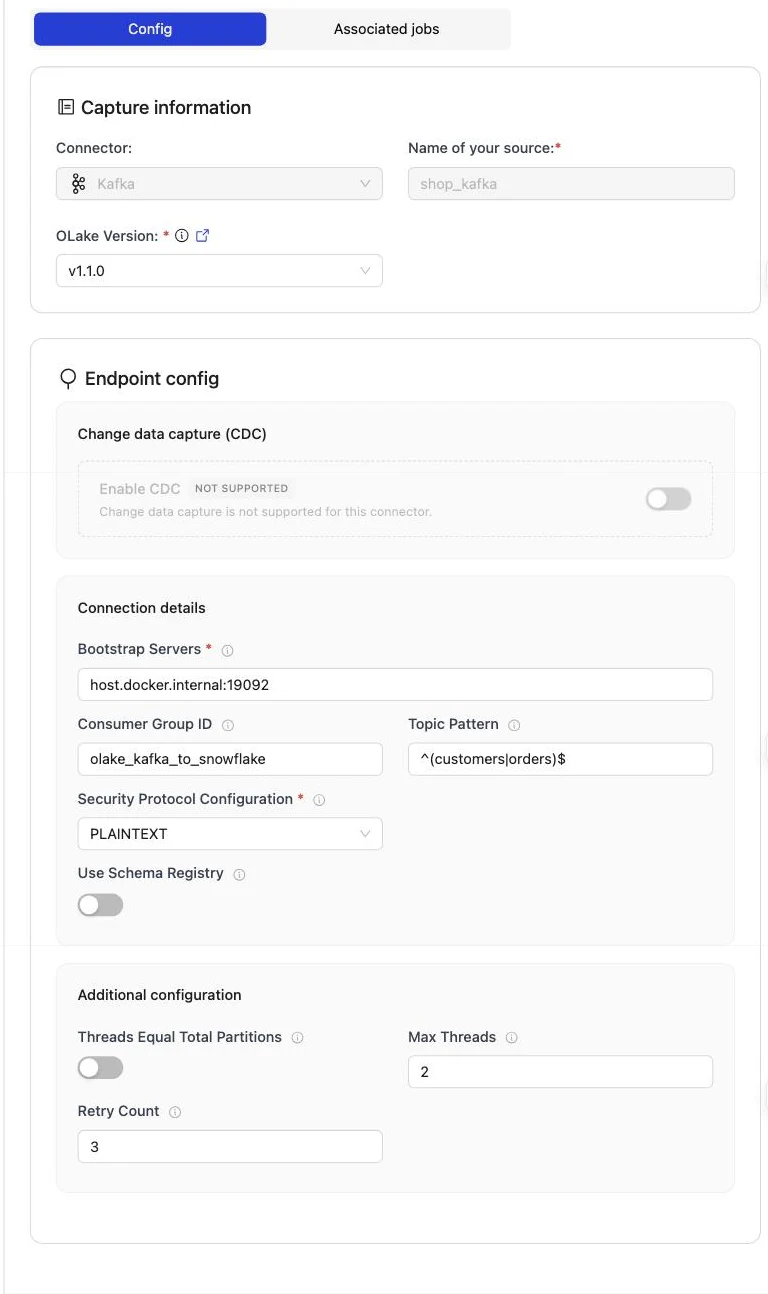
Set up source pings the brokers before anything is saved. The consumer group is created on the first sync; it does not need to exist yet.
The full field reference, including SASL and schema-registry options, is on the Kafka connector page.
Create source.json in your config folder. bootstrap_servers, protocol and consumer_group_id are the fields that matter; topic_pattern keeps discovery to the topics you want:
{
    "bootstrap_servers": "broker:9092, broker:9093",
    "protocol": {
      "security_protocol": "SASL_SSL",
      "sasl_mechanism": "SCRAM-SHA-512",
      "sasl_jaas_config": "org.apache.kafka.common.security.scram.ScramLoginModule required username=\"YOUR_KAFKA_USERNAME\" password=\"YOUR_KAFKA_PASSWORD\";"
    },
    "consumer_group_id": "example-consumer-group",
    "max_threads": 3,
    "threads_equal_total_partitions": false,
    "backoff_retry_count": 3,
    "topic_pattern": "^orders-.*",
    "schema_registry": {
      "endpoint": "http://localhost:8081",
      "username": "dummy",
      "password": "password"
  }
}
Then confirm OLake Go can reach the brokers:
docker run --pull=always \
  -v "$PWD/config:/mnt/config" \
  olakego/source-kafka:latest \
  check --config /mnt/config/source.json
A working setup returns "status": "SUCCEEDED". A wrong address returns failed to ping kafka brokers: unable to dial, which means the container cannot reach the port, not that the credentials are wrong. Every field is described on the Kafka connector page.
Step 4: Configure the Iceberg destination
- Unity Catalog
- OLake UI
- OLake CLI
- Open Destinations and click Create Destination.
- Pick Apache Iceberg as the connector and Unity as the catalog type.
- Choose Personal Access Token as the authentication type and fill in the fields below. The catalog name from the setup goes into the catalog field.
- Click Create. OLake Go calls the Unity Catalog endpoint with the token and saves the destination.
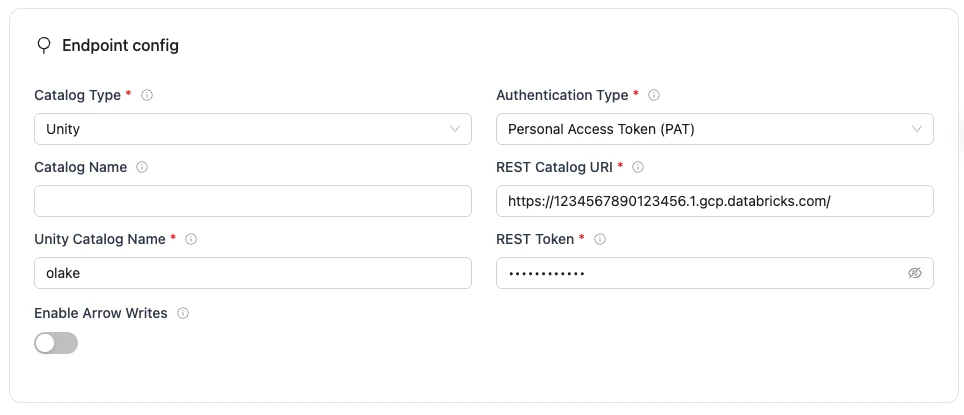
The run on this page wrote into a catalog called datazip, with a personal access token that expires after seven days. The snippets below use lakehouse; replace it with your catalog name.
Unity Configuration Parameters
| Parameter | Sample Value | Description |
|---|---|---|
REST Catalog URLrequired | https://1234567890123456.1.gcp.databricks.com/ | Databricks workspace URL with Unity Catalog REST API endpoint. Use your actual workspace URL. |
Authentication Typerequired | Personal Access Token | Authentication method OLake Go uses for Unity Catalog REST API requests. Set to match your workspace's authentication configuration. |
Unity Catalog Namerequired | workspace | Name of the catalog in Unity. |
Tokenrequired | dapi123456789... | Databricks Personal Access Token |
| Catalog Name | olake_iceberg | Name of the Iceberg catalog OLake Go registers tables under. Defaults to olake_iceberg if left empty. |
| Enable Arrow Writes | false | Writes data and delete files using Apache Arrow based writer and registers them in Iceberg. |
Create destination.json next to source.json:
{
  "type": "ICEBERG",
  "writer": {
    "catalog_type": "unity",
    "catalog_name": "olake_iceberg",
    "rest_catalog_url": "https://<workspace-url>/api/2.1/unity-catalog/iceberg-rest",
    "iceberg_s3_path": "lakehouse",
    "rest_auth_type": "personal access token",
    "token": "<personal access token>",
    "arrow_writes": false
  }
}
iceberg_s3_path holds the Unity Catalog catalog name, not a bucket path: Unity Catalog decides where the files go.
Unity Configuration Parameters
| Parameter | Sample Value | Description |
|---|---|---|
catalog_typerequired | unity | Defines the catalog type used by the writer. |
rest_catalog_urlrequired | https://1234567890123456.1.gcp.databricks.com/ | Databricks workspace URL with Unity Catalog REST API endpoint. Use your actual workspace URL. |
iceberg_s3_pathrequired | workspace | Name of the catalog in Unity. |
rest_auth_typerequired | Personal Access Token | Authentication method OLake Go uses for Unity Catalog REST API requests. Set to match your workspace's authentication configuration. |
tokenrequired | dapi123456789... | Databricks Personal Access Token |
| catalog_name | olake_iceberg | Name of the Iceberg catalog OLake Go registers tables under. Defaults to olake_iceberg if left empty. |
| arrow_writes | false | Writes data and delete files using Apache Arrow based writer and registers them in Iceberg. |
Step 5: Create the job and run the first sync
- OLake UI
- OLake CLI
- Open Jobs and click Create Job. Give it a name and a schedule. Every Day at a fixed hour, or a cron expression, both work; the schedule is how often the change stream is drained, not how often a full copy runs.
- Select the source and the destination you created.
- Under Advanced Settings, set Target Query Engines to Databricks, plus DuckDB and Apache Spark if they will read the tables too. OLake Go then resolves an Iceberg delete format every one of those engines can read, so you never pick one by hand.
- Click Next. OLake Go discovers the topics and opens the Streams page.
- Tick the topics to replicate. For each one, set the sync mode to CDC Only and the ingestion mode to Upsert. Under Dedup Keys, pick
id: that is the field OLake Go uses to match a later message to the row it replaces. Leave the Upsert Type as OLake Go resolved it (Deletion Vector in the run on this page). - Click Create Job, then open the job's menu and choose Sync Now for the first run.
Three target query engines were set on this job. Kafka streams offer one sync mode, CDC Only. With Upsert on id, OLake Go resolved Deletion Vector as the upsert type, on Iceberg format version V3, because Databricks reads no other delete format.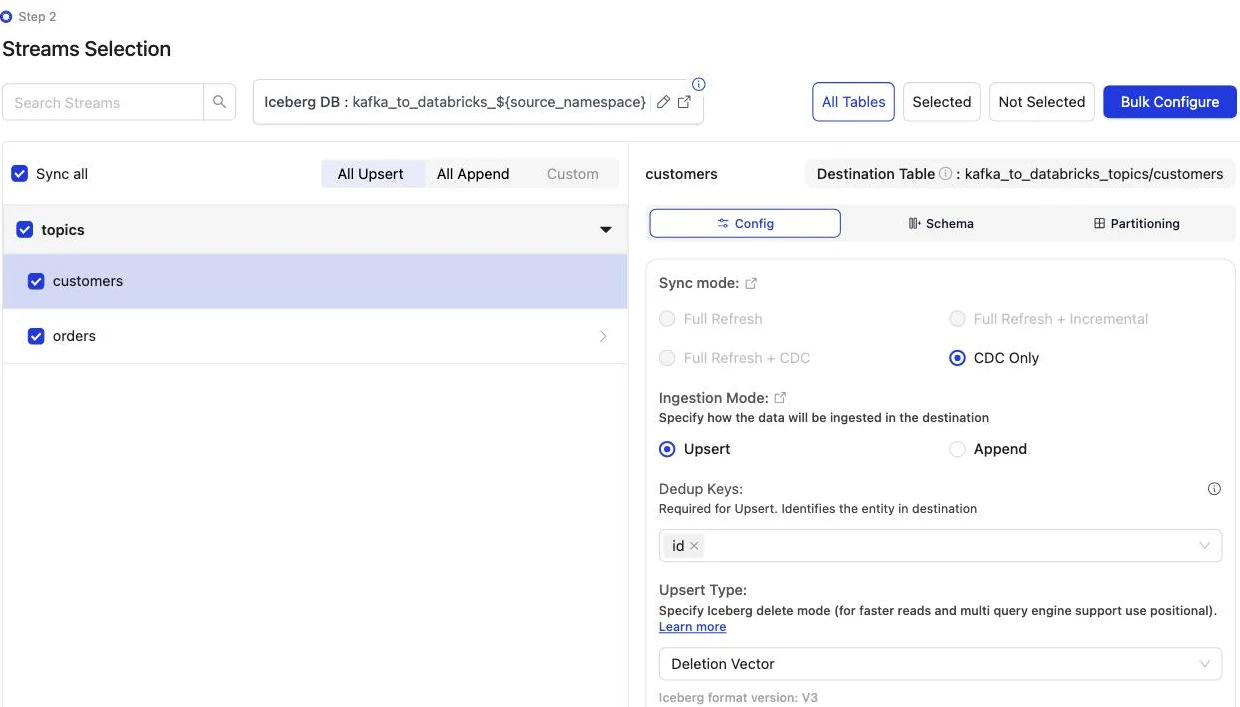
Discover the topics, choose the streams, then sync:
docker run --pull=always \
-v "$PWD/config:/mnt/config" \
olakego/source-kafka:latest \
discover --config /mnt/config/source.json
discover writes two files: available_streams.json (every topic it found, do not edit) and selected_streams.json (the topics you want and their settings). In selected_streams.json, set sync_mode to {props.cliSyncMode ?? 'cdc'} for each topic and pick the delete format your readers can open:
{
"selected_streams": {
  "topics": [
    {
      "stream_name": "customers",
      "sync_mode": "strict_cdc",
      "normalization": true,
      "append_mode": false,
      "dedup_keys": ["id"],
      "update_type": "dv"
    }
  ]
}
}
update_type accepts eq (equality deletes, the default), pos (positional deletes) and dv (deletion vectors). Positional deletes and deletion vectors keep a small index between runs, so give the container a persistent directory for it through OLAKE_INDEX_DB_DIR. The first sync runs without a state file; OLake Go writes one at the end of the run:
docker run --pull=always \
-v "$PWD/config:/mnt/config" \
-e OLAKE_INDEX_DB_DIR=/mnt/config/index-db \
olakego/source-kafka:latest \
sync \
--config /mnt/config/source.json \
--selected-streams /mnt/config/selected_streams.json \
--available-streams /mnt/config/available_streams.json \
--destination /mnt/config/destination.json
Every later run adds --state /mnt/config/state.json to the same command, which is how OLake Go knows to replay only the changes since the last run. The full selected_streams.json reference is on the Docker CLI page; the index directory is described under index DB setup.
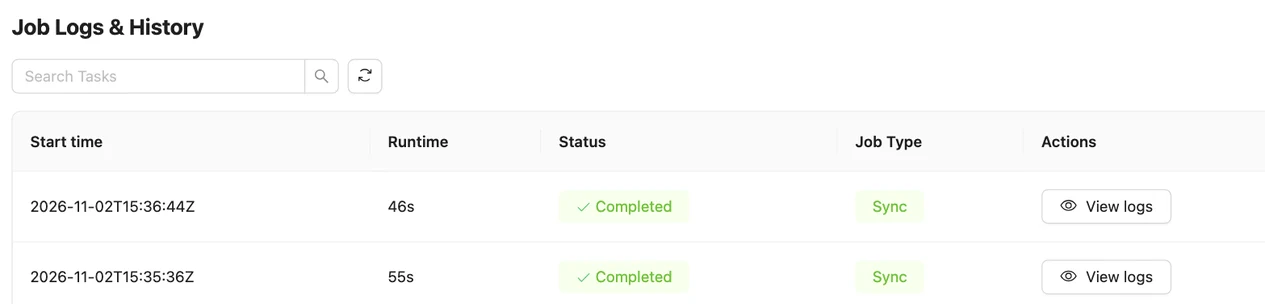
On this page the first run read 8 customer and 40 order messages (48 records, 9.00 KB) and finished in 55 seconds, container start included. OLake Go names the Unity Catalog schema after the job and the source namespace. The namespace for every Kafka topic is topics, so kafka_to_databricks produced kafka_to_databricks_topics.
Step 6: Query the tables in Databricks
- Unity Catalog
There is no registration step. The schema and tables OLake Go committed through Unity Catalog are managed Iceberg tables in the catalog you configured, and the Databricks SQL editor or a notebook reads them by their three-part name.
-- What OLake Go created (schema = <job name>_<source database>[_<source schema>])
SHOW TABLES IN lakehouse.kafka_to_databricks_topics;

SELECT id, name, city, tier
FROM lakehouse.kafka_to_databricks_topics.customers
ORDER BY id;

SELECT status, count(*) AS n, round(sum(amount), 2) AS total
FROM lakehouse.kafka_to_databricks_topics.orders
GROUP BY status ORDER BY status;
Any SQL warehouse or cluster on a recent Databricks Runtime reads them; a 2X-Small serverless warehouse is enough for checks. DESCRIBE EXTENDED on a table shows the Iceberg provider and the deletion vectors in its properties.
OLake Go adds four columns to every table: _olake_id (a hash of the primary key), _op_type, _olake_timestamp and _cdc_timestamp. _op_type is r for a row from the first snapshot, c for an insert, u for an update and d for a delete. Filter them out of dashboards, or use them to see when a row last changed.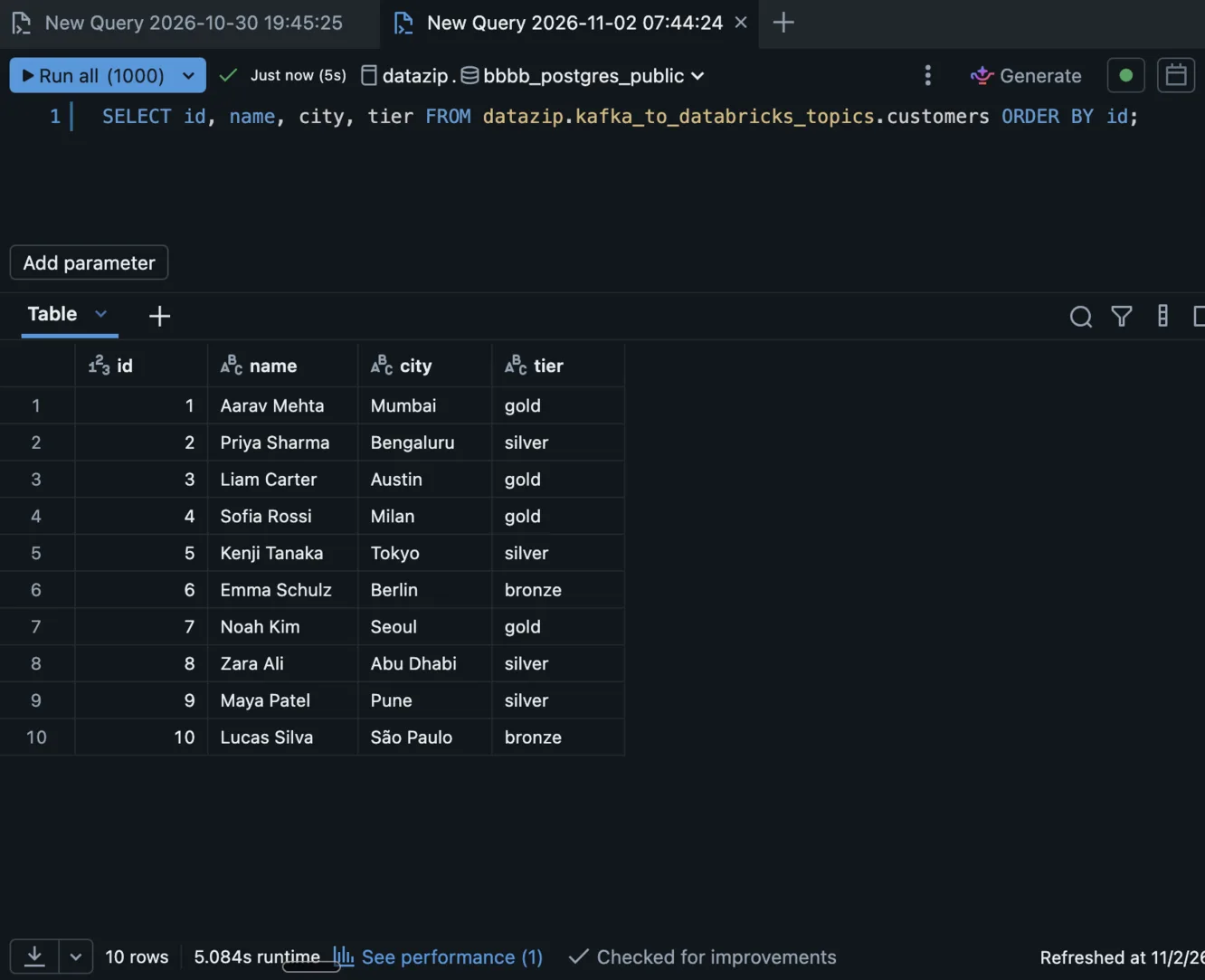
Upsert keeps one row per key, so a plain SELECT is the current state of each entity. After the second sync the queries above returned 10 customers, one per id, and 45 orders worth 25579.19 in total, on the 2X-Small serverless warehouse. No QUALIFY or view is needed.
Step 7: Produce new messages and sync again
To see the change path work, the run on this page produced 12 more messages after the first sync. Seven carry new keys; five repeat an existing key with a changed value.
# customers: two new keys, two repeated keys
9   {"id":9,"name":"Maya Patel","email":"maya@example.com","city":"Pune","tier":"silver", ...}
10  {"id":10,"name":"Lucas Silva","email":"lucas@example.com","city":"São Paulo","tier":"bronze", ...}
3   {"id":3,"name":"Liam Carter","email":"liam@example.com","city":"Austin","tier":"gold", ...}
8   {"id":8,"name":"Zara Ali","email":"zara@example.com","city":"Abu Dhabi","tier":"silver", ...}

# orders: five new keys (41 to 45), three repeated keys (1, 4, 7) with status "delivered"
41  {"id":41,"customer_id":9,"product":"Laptop","amount":1299.0,"status":"placed", ...}
1   {"id":1,"customer_id":2,"product":"Headphones","amount":99.19,"status":"delivered", ...}
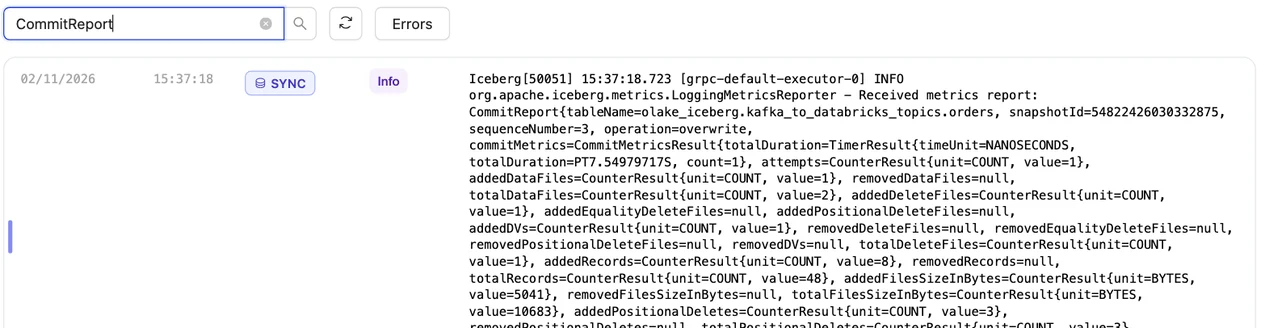
The second sync read 12 records (2.26 KB) from the two topics and finished in 46 seconds end to end. For customers that meant one new data file with 4 rows: the 2 new keys plus the new versions of the 2 repeated keys. One deletion vector retires the 2 old versions.
OLake Go's commit report in the sync log shows it directly: addedDataFiles=1, addedDVs=1, addedRecords=4, addedPositionalDeletes=2, with no equality or positional delete files. The orders table has the same shape with 8 rows and 3 deletes.
Databricks shows the result on the next query, with no refresh. Liam Carter is gold, Zara Ali moved to Abu Dhabi, and the two new customers are there: 10 rows, one per key. The _op_type column shows how each row arrived (c for a first-seen key, u for a repeated key) and _kafka_offset shows which message it came from.
Schema changes. When a new field appears in the messages, OLake Go adds it as a column on the next sync, and Databricks shows it. A field whose type changes in an incompatible way fails the sync rather than corrupt the table. Full rules are on the schema evolution page.
Query the same tables from DuckDB and Spark
Nothing is exported, copied or refreshed. Both engines read the files OLake Go wrote, through the same Unity Catalog endpoint, with storage credentials vended by Databricks. DuckDB from duckdb-iceberg 1.5.3 and Spark with Iceberg 1.8 or later read the deletion vectors.
- DuckDB
- Apache Spark
DuckDB attaches the Unity Catalog catalog as an Iceberg REST catalog with the same token. With vended_credentials, Unity Catalog hands DuckDB short-lived storage credentials per table, so no cloud keys are configured on the DuckDB side.
INSTALL iceberg; LOAD iceberg;
INSTALL httpfs;  LOAD httpfs;
CREATE SECRET unity (TYPE iceberg, TOKEN '<personal access token>');
ATTACH 'lakehouse' AS uc (
TYPE iceberg,
ENDPOINT 'https://<workspace-url>/api/2.1/unity-catalog/iceberg-rest',
SECRET unity,
ACCESS_DELEGATION_MODE 'vended_credentials'
);
SELECT id, name, city, tier
FROM uc.kafka_to_databricks_topics.customers
ORDER BY id;
DuckDB reads Iceberg v3 deletion vectors from duckdb-iceberg 1.5.3, so the rows match Databricks after every sync. The principal behind the token needs EXTERNAL USE SCHEMA, the same as OLake Go.
DuckDB 1.5.5 returned the same 10 customers, and the same 45 orders worth 25579.19, as Databricks.
Open source Spark reaches Unity Catalog as a plain Iceberg REST catalog. The warehouse is the catalog name, the token is a personal access token, and the X-Iceberg-Access-Delegation header asks Unity Catalog for short-lived storage credentials.
spark-sql \
  --packages org.apache.iceberg:iceberg-spark-runtime-4.0_2.13:1.10.0,org.apache.iceberg:iceberg-gcp-bundle:1.10.0 \
  --conf spark.sql.extensions=org.apache.iceberg.spark.extensions.IcebergSparkSessionExtensions \
  --conf spark.sql.catalog.uc=org.apache.iceberg.spark.SparkCatalog \
  --conf spark.sql.catalog.uc.type=rest \
  --conf spark.sql.catalog.uc.uri=https://<workspace-url>/api/2.1/unity-catalog/iceberg-rest \
  --conf spark.sql.catalog.uc.warehouse=lakehouse \
  --conf spark.sql.catalog.uc.token=<personal access token> \
  --conf spark.sql.catalog.uc.header.X-Iceberg-Access-Delegation=vended-credentials
SELECT id, name, city, tier FROM uc.kafka_to_databricks_topics.customers ORDER BY id;
Iceberg 1.8 or later reads the v3 deletion vectors OLake Go writes for Databricks; this page was tested with 1.10.0 on Spark 4.0.1. Swap iceberg-gcp-bundle for iceberg-aws-bundle or iceberg-azure-bundle to match the cloud the workspace runs on.
Spark 4.0.1 with Iceberg 1.10.0 returned the same 10 customers and the same orders totals as Databricks and DuckDB in the run on this page.
An orders roll-up by status matched the messages in all three engines. It gave 16 delivered orders for 8659.68, 18 placed for 10522.26, 11 shipped for 6397.25.
Data types: Kafka JSON to Iceberg to Databricks
A Kafka message has no schema of its own, so OLake Go infers one from a sample of messages at discover time and maps it to Iceberg types.
Databricks then maps Iceberg types to its own. Four Kafka columns are added to every row. This is what the run on this page produced:
| In the JSON value | Iceberg (written by OLake Go) | Databricks shows | Notes |
|---|---|---|---|
Integer ("id": 3) | long | BIGINT | |
Decimal ("amount": 99.19) | double | DOUBLE | The orders.amount sums on this page matched the messages to the cent in every engine; round at query time when you need exact decimal arithmetic. |
ISO 8601 timestamp string ("2026-10-29T15:22:04+00:00") | timestamptz (UTC) | TIMESTAMP | Strings that parse as timestamps are stored as timestamps. |
| Other strings | string | STRING | |
_kafka_key | string | STRING | The message key, base64-encoded (3 arrives as Mw==). |
_kafka_partition | int | INT | The partition the message was read from. |
_kafka_offset | long | BIGINT | The message's position in its partition. |
_kafka_timestamp | timestamptz | TIMESTAMP | The message timestamp: produce time or broker append time, depending on the topic's message.timestamp.type. |
Types on the left come from the Kafka connector reference; the Databricks side comes from DESCRIBE on the tables of this run. With Normalization on, which is the default, top-level fields become columns.
Cost and maintenance
- Storage is your cloud bucket behind the catalog's managed location. You pay your cloud's storage rates for the Parquet data files and deletion vectors.
- Compute. OLake Go runs wherever you run Docker and does not use a Databricks warehouse or cluster to write. Databricks compute is spent only when you query; the checks on this page ran on a 2X-Small serverless SQL warehouse.
- Maintenance. Each sync adds a small data file, plus a deletion vector when rows change. Plan compaction from the writer side: OLake Fusion does this for the catalogs OLake Go writes to, and Spark's
rewrite_data_filesworks through the same Unity Catalog endpoint. - Token rotation. A personal access token expires on the date set when it was created, and an expired token fails the next sync at the first catalog call. Use a service principal with OAuth machine-to-machine credentials for production jobs.
- Retention disk. Seven days of a busy topic is real disk on the brokers. Size for it, or shorten retention once the job runs reliably every hour.
Troubleshooting
1. The source test cannot reach the brokers
failed to ping kafka brokers: unable to dial: dial tcp 192.168.65.254:19999: connect: connection refused
The address in Bootstrap Servers is not reachable from inside the OLake Go container. For a broker on the same machine use host.docker.internal, not localhost.
Make sure the broker also advertises a listener the container can resolve; Kafka's advertised.listeners (and Redpanda's --advertise-kafka-addr) decide that. Credentials are not checked until the ping succeeds.
2. The Streams page is empty
Skipping topic customers (does not match topic_pattern: ^nothing_here$)
The topic pattern is a full regular expression anchored by you. ^orders$ matches one topic, ^orders matches every topic that starts with it, and a pattern with a typo matches nothing. Fix the pattern on the source and run discovery again; the sync log names every topic it skipped and why.
3. Upsert is greyed out on the Streams page
Upsert is not supported for this query engine.
Databricks reads deletion vectors only, and before these versions a Kafka upsert always wrote positional deletes. Upgrade the Kafka source to v1.1.1 or later and OLake UI to v0.8.2 or later. Then hard-reload the browser, since the old UI code can stay cached and keep showing the message.
4. A sync ends early after a consumer-group rebalance
A rebalance in OLake Go's consumer group, usually because another process joined it, makes the sync stop cleanly with what it has read. Nothing is lost: the messages read so far are committed, and the next sync resumes from the committed offsets.
Give each job its own consumer group and never point another consumer at it. If a group's offsets are damaged, create the job again with a new group id. The group name cannot be edited on an existing source in the UI.
5. The destination test fails with a permission error
Three settings cover nearly every failure. External data access may be off on the metastore, or the principal may lack EXTERNAL USE SCHEMA on the catalog. The third is a wrong catalog name in the destination.
ALL PRIVILEGES does not include EXTERNAL USE SCHEMA, so a catalog owner still has to grant it explicitly. Run the grants from step 2 again for the principal that owns the token.
How this compares with other ways to move Kafka data to Databricks
| Method | Freshness | Updates and deletes | Where the data lands | What you run |
|---|---|---|---|---|
| Databricks Structured Streaming with the Kafka source (checked Oct 2026) | Seconds, while the stream runs | With your own MERGE in foreachBatch | Tables written by a Databricks streaming job | A Databricks job or pipeline running on Databricks compute |
| Lakeflow Connect | Kafka is not among its managed connectors (checked Oct 2026) | Not applicable | Not applicable | Not applicable |
| Apache Iceberg Kafka Connect sink (checked Oct 2026) | Minutes, by commit interval | Append, or row-level changes when id columns and the Debezium or DMS transform are configured | Iceberg tables in a catalog you choose | A Kafka Connect cluster with the sink |
| OLake Go to Iceberg on Unity Catalog (this guide) | On a schedule down to one minute | Upsert on a deduplication key, written as deletion vectors; Append for event logs | Apache Iceberg tables that Databricks, DuckDB, Spark and Trino all read | One Docker Compose stack, open source; your storage plus your own compute |
Structured Streaming is the simpler choice when you need seconds of latency and a cluster can run all day. OLake Go suits topics that are fine on a schedule, and it keeps the ingestion off Databricks compute.
When not to use this
- You need seconds of latency. OLake Go drains the topic on a schedule, one minute at the shortest. Use Structured Streaming for a continuous feed.
- You are on an older OLake version. Before Kafka source v1.1.1 and OLake UI v0.8.2, only Append is offered for Kafka with Databricks. Upgrade both, or keep Append and pick the latest row per key at query time.
- The partition count will change while the job runs in Upsert mode. The same key would then hash to a different partition, and concurrent partition readers could leave a stale row behind. Finish the repartition, then create the job.
- Messages are not JSON or Avro. Protobuf, plain text and binary payloads cannot be mapped to columns.
FAQs
How do I get Kafka topics into Databricks as Iceberg tables without a streaming job?
Run OLake Go (open source, Apache 2.0) with the Kafka cluster as the source and Unity Catalog's Iceberg REST endpoint as the destination. Each sync reads the topics from the last committed offset and upserts the messages on a deduplication key into Unity Catalog managed Iceberg tables. No Kafka Connect cluster and no Databricks streaming job sit in the path.
Does OLake Go keep one row per key in Databricks, or one row per message?
One row per key when the stream runs in Upsert mode with a deduplication key, which is what this page uses. A later message with the same key retires the old row with a deletion vector and writes the new one, so Databricks reads one row per key with no QUALIFY or view. Append mode, which keeps every message as a row, is still there for event logs that are never updated.
Which OLake versions do I need for Kafka upserts into Databricks?
The OLake Go Kafka source v1.1.1 or later and OLake UI v0.8.2 or later. Unity Catalog managed Iceberg tables take deletion vectors only, and from v1.1.1 the Kafka writer keeps deletion vectors as the upsert format instead of switching to positional deletes. On older versions the Streams page greys out Upsert with the message Upsert is not supported for this query engine.
Where does the first sync start reading a Kafka topic?
A new consumer group has no committed offset, so the first sync reads every message the broker still retains in every partition of every selected topic. The run on this page read all 48 messages on its first sync. Each later sync resumes from the offsets OLake Go committed in its consumer group, so retention is the replay window.
Which message formats does OLake Go read from Kafka?
JSON values, and Avro values when a schema registry is configured on the source. Field types are inferred from a sample of messages at discover time: integers become BIGINT in Databricks, decimals DOUBLE, ISO 8601 timestamp strings TIMESTAMP and other strings STRING. Protobuf and plain-text messages are not supported.
Does Kafka to Databricks with OLake Go work on Amazon MSK, Confluent Cloud or Redpanda?
Yes. OLake Go speaks the Kafka protocol with PLAINTEXT, SASL_PLAINTEXT or SASL_SSL and the PLAIN or SCRAM-SHA-512 mechanisms, which covers MSK, Confluent Cloud and self-hosted clusters. The run on this page used Apache Kafka 4.3.1 in KRaft mode.
Related guides
Deeper reading on this site: