Oracle to Apache Iceberg: Sync with OLake Go
Oracle to Apache Iceberg usually means GoldenGate with a big data handler, or a Spark job that re-reads whole tables over Java Database Connectivity (JDBC) every night. OLake Go reads Oracle over a plain JDBC connection and writes the tables once as Iceberg in an Apache Polaris catalog. A cursor column keeps them fresh.
One limit up front: OLake Go has no log-based change data capture (CDC) for Oracle. Changes travel through a column such as UPDATED_AT, and hard deletes are not seen.
Polaris is an open source Iceberg REST (Representational State Transfer) catalog you run yourself, with the files in your own bucket. Apache Spark, DuckDB and Trino all read the tables through that one endpoint.
Key takeaways
- OLake Go replicates Oracle into Iceberg tables in Polaris: a full historical snapshot first, then incremental syncs on a cursor column such as
UPDATED_AT, with no GoldenGate, no LogMiner and no Kafka in between. - Changed rows replace their old versions through Iceberg row-level deletes in a format every target engine reads, so each table holds one current row per primary key.
- Spark, DuckDB and Trino read the same tables through the same catalog, with no export and no second copy. In the run on this page all three returned identical rows.
The short answer. To replicate Oracle to Apache Iceberg without redo-log access, run OLake Go with a read-only Oracle user as the source and an Iceberg REST catalog such as Apache Polaris as the destination. The first sync copies each table in full; every later sync fetches the rows whose cursor column moved and upserts them. Spark, DuckDB and Trino query the result.
How Oracle changes reach Apache Iceberg here
Two things happen in order, and OLake Go does both on its own. The first sync reads each table in parallel chunks, writes Parquet data files and records the highest cursor value it saw. Every later sync selects rows above that value, writes them as new data files and retires the old version of each updated row with a delete file.
Each sync ends with one commit to Polaris. OLake Go asks Polaris for short-lived storage credentials, uploads the files, then posts the new snapshot. Spark, DuckDB and Trino see it on their next query.
One thing to keep an eye on: the cursor is the only thing that carries changes. A row whose UPDATED_AT is not bumped on update is invisible to the next sync, and a deleted row is never seen. Set the column in every write path, or add a trigger, and soft-delete rows you need to remove downstream.
What you need
- Oracle Database 11g or later reachable over JDBC, with a read-only user and a cursor column on each table. The tables on this page ran on Oracle Database 23ai Free in Docker.
- An Apache Polaris server and a bucket, both reachable from OLake Go and from the engines. The run on this page used Polaris 1.8.0 and MinIO in Docker; on AWS, use an S3 bucket and an IAM role instead.
- At least one Iceberg reader. The run on this page used Apache Spark 3.5.6 with Iceberg 1.10.0, DuckDB 1.5.5 and Trino 484.
- OLake UI from the Docker Compose install. The run on this page used OLake Go v1.1.0.
- Docker, and about 40 minutes.
Step 1: Prepare Oracle for incremental sync
Most readers point OLake Go at tables they already have. If you want to follow along with the exact data from this page, create these two tables first:
The two sample tables used on this page
CREATE TABLE shop.customers (
  id NUMBER(10) GENERATED BY DEFAULT AS IDENTITY PRIMARY KEY,
  name VARCHAR2(100), email VARCHAR2(200), city VARCHAR2(100), tier VARCHAR2(20),
  created_at TIMESTAMP DEFAULT SYSTIMESTAMP,
  updated_at TIMESTAMP DEFAULT SYSTIMESTAMP);

CREATE TABLE shop.orders (
  id NUMBER(10) GENERATED BY DEFAULT AS IDENTITY PRIMARY KEY,
  customer_id NUMBER(10) REFERENCES shop.customers(id),
  product VARCHAR2(100), amount NUMBER(10,2), status VARCHAR2(20),
  created_at TIMESTAMP DEFAULT SYSTIMESTAMP,
  updated_at TIMESTAMP DEFAULT SYSTIMESTAMP);

-- Then insert whatever you like. This page started with 8 customers and 40 orders.
OLake Go reads Oracle tables over a plain Java Database Connectivity (JDBC) connection: a parallel full snapshot first, then incremental syncs that fetch only rows whose cursor column moved past the last value seen. There is no log-based change data capture (CDC) for Oracle in OLake Go, so three things must be in place before the first sync.
| Setting | Value | Why it matters |
|---|---|---|
| A read-only user | CREATE SESSION plus SELECT on each table | The snapshot and every incremental sync read the tables directly. |
| A cursor column | a column that grows with every change, such as updated_at | Incremental syncs select WHERE cursor > last value. Rows updated without touching the cursor are not picked up. |
| A primary key | on every table | OLake Go uses it to upsert changed rows into the Iceberg table. Without one, changed rows are appended. |
-- 1. A user for OLake Go
CREATE USER olake IDENTIFIED BY "<password>";
GRANT CREATE SESSION TO olake;

-- 2. Read access to the tables you sync
GRANT SELECT ON shop.customers TO olake;
GRANT SELECT ON shop.orders TO olake;
GRANT SELECT ANY DICTIONARY TO olake;   -- lets discovery read the catalog views

-- 3. A cursor column that your application always sets, for example
--    updated_at TIMESTAMP DEFAULT SYSTIMESTAMP, updated by a trigger or by the application on every change
Check the result before moving on:
SELECT username FROM all_users WHERE username = 'OLAKE';
SELECT table_name FROM all_tables WHERE owner = 'SHOP';
The full list of privileges, with the reason for each, is on the generic Oracle setup guide.
A deleted row has no cursor value to read, so it stays in the Iceberg table. If deletes matter, soft-delete in Oracle (a deleted_at column that also bumps updated_at) or schedule an occasional full refresh.
Step 2: Set up the Polaris catalog
An Iceberg table is a set of files plus a pointer to its current metadata, and the catalog holds that pointer. Apache Polaris is the catalog this page uses: OLake Go commits into it, and every reader asks it where the current snapshot is. The files sit in your own S3 or MinIO bucket; Polaris holds only the pointers and the permissions.
The Polaris catalog page lists which engines read it and how. Any Iceberg REST client with OAuth2 works, which covers Spark, DuckDB, Trino, ClickHouse, Flink and PyIceberg.
| Catalog | OLake Go writes | Apache Iceberg reads | Verified on this page |
|---|---|---|---|
| Apache Polaris | Yes | Yes: any Iceberg REST client with OAuth2 | Yes, end to end |
- Apache Polaris
Apache Polaris is an open source Iceberg REST catalog. It keeps the table metadata pointers, hands out short-lived storage credentials to engines, and applies its own role-based access control. OLake Go writes to it through the standard Iceberg REST API, and ClickHouse, Trino, DuckDB and Spark read from the same endpoint. The files live in an S3 bucket or an S3-compatible store that you own.
Three things need to exist before OLake Go can write: a Polaris server, a catalog inside it that points at your bucket, and a principal (a client id and secret) with the right to manage that catalog. The run on this page used Polaris 1.8.0 and MinIO in Docker; on AWS, swap the MinIO endpoint for a plain S3 bucket and an IAM role.
services:
  minio:
    image: minio/minio
    hostname: lake-minio
    command: server /data --console-address ":9001"
    environment: { MINIO_ROOT_USER: minioadmin, MINIO_ROOT_PASSWORD: minioadmin }
    ports: ["9000:9000", "9001:9001"]
  polaris:
    image: apache/polaris:latest
    depends_on: [minio]
    ports: ["8181:8181", "8182:8182"]
    environment:
      AWS_REGION: us-east-1
      AWS_ACCESS_KEY_ID: minioadmin
      AWS_SECRET_ACCESS_KEY: minioadmin
      POLARIS_BOOTSTRAP_CREDENTIALS: POLARIS,root,<root-secret>
      polaris.realm-context.realms: POLARIS
Polaris stores its own state in memory with this setup, so it starts empty every time; a production deployment points it at Postgres. Once it is up, create the bucket, the catalog and the principal through the management API. root is the bootstrap principal; the olake principal is the one OLake Go and the engines use.
P=http://localhost:8181

# 1. A bucket for the tables (MinIO; on AWS create it in the console or with aws s3 mb)
aws --endpoint-url http://localhost:9000 s3 mb s3://lakehouse

# 2. A root token
TOKEN=$(curl -s $P/api/catalog/v1/oauth/tokens -H 'Polaris-Realm: POLARIS' \
  -d grant_type=client_credentials -d client_id=root -d client_secret=<root-secret> \
  -d scope=PRINCIPAL_ROLE:ALL | jq -r .access_token)
H=(-H "Authorization: Bearer $TOKEN" -H 'Polaris-Realm: POLARIS' -H 'Content-Type: application/json')

# 3. The catalog: where the files go, and how Polaris and the engines reach the store
curl -s "${H[@]}" $P/api/management/v1/catalogs -d '{"catalog": {
  "name": "olake", "type": "INTERNAL", "readOnly": false,
  "properties": {"default-base-location": "s3://lakehouse/olake"},
  "storageConfigInfo": {"storageType": "S3", "allowedLocations": ["s3://lakehouse/olake"],
    "endpoint": "http://<minio-host>:9000/", "endpointInternal": "http://lake-minio:9000",
    "pathStyleAccess": true, "region": "us-east-1"}}}'

# 4. A principal for OLake Go and the engines. The response holds clientId and clientSecret: keep them.
curl -s "${H[@]}" $P/api/management/v1/principals -d '{"principal": {"name": "olake"}}'

# 5. Roles and the grant that lets the principal create namespaces and tables in the catalog
curl -s "${H[@]}" $P/api/management/v1/principal-roles -d '{"principalRole": {"name": "olake_role"}}'
curl -s "${H[@]}" $P/api/management/v1/catalogs/olake/catalog-roles -d '{"catalogRole": {"name": "olake_catalog_role"}}'
curl -s -X PUT "${H[@]}" $P/api/management/v1/principals/olake/principal-roles -d '{"principalRole": {"name": "olake_role"}}'
curl -s -X PUT "${H[@]}" $P/api/management/v1/principal-roles/olake_role/catalog-roles/olake -d '{"catalogRole": {"name": "olake_catalog_role"}}'
curl -s -X PUT "${H[@]}" $P/api/management/v1/catalogs/olake/catalog-roles/olake_catalog_role/grants -d '{"type": "catalog", "privilege": "CATALOG_MANAGE_CONTENT"}'
What each block is for:
endpointis the store address Polaris hands to engines along with vended credentials;endpointInternalis the address Polaris itself uses. On AWS S3 leave both out. On MinIO both are required, or Polaris tries to reach AWS and fails. Keep the trailing slash onendpoint: ClickHouse 26.8 and 26.10 build the object path from it, and without the slash every read fails with a 404 (the fix is explained under troubleshooting on this page).- Polaris vends credentials through the store's STS endpoint. MinIO exposes one, so nothing else is needed. For a store without STS, add
"stsUnavailable": trueand give Polaris static keys to hand out. CATALOG_MANAGE_CONTENTlets the principal create namespaces and tables and read and write their data. Scope it to a namespace instead when several teams share the catalog.- The principal's secret is shown once, in the response to step 4. It is what goes into OLake Go as
<client_id>:<client_secret>.
Polaris is a Java service, and Java's URI parser rejects hostnames that contain an underscore. A MinIO container named lab_minio makes every table creation fail with host must not be null or Expected scheme-specific part at index 5: http:. Use a hyphen in the hostname (lake-minio), as above.
You can check the principal outside OLake Go by exchanging its credentials for a token, the same call OLake Go makes on every sync:
curl -s http://localhost:8181/api/catalog/v1/oauth/tokens -H 'Polaris-Realm: POLARIS' \
  -d grant_type=client_credentials -d client_id=<client_id> -d client_secret=<client_secret> \
  -d scope=PRINCIPAL_ROLE:ALL
A good principal returns a JSON object with an access_token. Running Polaris on Kubernetes, with Postgres behind it, or with an external identity provider is covered on the Polaris catalog page.
Step 3: Connect Oracle to OLake Go
- OLake UI
- OLake CLI
- In the OLake UI, open Sources and click Create Source. Pick Oracle as the connector, give the source a name and keep the OLake Go version on the latest release.
- Fill in the host and port, choose Service Name (or SID) as the connection type and enter it, then the username and password from step 1. Type the username the way Oracle stores it, which is upper case unless you created it in double quotes: OLake Go quotes the name when it connects, so
olakeandOLAKEare different users. - Click Set up source. OLake Go tests the connection and saves the source.
Here is the source form from the run on this page. Oracle ran in another container, so the host is host.docker.internal. The connection type is Service Name (FREEPDB1) rather than a system identifier (SID), and the user is the one from step 1.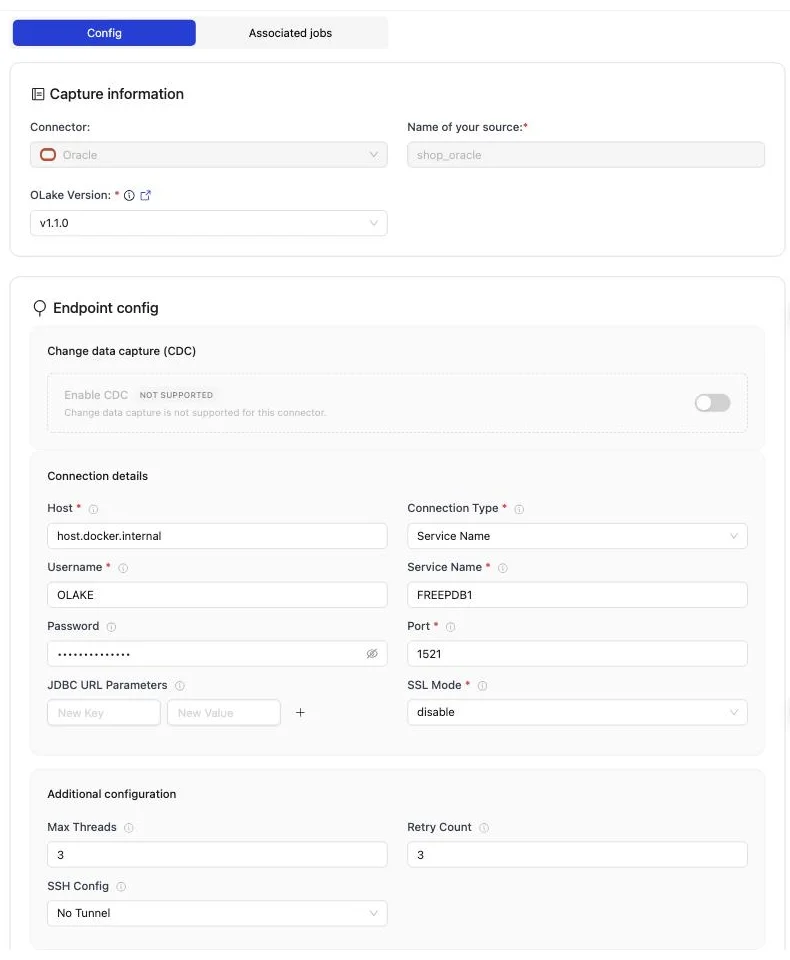
The full field reference, including SSL and SSH tunnels, is on the Oracle connector page.
Create source.json in your config folder with either service_name or sid:
{
 "host": "oracle-host",
 "username": "oracle-user",
 "password": "oracle-password",
 "service_name": "oracle-service-name",
 "sid": "oracle-sid",
 "port": 1521,
 "max_threads": 10,
 "backoff_retry_count": 3,
 "jdbc_url_params": {},
 "ssl": {
     "mode": "disable"
 }
}
Then confirm OLake Go can reach the database:
docker run --pull=always \
  -v "$PWD/config:/mnt/config" \
  olakego/source-oracle:latest \
  check --config /mnt/config/source.json
A working connection returns "status": "SUCCEEDED". Every field is described on the Oracle connector page.
Step 4: Configure the Iceberg destination
- Apache Polaris
- OLake UI
- OLake CLI
- Open Destinations and click Create Destination.
- Pick Apache Iceberg as the connector and Polaris as the catalog type.
- Choose OAuth2 as the authentication type. REST Catalog URI is the Polaris catalog endpoint (
http://<polaris-host>:8181/api/catalog), Polaris Catalog Name the catalog from the setup (olake), REST Auth URI the token endpoint, and REST Credential the principal's<client_id>:<client_secret>. - Fill in the store: AWS Region, and for MinIO the S3 Endpoint with the AWS Access Key and AWS Secret Key. On AWS S3 leave the endpoint empty.
- Click Create. OLake Go exchanges the credentials for a token, creates a namespace and a test table through Polaris, writes to the bucket and drops the test table again.
Here is the destination form from the run on this page. Polaris and MinIO ran in other containers, so both addresses use host.docker.internal; the credential is the olake principal from step 2.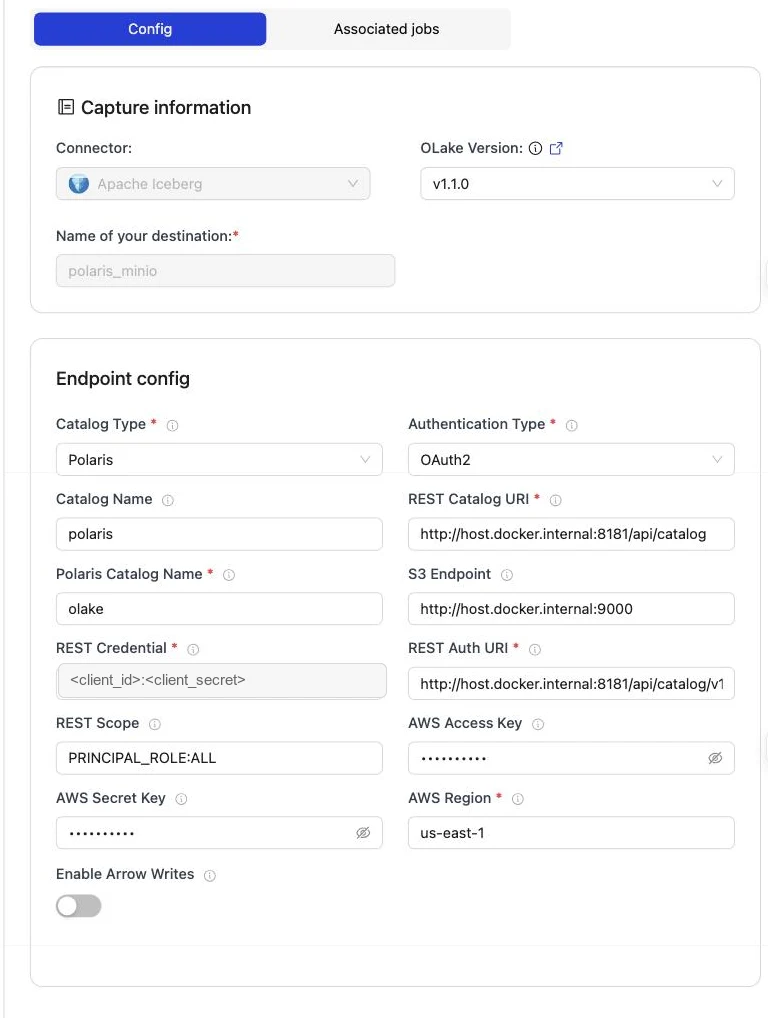
Polaris Configuration Parameters
| Parameter | Sample Value | Description |
|---|---|---|
REST Catalog URIrequired | http://<REST_ENDPOINT>:8181/api/catalog | Endpoint URL for the Polaris REST catalog service. |
Authentication Typerequired | oauth2 | Authentication method OLake Go uses for Polaris REST catalog requests. Set to match your catalog's authentication configuration. |
Polaris Catalog Namerequired | <POLARIS_CATALOG_NAME> | Name of the Polaris catalog to use, OLake Go passes this to the Polaris REST catalog as the warehouse identifier, so catalog operations are routed to that catalog and its pre-configured S3 storage and IAM settings. |
REST Auth URIrequired | http://<REST_ENDPOINT>:8181/api/catalog/v1/oauth/tokens | URL of the REST catalog’s OAuth2 token endpoint. OLake Go uses this with REST Credential to request an access token during OAuth2 client-credentials authentication. |
REST Credentialrequired | <olake_user_client_id>:<olake_user_client_secret> | Specifies the client ID and secret for OAuth2, formatted as client_id:client_secret. Used with REST Auth URI when OLake Go requests an access token from the catalog’s auth service. Not needed when using REST Token or other auth types. |
AWS Regionrequired | ap-south-1 | AWS Region where your S3 bucket exists. Required so OLake Go calls the correct regional S3 endpoint. |
| REST Scope | PRINCIPAL_ROLE:ALL | Required for OAuth2 client-credentials auth. Scopes are space-separated. Used with REST Auth URI and REST Credential for OAuth2 client-credentials auth. Values are catalog-specific. Not needed when using REST Token or other auth types. |
| S3 Endpoint | http://<S3_ENDPOINT>:9000 | S3 API endpoint for writing Iceberg data files. Leave empty for AWS S3 but required for S3-compatible storage like MinIO. |
| AWS Access Key | XXX | AWS access key ID for authentication. Optional if using IAM roles or instance profiles. If using IAM: Docker Compose: add the required IAM environment variables under x-envs in your compose file. See Service Environment Variables for setup details.Kubernetes: set up pod IAM in Cloud Integration. |
| AWS Secret Key | XXX | AWS secret access key for authentication. Optional if using IAM roles or instance profiles. If using IAM: Docker Compose: add the required IAM environment variables under x-envs in your compose file. See Service Environment Variables for setup details.Kubernetes: set up pod IAM in Cloud Integration. |
| Enable Arrow Writes | false | Writes data and delete files using Apache Arrow based writer and registers them in Iceberg. |
| Catalog Name | olake_iceberg | Name of the Iceberg catalog OLake Go registers tables under. Defaults to olake_iceberg if left empty. |
Create destination.json next to source.json:
{
  "type": "ICEBERG",
  "writer": {
    "catalog_type": "polaris",
    "catalog_name": "polaris",
    "rest_catalog_url": "http://<polaris-host>:8181/api/catalog",
    "iceberg_s3_path": "olake",
    "rest_auth_type": "oauth2",
    "oauth2_uri": "http://<polaris-host>:8181/api/catalog/v1/oauth/tokens",
    "credential": "<client_id>:<client_secret>",
    "scope": "PRINCIPAL_ROLE:ALL",
    "aws_region": "us-east-1",
    "s3_endpoint": "http://<minio-host>:9000",
    "aws_access_key": "<minio access key>",
    "aws_secret_key": "<minio secret key>",
    "arrow_writes": false
  }
}
Polaris Configuration Parameters
| Parameter | Sample Value | Description |
|---|---|---|
catalog_typerequired | polaris | Defines the catalog type used by the writer. |
rest_catalog_urlrequired | http://<REST_ENDPOINT>:8181/api/catalog | Endpoint URL for the Polaris REST catalog service. |
iceberg_s3_pathrequired | <POLARIS_CATALOG_NAME> | Name of the Polaris catalog to use, OLake Go passes this to the Polaris REST catalog as the warehouse identifier, so catalog operations are routed to that catalog and its pre-configured S3 storage and IAM settings. |
rest_auth_typerequired | oauth2 | Authentication method OLake Go uses for Polaris REST catalog requests. Set to match your catalog's authentication configuration. |
oauth2_urirequired | http://<REST_ENDPOINT>:8181/api/catalog/v1/oauth/tokens | URL of the REST catalog’s OAuth2 token endpoint. OLake Go uses this with REST Credential to request an access token during OAuth2 client-credentials authentication. |
credentialrequired | <olake_user_client_id>:<olake_user_client_secret> | Specifies the client ID and secret for OAuth2, formatted as client_id:client_secret. Used with REST Auth URI when OLake Go requests an access token from the catalog’s auth service. |
aws_regionrequired | ap-south-1 | AWS Region where your S3 bucket exists. Required so OLake Go calls the correct regional S3 endpoint. |
| scope | PRINCIPAL_ROLE:ALL | Required for OAuth2 client-credentials auth. Scopes are space-separated. Used with REST Auth URI and REST Credential for OAuth2 client-credentials auth. Values are catalog-specific. |
| s3_endpoint | http://<S3_ENDPOINT>:9000 | S3 API endpoint for writing Iceberg data files. Leave empty for AWS S3 but required for S3-compatible storage like MinIO. |
| aws_access_key | XXX | AWS access key ID for authentication. Optional if using IAM roles or instance profiles. If using IAM: Docker Compose: add the required IAM environment variables under x-envs in your compose file. See Service Environment Variables for setup details.Kubernetes: set up pod IAM in Cloud Integration. |
| aws_secret_key | XXX | AWS secret access key for authentication. Optional if using IAM roles or instance profiles. If using IAM: Docker Compose: add the required IAM environment variables under x-envs in your compose file. See Service Environment Variables for setup details.Kubernetes: set up pod IAM in Cloud Integration. |
| arrow_writes | false | Writes data and delete files using Apache Arrow based writer and registers them in Iceberg. |
| catalog_name | olake_iceberg | Name of the Iceberg catalog OLake Go registers tables under. Defaults to olake_iceberg if left empty. |
Step 5: Create the job and run the first sync
Because the Oracle connector has no CDC mode, each stream runs as Full Refresh + Incremental with UPDATED_AT as the cursor. The target query engines are Apache Spark, DuckDB and Trino.
- OLake UI
- OLake CLI
- Open Jobs and click Create Job. Give it a name and a schedule. Every Day at a fixed hour, or a cron expression, both work; the schedule is how often the change stream is drained, not how often a full copy runs.
- Select the source and the destination you created.
- Under Advanced Settings, set Target Query Engines to Apache Spark, DuckDB and Trino. OLake Go then resolves an Iceberg delete format every one of those engines can read, so you never pick one by hand.
- Click Next. OLake Go discovers the tables and opens the Streams page.
- Tick the tables to replicate. For each one, set the sync mode to Full Refresh + Incremental with
UPDATED_ATas the cursor column and the ingestion mode to Upsert. Leave the Upsert Type as OLake Go resolved it (Positional Deletes in the run on this page). - Click Create Job, then open the job's menu and choose Sync Now for the first run.
OLake Go offers only the delete formats all three engines read, which here is all three Iceberg formats. The run used Positional Deletes on Iceberg v2, readable by every current release of each engine.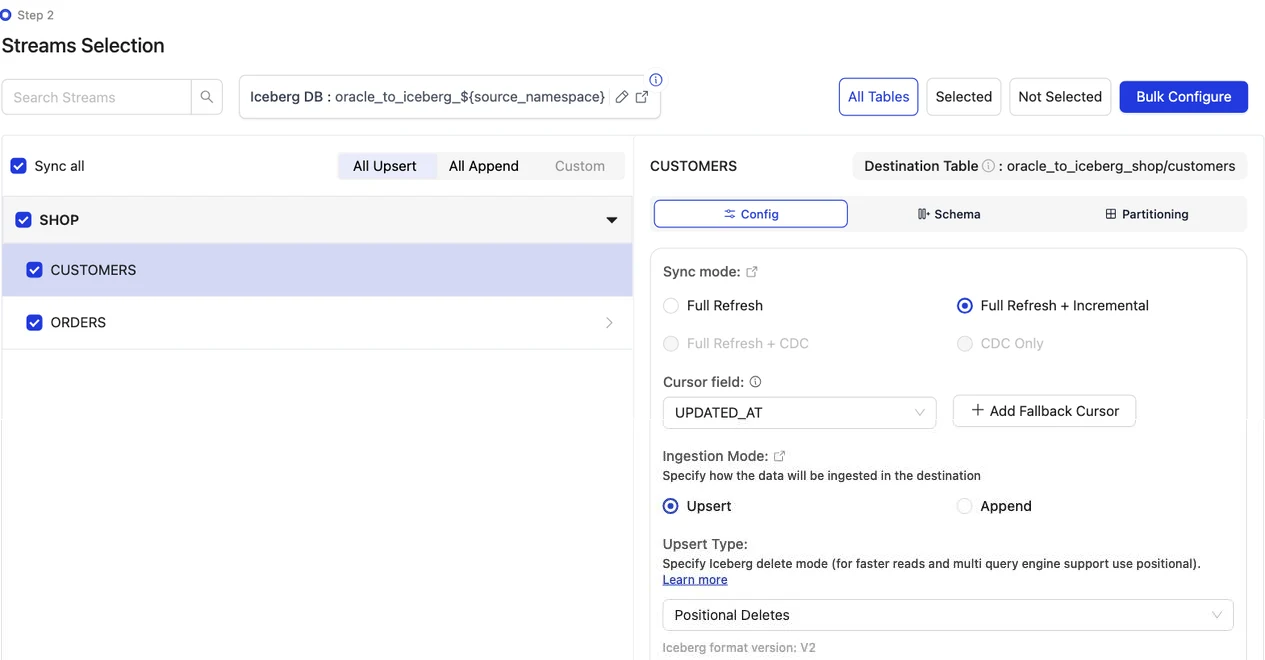
Discover the tables, choose the streams, then sync:
docker run --pull=always \
-v "$PWD/config:/mnt/config" \
olakego/source-oracle:latest \
discover --config /mnt/config/source.json
discover writes two files: available_streams.json (every table it found, do not edit) and selected_streams.json (the tables you want and their settings). In selected_streams.json, set sync_mode to {props.cliSyncMode ?? 'cdc'} for each table and pick the delete format your readers can open:
{
"selected_streams": {
  "SHOP": [
    {
      "stream_name": "CUSTOMERS",
      "sync_mode": "incremental",
      "cursor_field": "UPDATED_AT",
      "normalization": true,
      "append_mode": false,
      "update_type": "pos"
    }
  ]
}
}
update_type accepts eq (equality deletes, the default), pos (positional deletes) and dv (deletion vectors). Positional deletes and deletion vectors keep a small index between runs, so give the container a persistent directory for it through OLAKE_INDEX_DB_DIR. The first sync runs without a state file; OLake Go writes one at the end of the run:
docker run --pull=always \
-v "$PWD/config:/mnt/config" \
-e OLAKE_INDEX_DB_DIR=/mnt/config/index-db \
olakego/source-oracle:latest \
sync \
--config /mnt/config/source.json \
--selected-streams /mnt/config/selected_streams.json \
--available-streams /mnt/config/available_streams.json \
--destination /mnt/config/destination.json
Every later run adds --state /mnt/config/state.json to the same command, which is how OLake Go knows to replay only the changes since the last run. The full selected_streams.json reference is on the Docker CLI page; the index directory is described under index DB setup.
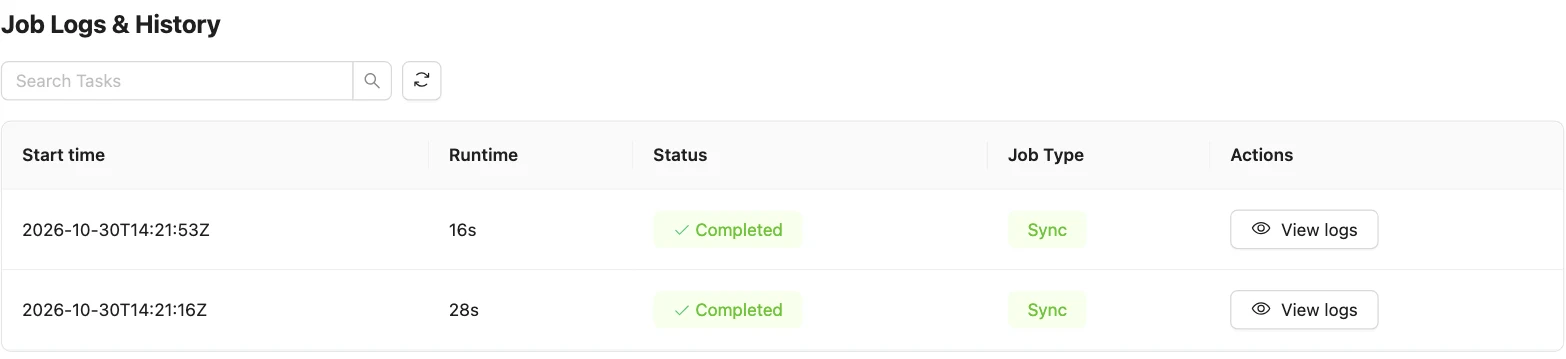
On this page the first run copied 8 customers and 40 orders (48 records, 2.24 KB) and finished in 28 seconds, container start included. OLake Go names the Iceberg namespace after the job and the source schema, lower-cased, so oracle_to_iceberg on schema SHOP produced oracle_to_iceberg_shop. The Iceberg DB field at the top of the Streams page changes it before the first sync.
Step 6: Query the Iceberg tables
DuckDB is the quickest reader to try: one process, no server. It attaches the whole Polaris catalog and reads the tables in place.
- Apache Polaris
There is no registration step. DuckDB attaches the whole Polaris catalog with ATTACH, lists every table OLake Go committed, and reads the files straight from the bucket. DuckDB fetches the OAuth2 token itself from the principal's client id and secret. On a laptop, where the store address Polaris hands out may not resolve, add an S3 secret for the store and turn credential vending off:
INSTALL iceberg; LOAD iceberg;
INSTALL httpfs;  LOAD httpfs;

CREATE SECRET polaris_secret (
TYPE iceberg,
CLIENT_ID '<client_id>', CLIENT_SECRET '<client_secret>',
OAUTH2_SERVER_URI 'http://<polaris-host>:8181/api/catalog/v1/oauth/tokens',
OAUTH2_SCOPE 'PRINCIPAL_ROLE:ALL'
);
-- MinIO, or any store whose address differs from the one Polaris vends
CREATE SECRET store_secret (
TYPE s3, KEY_ID '<access key>', SECRET '<secret key>',
ENDPOINT '<minio-host>:9000', URL_STYLE 'path', USE_SSL false, REGION 'us-east-1'
);

ATTACH 'olake' AS polaris (
TYPE iceberg,
ENDPOINT 'http://<polaris-host>:8181/api/catalog',
SECRET polaris_secret,
ACCESS_DELEGATION_MODE 'none'
);

SHOW ALL TABLES;

-- What OLake Go created (schema = <job name>_<source database>)
SELECT id, name, city, tier FROM polaris.oracle_to_iceberg_shop.customers ORDER BY id;
With Polaris on AWS S3, drop the S3 secret and the ACCESS_DELEGATION_MODE line: DuckDB then reads with the credentials Polaris vends. The attached catalog is read-only from DuckDB; OLake Go is the writer.
OLake Go adds four columns to every table: _olake_id (a hash of the primary key), _op_type, _olake_timestamp and _cdc_timestamp. _op_type is r for a row from the first snapshot, c for an insert, u for an update and d for a delete. Filter them out of dashboards, or use them to see when a row last changed.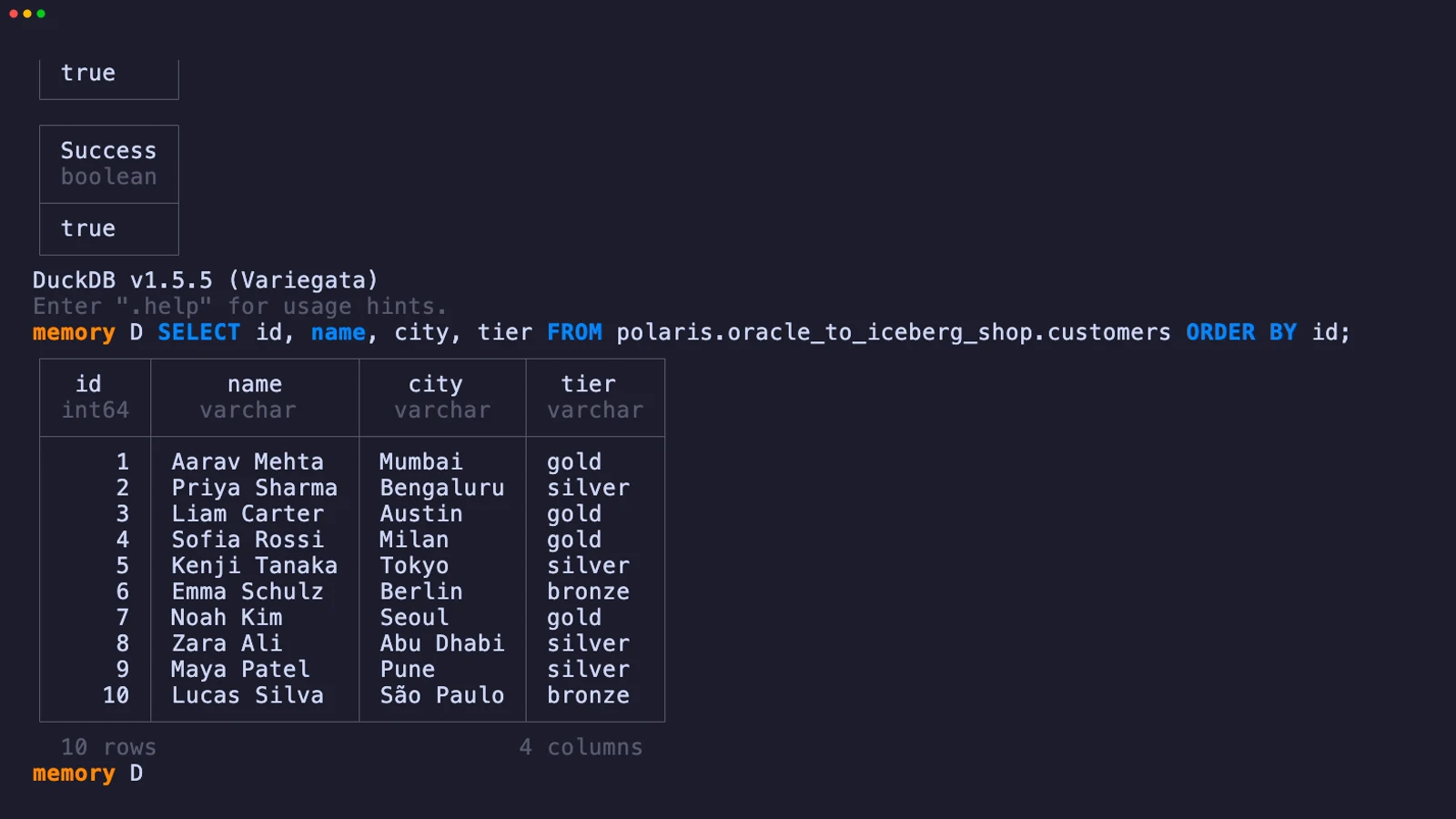
Step 7: Change rows in Oracle and sync again
To see the incremental path work, the run on this page made 12 changes in Oracle after the first sync. Every update also sets updated_at, which is what the cursor sees:
INSERT INTO customers (name, email, city, tier) VALUES ('Maya Patel', 'maya@example.com', 'Pune', 'silver');
INSERT INTO customers (name, email, city, tier) VALUES ('Lucas Silva', 'lucas@example.com', 'São Paulo', 'bronze');
INSERT INTO orders (customer_id, product, amount, status) VALUES (9, 'Laptop', 1299.00, 'placed');
INSERT INTO orders (customer_id, product, amount, status) VALUES (9, 'Mouse', 25.50, 'placed');
INSERT INTO orders (customer_id, product, amount, status) VALUES (10, 'Monitor', 349.99, 'placed');
INSERT INTO orders (customer_id, product, amount, status) VALUES (3, 'Keyboard', 89.00, 'placed');
INSERT INTO orders (customer_id, product, amount, status) VALUES (7, 'Webcam', 79.90, 'placed');
UPDATE customers SET tier = 'gold',      updated_at = SYSTIMESTAMP WHERE name = 'Liam Carter';
UPDATE customers SET city = 'Abu Dhabi', updated_at = SYSTIMESTAMP WHERE name = 'Zara Ali';
UPDATE orders    SET status = 'delivered', updated_at = SYSTIMESTAMP WHERE id IN (1, 4, 7);
COMMIT;
The second sync fetched 12 rows (598 bytes) above the saved cursor and finished in 16 seconds end to end. For orders that meant one new data file with 8 rows: 5 inserts plus the new versions of 3 updated rows.
One small positional delete file retires the 3 old versions by file and row position. OLake Go's commit report in the sync log shows it directly: addedDataFiles=1, addedRecords=8, addedPositionalDeleteFiles=1, addedPositionalDeletes=3, and no equality delete files.
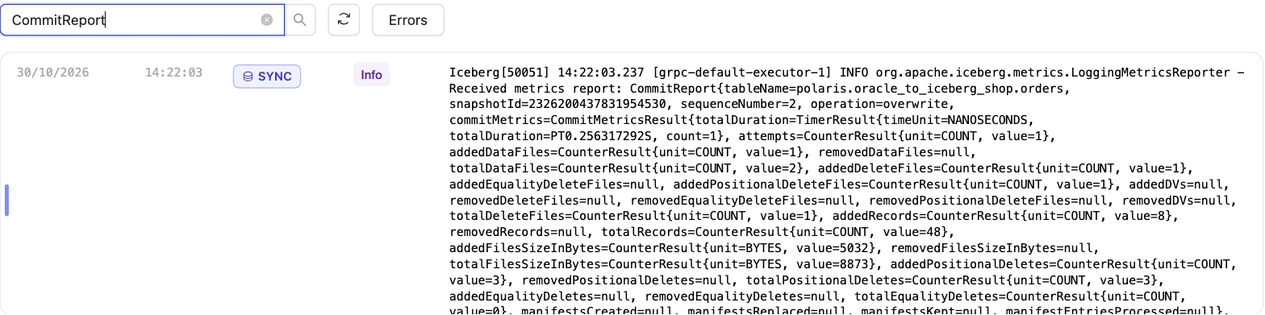
customers has the same shape with 4 rows and 2 deletes. Every reader shows the result on its next query: Liam Carter is gold, Zara Ali moved to Abu Dhabi, and the two new customers are there. In incremental mode OLake Go cannot tell an insert from an update, so every row the second sync brought carries _op_type = u; the snapshot rows keep r.
Schema changes. When a column is added in Oracle, OLake Go adds it to the Iceberg table on the next sync and commits the new schema to Polaris. Widening changes are applied; narrowing or incompatible type changes fail the sync rather than corrupt the table. Full rules are on the schema evolution page.
Query the same tables from Trino and Spark
This is the point of writing Iceberg. Nothing is exported, copied or refreshed: each engine reads the files OLake Go wrote, through the same Polaris endpoint.
- Trino
- Apache Spark
Trino reaches Polaris through its Iceberg connector in REST mode. One catalog properties file does it; Trino fetches the OAuth2 token with the principal's credentials and reads the files with the credentials Polaris vends.
connector.name=iceberg
iceberg.catalog.type=rest
iceberg.rest-catalog.uri=http://<polaris-host>:8181/api/catalog
iceberg.rest-catalog.warehouse=olake
iceberg.rest-catalog.security=OAUTH2
iceberg.rest-catalog.oauth2.credential=<client_id>:<client_secret>
iceberg.rest-catalog.oauth2.scope=PRINCIPAL_ROLE:ALL
iceberg.rest-catalog.oauth2.server-uri=http://<polaris-host>:8181/api/catalog/v1/oauth/tokens
iceberg.rest-catalog.vended-credentials-enabled=true
fs.native-s3.enabled=true
s3.region=us-east-1
# MinIO or another S3-compatible store only:
s3.endpoint=http://<minio-host>:9000
s3.path-style-access=true
SHOW SCHEMAS FROM polaris;
SELECT id, name, city, tier FROM polaris.oracle_to_iceberg_shop.customers ORDER BY id;
Trino 484 read the tables on this page with no further settings. Equality and positional deletes are read on every current release; deletion vectors from Trino 480, where the docs still mark them experimental.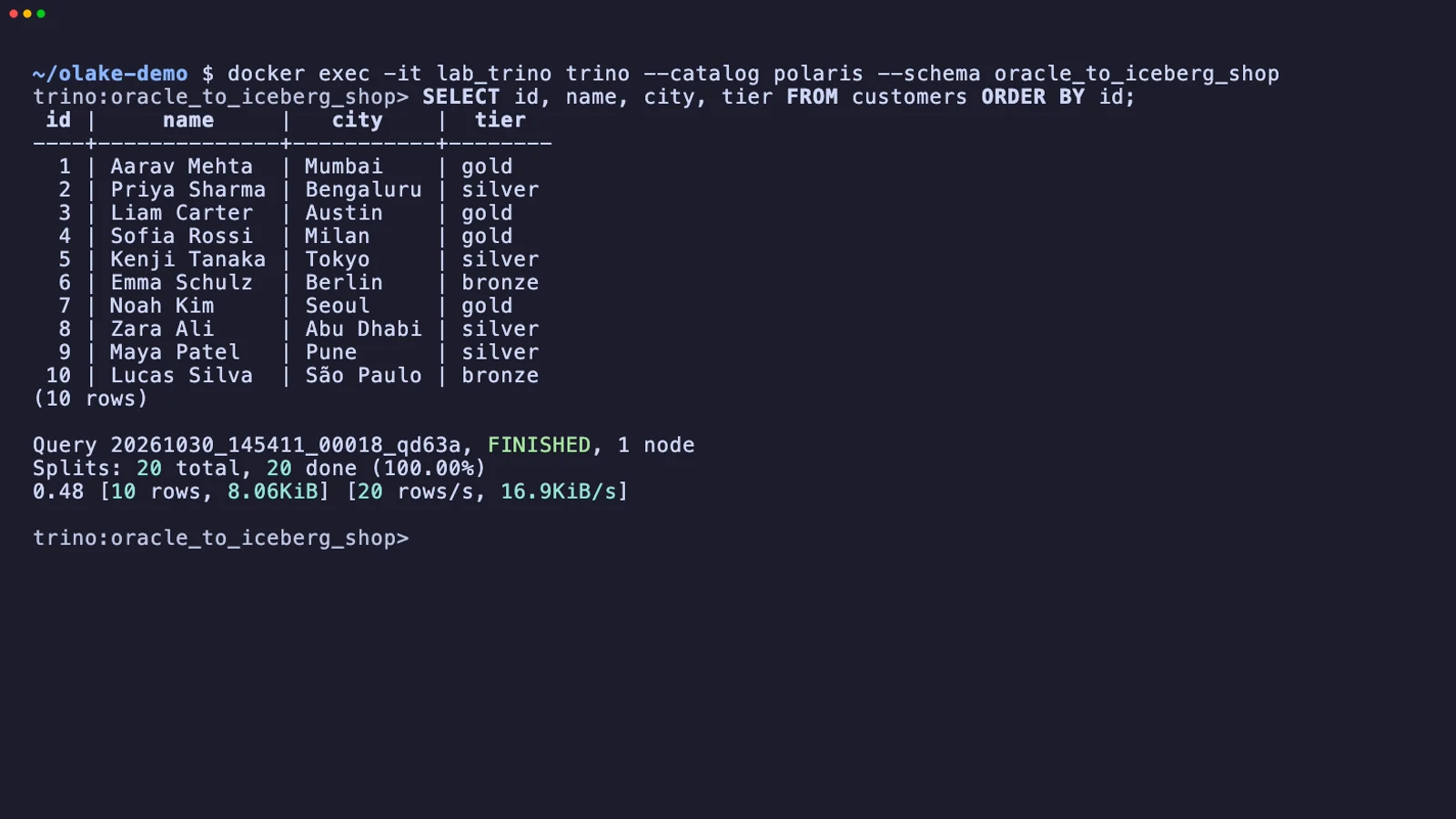
Open source Spark reaches Polaris through the Iceberg REST catalog. The warehouse is the Polaris catalog name, and credential is the principal's client ID and secret, which Spark trades for an OAuth2 token.
spark-sql \
  --packages org.apache.iceberg:iceberg-spark-runtime-3.5_2.12:1.10.0,org.apache.iceberg:iceberg-aws-bundle:1.10.0 \
  --conf spark.sql.extensions=org.apache.iceberg.spark.extensions.IcebergSparkSessionExtensions \
  --conf spark.sql.catalog.polaris=org.apache.iceberg.spark.SparkCatalog \
  --conf spark.sql.catalog.polaris.type=rest \
  --conf spark.sql.catalog.polaris.uri=http://<polaris-host>:8181/api/catalog \
  --conf spark.sql.catalog.polaris.warehouse=olake \
  --conf spark.sql.catalog.polaris.credential=<client_id>:<client_secret> \
  --conf spark.sql.catalog.polaris.scope=PRINCIPAL_ROLE:ALL \
  --conf spark.sql.catalog.polaris.header.X-Iceberg-Access-Delegation=vended-credentials \
  --conf spark.sql.catalog.polaris.client.region=us-east-1
SELECT id, name, city, tier FROM polaris.oracle_to_iceberg_shop.customers ORDER BY id;
On MinIO or another S3-compatible store, also set spark.sql.catalog.polaris.s3.endpoint and spark.sql.catalog.polaris.s3.path-style-access=true. The run on this page used Spark 3.5.6 with Iceberg 1.10.0 against MinIO, with the MinIO keys passed as s3.access-key-id and s3.secret-access-key instead of vended credentials.
Spark 3.5.6 with Iceberg 1.10.0 returned the same 10 customers and 45 orders in the run on this page.
An orders roll-up matched Oracle to the cent in all three engines: 45 orders for 25579.19 in total. By status it gave 16 delivered orders for 8659.68, 18 placed for 10522.26, 11 shipped for 6397.25.
Data types: Oracle to Apache Iceberg
OLake Go maps Oracle types to Iceberg types itself; each engine then shows the Iceberg type in its own terms. Numbers are the group to watch.
| Oracle | Iceberg (written by OLake Go) | Notes |
|---|---|---|
NUMBER(n,0) | long | The NUMBER(10) identity keys on this page arrived as long. |
NUMBER(n,m) with a scale, FLOAT, BINARY_DOUBLE | double | OLake Go stores decimals as doubles. The orders.amount sums on this page matched Oracle to the cent in every engine; round at query time when you need exact decimal arithmetic. |
BINARY_FLOAT | float | |
DATE, TIMESTAMP, TIMESTAMP WITH TIME ZONE, TIMESTAMP WITH LOCAL TIME ZONE | timestamptz (UTC) | Oracle DATE carries a time; it arrives as a UTC instant. |
VARCHAR2, NVARCHAR2, CHAR, CLOB, NCLOB, LONG | string | |
RAW, LONG RAW, BLOB, BFILE, INTERVAL types | string | Binary values arrive as text; keep large binaries out of the sync. |
Oracle types in the table come from the Oracle connector reference.
Cost and maintenance
- Storage is your bucket: you pay S3 or MinIO rates for the Parquet and delete files, and nothing to Polaris for holding pointers.
- Compute. OLake Go runs wherever you run Docker, for the length of a sync; the incremental sync on this page took 16 seconds. Readers spend compute only when they query.
- Oracle load. Each incremental sync runs one range query per table on the cursor column. Index
UPDATED_ATon large tables so the query does not scan them. - Maintenance. Nothing compacts the tables for you. A table that gets a new small file and delete file per sync wants compaction; OLake Fusion does this for the catalogs OLake Go writes to, and Spark's
rewrite_data_filesworks through the same Polaris endpoint. - Credential rotation. Polaris principals do not expire by default. Rotate the
olakeprincipal's secret on your own schedule; a rotated secret fails the next sync at the token exchange, before any data moves.
Troubleshooting
1. Discovery fails because the service is not registered
FATAL failed to ping database: ORA-12514: TNS:listener does not currently know of service requested in connect descriptor
The service name is wrong or the listener has not registered it yet. On a fresh container the pluggable database registers a minute or two after startup; lsnrctl status lists freepdb1 once it is ready. Otherwise fix the service name, or connect with the SID.
2. The source test fails with ORA-01017 although sqlplus logs in
failed to ping database: ORA-01017: invalid credential or not authorized; logon denied
OLake Go quotes the username when it connects, so Oracle compares it case-sensitively. A user created as CREATE USER olake is stored as OLAKE; enter it in upper case.
3. Updated rows are missing after an incremental sync
The update did not move the cursor column. OLake Go only fetches rows whose cursor value is above the last one it saw, so an UPDATE that leaves UPDATED_AT untouched is invisible. Set the column in every write path, or add a trigger that sets it on UPDATE.
4. A recreated job writes nothing on its first sync
Table[<namespace>.customers]: stream index is already up to date at snapshot[...]
chunk min[1] and max[<nil>] already committed, skipping
A job deleted and created again with the same name writes into the same Iceberg namespace. OLake Go sees the chunks of the earlier snapshot as already committed and skips them, so the snapshot writes nothing. Drop the old tables from Polaris first, or give the new job a different Iceberg DB name.
5. The destination test fails at the token exchange
OLake Go's destination test exchanges the principal's credentials at /api/catalog/v1/oauth/tokens before anything else. Three causes cover nearly every failure: a wrong client id or secret, a principal with no role that carries CATALOG_MANAGE_CONTENT on the catalog, or a wrong Polaris Catalog Name. Run the token check from the catalog setup; it returns the same error Polaris gives OLake Go.
How this compares with other ways to move Oracle data to Apache Iceberg
| Method | Freshness | Updates and deletes | Where the data lands | What you run |
|---|---|---|---|---|
| Oracle GoldenGate with a big data target | Seconds | Yes, from the redo log | Files or tables, depending on the handler | GoldenGate Extract and Replicat, a licensed Oracle option |
| Debezium Oracle connector, Kafka and the Iceberg Kafka Connect sink | Seconds to minutes | Yes, through LogMiner | Iceberg tables in your catalog | Kafka, Kafka Connect, supplemental logging on Oracle and both connectors |
| Spark job over JDBC | Hours to daily | Only with your own MERGE logic | Iceberg tables in your catalog | A Spark cluster, a scheduler and the merge code |
| Managed ELT (Fivetran, Estuary, Airbyte Cloud) | Minutes, by plan | Varies by tool | Their managed destination, often a warehouse table | Nothing; priced per row, per GB or per connector |
| OLake Go to Iceberg on Polaris (this guide) | Incremental on a schedule down to one minute | Inserts and updates through the cursor; no deletes | Apache Iceberg tables in your bucket and your catalog | One Docker Compose stack, open source; your bucket plus your own compute |
Debezium or GoldenGate is the right choice when deletes must be replicated from the redo log. OLake Go needs no Oracle option, no supplemental logging and no Kafka. That matters when a cursor column already exists and rows are rarely deleted.
When not to use this
- You need hard deletes replicated. Incremental sync cannot see a deleted row. Soft-delete in Oracle, or use a log-based tool.
- Tables have no cursor column and cannot get one. Without a monotonically increasing column, only Full Refresh works.
- You need seconds of latency. OLake Go syncs on a schedule, one minute at the shortest.
FAQs
How do I replicate Oracle to Apache Iceberg without GoldenGate?
Run OLake Go (open source, Apache 2.0) against the Oracle database with a read-only user, and point it at an Iceberg REST catalog such as Apache Polaris. The first sync copies each table in parallel chunks; every later sync fetches only rows whose cursor column (for example UPDATED_AT) moved, and upserts them. GoldenGate, Kafka and a Spark job are not needed, and no Oracle license option is involved.
Is this change data capture from the Oracle redo log?
No. The Oracle connector in OLake Go runs Full Refresh and Full Refresh + Incremental; it does not read redo logs or LogMiner. Incremental syncs select rows where a cursor column is greater than the last value seen, which captures inserts and updates that bump the cursor but not deletes. For log-based capture you need GoldenGate or Debezium's Oracle connector.
Does OLake Go copy the existing Oracle data before it starts the incremental syncs?
Yes, automatically. A job in Full Refresh + Incremental mode first copies every selected table in parallel chunks, records the highest cursor value, and from the next run fetches only rows above it. There is no separate backfill job.
Which Iceberg delete format does OLake Go write for Oracle updates?
The one every target query engine on the job reads. With Apache Spark, DuckDB and Trino as targets, OLake Go offered equality deletes, positional deletes and deletion vectors; the run on this page used positional deletes on Iceberg v2, which all three read on every current release. Each updated row's old version is retired by its file and row position.
Which Oracle data types change on the way to Iceberg?
NUMBER columns with a scale become Iceberg double, so round at query time when you need exact decimal arithmetic. Whole-number NUMBER columns become long. DATE and every TIMESTAMP variant become timestamptz in UTC. VARCHAR2, CLOB and the binary types arrive as string.
Can OLake Go read Oracle on RDS, Autonomous Database or on premises?
Yes. The connector connects over JDBC with a service name or SID, a read-only user and SELECT on the tables, so RDS for Oracle, Autonomous Database and self-managed instances all work. The run on this page used Oracle Database 23ai Free in Docker.
Related guides
Deeper reading on this site: