S3 to BigQuery: CSV Files as Apache Iceberg
Files land in S3 every hour or every day: exports from an application, drops from a partner, logs from a job. S3 to BigQuery usually means a BigQuery Data Transfer Service job, a bq load script on a schedule, or an external table per folder.
This guide takes a different route. OLake Go reads the files itself and turns each folder into an Apache Iceberg table in a BigLake catalog, Google Cloud's Iceberg representational state transfer (REST) catalog. Every later run syncs only the files that are new.
BigQuery queries the tables through the catalog with a four-part name, with no dataset to create and no external table to declare. Nothing else is in the path: no transfer job, no load job, no table definition per folder. DuckDB and Spark read the same tables through the same catalog.
Key takeaways
- OLake Go turns S3 folders into Iceberg tables in a BigLake catalog: the first sync reads every file under the prefix, and every later sync reads only files newer than the last run, by their modification time.
- BigQuery reads the catalog as a data source. Every file a sync commits is visible on the next
SELECT, with no refresh and no load job. - The same tables, written once by OLake Go, are also queryable from DuckDB and Spark. In the run on this page all three engines returned identical rows.
The short answer. To load S3 files into BigQuery as Iceberg, run OLake Go with the bucket and prefix as the source and a BigLake catalog with a Cloud Storage bucket as the destination.
Put each stream in Full Refresh + Incremental mode with _last_modified_time as the cursor. The first sync reads every file; every later sync reads only the files added since. BigQuery, DuckDB and Spark then query the same Iceberg tables, with no second copy.
How S3 files reach BigQuery here
Two things happen in order, and OLake Go does both on its own. The first sync lists everything under the prefix and makes one stream per first-level folder.
Then it reads every file in parallel: that is the historical load. At the end it saves the newest LastModified time it saw per stream.
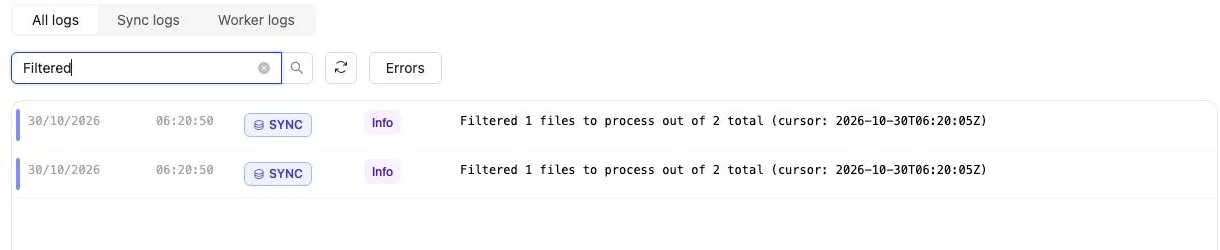
Every later sync lists the prefix again and reads only the files whose LastModified time is newer than the saved cursor. On this page the second sync reported Filtered 1 files to process out of 2 total for each stream.
Rows are appended; a file never changes a row that an earlier file wrote. Each sync ends with one commit to BigLake, and BigQuery, DuckDB and Spark see the new snapshot on their next query.
One thing to keep an eye on: the cursor is the object's modification time, not anything inside the file. Uploading a corrected copy of yesterday's file gives it today's LastModified time.
The whole file is then read again, and every row in it is appended a second time. Add files, never rewrite them, and keep an id column in the data so a query can pick the latest version of a row.
What you need
- A source bucket, on S3 or an S3-compatible store, with files in folders under one prefix: CSV, JSON, Parquet or XML, plain or gzip. Amazon S3, MinIO and LocalStack all work; the run on this page used MinIO in Docker with two CSV folders.
- Read-only access to the source bucket:
s3:ListBucketands3:GetObject, through a role on AWS or static keys on MinIO. - A Google Cloud project with the BigLake API enabled, a Cloud Storage bucket for the Iceberg files, and a service account for OLake Go with the BigLake Editor role on the project and Storage Object User on the bucket. The run on this page used a bucket in
us-central1. - BigQuery in the same project. Queries run in the bucket's region, and the account running them needs the BigQuery Job User role plus read access to the catalog.
- OLake UI from the Docker Compose install with the OLake Go S3 source. The run on this page used v1.1.0.
- Docker, and about 30 minutes.
Step 1: Prepare the source bucket
Most readers point OLake Go at files they already have. If you want to follow along with the exact data from this page, upload two CSV files shaped like these first:
The two sample files used on this page
Each stream is a folder under data/, with one dated subfolder per upload. The header row names the columns, and id identifies the row so a later file can correct it.
id,name,email,city,tier,created_at,updated_at
1,Aarav Mehta,aarav@example.com,Mumbai,gold,2026-10-30T03:34:34Z,2026-10-30T03:34:34Z
2,Priya Sharma,priya@example.com,Bengaluru,silver,2026-10-30T03:34:34Z,2026-10-30T03:34:34Z
id,customer_id,product,amount,status,created_at,updated_at
1,2,Headphones,99.19,shipped,2026-10-30T03:34:34Z,2026-10-30T03:34:34Z
2,3,Monitor,178.38,delivered,2026-10-30T03:34:34Z,2026-10-30T03:34:34Z
aws s3 sync ./stage s3://shop/data/
# Then add whatever you like. This page started with 8 customers and 40 orders.
There is nothing to switch on in S3. OLake Go lists the objects under a prefix, groups them into streams by their first folder, and remembers the newest LastModified time it has read. Four things decide whether that works for your bucket.
| Requirement | Value | Why it matters |
|---|---|---|
| Folder layout | <prefix>/<stream>/.../file | The first folder after the prefix is the stream name and becomes the table. Files sitting directly under the prefix belong to no stream. |
| File format | CSV, JSON (lines or array), Parquet or XML, plain or gzip | One format per source. Mixed buckets need one source per format, or a file pattern that picks one. |
| Read-only access | s3:ListBucket on the bucket, s3:GetObject on its objects | Listing finds the files and tracks their LastModified time; GetObject reads them. |
| Files that are added, not rewritten | New file per batch | Incremental syncs read files newer than the saved cursor. A rewritten file gets a new LastModified time and is read again in full. |
This is the layout the run on this page used, with one CSV file per day per stream:
s3://shop/data/
├── customers/
│   └── 2026-10-29/customers.csv
└── orders/
  └── 2026-10-29/orders.csv
On AWS, attach a policy with the two read actions to the user or role OLake Go runs as. On MinIO or another S3-compatible store, a user with read access to the bucket is enough, and the endpoint goes into the source form.
{
"Version": "2012-10-17",
"Statement": [
  { "Effect": "Allow", "Action": ["s3:ListBucket"], "Resource": ["arn:aws:s3:::shop"] },
  { "Effect": "Allow", "Action": ["s3:GetObject"], "Resource": ["arn:aws:s3:::shop/*"] }
]
}
Leave the access key fields empty on AWS to use the instance role, task role or environment credentials instead of static keys. Static keys are required for MinIO and LocalStack.
OLake Go reads a file when its LastModified time is newer than the cursor saved after the last sync. Uploading a corrected copy of an old file therefore re-reads the whole file and appends every row again. Add new files for new data; keep old files as they are.
Step 2: Set up the BigLake catalog
BigQuery reads Iceberg tables through a catalog. BigLake is the one this page uses: it is Google Cloud's Iceberg REST catalog, OLake Go creates a namespace per job in it, and the Iceberg files sit in your Cloud Storage bucket, separate from the source files.
BigQuery, DuckDB and Spark all read from the same catalog. BigQuery treats it as a data source in the project, so a table OLake Go commits is queryable on the next statement.
| Catalog | OLake Go writes | BigQuery reads | Verified on this page |
|---|---|---|---|
| BigLake (Google Cloud Lakehouse) | Yes | Yes: native: namespaces map to BigQuery datasets | Yes, end to end |
- BigLake (Google Cloud Lakehouse)
BigLake is the Iceberg REST catalog built into Google Cloud's Lakehouse. OLake Go talks to it at https://biglake.googleapis.com/iceberg/v1/restcatalog, the table files land in a Cloud Storage bucket you own, and BigQuery reads the tables without any registration step. Writing to BigLake needs OLake Go 0.9.1 or later.
Everything below happens in the Google Cloud console, in the project that will hold the tables.
- Enable the API. Open APIs and services, then Enable APIs and services, and enable the BigLake API. BigQuery and Cloud Storage are on by default in most projects.
- Create a bucket. In Cloud Storage, create a bucket in the region where BigQuery will run the queries (
us-central1on this page). The bucket name becomes the catalog name in BigQuery, so pick one you are happy to type in SQL. - Create a service account for OLake Go. In IAM and Admin, Service Accounts, create one (for example
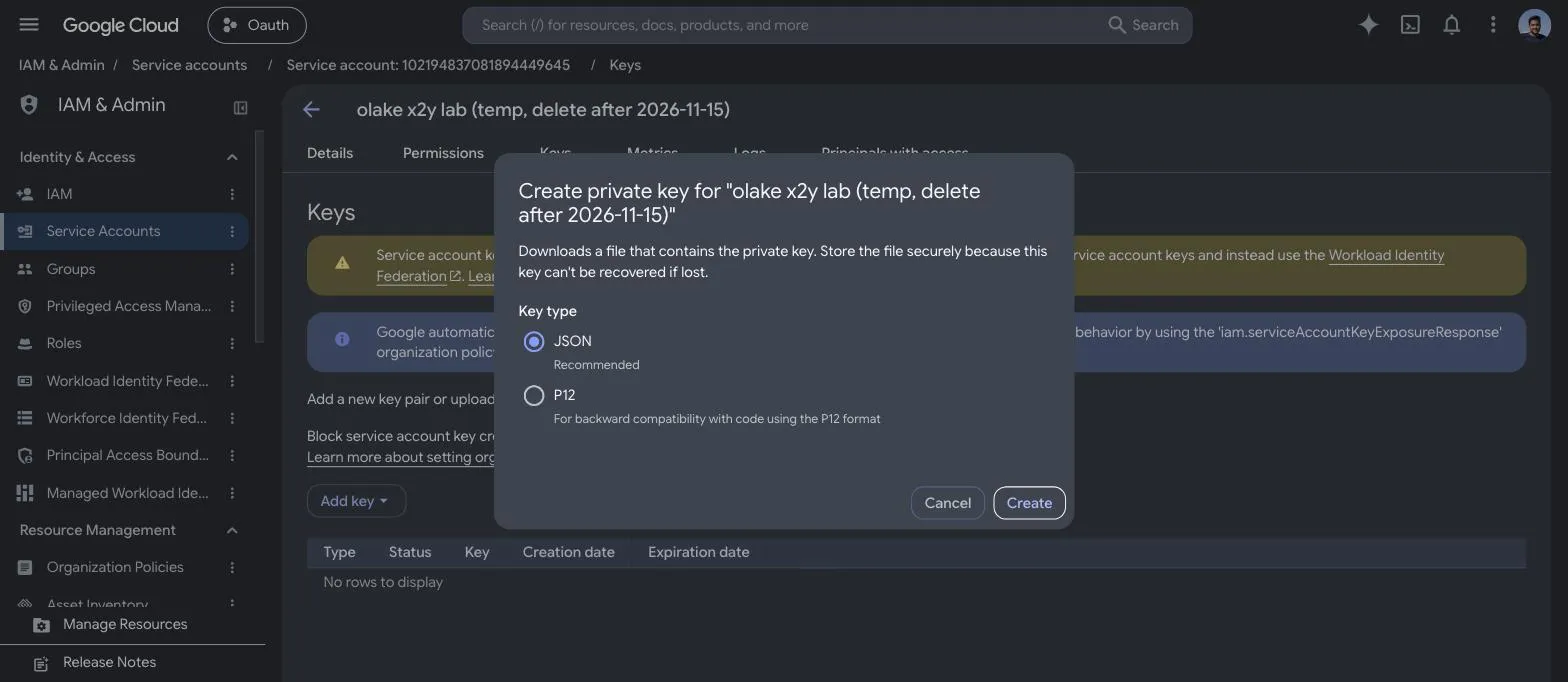
olake-biglake). Then grant it two roles: BigLake Editor on the project (IAM, Grant access, the service account as principal) and Storage Object User on the bucket (the bucket's Permissions tab). - Download a JSON key. On the service account's Keys tab, Add key, Create new key, JSON. The file downloads once; OLake Go asks for its contents.
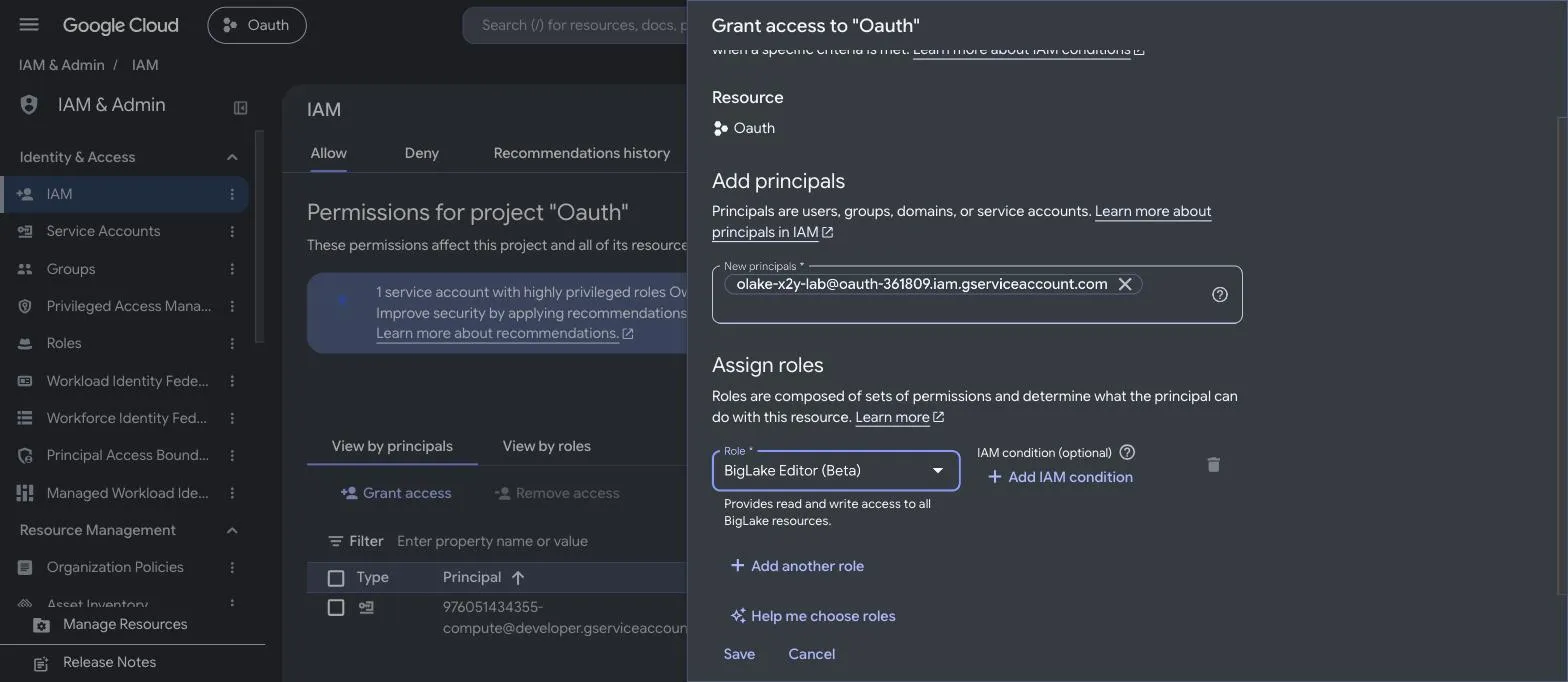
There is no catalog to create. BigLake creates a single-bucket catalog named after the bucket the first time OLake Go calls the endpoint with gs://<bucket> as the catalog path, in the default end-user credential mode, where every client brings its own storage credentials. The catalog shows up under BigLake, Catalogs after the first connection test.
Two things to know before the first sync:
- The service account's BigLake Editor role is what lets OLake Go create namespaces and commit tables. Storage Object User on the bucket is what lets it write the Parquet and metadata files. Missing either one fails the connection test with a
403frombiglake.googleapis.comor fromstorage.googleapis.com, which tells you which grant is missing. - Leave the catalog in end-user mode. OLake Go 1.1.0 does not send the
X-Iceberg-Access-Delegationheader, so a catalog switched to vended credentials rejects its commits (see troubleshooting). Readers that want short-lived tokens from the catalog can switch the mode later withgcloud beta biglake iceberg catalogs update <bucket> --credential-mode=vended-credentials, after settingrest_access_delegationin a CLI config.
Step 3: Connect S3 to OLake Go
- OLake UI
- OLake CLI
- In the OLake UI, open Sources and click Create Source. Pick S3 as the connector, give the source a name and keep the OLake Go version on the latest release.
- The Enable CDC toggle under Change data capture (CDC) reads not supported for S3 and stays off. Object storage has no change log; the job's Full Refresh + Incremental mode on the file modification time is what carries new data.
- Under Connection details, fill in the S3 Bucket Name, the AWS Region, and the Path Prefix that holds the stream folders. On AWS, leave Access Key ID and Secret Access Key empty to use the role OLake Go runs with; on MinIO or LocalStack fill them in and set Custom Endpoint to the service URL.
- Pick the File Format. For CSV, check the delimiter, the header toggle and the quote character; for XML, set the row identifier. File Pattern is an optional regular expression on the object key, useful when a prefix mixes formats.
- Click Set up source. OLake Go calls
HeadBucketwith the credentials; a 403 or 404 here means the key, the bucket name or the endpoint is wrong.
Here is the source form from the run on this page. MinIO ran in another container, so the custom endpoint is http://host.docker.internal:9000. The bucket is shop, the prefix data/, and the format CSV with a header row.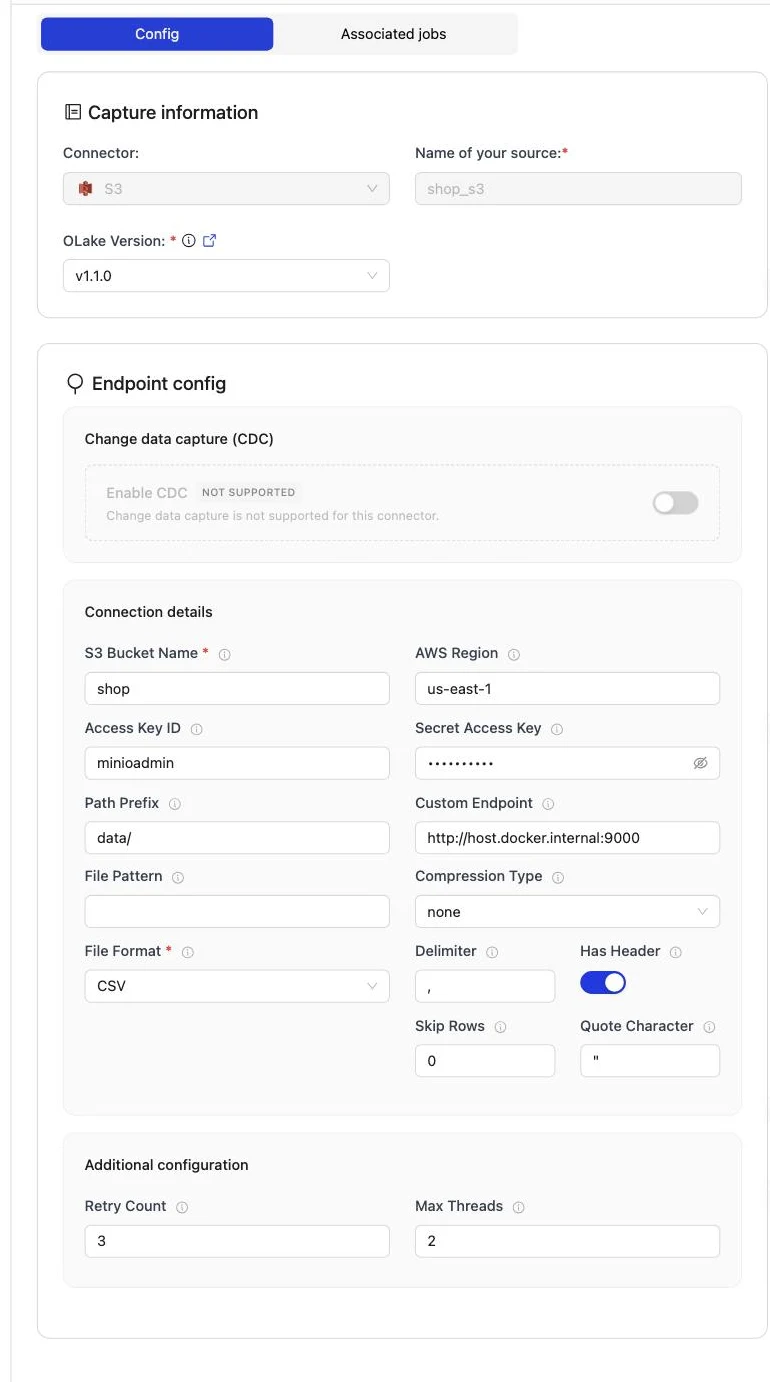
Set up source calls HeadBucket before anything is saved, so a wrong key or bucket name fails here rather than on the first sync.
The full field reference, including JSON, Parquet and XML options, is on the S3 connector page.
Create source.json in your config folder. bucket_name, region, path_prefix and file_format are the fields that matter; endpoint and the static keys are for S3-compatible stores:
{
  "bucket_name": "source-data",
  "region": "us-east-1",
  "path_prefix": "csv/",
  "access_key_id": "minioadmin",
  "secret_access_key": "minioadmin",
  "endpoint": "http://localhost:9000",
  "file_format": "csv",
  "max_threads": 5,
  "retry_count": 3,
  "csv": {
    "has_header": true,
    "delimiter": ",",
    "skip_rows": 0,
    "quote_character": "\""
  }
}
CSV Configuration Fields:
| Field | Description | Default |
|---|---|---|
delimiter | Field separator character | "," |
has_header | Whether CSV files contain a header row | true |
skip_rows | Number of rows to skip at the beginning of CSV files | 0 |
quote_character | Quote character for CSV files | "\"" |
Note: Gzip compression is automatically detected for .csv.gz files.
Then confirm OLake Go can reach the bucket:
docker run --pull=always \
  -v "$PWD/config:/mnt/config" \
  olakego/source-s3:latest \
  check --config /mnt/config/source.json
A working setup returns "status": "SUCCEEDED". A wrong key returns failed to access bucket <name>: operation error S3: HeadBucket, https response error StatusCode: 403; a wrong bucket name the same message with StatusCode: 404. Every field is described on the S3 connector page.
Step 4: Configure the Iceberg destination
- BigLake (Google Cloud Lakehouse)
- OLake UI
- OLake CLI
- Open Destinations and click Create Destination.
- Pick Apache Iceberg as the connector and BigLake as the catalog type.
- Fill in the fields below. The catalog path is the bucket, with no folder after it. Paste the whole service account JSON file into the credentials field.
- Click Create. OLake Go calls the BigLake endpoint, creates the catalog if it is the first contact, and writes and drops a test table in the bucket.
Here is the destination form from the run on this page. It holds the BigLake endpoint, the Cloud Storage bucket as the catalog path, the service account JSON and the project ID.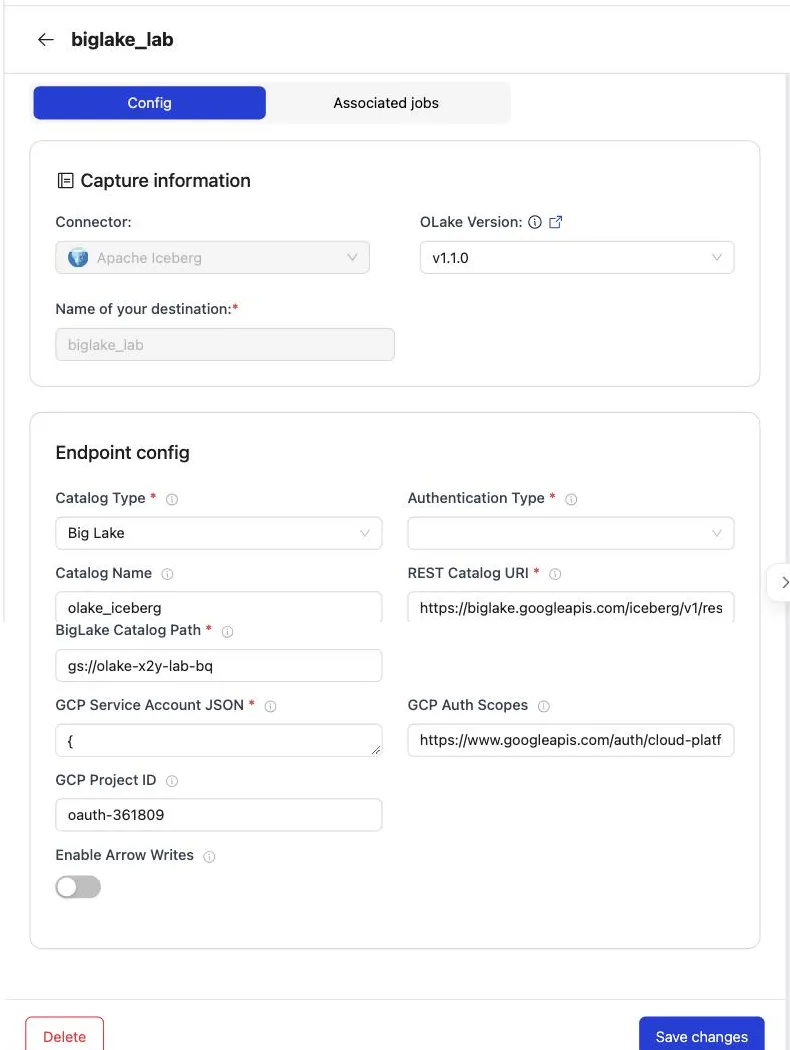
| Field | Value on this page | What it is |
|---|---|---|
| REST Catalog URI | https://biglake.googleapis.com/iceberg/v1/restcatalog | The BigLake Iceberg REST endpoint. The same for every project and region. |
| BigLake Catalog Path | gs://<bucket> | The bucket that holds the tables. The bucket name is also the catalog name BigQuery uses. Bucket root only; a folder after it is not supported. |
| Authentication Type | GCP | Google OAuth through the service account. The only choice for BigLake. |
| GCP Service Account JSON | the key file contents | Used for both the catalog calls and the Cloud Storage writes. |
| Catalog Name | olake_iceberg | A label OLake Go uses in its own logs. Lowercase letters and underscores only. |
| GCP Auth Scopes | https://www.googleapis.com/auth/cloud-platform | The OAuth scope on the token. Leave the default. |
| GCP Project ID | the project ID | Routes and bills the catalog calls. Required for multi-bucket catalogs, harmless to set for a single bucket. |
| Enable Arrow Writes | off | Keeps the default Java writer, which is what this page was tested with. |
Create destination.json next to source.json. The service account JSON goes in as one escaped string.
{
  "type": "ICEBERG",
  "writer": {
    "catalog_type": "biglake",
    "catalog_name": "olake_iceberg",
    "rest_catalog_url": "https://biglake.googleapis.com/iceberg/v1/restcatalog",
    "iceberg_s3_path": "gs://<bucket>",
    "rest_auth_type": "org.apache.iceberg.gcp.auth.GoogleAuthManager",
    "gcp_service_account_json": "{\"type\": \"service_account\", ...}",
    "gcp_project_id": "<project-id>",
    "gcp_auth_scopes": "https://www.googleapis.com/auth/cloud-platform",
    "arrow_writes": false
  }
}
| Key | Value on this page | What it is |
|---|---|---|
catalog_type | biglake | Selects the BigLake REST catalog. |
rest_catalog_url | https://biglake.googleapis.com/iceberg/v1/restcatalog | The BigLake endpoint. |
iceberg_s3_path | gs://<bucket> | The bucket, which is also the catalog name in BigQuery. The key is named for S3 but takes a gs:// path here. |
rest_auth_type | org.apache.iceberg.gcp.auth.GoogleAuthManager | Google OAuth with the service account. |
gcp_service_account_json | the key file as a string | Credentials for the catalog and the bucket. |
gcp_project_id | the project ID | Routes and bills the catalog calls. |
gcp_auth_scopes | https://www.googleapis.com/auth/cloud-platform | The OAuth scope. |
rest_access_delegation | not set | Set it to vended-credentials only when the catalog is in vended-credentials mode. The UI has no field for it. |
arrow_writes | false | The default Java writer. |
Step 5: Create the job and run the first sync
S3 streams differ from database streams in one way on the Streams page. The ingestion mode is Append and cannot be changed, because a file carries no key to match an earlier row by.
Set the sync mode to Full Refresh + Incremental and leave the cursor on _last_modified_time, which OLake Go adds to every stream. This job lists BigQuery, Spark and DuckDB as target query engines.
- OLake UI
- OLake CLI
- Open Jobs and click Create Job. Give it a name and a schedule. Every Day at a fixed hour, or a cron expression, both work; the schedule is how often the change stream is drained, not how often a full copy runs.
- Select the source and the destination you created.
- Under Advanced Settings, set Target Query Engines to Google BigQuery, Apache Spark and DuckDB. OLake Go then resolves an Iceberg delete format every one of those engines can read, so you never pick one by hand.
- Click Next. OLake Go discovers the folders and opens the Streams page.
- Tick the folders to replicate. For each one, set the sync mode to Full Refresh + Incremental with
_last_modified_timeas the cursor column and the ingestion mode to Append. - Click Create Job, then open the job's menu and choose Sync Now for the first run.
With Append mode there are no delete files to agree on, so the target engines only record which engines read the tables. Every engine that reads Iceberg v2 reads an append-only table.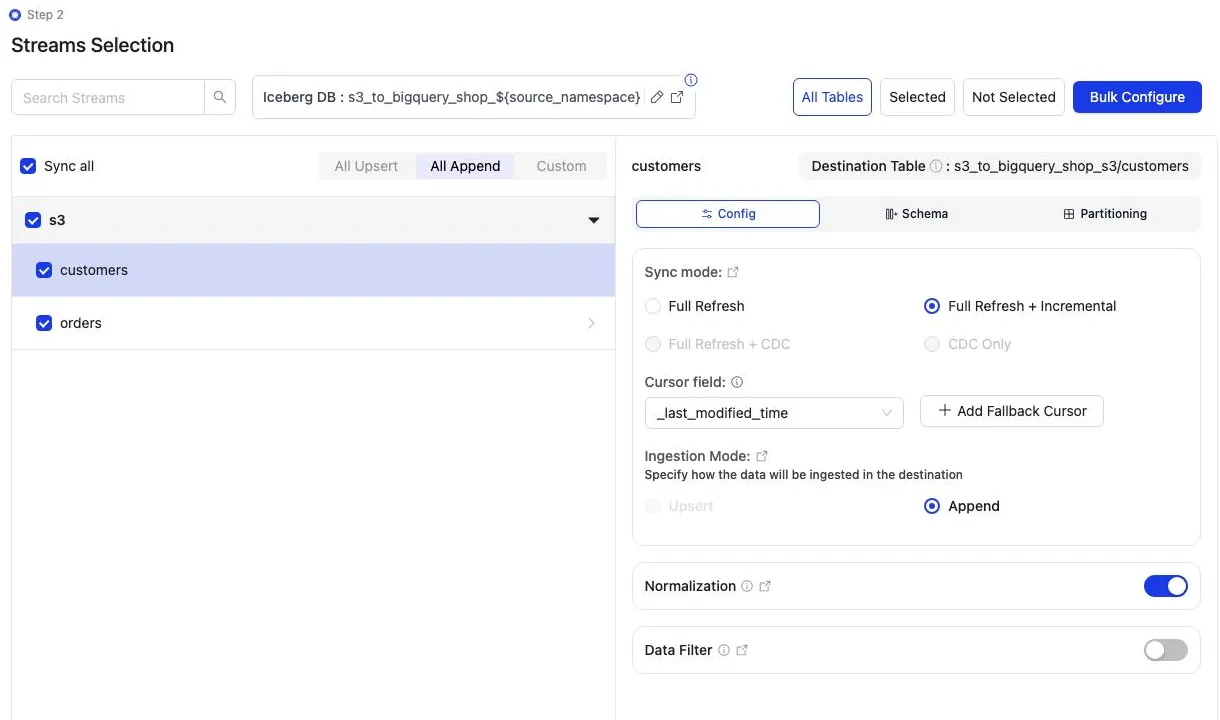
Discover the folders, choose the streams, then sync:
docker run --pull=always \
-v "$PWD/config:/mnt/config" \
olakego/source-s3:latest \
discover --config /mnt/config/source.json
discover writes two files: available_streams.json (every folder it found, do not edit) and selected_streams.json (the folders you want and their settings). In selected_streams.json, set sync_mode to {props.cliSyncMode ?? 'cdc'} for each folder:
{
"selected_streams": {
  "s3": [
    {
      "stream_name": "customers",
      "sync_mode": "incremental",
      "cursor_field": "_last_modified_time",
      "normalization": true,
      "append_mode": true
    }
  ]
}
}
Append mode writes data files only, so no delete format or index directory is involved. The first sync runs without a state file; OLake Go writes one at the end of the run:
docker run --pull=always \
-v "$PWD/config:/mnt/config" \
olakego/source-s3:latest \
sync \
--config /mnt/config/source.json \
--selected-streams /mnt/config/selected_streams.json \
--available-streams /mnt/config/available_streams.json \
--destination /mnt/config/destination.json
Every later run adds --state /mnt/config/state.json to the same command, which is how OLake Go knows to replay only the changes since the last run. The full selected_streams.json reference is on the Docker CLI page; the index directory is described under index DB setup.
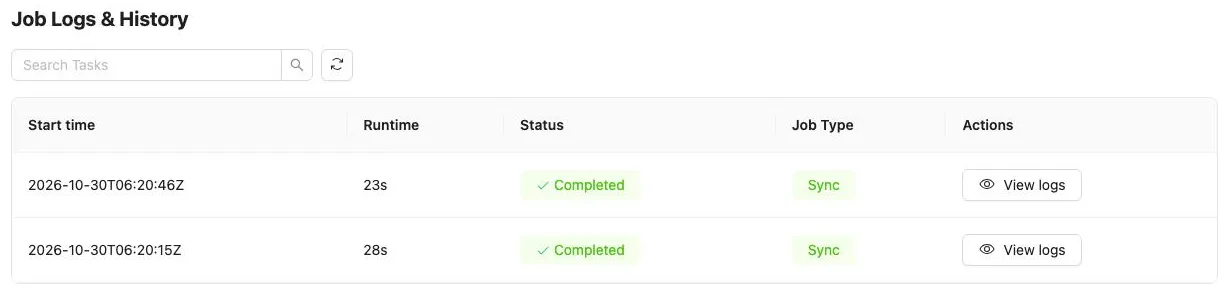
On this page the first run read the 8 customer and 40 order rows (48 records, 2.61 KB). It finished in 28 seconds, container start included. OLake Go names the BigLake namespace after the job, the bucket and the namespace.
The namespace for every S3 stream is s3, so s3_to_bigquery on bucket shop produced s3_to_bigquery_shop_s3. The Iceberg DB field at the top of the Streams page changes it before the first sync.
Step 6: Query the tables in BigQuery
- BigLake (Google Cloud Lakehouse)
There is no registration step and no external table to declare. A BigLake catalog is a BigQuery data source in the same project: the catalog is the bucket name, the namespace OLake Go created is the dataset, and the tables are the tables. Address them with the four-part name in backticks, and run the query in the bucket's region.
SELECT id, name, city, tier
FROM `<project-id>.<bucket>.s3_to_bigquery_shop_s3.customers`
ORDER BY id;

SELECT status, count(*) AS n, round(sum(amount), 2) AS total
FROM `<project-id>.<bucket>.s3_to_bigquery_shop_s3.orders`
GROUP BY status ORDER BY status;
From a terminal, bq query --project_id=<project-id> --location=<region> --use_legacy_sql=false "<sql>" runs the same statements. Set the location to the bucket's region (us-central1 on this page); the default US multi-region returns Not found: Dataset for a catalog whose bucket is regional.
OLake Go adds four columns to every table: _olake_id (a hash of the primary key), _op_type, _olake_timestamp and _cdc_timestamp. _op_type is r for a row from the first snapshot, c for an insert, u for an update and d for a delete. Filter them out of dashboards, or use them to see when a row last changed.
BigQuery reads Iceberg v2 tables with positional and equality deletes, which is why the job on this page uses positional deletes. Deletion vectors on v3 tables are a preview feature in BigQuery with per-query limits, so keep the job off deletion vectors while BigQuery is a reader.
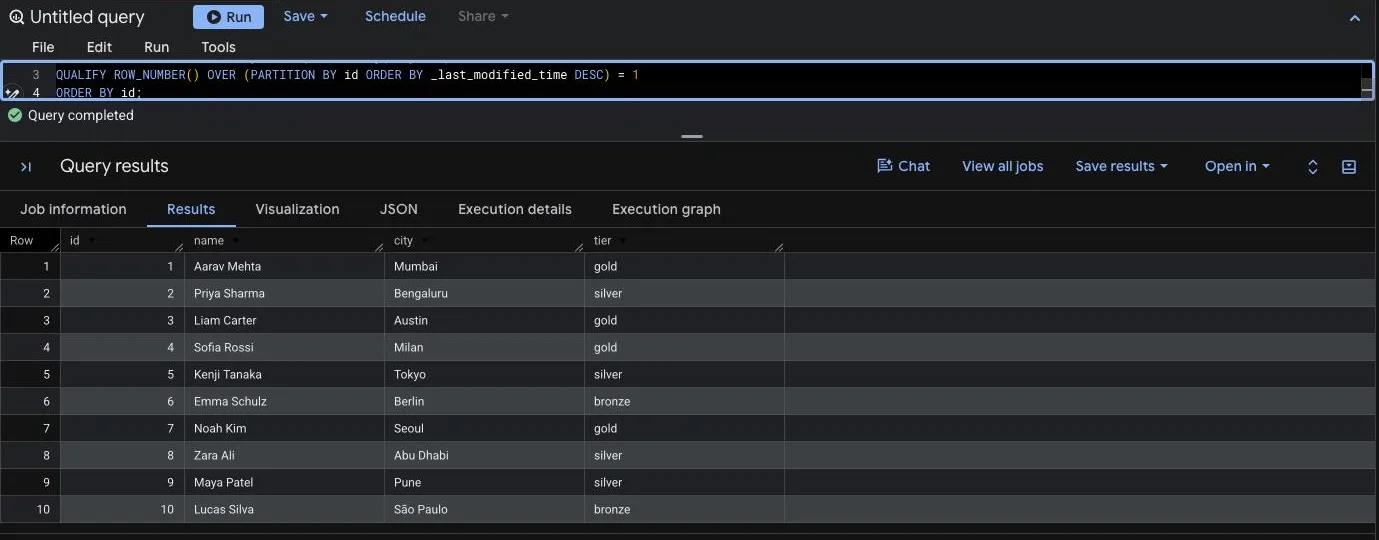
Because files append, the query that most readers want is the latest version of each row. BigQuery has QUALIFY, so one clause does it, ordering by the file time OLake Go stored in _last_modified_time. The id column arrived as FLOAT64 from the CSV, hence the cast:
SELECT CAST(id AS INT64) AS id, name, city, tier
FROM `<project-id>.<bucket>.s3_to_bigquery_shop_s3.customers`
QUALIFY ROW_NUMBER() OVER (PARTITION BY id ORDER BY _last_modified_time DESC) = 1
ORDER BY id;
Step 7: Add files to the bucket and sync again
To see the incremental path work, the run on this page uploaded one more file per folder after the first sync. Each carries new rows and corrected copies of existing rows, the way a daily export does:
data/customers/2026-10-30/customers-changes.csv   4 rows: ids 9 and 10 are new, ids 3 and 8 are corrections
data/orders/2026-10-30/orders-changes.csv         8 rows: ids 41 to 45 are new, ids 1, 4 and 7 now read "delivered"
The second sync listed both folders, skipped the two files it had already read, and read the two new ones. That was 12 records (686 bytes) in 23 seconds end to end. The sync log shows the filter per stream, with the cursor it compared against, and the commit report shows one new data file per table and no delete files: addedDataFiles=1, addedRecords=4 for customers.
BigQuery shows the result with no refresh. The corrected rows exist twice.
_op_type tells them apart: r for the first full read, u for rows that arrived through an incremental sync. _last_modified_time carries the file time, which is what the QUALIFY clause above sorts on:
id  name         city       tier    _op_type  _last_modified_time
3   Liam Carter  Austin     bronze  r         2026-10-30T06:20:05Z
3   Liam Carter  Austin     gold    u         2026-10-30T06:20:46Z
8   Zara Ali     Dubai      silver  r         2026-10-30T06:20:05Z
8   Zara Ali     Abu Dhabi  silver  u         2026-10-30T06:20:46Z
9   Maya Patel   Pune       silver  u         2026-10-30T06:20:46Z
10  Lucas Silva  São Paulo  bronze  u         2026-10-30T06:20:46Z
Schema changes. When a new column appears in a later file, OLake Go adds it to the Iceberg table on the next sync and commits the new schema to BigLake in the same commit.
BigQuery shows the column on the next query, with nulls for older rows. A column whose inferred type changes in an incompatible way fails the sync rather than corrupt the table. Full rules are on the schema evolution page.
Query the same tables from DuckDB and Spark
This is the point of writing Iceberg instead of loading BigQuery tables. Nothing is exported, copied or refreshed: both engines read the files OLake Go wrote, through the same BigLake catalog. DuckDB has QUALIFY too; Spark uses a ROW_NUMBER() subquery for the same result.
- DuckDB
- Apache Spark
DuckDB attaches BigLake as an Iceberg REST catalog with a Google access token. The catalog on this page is in end-user credential mode, so DuckDB also needs its own Cloud Storage credentials to read the files: an HMAC key for the service account (Cloud Storage, Settings, Interoperability, Create a key for a service account).
INSTALL iceberg; LOAD iceberg;
INSTALL httpfs;  LOAD httpfs;

-- gcloud auth print-access-token, or a token minted for the service account
CREATE SECRET biglake_catalog (
TYPE iceberg,
TOKEN '<access token>',
EXTRA_HTTP_HEADERS MAP {'x-goog-user-project': '<project-id>'}
);
-- the HMAC key pair for the bucket
CREATE SECRET biglake_files (TYPE gcs, KEY_ID '<hmac access id>', SECRET '<hmac secret>');

ATTACH 'gs://<bucket>' AS biglake (
TYPE iceberg,
ENDPOINT 'https://biglake.googleapis.com/iceberg/v1/restcatalog',
SECRET biglake_catalog
);

SHOW ALL TABLES;
SELECT id, name, city, tier FROM biglake.s3_to_bigquery_shop_s3.customers ORDER BY id;
The access token lives an hour; CREATE OR REPLACE SECRET with a fresh one when a query fails with 401. If the catalog is in vended-credentials mode instead, drop the gcs secret and add ACCESS_DELEGATION_MODE 'vended_credentials' to the ATTACH: BigLake then hands DuckDB a short-lived storage token per table. DuckDB reads positional deletes, so the rows match BigQuery after every sync.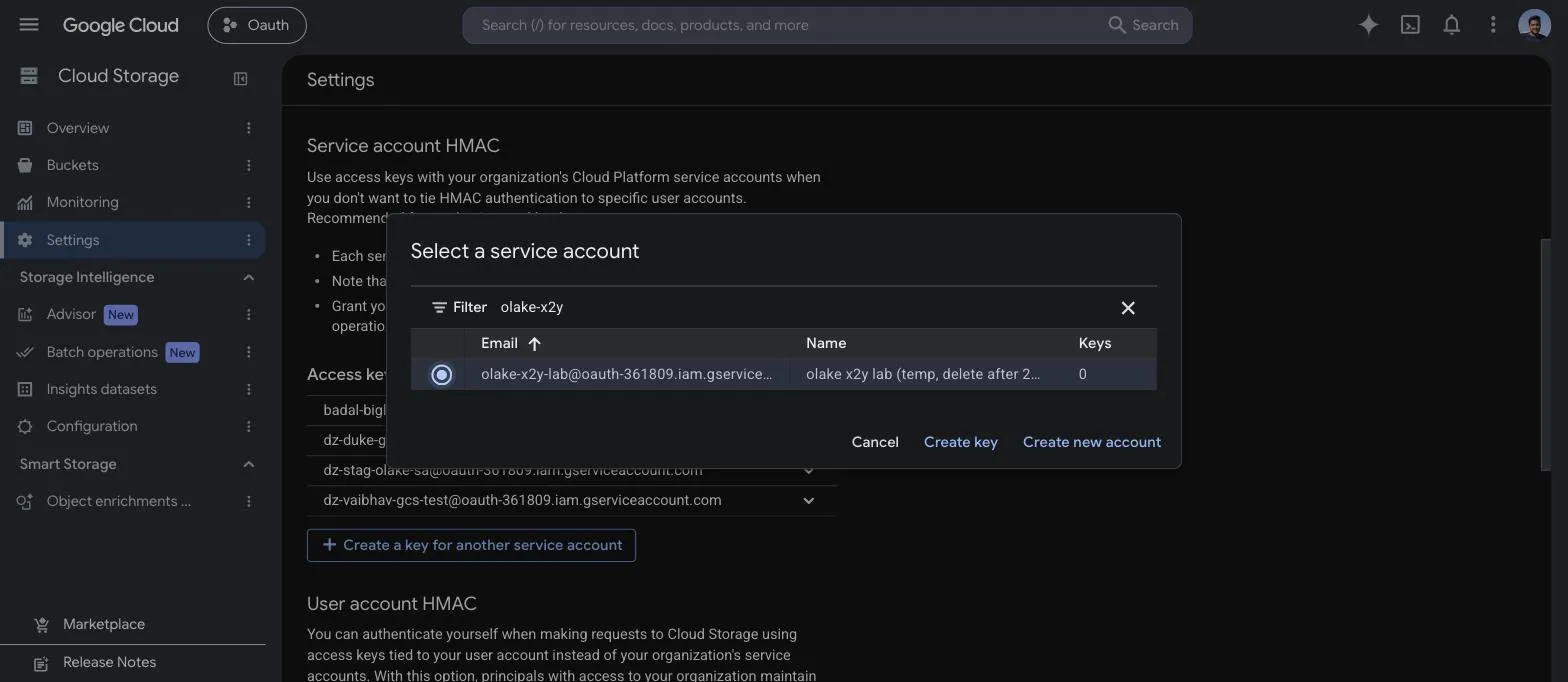
DuckDB 1.5.5 returned the same 10 customers and the same orders roll-up as BigQuery in the run on this page, with QUALIFY row_number() OVER (PARTITION BY id ORDER BY _last_modified_time DESC) = 1 on the scan. It read the current metadata file of each table through the catalog and the data files through the hash-based message authentication code (HMAC) key.
Spark reaches BigLake as a plain Iceberg REST catalog with Google's auth manager from the iceberg-gcp-bundle. The same service account key OLake Go uses works for both the catalog calls and the file reads, so point GOOGLE_APPLICATION_CREDENTIALS at it before starting Spark.
export GOOGLE_APPLICATION_CREDENTIALS=/path/to/service-account.json
spark-sql \
  --packages org.apache.iceberg:iceberg-spark-runtime-4.0_2.13:1.10.0,org.apache.iceberg:iceberg-gcp-bundle:1.10.0 \
  --conf spark.sql.extensions=org.apache.iceberg.spark.extensions.IcebergSparkSessionExtensions \
  --conf spark.sql.catalog.biglake=org.apache.iceberg.spark.SparkCatalog \
  --conf spark.sql.catalog.biglake.type=rest \
  --conf spark.sql.catalog.biglake.uri=https://biglake.googleapis.com/iceberg/v1/restcatalog \
  --conf spark.sql.catalog.biglake.warehouse=gs://<bucket> \
  --conf spark.sql.catalog.biglake.rest.auth.type=org.apache.iceberg.gcp.auth.GoogleAuthManager \
  --conf spark.sql.catalog.biglake.header.x-goog-user-project=<project-id> \
  --conf spark.sql.catalog.biglake.io-impl=org.apache.iceberg.gcp.gcs.GCSFileIO
SHOW TABLES IN biglake.s3_to_bigquery_shop_s3;
SELECT id, name, city, tier FROM biglake.s3_to_bigquery_shop_s3.customers ORDER BY id;
Use the Spark 4.0 runtime with Iceberg 1.10 or later; Spark 3.5 builds of Iceberg do not run on Java 21. Spark reads positional deletes with any Iceberg version, so no table setting changes when the job's delete format stays positional.
Spark 4.0.1 with Iceberg 1.10.0 returned the same rows in the run on this page, with ROW_NUMBER() OVER (PARTITION BY id ORDER BY _last_modified_time DESC) in a subquery and WHERE rn = 1, running on a laptop against the same catalog and bucket.
An orders roll-up over the latest row per id matched the files in all three engines. It gave 16 delivered orders for 8659.68, 18 placed for 10522.26, 11 shipped for 6397.25.
Data types: CSV to Iceberg to BigQuery
A CSV file has no types, so OLake Go infers them from a sample of rows at discover time and maps them to Iceberg types.
BigQuery then maps Iceberg types to its own when it reads the catalog. Parquet files skip the inference and keep their own types. This is what the CSV run on this page produced:
| In the CSV | Iceberg (written by OLake Go) | BigQuery shows | Notes |
|---|---|---|---|
Whole numbers (id, customer_id) | double | FLOAT64 | In this run the integer columns were inferred as floating point. Cast with CAST(id AS INT64) in queries, or use Parquet when the type matters. |
Decimals (amount) | double | FLOAT64 | The orders.amount sums on this page matched the files to the cent in every engine; round at query time when you need exact decimal arithmetic. |
ISO 8601 timestamps (created_at) | timestamptz (UTC) | TIMESTAMP | Strings that parse as timestamps are stored as timestamps. |
| Other text | string | STRING | |
_last_modified_time | string | STRING | The object's LastModified time in ISO 8601, so it sorts correctly as text. Added to every row by OLake Go. |
Types on the left come from the S3 connector reference. The BigQuery side comes from the BigQuery Iceberg tables page (checked 2026-10-30) and from the table schemas of this run. JSON files map integers to bigint and nested objects to JSON text; Parquet keeps int, bigint, date and timestamp as they are.
Cost and maintenance
- Storage is your Cloud Storage bucket: you pay Cloud Storage rates for the Parquet files, on top of the source files in S3. The BigLake catalog itself has no per-table charge.
- Compute. OLake Go runs wherever you run Docker. BigQuery bills on-demand queries by bytes scanned, or by slot time on an edition; a query over the catalog reads the Parquet files in the bucket, so filter on the columns you need. DuckDB and Spark cost whatever machine they run on.
- Egress. Reading source files out of Amazon S3 into Google Cloud is cross-cloud traffic billed by AWS. Run OLake Go close to the source, and keep the prefix to the folders it needs.
- Listing calls. Every sync lists the whole source prefix to find new files. A prefix with hundreds of thousands of objects makes that the slowest part of the run; keep the prefix to the folders OLake Go needs, or move processed files out.
- Maintenance. A folder that gets a small file every few minutes wants compaction, and BigLake keeps every snapshot OLake Go commits in the table's
metadata.json. BigLake rejects ametadata.jsonabove 1 MB, which a busy table reaches after a few thousand syncs. Expire old snapshots and compact on a schedule with OLake Fusion or with Spark'sexpire_snapshotsandrewrite_data_filesprocedures through the same catalog. - Key rotation. The service account key is what OLake Go writes with. Rotate it on your schedule from the service account's Keys tab and paste the new JSON into the destination.
Troubleshooting
1. The source test is refused
failed to access bucket shop: operation error S3: HeadBucket, https response error StatusCode: 403, api error Forbidden: Forbidden
The key pair cannot read the source bucket. On AWS, check that the policy from step 1 is attached to the user or role, and that the bucket policy does not deny it.
On MinIO, the access key or secret is wrong. A StatusCode: 404 with NotFound instead means the bucket name is wrong or the endpoint points at another store.
2. Discovery finds nothing
Discovered 0 files in 0 streams (after filtering)
Stream grouping enabled at level 1 (first folder after path_prefix)
FATAL no streams found in connector
Either the prefix holds no files, or the files sit directly under it with no folder to name the stream. Move them into a folder per table (data/customers/...), check that Path Prefix ends with /, and loosen File Pattern if you set one.
3. Rows appear twice after a sync
A file was rewritten in place, or a corrected copy was uploaded with the same rows. Its new LastModified time made OLake Go read it again, and Append mode added every row a second time. Keep the QUALIFY query from step 6 for reads, and change the upstream process to add files rather than replace them.
4. BigQuery refuses to partition the window by id
Partitioning by expressions of type FLOAT64 is not allowed
In this run id was inferred as a double, and BigQuery does not allow a FLOAT64 expression in PARTITION BY. Cast it in the window: ROW_NUMBER() OVER (PARTITION BY CAST(id AS INT64) ORDER BY _last_modified_time DESC). The query in step 6 gets away without the cast because its CAST(id AS INT64) AS id alias is what the QUALIFY clause resolves.
5. The destination test fails on a catalog in vended-credentials mode
failed to test destination: failed to create or get table: rpc error: code = Internal desc = Failed to process request: Malformed request: X-Iceberg-Access-Delegation header must be present and contain `vended-credentials` when credential mode is `CREDENTIAL_MODE_VENDED_CREDENTIALS`.
The catalog was created, or switched, with --credential-mode=vended-credentials, and OLake Go 1.1.0 does not send the header BigLake wants in that mode (olake#1369). Switch the catalog back with gcloud beta biglake iceberg catalogs update <bucket> --credential-mode=end-user, which is the default for a catalog OLake Go created itself. With the CLI, "rest_access_delegation": "vended-credentials" in destination.json makes the same test pass; the UI has no field for it yet.
6. BigQuery cannot find the dataset
Not found: Dataset <project>:<bucket>.s3_to_bigquery_shop_s3 was not found in location US
The query ran in a location other than the bucket's region. Set the query location to the bucket's region in the editor's More, Query settings panel, or pass --location=<region> to bq. Leaving the location unset lets BigQuery pick it from the table.
How this compares with other ways to load S3 files into BigQuery
| Method | Freshness | Updates and deletes | Where the data lands | What you run |
|---|---|---|---|---|
| BigQuery Data Transfer Service for Amazon S3 | By schedule, 1 hour at the shortest, 24 hours by default | Appends (WRITE_APPEND) or overwrites (WRITE_TRUNCATE) a table; no merge | Native BigQuery tables; BigQuery is the only reader | A transfer configuration per table, with an AWS key pair stored in Google Cloud |
bq load from files staged in Cloud Storage on a schedule | By schedule | Appends or overwrites; no merge | Native BigQuery tables | A copy from S3 to Cloud Storage, a scheduler and a load command per table |
| BigQuery Omni BigLake tables over the files in S3 | Live, per query | No | Nothing is copied; BigQuery reads the CSV in place in AWS | An Omni connection and a BigLake table per folder, in an Omni region, on Enterprise edition or on-demand pricing |
| Managed ELT (Fivetran, Estuary, Airbyte Cloud) | Minutes, by plan | Varies by tool | BigQuery tables, a second copy you pay to move and store | Nothing; priced per row, per GB or per connector |
| OLake Go to Iceberg on BigLake (this guide) | On a schedule down to one minute | No; files are appended, with _last_modified_time for latest-row queries | Apache Iceberg tables that BigQuery, Spark, DuckDB, Trino and Flink all read | One Docker Compose stack, open source; your bucket plus your own compute |
The transfer service is the simpler choice when a daily load is fine and BigQuery is the only reader. Writing Iceberg once turns CSV into typed Parquet that Spark and DuckDB read without a second copy. It also keeps the pipeline the same when a database or Kafka source is added beside the files.
When not to use this
- Rows must be updated or deleted at write time. Files have no key, so S3 streams only append. Use a database or Kafka source for that, or merge downstream into a native BigQuery table.
- The files are rewritten in place. Every rewrite is read again in full. Change the producer to add files, or accept duplicates and query the latest row per key.
- The files are already Parquet in Google Cloud Storage and BigQuery is the only reader. An external table reads those files in place; copying them into Iceberg buys nothing until another engine needs them or the schema starts to drift.
- Files are not CSV, JSON, Parquet or XML. Fixed-width, Excel and Avro files are not read.
FAQs
How do I load files from S3 into BigQuery without a transfer job or an external table per folder?
Run OLake Go (open source, Apache 2.0) with the bucket and prefix as the source and a BigLake catalog with a Cloud Storage bucket as the Iceberg destination. Each folder under the prefix becomes an Iceberg table in a BigLake namespace, the first sync reads every file, and every later sync reads only files newer than the last run. BigQuery queries the namespace as a dataset, with no transfer job, no load job and no table definition per folder.
Does OLake Go re-read the whole bucket on every sync?
No. OLake Go saves the newest LastModified time it has read per stream and, on the next sync, lists the prefix and reads only files modified after it. The run on this page read 1 of 2 files per stream on its second sync. A file that is rewritten in place gets a new LastModified time and is read again in full.
Can OLake Go update or delete rows from S3 files?
No. Files carry no primary key or change log, so S3 streams run in Append mode only: every row in every new file becomes a row in the table. When a later file corrects a row, both versions exist. Keep the latest with a QUALIFY clause over the id and _last_modified_time columns, or merge downstream into a native BigQuery table.
Which file formats does OLake Go read from S3?
CSV (with delimiter, header and quote options), JSON as line-delimited or array files, Parquet, and XML with a row identifier, each plain or gzip-compressed. One source handles one format; a file pattern narrows the keys when a prefix holds more than one. Parquet keeps its own types; CSV types are inferred from a sample of rows.
Does this work with MinIO or another S3-compatible store?
Yes, for the source side. Set the custom endpoint on the source and provide static keys. The run on this page used MinIO in Docker with the endpoint http://host.docker.internal:9000 as the source, and a BigLake catalog on Cloud Storage as the destination. When the source files already sit in Amazon S3, the endpoint stays empty and the keys can be left out to use an instance or task role.
How are the BigQuery tables named for an S3 source?
After the folder. The first folder under the path prefix is the stream, so data/customers/ becomes a table called customers. The BigLake namespace defaults to the job name, the bucket name and the namespace s3; the job s3_to_bigquery on bucket shop produced s3_to_bigquery_shop_s3, which BigQuery shows as a dataset under the catalog. The Iceberg DB field on the Streams page changes it before the first sync.
Do I need to create a BigQuery dataset or an external table?
No. A BigLake catalog is a data source BigQuery reads directly: the bucket name is the catalog, the namespace OLake Go creates is the dataset, and the tables appear under it. The query uses the four-part name project.bucket.namespace.table, and there is no CREATE EXTERNAL TABLE and no metadata refresh.
Related guides
Deeper reading on this site: