AWS Glue Catalog Write Guide
OLake Go integrates with AWS Glue Catalog to provide full support for Apache Iceberg tables. This setup ensures that:
- Data is stored in Amazon S3 (Parquet + metadata files)
- Metadata is managed in AWS Glue Catalog (schemas, partitions, table properties)
- OLake Go seamlessly writes into Iceberg tables through Glue APIs
Prerequisites
Before configuring OLake Go with AWS Glue Catalog, ensure the following are set up:
1. Amazon S3 Bucket
- Create an S3 bucket in the same AWS region as your Glue Catalog.
- Example:
s3://olake-iceberg/
2. AWS IAM Permissions
- Create an IAM role or user with Glue + S3 access.
Here is a sample IAM policy example:
IAM Policy JSON
{
    "Version": "2012-10-17",
    "Statement": [
        {
            "Sid": "GlueAccess",
            "Effect": "Allow",
            "Action": [
                "glue:CreateTable",
                "glue:CreateDatabase",
                "glue:GetTable",
                "glue:GetTables",
                "glue:GetDatabase",
                "glue:GetDatabases",
                "glue:SearchTables",
                "glue:UpdateDatabase",
                "glue:UpdateTable"
            ],
            "Resource": [
                "arn:aws:glue:<REGION>:<ACCOUNT_ID>:catalog",
                "arn:aws:glue:<REGION>:<ACCOUNT_ID>:database/{AWS_GLUE_DATABASE_NAME}",
                "arn:aws:glue:<REGION>:<ACCOUNT_ID>:table/{AWS_GLUE_DATABASE_NAME}/*"
            ]
        },
        {
            "Sid": "S3BucketReadWrite",
            "Effect": "Allow",
            "Action": [
                "s3:ListBucket",
                "s3:GetBucket*",
                "s3:*Object"
            ],
            "Resource": [
                "arn:aws:s3:::{S3_BUCKET_NAME}",
                "arn:aws:s3:::{S3_BUCKET_NAME}/*"
            ]
        },
        {
            "Sid": "ListAllBuckets",
            "Effect": "Allow",
            "Action": "s3:ListAllMyBuckets",
            "Resource": "*"
        }
    ]
}
- Replace
<REGION>,<ACCOUNT_ID>,{AWS_GLUE_DATABASE_NAME}, and{S3_BUCKET_NAME}with your actual values - If you already have databases and tables in Glue Catalog, you can remove
CreateDatabaseandCreateTablepermissions - The
SearchTablespermission is optional and used for table discovery operations - Note: Drop table or delete table permissions are not included. Add
glue:DeleteTableif you need table deletion capabilities
Configuration
- OLake UI
- OLake CLI
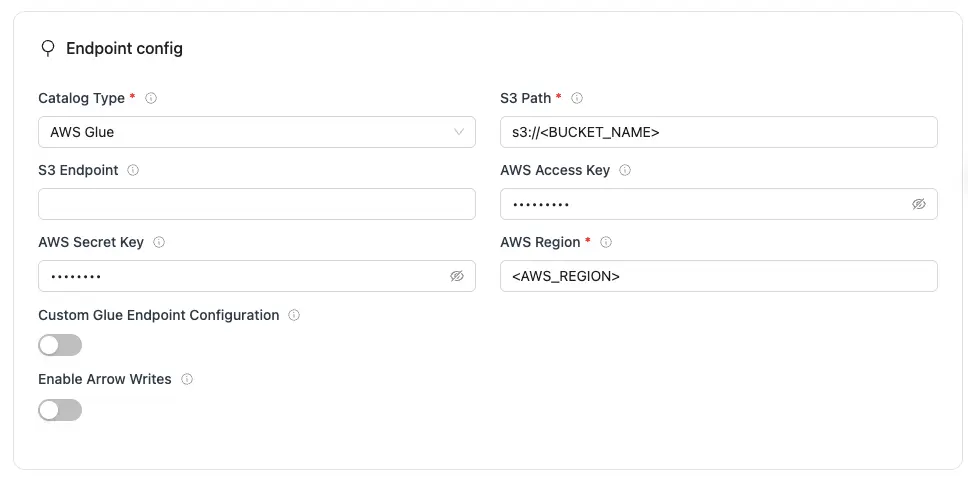
| Parameter | Sample Value | Description |
|---|---|---|
S3 Path required | s3://<BUCKET_NAME>/ | S3 bucket path where Iceberg table data and metadata files will be stored. |
AWS Region required | ap-south-1 | AWS Region where your S3 bucket and Glue Data Catalog exist. Required so OLake Go calls the correct regional S3 and Glue endpoints. |
| AWS Access Key | XXX | AWS access key ID for authentication. Optional if using IAM roles or instance profiles. If using IAM: Docker Compose: add the required IAM environment variables under x-envs in your compose file. See Service Environment Variables for setup details.Kubernetes: set up pod IAM in Cloud IAM Integration. |
| AWS Secret Key | XXX | AWS secret access key for authentication. Optional if using IAM roles or instance profiles. If using IAM: Docker Compose: add the required IAM environment variables under x-envs in your compose file. See Service Environment Variables for setup details.Kubernetes: set up pod IAM in Cloud IAM Integration. |
| S3 Endpoint | https://glue.ap-south-1.amazonaws.com | S3 API endpoint for writing Iceberg data files. Optional for AWS S3 but required for S3-compatible storage like MinIO. |
| Custom Glue Endpoint Configuration | true/false | Enable custom Glue catalog configuration when Glue catalog settings differ from S3 (different credentials, region, or endpoint). Shows additional Glue configuration fields. Leave off when Glue and S3 use the same AWS setup. |
| Enable Arrow Writes | true/false | Writes data and delete files using Apache Arrow based writer and registers them in Iceberg. |
The following fields appear in the UI after Custom Glue Endpoint Configuration is turned on. Configure Glue catalog connection settings here separately from the S3 fields above.
| Parameter | Sample Value | Description |
|---|---|---|
| Glue Catalog ID | 123456789012 | AWS account ID used as the Glue Data Catalog identifier. |
| Glue Access Key | XXX | Access key for authenticating Glue catalog requests. Required when Glue credentials differ from S3 credentials. |
| Glue Secret Key | XXX | Secret key for authenticating Glue catalog requests. Required when Glue credentials differ from S3 credentials. |
| Glue Endpoint | https://glue.ap-south-1.amazonaws.com | Custom endpoint URL for AWS Glue or a Glue-compatible catalog service. |
| Glue Region | ap-south-1 | Region for the Glue catalog, if different from the S3 region. Falls back to AWS Region if not set. |
For AWS Glue Catalog, the catalog name is fixed to olake_iceberg and cannot be customized.
Click Create -> to test the connection and verify that OLake Go can validate both Glue Catalog and S3 access.
Create a destination.json file with the following configuration:
{
    "type": "ICEBERG",
    "writer": {
      "catalog_type": "glue",
      "catalog_name": "olake_iceberg",
      "iceberg_s3_path": "s3://<BUCKET_NAME>/",
      "aws_region": "<AWS_REGION>",
      "aws_access_key": "<AWS_ACCESS_KEY>",
      "aws_secret_key": "<AWS_SECRET_KEY>",
      "arrow_writes": false
    }
}
| Parameter | Sample Value | Description |
|---|---|---|
iceberg_s3_path required | s3://<BUCKET_NAME>/ | S3 bucket path where Iceberg table data and metadata files will be stored. |
aws_region required | ap-south-1 | AWS Region where your S3 bucket and Glue Data Catalog exist. Required so OLake Go calls the correct regional S3 and Glue endpoints. |
| aws_access_key | XXX | AWS access key ID for S3 authentication. Optional if using IAM roles or instance profiles. If using IAM: add the required IAM environment variables in your shell or runtime environment. |
| aws_secret_key | XXX | AWS secret access key for S3 authentication. Optional if using IAM roles or instance profiles. If using IAM: add the required IAM environment variables in your shell or runtime environment. |
| s3_endpoint | https://glue.ap-south-1.amazonaws.com | S3 API endpoint for reading/writing Iceberg data files. Optional for AWS S3 but required for S3-compatible storage like MinIO. |
| glue_additional_config | true/false | Enable custom Glue catalog configuration when Glue catalog settings differ from S3 (different credentials, region, or endpoint). Leave off when Glue and S3 use the same AWS setup. |
| arrow_writes | false | Writes data and delete files using Apache Arrow based writer and registers them in Iceberg. |
When using separate Glue catalog settings, set glue_additional_config to true in destination.json and add the fields below. These configure Glue catalog connection settings separately from the S3 fields above.
| Parameter | Sample Value | Description |
|---|---|---|
| glue_catalog_id | 123456789012 | AWS account ID used as the Glue Data Catalog identifier. |
| glue_access_key | XXX | Access key for authenticating Glue catalog requests. Required when Glue credentials differ from S3 credentials. |
| glue_secret_key | XXX | Secret key for authenticating Glue catalog requests. Required when Glue credentials differ from S3 credentials. |
| glue_endpoint | https://glue.ap-south-1.amazonaws.com | Custom endpoint URL for AWS Glue or a Glue-compatible catalog service. |
| glue_region | ap-south-1 | Region for the Glue catalog, if different from the S3 region. Falls back to AWS Region if not set. |
For AWS Glue Catalog, the catalog name is fixed to olake_iceberg and cannot be customized.
OLake Go will automatically test:
- AWS credentials validity
- S3 bucket access permissions
- Glue Catalog connectivity
- Database creation/access permissions
Querying Data
Once OLake Go has written data to Iceberg tables in AWS Glue Catalog, you can query the data using AWS Athena:
SELECT * FROM "ICEBERG_DATABASE_NAME"."TABLE_NAME" LIMIT 10;
Troubleshooting
The OLake Go Iceberg Writer with AWS Glue Catalog stops immediately upon encountering errors to ensure data integrity. Below are common issues and their fixes:
-
AccessDeniedException: User is not authorized to perform action
- Cause: IAM role or user lacks required permissions for AWS Glue or S3 operations.
- Fix:
- Ensure your IAM policy includes necessary Glue permissions:
json{"Version": "2012-10-17","Statement": [{"Effect": "Allow","Action": ["glue:CreateDatabase","glue:GetDatabase","glue:CreateTable","glue:GetTable","glue:GetTables","glue:UpdateTable","glue:GetPartitions"],"Resource": "*"}]}
- Add S3 permissions for the warehouse path:
json{"Effect": "Allow","Action": ["s3:GetObject","s3:PutObject","s3:DeleteObject","s3:ListBucket"],"Resource": ["arn:aws:s3:::your-bucket-name/*","arn:aws:s3:::your-bucket-name"]}
- Ensure your IAM policy includes necessary Glue permissions:
-
NoSuchBucket: The specified bucket does not exist
- Cause: S3 bucket doesn't exist, wrong region, or incorrect bucket name in configuration.
- Fix:
- Verify bucket exists in the correct region:
bashaws s3 ls s3://your-bucket-name/ --region us-east-1
- Create bucket if it doesn't exist:
bashaws s3 mb s3://your-bucket-name --region us-east-1
- Ensure the
aws_regionin your configuration matches the bucket's region.
- Verify bucket exists in the correct region:
-
Database does not exist in Glue Catalog
- Cause: Specified database name doesn't exist in AWS Glue Data Catalog.
- Fix: OLake Go will automatically create the database if you have
glue:CreateDatabasepermissions. Verify permissions or create manually:bashaws glue create-database --database-input Name=iceberg_db --region us-east-1
-
InvalidInputException: Invalid S3 location
- Cause: Malformed S3 path or unsupported S3 URI format.
- Fix:
- Avoid special characters except hyphens and underscores
- Example valid paths:
s3://my-iceberg-warehouse/s3://data-lake-bucket/iceberg/warehouse
-
Connection timeout or network errors
- Cause: Network connectivity issues, VPC configuration, or security group restrictions.
- Fix:
- Verify internet connectivity to AWS services
- Check VPC endpoints for Glue and S3 if running in private subnets
- Ensure security groups allow outbound HTTPS (port 443) traffic
- Test connectivity:
bashaws sts get-caller-identity --region us-east-1aws glue get-databases --region us-east-1
-
Table already exists with different schema
- Cause: Attempting to create an Iceberg table that conflicts with existing table schema.
- Fix:
- Check existing table schema in Glue Console
- Drop and recreate table if schema change is intended:
bashaws glue delete-table --database-name iceberg_db --name table_name --region us-east-1
- Or use OLake Go's schema evolution capabilities for compatible changes