
 Twitter
 LinkedIn
 Facebook
 Email
Email
Hive Catalog Write Guide
OLake Go integrates with Hive Catalog to provide full support for Apache Iceberg tables.
With this setup:
- Data is stored in object storage (S3, GCS, MinIO, or any S3-compatible system).
- Metadata is managed by Hive Metastore.
- OLake Go seamlessly writes into Iceberg tables using Hive Metastore + Object storage.
Prerequisites
Before configuring OLake Go with Hive Catalog, ensure the following:
1. Hive Metastore
A Hive Metastore service will serve as the Iceberg metadata catalog. This can be:
- Managed service: GCP Dataproc Metastore, AWS EMR, or Azure HDInsight
- Self-hosted: Apache Hive Metastore running on your infrastructure
- Local development: Docker-based Hive Metastore
Required Metastore Configuration:
- Thrift protocol enabled (default port 9083)
- Database backend (PostgreSQL, MySQL, or other JDBC-supported database) for metadata storage with required permissions of creating, inserting, updating, deleting, and reading from the database.
2. Object Storage
A bucket for storing Iceberg data files (Parquet + metadata).
Configuration
- OLake UI
- OLake CLI
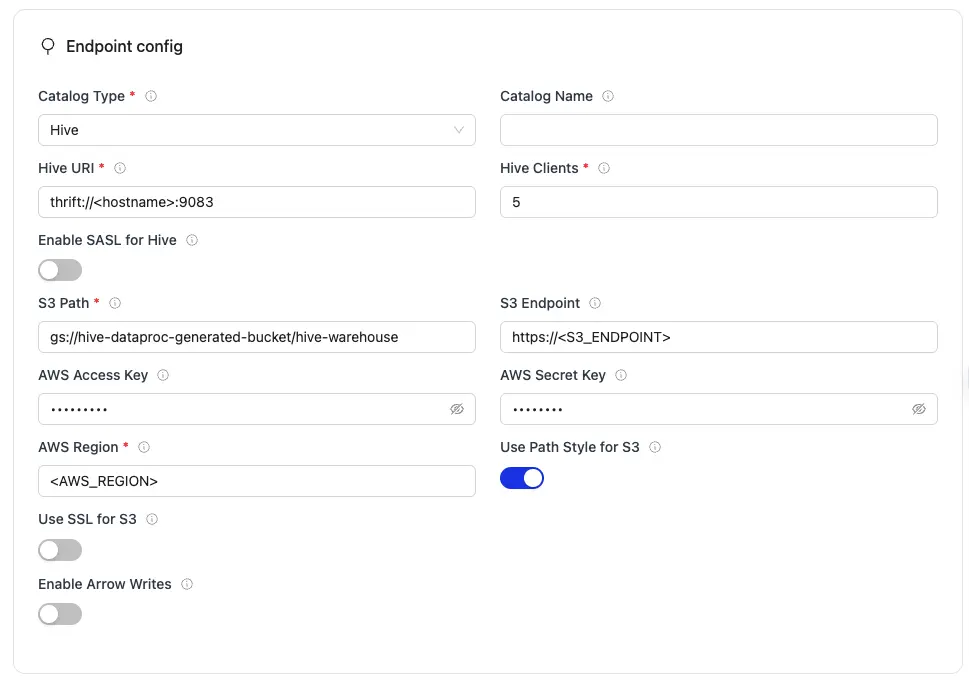
| Parameter | Sample Value | Description |
|---|---|---|
S3 Path required | gs://hive-dataproc-generated-bucket/hive-warehouse or s3://<BUCKET_NAME>/ | S3 bucket path where Iceberg table data and metadata files will be stored. |
AWS Region required | us-east-1 | AWS Region where your S3 bucket exist. Required so OLake Go calls the correct regional S3 endpoints. |
Hive Clients required | 5 | Specifies the number of Hive clients allocated for managing interactions with the Hive Metastore. |
Hive URI required | thrift://<hostname>:9083 or thrift://METASTORE_IP:9083 | Thrift endpoint URL for your Hive Metastore service. OLake Go uses this to read and write Iceberg catalog metadata. |
| AWS Access Key | XXX | AWS access key ID for authentication. Optional if using IAM roles or instance profiles. If using IAM: Docker Compose: add the required IAM environment variables under x-envs in your compose file. See Service Environment Variables for setup details.Kubernetes: set up pod IAM in Cloud IAM Integration. |
| AWS Secret Key | XXX | AWS secret access key for authentication. Optional if using IAM roles or instance profiles. If using IAM: Docker Compose: add the required IAM environment variables under x-envs in your compose file. See Service Environment Variables for setup details.Kubernetes: set up pod IAM in Cloud IAM Integration. |
| S3 Endpoint | https://glue.ap-south-1.amazonaws.com | S3 API endpoint for writing Iceberg data files. Optional for AWS S3 but required for S3-compatible storage like MinIO. |
| Catalog Name | olake_iceberg | Name of the Iceberg catalog OLake Go registers tables under. Defaults to olake_iceberg if left empty. |
| Use SSL for S3 | false/true | Controls whether OLake Go uses HTTPS when connecting to the S3 API for writing Iceberg files. Set to false when S3 Endpoint uses http:// (for example, local MinIO). Set to true when the endpoint uses https:// (for example, AWS S3 or TLS-enabled MinIO). |
| Use Path Style for S3 | false/true | Controls how OLake Go formats S3 request URLs. Path-style puts the bucket name in the URL path instead of the hostname. This is required for MinIO and other S3-compatible storage that do not support AWS-style virtual-hosted URLs. |
| Enable SASL for Hive | false/true | Enables SASL authentication when OLake Go connects to the Hive Metastore over Thrift. Required only if your metastore enforces SASL-based client authentication. |
| Enable Arrow Writes | false/true | Writes data and delete files using Apache Arrow based writer and registers them in Iceberg. |
Click Create -> to test the connection and verify that OLake Go can validate both the Hive Metastore connection and S3 compatible object storage access.
For the catalog name, OLake Go only supports lowercase letters and underscores. Spaces and special characters are not supported.
{
    "type": "ICEBERG",
    "writer": {
        "catalog_type": "hive",
        "iceberg_s3_path": "s3://warehouse/",
        "aws_region": "us-east-1",
        "aws_access_key": "XXX",
        "aws_secret_key": "XXX",
        "s3_endpoint": "http://S3_ENDPOINT",
        "hive_uri": "thrift://<hostname>:9083",
        "catalog_name": "olake_iceberg",
        "s3_use_ssl": false,
        "s3_path_style": true,
        "hive_clients": 5,
        "hive_sasl_enabled": false,
        "arrow_writes": false
    }
}
| Parameter | Sample Value | Description |
|---|---|---|
iceberg_s3_path required | s3://warehouse/ or gs://hive-dataproc-generated-bucket/hive-warehouse | S3 bucket path where Iceberg table data and metadata files will be stored. |
aws_region required | us-east-1 | AWS Region where your S3 bucket exist. Required so OLake Go calls the correct regional S3 endpoints. |
hive_uri required | thrift://<hostname>:9083 or thrift://METASTORE_IP:9083 | Thrift endpoint URL for your Hive Metastore service. OLake Go uses this to read and write Iceberg catalog metadata. |
hive_clients required | 5 | Specifies the number of Hive clients allocated for managing interactions with the Hive Metastore. |
| aws_access_key | XXX | AWS access key ID for authentication. Optional if using IAM roles or instance profiles. If using IAM: Docker Compose: add the required IAM environment variables under x-envs in your compose file. See Service Environment Variables for setup details.Kubernetes: set up pod IAM in Cloud IAM Integration. |
| aws_secret_key | XXX | AWS secret access key for authentication. Optional if using IAM roles or instance profiles. If using IAM: Docker Compose: add the required IAM environment variables under x-envs in your compose file. See Service Environment Variables for setup details.Kubernetes: set up pod IAM in Cloud IAM Integration. |
| s3_endpoint | http://S3_ENDPOINT | S3 API endpoint for writing Iceberg data files. Optional for AWS S3 but required for S3-compatible storage like MinIO. |
| catalog_name | olake_iceberg | Name of the Iceberg catalog OLake Go registers tables under. Defaults to olake_iceberg if left empty. |
| s3_use_ssl | false/true | Controls whether OLake Go uses HTTPS when connecting to the S3 API for writing Iceberg files. Set to false when S3 Endpoint uses http:// (for example, local MinIO). Set to true when the endpoint uses https:// (for example, AWS S3 or TLS-enabled MinIO). |
| s3_path_style | false/true | Controls how OLake Go formats S3 request URLs. Path-style puts the bucket name in the URL path instead of the hostname. This is required for MinIO and other S3-compatible storage that do not support AWS-style virtual-hosted URLs. |
| hive_sasl_enabled | false/true | Enables SASL authentication when OLake Go connects to the Hive Metastore over Thrift. Required only if your metastore enforces SASL-based client authentication. |
| arrow_writes | false/true | Writes data and delete files using Apache Arrow based writer and registers them in Iceberg. |
For the catalog name, OLake Go only supports lowercase letters and underscores. Spaces and special characters are not supported.
Setup For Testing
- GCP Dataproc Metastore
- Local Docker Compose Setup
GCP Dataproc Metastore
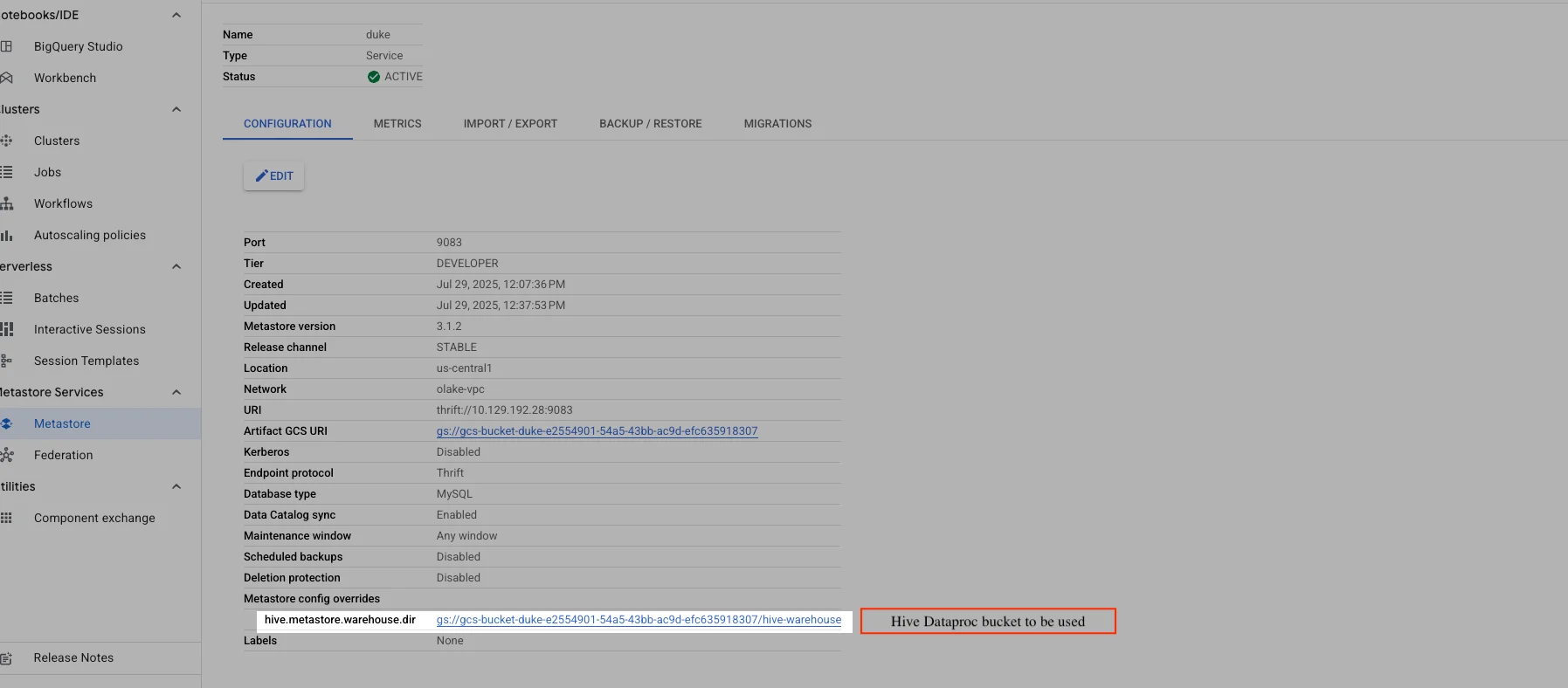
OLake Go supports using Google Cloud Dataproc Metastore (Hive) as the Iceberg catalog and Google Cloud Storage (GCS) as the data lake destination. This allows you to leverage GCP-native services for scalable, managed metadata and storage.
Dataproc Metastore
Step-by-Step Setup
- Create a GCP Project (if you don't have one).
- Provision a Dataproc Metastore (Hive):
- Go to the GCP Console → Dataproc → Metastore services.
- Click "Create Metastore Service".
- Fill in service name, location, version, release channel, port (default: 9083), and service tier.
- Set the endpoint protocol to Thrift.
- Expose the service to your running network (VPC/subnet).
- Enable the Data Catalog sync option if desired.
- Choose database type and other options as needed.
- Click Submit. Creation may take 20–30 minutes.
- Expose the Metastore endpoint to the network where OLake will run (ensure network connectivity and firewall rules allow access to the Thrift port).
- Create or choose a GCS bucket for Iceberg data.
- Deploy OLake Go in the same network (or with access to the Metastore endpoint).
- The
hive_urimust use the Thrift protocol and point to your Dataproc Metastore endpoint. - The
iceberg_s3_pathcan use thegs://prefix for GCS buckets. - Ensure OLake Go has network access to the Metastore and permissions to write to the GCS bucket.
For local development and testing, you can set up a complete Hive Metastore environment using Docker Compose. This setup includes Hive Metastore, PostgreSQL, and MinIO (S3-compatible storage).
Docker Compose Setup
Create the following files in your project directory:
docker-compose.yml
docker-compose.yml
services:
  minio:
    image: quay.io/minio/minio:RELEASE.2025-04-03T14-56-28Z
    container_name: minio-hive
    environment:
      - MINIO_ROOT_USER=admin
      - MINIO_ROOT_PASSWORD=password
      - MINIO_DOMAIN=minio
    networks:
      iceberg_net:
        aliases:
          - warehouse.minio
    ports:
      - 9001:9001
      - 9000:9000
    volumes:
      - ./data/minio-data:/data
    command: [ "server", "/data", "--console-address", ":9001" ]

  mc:
    depends_on:
      - minio
    image: quay.io/minio/mc:RELEASE.2025-04-03T17-07-56Z
    container_name: mc-hive
    networks:
      iceberg_net:
    environment:
      - AWS_ACCESS_KEY_ID=admin
      - AWS_SECRET_ACCESS_KEY=password
      - AWS_REGION=us-east-1
    entrypoint: |
      /bin/sh -c "
      until (/usr/bin/mc config host add minio http://minio:9000 admin password) do echo '...waiting...' && sleep 1; done;
      if ! /usr/bin/mc ls minio/warehouse > /dev/null 2>&1; then
        /usr/bin/mc mb minio/warehouse;
        /usr/bin/mc policy set public minio/warehouse;
      fi;
      tail -f /dev/null
      "

  postgres:
    image: postgres:15
    container_name: iceberg-postgres-hive
    networks:
      iceberg_net:
    environment:
      - POSTGRES_USER=iceberg
      - POSTGRES_PASSWORD=password
      - POSTGRES_DB=iceberg
    healthcheck:
      test: [ "CMD", "pg_isready", "-U", "iceberg", "-d", "iceberg" ]
      interval: 2s
      timeout: 10s
      retries: 3
      start_period: 10s
    ports:
      - 5432:5432
    volumes:
      - ./data/postgres-data:/var/lib/postgresql/data

  hive-metastore:
    image: apache/hive:4.0.0
    container_name: hive-metastore-only
    networks:
      iceberg_net:
    ports:
      - "9083:9083"
    environment:
        - SERVICE_NAME=metastore
    depends_on:
      - postgres
    user: root
    volumes:
        - ./data/ivy-cache:/root/.ivy2
        - ./hive-site.conf:/opt/hive/conf/hive-site.xml
    entrypoint: |
      /bin/sh -c "
      set -e
      echo 'Downloading required JARs for Hive Metastore...'
      HIVE_LIB_DIR=/opt/hive/lib
      mkdir -p $${HIVE_LIB_DIR}

      if ! command -v curl >/dev/null 2>&1 && ! command -v wget >/dev/null 2>&1; then \
        echo 'curl/wget not found. Attempting to install...'; \
        if command -v apt-get >/dev/null 2>&1; then \
          apt-get update && apt-get install -y curl ca-certificates && rm -rf /var/lib/apt/lists/*; \
        elif command -v microdnf >/dev/null 2>&1; then \
          microdnf install -y curl ca-certificates || true; \
        elif command -v dnf >/dev/null 2>&1; then \
          dnf install -y curl ca-certificates || true; \
        elif command -v yum >/dev/null 2>&1; then \
          yum install -y curl ca-certificates || true; \
        elif command -v apk >/dev/null 2>&1; then \
          apk add --no-cache curl ca-certificates; \
        else \
          echo 'No supported package manager found to install curl/wget.'; exit 1; \
        fi; \
      fi

      download() { url=$1; dest=$2; name=$$(basename \"$$dest\"); \
        for i in 1 2 3 4 5; do \
          echo \"Downloading $${name} (attempt $${i})...\"; \
          if command -v curl >/dev/null 2>&1; then \
            curl -fSL \"$$url\" -o \"$$dest\" && break; \
          elif command -v wget >/dev/null 2>&1; then \
            wget -O \"$$dest\" \"$$url\" && break; \
          else \
            echo 'Neither curl nor wget is available in the container.'; exit 1; \
          fi; \
          echo 'Download failed, retrying in 3s...'; sleep 3; \
          if [ $$i -eq 5 ]; then echo 'Failed to download after retries'; exit 1; fi; \
        done; }

      download https://repo1.maven.org/maven2/org/apache/hadoop/hadoop-aws/3.3.4/hadoop-aws-3.3.4.jar $${HIVE_LIB_DIR}/hadoop-aws-3.3.4.jar
      download https://repo1.maven.org/maven2/com/amazonaws/aws-java-sdk-bundle/1.12.262/aws-java-sdk-bundle-1.12.262.jar $${HIVE_LIB_DIR}/aws-java-sdk-bundle-1.12.262.jar
      download https://repo1.maven.org/maven2/org/postgresql/postgresql/42.5.4/postgresql-42.5.4.jar $${HIVE_LIB_DIR}/postgresql-42.5.4.jar

      if [ ! -f $${HIVE_LIB_DIR}/hadoop-aws-3.3.4.jar ] || [ ! -f $${HIVE_LIB_DIR}/aws-java-sdk-bundle-1.12.262.jar ] || [ ! -f $${HIVE_LIB_DIR}/postgresql-42.5.4.jar ]; then
        echo 'JAR files not found in Hive lib directory. Exiting.'; exit 1; fi

      chown -R hive:hive $${HIVE_LIB_DIR}
      echo 'JAR files downloaded to Hive lib directory. Starting hive-metastore...'

      sh -c \"/entrypoint.sh\"
      "

networks:
  iceberg_net:

volumes:
  postgres-data:
  minio-data:
hive-site.conf
hive-site.conf
<configuration>
    <property>
        <name>hive.server2.enable.doAs</name>
        <value>false</value>
    </property>
    <property>
        <name>hive.tez.exec.inplace.progress</name>
        <value>false</value>
    </property>
    <property>
        <name>hive.exec.scratchdir</name>
        <value>/opt/hive/scratch_dir</value>
    </property>
    <property>
        <name>hive.user.install.directory</name>
        <value>/opt/hive/install_dir</value>
    </property>
    <property>
        <name>tez.runtime.optimize.local.fetch</name>
        <value>true</value>
    </property>
    <property>
        <name>hive.exec.submit.local.task.via.child</name>
        <value>false</value>
    </property>
    <property>
        <name>mapreduce.framework.name</name>
        <value>local</value>
    </property>
    <property>
        <name>tez.local.mode</name>
        <value>true</value>
    </property>
    <property>
        <name>hive.execution.engine</name>
        <value>tez</value>
    </property>
    <property>
        <name>metastore.metastore.event.db.notification.api.auth</name>
        <value>false</value>
    </property>
    <property>
        <name>hive.metastore.warehouse.dir</name>
        <value>s3a://warehouse/</value>
    </property>
    <property>
        <name>fs.s3a.endpoint</name>
        <value>http://minio:9000</value>
    </property>
    <property>
        <name>fs.s3a.access.key</name>
        <value>admin</value>
    </property>
    <property>
        <name>fs.s3a.secret.key</name>
        <value>password</value>
    </property>
    <property>
        <name>fs.s3a.path.style.access</name>
        <value>true</value>
    </property>
    <property>
        <name>fs.s3a.impl</name>
        <value>org.apache.hadoop.fs.s3a.S3AFileSystem</value>
    </property>
    <property>
        <name>fs.s3a.connection.ssl.enabled</name>
        <value>false</value>
    </property>
    <property>
        <name>hive.metastore.authorization.storage.checks</name>
        <value>false</value>
        <description>Disables storage-based authorization checks to allow Hive better compatibility with MinIO.
        </description>
    </property>
    <property>
        <name>hive.metastore.pre.event.listeners</name>
        <value>org.apache.hadoop.hive.ql.security.authorization.AuthorizationPreEventListener</value>
    </property>
    <property>
        <name>hive.security.metastore.authorization.manager</name>
        <value>org.apache.hadoop.hive.ql.security.authorization.StorageBasedAuthorizationProvider</value>
    </property>
</configuration>
Dockerfile
No Spark image is required for this setup.
Starting the Environment
-
Start the services:
docker-compose up -d -
Wait for Hive to initialize (first run downloads dependencies):
- Tail the Hive Metastore logs and wait until these messages appear:
docker logs -f hive-metastore-onlyStarting metastore schema initialization to 4.0.0
Initialization script hive-schema-4.0.0.derby.sql
- Tail the Hive Metastore logs and wait until these messages appear:
-
Verify services are running:
docker-compose ps
Troubleshooting
The OLake Go Hive Catalog connector stops immediately upon encountering errors to ensure data accuracy. Below are common issues and their fixes:
-
Hive Metastore JAR Dependencies Missing
- Cause: Required JAR files not available in Hive Metastore classpath for S3 and PostgreSQL connectivity.
- Fix:
- Verify the following essential JARs are present in
/opt/hive/lib/:# Check for required JARs
ls -la /opt/hive/lib/ | grep -E "(hadoop-aws|postgresql|aws-java-sdk)" - Required JARs for S3 Integration:
hadoop-aws-3.3.4.jar- Enables S3A filesystem supportaws-java-sdk-bundle-1.12.262.jar- AWS SDK for S3 operations
- Required JARs for PostgreSQL Backend:
postgresql-42.5.4.jar- PostgreSQL JDBC driver for metadata storage
- Verify the following essential JARs are present in
-
Connection Refused to Hive Metastore
- Cause: Hive Metastore service not accessible or network connectivity issues.
- Fix:
- Verify Hive Metastore is running and accessible:
telnet <hive-metastore-host> 9083 - Check
hive_uriformat:thrift://<hostname>:9083 - Use
host.docker.internalinstead oflocalhostwhen running in Docker. - Ensure firewall rules allow access to port 9083.
- For GCP Dataproc Metastore, verify VPC connectivity and service status.
- Verify Hive Metastore is running and accessible:
-
Database Backend Connection Failed
- Cause: PostgreSQL/MySQL backend database not accessible or misconfigured.
- Fix:
- Verify database backend is running:
psql -h <db-host> -p 5432 -U <username> -d <database> - Ensure database user has required permissions:
GRANT CREATE, INSERT, UPDATE, DELETE, SELECT ON DATABASE <database_name> TO <username>; - Check Hive Metastore configuration for correct JDBC URL.
- Verify database backend is running:
-
S3/Object Storage Access Denied
- Cause: Invalid AWS credentials or insufficient S3 bucket permissions.
- Fix:
- Verify AWS credentials and permissions:
aws s3 ls s3://<bucket-name> - For MinIO, ensure correct endpoint and credentials:
mc config host add minio http://<endpoint> <access-key> <secret-key>
mc ls minio/<bucket-name> - Check
s3_endpoint,aws_access_key, andaws_secret_keyconfiguration. - Ensure bucket exists and is in the correct region.
- Verify AWS credentials and permissions:
-
Path Style Access Error with MinIO
- Cause: S3 addressing configuration issue with MinIO or non-AWS S3.
- Fix:
- Set
s3_path_style: truefor MinIO and non-AWS S3 services. - Use correct endpoint format:
http://minio:9000(no bucket in URL). - Ensure
s3_use_ssl: falsefor HTTP endpoints.
- Set