
 Twitter
 LinkedIn
 Facebook
 Email
Email
JDBC/SQL Catalog Write Guide
OLake Go integrates with JDBC/SQL catalogs (such as PostgreSQL, MySQL, etc.) to provide full support for Apache Iceberg tables.
With this setup:
- Data is stored in object storage (S3, MinIO, or any S3-compatible system).
- Metadata is managed in a relational database (via JDBC).
- OLake Go seamlessly writes into Iceberg tables using JDBC + object storage.
Prerequisites
Before configuring OLake Go with JDBC Catalog, ensure the following:
1. Relational Database
- A JDBC-supported database (such as PostgreSQL or MySQL) will serve as the Iceberg metadata catalog.
Required Database Permissions
The JDBC catalog user must have sufficient privileges to manage Iceberg metadata tables. OLake Go requires the following database permissions:
CREATE TABLE - Creates Iceberg catalog metadata tables (
iceberg_tables,iceberg_namespace_properties, etc.) on first connectionINSERT - Adds new table metadata entries, namespace registrations, and commit history records to catalog tables
UPDATE - Modifies existing table metadata during schema evolution, partition updates, and table property changes
DELETE - Removes obsolete metadata entries when tables are dropped or during catalog maintenance operations
SELECT - Reads metadata for table discovery, schema validation, and query planning operations
For detailed database-specific setup instructions and advanced permission configurations, refer to the Apache Iceberg JDBC Catalog documentation.
2. Object Storage
- A bucket for storing Iceberg data files (Parquet + metadata).
Configuration
- OLake UI
- OLake CLI
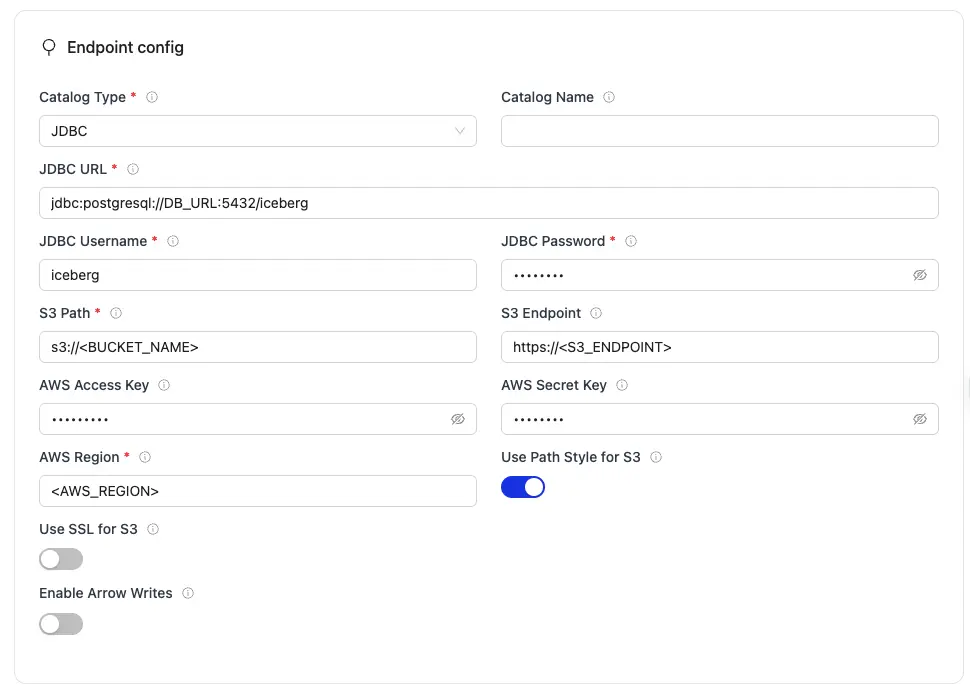
| Parameter | Sample Value | Description |
|---|---|---|
JDBC URL required | jdbc:postgresql://<DB_URL>:5432/iceberg | JDBC connection string for the catalog database. Replace <DB_URL> with your database host or use host.docker.internal for local Docker containers. |
JDBC Username required | iceberg | Database username for JDBC catalog authentication. |
JDBC Password required | password | Database password for JDBC catalog authentication. |
S3 Path required | s3://warehouse | S3 bucket path where Iceberg table data and metadata files will be stored. |
AWS Region required | us-east-1 | AWS Region where your S3 bucket exist. Required so OLake Go calls the correct regional S3 endpoints. |
| Catalog Name | olake_iceberg | Name of the Iceberg catalog OLake Go registers tables under. Defaults to olake_iceberg if left empty. |
| S3 Endpoint | https://glue.ap-south-1.amazonaws.com | S3 API endpoint for writing Iceberg data files. Optional for AWS S3 but required for S3-compatible storage like MinIO. |
| Use SSL for S3 | false/true | Controls whether OLake Go uses HTTPS when connecting to the S3 API for writing Iceberg files. Set to false when S3 Endpoint uses http:// (for example, local MinIO). Set to true when the endpoint uses https:// (for example, AWS S3 or TLS-enabled MinIO). |
| Use Path Style for S3 | false/true | Controls how OLake Go formats S3 request URLs. Path-style puts the bucket name in the URL path instead of the hostname. This is required for MinIO and other S3-compatible storage that do not support AWS-style virtual-hosted URLs. |
| AWS Access Key | XXX | AWS access key ID for authentication. Optional if using IAM roles or instance profiles. If using IAM: Docker Compose: add the required IAM environment variables under x-envs in your compose file. See Service Environment Variables for setup details.Kubernetes: set up pod IAM in Cloud IAM Integration. |
| AWS Secret Key | XXX | AWS secret access key for authentication. Optional if using IAM roles or instance profiles. If using IAM: Docker Compose: add the required IAM environment variables under x-envs in your compose file. See Service Environment Variables for setup details.Kubernetes: set up pod IAM in Cloud IAM Integration. |
| Enable Arrow Writes | false/true | Writes data and delete files using Apache Arrow based writer and registers them in Iceberg. |
For the catalog name, OLake Go only supports lowercase letters and underscores. Spaces and special characters are not supported.
Click Create -> to test the connection and verify that OLake Go can validate both the JDBC catalog connection and S3 compatible object storage access.
Create a destination.json with the following configuration:
{
     "type": "ICEBERG",
     "writer": {
          "catalog_type": "jdbc",
          "jdbc_url": "jdbc:postgresql://<DB_URL>:5432/iceberg",
          "catalog_name": "olake_iceberg",
          "jdbc_username": "<USERNAME>",
          "jdbc_password": "<PASSWORD>",
          "iceberg_s3_path": "s3://<BUCKET_NAME>",
          "s3_endpoint": "https://<S3_ENDPOINT>",
          "s3_use_ssl": false,
          "s3_path_style": true,
          "aws_access_key": "<AWS_ACCESS_KEY>",
          "aws_region": "<AWS_REGION>",
          "aws_secret_key": "<AWS_SECRET_KEY>",
          "arrow_writes": false
     }
}
| Parameter | Sample Value | Description |
|---|---|---|
jdbc_url required | jdbc:postgresql://<DB_URL>:5432/iceberg | JDBC connection string for the catalog database. Replace <DB_URL> with your database host or use host.docker.internal for local Docker containers. |
jdbc_username required | iceberg | Database username for JDBC catalog authentication. |
jdbc_password required | password | Database password for JDBC catalog authentication. |
iceberg_s3_path required | s3://warehouse | S3 bucket path where Iceberg table data and metadata files will be stored. |
aws_region required | us-east-1 | AWS Region where your S3 bucket exist. Required so OLake Go calls the correct regional S3 endpoints. |
| catalog_name | olake_iceberg | Name of the Iceberg catalog OLake Go registers tables under. Defaults to olake_iceberg if left empty. |
| s3_endpoint | https://glue.ap-south-1.amazonaws.com | S3 API endpoint for writing Iceberg data files. Optional for AWS S3 but required for S3-compatible storage like MinIO. |
| s3_use_ssl | false/true | Controls whether OLake Go uses HTTPS when connecting to the S3 API for writing Iceberg files. Set to false when S3 Endpoint uses http:// (for example, local MinIO). Set to true when the endpoint uses https:// (for example, AWS S3 or TLS-enabled MinIO). |
| s3_path_style | false/true | Controls how OLake Go formats S3 request URLs. Path-style puts the bucket name in the URL path instead of the hostname. This is required for MinIO and other S3-compatible storage that do not support AWS-style virtual-hosted URLs. |
| aws_access_key | XXX | AWS access key ID for authentication. Optional if using IAM roles or instance profiles. If using IAM: Docker Compose: add the required IAM environment variables under x-envs in your compose file. See Service Environment Variables for setup details.Kubernetes: set up pod IAM in Cloud IAM Integration. |
| aws_secret_key | XXX | AWS secret access key for authentication. Optional if using IAM roles or instance profiles. If using IAM: Docker Compose: add the required IAM environment variables under x-envs in your compose file. See Service Environment Variables for setup details.Kubernetes: set up pod IAM in Cloud IAM Integration. |
| arrow_writes | false/true | Writes data and delete files using Apache Arrow based writer and registers them in Iceberg. |
For the catalog name, OLake Go only supports lowercase letters and underscores. Spaces and special characters are not supported.
OLake Go automatically validates:
- JDBC connectivity & authentication
- Object storage access (S3/MinIO)
- Database creation & access permissions
Local Development Setup
Here's an example docker-compose.yml for OLake Go with PostgreSQL JDBC Catalog + MinIO:
version: "3.9"

services:
  postgres:
    image: postgres:15
    container_name: iceberg-postgres
    environment:
      POSTGRES_USER: iceberg
      POSTGRES_PASSWORD: password
      POSTGRES_DB: iceberg
    ports:
      - "5432:5432"
    healthcheck:
      test: ["CMD", "pg_isready", "-U", "iceberg", "-d", "iceberg"]
      interval: 2s
      timeout: 10s
      retries: 5
      start_period: 10s
    volumes:
      - ./data/postgres-data:/var/lib/postgresql/data
    networks:
      - iceberg_net

  minio:
    image: quay.io/minio/minio:RELEASE.2025-04-03T14-56-28Z
    container_name: minio
    environment:
      - MINIO_ROOT_USER=admin
      - MINIO_ROOT_PASSWORD=password
      - MINIO_DOMAIN=minio
    networks:
      iceberg_net:
        aliases:
          - warehouse.minio
    ports:
      - 9001:9001
      - 9000:9000
    volumes:
      - ./data/minio-data:/data
    command: [ "server", "/data", "--console-address", ":9001" ]

  mc:
    depends_on:
      - minio
    image: quay.io/minio/mc:RELEASE.2025-04-03T17-07-56Z
    container_name: mc
    networks:
      iceberg_net:
    environment:
      - AWS_ACCESS_KEY_ID=admin
      - AWS_SECRET_ACCESS_KEY=password
      - AWS_REGION=us-east-1
    entrypoint: |
      /bin/sh -c "
      until (/usr/bin/mc config host add minio http://minio:9000 admin password) do echo '...waiting...' && sleep 1; done;
      if ! /usr/bin/mc ls minio/warehouse > /dev/null 2>&1; then
        /usr/bin/mc mb minio/warehouse;
        /usr/bin/mc policy set public minio/warehouse;
      fi;
      tail -f /dev/null
      "

networks:
  iceberg_net:
    name: iceberg_net

volumes:
  postgres-data:
  minio-data:
Troubleshooting
The OLake Go JDBC Catalog connector stops immediately upon encountering errors to ensure data accuracy. Below are common issues and their fixes:
-
Connection Refused to Host:Port
- Cause: JDBC database not accessible or network connectivity issues.
- Fix:
- Verify database is running and accessible:
psql -h <host> -p <port> -U <username> -d <database> - Check
jdbc_urlformat and port configuration. - Use
host.docker.internalinstead oflocalhostwhen running in Docker. - Ensure database accepts connections from OLake's IP address.
- Verify database is running and accessible:
-
Authentication Failed for User
- Cause: Invalid database credentials or insufficient user permissions.
- Fix:
- Verify
jdbc_usernameandjdbc_passwordare correct. - Ensure user exists in the database and has required permissions:
GRANT CREATE, INSERT, UPDATE, DELETE, SELECT ON DATABASE <database_name> TO <username>;
- Verify
-
SSL Connection Error
- Cause: SSL/TLS configuration mismatch between client and server.
- Fix:
- For S3: Ensure
s3_use_sslmatches endpoint protocol (http/https). - For JDBC: Add SSL parameters to jdbc_url for non-SSL databases:
"jdbc_url": "jdbc:postgresql://<host>:<port>/<database>?sslmode=disable"
- For S3: Ensure
-
NoSuchBucket Error
- Cause: S3 bucket specified in configuration doesn't exist.
- Fix:
- Create the bucket specified in
iceberg_s3_path:mc mb <alias>/<bucket_name> - Verify bucket name matches exactly (case-sensitive).
- Ensure bucket is in the correct region.
- Create the bucket specified in
-
Table Already Exists Error
- Cause: Iceberg metadata table conflicts in the catalog database.
- Fix:
- Drop existing tables if safe to do so.
- Use different
iceberg_dbname in configuration. - Clear existing metadata tables manually if needed.
-
Path Style Access Error
- Cause: S3 addressing configuration issue with MinIO or non-AWS S3.
- Fix:
- Set
s3_path_style: truefor MinIO and non-AWS S3 services. - Use correct endpoint format without bucket name in the URL.
- Set