
 Twitter
 LinkedIn
 Facebook
 Email
Email
REST Catalog
The REST catalog is a standardized API designed to simplify the management of Apache Iceberg tables across diverse engines and programming languages. By providing a unified client interface, it eliminates the need for separate catalog integrations for engines like Spark, Flink, Trino, or languages like Java.
Built on an OpenAPI specification, the REST catalog offers a modern, flexible alternative to the Hive Metastore's Thrift interface, tailored specifically for Iceberg's architecture.
- Generic
- Lakekeeper
- Nessie
- S3 Tables
- Unity
- Apache Polaris
- BigLake
- Horizon
The Generic REST Catalog is the default implementation of the Apache Iceberg REST Catalog API. It provides a standard, engine-agnostic way to manage Iceberg tables without depending on a specific catalog service like Nessie, Polaris, or Unity.
Prerequisites
Required services:
- Object store – e.g., S3, MinIO, or another S3-compatible storage for table data and metadata.
- Metadata database – typically PostgreSQL, with a dedicated database and user for Iceberg.
- REST service – the Iceberg REST Catalog service.
Permissions:
- The REST Catalog service user needs read and write permissions on the object store buckets used by Iceberg tables.
- The catalog user should have full DDL and DML privileges on the Iceberg metadata database and tables.
Configuration
Configure the following fields to connect OLake Go to your REST catalog.
Authentication
The catalog supports multiple authentication types.
- OLake UI
- OLake CLI
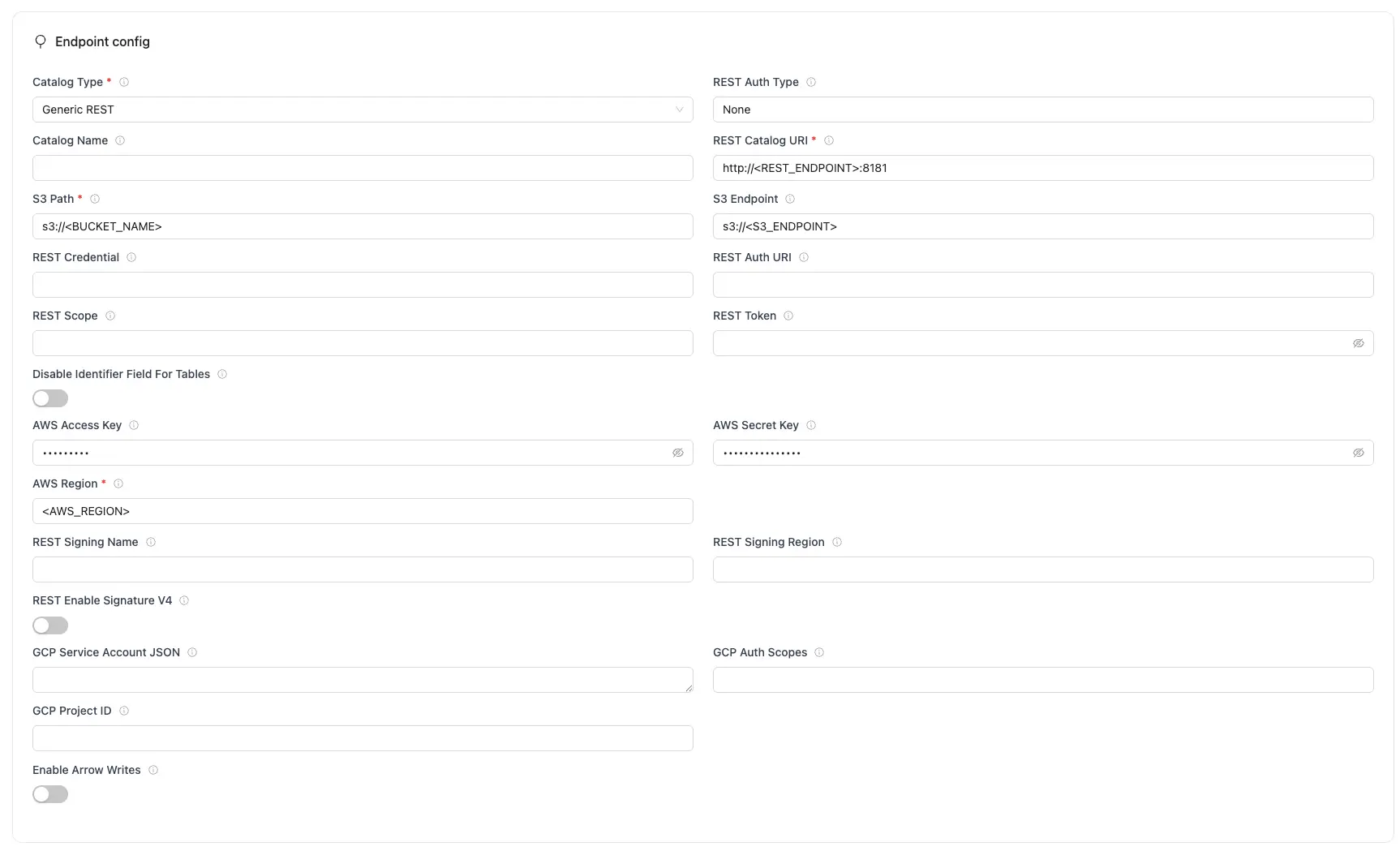
REST Configuration Parameters
| Parameter | Sample Value | Description |
|---|---|---|
REST Catalog URL required | http://<REST_ENDPOINT>:8181 | Specifies the endpoint URL for the REST catalog service that the writer will connect to. |
S3 Path required | s3://<BUCKET_NAME> | S3 bucket path where Iceberg table data and metadata files will be stored. |
AWS Region required | ap-south-1 | AWS Region where your S3 bucket exists. Required so OLake Go calls the correct regional S3 endpoint for writing Iceberg data files. |
| Catalog Name | olake_iceberg | Name of the Iceberg catalog OLake Go registers tables under. Defaults to olake_iceberg if left empty. |
| S3 Endpoint | https://glue.ap-south-1.amazonaws.com | S3 API endpoint for writing Iceberg data files. Optional for AWS S3 but required for S3-compatible storage like MinIO. |
| AWS Access Key | XXX | AWS access key ID for authentication. Optional if using IAM roles or instance profiles. If using IAM: Docker Compose: add the required IAM environment variables under x-envs in your compose file. See Service Environment Variables for setup details.Kubernetes: set up pod IAM in Cloud IAM Integration. |
| AWS Secret Key | XXX | AWS secret access key for authentication. Optional if using IAM roles or instance profiles. If using IAM: Docker Compose: add the required IAM environment variables under x-envs in your compose file. See Service Environment Variables for setup details.Kubernetes: set up pod IAM in Cloud IAM Integration. |
| Enable Arrow Writes | false/true | Writes data and delete files using Apache Arrow based writer and registers them in Iceberg. |
| Token | abc...xyz | Specifies the Bearer token sent in the Authorization header for authenticating with the REST catalog service. |
| Authentication Type | none oauth2 sigv4 google | How OLake Go authenticates with the REST catalog. Select the method your catalog supports. This determines which authentication fields are shown and required. |
| REST Auth URI | https://auth.server.com/oauth/token | URL of the REST catalog’s OAuth2 token endpoint. OLake Go uses this with REST Credential to request an access token during OAuth2 client-credentials authentication. |
| REST Credential | <client_id>:<client_secret> | Specifies the client ID and secret for OAuth2, formatted as client_id:client_secret. Used with REST Auth URI when OLake Go requests an access token from the catalog’s auth service. Not needed when using REST Token or other auth types. |
| REST Scope | PRINCIPAL_ROLE:ALL | Required for OAuth2 client-credentials authentication along with REST Auth URI and REST Credential. Tells the OAuth2 server what level of access to grant, space-separated if requesting more than one. Values are catalog-specific. Not needed when using REST Token or other auth types. |
| REST Signing Name | s3tables | AWS SigV4 service name used to sign REST catalog API requests. Required when REST Enable Signature V4 is turned on. |
| REST Signing Region | us-east-1 | AWS region used for SigV4 signing of REST catalog API requests. Required when REST REST Enable Signature V4 is turned on. Must match your catalog region. |
| REST Enable Signature V4 | true/false | Enable AWS Signature V4 signing. |
| Disable Identifier Tables | true/false | Needed to set true for Databricks Unity Catalog as it doesn't support identifier fields |
For the catalog name, OLake Go only supports lowercase letters and underscores. Spaces and special characters are not supported.
Click Create -> to test the connection and verify that OLake Go can validate both the REST catalog endpoint and S3 compatible object storage access.
Create a destination.json with the following configuration:
{
  "type": "ICEBERG",
  "writer": {
    "catalog_type": "rest",
    "catalog_name": "olake_iceberg",
    "rest_catalog_url": "http://<REST_ENDPOINT>:8181",
    "iceberg_s3_path": "s3://<BUCKET_NAME>",
    "s3_endpoint": "http://<S3_ENDPOINT>:9090",
    "aws_region": "<AWS_REGION>",
    "aws_access_key": "<AWS_ACCESS_KEY>",
    "aws_secret_key": "<AWS_SECRET_KEY>",
    "arrow_writes": false
  }
}
Configuration Fields
| Parameter | Sample Value | Description |
|---|---|---|
catalog_type required | rest | Defines the catalog type used by the writer. |
rest_catalog_url required | http://<REST_ENDPOINT>:8181 | Specifies the endpoint URL for the REST catalog service that the writer will connect to. |
iceberg_s3_path required | s3://<BUCKET_NAME> | S3 bucket path where Iceberg table data and metadata files will be stored. |
aws_region required | ap-south-1 | AWS Region where your S3 bucket exists. Required so OLake Go calls the correct regional S3 endpoint for writing Iceberg data files. |
| catalog_name | olake_iceberg | Name of the Iceberg catalog OLake Go registers tables under. Defaults to olake_iceberg if left empty. |
| s3_endpoint | https://glue.ap-south-1.amazonaws.com | S3 API endpoint for writing Iceberg data files. Optional for AWS S3 but required for S3-compatible storage like MinIO. |
| aws_access_key | XXX | AWS access key ID for authentication. Optional if using IAM roles or instance profiles. If using IAM: Docker Compose: add the required IAM environment variables under x-envs in your compose file. See Service Environment Variables for setup details.Kubernetes: set up pod IAM in Cloud IAM Integration. |
| aws_secret_key | XXX | AWS secret access key for authentication. Optional if using IAM roles or instance profiles. If using IAM: Docker Compose: add the required IAM environment variables under x-envs in your compose file. See Service Environment Variables for setup details.Kubernetes: set up pod IAM in Cloud IAM Integration. |
| arrow_writes | false/true | Writes data and delete files using Apache Arrow based writer and registers them in Iceberg. |
| token | abc...xyz | Specifies the Bearer token sent in the Authorization header for authenticating with the REST catalog service. |
| oauth2_uri | https://auth.server.com/oauth/token | URL of the REST catalog’s OAuth2 token endpoint. OLake Go uses this with REST Credential to request an access token during OAuth2 client-credentials authentication. |
| credential | <client_id>:<client_secret> | Specifies the client ID and secret for OAuth2, formatted as client_id:client_secret. Used with REST Auth URI when OLake Go requests an access token from the catalog’s auth service. Not needed when using REST Token or other auth types. |
| scope | PRINCIPAL_ROLE:ALL | Required for OAuth2 client-credentials authentication along with REST Auth URI and REST Credential. Tells the OAuth2 server what level of access to grant, space-separated if requesting more than one. Values are catalog-specific. Not needed when using REST Token or other auth types. |
| rest_signing_name | s3tables | AWS SigV4 service name used to sign REST catalog API requests. Required when REST Auth Type is sigv4 or REST Enable Signature V4 is turned on. |
| rest_signing_region | us-east-1 | AWS region used for SigV4 signing of REST catalog API requests. Required when REST Auth Type is sigv4 or REST Enable Signature V4 is turned on. Must match your catalog region (usually the same as AWS Region). |
| rest_signing_v_4 | true/false | Enable AWS Signature V4 signing. |
| no_identifier_fields | true/false | Needed to set true for Databricks Unity Catalog as it doesn't support identifier fields |
For the catalog name, OLake Go only supports lowercase letters and underscores. Spaces and special characters are not supported.
Setup For Local Testing
Save the following docker-compose.yml which will start the following services required for an Iceberg REST Catalog.
- REST Catalog Service (Tabular image) – Provides the REST API for managing Iceberg tables.
- PostgreSQL – Serves as the metadata database to track Iceberg table metadata and schema evolution.
- MinIO + MinIO Client – An S3-compatible object store used to store table data and snapshots.
version: "3.9"

services:
  rest:
    image: tabulario/iceberg-rest
    container_name: iceberg-rest
    ports:
      - 8181:8181
    volumes:
      - catalog-data:/catalog
    environment:
      AWS_ACCESS_KEY_ID: admin
      AWS_SECRET_ACCESS_KEY: password
      AWS_REGION: us-east-1
      CATALOG_WAREHOUSE: s3://warehouse/
      CATALOG_IO__IMPL: org.apache.iceberg.aws.s3.S3FileIO
      CATALOG_S3_ENDPOINT: http://minio:9090
      CATALOG_URI: jdbc:postgresql://postgres:5432/iceberg
      CATALOG_JDBC_USER: iceberg
      CATALOG_JDBC_PASSWORD: password
    networks:
      - iceberg_net
    depends_on:
      postgres:
        condition: service_healthy
      mc:
        condition: service_completed_successfully

  postgres:
    image: postgres:15
    container_name: postgres
    networks:
      - iceberg_net
    environment:
      POSTGRES_USER: iceberg
      POSTGRES_PASSWORD: password
      POSTGRES_DB: iceberg
    healthcheck:
      test: [ "CMD", "pg_isready", "-U", "iceberg", "-d", "password" ]
      interval: 2s
      timeout: 10s
      retries: 3
      start_period: 10s
    ports:
      - 5432:5432
    volumes:
      - ./data/postgres-data:/var/lib/postgresql/data

  minio:
    image: olakego/minio
    hostname: minio
    container_name: minio
    ports:
      - 9090:9090
      - 9091:9091
    volumes:
      - minio-data:/data
    environment:
      MINIO_ACCESS_KEY: admin
      MINIO_SECRET_KEY: password
      MINIO_DOMAIN: minio
    command: server --address ":9090" --console-address ":9091" /data
    networks:
      iceberg_net:
        aliases:
          - warehouse.minio

  mc:
    image: olakego/mc
    container_name: mc
    environment:
      AWS_ACCESS_KEY_ID: admin
      AWS_SECRET_ACCESS_KEY: password
      AWS_REGION: us-east-1
    entrypoint: >
      /bin/sh -c "
      until (/usr/bin/mc alias set minio http://minio:9090 admin password) do echo '...waiting...' && sleep 1; done;
      echo 'Ensuring warehouse bucket exists and is public...';
      if /usr/bin/mc stat minio/warehouse > /dev/null 2>&1; then
        echo 'Warehouse bucket exists, removing for fresh start...';
        /usr/bin/mc rm -r --force minio/warehouse || echo 'Failed to remove warehouse, proceeding...';
      fi;
      /usr/bin/mc mb minio/warehouse;
      /usr/bin/mc anonymous set public minio/warehouse;
      echo 'Minio warehouse bucket setup complete.';
      "
    networks:
      - iceberg_net
    depends_on:
      - minio

volumes:
  catalog-data:
  minio-data:

networks:
  iceberg_net:
Start the services:
docker-compose up -d
All services involved in the sync OLake Go, REST Catalog Service, MinIO, and Postgres must run in the same Docker network.
Troubleshooting
-
Your authentication credentials are invalid ... unauthorized_client
- Fix:
- Ensure the correct OAuth/token or DB username/password is provided.
- Re-issue new tokens or refresh secrets if expired.
- Check using this command:
curl -H "Authorization: Bearer <token>" https://<catalog-endpoint>/v1/config
- Fix:
-
User:
<ARN>is not authorized to perform: sts:AssumeRole- Fix:
- Make sure the correct IAM role is assigned.
- Validate role trust relationships and necessary permissions to S3 and Catalog.
- Check using this command:
aws sts assume-role --role-arn <S3_role_arn> --role-session-name test-session
- Fix:
The Lakekeeper REST Catalog is a catalog service that provides a unified view of all your Iceberg tables and data lakes.
It implements the Apache Iceberg REST Catalog API, with extensions for governance and monitoring.
Using Lakekeeper, you can manage tables across different storage systems while exposing them to engines in a consistent way.
Prerequisites
Required services:
- Lakekeeper Server – The REST catalog service for Iceberg tables.
- Object Store – e.g., AWS S3, MinIO, or any S3-compatible storage for table data and snapshots.
- Metadata Database – PostgreSQL, used internally by Lakekeeper to store catalog state and metadata.
Permissions:
- Lakekeeper must have read/write access to the object store bucket(s).
- The PostgreSQL user must have DDL/DML rights to manage catalog metadata tables.
Configuration
Configure the following fields to connect OLake Go to your REST catalog.
Authentication
The catalog supports multiple authentication types. Select the one your service uses to see the fields you need to configure.
- None
- Token
- OAuth2
- OLake UI
- OLake CLI
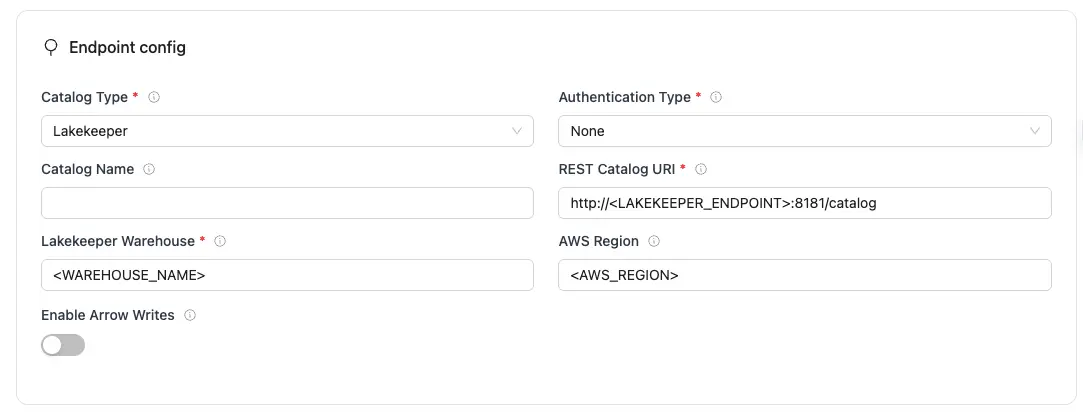
Lakekeeper Configuration Parameters:
| Parameter | Sample Value | Description |
|---|---|---|
REST Catalog URIrequired | http://<LAKEKEEPER_ENDPOINT>:8181/catalog | Specifies the endpoint URL for the Lakekeeper catalog service that the writer will connect to. |
Authentication Typerequired | none | Authentication method OLake Go uses for REST catalog requests. Set to match your catalog's authentication requirement. |
Lakekeeper Warehouserequired | <WAREHOUSE_NAME> | Name of the Lakekeeper warehouse to use, OLake Go uses this to look up the storage configuration (eg. S3 bucket) already defined in Lakekeeper. |
| Catalog Name | olake_iceberg | Name of the Iceberg catalog OLake Go registers tables under. Defaults to olake_iceberg if left empty. |
| AWS Region | ap-south-1 | Specifies the AWS region associated with the S3 bucket where the data is stored. Optional if added in the lakekeeper warehouse configuration. |
| Enable Arrow Writes | false/true | Writes data and delete files using Apache Arrow based writer and registers them in Iceberg. |
Click Create -> to test the connection and verify that OLake Go can validate both the Lakekeeper REST catalog and warehouse access.
Create a destination.json with the following configuration:
{
  "type": "ICEBERG",
  "writer": {
    "catalog_type": "lakekeeper",
    "catalog_name": "olake_iceberg",
    "rest_catalog_url": "http://<LAKEKEEPER_ENDPOINT>:8181/catalog",
    "iceberg_s3_path": "<WAREHOUSE_NAME>",
    "aws_region": "<AWS_REGION>",
    "arrow_writes": false
  }
}
Lakekeeper Configuration Parameters:
| Parameter | Sample Value | Description |
|---|---|---|
catalog_typerequired | lakekeeper | Defines the catalog type used by the writer. |
rest_catalog_urlrequired | http://<LAKEKEEPER_ENDPOINT>:8181/catalog | Specifies the endpoint URL for the Lakekeeper catalog service that the writer will connect to. |
iceberg_s3_pathrequired | <WAREHOUSE_NAME> | Name of the Lakekeeper warehouse to use, OLake Go uses this to look up the storage configuration (eg. S3 bucket) already defined in Lakekeeper. |
| catalog_name | olake_iceberg | Name of the Iceberg catalog OLake Go registers tables under. Defaults to olake_iceberg if left empty. |
| aws_region | ap-south-1 | Specifies the AWS region associated with the S3 bucket where the data is stored. Optional if added in the lakekeeper warehouse configuration. |
| arrow_writes | false/true | Writes data and delete files using Apache Arrow based writer and registers them in Iceberg. |
- OLake UI
- OLake CLI
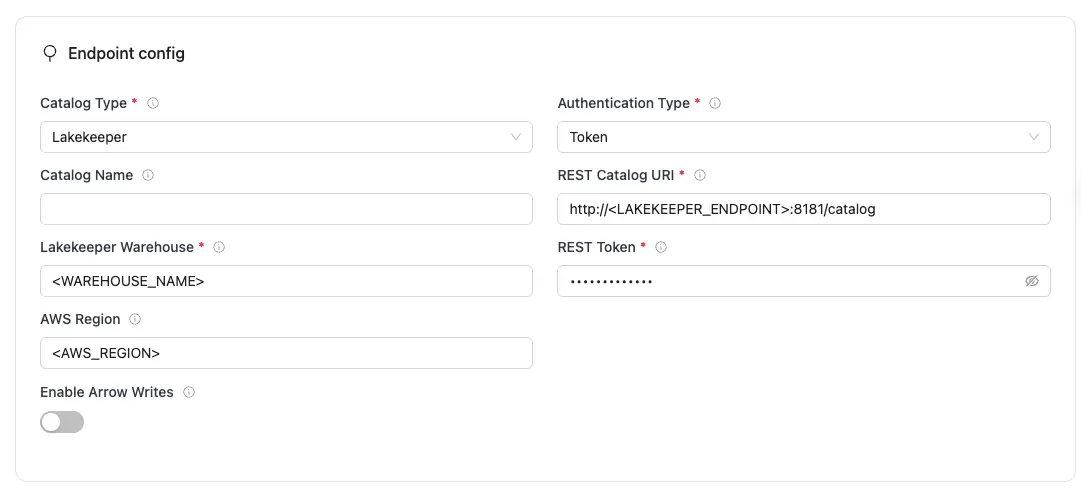
Lakekeeper Configuration Parameters:
| Parameter | Sample Value | Description |
|---|---|---|
REST Catalog URIrequired | http://<LAKEKEEPER_ENDPOINT>:8181/catalog | Specifies the endpoint URL for the Lakekeeper catalog service that the writer will connect to. |
Authentication Typerequired | token | Authentication method OLake Go uses for REST catalog requests. Set to match your catalog's authentication requirement. |
Lakekeeper Warehouserequired | <WAREHOUSE_NAME> | Name of the Lakekeeper warehouse to use, OLake Go uses this to look up the storage configuration (eg. S3 bucket) already defined in Lakekeeper. |
Tokenrequired | abc...xyz | Specifies the Bearer token sent in the Authorization header for authenticating with the REST catalog service. |
| Catalog Name | olake_iceberg | Name of the Iceberg catalog OLake Go registers tables under. Defaults to olake_iceberg if left empty. |
| AWS Region | ap-south-1 | Specifies the AWS region associated with the S3 bucket where the data is stored. Optional if added in the lakekeeper warehouse configuration. |
| Enable Arrow Writes | false/true | Writes data and delete files using Apache Arrow based writer and registers them in Iceberg. |
Click Create -> to test the connection and verify that OLake Go can validate both the Lakekeeper REST catalog and warehouse access.
Create a destination.json with the following configuration:
{
  "type": "ICEBERG",
  "writer": {
    "catalog_type": "lakekeeper",
    "catalog_name": "olake_iceberg",
    "rest_catalog_url": "http://<LAKEKEEPER_ENDPOINT>:8181/catalog",
    "iceberg_s3_path": "<WAREHOUSE_NAME>",
    "aws_region": "<AWS_REGION>",
    "token": "<TOKEN>",
    "arrow_writes": false
  }
}
Lakekeeper Configuration Parameters:
| Parameter | Sample Value | Description |
|---|---|---|
catalog_typerequired | lakekeeper | Defines the catalog type used by the writer. |
rest_catalog_urlrequired | http://<LAKEKEEPER_ENDPOINT>:8181/catalog | Specifies the endpoint URL for the Lakekeeper catalog service that the writer will connect to. |
iceberg_s3_pathrequired | <WAREHOUSE_NAME> | Name of the Lakekeeper warehouse to use, OLake Go uses this to look up the storage configuration (eg. S3 bucket) already defined in Lakekeeper. |
tokenrequired | abc...xyz | Specifies the Bearer token sent in the Authorization header for authenticating with the REST catalog service. |
| catalog_name | olake_iceberg | Name of the Iceberg catalog OLake Go registers tables under. Defaults to olake_iceberg if left empty. |
| aws_region | ap-south-1 | Specifies the AWS region associated with the S3 bucket where the data is stored. Optional if added in the lakekeeper warehouse configuration. |
| arrow_writes | false/true | Writes data and delete files using Apache Arrow based writer and registers them in Iceberg. |
- OLake UI
- OLake CLI
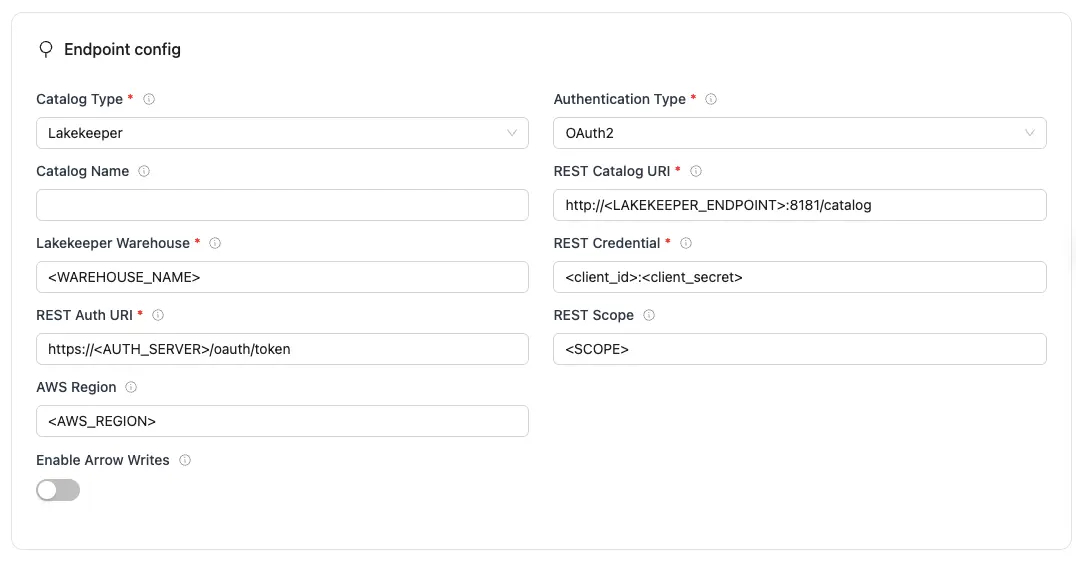
Lakekeeper Configuration Parameters:
| Parameter | Sample Value | Description |
|---|---|---|
REST Catalog URIrequired | http://<LAKEKEEPER_ENDPOINT>:8181/catalog | Specifies the endpoint URL for the Lakekeeper catalog service that the writer will connect to. |
Authentication Typerequired | oauth2 | Authentication method OLake Go uses for REST catalog requests. Set to match your catalog's authentication requirement. |
Lakekeeper Warehouserequired | <WAREHOUSE_NAME> | Name of the Lakekeeper warehouse to use, OLake Go uses this to look up the storage configuration (eg. S3 bucket) already defined in Lakekeeper. |
REST Auth URIrequired | https://auth.server.com/oauth/token | URL of the REST catalog’s OAuth2 token endpoint. OLake Go uses this with REST Credential to request an access token during OAuth2 client-credentials authentication. |
REST Credentialrequired | <client_id>:<client_secret> | Specifies the client ID and secret for OAuth2, formatted as client_id:client_secret. Used with REST Auth URI when OLake Go requests an access token from the catalog’s auth service. |
| Catalog Name | olake_iceberg | Name of the Iceberg catalog OLake Go registers tables under. Defaults to olake_iceberg if left empty. |
| AWS Region | ap-south-1 | Specifies the AWS region associated with the S3 bucket where the data is stored. Optional if added in the lakekeeper warehouse configuration. |
| Enable Arrow Writes | false/true | Writes data and delete files using Apache Arrow based writer and registers them in Iceberg. |
| REST Scope | PRINCIPAL_ROLE:ALL | Required for OAuth2 client-credentials authentication along with REST Auth URI and REST Credential. Tells the OAuth2 server what level of access to grant, space-separated if requesting more than one. Values are catalog-specific. |
Click Create -> to test the connection and verify that OLake Go can validate both the Lakekeeper REST catalog and warehouse access.
Create a destination.json with the following configuration:
{
  "type": "ICEBERG",
  "writer": {
    "catalog_type": "lakekeeper",
    "catalog_name": "olake_iceberg",
    "rest_catalog_url": "http://<LAKEKEEPER_ENDPOINT>:8181/catalog",
    "iceberg_s3_path": "<WAREHOUSE_NAME>",
    "aws_region": "<AWS_REGION>",
    "oauth2_uri": "https://<AUTH_SERVER>/oauth/token",
    "credential": "<client_id>:<client_secret>",
    "scope": "<SCOPE>",
    "arrow_writes": false
  }
}
Lakekeeper Configuration Parameters:
| Parameter | Sample Value | Description |
|---|---|---|
catalog_typerequired | lakekeeper | Defines the catalog type used by the writer. |
rest_catalog_urlrequired | http://<LAKEKEEPER_ENDPOINT>:8181/catalog | Specifies the endpoint URL for the Lakekeeper catalog service that the writer will connect to. |
iceberg_s3_pathrequired | <WAREHOUSE_NAME> | Name of the Lakekeeper warehouse to use, OLake Go uses this to look up the storage configuration (eg. S3 bucket) already defined in Lakekeeper. |
oauth2_urirequired | https://auth.server.com/oauth/token | URL of the REST catalog’s OAuth2 token endpoint. OLake Go uses this with REST Credential to request an access token during OAuth2 client-credentials authentication. |
credentialrequired | <client_id>:<client_secret> | Specifies the client ID and secret for OAuth2, formatted as client_id:client_secret. Used with REST Auth URI when OLake Go requests an access token from the catalog’s auth service. |
| catalog_name | olake_iceberg | Name of the Iceberg catalog OLake Go registers tables under. Defaults to olake_iceberg if left empty. |
| aws_region | ap-south-1 | Specifies the AWS region associated with the S3 bucket where the data is stored. Optional if added in the lakekeeper warehouse configuration. |
| arrow_writes | false/true | Writes data and delete files using Apache Arrow based writer and registers them in Iceberg. |
| scope | PRINCIPAL_ROLE:ALL | Required for OAuth2 client-credentials authentication along with REST Auth URI and REST Credential. Tells the OAuth2 server what level of access to grant, space-separated if requesting more than one. Values are catalog-specific. |
Setup For Local Testing
Save the following docker-compose.yml which will start all required services for a Lakekeeper REST Catalog:
- Lakekeeper Server – Provides the REST API for Iceberg table operations.
- PostgreSQL – Metadata database.
- MinIO + MinIO Client – S3-compatible object store.
version: "3"

services:
  lakekeeper:
    image: &lakekeeper-image ${LAKEKEEPER__SERVER_IMAGE:-quay.io/lakekeeper/catalog:v0.11.1}
    pull_policy: &lakekeeper-pull-policy always
    environment: &lakekeeper-environment
      - LAKEKEEPER__PG_ENCRYPTION_KEY=This-is-NOT-Secure!
      - LAKEKEEPER__PG_DATABASE_URL_READ=postgresql://iceberg:password@postgres:5432/iceberg
      - LAKEKEEPER__PG_DATABASE_URL_WRITE=postgresql://iceberg:password@postgres:5432/iceberg
      - LAKEKEEPER__AUTHZ_BACKEND=allowall
    command: [ "serve" ]
    healthcheck:
      test: [ "CMD", "/home/nonroot/iceberg-catalog", "healthcheck" ]
      interval: 1s
      timeout: 10s
      retries: 3
      start_period: 3s
    depends_on:
      migrate:
        condition: service_completed_successfully
    ports:
      - "8181:8181"
    networks:
      iceberg_net:

  migrate:
    image: *lakekeeper-image
    pull_policy: *lakekeeper-pull-policy
    environment: *lakekeeper-environment
    restart: "no"
    command: [ "migrate" ]
    depends_on:
      postgres:
        condition: service_healthy
    networks:
      iceberg_net:

  minio:
    image: olakego/minio:RELEASE.2025-04-03T14-56-28Z
    container_name: minio
    environment:
      - MINIO_ROOT_USER=admin
      - MINIO_ROOT_PASSWORD=password
      - MINIO_DOMAIN=minio
    networks:
      iceberg_net:
        aliases:
          - warehouse.minio
    ports:
      - 9001:9001
      - 9000:9000
    volumes:
      - ./data/minio-data:/data
    command: [ "server", "/data", "--console-address", ":9001" ]

  mc:
    depends_on:
      - minio
    image: olakego/mc:RELEASE.2025-04-03T17-07-56Z
    container_name: mc
    networks:
      iceberg_net:
    environment:
      - AWS_ACCESS_KEY_ID=admin
      - AWS_SECRET_ACCESS_KEY=password
      - AWS_REGION=us-east-1
    entrypoint: |
      /bin/sh -c "
      until (/usr/bin/mc config host add minio http://minio:9000 admin password) do echo '...waiting...' && sleep 1; done;
      if ! /usr/bin/mc ls minio/warehouse > /dev/null 2>&1; then
        /usr/bin/mc mb minio/warehouse;
        /usr/bin/mc policy set public minio/warehouse;
      fi;
      tail -f /dev/null
      "

  postgres:
    image: postgres:15
    container_name: iceberg-postgres
    networks:
      iceberg_net:
    environment:
      - POSTGRES_USER=iceberg
      - POSTGRES_PASSWORD=password
      - POSTGRES_DB=iceberg
    healthcheck:
      test: [ "CMD", "pg_isready", "-U", "iceberg", "-d", "iceberg" ]
      interval: 2s
      timeout: 10s
      retries: 3
      start_period: 10s
    ports:
      - 5432:5432
    volumes:
      - ./data/postgres-data:/var/lib/postgresql/data

networks:
  iceberg_net:

volumes:
  postgres-data:
  minio-data:
Start the services:
docker-compose up -d
Once you have started the services you can access the Lakekeeper UI at: http://localhost:8181/ui
Steps to Create a Warehouse
- In the Lakekeeper UI, navigate to the Warehouse section.
- Click on the Add Warehouse button.
- Provide a name to your warehouse (e.g.,
WAREHOUSE_NAME) - Choose S3 as the storage option.
- Enter AWS Credentials
- Credential Type →
Access Key - Access Key ID →
admin - Secret Access Key →
password
- Credential Type →
- Configure S3 Settings
- Set S3 Flavor →
S3 Compatible Storage - Bucket Region →
us-east-1 - Enable toggle →
Enable alternative S3 protocols - Enable toggle →
Enable path style access
- Set S3 Flavor →
- Specify Bucket Details
- Bucket Name →
warehouse
- Bucket Name →
- Configure the Endpoint
- Endpoint →
http:<YOUR_MACHINE_IP>:9000 - To retrieve your machine’s IP address, run:
ipconfig getifaddr en0 - Endpoint →
After completing these steps, your Warehouse will be registered and ready for use with Iceberg tables via Lakekeeper.
All services involved in the sync — OLake, Lakekeeper, MinIO, and Postgres — must run in the same Docker network.
Troubleshooting
-
Invalid Database Connection
- Fix:
- Verify
LAKEKEEPER__PG_DATABASE_URL_*, username, and password. - Check PostgreSQL is running and healthy.
- Verify
- Fix:
-
Permission Denied on S3 Bucket
- Fix:
- Ensure the access key and secret key are correct.
- Verify the bucket (warehouse) exists and is accessible.
- Test with:
mc ls minio/warehouse
- Fix:
-
Access Denied / S3 or Object Store Permission Errors
- Fix:
- Make sure Lakekeeper’s runtime account/service role has the required access:
s3:GetObject,s3:PutObject,s3:DeleteObject,s3:ListBucket. - Check using this command:
aws s3 ls s3://<your-bucket>/<your-prefix>
- Make sure Lakekeeper’s runtime account/service role has the required access:
- Fix:
The REST Nessie Catalog integrates Project Nessie as the catalog for Apache Iceberg using the REST Catalog API.
Unlike the Generic REST Catalog, Nessie adds Git-like version control for data, enabling branching, tagging, and reproducible queries across multiple engines.
Prerequisites
Required services:
- Object store – e.g., S3, MinIO, or another S3-compatible storage for table data and metadata.
- Metadata database – typically PostgreSQL, with a dedicated database and user for Iceberg + Nessie.
- Nessie REST Service – a Nessie deployment that provides the REST catalog API along with versioning features
Permissions:
- The Nessie service requires read/write access permissions to the configured object store (e.g., S3, MinIO) buckets or directories used for table data and metadata storage.
- Ensure the IAM role or user permissions allow listing, reading, writing, and deleting objects.
- The database user for Nessie metadata storage (PostgreSQL or alternative) should have full create, read, update, and delete (CRUD) privileges on the dedicated Nessie schema or database.
Configuration
Configure the following fields to connect OLake Go to your REST catalog.
Authentication
The catalog supports multiple authentication types. Select the one your service uses to see the fields you need to configure.
- None
- Token
- OAuth2
- OLake UI
- OLake CLI
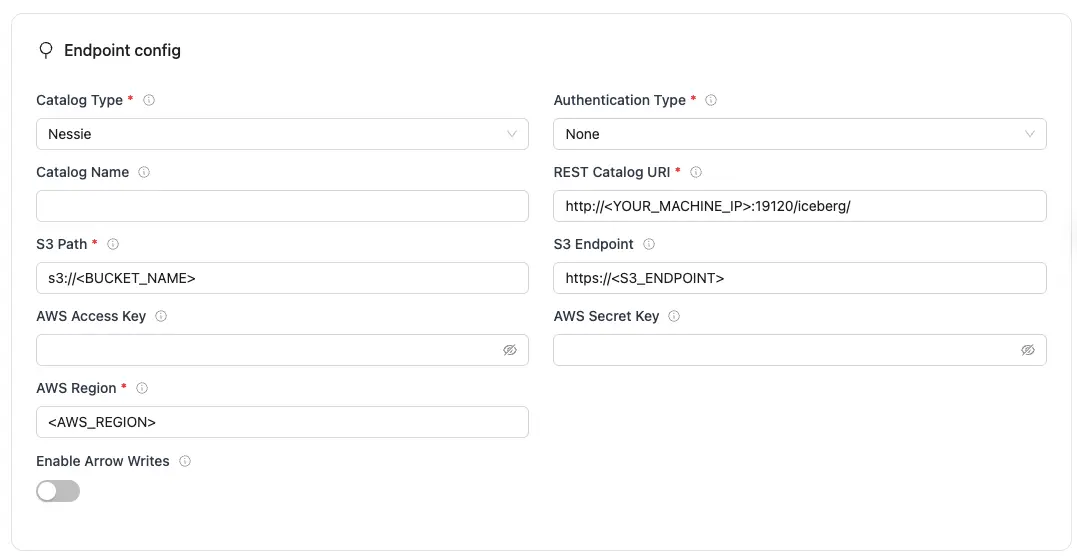
Nessie Configuration Parameters:
| Parameter | Sample Value | Description |
|---|---|---|
REST Catalog URIrequired | http://<YOUR_MACHINE_IP>:19120/iceberg/ | Specifies the endpoint URL for the Nessie REST catalog service. Linux: Use machine's IP (e.g., http://192.168.1.100:19120/iceberg/)macOS: Use http://host.docker.internal:19120/iceberg/ |
Authentication Typerequired | none | Authentication method OLake Go uses for REST catalog requests. Set to match your catalog's authentication requirement. |
S3 Pathrequired | s3://<BUCKET_NAME> | S3 bucket path where Iceberg table data and metadata files will be stored. |
AWS Regionrequired | ap-south-1 | Specifies the AWS region associated with the S3 bucket where the data is stored. |
| Catalog Name | olake_iceberg | Name of the Iceberg catalog OLake Go registers tables under. Defaults to olake_iceberg if left empty. |
| S3 Endpoint | http://<YOUR_MACHINE_IP>:9000/ | Endpoint for the MinIO or S3-compatible service. If using AWS S3 then leave empty. Linux: Use machine's IP (e.g., http://192.168.1.100:9000/)macOS: Use http://host.docker.internal:9000/ |
| AWS Access Key | XXX | AWS access key ID for authentication. Optional if using IAM roles or instance profiles. If using IAM: Docker Compose: add the required IAM environment variables under x-envs in your compose file. See Service Environment Variables for setup details.Kubernetes: set up pod IAM in Cloud IAM Integration. |
| AWS Secret Key | XXX | AWS secret access key for authentication. Optional if using IAM roles or instance profiles. If using IAM: Docker Compose: add the required IAM environment variables under x-envs in your compose file. See Service Environment Variables for setup details.Kubernetes: set up pod IAM in Cloud IAM Integration. |
| Enable Arrow Writes | false/true | Writes data and delete files using Apache Arrow based writer and registers them in Iceberg. |
Click Create -> to test the connection and verify that OLake Go can validate both the Nessie REST catalog and S3 compatible object storage access.
To connect to Iceberg using Nessie as the catalog, create destination.json with the following configuration:
{
  "type": "ICEBERG",
  "writer": {
    "catalog_type": "nessie",
      "rest_catalog_url": "http://<YOUR_MACHINE_IP>:19120/iceberg/",
      "catalog_name": "olake_iceberg",
      "iceberg_s3_path": "s3://<BUCKET_NAME>",
      "s3_endpoint": "http://<YOUR_MACHINE_IP>:9000/",
      "aws_access_key": "<AWS_ACCESS_KEY>",
      "aws_secret_key": "<AWS_SECRET_KEY>",
      "aws_region": "<AWS_REGION>",
      "arrow_writes": false
  }
}
Nessie Configuration Parameters
| Parameter | Sample Value | Description |
|---|---|---|
catalog_typerequired | nessie | Defines the catalog type used by the writer. |
rest_catalog_urlrequired | http://<YOUR_MACHINE_IP>:19120/iceberg/ | Specifies the endpoint URL for the Nessie REST catalog service. Linux: Use machine's IP (e.g., http://192.168.1.100:19120/iceberg/)macOS: Use http://host.docker.internal:19120/iceberg/ |
iceberg_s3_pathrequired | s3://<BUCKET_NAME> | S3 bucket path where Iceberg table data and metadata files will be stored. |
aws_regionrequired | ap-south-1 | Specifies the AWS region associated with the S3 bucket where the data is stored. |
| catalog_name | olake_iceberg | Name of the Iceberg catalog OLake Go registers tables under. Defaults to olake_iceberg if left empty. |
| s3_endpoint | http://<YOUR_MACHINE_IP>:9000/ | Endpoint for the MinIO or S3-compatible service. If using AWS S3 then leave empty. Linux: Use machine's IP (e.g., http://192.168.1.100:9000/)macOS: Use http://host.docker.internal:9000/ |
| aws_access_key | XXX | AWS access key ID for authentication. Optional if using IAM roles or instance profiles. If using IAM: Docker Compose: add the required IAM environment variables under x-envs in your compose file. See Service Environment Variables for setup details.Kubernetes: set up pod IAM in Cloud IAM Integration. |
| aws_secret_key | XXX | AWS secret access key for authentication. Optional if using IAM roles or instance profiles. If using IAM: Docker Compose: add the required IAM environment variables under x-envs in your compose file. See Service Environment Variables for setup details.Kubernetes: set up pod IAM in Cloud IAM Integration. |
| arrow_writes | false/true | Writes data and delete files using Apache Arrow based writer and registers them in Iceberg. |
- OLake UI
- OLake CLI
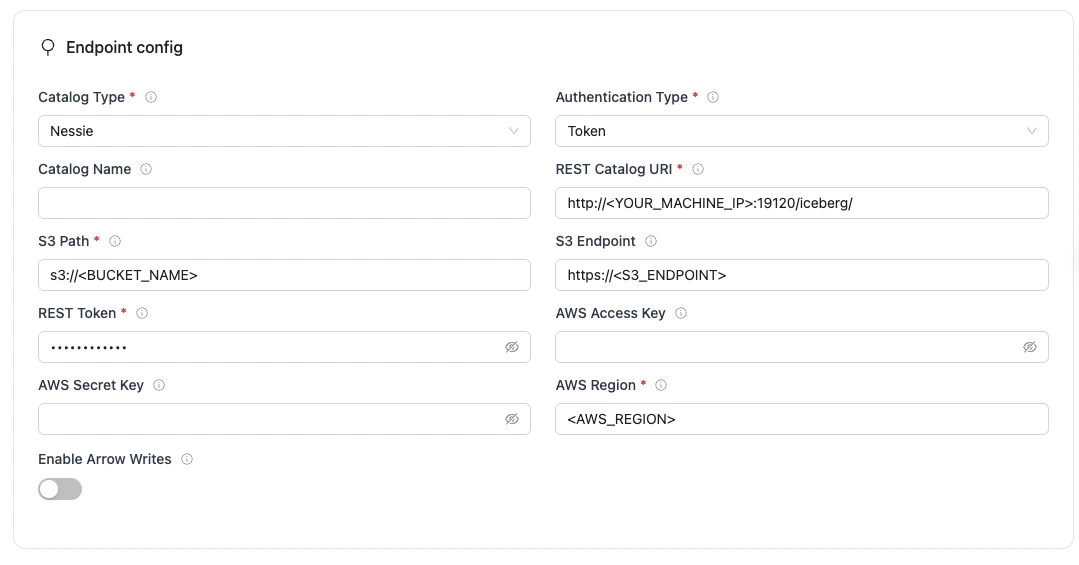
Nessie Configuration Parameters:
| Parameter | Sample Value | Description |
|---|---|---|
REST Catalog URIrequired | http://<YOUR_MACHINE_IP>:19120/iceberg/ | Specifies the endpoint URL for the Nessie REST catalog service. Linux: Use machine's IP (e.g., http://192.168.1.100:19120/iceberg/)macOS: Use http://host.docker.internal:19120/iceberg/ |
Authentication Typerequired | token | Authentication method OLake Go uses for REST catalog requests. Set to match your catalog's authentication requirement. |
S3 Pathrequired | s3://<BUCKET_NAME> | S3 bucket path where Iceberg table data and metadata files will be stored. |
AWS Regionrequired | ap-south-1 | Specifies the AWS region associated with the S3 bucket where the data is stored. |
Tokenrequired | abc...xyz | Specifies the Bearer token sent in the Authorization header for authenticating with the REST catalog service. |
| Catalog Name | olake_iceberg | Name of the Iceberg catalog OLake Go registers tables under. Defaults to olake_iceberg if left empty. |
| S3 Endpoint | http://<YOUR_MACHINE_IP>:9000/ | Endpoint for the MinIO or S3-compatible service. If using AWS S3 then leave empty. Linux: Use machine's IP (e.g., http://192.168.1.100:9000/)macOS: Use http://host.docker.internal:9000/ |
| AWS Access Key | XXX | AWS access key ID for authentication. Optional if using IAM roles or instance profiles. If using IAM: Docker Compose: add the required IAM environment variables under x-envs in your compose file. See Service Environment Variables for setup details.Kubernetes: set up pod IAM in Cloud IAM Integration. |
| AWS Secret Key | XXX | AWS secret access key for authentication. Optional if using IAM roles or instance profiles. If using IAM: Docker Compose: add the required IAM environment variables under x-envs in your compose file. See Service Environment Variables for setup details.Kubernetes: set up pod IAM in Cloud IAM Integration. |
| Enable Arrow Writes | false/true | Writes data and delete files using Apache Arrow based writer and registers them in Iceberg. |
Click Create -> to test the connection and verify that OLake Go can validate both the Nessie REST catalog and S3 compatible object storage access.
To connect to Iceberg using Nessie as the catalog, create destination.json with the following configuration:
{
  "type": "ICEBERG",
  "writer": {
    "catalog_type": "nessie",
      "rest_catalog_url": "http://<YOUR_MACHINE_IP>:19120/iceberg/",
      "catalog_name": "olake_iceberg",
      "iceberg_s3_path": "s3://<BUCKET_NAME>",
      "s3_endpoint": "http://<YOUR_MACHINE_IP>:9000/",
      "aws_access_key": "<S3_ACCESS_KEY>",
      "aws_secret_key": "<S3_SECRET_KEY>",
      "aws_region": "<AWS_REGION>",
      "token": "<TOKEN>",
      "arrow_writes": false
  }
}
Nessie Configuration Parameters
| Parameter | Sample Value | Description |
|---|---|---|
catalog_typerequired | nessie | Defines the catalog type used by the writer. |
rest_catalog_urlrequired | http://<YOUR_MACHINE_IP>:19120/iceberg/ | Specifies the endpoint URL for the Nessie REST catalog service. Linux: Use machine's IP (e.g., http://192.168.1.100:19120/iceberg/)macOS: Use http://host.docker.internal:19120/iceberg/ |
iceberg_s3_pathrequired | s3://<BUCKET_NAME> | S3 bucket path where Iceberg table data and metadata files will be stored. |
aws_regionrequired | ap-south-1 | Specifies the AWS region associated with the S3 bucket where the data is stored. |
tokenrequired | abc...xyz | Specifies the Bearer token sent in the Authorization header for authenticating with the REST catalog service. |
| catalog_name | olake_iceberg | Name of the Iceberg catalog OLake Go registers tables under. Defaults to olake_iceberg if left empty. |
| s3_endpoint | http://<YOUR_MACHINE_IP>:9000/ | Endpoint for the MinIO or S3-compatible service. If using AWS S3 then leave empty. Linux: Use machine's IP (e.g., http://192.168.1.100:9000/)macOS: Use http://host.docker.internal:9000/ |
| aws_access_key | XXX | AWS access key ID for authentication. Optional if using IAM roles or instance profiles. If using IAM: Docker Compose: add the required IAM environment variables under x-envs in your compose file. See Service Environment Variables for setup details.Kubernetes: set up pod IAM in Cloud IAM Integration. |
| aws_secret_key | XXX | AWS secret access key for authentication. Optional if using IAM roles or instance profiles. If using IAM: Docker Compose: add the required IAM environment variables under x-envs in your compose file. See Service Environment Variables for setup details.Kubernetes: set up pod IAM in Cloud IAM Integration. |
| arrow_writes | false/true | Writes data and delete files using Apache Arrow based writer and registers them in Iceberg. |
- OLake UI
- OLake CLI
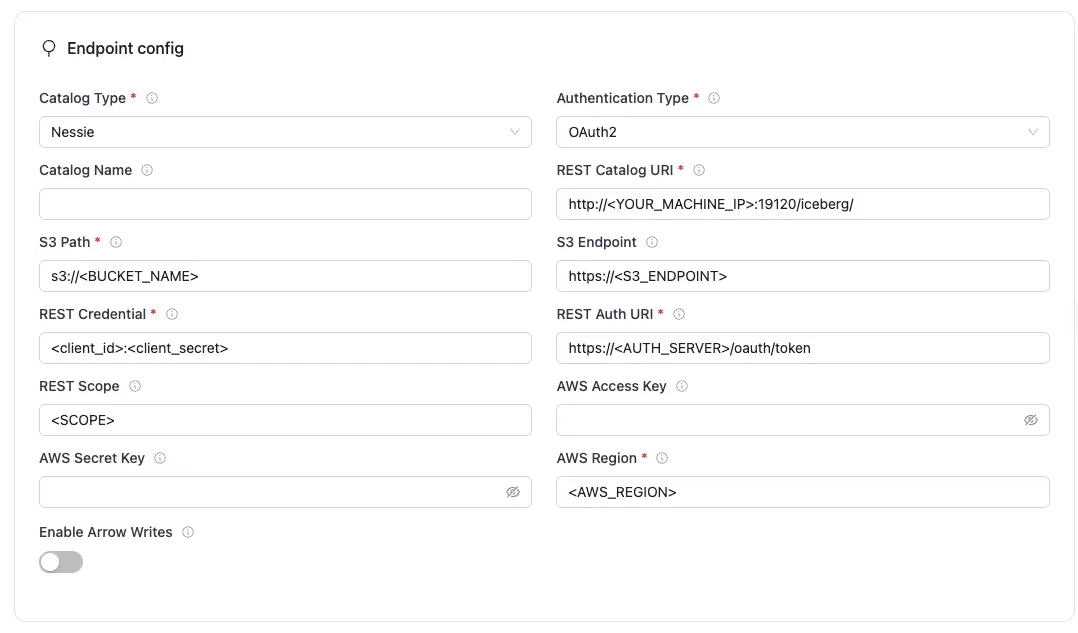
Nessie Configuration Parameters:
| Parameter | Sample Value | Description |
|---|---|---|
REST Catalog URIrequired | http://<YOUR_MACHINE_IP>:19120/iceberg/ | Specifies the endpoint URL for the Nessie REST catalog service. Linux: Use machine's IP (e.g., http://192.168.1.100:19120/iceberg/)macOS: Use http://host.docker.internal:19120/iceberg/ |
Authentication Typerequired | oauth2 | Authentication method OLake Go uses for REST catalog requests. Set to match your catalog's authentication requirement. |
S3 Pathrequired | s3://<BUCKET_NAME> | S3 bucket path where Iceberg table data and metadata files will be stored. |
AWS Regionrequired | ap-south-1 | Specifies the AWS region associated with the S3 bucket where the data is stored. |
REST Auth URIrequired | https://auth.server.com/oauth/token | URL of the REST catalog’s OAuth2 token endpoint. OLake Go uses this with REST Credential to request an access token during OAuth2 client-credentials authentication. |
REST Credentialrequired | <client_id>:<client_secret> | Specifies the client ID and secret for OAuth2, formatted as client_id:client_secret. Used with REST Auth URI when OLake Go requests an access token from the catalog’s auth service. |
| Catalog Name | olake_iceberg | Name of the Iceberg catalog OLake Go registers tables under. Defaults to olake_iceberg if left empty. |
| S3 Endpoint | http://<YOUR_MACHINE_IP>:9000/ | Endpoint for the MinIO or S3-compatible service. If using AWS S3 then leave empty. Linux: Use machine's IP (e.g., http://192.168.1.100:9000/)macOS: Use http://host.docker.internal:9000/ |
| AWS Access Key | XXX | AWS access key ID for authentication. Optional if using IAM roles or instance profiles. If using IAM: Docker Compose: add the required IAM environment variables under x-envs in your compose file. See Service Environment Variables for setup details.Kubernetes: set up pod IAM in Cloud IAM Integration. |
| AWS Secret Key | XXX | AWS secret access key for authentication. Optional if using IAM roles or instance profiles. If using IAM: Docker Compose: add the required IAM environment variables under x-envs in your compose file. See Service Environment Variables for setup details.Kubernetes: set up pod IAM in Cloud IAM Integration. |
| Enable Arrow Writes | false/true | Writes data and delete files using Apache Arrow based writer and registers them in Iceberg. |
| REST Scope | PRINCIPAL_ROLE:ALL | Required for OAuth2 client-credentials authentication along with REST Auth URI and REST Credential. Tells the OAuth2 server what level of access to grant, space-separated if requesting more than one. Values are catalog-specific. |
Click Create -> to test the connection and verify that OLake Go can validate both the Nessie REST catalog and S3 compatible object storage access.
To connect to Iceberg using Nessie as the catalog, create destination.json with the following configuration:
{
  "type": "ICEBERG",
  "writer": {
    "catalog_type": "nessie",
      "rest_catalog_url": "http://<YOUR_MACHINE_IP>:19120/iceberg/",
      "catalog_name": "olake_iceberg",
      "iceberg_s3_path": "s3://<BUCKET_NAME>",
      "s3_endpoint": "http://<YOUR_MACHINE_IP>:9000/",
      "aws_access_key": "<S3_ACCESS_KEY>",
      "aws_secret_key": "<S3_SECRET_KEY>",
      "aws_region": "<AWS_REGION>",
      "oauth2_uri": "https://<AUTH_SERVER>/oauth/token",
      "credential": "<client_id>:<client_secret>",
      "scope": "<SCOPE>",
      "arrow_writes": false
  }
}
Nessie Configuration Parameters
| Parameter | Sample Value | Description |
|---|---|---|
catalog_typerequired | nessie | Defines the catalog type used by the writer. |
rest_catalog_urlrequired | http://<YOUR_MACHINE_IP>:19120/iceberg/ | Specifies the endpoint URL for the Nessie REST catalog service. Linux: Use machine's IP (e.g., http://192.168.1.100:19120/iceberg/)macOS: Use http://host.docker.internal:19120/iceberg/ |
iceberg_s3_pathrequired | s3://<BUCKET_NAME> | S3 bucket path where Iceberg table data and metadata files will be stored. |
aws_regionrequired | ap-south-1 | Specifies the AWS region associated with the S3 bucket where the data is stored. |
oauth2_urirequired | https://auth.server.com/oauth/token | URL of the REST catalog’s OAuth2 token endpoint. OLake Go uses this with REST Credential to request an access token during OAuth2 client-credentials authentication. |
credentialrequired | <client_id>:<client_secret> | Specifies the client ID and secret for OAuth2, formatted as client_id:client_secret. Used with REST Auth URI when OLake Go requests an access token from the catalog’s auth service. |
| catalog_name | olake_iceberg | Name of the Iceberg catalog OLake Go registers tables under. Defaults to olake_iceberg if left empty. |
| s3_endpoint | http://<YOUR_MACHINE_IP>:9000/ | Endpoint for the MinIO or S3-compatible service. If using AWS S3 then leave empty. Linux: Use machine's IP (e.g., http://192.168.1.100:9000/)macOS: Use http://host.docker.internal:9000/ |
| aws_access_key | XXX | AWS access key ID for authentication. Optional if using IAM roles or instance profiles. If using IAM: Docker Compose: add the required IAM environment variables under x-envs in your compose file. See Service Environment Variables for setup details.Kubernetes: set up pod IAM in Cloud IAM Integration. |
| aws_secret_key | XXX | AWS secret access key for authentication. Optional if using IAM roles or instance profiles. If using IAM: Docker Compose: add the required IAM environment variables under x-envs in your compose file. See Service Environment Variables for setup details.Kubernetes: set up pod IAM in Cloud IAM Integration. |
| arrow_writes | false/true | Writes data and delete files using Apache Arrow based writer and registers them in Iceberg. |
| scope | PRINCIPAL_ROLE:ALL | Required for OAuth2 client-credentials authentication along with REST Auth URI and REST Credential. Tells the OAuth2 server what level of access to grant, space-separated if requesting more than one. Values are catalog-specific. |
Setup For Local Testing
Save the following as docker-compose.yml: which will start the services required for a Nessie REST Catalog:
- Nessie REST Service – Provides the REST API for managing Iceberg tables with version control.
- PostgreSQL – Stores Nessie's metadata and catalog state.
- MinIO + MinIO Client – An S3-compatible object store used to store table data and snapshots.
Before starting the services, update the nessie.catalog.service.s3.default-options.external-endpoint configuration in the docker-compose file:
For Linux machines:
- Replace
<YOUR_MACHINE_IP>with machine's private IP address - Find private IP using:
hostname -I | awk '{print $1}'orip addr show
For macOS machines:
- Replace
<YOUR_MACHINE_IP>withhost.docker.internal
services:
  nessie:
    image: ghcr.io/projectnessie/nessie:0.105.0
    container_name: nessie
    ports:
      - "19120:19120"
    environment:
      - nessie.version.store.type=JDBC
      - quarkus.datasource.db-kind=postgresql
      - quarkus.datasource.jdbc.url=jdbc:postgresql://postgres:5432/nessie_db
      - quarkus.datasource.username=nessie
      - quarkus.datasource.password=nessie
      - nessie.catalog.default-warehouse=warehouse
      - nessie.catalog.warehouses.warehouse.location=s3://warehouse/
      - nessie.catalog.service.s3.default-options.region=us-east-1
      - nessie.catalog.service.s3.default-options.path-style-access=true
      - nessie.catalog.service.s3.default-options.endpoint=http://minio:9000/
      - nessie.catalog.service.s3.default-options.external-endpoint=http://<YOUR_MACHINE_IP>:9000/
      - nessie.catalog.service.s3.default-options.access-key=urn:nessie-secret:quarkus:nessie.catalog.secrets.access-key
      - nessie.catalog.secrets.access-key.name=minio
      - nessie.catalog.secrets.access-key.secret=minio123
    depends_on:
      postgres:
        condition: service_healthy
      mc:
        condition: service_completed_successfully
    networks:
      - nessie-network

  minio:
    image: olakego/minio:RELEASE.2025-04-03T14-56-28Z
    container_name: minio
    ports:
      - "9000:9000"
      - "9090:9090"
    environment:
      MINIO_ROOT_USER: minio
      MINIO_ROOT_PASSWORD: minio123
      MINIO_ADDRESS: ":9000"
      MINIO_CONSOLE_ADDRESS: ":9090"
    volumes:
      - minio-data:/data
    command: server /data
    networks:
      - nessie-network
    healthcheck:
      test: ["CMD-SHELL", "curl -f http://localhost:9000/minio/health/live || exit 1"]
      interval: 5s
      timeout: 2s
      retries: 15

  mc:
    image: olakego/minio:RELEASE.2025-04-03T14-56-28Z
    container_name: mc
    depends_on:
      minio:
        condition: service_healthy
    entrypoint: /bin/bash
    restart: "no"
    command: >
      -c "mc alias set myminio http://minio:9000/ minio minio123 &&
          mc mb myminio/warehouse --ignore-existing"
    networks:
      - nessie-network

  postgres:
    image: postgres:15
    container_name: postgres
    environment:
      POSTGRES_USER: nessie
      POSTGRES_PASSWORD: nessie
      POSTGRES_DB: nessie_db
    ports:
      - "5432:5432"
    volumes:
      - postgres-data:/data
    networks:
      - nessie-network
    healthcheck:
      test: ["CMD-SHELL", "pg_isready -U nessie"]
      interval: 5s
      timeout: 2s
      retries: 10

volumes:
  minio-data:
  postgres-data:

networks:
  nessie-network:
    driver: bridge
Start the services:
docker-compose up -d
All services involved in the sync — OLake, Nessie, MinIO, and Postgres — must run in the same Docker network.
Troubleshooting
-
Invalid Reference (Branch/Tag Not Found)
- Fix: Verify that the branch/tag exists before running operations like sync or queries.
- Use the REST API or CLI to list branches/tags:
curl https://<nessie-endpoint>/api/v2/trees/branch
-
Commit Conflicts
- Cause: Nessie uses optimistic concurrency control. If multiple writers update the same branch, a commit may be rejected because the branch has advanced since your last fetch
- Fix: If multiple writers update the same table, Nessie may reject the commit. Retry after pulling the latest state.
S3 Tables is an AWS service that provides a REST catalog implementation for Apache Iceberg tables. It allows you to manage Iceberg tables directly through AWS S3 with AWS Signature V4 authentication.
Prerequisites
Required services:
- AWS S3 Bucket – for storing Iceberg table data and metadata.
- AWS Account – with permissions to create and manage S3 Tables and access related AWS analytics services.
- AWS Credentials – access key ID and secret key for authentication, with permissions to read/write to the S3 bucket.
- Compatible Query Engine – such as Amazon Athena, EMR (Spark), Glue, or other Iceberg-aware engines configured to use S3 Tables.
Configuration
Configure the following fields to connect OLake Go to your REST catalog.
Authentication
S3 Tables requires SigV4 authentication for REST catalog requests. This is mandatory on the AWS side.
- OLake UI
- OLake CLI
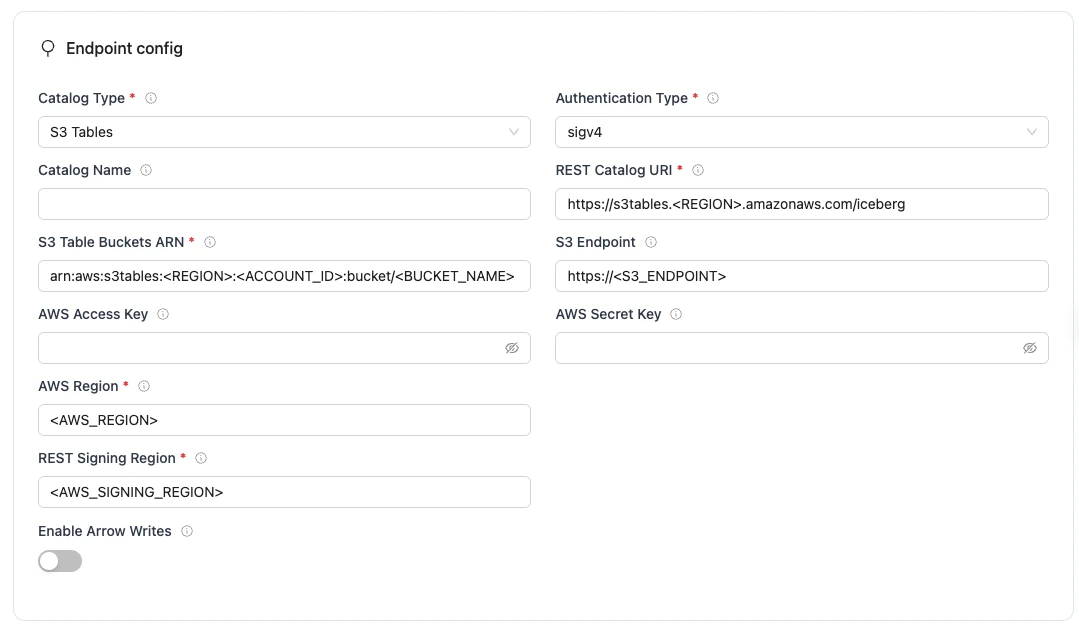
S3 Tables Configuration Parameters:
| Parameter | Sample Value | Description |
|---|---|---|
REST Catalog URI required | https://s3tables.<REGION>.amazonaws.com/iceberg | Specifies the endpoint URL for the S3 Tables REST catalog service. |
Authentication Type required | sigv4 | Authentication method OLake Go uses for S3 Tables REST catalog requests. S3 Tables only supports AWS Signature Version 4 (SigV4) authentication. |
S3 Table Buckets ARN required | arn:aws:s3tables:<REGION>:<ACCOUNT_ID>:bucket/<BUCKET_NAME> | ARN of your S3 Tables table bucket. Acts as the warehouse identifier for the REST catalog. The namespaces and tables are created within this bucket. |
AWS Region required | ap-south-1 | Specifies the AWS region associated with the S3 tables bucket where the data is stored. |
REST Signing Region required | ap-south-1 | AWS region used for SigV4 signing of REST catalog API requests. Must match your catalog region. |
| Catalog Name | olake_iceberg | Name of the Iceberg catalog OLake Go registers tables under. Defaults to olake_iceberg if left empty. |
| AWS Access Key | XXX | AWS access key ID for authentication. Optional if using IAM roles or instance profiles. If using IAM: Docker Compose: add the required IAM environment variables under x-envs in your compose file. See Service Environment Variables for setup details.Kubernetes: set up pod IAM in Cloud IAM Integration. |
| AWS Secret Key | XXX | AWS secret access key for authentication. Optional if using IAM roles or instance profiles. If using IAM: Docker Compose: add the required IAM environment variables under x-envs in your compose file. See Service Environment Variables for setup details.Kubernetes: set up pod IAM in Cloud IAM Integration. |
| Enable Arrow Writes | false/true | Writes data and delete files using Apache Arrow based writer and registers them in Iceberg. |
For the catalog name, OLake Go only supports lowercase letters and underscores. Spaces and special characters are not supported.
Click Create -> to test the connection and verify that OLake Go can validate both the S3 Tables REST catalog and S3 Tables bucket access.
To connect to Iceberg using S3 Tables as the catalog, create destination.json with the following configuration:
{
"type": "ICEBERG",
"writer": {
    "catalog_type": "s3tables",
    "rest_catalog_url": "https://s3tables.<REGION>.amazonaws.com/iceberg",
    "catalog_name": "olake_iceberg",
    "iceberg_s3_path": "arn:aws:s3tables:<REGION>:<ACCOUNT_ID>:bucket/<BUCKET_NAME>",
    "aws_access_key": "<AWS_ACCESS_KEY>",
    "aws_secret_key": "<AWS_SECRET_KEY>",
    "aws_region": "<AWS_REGION>",
    "rest_signing_name": "s3tables",
    "rest_signing_region": "<REST_SIGNING_REGION>",
    "rest_signing_v_4": true,
    "arrow_writes": false
  }
}
S3 Tables Configuration Parameters
| Parameter | Sample Value | Description |
|---|---|---|
catalog_type required | s3tables | Defines the catalog type used by the writer. "rest" means the writer interacts with a RESTful catalog service. |
rest_catalog_url required | https://s3tables.<REGION>.amazonaws.com/iceberg | Specifies the endpoint URL for the S3 Tables REST catalog service. |
iceberg_s3_path required | arn:aws:s3tables:<REGION>:<ACCOUNT_ID>:bucket/<BUCKET_NAME> | ARN of your S3 Tables table bucket. Acts as the warehouse identifier for the REST catalog. The namespaces and tables are created within this bucket. |
aws_region required | ap-south-1 | Specifies the AWS region associated with the S3 tables bucket where the data is stored. |
rest_signing_region required | ap-south-1 | AWS region used for SigV4 signing of REST catalog API requests. Must match your catalog region. |
| catalog_name | olake_iceberg | Name of the Iceberg catalog OLake Go registers tables under. Defaults to olake_iceberg if left empty. |
| aws_access_key | XXX | AWS access key ID for authentication. Optional if using IAM roles or instance profiles. If using IAM: Docker Compose: add the required IAM environment variables under x-envs in your compose file. See Service Environment Variables for setup details.Kubernetes: set up pod IAM in Cloud IAM Integration. |
| aws_secret_key | XXX | AWS secret access key for authentication. Optional if using IAM roles or instance profiles. If using IAM: Docker Compose: add the required IAM environment variables under x-envs in your compose file. See Service Environment Variables for setup details.Kubernetes: set up pod IAM in Cloud IAM Integration. |
| arrow_writes | false/true | Writes data and delete files using Apache Arrow based writer and registers them in Iceberg. |
For the catalog name, OLake Go only supports lowercase letters and underscores. Spaces and special characters are not supported.
Troubleshooting
-
Permission denied (AccessDenied)
- Cause: Missing or insufficient IAM permissions
- Fix:
- Ensure your IAM role or user has these permissions::
s3tables:*s3:GetObject,s3:PutObject,s3:DeleteObject,s3:ListBucket
- Verify bucket policies or resource-based policies do not block access.
- Ensure your IAM role or user has these permissions::
-
Invalid or expired credentials
- Cause: Incorrect keys or expired session tokens
- Fix:
- Double-check your
AWS Access KeyandAWS Secret Key. - For temporary credentials (assumed roles, sessions), refresh them before they expire.
- Verify that the IAM role is correctly attached and trusted.
- Double-check your
-
Incorrect REST Catalog URI
- Cause: Wrong endpoint or region.
- Fix:
- The REST catalog endpoint must follow the pattern:
https://s3tables.<REGION>.amazonaws.com/iceberg - Confirm the region is correct and the URI is reachable.
- The REST catalog endpoint must follow the pattern:
OLake supports Databricks Unity Catalog as a REST catalog destination using Token-based or OAuth2 authentication via the Iceberg REST Catalog API.
Important Limitations
- Managed Tables Only: Iceberg REST writes are supported only for Managed Unity Catalog.
For more details, refer to the official Databricks documentation.
Prerequisites
- Admin access to the Databricks workspace
- Access to external object storage (e.g., AWS S3) backing the tables
Configure External Location
- Go to Catalog
- Create a new External Location
- Follow the recommended Databricks guide to add object storage quickly and securely.
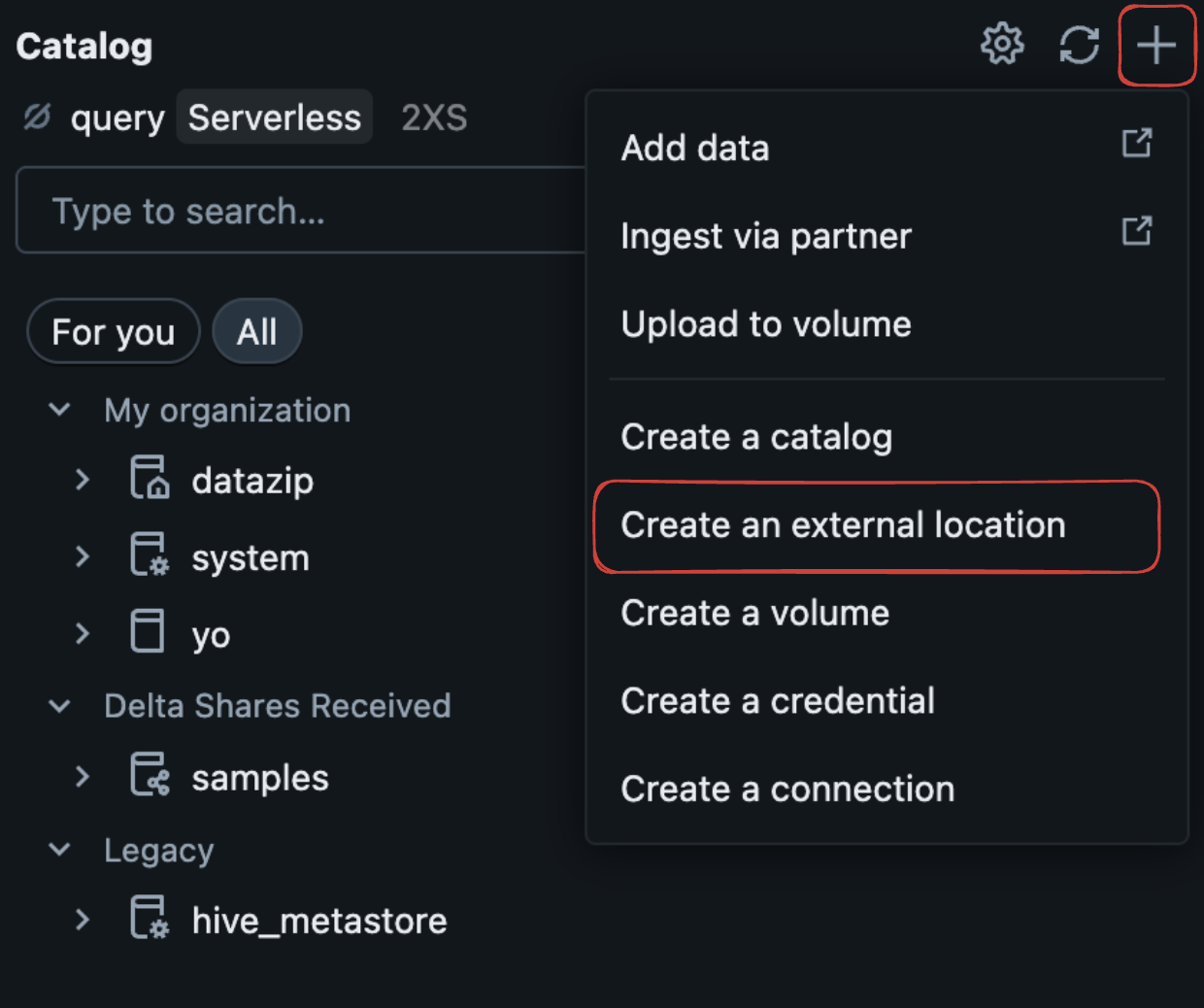
Unity Catalog requires properly configured external storage for Iceberg tables.
Configuration
Configure the following fields to connect OLake Go to your REST catalog.
Authentication
The catalog supports multiple authentication types. Select the one your service uses to see the fields you need to configure.
- Personal Access Token
- OAuth2 M2M
- OAuth2 U2M
- Token Federation
To use Personal Access Token authentication with Unity Catalog, generate a PAT in your Databricks workspace first. Follow the steps in the Databricks personal access tokens documentation to create and securely store the token before configuring OLake Go.
- OLake UI
- OLake CLI
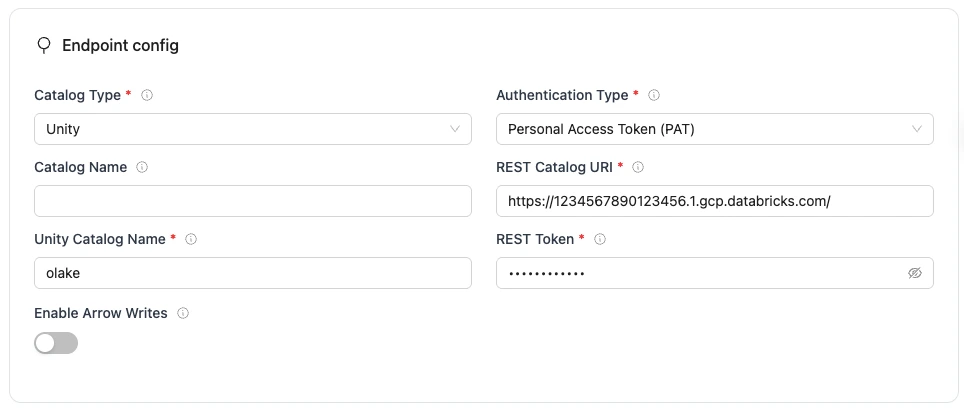
Unity Configuration Parameters
| Parameter | Sample Value | Description |
|---|---|---|
REST Catalog URLrequired | https://1234567890123456.1.gcp.databricks.com/ | Databricks workspace URL with Unity Catalog REST API endpoint. Use your actual workspace URL. |
Authentication Typerequired | Personal Access Token | Authentication method OLake Go uses for Unity Catalog REST API requests. Set to match your workspace's authentication configuration. |
Unity Catalog Namerequired | workspace | Name of the catalog in Unity. |
Tokenrequired | dapi123456789... | Databricks Personal Access Token |
| Catalog Name | olake_iceberg | Name of the Iceberg catalog OLake Go registers tables under. Defaults to olake_iceberg if left empty. |
| Enable Arrow Writes | false | Writes data and delete files using Apache Arrow based writer and registers them in Iceberg. |
Click Create -> to test the connection and verify that OLake Go can validate both the Unity Catalog REST endpoint and authentication.
JSON Configuration
Create a json for destination config (destination.json)
{
  "type": "ICEBERG",
  "writer": {
    "catalog_type": "unity",
    "catalog_name": "olake_iceberg",
    "rest_catalog_url": "https://<DATABRICK_WORKSPACE_URL>/",
    "iceberg_s3_path": "<CATALOG_NAME>",
    "token": "<DATABRICK_USER_PERSONAL_ACCESS_TOKEN>",
    "arrow_writes": false
  }
}
Unity Configuration Parameters
| Parameter | Sample Value | Description |
|---|---|---|
catalog_typerequired | unity | Defines the catalog type used by the writer. |
rest_catalog_urlrequired | https://1234567890123456.1.gcp.databricks.com/ | Databricks workspace URL with Unity Catalog REST API endpoint. Use your actual workspace URL. |
iceberg_s3_pathrequired | workspace | Name of the catalog in Unity. |
tokenrequired | dapi123456789... | Databricks Personal Access Token |
| catalog_name | olake_iceberg | Name of the Iceberg catalog OLake Go registers tables under. Defaults to olake_iceberg if left empty. |
| arrow_writes | false | Writes data and delete files using Apache Arrow based writer and registers them in Iceberg. |
To use OAuth2 M2M authentication with Unity Catalog, configure a Databricks service principal and obtain the client ID, client secret, and REST Auth URI before setting up OLake Go. Follow the steps in the Authorize service principal access to Databricks with OAuth documentation to create the service principal and collect these credentials.
- OLake UI
- OLake CLI
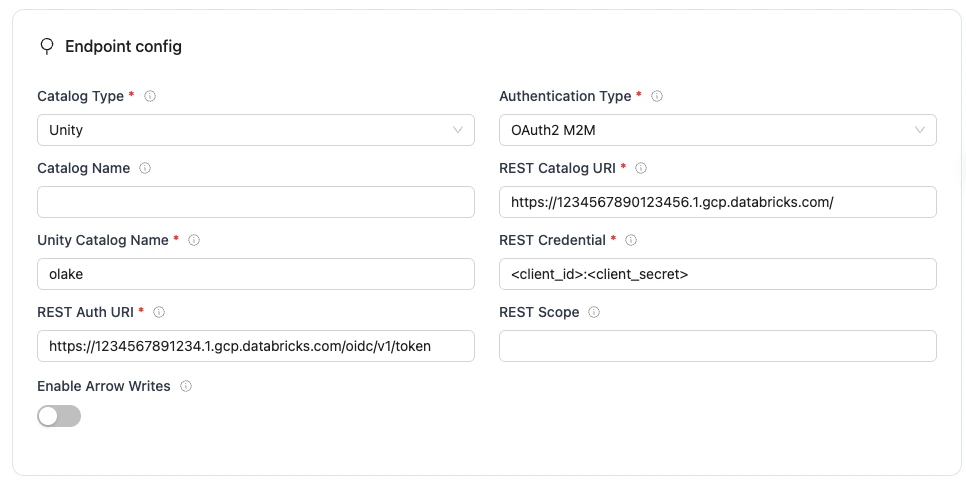
Unity Configuration Parameters
| Parameter | Sample Value | Description |
|---|---|---|
REST Catalog URLrequired | https://1234567890123456.1.gcp.databricks.com/ | Databricks workspace URL with Unity Catalog REST API endpoint. Use your actual workspace URL. |
Authentication Typerequired | OAuth2 M2M | Authentication method OLake Go uses for Unity Catalog REST API requests. Set to match your workspace's authentication configuration. |
Unity Catalog Namerequired | workspace | Name of the catalog in Unity. |
REST Auth URIrequired | https://1234567890123456.1.gcp.databricks.com/oidc/v1/token | URL of the REST catalog’s OAuth2 token endpoint. OLake Go uses this with REST Credential to request an access token during OAuth2 client-credentials authentication. |
REST Credentialrequired | <client_id>:<client_secret> | Specifies the client ID and secret for OAuth2, formatted as client_id:client_secret. Used with REST Auth URI when OLake Go requests an access token from the catalog’s auth service. |
| Catalog Name | olake_iceberg | Name of the Iceberg catalog OLake Go registers tables under. Defaults to olake_iceberg if left empty. |
| REST Scope | PRINCIPAL_ROLE:ALL | Required for OAuth2 client-credentials authentication along with REST Auth URI and REST Credential. Tells the OAuth2 server what level of access to grant, space-separated if requesting more than one. Values are catalog-specific. |
| Enable Arrow Writes | false | Writes data and delete files using Apache Arrow based writer and registers them in Iceberg. |
Click Create -> to test the connection and verify that OLake Go can validate both the Unity Catalog REST endpoint and authentication.
JSON Configuration
Create a json for destination config (destination.json)
{
  "type": "ICEBERG",
  "writer": {
    "catalog_type": "unity",
    "catalog_name": "olake_iceberg",
    "rest_catalog_url": "https://<DATABRICK_WORKSPACE_URL>/api/2.1/unity-catalog/iceberg-rest",
    "iceberg_s3_path": "<CATALOG_NAME>",
    "rest_auth_uri": "<DATABRICKS_OAUTH_URI>",
    "rest_credential": "<CLIENT_ID>:<CLIENT_SECRET>",
    "rest_scope": "<SCOPE>",
    "arrow_writes": false
  }
}
Unity Configuration Parameters
| Parameter | Sample Value | Description |
|---|---|---|
catalog_typerequired | unity | Defines the catalog type used by the writer. |
rest_catalog_urlrequired | https://1234567890123456.1.gcp.databricks.com/ | Databricks workspace URL with Unity Catalog REST API endpoint. Use your actual workspace URL. |
iceberg_s3_pathrequired | workspace | Name of the catalog in Unity. |
oauth2_urirequired | https://1234567890123456.1.gcp.databricks.com/oidc/v1/token | URL of the REST catalog’s OAuth2 token endpoint. OLake Go uses this with REST Credential to request an access token during OAuth2 client-credentials authentication. |
credentialrequired | <client_id>:<client_secret> | Specifies the client ID and secret for OAuth2, formatted as client_id:client_secret. Used with REST Auth URI when OLake Go requests an access token from the catalog’s auth service. Not needed when using REST Token or other auth types. |
| catalog_name | olake_iceberg | Name of the Iceberg catalog OLake Go registers tables under. Defaults to olake_iceberg if left empty. |
| scope | PRINCIPAL_ROLE:ALL | Required for OAuth2 client-credentials authentication along with REST Auth URI and REST Credential. Tells the OAuth2 server what level of access to grant, space-separated if requesting more than one. Values are catalog-specific. |
| arrow_writes | false | Writes data and delete files using Apache Arrow based writer and registers them in Iceberg. |
To use OAuth2 U2M authentication with Unity Catalog, complete the OAuth authorization flow in Databricks to obtain an access token. Follow the steps in the Authorize user access to Databricks with OAuth documentation. In OLake Go, you only need the token obtained during this setup.
- OLake UI
- OLake CLI
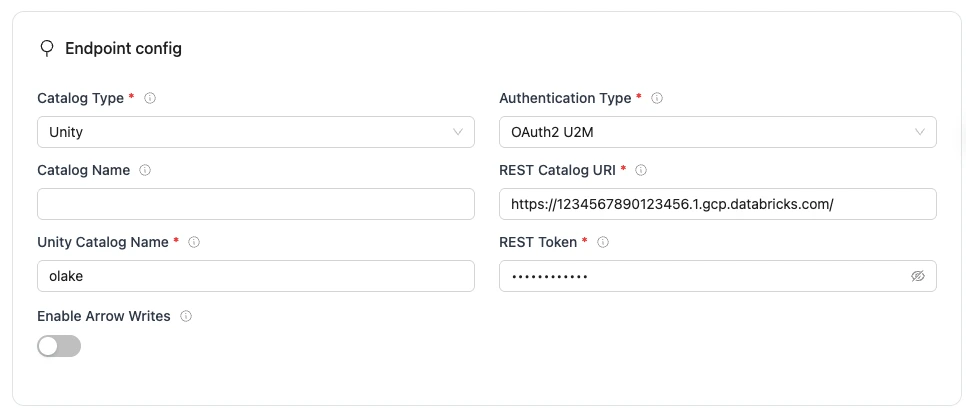
Unity Configuration Parameters
| Parameter | Sample Value | Description |
|---|---|---|
REST Catalog URLrequired | https://1234567890123456.1.gcp.databricks.com/ | Databricks workspace URL with Unity Catalog REST API endpoint. Use your actual workspace URL. |
Authentication Typerequired | OAuth2 U2M | Authentication method OLake Go uses for Unity Catalog REST API requests. Set to match your workspace's authentication configuration. |
Unity Catalog Namerequired | workspace | Name of the catalog in Unity. |
Access Tokenrequired | dapi123456789... | Access token obtained during the U2M authorization flow in Databricks. |
| Catalog Name | olake_iceberg | Name of the Iceberg catalog OLake Go registers tables under. Defaults to olake_iceberg if left empty. |
| Enable Arrow Writes | false | Writes data and delete files using Apache Arrow based writer and registers them in Iceberg. |
Click Create -> to test the connection and verify that OLake Go can validate both the Unity Catalog REST endpoint and authentication.
JSON Configuration
Create a json for destination config (destination.json)
{
  "type": "ICEBERG",
  "writer": {
    "catalog_type": "unity",
    "catalog_name": "olake_iceberg",
    "rest_catalog_url": "https://<DATABRICK_WORKSPACE_URL>/api/2.1/unity-catalog/iceberg-rest",
    "iceberg_s3_path": "<CATALOG_NAME>",
    "token": "<DATABRICK_USER_OAUTH_TOKEN>",
    "arrow_writes": false
  }
}
Unity Configuration Parameters
| Parameter | Sample Value | Description |
|---|---|---|
catalog_typerequired | unity | Defines the catalog type used by the writer. |
rest_catalog_urlrequired | https://1234567890123456.1.gcp.databricks.com/ | Databricks workspace URL with Unity Catalog REST API endpoint. Use your actual workspace URL. |
iceberg_s3_pathrequired | workspace | Name of the catalog in Unity. |
tokenrequired | dapi123456789... | Access token obtained during the U2M authorization flow in Databricks. |
| catalog_name | olake_iceberg | Name of the Iceberg catalog OLake Go registers tables under. Defaults to olake_iceberg if left empty. |
| arrow_writes | false | Writes data and delete files using Apache Arrow based writer and registers them in Iceberg. |
To use Token Federation authentication with Unity Catalog, configure a federation policy in Databricks and obtain an access token for OLake Go. Follow the steps in the Configure a federation policy documentation. In OLake Go, you only need the token obtained during this setup.
- OLake UI
- OLake CLI
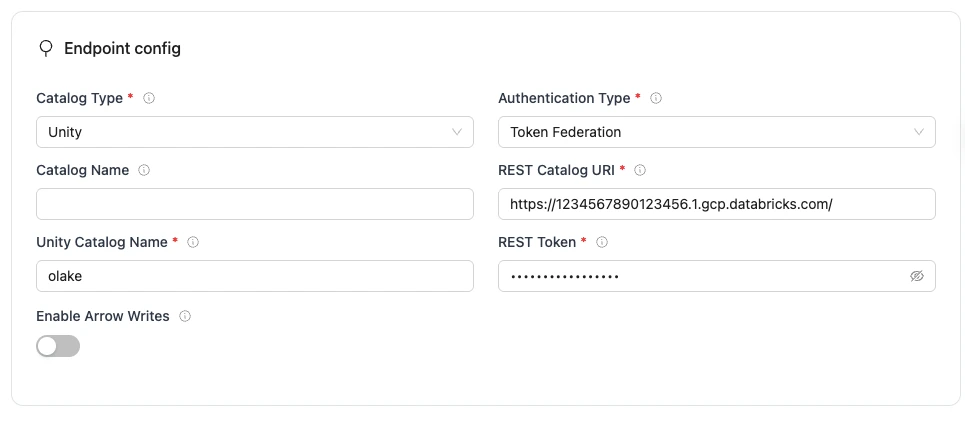
Unity Configuration Parameters
| Parameter | Sample Value | Description |
|---|---|---|
REST Catalog URLrequired | https://1234567890123456.1.gcp.databricks.com/ | Databricks workspace URL with Unity Catalog REST API endpoint. Use your actual workspace URL. |
Authentication Typerequired | Token Federation | Authentication method OLake Go uses for Unity Catalog REST API requests. Set to match your workspace's authentication configuration. |
Unity Catalog Namerequired | workspace | Name of the catalog in Unity. |
Access Tokenrequired | dapi123456789... | Access token obtained through your Databricks federation policy. |
| Catalog Name | olake_iceberg | Name of the Iceberg catalog OLake Go registers tables under. Defaults to olake_iceberg if left empty. |
| Enable Arrow Writes | false | Writes data and delete files using Apache Arrow based writer and registers them in Iceberg. |
Click Create -> to test the connection and verify that OLake Go can validate both the Unity Catalog REST endpoint and authentication.
JSON Configuration
Create a json for destination config (destination.json)
{
  "type": "ICEBERG",
  "writer": {
    "catalog_type": "unity",
    "catalog_name": "olake_iceberg",
    "rest_catalog_url": "https://<DATABRICK_WORKSPACE_URL>/api/2.1/unity-catalog/iceberg-rest",
    "iceberg_s3_path": "<CATALOG_NAME>",
    "token": "<DATABRICK_FEDERATION_TOKEN>",
    "arrow_writes": false
  }
}
Unity Configuration Parameters
| Parameter | Sample Value | Description |
|---|---|---|
catalog_typerequired | unity | Defines the catalog type used by the writer. |
rest_catalog_urlrequired | https://1234567890123456.1.gcp.databricks.com/ | Databricks workspace URL with Unity Catalog REST API endpoint. Use your actual workspace URL. |
iceberg_s3_pathrequired | workspace | Name of the catalog in Unity. |
tokenrequired | dapi123456789... | Access token obtained through your Databricks federation policy. |
| catalog_name | olake_iceberg | Name of the Iceberg catalog OLake Go registers tables under. Defaults to olake_iceberg if left empty. |
| arrow_writes | false | Writes data and delete files using Apache Arrow based writer and registers them in Iceberg. |
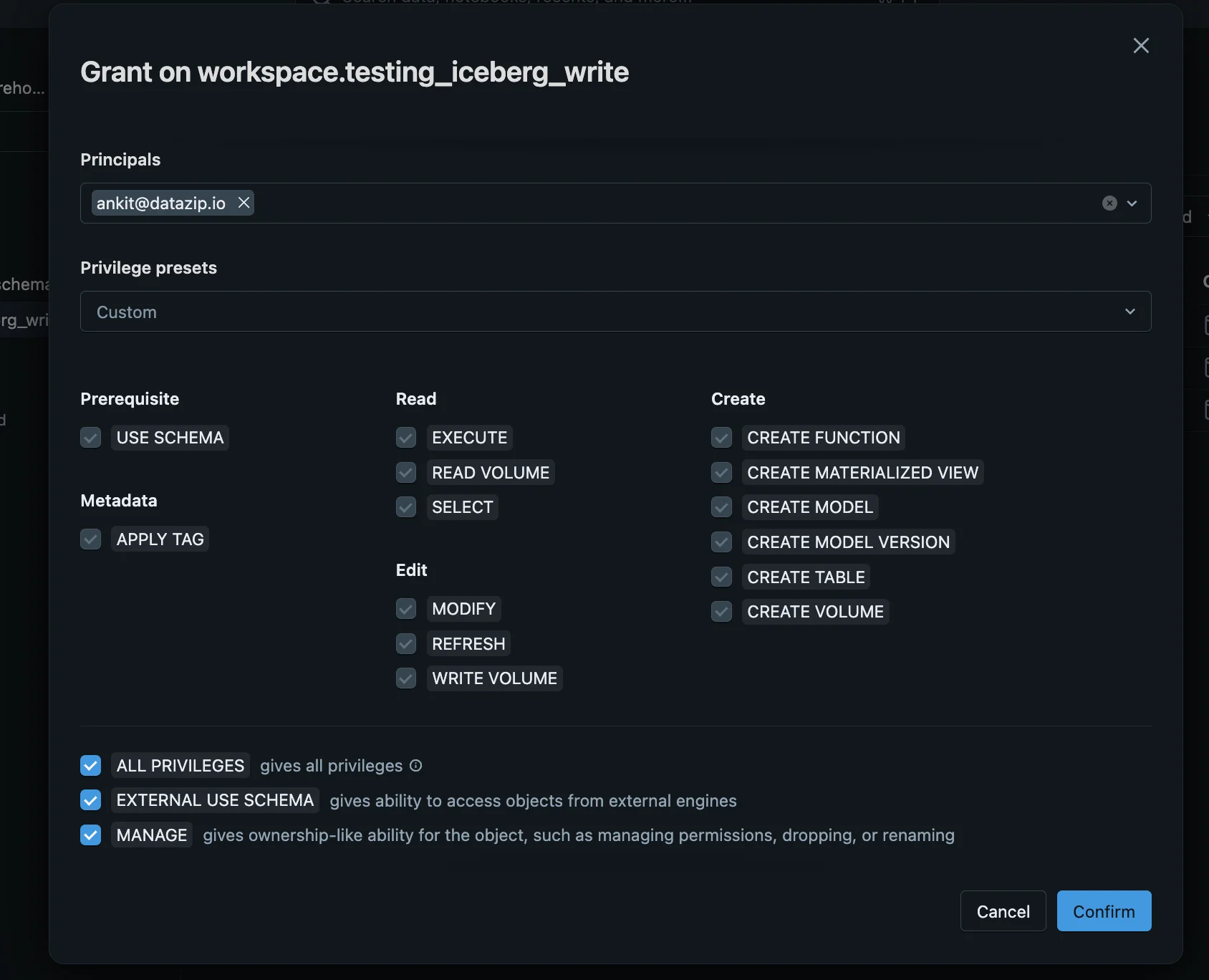
Grant Schema Permissions
- Go to Schema → Permissions
- Grant the following privileges to the new user created in Step 1:
ALL PRIVILEGESEXTERNAL USE SCHEMAMANAGE
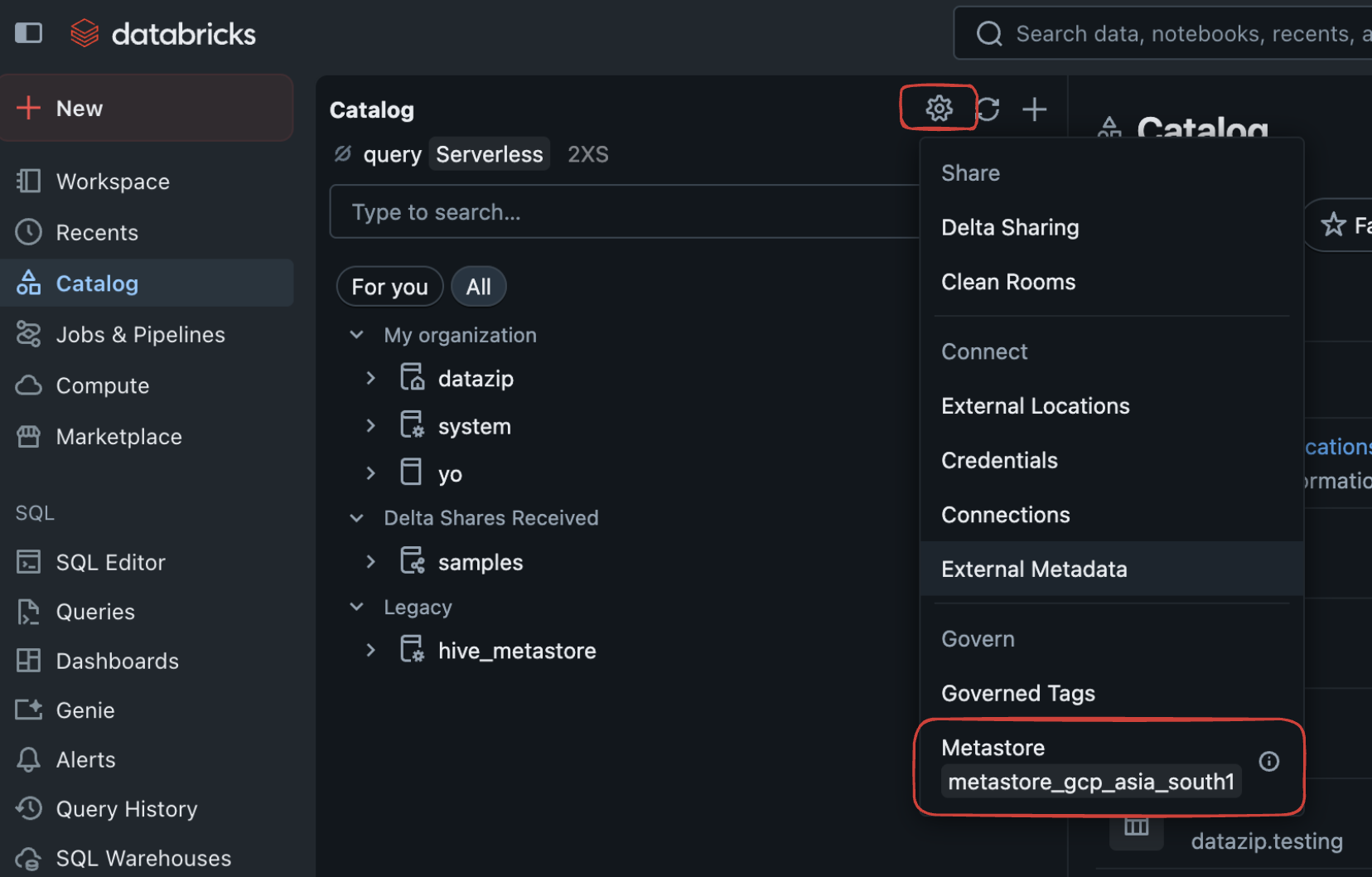
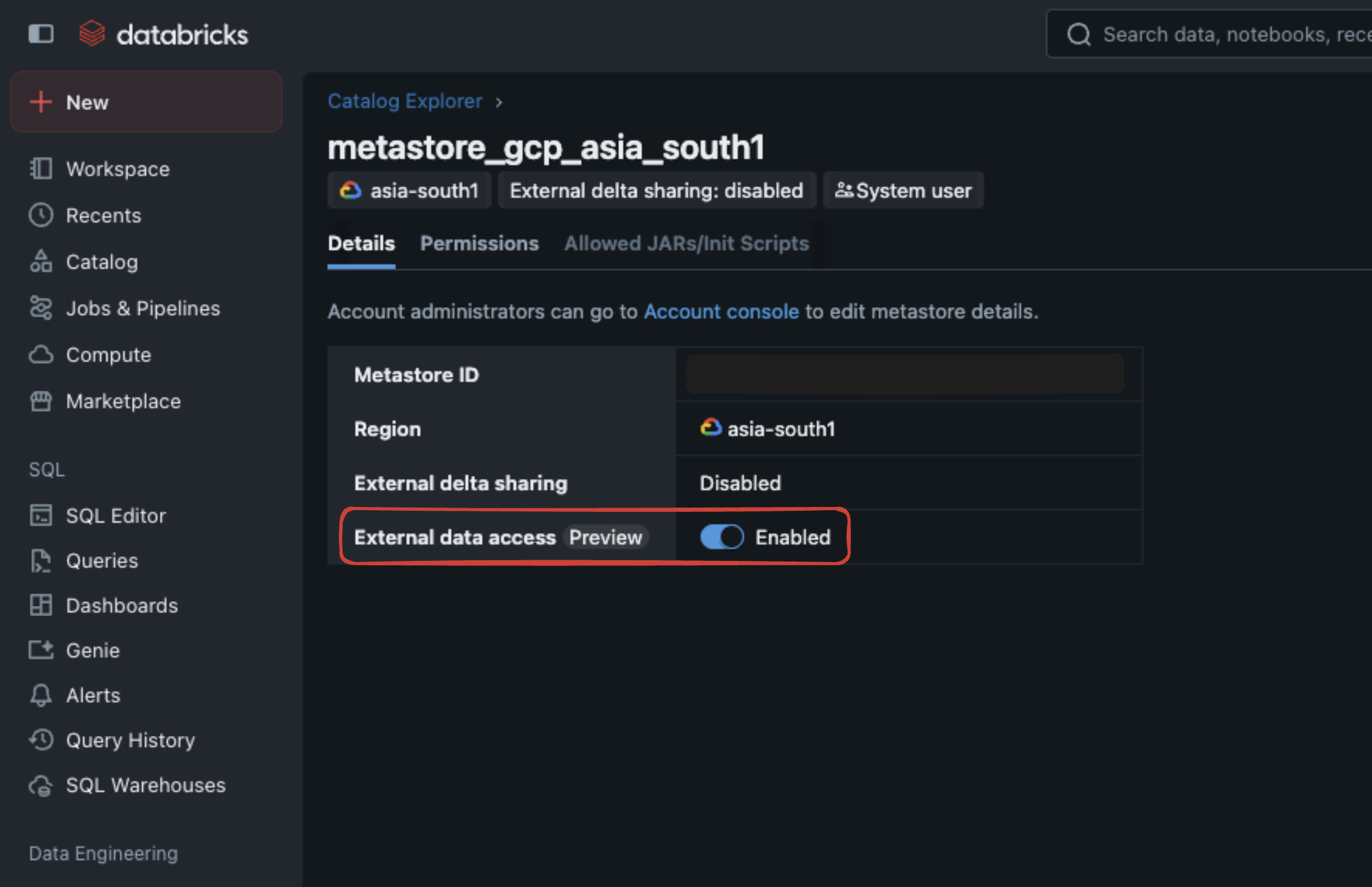
If you're not an administrator, contact your admin to enable external data access: Go to Catalog → Settings → Metastore
Enable External Data Access
⚠️ Enable Metastore External Data Access
Troubleshooting
Common Issues
- Authentication Errors: Verify your Personal Access Token is valid and has the necessary permissions
- Catalog Not Found: Ensure the catalog name exists in your Unity Catalog
- Schema Permissions: Check that you have CREATE TABLE permissions on the target schema
- Network Access: Verify your OLake Go instance can reach the Databricks workspace URL
Apache Polaris is an Iceberg REST catalog implementation that provides table management through a REST API. It supports OAuth2 authentication, fine-grained access control, and integrates with cloud object stores like AWS S3 for metadata and data storage
Prerequisites
Required services:
- Object store – e.g., AWS S3, MinIO, GCS, or any cloud-compatible storage for Iceberg table data and metadata.
- Polaris REST Service – Provides the Iceberg REST Catalog API with built-in OAuth2 authentication, authorization, and management features.
- Identity and access management (OAuth2) – Polaris uses OAuth2 to issue and validate tokens, supporting fine-grained role-based access control (RBAC).
- Metadata database (optional) – Polaris can use an internal backing database (e.g., PostgreSQL) for managing tokens and system metadata, handled internally.
Required permissions:
-
Object Store Permissions
Polaris requires read/write privileges on the target object storage buckets or prefixes where Iceberg data and metadata reside. -
IAM Role and Trust Policy
- For AWS S3, create an IAM role with permissions scoped to the Polaris bucket and assign a trust policy allowing Polaris service principals to assume the role.
- Include permissions like
s3:ListBucket,s3:GetObject,s3:PutObject, ands3:DeleteObject. Check Setup Guide for detailed instructions on IAM configuration.
-
OAuth2 Client and Service Principals
- Define Polaris service principals and OAuth2 clients with credentials (client ID and secret) that query engines and clients use to authenticate.
- Assign RBAC permissions to control access at the catalog, namespace, table, and column level.
Configuration
Configure the following fields to connect OLake Go to your REST catalog.
Authentication
The catalog supports multiple authentication types. Select the one your service uses to see the fields you need to configure.
- Token
- OAuth2
- OLake UI
- OLake CLI
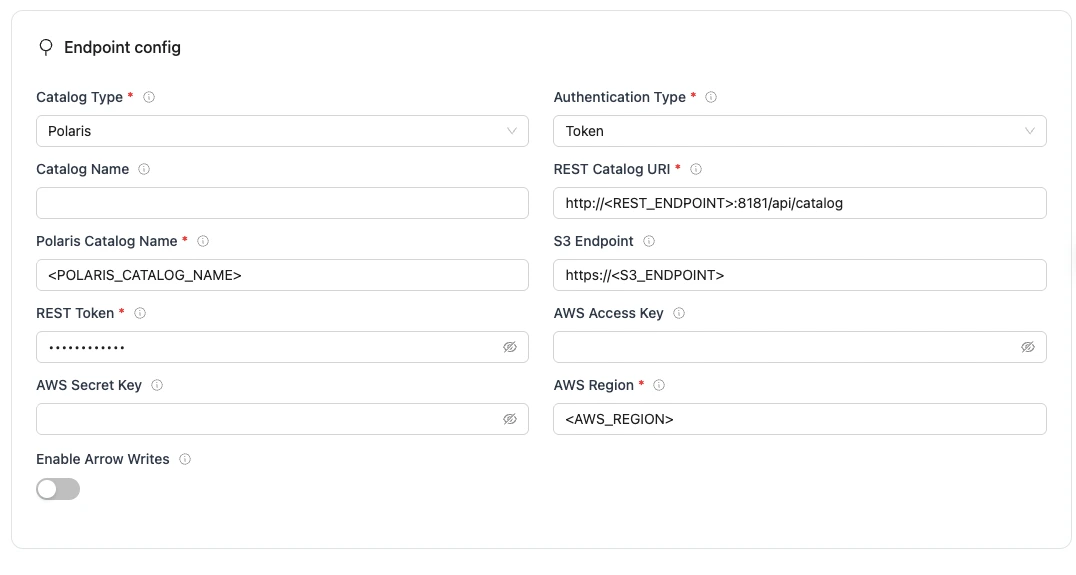
Polaris Configuration Parameters
| Parameter | Sample Value | Description |
|---|---|---|
REST Catalog URIrequired | http://<REST_ENDPOINT>:8181/api/catalog | Endpoint URL for the Polaris REST catalog service. |
Authentication Typerequired | token | Authentication method OLake Go uses for Polaris REST catalog requests. Set to match your catalog's authentication configuration. |
Polaris Catalog Namerequired | <POLARIS_CATALOG_NAME> | Name of the Polaris catalog to use, OLake Go passes this to the Polaris REST catalog as the warehouse identifier, so catalog operations are routed to that catalog and its pre-configured S3 storage and IAM settings. |
REST Tokenrequired | abc...xyz | Specifies the Bearer token sent in the Authorization header for authenticating with the REST catalog service. |
AWS Regionrequired | ap-south-1 | AWS Region where your S3 bucket exists. Required so OLake Go calls the correct regional S3 endpoint. |
| S3 Endpoint | http://<S3_ENDPOINT>:9000 | S3 API endpoint for writing Iceberg data files. Leave empty for AWS S3 but required for S3-compatible storage like MinIO. |
| AWS Access Key | XXX | AWS access key ID for authentication. Optional if using IAM roles or instance profiles. If using IAM: Docker Compose: add the required IAM environment variables under x-envs in your compose file. See Service Environment Variables for setup details.Kubernetes: set up pod IAM in Cloud IAM Integration. |
| AWS Secret Key | XXX | AWS secret access key for authentication. Optional if using IAM roles or instance profiles. If using IAM: Docker Compose: add the required IAM environment variables under x-envs in your compose file. See Service Environment Variables for setup details.Kubernetes: set up pod IAM in Cloud IAM Integration. |
| Enable Arrow Writes | false | Writes data and delete files using Apache Arrow based writer and registers them in Iceberg. |
| Catalog Name | olake_iceberg | Name of the Iceberg catalog OLake Go registers tables under. Defaults to olake_iceberg if left empty. |
Click Create -> to test the connection and verify that OLake Go can validate both the Polaris REST catalog and authentication.
To connect to Iceberg using Polaris as the catalog, create destination.json with the following configuration
{
    "type": "ICEBERG",
    "writer": {
      "catalog_type": "polaris",
      "rest_catalog_url": "http://<REST_ENDPOINT>:8181/api/catalog",
      "catalog_name": "olake_iceberg",
      "iceberg_s3_path": "<POLARIS_CATALOG_NAME>",
      "rest_auth_type": "token",
      "token": "TOKEN",
      "aws_region": "<S3_REGION>",
      "arrow_writes": false
    }
}
Polaris Configuration Parameters
| Parameter | Sample Value | Description |
|---|---|---|
catalog_typerequired | polaris | Defines the catalog type used by the writer. |
rest_catalog_urlrequired | http://<REST_ENDPOINT>:8181/api/catalog | Endpoint URL for the Polaris REST catalog service. |
iceberg_s3_pathrequired | <POLARIS_CATALOG_NAME> | Name of the Polaris catalog to use, OLake Go passes this to the Polaris REST catalog as the warehouse identifier, so catalog operations are routed to that catalog and its pre-configured S3 storage and IAM settings. |
tokenrequired | abc...xyz | Specifies the Bearer token sent in the Authorization header for authenticating with the REST catalog service. |
aws_regionrequired | ap-south-1 | AWS Region where your S3 bucket exists. Required so OLake Go calls the correct regional S3 endpoint. |
| s3_endpoint | http://<S3_ENDPOINT>:9000 | S3 API endpoint for writing Iceberg data files. Leave empty for AWS S3 but required for S3-compatible storage like MinIO. |
| aws_access_key | XXX | AWS access key ID for authentication. Optional if using IAM roles or instance profiles. If using IAM: Docker Compose: add the required IAM environment variables under x-envs in your compose file. See Service Environment Variables for setup details.Kubernetes: set up pod IAM in Cloud IAM Integration. |
| aws_secret_key | XXX | AWS secret access key for authentication. Optional if using IAM roles or instance profiles. If using IAM: Docker Compose: add the required IAM environment variables under x-envs in your compose file. See Service Environment Variables for setup details.Kubernetes: set up pod IAM in Cloud IAM Integration. |
| arrow_writes | false | Writes data and delete files using Apache Arrow based writer and registers them in Iceberg. |
| catalog_name | olake_iceberg | Name of the Iceberg catalog OLake Go registers tables under. Defaults to olake_iceberg if left empty. |
- OLake UI
- OLake CLI
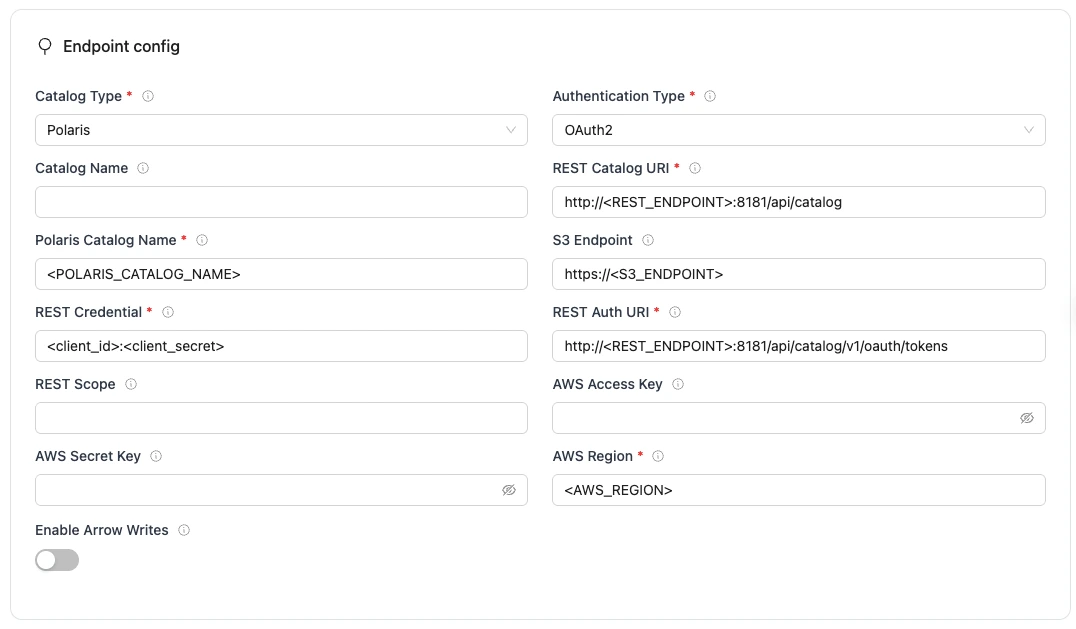
Polaris Configuration Parameters
| Parameter | Sample Value | Description |
|---|---|---|
REST Catalog URIrequired | http://<REST_ENDPOINT>:8181/api/catalog | Endpoint URL for the Polaris REST catalog service. |
Authentication Typerequired | oauth2 | Authentication method OLake Go uses for Polaris REST catalog requests. Set to match your catalog's authentication configuration. |
Polaris Catalog Namerequired | <POLARIS_CATALOG_NAME> | Name of the Polaris catalog to use, OLake Go passes this to the Polaris REST catalog as the warehouse identifier, so catalog operations are routed to that catalog and its pre-configured S3 storage and IAM settings. |
REST Auth URIrequired | http://<REST_ENDPOINT>:8181/api/catalog/v1/oauth/tokens | URL of the REST catalog’s OAuth2 token endpoint. OLake Go uses this with REST Credential to request an access token during OAuth2 client-credentials authentication. |
REST Credentialrequired | <olake_user_client_id>:<olake_user_client_secret> | Specifies the client ID and secret for OAuth2, formatted as client_id:client_secret. Used with REST Auth URI when OLake Go requests an access token from the catalog’s auth service. Not needed when using REST Token or other auth types. |
AWS Regionrequired | ap-south-1 | AWS Region where your S3 bucket exists. Required so OLake Go calls the correct regional S3 endpoint. |
| REST Scope | PRINCIPAL_ROLE:ALL | Required for OAuth2 client-credentials auth. Scopes are space-separated. Used with REST Auth URI and REST Credential for OAuth2 client-credentials auth. Values are catalog-specific. Not needed when using REST Token or other auth types. |
| S3 Endpoint | http://<S3_ENDPOINT>:9000 | S3 API endpoint for writing Iceberg data files. Leave empty for AWS S3 but required for S3-compatible storage like MinIO. |
| AWS Access Key | XXX | AWS access key ID for authentication. Optional if using IAM roles or instance profiles. If using IAM: Docker Compose: add the required IAM environment variables under x-envs in your compose file. See Service Environment Variables for setup details.Kubernetes: set up pod IAM in Cloud IAM Integration. |
| AWS Secret Key | XXX | AWS secret access key for authentication. Optional if using IAM roles or instance profiles. If using IAM: Docker Compose: add the required IAM environment variables under x-envs in your compose file. See Service Environment Variables for setup details.Kubernetes: set up pod IAM in Cloud IAM Integration. |
| Enable Arrow Writes | false | Writes data and delete files using Apache Arrow based writer and registers them in Iceberg. |
| Catalog Name | olake_iceberg | Name of the Iceberg catalog OLake Go registers tables under. Defaults to olake_iceberg if left empty. |
Click Create -> to test the connection and verify that OLake Go can validate both the Polaris REST catalog and authentication.
To connect to Iceberg using Polaris as the catalog, create destination.json with the following configuration
{
    "type": "ICEBERG",
    "writer": {
      "catalog_type": "polaris",
      "rest_catalog_url": "http://<REST_ENDPOINT>:8181/api/catalog",
      "catalog_name": "olake_iceberg",
      "iceberg_s3_path": "<POLARIS_CATALOG_NAME>",
      "rest_auth_type": "oauth2",
      "oauth2_uri": "http://<REST_ENDPOINT>:8181/api/catalog/v1/oauth/tokens",
      "credential": "<client_id>:<client_secret>",
      "scope": "<SCOPE>",
      "aws_region": "<S3_REGION>",
      "arrow_writes": false
    }
}
Polaris Configuration Parameters
| Parameter | Sample Value | Description |
|---|---|---|
catalog_typerequired | polaris | Defines the catalog type used by the writer. |
rest_catalog_urlrequired | http://<REST_ENDPOINT>:8181/api/catalog | Endpoint URL for the Polaris REST catalog service. |
iceberg_s3_pathrequired | <POLARIS_CATALOG_NAME> | Name of the Polaris catalog to use, OLake Go passes this to the Polaris REST catalog as the warehouse identifier, so catalog operations are routed to that catalog and its pre-configured S3 storage and IAM settings. |
oauth2_urirequired | http://<REST_ENDPOINT>:8181/api/catalog/v1/oauth/tokens | URL of the REST catalog’s OAuth2 token endpoint. OLake Go uses this with REST Credential to request an access token during OAuth2 client-credentials authentication. |
credentialrequired | <olake_user_client_id>:<olake_user_client_secret> | Specifies the client ID and secret for OAuth2, formatted as client_id:client_secret. Used with REST Auth URI when OLake Go requests an access token from the catalog’s auth service. |
aws_regionrequired | ap-south-1 | AWS Region where your S3 bucket exists. Required so OLake Go calls the correct regional S3 endpoint. |
| scope | PRINCIPAL_ROLE:ALL | Required for OAuth2 client-credentials auth. Scopes are space-separated. Used with REST Auth URI and REST Credential for OAuth2 client-credentials auth. Values are catalog-specific. |
| s3_endpoint | http://<S3_ENDPOINT>:9000 | S3 API endpoint for writing Iceberg data files. Leave empty for AWS S3 but required for S3-compatible storage like MinIO. |
| aws_access_key | XXX | AWS access key ID for authentication. Optional if using IAM roles or instance profiles. If using IAM: Docker Compose: add the required IAM environment variables under x-envs in your compose file. See Service Environment Variables for setup details.Kubernetes: set up pod IAM in Cloud IAM Integration. |
| aws_secret_key | XXX | AWS secret access key for authentication. Optional if using IAM roles or instance profiles. If using IAM: Docker Compose: add the required IAM environment variables under x-envs in your compose file. See Service Environment Variables for setup details.Kubernetes: set up pod IAM in Cloud IAM Integration. |
| arrow_writes | false | Writes data and delete files using Apache Arrow based writer and registers them in Iceberg. |
| catalog_name | olake_iceberg | Name of the Iceberg catalog OLake Go registers tables under. Defaults to olake_iceberg if left empty. |
Setup Steps:
- Save the following as
docker-compose.yml:
services:
  polaris:
    image: apache/polaris:1.1.0-incubating
    container_name: polaris
    ports:
      - "8181:8181"
    networks:
      - polaris-network

networks:
  polaris-network:
    driver: bridge
- Start the services:
docker-compose up -d
- Get Polaris root credentials from logs:
docker logs polaris | grep --text "root principal credentials"
Look for a line similar to:
realm: default-realm root principal credentials: bd0b5cde9ffb3966:9c377f72a27ba22c47e26cd53423fa96
In case, you cannot find it, run docker logs polaris to check for the credentials.
Extract the credentials:
- Client ID:
bd0b5cde9ffb3966 - Client Secret:
9c377f72a27ba22c47e26cd53423fa96
- Get bearer token for API requests (replace
<client_id>and<client_secret>with the root credential):
curl -i -X POST \
  http://localhost:8181/api/catalog/v1/oauth/tokens \
  -d 'grant_type=client_credentials&client_id=<client_id>&client_secret=<client_secret>&scope=PRINCIPAL_ROLE:ALL'
-
Setup an AWS S3 bucket.
-
Create an AWS IAM Role with the following policy attached:
S3 Access Policy:
{
    "Version": "2012-10-17",
    "Statement": [
        {
            "Effect": "Allow",
            "Action": [
                "s3:GetObject",
                "s3:PutObject",
                "s3:DeleteObject",
                "s3:ListBucket"
            ],
            "Resource": [
                "arn:aws:s3:::your-bucket-name",
                "arn:aws:s3:::your-bucket-name/*"
            ]
        }
    ]
}
For detailed instructions on creating and attaching the IAM role to your EC2 instance, refer to the IAM setup guide.
The IAM role ARN will be in the format:
arn:aws:iam::############:role/polaris-lakehouse-role
Copy this ARN as it will be needed in the next step.
When setting up OLake, ensure OLake runs on an instance with the same AWS IAM Role and Region configured as used for Polaris.
- Create catalog (replace
<bearer_token>with token received in previous steps,your-bucket-namewith the S3 bucket name, and<your-iam-role-arn>with the ARN from step 6):
curl -i -X POST http://localhost:8181/api/management/v1/catalogs \
  -H "Authorization: Bearer <bearer_token>" \
  -H 'Accept: application/json' \
  -H 'Content-Type: application/json' \
  -d '{
    "name": "olake_catalog",
    "type": "INTERNAL",
    "properties": {
      "default-base-location": "s3://your-bucket-name"
    },
    "storageConfigInfo": {
      "storageType": "S3",
      "roleArn": "<your-iam-role-arn>",
      "allowedLocations": ["s3://your-bucket-name"]
    }
  }'
- Create user and assign roles (replace
<bearer_token>with your bearer token). The create user command's response includes the new user's client credentials.
# Create user (output includes client_id and client_secret, note them required in olake configuration)
curl -i -X POST "http://localhost:8181/api/management/v1/principals" \
  -H "Authorization: Bearer <bearer_token>" \
  -H "Content-Type: application/json" \
  -d '{"name": "olake_user", "type": "user"}'

# Create principal role
curl -i -X POST "http://localhost:8181/api/management/v1/principal-roles" \
  -H "Authorization: Bearer <bearer_token>" \
  -H "Content-Type: application/json" \
  -d '{"principalRole": {"name": "olake_user_role"}}'

# Assign role to user
curl -i -X PUT "http://localhost:8181/api/management/v1/principals/olake_user/principal-roles" \
  -H "Authorization: Bearer <bearer_token>" \
  -H "Content-Type: application/json" \
  -d '{"principalRole": {"name": "olake_user_role"}}'

# Create catalog role
curl -i -X POST "http://localhost:8181/api/management/v1/catalogs/olake_catalog/catalog-roles" \
  -H "Authorization: Bearer <bearer_token>" \
  -H "Content-Type: application/json" \
  -d '{"catalogRole": {"name": "olake_catalog_role"}}'

# Assign catalog role to principal role
curl -i -X PUT "http://localhost:8181/api/management/v1/principal-roles/olake_user_role/catalog-roles/olake_catalog" \
  -H "Authorization: Bearer <bearer_token>" \
  -H "Content-Type: application/json" \
  -d '{"catalogRole": {"name": "olake_catalog_role"}}'

# Grant privileges
curl -i -X PUT "http://localhost:8181/api/management/v1/catalogs/olake_catalog/catalog-roles/olake_catalog_role/grants" \
  -H "Authorization: Bearer <bearer_token>" \
  -H "Content-Type: application/json" \
  -d '{"grant": {"type": "catalog", "privilege": "CATALOG_MANAGE_CONTENT"}}'
All services involved in the sync process — including the OLake source image, Polaris, and any other dependencies — must be part of the same Docker network or accessible via network configuration.
While setting up REST Catalog URI for Polaris, in any case, if either localhost or host.docker.internal do not work in place of hostname, you can pass the machine IP where Polaris is hosted.
Important Notes:
- The
olake_usercredentials (not root credentials) must be used for the final OLake configuration. - The IAM role ARN is required for S3 access permissions.
- The AWS region must match across all configurations.
When accessing the Polaris REST Catalog from outside the EC2 instance, the EC2 instance's public IP address or domain name must be used instead of localhost
Example External Configuration:
{
  "rest_catalog_url": "https://polaris.olake.io/api/catalog",
  "oauth2_uri": "https://polaris.olake.io/api/catalog/v1/oauth/tokens"
}
Troubleshooting
-
Invalid OAuth2 credentials (401 Unauthorized)
- Cause: Incorrect or expired OAuth2 client credentials
- Fix:
- Verify that client_id, client_secret, scope, and token endpoint match your Polaris configuration.
- Refresh tokens if expired
-
Permission Denied on S3 Bucket
- Cause: Missing or incorrect IAM permissions.
- Fix:
- Ensure the IAM Role ARN configured for Polaris has the following permissions on your bucket:
s3:GetObjects3:PutObjects3:DeleteObjects3:ListBucket
- Confirm the bucket name matches exactly, including letter case.
- If using prefixes, check that your role has access to the correct path (e.g., mybucket/tenant-prefix/*)
- Ensure the IAM Role ARN configured for Polaris has the following permissions on your bucket:
-
Connection Errors to Polaris REST API
- Cause: The REST service is not reachable
- Fix:
- Confirm that the Polaris REST service is running and accessible on the correct port (default is
8181). - Ensure the service is reachable from your OLake environment; verify Docker network connectivity or firewall rules if self-hosted.
- If TLS is enabled, check that certificates are trusted and correctly configured
- Confirm that the Polaris REST service is running and accessible on the correct port (default is
BigLake is Google Cloud's fully managed lakehouse solution that provides an Apache Iceberg REST catalog endpoint. It enables seamless interoperability across query engines like Apache Spark, BigQuery, and other compatible tools, with built-in support for Google Cloud authentication and fine-grained access control.
BigLake catalog support is available in OLake Go version 0.9.1 and above.
Prerequisites
Required services:
- Google Cloud Project – with billing enabled and the BigLake API activated.
- Cloud Storage Bucket – for storing Iceberg table data and metadata.
- BigLake Catalog – created in Google Cloud.
- Service Account – with appropriate BigLake and Cloud Storage permissions.
Required permissions:
- Service Account Roles:
BigLake Editor(roles/biglake.editor) – for writing table data.Storage Object User(roles/storage.objectUser) – on all associated Cloud Storage buckets.
For detailed setup instructions, prerequisites, and IAM configuration, refer to the Google Cloud BigLake REST Catalog documentation.
Configuration
Configure the following fields to connect OLake Go to your BigLake REST catalog.
Authentication
BigLake requires Google OAuth authentication using a service account. This is the only supported authentication method.
- OLake UI
- OLake CLI
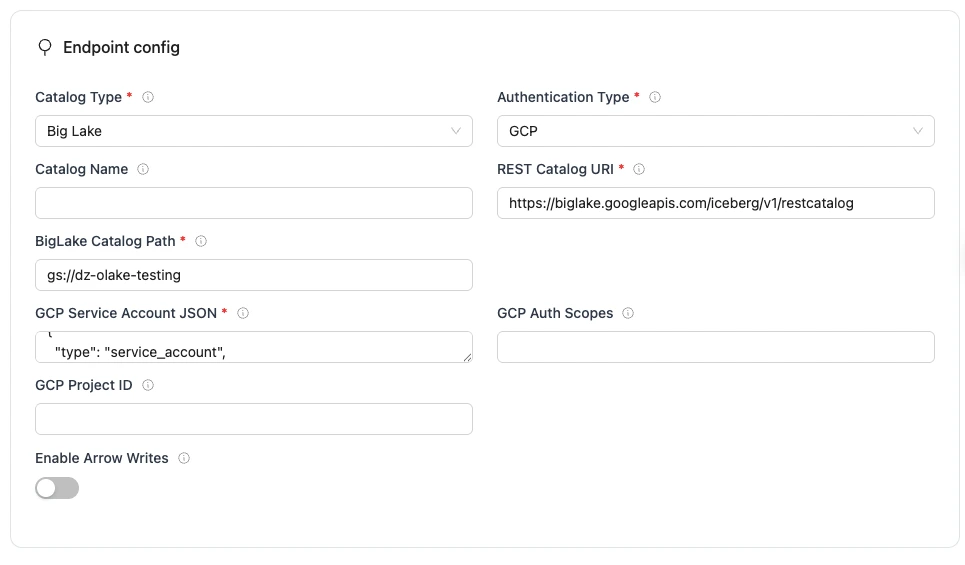
BigLake Configuration Parameters:
| Parameter | Sample Value | Description |
|---|---|---|
REST Catalog URI required | https://biglake.googleapis.com/iceberg/v1/restcatalog | Endpoint URL for the Google Cloud BigLake REST catalog service. |
BigLake Catalog Path required | Single-bucket catalog:gs://<BUCKET_NAME> Multiple-bucket catalog: bl://projects/<PROJECT_ID>/catalogs/<CATALOG_ID> | BigLake catalog path to use, OLake Go uses this to look up the storage configuration (e.g. Cloud Storage buckets) already defined in BigLake. Single-bucket catalog: This configuration restricts your catalog to a single bucket and locks the catalog name to the bucket name. Use bucket root path only, subfolder paths such as gs://<BUCKET_NAME>/<subfolder> is not supported yet.Multiple-bucket catalog: This configuration lets your catalog associate multiple buckets and lets you name your catalog independently of any bucket name. |
Authentication Type required | GCP | Iceberg authentication manager for Google Cloud OAuth. BigLake supports only this auth type. |
GCP Service Account JSON required | { "type": "service_account", ... } | JSON content of the GCP service account key file. OLake Go uses this to authorize REST catalog and Cloud Storage access in your Google Cloud project. |
| Catalog Name | olake_iceberg | Name of the Iceberg catalog OLake Go registers tables under. Defaults to olake_iceberg if left empty. |
| GCP Auth Scopes | https://www.googleapis.com/auth/cloud-platform | Defines which OAuth scopes Google grants on the access token, comma-separated if requesting more than one. |
| GCP Project ID | your-project_id | Required for multi-bucket catalogs only. Identifies the GCP project for BigLake request routing and billing. |
| Enable Arrow Writes | false/true | Writes data and delete files using Apache Arrow based writer and registers them in Iceberg. |
For the catalog name, OLake Go only supports lowercase letters and underscores. Spaces and special characters are not supported.
Click Create -> to test the connection and verify that OLake Go can validate both the BigLake REST catalog endpoint and authentication.
To connect to Iceberg using BigLake as the catalog, create destination.json with the following configuration:
{
"type": "ICEBERG",
"writer": {
    "catalog_type": "biglake",
    "rest_catalog_url": "https://biglake.googleapis.com/iceberg/v1/restcatalog",
    "catalog_name": "olake_iceberg",
    "iceberg_s3_path": "gs://<BUCKET_NAME>",
    "rest_auth_type": "org.apache.iceberg.gcp.auth.GoogleAuthManager",
    "gcp_service_account_json": "{ "type": "service_account", ... }",
    "gcp_project_id": "<your-project_id>",
    "arrow_writes": false
  }
}
BigLake Configuration Parameters
| Parameter | Sample Value | Description |
|---|---|---|
catalog_type required | biglake | Defines the catalog type used by the writer. |
rest_catalog_url required | https://biglake.googleapis.com/iceberg/v1/restcatalog | Endpoint URL for the Google Cloud BigLake REST catalog service. |
iceberg_s3_path required | Single-bucket catalog:gs://<BUCKET_NAME> Multiple-bucket catalog: bl://projects/<PROJECT_ID>/catalogs/<CATALOG_ID> | BigLake catalog path to use, OLake Go uses this to look up the storage configuration (e.g. Cloud Storage buckets) already defined in BigLake. Single-bucket catalog: This configuration restricts your catalog to a single bucket and locks the catalog name to the bucket name. Use bucket root path only, subfolder paths such as gs://<BUCKET_NAME>/<subfolder> is not supported yet. Multiple-bucket catalog: This configuration lets your catalog associate multiple buckets and lets you name your catalog independently of any bucket name. |
rest_auth_type required | org.apache.iceberg.gcp.auth.GoogleAuthManager | Iceberg authentication manager for Google Cloud OAuth. BigLake supports only this auth type. |
gcp_service_account_json required | {"type": "service_account", ...} | JSON content of the GCP service account key file. OLake Go uses this to authorize REST catalog and Cloud Storage access in your Google Cloud project. |
| catalog_name | olake_iceberg | Name of the Iceberg catalog OLake Go registers tables under. Defaults to olake_iceberg if left empty. |
| gcp_auth_scopes | https://www.googleapis.com/auth/cloud-platform | Defines which OAuth scopes Google grants on the access token, comma-separated if requesting more than one. |
| gcp_project_id | your-project_id | Required for multi-bucket catalogs only. Identifies the GCP project for BigLake request routing and billing. |
| arrow_writes | false/true | Writes data and delete files using Apache Arrow based writer and registers them in Iceberg. |
For the catalog name, OLake Go only supports lowercase letters and underscores. Spaces and special characters are not supported.
OLake Go supports Snowflake Horizon Catalog as an Iceberg REST catalog destination. Configure External OAuth, key-pair authentication or programmatic access tokens (PAT) to authenticate OLake Go to the Horizon REST endpoint.
Horizon catalog support is available in OLake Go version 0.11.0 and above.
Prerequisites
-
Database: A Snowflake database where OLake Go will create Iceberg tables. The database must have its catalog and external volume configured as SNOWFLAKE and SNOWFLAKE_MANAGED respectively:
ALTER DATABASE <your_database_name> SET CATALOG = 'SNOWFLAKE';
ALTER DATABASE <your_database_name> SET EXTERNAL_VOLUME = 'SNOWFLAKE_MANAGED';noteIf you use external storage (AWS, GCP, Azure) instead of Snowflake-managed storage, set
EXTERNAL_VOLUMEto the name of your external volume being used. -
Role: A Snowflake role with database usage privileges and permission to create schemas, assigned to the user OLake Go will use for authentication. If the database uses an external volume other than
SNOWFLAKE_MANAGED, this role must also have access to that external volume. -
Authentication Policy: An authentication policy that allows your chosen authentication method, attached to the user.
-
Account identifier: Your Snowflake account identifier uses the form
<org>-<account>. Look it up with:SELECT CURRENT_ORGANIZATION_NAME() || '-' || CURRENT_ACCOUNT_NAME() AS account_identifier; -
Region: The region of your Snowflake account. Look it up with:
SELECT CURRENT_REGION();
Configuration
Configure the following fields to connect OLake Go to your Horizon REST catalog.
Authentication
The catalog supports multiple authentication types. Select the one your service uses to see the fields you need to configure.
- Programmatic Access Token (PAT)
- Key-Pair Authentication
- External OAuth
To use Programmatic Access Token (PAT) authentication with Horizon Catalog, generate a PAT in Snowflake first. Follow the steps in the Using programmatic access tokens for authentication documentation to create and securely store the token before configuring OLake Go.
- OLake UI
- OLake CLI
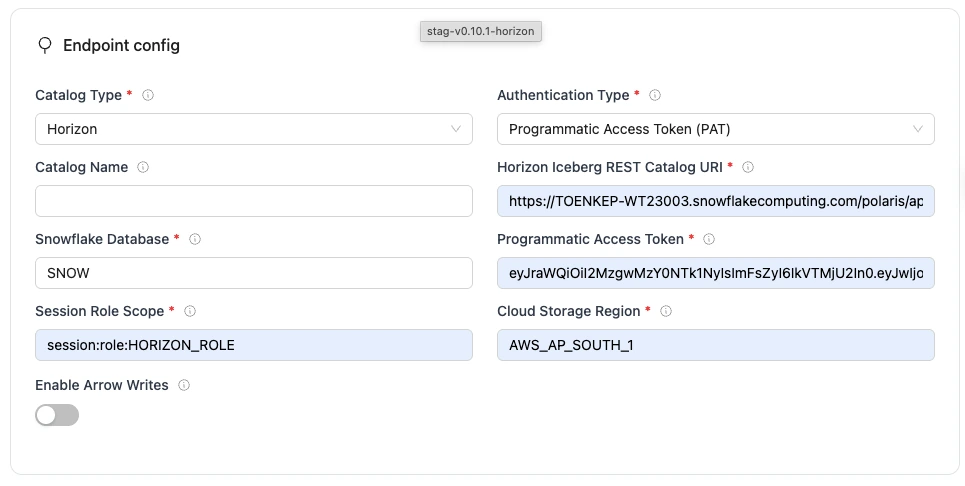
Horizon Configuration Parameters
| Parameter | Sample Value | Description |
|---|---|---|
Authentication Typerequired | Programmatic Access Token (PAT) | Authentication method OLake Go uses for Horizon Catalog REST API requests. Set to match your workspace's authentication configuration. |
Horizon Iceberg REST Catalog URIrequired | https://<account_identifier>.snowflakecomputing.com/polaris/api/catalog | Snowflake Horizon Catalog REST API endpoint. |
Snowflake Databaserequired | SNOW | The name of the database in Snowflake. |
Session Role Scoperequired | session:role:<HORIZON_ROLE> | Informs Snowflake which role to use for this Horizon Catalog REST session, which controls privileges for catalog and table operations. Space-separated if providing more than one. |
Programmatic Access Tokenrequired | ver:1-hint:... | Snowflake programmatic access token (PAT). |
Cloud Storage Regionrequired | AWS_AP_SOUTH_1 | Snowflake's account region used to route requests to the correct storage endpoint. Run SELECT CURRENT_REGION(); to know the region |
| Catalog Name | horizon | Name of the Iceberg catalog OLake Go registers tables under. Defaults to olake_iceberg if left empty. |
| Enable Arrow Writes | false | Writes data and delete files using Apache Arrow based writer and registers them in Iceberg. |
Click Create -> to test the connection and verify that OLake Go can validate both the Horizon Catalog REST endpoint and authentication.
JSON Configuration
Create a json for destination config (destination.json)
{
  "type": "ICEBERG",
  "writer": {
    "catalog_type": "horizon",
    "catalog_name": "horizon",
    "rest_catalog_url": "https://<account_identifier>.snowflakecomputing.com/polaris/api/catalog",
    "iceberg_s3_path": "SNOW",
    "aws_region": "AWS_AP_SOUTH_1",
    "scope": "session:role:<HORIZON_ROLE>",
    "rest_auth_type": "Programmatic Access Token (PAT)",
    "credential": "<SNOWFLAKE_PAT>",
    "arrow_writes": false
  }
}
Horizon Configuration Parameters
| Parameter | Sample Value | Description |
|---|---|---|
catalog_typerequired | horizon | Defines the catalog type used by the writer. |
rest_auth_typerequired | Programmatic Access Token (PAT) | Authentication method OLake Go uses for Horizon Catalog REST API requests. Set to match your workspace's authentication configuration. |
rest_catalog_urlrequired | https://<account_identifier>.snowflakecomputing.com/polaris/api/catalog | Snowflake Horizon Catalog REST API endpoint. |
iceberg_s3_pathrequired | SNOW | The name of the database in Snowflake. |
credentialrequired | ver:1-hint:... | Snowflake programmatic access token (PAT). |
scoperequired | session:role:<HORIZON_ROLE> | Informs Snowflake which role to use for this Horizon Catalog REST session, which controls privileges for catalog and table operations. Space-separated if providing more than one. |
aws_regionrequired | AWS_AP_SOUTH_1 | Snowflake's account region used to route requests to the correct storage endpoint. Run SELECT CURRENT_REGION(); to know the region |
| catalog_name | horizon | Name of the Iceberg catalog OLake Go registers tables under. Defaults to olake_iceberg if left empty. |
| arrow_writes | false | Writes data and delete files using Apache Arrow based writer and registers them in Iceberg. |
To use Key-Pair Authentication with Horizon Catalog, generate an RSA key pair and assign the public key to your Snowflake user, then produce the JWT that OLake Go uses as the Iceberg credential. Follow the steps in the Key-pair authentication and key-pair rotation documentation.
- OLake UI
- OLake CLI
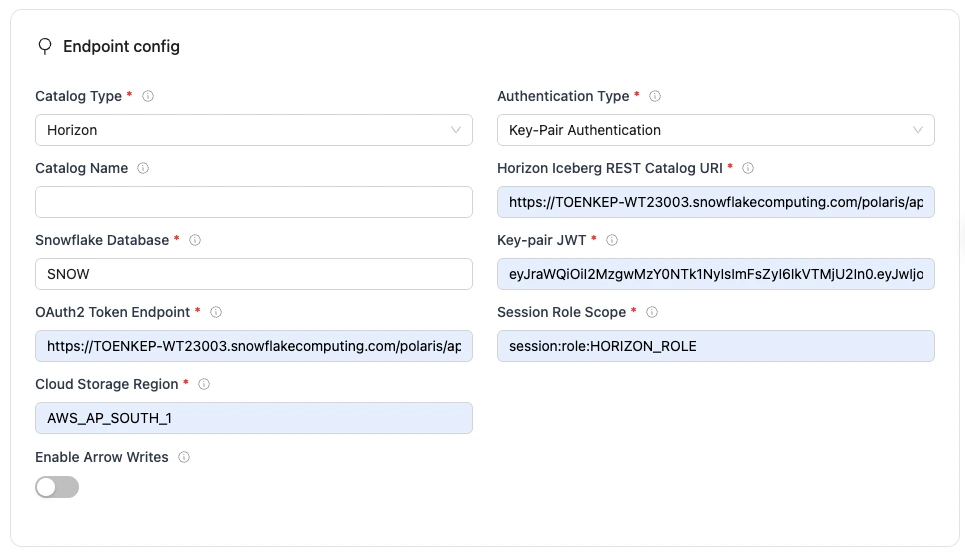
Horizon Configuration Parameters
| Parameter | Sample Value | Description |
|---|---|---|
Authentication Typerequired | Key-Pair Authentication | Authentication method OLake Go uses for Horizon Catalog REST API requests. Set to match your workspace's authentication configuration. |
Snowflake Databaserequired | SNOW | The name of the database in Snowflake. |
Horizon Iceberg REST Catalog URIrequired | https://<account_identifier>.snowflakecomputing.com/polaris/api/catalog | Snowflake Horizon Catalog REST API endpoint. |
Key-pair JWTrequired | eyJhbGciOi... | JWT signed with your Snowflake key pair, used as the Iceberg REST credential. |
OAuth2 Token Endpointrequired | https://<account_identifier>.snowflakecomputing.com/polaris/api/catalog/v1/oauth/tokens | OAuth token endpoint URL used with key-pair authentication. |
Session Role Scoperequired | session:role:<HORIZON_ROLE> | Informs Snowflake which role to use for this Horizon Catalog REST session, which controls privileges for catalog and table operations. Space-separated if providing more than one. |
Cloud Storage Regionrequired | AWS_AP_SOUTH_1 | Snowflake's account region used to route requests to the correct storage endpoint. Run SELECT CURRENT_REGION(); to know the region |
| Catalog Name | horizon | Name of the Iceberg catalog OLake Go registers tables under. Defaults to olake_iceberg if left empty. |
| Enable Arrow Writes | false | Writes data and delete files using Apache Arrow based writer and registers them in Iceberg. |
Click Create -> to test the connection and verify that OLake Go can validate both the Horizon Catalog REST endpoint and authentication.
JSON Configuration
Create a json for destination config (destination.json)
{
  "type": "ICEBERG",
  "writer": {
    "catalog_type": "horizon",
    "catalog_name": "horizon",
    "rest_catalog_url": "https://<account_identifier>.snowflakecomputing.com/polaris/api/catalog",
    "iceberg_s3_path": "SNOW",
    "aws_region": "AWS_AP_SOUTH_1",
    "scope": "session:role:<HORIZON_ROLE>",
    "rest_auth_type": "Key-Pair Authentication",
    "credential": "<KEY_PAIR_JWT>",
    "oauth2_uri": "https://<account_identifier>.snowflakecomputing.com/polaris/api/catalog/v1/oauth/tokens",
    "arrow_writes": false
  }
}
Horizon Configuration Parameters
| Parameter | Sample Value | Description |
|---|---|---|
catalog_typerequired | horizon | Defines the catalog type used by the writer. |
rest_auth_typerequired | Key-Pair Authentication | Authentication method OLake Go uses for Horizon Catalog REST API requests. Set to match your workspace's authentication configuration. |
rest_catalog_urlrequired | https://<account_identifier>.snowflakecomputing.com/polaris/api/catalog | Snowflake Horizon Catalog REST API endpoint. |
iceberg_s3_pathrequired | SNOW | The name of the database in Snowflake. |
credentialrequired | eyJhbGciOi... | JWT signed with your Snowflake key pair, used as the Iceberg REST credential. |
oauth2_urirequired | https://<account_identifier>.snowflakecomputing.com/polaris/api/catalog/v1/oauth/tokens | OAuth token endpoint URL used with key-pair authentication. |
scoperequired | session:role:<HORIZON_ROLE> | Informs Snowflake which role to use for this Horizon Catalog REST session, which controls privileges for catalog and table operations. Space-separated if providing more than one. |
aws_regionrequired | AWS_AP_SOUTH_1 | Snowflake's account region used to route requests to the correct storage endpoint. Run SELECT CURRENT_REGION(); to know the region |
| catalog_name | horizon | Name of the Iceberg catalog OLake Go registers tables under. Defaults to olake_iceberg if left empty. |
| arrow_writes | false | Writes data and delete files using Apache Arrow based writer and registers them in Iceberg. |
To use External OAuth with Horizon Catalog, configure an External OAuth security integration in Snowflake and obtain a bearer access token for OLake Go. Follow the steps in the External OAuth overview documentation.
- OLake UI
- OLake CLI
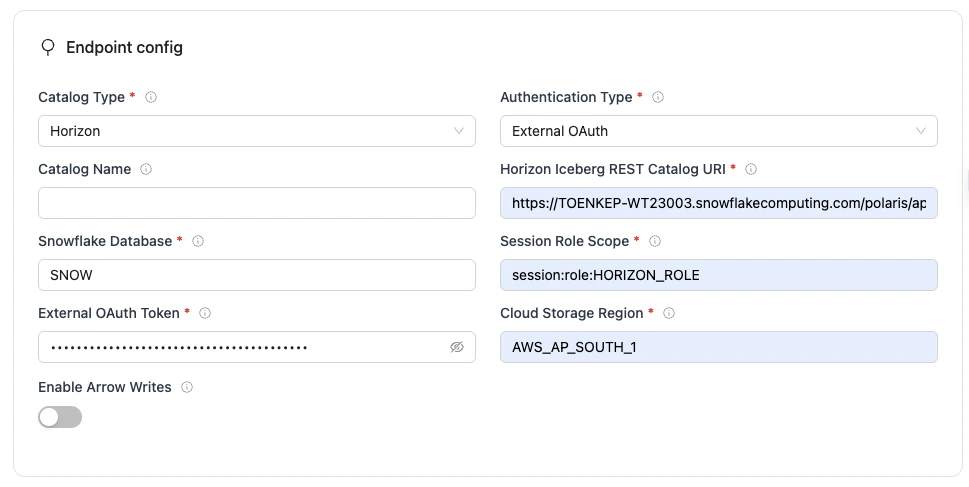
Horizon Configuration Parameters
| Parameter | Sample Value | Description |
|---|---|---|
Authentication Typerequired | External OAuth | Authentication method OLake Go uses for Horizon Catalog REST API requests. Set to match your workspace's authentication configuration. |
Horizon Iceberg REST Catalog URIrequired | https://<account_identifier>.snowflakecomputing.com/polaris/api/catalog | Snowflake Horizon Catalog REST API endpoint. |
Snowflake Databaserequired | SNOW | The name of the database in Snowflake. |
Session Role Scoperequired | session:role:<HORIZON_ROLE> | Informs Snowflake which role to use for this Horizon Catalog REST session, which controls privileges for catalog and table operations. Space-separated if providing more than one. |
External OAuth Tokenrequired | eyJhbGciOi... | Bearer access token from your External OAuth authorization server. |
Cloud Storage Regionrequired | AWS_AP_SOUTH_1 | Snowflake's account region used to route requests to the correct storage endpoint. Run SELECT CURRENT_REGION(); to know the region |
| Catalog Name | horizon | Name of the Iceberg catalog OLake Go registers tables under. Defaults to olake_iceberg if left empty. |
| Enable Arrow Writes | false | Writes data and delete files using Apache Arrow based writer and registers them in Iceberg. |
Click Create -> to test the connection and verify that OLake Go can validate both the Horizon Catalog REST endpoint and authentication.
JSON Configuration
Create a json for destination config (destination.json)
{
  "type": "ICEBERG",
  "writer": {
    "catalog_type": "horizon",
    "catalog_name": "horizon",
    "rest_catalog_url": "https://<account_identifier>.snowflakecomputing.com/polaris/api/catalog",
    "iceberg_s3_path": "SNOW",
    "aws_region": "AWS_AP_SOUTH_1",
    "scope": "session:role:<HORIZON_ROLE>",
    "rest_auth_type": "External OAuth",
    "token": "<EXTERNAL_OAUTH_ACCESS_TOKEN>",
    "arrow_writes": false
  }
}
Horizon Configuration Parameters
| Parameter | Sample Value | Description |
|---|---|---|
catalog_typerequired | horizon | Defines the catalog type used by the writer. |
rest_auth_typerequired | External OAuth | Authentication method OLake Go uses for Horizon Catalog REST API requests. Set to match your workspace's authentication configuration. |
rest_catalog_urlrequired | https://<account_identifier>.snowflakecomputing.com/polaris/api/catalog | Snowflake Horizon Catalog REST API endpoint. |
iceberg_s3_pathrequired | SNOW | The name of the database in Snowflake. |
scoperequired | session:role:<HORIZON_ROLE> | Informs Snowflake which role to use for this Horizon Catalog REST session, which controls privileges for catalog and table operations. Space-separated if providing more than one. |
tokenrequired | eyJhbGciOi... | Bearer access token from your External OAuth authorization server. |
aws_regionrequired | AWS_AP_SOUTH_1 | Snowflake's account region used to route requests to the correct storage endpoint. Run SELECT CURRENT_REGION(); to know the region |
| catalog_name | horizon | Name of the Iceberg catalog OLake Go registers tables under. Defaults to olake_iceberg if left empty. |
| arrow_writes | false | Writes data and delete files using Apache Arrow based writer and registers them in Iceberg. |
Troubleshooting
Common Issues
- Database or role name mismatch (case sensitivity): Snowflake uppercases unquoted identifiers. If
CREATE DATABASE IF NOT EXISTS snowis run, or a role is created without double quotes, Snowflake stores the name asSNOW, notsnow. If double quotes are used (CREATE DATABASE IF NOT EXISTS "snow"), the name is stored exactly as written. OLake Go must use the same spelling and casing as created in Snowflake.