Last updated:|... min read

 Twitter
 LinkedIn
 Facebook
 Email
Email
S3 Parquet
OLake Go supports writing in parquet format directly to S3. Before proceeding with the S3 Parquet destination, we recommend reviewing the Getting Started and Installation sections.
Prerequisites
- Before setting up the destination, make sure you have successfully set up the
source. - AWS S3: Review the minimum required IAM Permissions for S3 Parquet Writer.
- GCS: Review GCP IAM Permission for role-based access, and create HMAC keys for your service account to use as S3 credentials. See Creation of HMAC Keys below.
Configuration
- OLake UI
- OLake CLI
- Before setting up the destination, make sure you have successfully set up the source.
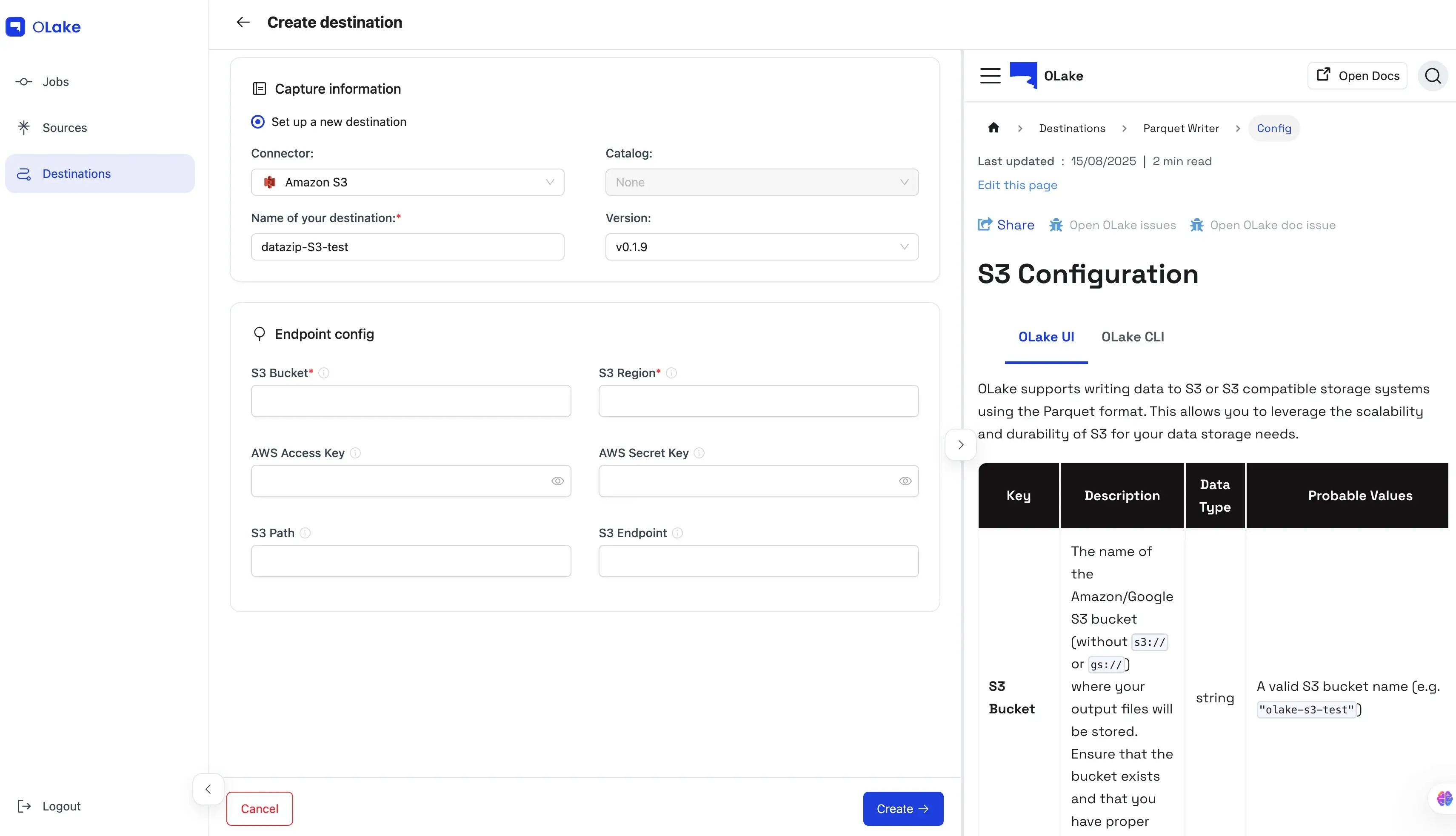
| Key | Description | Data Type | Probable Values |
|---|---|---|---|
| S3 Bucket | The name of the Amazon/Google S3 bucket (without s3:// or gs://) where your output files will be stored. Ensure that the bucket exists and that you have proper access. | string | A valid S3 bucket name (e.g. "olake-s3-test") |
| S3 Region | The AWS/MinIO/GCS region where the specified S3 bucket is hosted. | string | AWS/GCS region codes such as "ap-south-1", "us-west-2", etc. |
| S3 Access Key | The AWS/MinIO/GCS HMAC access key used for authenticating S3 requests. | string | A valid AWS/GCS HMAC access key |
| S3 Secret Key | The AWS/MinIO/GCS HMAC secret key used for S3 authentication. This key should be kept secure. | string | A valid AWS/GCS HMAC secret key |
| S3 Path | The specific path (or prefix) within the S3 bucket where data files will be written. This is typically a folder path that starts with a / (e.g. "/data"). | string | A valid path string |
| S3 Endpoint | (Optional) Custom S3-compatible endpoint. Required when using GCS HMAC keys or MinIO S3. | string | "https://storage.googleapis.com", "https://<MinIO-Storage-Endpoint>:9000" |
| Max File Size (MB) | (Optional) Rolls a partition into a new parquet file once the current file reaches this size in MB. Fractional values are allowed. Defaults to 512 when unset. | number | A positive number (integers e.g. 512, 128 or fractional e.g. 0.1 for 100KB) |
destination.json
{
    "type": "PARQUET",
    "writer": {
      "s3_bucket": "<BUCKET_NAME>",
      "s3_region": "ap-south-1",
      "s3_access_key": "XXX",
      "s3_secret_key": "XXX",
      "s3_path": "/data",
      "s3_endpoint": "http://<S3_ENDPOINT>:9000"
    }
}
| Key | Description | Data Type | Probable Values |
|---|---|---|---|
| type | Specifies the output file format for writing data. Currently, only the "PARQUET" format is supported. | string | "PARQUET" |
| s3_bucket | The name of the Amazon S3/GCS bucket (without s3:// or gs://) where your output files will be stored. Ensure that the bucket exists and that you have proper access. | string | A valid S3 bucket name (e.g. "olake-s3-test") |
| s3_region | The AWS/GCS region where the specified S3 bucket is hosted. | string | AWS/GCS region codes such as "us-west-2", "ap-south-1", etc. |
| s3_access_key | The AWS/GCS HMAC access key used for authenticating S3 requests. | string | A valid AWS/GCS HMAC access key |
| s3_secret_key | The AWS/GCS HMAC secret key used for S3 authentication. This key should be kept secure. | string | A valid AWS/GCS HMAC secret key |
| s3_endpoint | (Optional) The custom endpoint for S3-compatible services. Required for GCS using HMAC keys. | string | "https://storage.googleapis.com" |
| s3_path | (Optional) The specific path (or prefix) within the S3 bucket where data files will be written. This is typically a folder path that starts with a / (e.g. "/data"). | string | A valid path string |
| max_file_size_mb | (Optional) Rolls a partition into a new parquet file once the current file reaches this size in MB. Fractional values are allowed. Defaults to 512 when unset. | number | A positive number (integers e.g. 512, 128 or fractional e.g. 0.1 for 100KB) |
info
- The generated
.parquetfiles use SNAPPY compression (Read more). Note that SNAPPY is no longer supported by S3 Select when performing queries. - OLake Go creates a test folder named
olake_writer_testcontaining a single text file (.txt) with the content:This is used to verify that you have the necessary permissions to write to S3.S3 write test