Data Migration Strategy: A Plain Checklist
20 min read
Key takeaways
A data migration strategy is just a plan for moving data from an old system to a new one, without losing any of it and without freezing the business for long. It answers three questions: what to do with each system, how to switch over, and how to prove the copy is right.
The switch is the scary part: a one-shot "big bang" needs downtime, while a copy that keeps following changes takes more setup but gives you a shorter pause. Whatever you pick, write your rollback plan down before you start.
- A strategy is three decisions, not one. Decide what happens to each system, how clients switch over, and how you'll check the result.
- Zero downtime is not on offer. Google's architecture guide says truly zero downtime for clients is impossible, and near-zero is the goal. Sorry.
- Pick the cutover by how long you can stop. Big bang is faster but needs a pause. Our read: trickle and replication-based moves shrink the pause and add moving parts.
- Validation has limits. AWS's own data checker needs a primary key or unique index, and it can't check rows that keep changing.
- Keep a way back. Google's guide describes a fallback phase that copies target changes back to the source, so a reverse move stays possible days or weeks later.
Not sure where to begin? Ask yourself one thing: how long can the business stop?
| If the business can... | Start with | Why |
|---|---|---|
| Stop for the whole copy | Big bang | Faster, per MongoDB, but it needs downtime |
| Stop only briefly, and the data is large or busy | Replication-based | Google: short pause, never zero |
| Not stop, and can live with a longer project | Trickle or phased | MongoDB: less downtime, longer project |
| Not sure yet | Write the success test and rollback plan first | Both shape the choice |
Every fact below comes from vendor and project documentation we read in October 2026. We did not run these tools ourselves, so confirm current limits before you commit.
What is a data migration strategy?
Data migration is moving data from one storage system or computing environment to another. That's AWS's definition, and International Business Machines (IBM) uses nearly the same words. The strategy is the plan for doing it safely.
Here's the catch. Most guides use the word "strategy" for three different things, which is why they feel muddled. So let's pull them apart, with the question each one answers.
| Decision | The question | Typical options | Where to read more |
|---|---|---|---|
| What to do with each system | Move it as is, change it, replace it, keep it or switch it off? | The seven "Rs" such as rehost, replatform, retire | Section below |
| How to cut over | How do users move from old to new, and how long do they wait? | Big bang, trickle, replication-based | Section below |
| How to prove it worked | What would make you trust the new copy, and how do you go back? | Row counts, row-level checks, fallback | Section below |
If a page crowns one "best strategy", it's mixing these up. A system you plan to retire needs no cutover plan at all.
One more thing people blur: migration isn't replication. AWS describes replication as copying data to keep matching copies in more than one place, and defines migration as moving data from one environment to another. Some tools do both, and that matters in the cutover section.
How much data, and how fast?
Cutover is about time. The copy itself is about size, and about the road your data travels. IBM splits moves from a local data center to the cloud into two kinds: online, where data moves over the internet or a private network link, and offline, where it rides on a storage device that gets shipped.
Yes, shipping a box is a real option. IBM gives a size rule of thumb. Under 10 terabytes (TB), shipping data on a client-provided device is often the simplest and most cost-effective method, and for amounts up to multiple petabytes (PB), a specialized migration device from your cloud provider can be the most convenient and affordable.
| Data size | IBM's suggestion | The catch |
|---|---|---|
| Under 10 TB | Ship it on your own storage device, often simplest and most cost-effective | IBM names shipping security as a risk |
| Up to multiple PB | Provider-supplied migration device | Same security risk, plus a vendor appliance kept longer than agreed can incur extra charges |
| Mission-critical workloads | Move in stages, test at intervals, run source and target in parallel | Two live systems for a while |
Offline shipping suits a one-time copy. Our read: it won't keep changes flowing, so a busy database still needs a replication step on top.
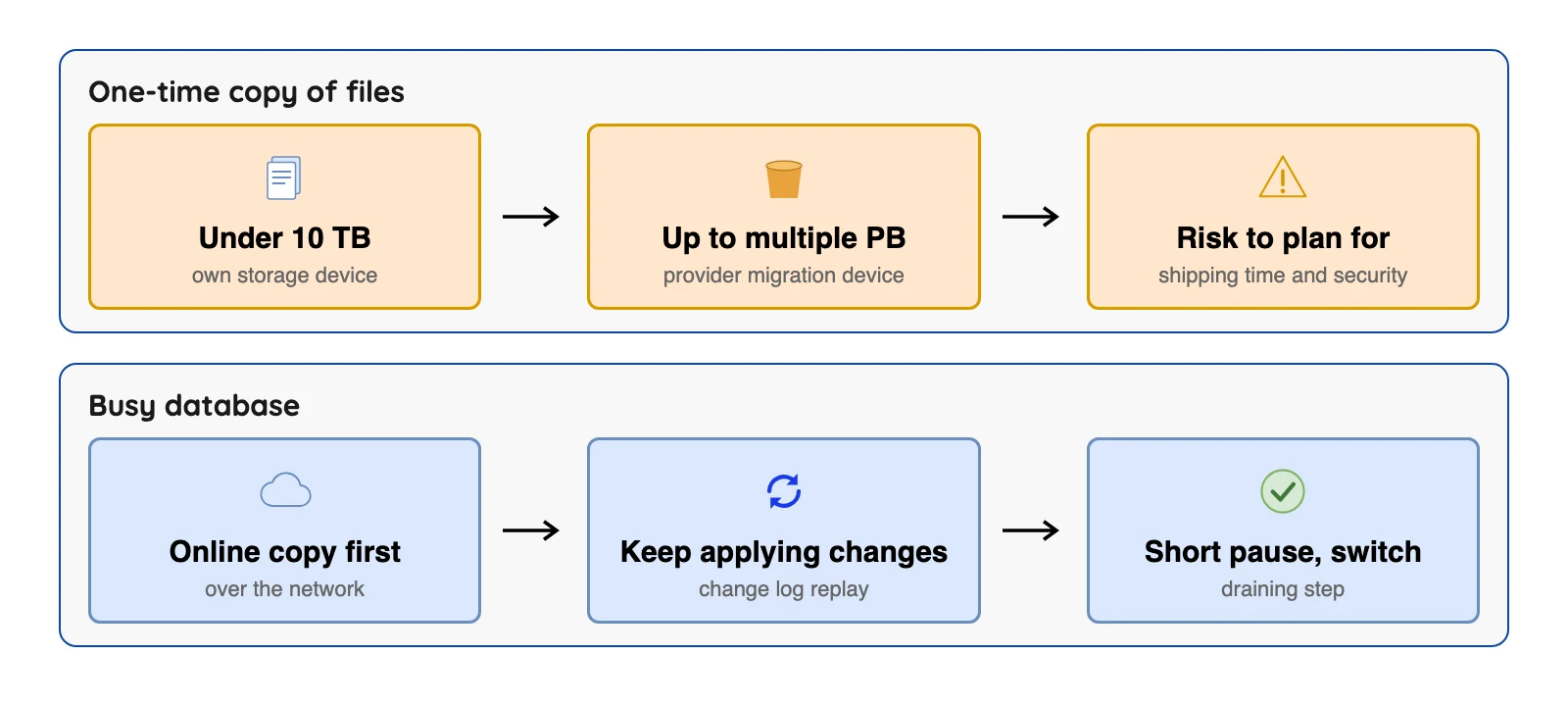
Our diagram of IBM's size guidance and Google's replication phases, read October 2026.
Choose what to do with each system first
Before you copy a single byte, ask what each system is actually for. AWS Prescriptive Guidance names seven options, the "7 Rs": retire, retain, rehost, relocate, repurchase, replatform and refactor.
In plain words, retire means switch it off, and retain means leave it where it is.
Rehost, which AWS calls "lift and shift", means move it without changes. Replatform means move it and tweak a few things. Refactor means redesign it during the move.
Here's the AWS take. Common choices for large migrations are rehost, replatform, relocate and retire. Refactor is not recommended for large migrations because it's the most complex, and AWS suggests modernizing after the migration is complete.
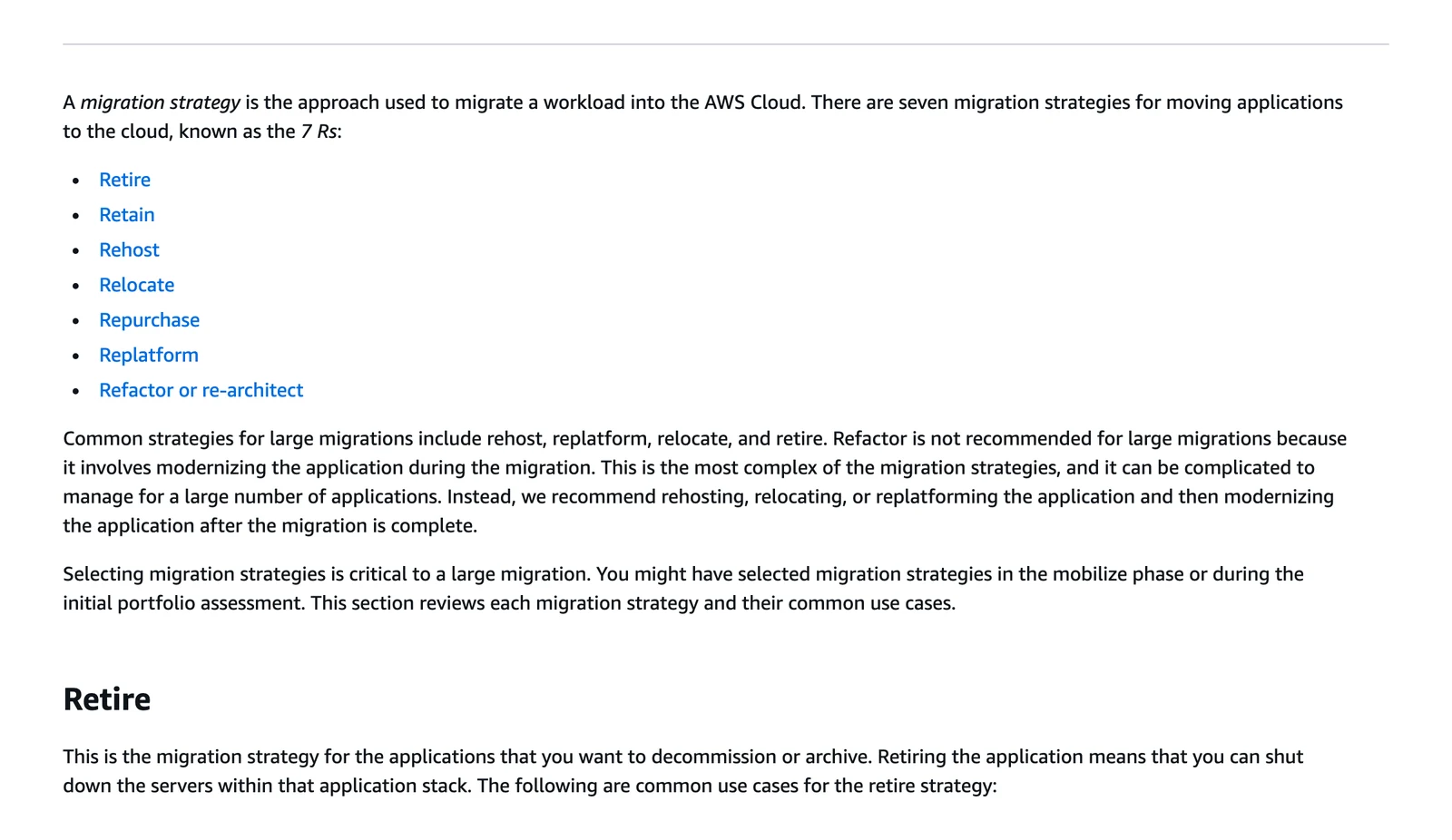
AWS Prescriptive Guidance, "About the migration strategies", October 2026.
That advice is aimed at moving many applications to AWS. Our read: it's a fair rule for small projects too, because moving and redesigning at once makes errors hard to trace. The limit is that the 7 Rs describe applications, not data, so they don't tell you how to cut over. That's the next choice.
Cutover options compared
The cutover is the moment users and apps start reading from the new system. MongoDB's migration guide names three approaches, and Fivetran's guide adds a phased one. Both vendors sell products in this area, so read the guides as vendor views.
The table puts a named limit beside each, so you see the cost before the benefit.
| Approach | What it means | Better when | Named limit |
|---|---|---|---|
| Big bang | Copy everything in one operation, then switch | The system can be offline for the whole copy, and the data is small enough | MongoDB: it is faster but needs downtime |
| Trickle | Move data gradually while old and new run side by side | You cannot stop the business for long | MongoDB: it minimises downtime but extends the project |
| Replication-based (near-zero downtime) | Copy once, keep applying changes from the source, then switch when in sync | The database is large or always busy | Google: downtime is short, never zero |
| Phased | Move one group of data or one app at a time (our reading) | Systems are separable (our reading) | Fivetran's guide names it but states no limit for it. Our reading: two systems hold live data for a while |
About that third row. Google's guide calls a good migration consistent: complete, duplicate free and ordered. That's a handy test for any approach.
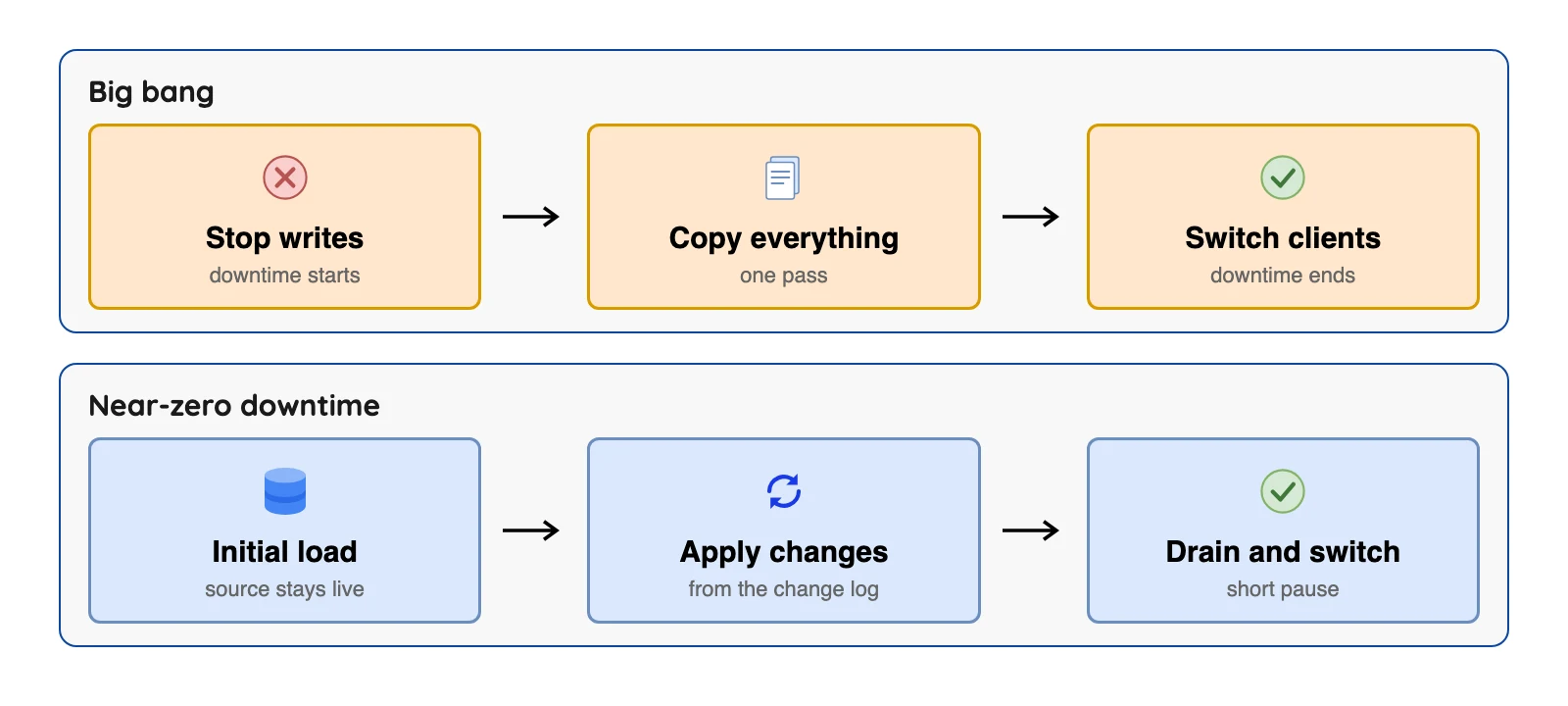
The replication-based lane runs on change data capture (CDC), which reads a database's own log of changes and replays them on the target. Fair warning: not every database or tool supports it, so check your source before you pick this lane.
How a near-zero downtime move runs
Curious what "near-zero" looks like in practice? Google's guide breaks it into five phases plus a fallback. Here all six are in plain words.
- Initial load. Copy all existing data, and note the source's time when you start.
- Continuing migration. Replay the source's logged changes from that time onward.
- Draining. Pause writes on the source and apply the last changes until both sides match.
- Switchover. Test the target, then point clients at it.
- Source deletion. Remove the old source after a final backup.
- Fallback. Copy target changes back to the source if something goes wrong.
Draining is part of the short pause, and switchover testing adds to it. That's why you get near-zero instead of zero. We did not measure it, so ask for a pause figure from a test run on your own data.
Google's guide adds one more rule: avoid schema or data changes during the migration. So if the old system keeps changing its table layout, you'll want to plan a freeze.
A Data Migration Checklist You Can Copy
Okay, time to be practical. This list is our own, built from the cloud vendors' documentation linked in this post, and it names the source of each less obvious item. Treat it as a pass-or-fail list before each stage.
Before you copy
- List every system and its owner. Note what reads and writes each one, so nothing gets forgotten at cutover.
- Clean before you move. AWS says cleaning data before migration can be good practice, such as removing duplicates, incomplete rows and incorrect rows.
- Decide what to retire or retain. Don't migrate data nobody uses. For applications, AWS's retire guidance gives one example test: no inbound connection for the last 90 days.
- Write the success test. For each table, decide what "correct" means: row counts, key fields, a sample of values.
- Check the tool's limits. Run its pre-check if it has one. AWS Database Migration Service (DMS) offers a premigration assessment that looks for problems before a task runs, though it's a chance to fix issues, not a guarantee.
- Run a small proof first. AWS DMS best practices say to run a small proof-of-concept migration. Small mistakes are cheap.
- Back up the source and the target. Google's guide says to test with production data and back up before applying changes.
During the copy
- Remember what tools don't copy. The AWS DMS best practices page says DMS does not automatically create secondary indexes, foreign keys or user accounts on the target. Easy to forget, painful to find later.
- Delay constraints during a full load. The same page says to drop or delay foreign keys and triggers during a full load and enable triggers right before cutover.
- Watch lag if you replicate changes. AWS says ongoing replication is not real time, offers no service level agreement (SLA) for latency, and delay can reach several minutes or more under heavy load.
- Freeze schema changes. Per Google's guide, avoid them until the draining phase is complete.
At cutover
- Rehearse the switch. Google's guide says to test client functionality on the target before enabling production access.
- Back up the target before clients connect. Google's guide asks for this explicitly.
- Agree the point of no return. Decide the hour after which going back needs a fallback copy, not just a redirect.
After cutover
- Keep the source for a set time. Google's guide notes you sometimes keep the source databases as a fallback until the target is reliable.
- Run the success test again on live data.
- Watch costs. IBM says unanticipated costs often result from improper planning, so compare the first bills with the plan.
- Delete the source only with a written sign-off. Last, never first.
Validation: what it can and cannot prove
Be honest: how many checklists boil validation down to "compare row counts"? Counts catch missing rows. They won't catch a value that quietly changed.
AWS Database Migration Service (DMS) compares each source row with its target row and reports mismatches. Its validation docs list limits you should know before you lean on it.
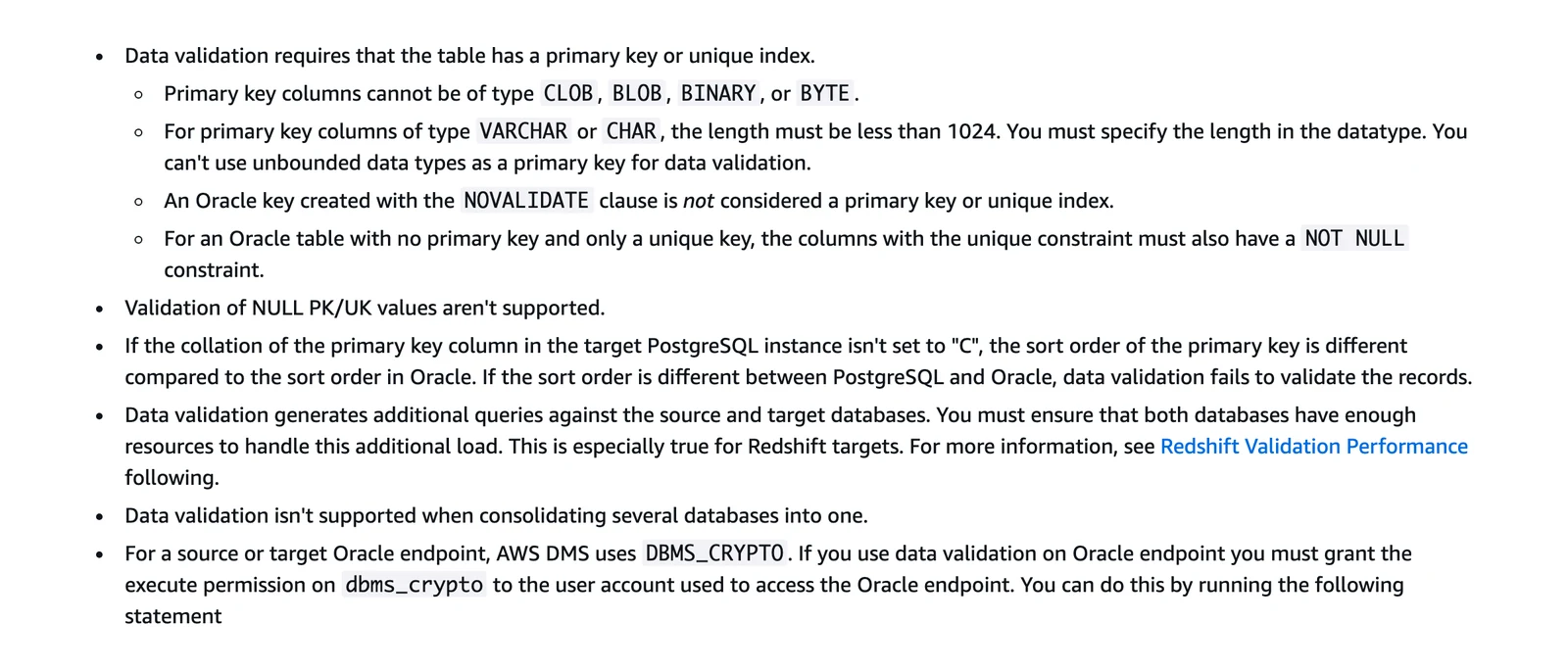
AWS DMS documentation, "Limitations" section of the data validation page, October 2026. The page continues past this crop, including the note that views are not validated.
In plain words, a table needs a primary key (a column that uniquely names each row) or a unique index. Validation runs extra queries on both databases, takes extra time, and can't check views or rows that change constantly. So a busy table you check while it's still changing is the hardest case.
That's why a two-layer test makes sense. Use a cheap check for everything, such as counts per table. Save the stronger check for the tables that matter most, like money or customer records.
Rollback: plan the way back before you start
Most vendor guides say "have a rollback plan" and stop there. Thanks, very helpful. Google's architecture guide is the exception, and it explains why a plan needs real design work.
Picture the moment after switchover. New writes land on the target, so the source stops receiving changes and goes stale. Going back would then lose the recent writes, unless you copy them back.
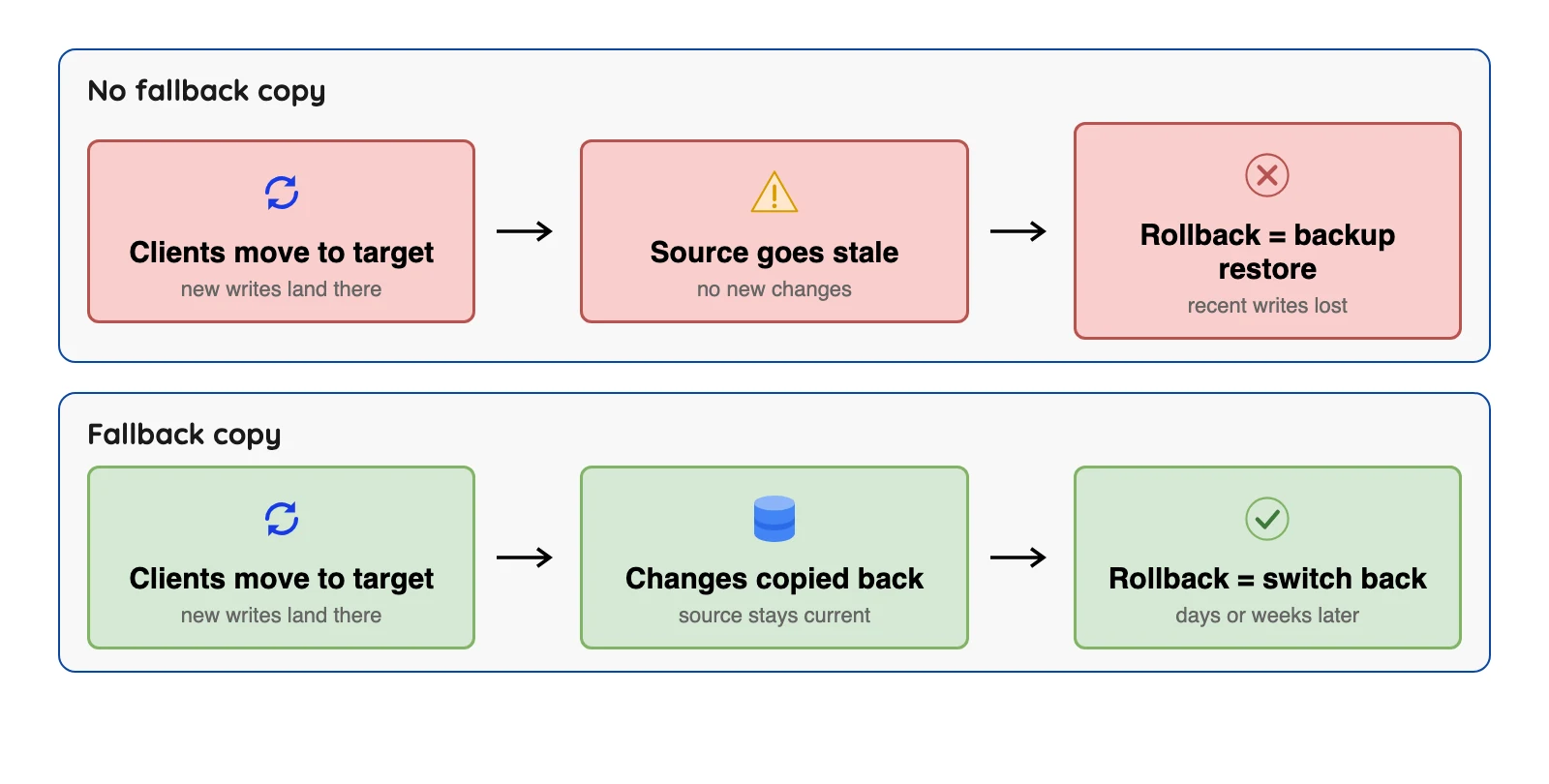
Google's fallback phase does that copying (see its part 2 guide, last reviewed 2025-04-29). Its guide says every change applied to the target is applied right away to the source, and that you should design the target schema so a reverse migration is possible. The left lane of the diagram is our reading of the consequence, not a quote.
And some tools give you no way back at all. The PostgreSQL docs say that with pg_upgrade in link mode, once you start the new cluster you cannot access the old one, and if the upgrade failed after that point the old cluster must be restored from backup. It's fast, but that's a real limit, and it belongs on your risk list.
Tools by Job, With Their Limits
A strategy isn't a tool, but the cloud providers' migration services shape what's easy. Here are four with their documented limits.
| Service | What the vendor says it covers | Named limit | Source |
|---|---|---|---|
| AWS Database Migration Service (DMS) | One-time moves or ongoing replication of databases | No SLA on change latency; does not create secondary indexes, foreign keys or user accounts | AWS best practices |
| Google Database Migration Service | Moves into Google Cloud databases such as Cloud SQL and AlloyDB | The destinations its overview names are Cloud SQL and AlloyDB | Google docs |
| Azure Database Migration Service | Moves into Azure SQL targets | The classic service for SQL Server scenarios was not supported after March 15, 2026 | Microsoft notice |
| PostgreSQL pg_upgrade | Upgrading to a newer Postgres major version in place | In link mode there is no safe return to the old cluster | PostgreSQL docs, linked above |
Each one is built around its own cloud. If your target lives in that cloud, its own service is the first one to price and test. Google's docs also separate a one-time migration (a single snapshot) from a continuous one (a snapshot followed by a flow of changes), which is a handy test for any tool.
If you want to keep a copy up to date rather than move once, that's a replication job.
What people say about these services
Vendor pages tell you the limits. A public thread tells you how a tool felt to use. We read this thread in October 2026, and the quote is one person's view, not a survey.
| Service | Praise | Complaint |
|---|---|---|
| Azure Database Migration Service | A Hacker News commenter on the thread "We migrated our PostgreSQL database with 11 seconds downtime" (January 2024): "Azure DMS worked pretty seamlessly in migrations that did not involve the above situations." | The same comment says that once those cases came in, replication was "hairy". The cases were data over 2 TB, heavy write spikes and large or unusual column types. |
One caution. The Azure commenter now works at PeerDB, a company that sells change data capture tools, so read that view as coming from a competitor's staff.
A worked example (an illustration)
Let's make this concrete. The example below is invented, just to show the choices. A small shop runs its orders in one Postgres database, the owner wants to move to a managed database on a cloud, and the shop takes orders all day.
| Step | Choice | Why |
|---|---|---|
| What to do | Replatform: same data, managed database | Fewer servers to run, no redesign |
| Cutover | Replication-based, with a short drain at 3 a.m. | Copy while the shop is open, pause only for the final sync |
| Proof | Row counts for all tables, row-level check on orders and payments | Money tables get the stronger test |
| Way back | Keep the old database and copy changes back for two weeks | Any bad surprise can be reversed by switching back |
| Sign-off | Owner and developer both approve before deletion | The old copy is deleted last, not first |
Now flip it. If the shop could close overnight, big bang would be simpler and the extra steps would be wasted. That's the honest trade: more safety costs more setup.
Common Mistakes (and Where They Come From)
- Trusting a failure statistic. You may see "over 80% of migrations run over time or budget". One vendor blog attributes it to Gartner, but we didn't find a Gartner page, so we don't repeat it. A failure rate figure on Wikipedia dates from 2011, which is too old to rely on.
- Treating zero downtime as achievable. Google's guide says it's impossible. Ask vendors what the pause actually is.
- Mixing migration with schema versioning. Tools such as Flyway describe migrations as SQL scripts that can capture schema and data changes. Our read: that is a different job from moving data between systems.
Want to check what stuck? Try this short quiz.
Test your migration strategy basics
Question 1 of 5
Your business can switch everything off for the whole copy. Which cutover approach fits best?
Frequently asked questions
Q1. What is a data migration strategy?
Q2. What are the main data migration strategies?
Q3. What is the difference between big bang and trickle migration?
Q4. Is zero-downtime migration possible?
Q5. What should a data migration checklist include?
Q6. How do you validate a data migration?
Q7. What are the types of data migration?
Q8. Should you improve the system while you migrate it?
Q9. When is shipping a storage device better than an online copy?
Q10. How long should you keep the old system after migrating?
Conclusion
The short version: a data migration strategy is three plain choices, namely what to do with each system, how to cut over, and how to prove and reverse the result. The cutover is where the real trade-offs live, so pick the longest pause the business can accept. Every step toward zero adds setup.
Before the first copy, write down your success test and your rollback plan. Then check each tool's limits on the vendor's own page, since the ones quoted here were read in October 2026 and can change.