What Is Database Migration? Steps, Risks and Tools
25 min read
Key takeaways
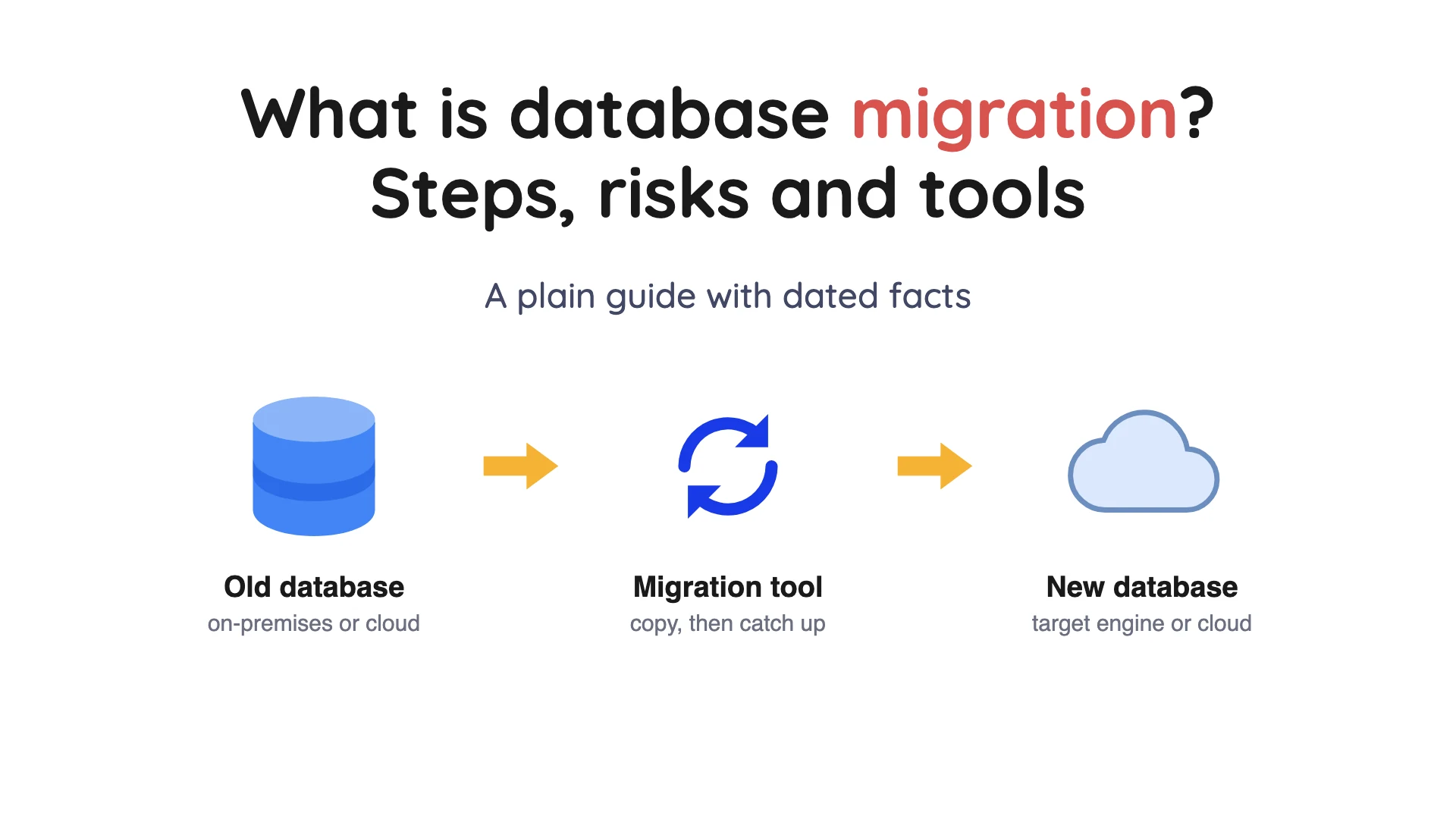
Database migration means moving your database's data and structure to a new home, then pointing your applications at it. The new home can be a new server, a new cloud or a different database engine.
A safe move has seven steps: size it up, pick an approach, convert the structure, rehearse, copy, check the copy, and switch with a way back. The big risks are data that doesn't match, downtime longer than you planned and no fallback.
For the same engine, the database's own tools are often enough. For a move to a cloud, start with that cloud's own migration service.
If you want to keep an analytics copy current instead, OLake Go replicates PostgreSQL, MySQL and MariaDB, MongoDB and SQL Server into Apache Iceberg or Parquet.
- Database migration is a project with an end date. You copy the data, check it, switch the app, and then the old database goes away. Keeping a copy current for years? That's a different job called replication, and OLake Go is built for it (see our docs).
- There are seven steps. The two that people skip are rehearsing on a copy and checking that the new database matches the old one. Don't skip them.
- Zero downtime is a target nobody can promise. Google's own architecture guide says truly zero downtime for clients is impossible. Aim for a pause so short that nobody notices.
- Check the retirement dates. Microsoft ended support for Azure Database Migration Service (classic) for SQL Server moves on 15 March 2026 (retirement notice) (checked Oct 2026). An old guide may point you at a dead tool.
- Keep the old database until the new one has proven itself. In PostgreSQL's pg_upgrade link mode, once the new cluster starts, the old one is unsafe to use. The docs say to restore from a backup.
We did not run the other tools below. Every fact about them comes from the vendor's or project's own documentation, and each claim links the page it came from. Plans and prices change often, so check the vendor's page before you decide.
What is database migration?
Let's start with the plain version. Google's Database Migration Service docs define migration as moving data and metadata from a source database to a destination database.
Metadata is the description of the data: table layouts, column types, indexes and rules. The "source" is where you start, and the "target" is where you end up.
Think of moving house. You don't just carry the boxes, you also check that the sofa fits the new living room and the power works.
A database move is the same deal. The data, its structure and the programs that use them all have to arrive together.
A move can mean a new server, a new cloud, a different database engine or a newer version of the same one. Each one changes the size of the job, so name yours first.
Why teams migrate
Nobody migrates for fun. MongoDB's guide lists five common reasons: newer database features, consolidating several databases, cutting running costs, better disaster recovery, and security or compliance rules. AWS adds that a move from on-premises servers to the cloud is often done for reliability, scalability and performance.
Your reason matters, because it sets what "done" means. Cost moves are done when the old bill stops. For compliance, done means the audit passes.
Three things people confuse it with
The search term covers three different jobs.
| Job | What it does | Ends when | Where to read more |
|---|---|---|---|
| Database migration | Moves a database to a new server, cloud or engine | You switch the app to the new database | This page and the data migration strategy checklist |
| Schema migration | Applies versioned changes to table layouts with scripts | Never, it is part of normal development | Flyway's docs below |
| Replication | Keeps a second copy current all the time | You decide to stop | What is change data capture |
Flyway's documentation describes migrations as SQL scripts that capture incremental schema and data changes to a database. Think of it as version control for your tables. Our read: it is a different job from moving data between systems.
There is a fourth job that looks similar. Copying a live database into a lake or warehouse for analysis runs for years, and the app never switches over.
OLake Go is built for that job. It is open source under Apache 2.0 (GitHub repo) and replicates databases into Apache Iceberg or Parquet, with change data capture for Postgres, MySQL and MariaDB, MongoDB and SQL Server in our docs.
Types of database migration
A few labels show up in almost every vendor guide. They describe how different the old and new databases are, and how long the copy runs.
Same engine or different engine
Google's docs say a homogeneous migration moves between the same database technology, such as MySQL to Cloud SQL for MySQL. A heterogeneous migration changes the technology, such as Oracle to Cloud SQL for PostgreSQL.
Different engines are harder. Table definitions, data types and stored code all have to be converted.
AWS has a feature for that inside its Database Migration Service (DMS), called DMS Schema Conversion. Its docs say it converts schemas and most of the code objects in a database to a format the target accepts.
One-time or continuous
Google's docs describe a one-time migration as a single point-in-time snapshot. A continuous migration is a flow of changes that follows an initial full dump and load.
That second kind reads the database's change log, the file where the database writes down every insert, update and delete in order. The trick is called change data capture (CDC).
Offline or online
AWS's what-is page splits moves by how long your app can sit still. Offline migration suits non-critical databases that can live with a long pause. Live production workloads need data replication so the pause stays short.
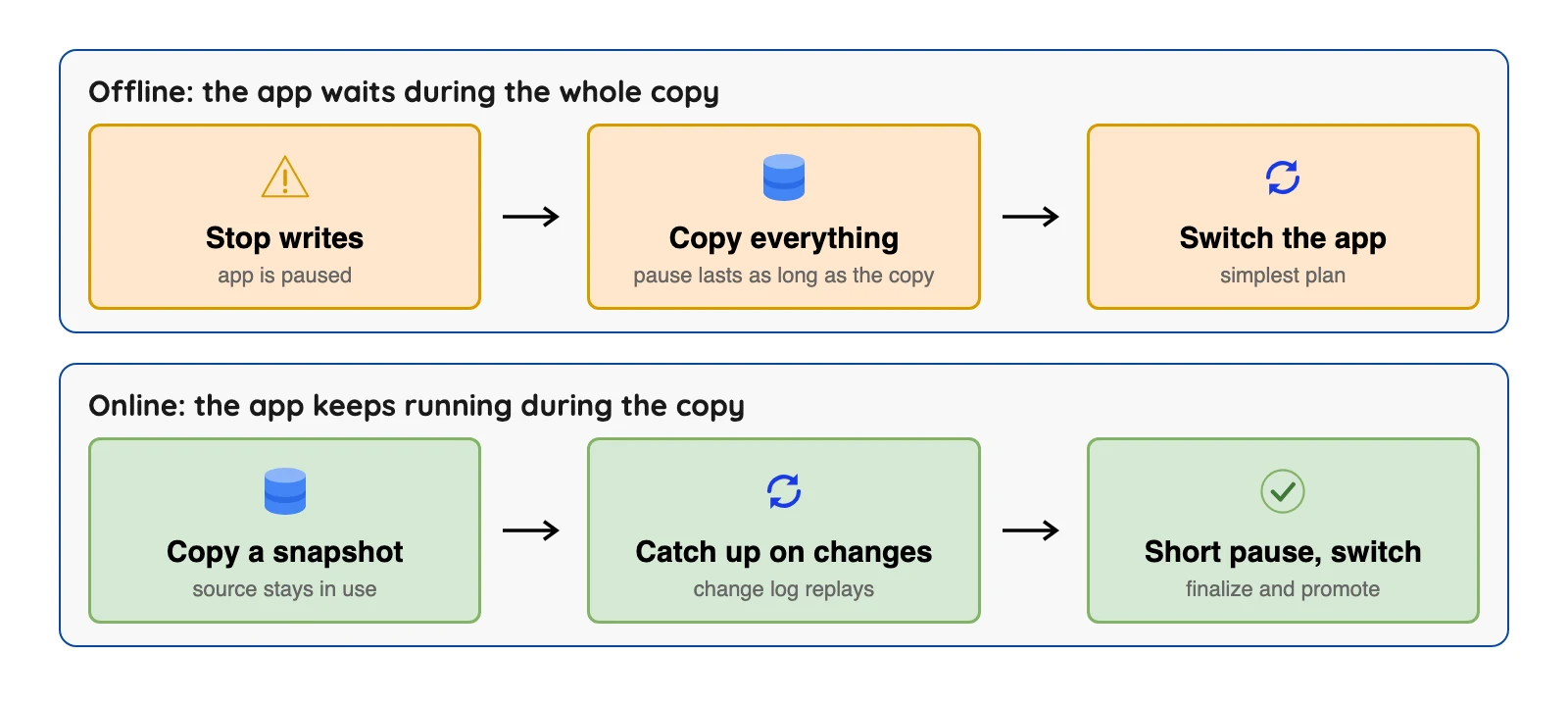
The top row is simpler, but the pause lasts as long as the copy. The bottom row takes more work to set up, and in return the pause shrinks to the switch itself.
Big bang, trickle or zero-downtime
MongoDB's guide names three strategies. Big bang does the whole move in one go.
Trickle runs the old and new databases side by side, which keeps downtime low but stretches the project. Zero-downtime uses replication and redirection so users keep working.
That last label oversells itself. Google's architecture guide says that in a migration, truly zero downtime for clients is impossible, and it recommends aiming for near-zero downtime.
The seven Rs, for bigger programs
Moving a whole estate, not just one database? AWS Prescriptive Guidance names seven strategies: retire, retain, rehost, relocate, repurchase, replatform and refactor.
The guide calls rehost "lift and shift", which means moving as is. Refactor, which means redesigning, is not recommended for large migrations.
The seven steps of a database migration
Here's the short version of what the vendor guides tell you to do. Each step comes with a thing that goes wrong and a way to check.
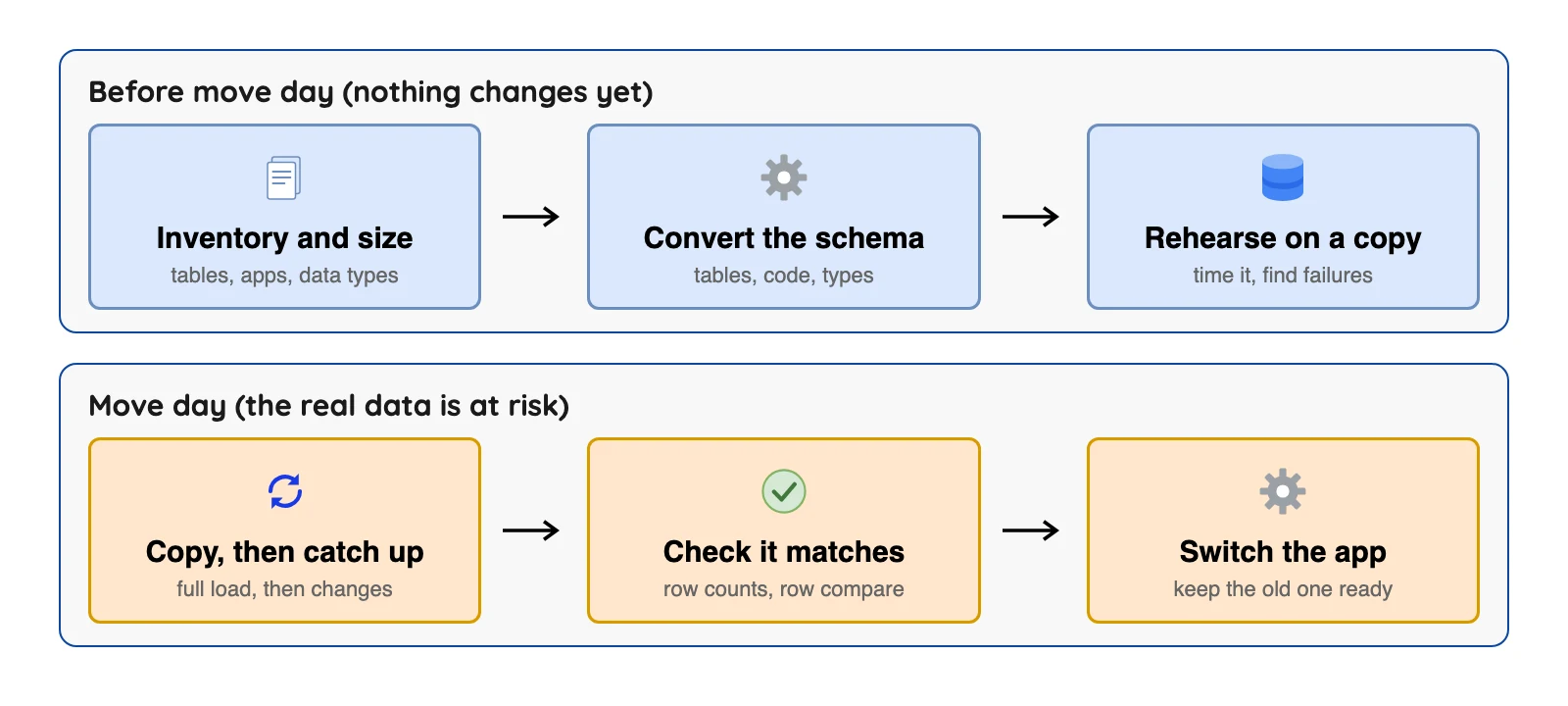
The first row is the safe part, because nothing changes yet. The second row is where your real data is at risk.
1. Size it up
List every database, table and program that touches the data. Note how big each table is and how many have large text or file columns. AWS's best-practice page says a small test migration shows these facts, including how many tables have large object columns and how long a test run takes.
What goes wrong: a program nobody remembered still reads the old database after you switch. How to check: ask each team which systems connect, and then ask again.
2. Pick the approach
Decide between one-time and continuous, and between same engine and different engine. The table in "Which option fits which situation" helps. The question that matters most is simple: how long can your application pause?
3. Convert the structure
For a same-engine move, native tools can handle the structure. AWS's docs list Oracle SQL Developer, MySQL Workbench and pgAdmin 4 as examples. Changing engines needs a conversion tool, and you should expect some manual work.
One gap is easy to miss. AWS's docs say DMS handles basic schema migration, including tables and primary keys. They also say it does not automatically create secondary indexes, foreign keys or user accounts on the target.
4. Rehearse on a copy
Do a full dress rehearsal. Run the whole move on a copy of the data, with the same tool and the same settings. AWS also offers a premigration assessment, which checks a migration task for problems that might stop it from running as expected, before you run it.
AWS recommends a proof of concept to find problems early and to set a more realistic timeline. PostgreSQL's docs suggest the same idea for upgrades: build a schema-only copy of the old cluster, insert dummy data and upgrade that.
5. Copy, then catch up
First the tool copies everything that exists. That's the full load. For a continuous migration it then applies the changes that arrived during the copy, until the two databases are in step.
Google's service works this way. Its docs say it takes a snapshot of the source, loads it into the destination and then begins continuous replication, while the source stays in use.
6. Check that the copy is right
"It copied without errors" is not the same as "it's right." Google's architecture guide says a consistent migration is complete, free of duplicates and ordered.
Complete means all the chosen data arrived. Free of duplicates means each piece arrived once, and ordered means changes were applied in the order they happened.
Once the data matches, test the new database the way your app really uses it. MongoDB's guide says to test features, speed and security, and to have a rollback plan.
Watch the tool's own numbers too. AWS DMS shows incoming and committed changes, latency and per-table row counts in its task metrics.
Tools can do the comparing for you. AWS DMS data validation compares each source row with its target row and reports mismatches. It has limits, though, and the next section covers them.
7. Switch the app and keep a way back
Cutover is the moment your applications start using the new database. Google's docs say that when the destination is ready for reads and writes, you finalize replication and the destination becomes a standalone primary. Switch while the two are in sync and downtime stays minimal.
Resist the urge to delete the old database that day. Google's architecture guide says teams sometimes keep the source databases as a fallback if unforeseen issues appear, and delete them only once the target runs reliably.
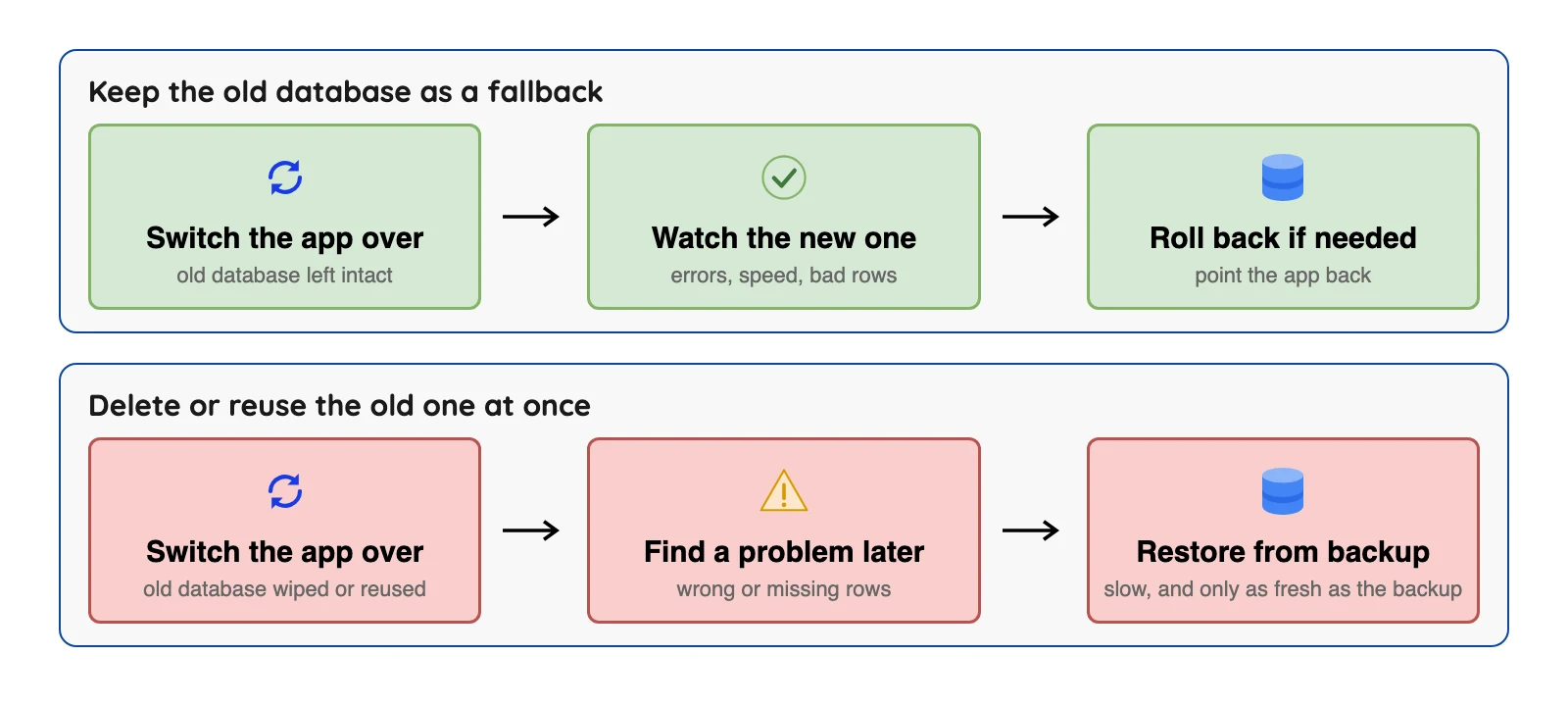
The top row costs some disk space for a while. The bottom row can cost far more if the new database turns out to have a problem.
What decides how long a migration takes
Everyone asks "how long will it take?" and no source gives one honest number, so we won't invent one. AWS lists six factors that affect DMS performance: resources on the source, network throughput, replication server capacity, how fast the target can take changes, the type and spread of the source data, and the number of objects to move.
That's why the rehearsal in step 4 matters. Time a full test run, then plan the real run with room to spare. One more tip from the same page: stop any running migration tasks before you upgrade the source or target database, then resume them afterwards.
Risks, and how the docs say to reduce them
Most vendor pages say "data loss" and stop there, which isn't much help. The table below is more specific, and every row comes from a primary document.
| Risk | What it looks like | What the docs say to do | Source |
|---|---|---|---|
| Rows that do not match | Missing, extra or changed rows after the copy | Run validation, but know it needs a primary key or unique index on each table | AWS DMS validation docs |
| Left-behind objects | Indexes, users, privileges and stored procedures missing on the target | Create them yourself, because DMS does not propagate them | AWS DMS best practices page |
| Slow catch-up | The new database lags behind the old one | Plan for it. AWS gives no service-level agreement (SLA) for CDC latency and says it can rise to several minutes or longer | AWS DMS best practices page |
| Load on the old database | The live app slows down during the copy | Reduce tasks or tables per task, because each task reads the source | AWS DMS best practices page |
| Large values left behind | Long text or file-like values are shortened or not copied | Set the size limit to your largest value. In limited mode the default is 32 KB, and larger values must be moved by hand | AWS DMS best practices page |
| No way back | A bad cutover cannot be undone | Keep the source as a fallback until the target is reliable | Google architecture guide |
| A retired tool | A guide tells you to use a service that is no longer supported | Check the vendor's retirement notice first | Microsoft retirement notice |
An SLA is a promise about service levels. AWS says plainly that DMS CDC is not real-time, and that you shouldn't use it where you need sub-second or guaranteed low latency (checked Oct 2026).
How far validation can be trusted
Most guides say "validate your data" and move on. The limits list on the AWS validation page is short, and it's worth reading before you lean on it (checked Oct 2026).
First, a table needs a primary key or unique index, which is a column that identifies each row. The same page lists more limits.
Views can't be validated, and rows that change all the time can't be compared. Validation also adds queries to both databases and takes extra time on top of the migration.
If more than 10,000 records fail or are suspended, AWS DMS stops validating. Fix the underlying problem before you go on.
A worked example: a large table
AWS's best-practice page gives an example of splitting one giant table. Suppose a table has an integer key from 1 to 8,000,000. You can create eight tasks with row filters and have each one migrate one million records.
The same page warns that each task reads the source on its own. More tasks speed up the copy but add load to the live database, so you have to find a balance. Transactional consistency is kept inside one task, so tables that share transactions should stay together.
Foreign keys and triggers during a full load
This one is a bit counterintuitive. For the bulk copy, AWS recommends dropping or delaying primary key indexes, secondary indexes, foreign key constraints and triggers. The reason is that tables load in groups, so foreign keys are broken along the way and triggers can fire on rows that were already bulk loaded.
Turn triggers back on right before the cutover. For a full load plus CDC task, add secondary indexes before the CDC phase so updates don't cause full table scans.
Database migration tools compared
You don't need to compare dozens of products. There are four kinds of tool. Native database tools cover many same-engine moves, and cloud migration services cover moves into one cloud.
Schema conversion tools help when the engine changes. Data integration tools solve a related job, loading data for analysis.
| Option | Best for | Online (continuous) option | Named limit | Cost, as published |
|---|---|---|---|---|
| PostgreSQL tools (pg_dump, pg_upgrade) | Same engine, new server or version | No, these are one-time tools | In pg_upgrade link mode, once the new cluster starts the old one is unsafe to use | Free, part of PostgreSQL |
| AWS DMS | Moves into AWS, many engine pairs | Yes, full load plus CDC | No SLA on CDC latency; does not create secondary indexes, foreign keys or users | Instance hours or serverless units |
| Google Database Migration Service | Moves into Cloud SQL or AlloyDB | Yes, continuous | Destinations are Google Cloud databases only | No extra charge for MySQL-native or PostgreSQL-native moves to Cloud SQL or AlloyDB for PostgreSQL |
| Azure Database Migration Service | Moves into Azure SQL targets | Yes, in Premium (classic pricing page) | Classic SQL Server scenarios ended 15 March 2026 | Standard free; Premium billed by vCore hour |
| Data integration tools | Loading analytics systems, not switching an app | Often, as scheduled or CDC syncs | A different job from cutting over an application | Varies by tool |
| OLake Go (ours) | Keeping an Iceberg or Parquet copy current for analytics | Yes, full load then change capture for PostgreSQL, MySQL and MariaDB, MongoDB and SQL Server | Output is Iceberg or Parquet | Open source (Apache 2.0), free to self-run |
Sources: AWS DMS price list, Google pricing page, Azure pricing page (checked Oct 2026)
For the full tool list, see data migration tools compared. For the order of work, see the data migration strategy checklist.
Native database tools
First, a word. A cluster is the set of databases that one PostgreSQL server manages.
PostgreSQL's pg_upgrade upgrades data to a later major version without the dump and restore step. Its link mode uses hard links, a way for two names to point at the same file, instead of copying files. That makes the upgrade faster and uses less disk space.
The way back is the weak point. Once the new cluster has started in link mode, it has written to shared files.
The pg_upgrade docs say it is then unsafe to use the old cluster, which must be restored from backup (checked Oct 2026).
Our read: native tools fit when the engine stays the same and a short pause is fine. They do not fit when the engines differ or when you can't stop writes.
AWS Database Migration Service
AWS describes DMS as migrating databases, data warehouses, NoSQL databases and other data stores, as one-time moves or ongoing replication. Its sources page lists self-managed sources including Oracle 10.2 to 19c, SQL Server 2008 to 2022 and MySQL 5.5 to 8.4. The same page lists MariaDB 10.0 to 11.4, PostgreSQL 9.4 to 18 and MongoDB 3.x to 8.0 (checked Oct 2026).
DMS fits moves with many engine pairs and targets in AWS. It does not fit where you need guaranteed low latency, as shown above. A task can be full load only, full load plus CDC, or CDC only.
Now the price. AWS's price-list file lists a dms.t3.medium instance in us-east-1 at $0.0745 an hour for one availability zone and $0.149 an hour for two, on demand (checked Oct 2026). DMS Serverless is billed by capacity units, and the cloud's own data transfer and storage charges apply separately.
Google Database Migration Service
If you're moving into Cloud SQL or AlloyDB, Google's service is the one built for those targets. Its docs list homogeneous migrations to Cloud SQL for MySQL, Cloud SQL for PostgreSQL, AlloyDB for PostgreSQL and Cloud SQL for SQL Server. They also list heterogeneous moves from Oracle and from SQL Server to PostgreSQL targets (checked Oct 2026).
Google's pricing page says homogeneous native migrations to Cloud SQL or AlloyDB for PostgreSQL carry no extra charge. Heterogeneous migrations are priced by the gigabytes processed (checked Oct 2026). The page states the free backfill allowance two different ways, so we do not quote it.
Google's service fits moves inside Google Cloud. It loses on reach, because the destinations are Google Cloud databases.
Azure Database Migration Service
Microsoft's overview, updated 19 February 2026, describes Azure Database Migration Service as a fully managed service for moves to Azure data platforms with minimal downtime. The targets in its comparison table are Azure SQL Database, Azure SQL Managed Instance and SQL Server on Azure Virtual Machines.
Microsoft's retirement notice says the classic service for SQL Server scenarios could not be created after 1 August 2023 and was not supported after 15 March 2026. MySQL, PostgreSQL and MongoDB scenarios in the classic service were outside that retirement. The notice names the Azure portal service, the Azure SQL migration extension in Azure Data Studio, and PowerShell or the command line as the replacements (checked Oct 2026).
The pricing page still uses the name "classic". It lists Standard compute at 1, 2 and 4 vCores (virtual cores, a logical CPU each) as free, for offline migration only. It lists Premium at 4 vCores at $0.37 an hour, free for six months (183 days) from service creation (checked Oct 2026).
The page does not say whether the same rates apply to the newer Azure portal service, so check before you budget.
Ask any vendor what "minimal downtime" means in minutes for your data size, then test it in your rehearsal. Azure's service fits when your target is an Azure SQL product, and it does not cover targets outside that list.
What practitioners say
Public discussion of migration services is thin outside AWS. We quote one positive and one negative view for AWS DMS and none for the other options, because we could not open a verified pair for them. Each quote is one person's view, with its date and link.
On AWS DMS, one Hacker News commenter praised it in January 2024 for long-running replication. They wrote that there is "some complexity/gotchas" but "it's always been more than up to the task." Another commenter in the same thread wrote in January 2024: "AWS DMS did not work for my team and we proceeded with pglogical."
Treat these as two voices, not a survey.
Which option fits which situation
| Your situation | Likely fit | Why | Limit |
|---|---|---|---|
| Same engine, new major version, short pause is fine | The database's own upgrade tool | No extra service to run | Rollback can be hard, as in pg_upgrade link mode |
| Moving a database into Google Cloud SQL or AlloyDB | Google Database Migration Service | Online, and no extra charge for MySQL-native or PostgreSQL-native moves | Google Cloud targets only |
| Moving Oracle, SQL Server, MySQL or PostgreSQL into AWS | AWS DMS | Wide list of sources and targets | No SLA on CDC latency; objects like secondary indexes need manual work |
| Moving SQL Server into Azure SQL products | Azure Database Migration Service (current portal version) | Built for those targets | Not for targets outside Azure; check the classic retirement |
| Pause must be very short on a busy database | An online option, plus a rehearsal | Copy first, then catch up from the change log | Not real time, so plan a catch-up check before cutover |
| Feeding analytics, not switching an app | A data integration or replication tool such as OLake Go (our docs) | Built to keep syncing | A different job from a cutover |
A plain checklist before you start
Short on time? Here's the whole post as a to-do list. Each item points back to a section above.
- Write down every system that connects to the database, and who owns it.
- Decide how long the app can be paused, and pick one-time or continuous to fit.
- Convert the structure, then list what the tool will not create, such as secondary indexes, foreign keys and users.
- Rehearse the full move on a copy and time it.
- Turn on validation and check its limits for your tables.
- Write the cutover steps and the rollback steps before move day.
- Keep the old database until the new one has run reliably for a period you chose in advance.
The data migration strategy checklist goes deeper on planning and cutover.
Conclusion
Database migration is moving data, structure and applications to a new database, then switching over. The hard parts are the rehearsal, the check and the way back.
Same-engine moves can start with the database's own tools.
Cloud moves can start with that cloud's own service. Read its limits and retirement notices first, and see data migration tools compared for the wider list. Whatever you pick, keep the old database until the new one has earned its place.
If you want a copy flowing for analytics instead of a cutover, use a replication tool such as OLake Go (our docs).
Test your database migration basics
Question 1 of 5
Warm-up: a database migration is a project with an end. Which job instead keeps a second copy up to date with no planned end date?