MySQL to Redshift: CDC via Apache Iceberg
MySQL to Redshift usually means a Database Migration Service (DMS) task, the zero-ETL (extract, transform, load) integration that only Aurora and Amazon Relational Database Service (RDS) offer, or a nightly export and COPY. This guide takes a fourth route. OLake Go reads the MySQL binary log and commits the changes as Apache Iceberg tables into the AWS Glue Data Catalog, with the files in your own S3 bucket.
Redshift maps the Glue database onto an external schema and queries the tables in place. Nothing else is in the path: no DMS, no Kafka, no load job. Athena and DuckDB read the same tables through the same catalog.
Key takeaways
- OLake Go replicates MySQL into Iceberg tables in the Glue Data Catalog: a full historical snapshot first, then change data capture (CDC) from the binlog, with no DMS or Debezium in between. Any MySQL 8 server works, not only Aurora or RDS.
- Redshift reads the Glue database through one
CREATE EXTERNAL SCHEMAstatement, with no refresh. Every change a sync commits is visible on the next query, on Serverless and RA3 alike. - The same tables, written once by OLake Go, are also queryable from Athena and DuckDB. In the run on this page all three engines returned identical rows.
The short answer. To replicate MySQL to Redshift with change data capture (CDC), run OLake Go with MySQL's binary log as the source and the AWS Glue Data Catalog as the Iceberg destination. Set the upsert type to Positional Deletes, the format Redshift reads.
The first sync copies each table in full (the historical snapshot); every later sync replays inserts, updates and deletes from the binlog. Redshift, Athena and DuckDB then query the same Iceberg tables, with no second copy.
How MySQL CDC reaches Redshift here
Two things happen in order, and OLake Go does both on its own. The first sync records the current binlog position. Then it reads each table in parallel chunks and writes Parquet data files: that is the historical load.
Every later sync opens the binlog at the saved position and replays the inserts, updates and deletes since. Nothing written during the snapshot is lost, and there is no separate backfill job.
Each sync ends with one commit to Glue. OLake Go uploads the data and delete files to the bucket, then updates the table's metadata pointer in the Glue database. Redshift, Athena and DuckDB see the new snapshot on their next query; none of them keeps a copy.
One thing to keep an eye on: the binlog is MySQL's replay window. MySQL deletes binlog files after binlog_expire_logs_seconds.
A job paused for longer than that cannot resume and needs a fresh snapshot. Keep retention longer than your longest planned pause, and alert on SHOW BINARY LOGS size if disk is tight.
What you need
- MySQL 8.0 or later with the binlog on in
ROWformat and a user that can read it. The tables on this page ran on MySQL 8.4 in Docker. Hosted MySQL on Amazon RDS, Aurora, Google Cloud SQL or Azure works the same way; step 1 links the setup guides. - An AWS account with an S3 bucket for the files and an IAM user or role for OLake Go with Glue and S3 permissions. The run on this page used a bucket and a scoped IAM user in
ap-southeast-1. - Amazon Redshift, Serverless or an RA3 cluster, with an IAM role attached that can read Glue and the bucket. The run on this page used a Serverless workgroup at 8 RPU.
- OLake UI from the Docker Compose install. The run on this page used OLake Go v1.1.0.
- Docker, and about 40 minutes.
Step 1: Prepare MySQL for CDC
Most readers point OLake Go at tables they already have. If you want to follow along with the exact data from this page, create these two tables first:
The two sample tables used on this page
CREATE TABLE customers (
  id INT AUTO_INCREMENT PRIMARY KEY,
  name VARCHAR(100), email VARCHAR(200), city VARCHAR(100), tier VARCHAR(20),
  created_at TIMESTAMP DEFAULT CURRENT_TIMESTAMP,
  updated_at TIMESTAMP DEFAULT CURRENT_TIMESTAMP ON UPDATE CURRENT_TIMESTAMP);

CREATE TABLE orders (
  id INT AUTO_INCREMENT PRIMARY KEY,
  customer_id INT, product VARCHAR(100), amount DECIMAL(10,2), status VARCHAR(20),
  created_at TIMESTAMP DEFAULT CURRENT_TIMESTAMP,
  updated_at TIMESTAMP DEFAULT CURRENT_TIMESTAMP ON UPDATE CURRENT_TIMESTAMP,
  FOREIGN KEY (customer_id) REFERENCES customers(id));

-- Then insert whatever you like. This page started with 8 customers and 40 orders.
OLake Go reads MySQL changes from the binary log (binlog), the same stream MySQL replicas use. Four things must be in place on the server before the first sync.
| Setting | Value | Why it matters |
|---|---|---|
log_bin | ON with a server_id | Without a binlog MySQL records no row changes, so there is nothing to replicate. Changing it needs a restart. |
binlog_format | ROW | Statement-based logging does not carry the row images OLake Go needs. |
binlog_row_metadata | FULL | Adds column names and types to every event, so OLake Go can map changes to columns after a schema change. |
| Replication user | SELECT, REPLICATION SLAVE, REPLICATION CLIENT | The snapshot reads the tables; the change stream reads the binlog. |
-- 1. Binary logging: put these in my.cnf (or the parameter group on managed MySQL) and restart
--    server-id = 1
--    log_bin = mysql-bin
--    binlog_format = ROW
--    binlog_row_metadata = FULL
--    binlog_expire_logs_seconds = 604800   -- keep 7 days, so a paused job can catch up
--    gtid_mode = ON, enforce_gtid_consistency = ON   -- optional; gives microsecond _cdc_timestamp

-- 2. A user for OLake Go
CREATE USER IF NOT EXISTS 'olake'@'%' IDENTIFIED BY '<password>';
GRANT SELECT, REPLICATION SLAVE, REPLICATION CLIENT ON *.* TO 'olake'@'%';
FLUSH PRIVILEGES;

-- 3. Table statistics: the chunked snapshot plans its chunks from them
ANALYZE TABLE customers, orders;
Check the result before moving on:
SHOW VARIABLES WHERE Variable_name IN ('log_bin', 'binlog_format', 'binlog_row_metadata', 'server_id');
SHOW GRANTS FOR 'olake'@'%';
Managed MySQL sets these through a parameter group or server setting rather than my.cnf. Each flavour has its own guide:
| Where MySQL runs | Guide |
|---|---|
| Amazon RDS | RDS MySQL CDC setup |
| Amazon Aurora | Aurora MySQL CDC setup |
| Azure Database for MySQL | Azure MySQL CDC setup |
| Google Cloud SQL | Cloud SQL MySQL CDC setup |
| Your own server or VM | Generic MySQL CDC setup |
| Docker, for a local test | Local MySQL with Docker Compose |
MySQL deletes binlog files after binlog_expire_logs_seconds. If a job is paused longer than that, the next sync cannot find its saved position and needs a fresh full snapshot. Keep retention longer than your longest planned pause.
Step 2: Set up the Glue catalog
Redshift reads Iceberg tables through a catalog. AWS Glue Data Catalog is the one this page uses: OLake Go creates a Glue database per job and registers each table there. The files sit in your S3 bucket.
Redshift, Athena, Amazon Elastic MapReduce (EMR) and DuckDB all read from the same catalog. Redshift reaches it through an external schema, with the IAM role attached to the workgroup or cluster.
| Catalog | OLake Go writes | Amazon Redshift reads | Verified on this page |
|---|---|---|---|
| AWS Glue | Yes | Yes: external schema from the Glue Data Catalog | Yes, end to end |
- AWS Glue
AWS Glue Data Catalog is the default catalog in OLake Go. The tables live as Parquet and metadata files in an S3 bucket you own, and Glue holds the pointer to the current metadata file. Athena, Redshift, EMR, Spark and DuckDB read the same tables through Glue, which is why it is the catalog to pick when more than one AWS engine will read the data.
You need:
- An S3 bucket for the table files, in the region where your engines run.
- An IAM user or role for OLake Go with Glue and S3 permissions. The exact policy is on the AWS Glue catalog page.
- No Glue database in advance: OLake Go creates one per job, named after the source database and schema (for example
pg_to_snowflake_shop_public).
Glue has no built-in compaction for tables written by external engines, so plan on OLake Fusion or Spark for maintenance once the change volume grows.
The run on this page gave OLake Go a scoped IAM user with this inline policy. Redshift got a role with AmazonS3ReadOnlyAccess and read access to Glue:
{
  "Version": "2012-10-17",
  "Statement": [
    { "Effect": "Allow", "Action": ["s3:ListBucket", "s3:GetBucketLocation"], "Resource": "arn:aws:s3:::<bucket>" },
    { "Effect": "Allow", "Action": ["s3:GetObject", "s3:PutObject", "s3:DeleteObject", "s3:AbortMultipartUpload", "s3:ListMultipartUploadParts"], "Resource": "arn:aws:s3:::<bucket>/*" },
    { "Effect": "Allow",
      "Action": ["glue:GetDatabase", "glue:GetDatabases", "glue:CreateDatabase", "glue:GetTable", "glue:GetTables", "glue:CreateTable", "glue:UpdateTable", "glue:DeleteTable"],
      "Resource": ["arn:aws:glue:<region>:<account>:catalog", "arn:aws:glue:<region>:<account>:database/*", "arn:aws:glue:<region>:<account>:table/*/*"] }
  ]
}
Step 3: Connect MySQL to OLake Go
- OLake UI
- OLake CLI
- In the OLake UI, open Sources and click Create Source. Pick MySQL as the connector, give the source a name and keep the OLake Go version on the latest release.
- Under Change data capture (CDC), leave Enable CDC on. The default Initial Wait Time is fine; raise it only if the binlog is large and the next sync times out while finding its saved position.
- Under Connection details, fill in the host, port, database name, username and password. Keep TLS off for a local test; on managed MySQL use the provider's certificate.
- Click Set up source. OLake Go tests the connection, then checks the binlog prerequisites (
binlog_access,log_bin,binlog_format,binlog_row_metadata) and shows the current and recommended value for anything that fails.
Here is the source form from the run on this page. MySQL ran in another container, so the host is host.docker.internal; the user is the replication user from step 1.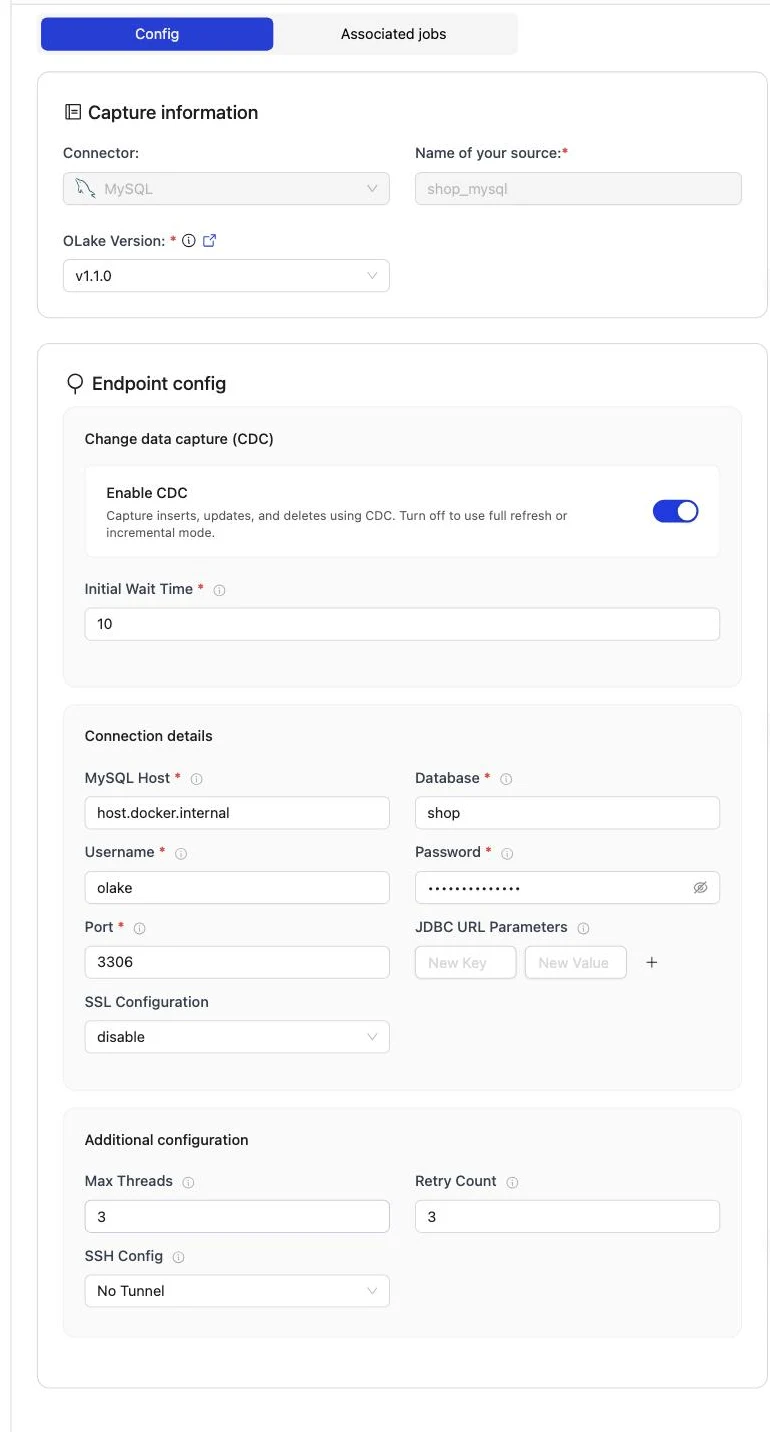
Set up source runs the connection test and the binlog checks (binlog_access, log_bin, binlog_format, binlog_row_metadata) before anything is saved. When one fails, the dialog names the setting and its recommended value.
The full field reference, including SSL and SSH tunnels, is on the MySQL connector page.
Create source.json in your config folder. The update_method block is what turns CDC on:
    {
        "hosts": "mysql-host",
        "username": "mysql-user",
        "password": "mysqlpwd",
        "database": "my-db",
        "port": 3306,
        "tls_skip_verify": true,
        "update_method": {
          "initial_wait_time": 10
        },
        "max_threads": 5,
        "backoff_retry_count": 4,
        "ssh_config": {
          "host": "my-tunnel-host",
          "port": 22,
          "username": "my-tunnel-user",
          "password": "tunnel-password"
        },
        "ssl": {
          "mode": "disable"
        },
        "jdbc_url_params": {
          "connectTimeout": "10000"
        }
    }
Then confirm OLake Go can reach the database:
docker run --pull=always \
  -v "$PWD/config:/mnt/config" \
  olakego/source-mysql:latest \
  check --config /mnt/config/source.json
A working setup returns "status": "SUCCEEDED" together with a prerequisites list that reports the binlog settings as passed. Every field is described on the MySQL connector page.
Step 4: Configure the Iceberg destination
- AWS Glue
- OLake UI
- OLake CLI
- Open Destinations and click Create Destination.
- Pick Apache Iceberg as the connector and AWS Glue as the catalog type.
- Enter the S3 path, the AWS region and the access key pair (or leave the keys empty to use the instance role).
- Click Create.
| Parameter | Sample Value | Description |
|---|---|---|
S3 Path required | s3://<BUCKET_NAME>/ | S3 bucket path where Iceberg table data and metadata files will be stored. |
AWS Region required | ap-south-1 | AWS Region where your S3 bucket and Glue Data Catalog exist. Required so OLake Go calls the correct regional S3 and Glue endpoints. |
| AWS Access Key | XXX | AWS access key ID for authentication. Optional if using IAM roles or instance profiles. If using IAM: Docker Compose: add the required IAM environment variables under x-envs in your compose file. See Service Environment Variables for setup details.Kubernetes: set up pod IAM in Cloud Integration. |
| AWS Secret Key | XXX | AWS secret access key for authentication. Optional if using IAM roles or instance profiles. If using IAM: Docker Compose: add the required IAM environment variables under x-envs in your compose file. See Service Environment Variables for setup details.Kubernetes: set up pod IAM in Cloud Integration. |
| S3 Endpoint | https://glue.ap-south-1.amazonaws.com | S3 API endpoint for writing Iceberg data files. Optional for AWS S3 but required for S3-compatible storage like MinIO. |
| Custom Glue Endpoint Configuration | true/false | Enable custom Glue catalog configuration when Glue catalog settings differ from S3 (different credentials, region, or endpoint). Shows additional Glue configuration fields. Leave off when Glue and S3 use the same AWS setup. |
| Enable Arrow Writes | true/false | Writes data and delete files using Apache Arrow based writer and registers them in Iceberg. |
The following fields appear in the UI after Custom Glue Endpoint Configuration is turned on. Configure Glue catalog connection settings here separately from the S3 fields above.
| Parameter | Sample Value | Description |
|---|---|---|
| Glue Catalog ID | 123456789012 | AWS account ID used as the Glue Data Catalog identifier. |
| Glue Access Key | XXX | Access key for authenticating Glue catalog requests. Required when Glue credentials differ from S3 credentials. |
| Glue Secret Key | XXX | Secret key for authenticating Glue catalog requests. Required when Glue credentials differ from S3 credentials. |
| Glue Endpoint | https://glue.ap-south-1.amazonaws.com | Custom endpoint URL for AWS Glue or a Glue-compatible catalog service. |
| Glue Region | ap-south-1 | Region for the Glue catalog, if different from the S3 region. Falls back to AWS Region if not set. |
{
    "type": "ICEBERG",
    "writer": {
      "catalog_type": "glue",
      "catalog_name": "olake_iceberg",
      "iceberg_s3_path": "s3://<BUCKET_NAME>/",
      "aws_region": "<AWS_REGION>",
      "aws_access_key": "<AWS_ACCESS_KEY>",
      "aws_secret_key": "<AWS_SECRET_KEY>",
      "arrow_writes": false
    }
}
| Parameter | Sample Value | Description |
|---|---|---|
iceberg_s3_path required | s3://<BUCKET_NAME>/ | S3 bucket path where Iceberg table data and metadata files will be stored. |
aws_region required | ap-south-1 | AWS Region where your S3 bucket and Glue Data Catalog exist. Required so OLake Go calls the correct regional S3 and Glue endpoints. |
| aws_access_key | XXX | AWS access key ID for S3 authentication. Optional if using IAM roles or instance profiles. If using IAM: add the required IAM environment variables in your shell or runtime environment. |
| aws_secret_key | XXX | AWS secret access key for S3 authentication. Optional if using IAM roles or instance profiles. If using IAM: add the required IAM environment variables in your shell or runtime environment. |
| s3_endpoint | https://glue.ap-south-1.amazonaws.com | S3 API endpoint for reading/writing Iceberg data files. Optional for AWS S3 but required for S3-compatible storage like MinIO. |
| glue_additional_config | true/false | Enable custom Glue catalog configuration when Glue catalog settings differ from S3 (different credentials, region, or endpoint). Leave off when Glue and S3 use the same AWS setup. |
| arrow_writes | false | Writes data and delete files using Apache Arrow based writer and registers them in Iceberg. |
When using separate Glue catalog settings, set glue_additional_config to true in destination.json and add the fields below. These configure Glue catalog connection settings separately from the S3 fields above.
| Parameter | Sample Value | Description |
|---|---|---|
| glue_catalog_id | 123456789012 | AWS account ID used as the Glue Data Catalog identifier. |
| glue_access_key | XXX | Access key for authenticating Glue catalog requests. Required when Glue credentials differ from S3 credentials. |
| glue_secret_key | XXX | Secret key for authenticating Glue catalog requests. Required when Glue credentials differ from S3 credentials. |
| glue_endpoint | https://glue.ap-south-1.amazonaws.com | Custom endpoint URL for AWS Glue or a Glue-compatible catalog service. |
| glue_region | ap-south-1 | Region for the Glue catalog, if different from the S3 region. Falls back to AWS Region if not set. |
Here is the destination form from the run on this page. It holds the bucket path OLake Go writes under, the region of the bucket and the Glue catalog, and the access key pair of the IAM user from step 2.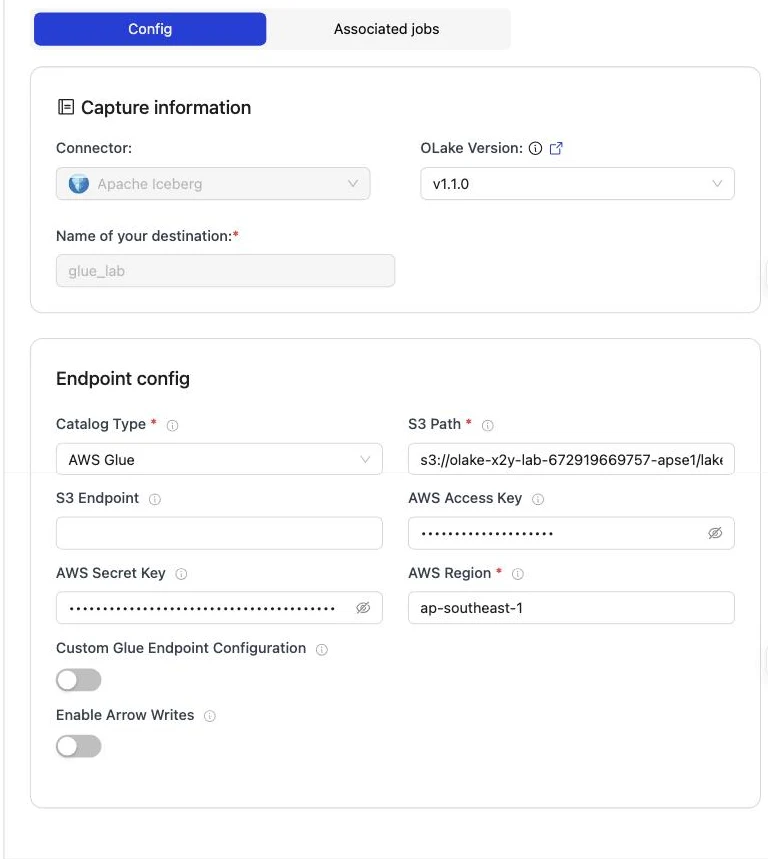
Step 5: Create the job and run the first sync
Redshift is not in OLake Go's target engine picker yet. This job therefore lists Athena and DuckDB as target engines and sets the upsert type to Positional Deletes by hand.
That is the format Redshift reads, and both listed engines read it too. Each stream runs as Full Refresh + CDC, so the binlog carries every change after the snapshot.
- OLake UI
- OLake CLI
- Open Jobs and click Create Job. Give it a name and a schedule. Every Day at a fixed hour, or a cron expression, both work; the schedule is how often the change stream is drained, not how often a full copy runs.
- Select the source and the destination you created.
- Under Advanced Settings, set Target Query Engines to AWS Athena and DuckDB (Redshift is not in the list yet; it reads what Athena reads). OLake Go then resolves an Iceberg delete format every one of those engines can read, so you never pick one by hand.
- Click Next. OLake Go discovers the tables and opens the Streams page.
- Tick the tables to replicate. For each one, set the sync mode to Full Refresh + CDC and the ingestion mode to Upsert. Leave the Upsert Type as OLake Go resolved it (Positional Deletes in the run on this page).
- Click Create Job, then open the job's menu and choose Sync Now for the first run.
OLake Go offers every delete format Athena and DuckDB both read. The run on this page picked Positional Deletes from that list because Redshift reads Iceberg v2 tables with positional deletes and nothing else.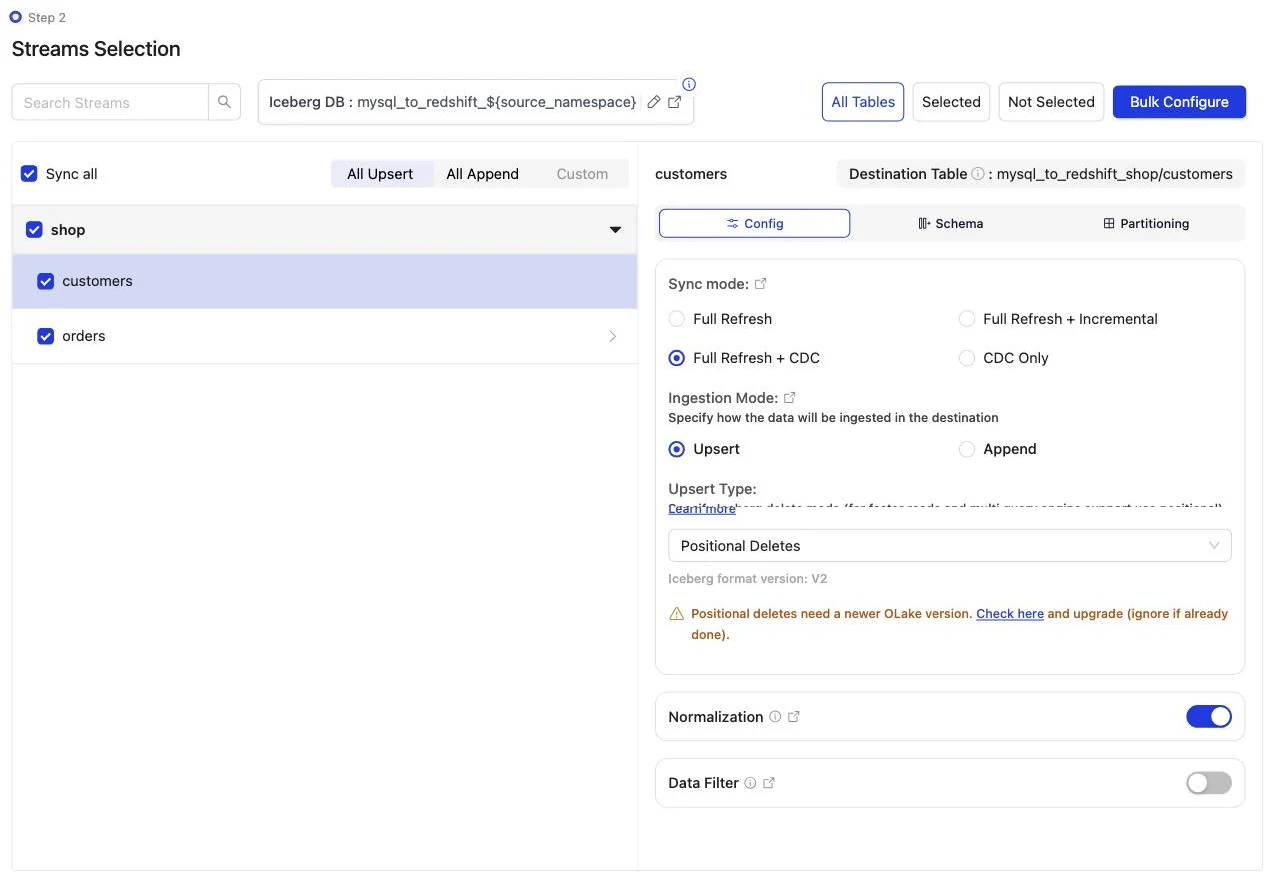
Discover the tables, choose the streams, then sync:
docker run --pull=always \
-v "$PWD/config:/mnt/config" \
olakego/source-mysql:latest \
discover --config /mnt/config/source.json
discover writes two files: available_streams.json (every table it found, do not edit) and selected_streams.json (the tables you want and their settings). In selected_streams.json, set sync_mode to {props.cliSyncMode ?? 'cdc'} for each table and pick the delete format your readers can open:
{
"selected_streams": {
  "shop": [
    {
      "stream_name": "customers",
      "sync_mode": "cdc",
      "normalization": true,
      "append_mode": false,
      "update_type": "pos"
    }
  ]
}
}
update_type accepts eq (equality deletes, the default), pos (positional deletes) and dv (deletion vectors). Positional deletes and deletion vectors keep a small index between runs, so give the container a persistent directory for it through OLAKE_INDEX_DB_DIR. The first sync runs without a state file; OLake Go writes one at the end of the run:
docker run --pull=always \
-v "$PWD/config:/mnt/config" \
-e OLAKE_INDEX_DB_DIR=/mnt/config/index-db \
olakego/source-mysql:latest \
sync \
--config /mnt/config/source.json \
--selected-streams /mnt/config/selected_streams.json \
--available-streams /mnt/config/available_streams.json \
--destination /mnt/config/destination.json
Every later run adds --state /mnt/config/state.json to the same command, which is how OLake Go knows to replay only the changes since the last run. The full selected_streams.json reference is on the Docker CLI page; the index directory is described under index DB setup.
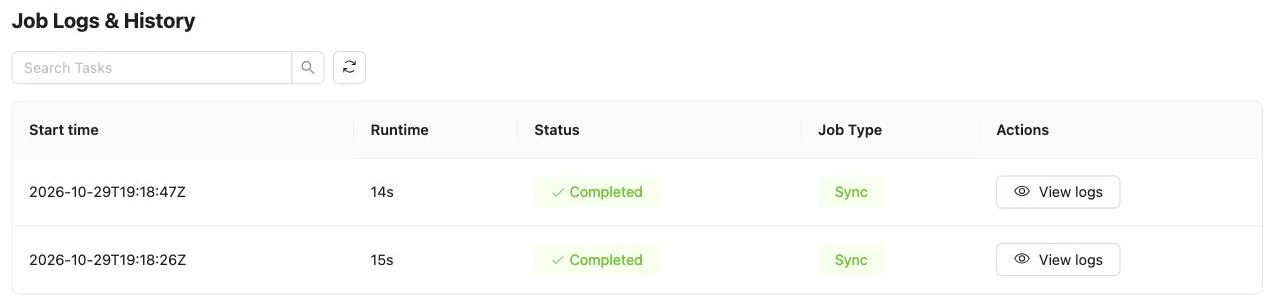
On this page the first run copied 8 customers and 40 orders (48 records, 2.10 KB) and finished in 15 seconds, container start included. OLake Go names the Glue database after the job and the source database, so mysql_to_redshift on database shop produced mysql_to_redshift_shop. The Iceberg DB field at the top of the Streams page changes it before the first sync.
Step 6: Query the tables in Redshift
- AWS Glue
Redshift reads the Glue Data Catalog through an external schema: one statement maps a Glue database onto a schema name in your Redshift database, and every Iceberg table OLake Go commits there is queryable at once, with no refresh. Redshift Serverless and RA3 clusters both do this; the IAM role attached to the namespace or cluster needs read access to Glue and to the bucket.
-- Once: map the Glue database OLake Go created (schema = <job name>_<source database>_<source schema>)
CREATE EXTERNAL SCHEMA lakehouse
FROM DATA CATALOG
DATABASE 'mysql_to_redshift_shop'
IAM_ROLE default;

-- Then query the Iceberg tables like any other schema
SELECT id, name, city, tier FROM lakehouse.customers ORDER BY id;
SELECT status, count(*) AS n, round(sum(amount), 2) AS total
FROM lakehouse.orders GROUP BY status ORDER BY status;
IAM_ROLE default uses the default role of the namespace (Serverless) or cluster; name a role ARN instead when you keep several. Redshift reads Iceberg v2 tables with positional deletes, which is why the job on this page uses that upsert type. The external schema is read-only: OLake Go is the writer, and INSERT or DELETE on these tables fails.
OLake Go adds four columns to every table: _olake_id (a hash of the primary key), _op_type, _olake_timestamp and _cdc_timestamp. _op_type is r for a row from the first snapshot, c for an insert, u for an update and d for a delete. Filter them out of dashboards, or use them to see when a row last changed.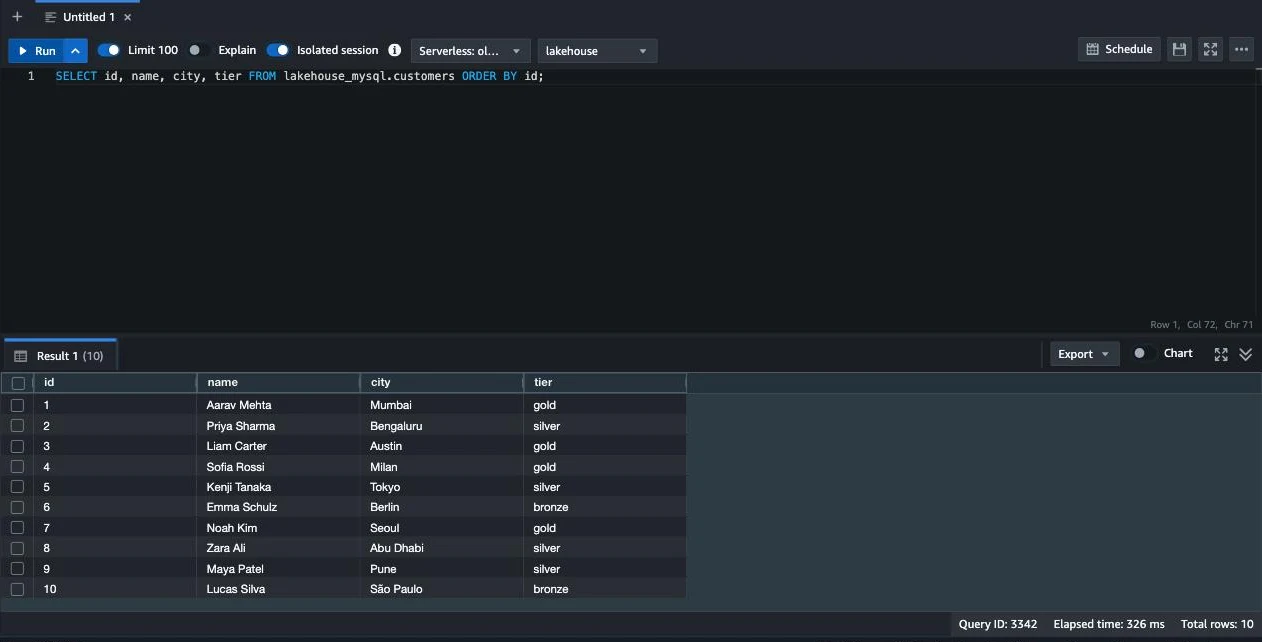
Step 7: Change rows in MySQL and sync again
To see the change path work, the run on this page made 12 changes in MySQL after the first sync:
INSERT INTO customers (name, email, city, tier) VALUES
  ('Maya Patel', 'maya@example.com', 'Pune', 'silver'),
  ('Lucas Silva', 'lucas@example.com', 'São Paulo', 'bronze');
INSERT INTO orders (customer_id, product, amount, status) VALUES
  (9, 'Laptop', 1299.00, 'placed'), (9, 'Mouse', 25.50, 'placed'),
  (10, 'Monitor', 349.99, 'placed'), (3, 'Keyboard', 89.00, 'placed'), (7, 'Webcam', 79.90, 'placed');
UPDATE customers SET tier = 'gold'      WHERE name = 'Liam Carter';
UPDATE customers SET city = 'Abu Dhabi' WHERE name = 'Zara Ali';
UPDATE orders    SET status = 'delivered' WHERE id IN (1, 4, 7);
The second sync read 12 records (563 bytes) from the binlog and finished in 14 seconds end to end. For customers that meant one new data file with 4 rows: 2 inserts plus the new versions of 2 updated rows.
One small positional delete file retires the 2 old versions. OLake Go's commit report in the sync log shows it directly: addedDataFiles=1, addedRecords=4, addedPositionalDeleteFiles=1, addedPositionalDeletes=2. The orders table has the same shape with 8 rows and 3 deletes.
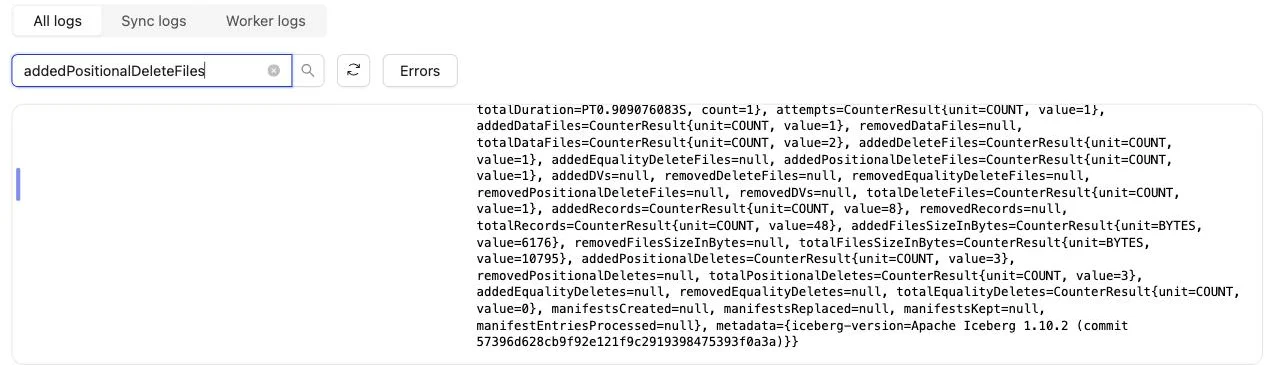
Redshift shows the result on the next query, with no refresh and no ALTER TABLE. Liam Carter is gold, Zara Ali moved to Abu Dhabi, and the two new customers are there.
The two retired versions are gone, because Redshift applies the positional deletes while reading. The _op_type column shows how each row arrived: r for the snapshot, c for the inserts and u for the updates.
Schema changes. When a column is added in MySQL, OLake Go adds it to the Iceberg table on the next sync. The Glue table definition is updated in the same commit, and Redshift shows it on the next query of the external schema. Widening changes (int to bigint, float to double) are applied.
Narrowing or incompatible type changes fail the sync rather than corrupt the table. binlog_row_metadata = FULL is what lets OLake Go see the new column names in the binlog. Full rules are on the schema evolution page.
Query the same tables from Athena and DuckDB
This is the point of writing Iceberg instead of loading Redshift tables. Nothing is exported, copied or refreshed: both engines read the files OLake Go wrote, through the same Glue database.
- Amazon Athena
- DuckDB
Athena reads the Glue Data Catalog natively: the Glue database OLake Go created shows up in the query editor's database list, and the Iceberg tables in it need no registration and no refresh. Pick a workgroup with a query result location in S3, select the database, and query.
SELECT id, name, city, tier FROM mysql_to_redshift_shop.customers ORDER BY id;
SELECT status, count(*) AS n, round(sum(amount), 2) AS total
FROM mysql_to_redshift_shop.orders GROUP BY status ORDER BY status;
Athena engine v3 reads Iceberg v2 tables with positional and equality deletes, and cannot read v3 tables at all. Keep the job on positional or equality deletes, never deletion vectors, while Athena is a reader. From the command line, aws athena start-query-execution --work-group <workgroup> --query-execution-context Database=${props.schema ?? 'postgres_to_redshift_shop_public'} --query-string "..." runs the same queries; aws athena get-query-results returns the rows.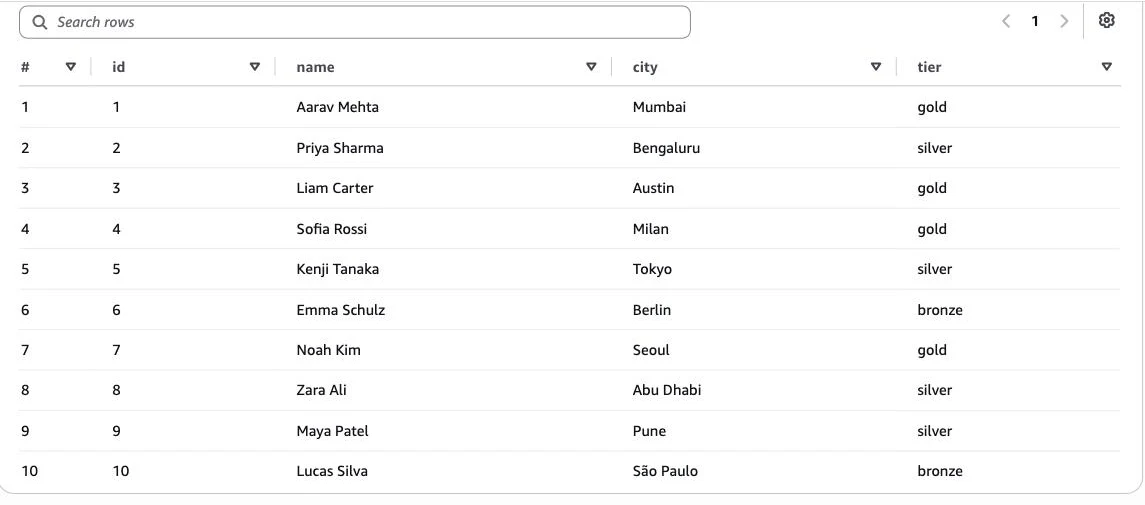
DuckDB reads an Iceberg table from its current metadata file, which Glue holds as the table's metadata_location. Ask Glue for it, then scan: no catalog to configure, and the same S3 keys you gave OLake Go are enough.
aws glue get-table --database-name <glue database> --name customers \
  --query 'Table.Parameters.metadata_location' --output text
INSTALL iceberg; LOAD iceberg;
INSTALL httpfs;  LOAD httpfs;

CREATE SECRET lake (TYPE s3, KEY_ID '<access key>', SECRET '<secret key>', REGION '<region>');

SELECT id, name, city, tier
FROM iceberg_scan('s3://<bucket>/lakehouse/mysql_to_redshift_shop.db/customers/metadata/<latest>.metadata.json')
ORDER BY id;
Each sync writes a new metadata file, so fetch the location again before a fresh read, or wrap the two steps in a script. DuckDB can also attach the Glue Data Catalog as an Iceberg REST catalog (ATTACH '<account id>' AS glue (TYPE iceberg, ENDPOINT_TYPE 'glue')), which needs Lake Formation permissions on the catalog; that path is not covered on this page. DuckDB reads positional deletes, and deletion vectors from duckdb-iceberg 1.5.3.
DuckDB 1.5.5 returned the same 10 customers and the same orders roll-up as Redshift and Athena in the run on this page. It read the current metadata file of each table.
An orders roll-up matched MySQL to the cent in all three engines. It gave 16 delivered orders for 8659.68, 18 placed for 10522.26, 11 shipped for 6397.25.
Data types: MySQL to Iceberg to Redshift
OLake Go maps MySQL types to Iceberg types, and Redshift maps Iceberg types to its own through the external schema. Most columns pass through unchanged; three groups are worth knowing about.
| MySQL | Iceberg (written by OLake Go) | Redshift shows | Notes |
|---|---|---|---|
int, mediumint, smallint, tinyint (signed or unsigned) | int | INTEGER | The id and customer_id columns on this page arrived as INTEGER. |
bigint, bigint unsigned | long | BIGINT | |
decimal(p,s), float, double | double | DOUBLE PRECISION | OLake Go stores decimals as doubles. The orders.amount sums on this page matched MySQL to the cent in every engine; round at query time when you need exact decimal arithmetic. |
datetime, timestamp | timestamptz (UTC) | TIMESTAMP | datetime has no zone in MySQL; it is read as UTC and shown without a zone. |
char, varchar, text family, enum, json, time, bit(1) | string | VARCHAR | Parse json with Redshift's JSON_PARSE or json_extract_path_text. time arrives as text. |
binary(n), varbinary, blob family | fixed[n] or binary | VARBYTE | Keep large binaries out of the sync. |
MySQL types in the table come from the MySQL connector reference. The Redshift side comes from the Redshift Iceberg page (checked 2026-10-30) and from svv_external_columns on the tables of this run.
Cost and maintenance
- Storage is your bucket: you pay S3 rates for the Parquet and delete files, and nothing to Glue beyond its per-object pricing for the table entries.
- Compute. OLake Go runs wherever you run Docker. Redshift Serverless bills RPU-hours only while queries run; a query over the external schema scans the Parquet files in S3 through Redshift Spectrum, so filter on the columns you need. Athena bills per terabyte scanned.
- Maintenance. Glue has no built-in compaction for tables written by external engines. A CDC table that gets a new small file and delete file per sync wants compaction; OLake Fusion does this for the catalogs OLake Go writes to, and Spark on EMR's
rewrite_data_filesworks through the same Glue catalog. - Binlog disk. Seven days of binlog on a busy server can be tens of gigabytes. Size the volume for it, or shorten retention once the job runs reliably every hour.
- Key rotation. The IAM user's access key is what OLake Go writes with. Rotate it on your schedule, or run OLake Go on an instance with a role and leave the key fields empty.
Troubleshooting
1. The first sync stops with a statistics error
failed to get or split chunks: stats not populated for table[shop.orders]. Please run ANALYZE TABLE to update table statistics
OLake Go plans the parallel snapshot from information_schema row estimates. A freshly created or freshly loaded table has none. Run ANALYZE TABLE <table>; for each table in the job, then sync again.
2. The source test fails on the binlog
binlog_format: current STATEMENT, recommended ROW
The test dialog names the setting. binlog_format and binlog_row_metadata can be changed at runtime with SET GLOBAL.
Put them in my.cnf (or the parameter group) too, or they revert on restart. log_bin itself needs a restart.
3. The next sync cannot find its binlog position
idle timeout reached, exiting binlog syncer
Two causes. If binlog_expire_logs_seconds already removed the saved binlog file, run a fresh full snapshot and lengthen retention.
If the file exists but the server is slow to seek to the position, raise Initial Wait Time on the source. 10 seconds was enough for the two-table database on this page.
4. The destination test fails on a table OLake Go did not create
User: arn:aws:iam::<account>:user/<olake user> is not authorized to perform: s3:GetObject on resource: "arn:aws:s3:::<another bucket>/.../test_olake.db/test_olake/metadata/00000-....metadata.json"
OLake Go's destination test opens a probe table called test_olake.test_olake in the Glue database test_olake. An earlier run in the same account and region may have left that table behind, pointing at a bucket your user cannot read.
The test then fails before it writes anything. Delete the stale table from Glue, or run OLake Go against a region whose Glue catalog does not have it.
5. Redshift cannot see the external schema's tables
ERROR: Database 'mysql_to_redshift_shop' does not exist in the Glue Data Catalog
The external schema was created before the first sync, or in a different region from the Glue database. OLake Go creates the Glue database on the first sync; create the external schema after it, in the workgroup's region.
How this compares with other ways to move MySQL data to Redshift
| Method | Freshness | Updates and deletes | Where the data lands | What you run |
|---|---|---|---|---|
| Aurora MySQL and RDS for MySQL zero-ETL integration | Seconds | Yes | Native Redshift tables; Redshift is the only reader | Nothing; only for Aurora MySQL and RDS for MySQL sources, not self-managed MySQL |
| AWS DMS to Redshift | CDC through the binlog | Yes | Native Redshift tables | A DMS replication instance and task, plus an S3 staging bucket |
Export (mysqldump or SELECT INTO OUTFILE), then COPY into Redshift | Hours to daily | No; full reloads only | Native Redshift tables | A script, a scheduler and a staging bucket |
| Managed ELT (Fivetran, Estuary, Airbyte Cloud) | Minutes, by plan | Varies by tool | Redshift tables, a second copy you pay to move and store | Nothing; priced per row, per GB or per connector |
| OLake Go to Iceberg on Glue (this guide) | CDC on a schedule down to one minute | Yes, as Iceberg row-level deletes | Apache Iceberg tables that Redshift, Athena, EMR, Spark and DuckDB all read | One Docker Compose stack, open source; your bucket plus your own compute |
Zero-ETL is the simpler choice when the source is Aurora MySQL or RDS for MySQL and Redshift is the only reader. Writing Iceberg once avoids paying to move and store a second copy. That matters as soon as Athena, EMR or a notebook needs the same rows, the server is not on RDS, or you want to own the files.
When not to use this
- Every query must hit native Redshift speed. Spectrum reads Parquet from S3 on every query. Keep the Iceberg tables as the source and load the hot slice into a native table on a schedule.
- You need equality deletes or deletion vectors. Redshift reads positional deletes only. Keep the upsert type on Positional Deletes while Redshift is a reader.
- Tables have no primary key. Inserts replicate; updates and deletes cannot be matched to a row and are not applied. Add a primary key or a unique index first.
FAQs
How do I replicate MySQL to Redshift without DMS or a zero-ETL integration?
Run OLake Go (open source, Apache 2.0) against a MySQL server with row-based binary logging on, and point it at the AWS Glue Data Catalog with an S3 bucket. The first sync copies the tables in full, every later sync replays only the changes from the binlog, and Redshift reads the result through an external schema over the Glue database. DMS, Kafka, Debezium and a Redshift load job are not needed, and the MySQL server can be anywhere, not only on RDS or Aurora.
Does Redshift read Iceberg tables with row-level deletes?
Yes. Redshift reads Iceberg v2 tables with positional deletes through Redshift Spectrum, on Serverless and RA3. The run on this page used positional deletes and Redshift returned one row per key after the updates. Equality deletes and Iceberg v3 tables with deletion vectors are not the right pick while Redshift is a reader.
Does OLake Go copy the existing MySQL data before it starts reading the binlog?
Yes, automatically. A job in Full Refresh + CDC mode records the binlog position, copies every selected table in parallel chunks, then switches to the binlog from that position. Nothing written during the copy is lost, and there is no separate backfill job.
Is Redshift one of OLake Go's target query engines?
Not in the picker yet. On this page the job lists Athena and DuckDB as target engines and sets the upsert type to Positional Deletes by hand, which is the format Redshift reads. Redshift then reads the tables through the external schema like any other Iceberg v2 table.
Does MySQL CDC with OLake Go work on Amazon RDS, Aurora or Cloud SQL?
Yes, as long as the binlog is on with row format. Managed MySQL sets binlog_format, binlog_row_metadata and retention through a parameter group or flag instead of my.cnf; step 1 links the setup guide for each. On RDS the binlog is on once automated backups are enabled; set binlog_format to ROW in the parameter group.
Which MySQL data types change on the way to Redshift?
decimal columns become Iceberg double and show up in Redshift as DOUBLE PRECISION, so round at query time when you need exact decimal arithmetic. datetime and timestamp become TIMESTAMP in UTC. int stays INTEGER, bigint BIGINT, and varchar, text, json, enum and time arrive as VARCHAR.
How much binlog does MySQL need to keep for OLake Go?
Enough to cover your longest pause. OLake Go saves the binlog position after every sync and resumes from it; if MySQL has already expired that file, the next sync cannot resume and needs a fresh snapshot. Seven days (binlog_expire_logs_seconds = 604800) is a safe default for a job that runs at least daily.
Related guides
Deeper reading on this site: