Docker (CLI)
Docker CLI can be installed and executed using the official Docker images. Each supported source driver has a dedicated image available on the OLake Go Docker Hub page.
Prerequisites
- Docker installed and running on the host system
- Internet access to pull Docker images
In the subsequent commands, replace [SOURCE-TYPE] with the value corresponding to the required driver.
| Driver Name | [SOURCE-TYPE] |
|---|---|
| Postgres | postgres |
| MySQL | mysql |
| Oracle | oracle |
| MongoDB | mongodb |
| MSSQL | mssql |
| Kafka | kafka |
| DB2 | db2 |
| S3 | s3 |
With the driver identified, the next step is configuring the source system.
Mounting Certificate Files
The following versions are required: OLake Go 1.1.2 and above.
To read TLS certificates from files, mount the certificate directory into the container with an extra -v flag. For example: -v [ABSOLUTE_PATH_OF_CERTS_FOLDER]:/etc/ssl/custom-certs.
Then set cert_source to path in your source.json. See each connector's CLI configuration for the full list of fields.
Sources
Each source driver requires specific configuration. Detailed setup instructions can be found in the following guides:
- Working with MongoDB
- Working with MySQL
- Working with Oracle
- Working with Postgres
- Working with S3
- Working with DB2
- Working with MSSQL
- Working with Kafka
Destination
Destinations specify where ingested data will be written. OLake Go supports multiple destinations. The following guides provide setup of:
- Working with AWS S3
- Working with Iceberg Glue Catalog
- Working with Iceberg Hive Catalog
- Working with Iceberg JDBC Catalog
- Working with Iceberg REST Catalog
- Working with Iceberg Lakekeeper Catalog
- Working with Iceberg Nessie Catalog
- Working with Iceberg S3 Tables Catalog
- Working with Iceberg Unity Catalog
- Working with Iceberg Polaris Catalog
- Working with Iceberg BigLake Catalog
- Working with Iceberg Horizon Catalog
What's Next : Once both source and destination are configured, the next step is to discover available streams/tables.
Discover Command
-
Streams config now uses two files:
selected_streams.json(the file you edit) andavailable_streams.json(read-only, written by discover). -
Streams v2 and the new CLI flags are supported from OLake Go v1.0.0 or later.
-
See the migration guide to migrate to Streams v2 from Streams v1 or the Streams v1 reference for more details on the legacy format.
Discover reads your source and lists every stream (table or collection) it finds.
docker run --pull=always \
-v "[PATH_OF_CONFIG_FOLDER]:/mnt/config" \
olakego/source-[SOURCE-TYPE]:latest \
discover \
--config /mnt/config/source.json
This command writes three files in the config folder:
selected_streams.json: It lists the streams to sync and their settings. This is the file you edit.available_streams.json: It lists every stream OLake Go finds after running the discover command. This file is not supposed to be edited.streams.json: Single file with your stream selections and per-stream settings. See Streams v1 reference.
On a first run, OLake Go selects every discovered stream.
Re-discover and keep your edits
Pass both existing files to refresh them from the source. OLake Go keeps your selected_streams.json entries.
docker run --pull=always \
-v "[PATH_OF_CONFIG_FOLDER]:/mnt/config" \
olakego/source-[SOURCE-TYPE]:latest \
discover \
--config /mnt/config/source.json \
--selected-streams /mnt/config/selected_streams.json \
--available-streams /mnt/config/available_streams.json
New tables are not selected automatically. Add them to selected_streams.json by hand.
Available flags
--config required
--config /mnt/config/source.json
Description:
- Specifies the path to the source configuration file.
- For details about configuration files for different sources, see:
--selected-streams optional
--selected-streams /mnt/config/selected_streams.json \
--available-streams /mnt/config/available_streams.json
Description:
- Specifies the path to
selected_streams.json. This is the file you edit. It lists the streams to sync and their settings. - Must be passed together with
--available-streams. - Used by
discover(merge, keeps your edits),syncandclear-destination. - For the file format, see Streams configuration.
--available-streams optional
--selected-streams /mnt/config/selected_streams.json \
--available-streams /mnt/config/available_streams.json
Description:
- Specifies the path to
available_streams.json. Discover writes this read-only file. Do not edit it. - Must be passed together with
--selected-streams. - Used by
discover(merge, keeps your edits),syncandclear-destination. - For the file format, see Streams configuration.
--destination-database-prefix optional
--destination-database-prefix olake
Description:
- Adds a custom prefix to the database name created in the destination.
- Example:
If the source database is
sales-dband the driver ismysql:- Default (Normalized) →
mysql_sales_db - With prefix (Normalized) →
olake_sales_db
- Default (Normalized) →
--timeout optional
--timeout 600
Description:
- Applies only to the discover command.
- Overrides the default timeout of 300 seconds (5 minutes).
- This is helpful when working with large datasets or slower networks where the operation may need extra time to complete.
--max-discover-threads optional
--max-discover-threads 100
Description:
- Applies only to the discover command.
- Sets the maximum number of parallel threads used for discovering table schemas in the database.
- Value: Integer (mandatory when the flag is used). Minimum value is 1 (must be greater than 0).
- Default: If the flag is not provided, the value defaults to 50.
--target-query-engines optional
--target-query-engines trino,databricks,spark
Description:
- Applies only to the discover command.
- Comma-separated list of query engines you plan to use to read synced Iceberg tables (for example
trino,databricks,spark). - Discover limits each stream's
available_update_typesinavailable_streams.jsonto delete formats those engines can read. With multiple engines, only formats supported by all listed engines are included (the intersection). - Use this when editing
selected_streams.jsonsoupdate_typechoices match your query engines. - To know more about the behavior of this flag, see Target Query Engines.
--difference-selected-streams optional
--selected-streams /mnt/config/selected_streams.json \
--available-streams /mnt/config/available_streams.json \
--difference-selected-streams /mnt/config/new_selected_streams.json \
--difference-available-streams /mnt/config/new_available_streams.json
Description:
- Used with the discover command to compare differences between two
selected_streams.jsonfiles, specifically an old file and a new file. - Must be used together with
--selected-streams /path/old_selected_streams.jsonto specify the path to the old selected streams file. - The
--difference-selected-streamsflag specifies the path to the newselected_streams.jsonthat will be compared against the old one. - Running this command generates a
difference_selected_streams.jsonfile containing the differences between the old and new selected streams files.
Internal testing command
This command is primarily used internally for testing purposes to compare differences between old and new selected_streams.json files. It is not typically required for production use. However, if you want to check the differences between selected streams, you can use this command.
--difference-available-streams optional
--selected-streams /mnt/config/selected_streams.json \
--available-streams /mnt/config/available_streams.json \
--difference-selected-streams /mnt/config/new_selected_streams.json \
--difference-available-streams /mnt/config/new_available_streams.json
Description:
- Used with the discover command to compare differences between two
available_streams.jsonfiles, specifically an old file and a new file. - Must be used together with
--available-streams /path/old_available_streams.jsonto specify the path to the old available streams file. - The
--difference-available-streamsflag specifies the path to the newavailable_streams.jsonthat will be compared against the old one. - Running this command generates a
difference_available_streams.jsonfile containing the differences between the old and new available streams files.
Internal testing command
This command is primarily used internally for testing purposes to compare differences between old and new available_streams.json files. It is not typically required for production use. However, if you want to check the differences between available streams, you can use this command.
Using a version specific image is recommended instead of using latest in the commands for production use case.
What's Next : Edit selected_streams.json to choose streams and set their options.
Streams Config
Two files describe your streams. Discover writes both.
selected_streams.json: It lists the streams to sync and their settings. This is the file you edit.available_streams.json: It lists every stream OLake Go finds after running the discover command. This file is not supposed to be edited.streams.json: Single file with your stream selections and per-stream settings. Thisstreams.jsonhas been deprecated. See Streams v1 reference.
1. Selected Streams
The top-level key is selected_streams. It maps each namespace (database or schema name) to a list of stream entries.
{
  "selected_streams": {
    "public": [
      {
        "stream_name": "orders",
        "sync_mode": "incremental",
        "cursor_field": "updated_at",
        "partition_regex": "/{created_at,year}",
        "normalization": true,
        "update_type": "eq",
        "append_mode": false,
        "destination_database": "analytics",
        "destination_table": "orders_raw",
        "filter_config": {
          "logical_operator": "and",
          "conditions": [
            { "column": "status", "operator": "=", "value": "active" }
          ]
        },
        "selected_columns": {
          "columns": ["id", "status", "updated_at", "created_at"],
          "sync_new_columns": true
        }
      },
      {
        "stream_name": "customers",
        "sync_mode": "cdc",
        "partition_regex": ""
      }
    ]
  }
}
Details about all the fields mentioned in selected streams
| Field | Type | Sample Values | Required | Description |
|---|---|---|---|---|
stream_name | string | orders | Yes | Identifier for the stream. Must match the stream name defined in the Streams configurations. |
sync_mode | string | incremental | Yes | Indicates the active sync mode. Possible values are defined in supported_sync_modes in available_streams.json. |
cursor_field | string | updated_at | Only for incremental | Defines the cursor field used to track incremental sync. To read more about how this works, refer to the Sync Modes |
destination_database | string | analytics | No | Specifies the destination database name where data will be stored. By default, the source name is used as the prefix, but you can override it using the --destination-database-prefix flag. The source namespace is always appended to the database name. All special characters and spaces are replaced with (_), and the database is automatically created if it doesn’t exist. |
destination_table | string | orders_raw | No | Specifies the name of the destination table where the data will be stored. The table name is derived from the source stream name and normalized by replacing special characters and spaces with underscores (_). |
partition_regex | string | /{created_at,year} | No | A pattern defining how to partition the data. To read more, refer the Partition Regex for S3 or Partition Regex for iceberg |
normalization | boolean | true | No | Converts top-level JSON fields into columns, while nested JSON objects are stored as string values. |
append_mode | boolean | false | No | Disables upserts in Iceberg when set to true. (In upsert mode dedupe happens via equality delete) |
dedup_keys | array | ["customer_id"] | Only for Kafka with Upsert ingestion mode | Required when Upsert ingestion mode is selected for Kafka source. Specifies the columns used to identify unique records for deduplication. |
update_type | string | eq | No | Specifies the format in which delete files are written during sync. "eq" writes equality delete files. "pos" writes positional delete files. "dv" writes deletion vector files. |
use_source_column_names | boolean | true | No | Controls destination column naming. When false, OLake Go lowercases names and replaces any non-alphanumeric character with _ (for example UserID → userid, First-Name → first_name). When true, names are copied from the source as-is, including case, spaces, and hyphens. Use true only when queries or tools require exact source names; otherwise keep false for normalized, destination-safe identifiers. |
filter_config | object | | No | Ensures that only data matching the specified condition is synced. |
selected_columns.columns | array | [id, status, updated_at, created_at] | No | List of columns to be included in the sync for each stream. |
selected_columns.sync_new_columns | boolean | true | No | If true, newly discovered columns are automatically included in future syncs. If false, new columns must be manually added to selected_columns.columns to be synced. |
For Kafka sources with Upsert ingestion mode, the following configuration is required:
append_modemust be set tofalseupdate_typemust be set to"pos"(Positional Deletes only)- An additional field
"dedup_keys"(array) must be added to specify deduplication keys, for example:"dedup_keys": ["customer_id"]
2. Available Streams
The top-level key is streams: a list of objects, each with one stream that describes a table OLake Go found from the source. Discover writes and refreshes this file. This file is not supposed to be edited.
{
  "streams": [
    {
      "stream": {
        "name": "orders",
        "namespace": "public",
        "type_schema": { "properties": { "...": "..." } },
        "supported_sync_modes": ["cdc", "full_refresh", "incremental", "strict_cdc"],
        "source_defined_primary_key": ["id"],
        "available_cursor_fields": ["id", "updated_at", "created_at"],
        "available_update_types": ["eq", "pos", "dv"],
        "available_write_modes": ["append", "upsert"],
        "sync_mode": "cdc",
        "destination_database": "postgres_mydb:public",
        "destination_table": "orders",
        "selectable_columns": ["_olake_id", "_olake_timestamp", "id", "status", "updated_at", "created_at"],
        "default_stream_properties": {
          "normalization": true,
          "append_mode": false,
          "update_type": "eq"
        }
      }
    }
  ]
}
Details about all the fields mentioned in available streams
| Field | Meaning |
|---|---|
name | Unique identifier for the stream. Each stream must have a unique name. |
namespace | Database name that the stream belongs to. |
type_schema | Defines the columns in streams or tables, including the destination column name. Includes destination column names and olake generated columns. |
supported_sync_modes | Sync modes this stream supports. Includes "full_refresh", "cdc", "strict_cdc" and "incremental". To read more about this refer to the Sync Modes |
source_defined_primary_key | Specifies the field(s) that is set as a primary key in the source. |
available_cursor_fields | Lists fields that can be used as cursor fileds (to track synchronization progress) in incremental sync mode. |
available_update_types | Values you can use as update_type. |
available_write_modes | Write modes (append or upsert) this stream supports. |
sync_mode, cursor_field, destination_database, destination_table | Discovered defaults. Override them in selected_streams.json. |
selectable_columns | Columns you can list in selected_columns.columns. |
default_stream_properties | Defaults for normalization, append_mode, and update_type. |
Sync
The Sync section describes how to start the sync process using the configuration files. It also explains how to run sync with a state file when operating in Incremental (Bookmark/cursor) or CDC mode.
-
Streams config now uses two files:
selected_streams.json(the file you edit) andavailable_streams.json(read-only, written by discover). -
Streams v2 and the new CLI flags are supported from OLake Go v1.0.0 or later.
-
See the migration guide to migrate to Streams v2 from Streams v1 or the Streams v1 reference for more details on the legacy format.
Sync command
Run this command for a Full Refresh sync or a first sync, before a state file exists.
docker run --pull=always \
-v "[PATH_OF_CONFIG_FOLDER]:/mnt/config" \
olakego/source-[SOURCE-TYPE]:latest \
sync \
--config /mnt/config/source.json \
--selected-streams /mnt/config/selected_streams.json \
--available-streams /mnt/config/available_streams.json \
--destination /mnt/config/destination.json
Available flags
--config required
--config /mnt/config/source.json
Description:
- Specifies the path to the source configuration file.
- For details about configuration files for different sources, see:
--selected-streams required
--selected-streams /mnt/config/selected_streams.json \
--available-streams /mnt/config/available_streams.json
Description:
- Specifies the path to
selected_streams.json. This is the file you edit. It lists the streams to sync and their settings. - Must be passed together with
--available-streams. - Used by
discover(merge, keeps your edits),syncandclear-destination. - For the file format, see Streams configuration.
--available-streams required
--selected-streams /mnt/config/selected_streams.json \
--available-streams /mnt/config/available_streams.json
Description:
- Specifies the path to
available_streams.json. Discover writes this read-only file. Do not edit it. - Must be passed together with
--selected-streams. - Used by
discover(merge, keeps your edits),syncandclear-destination. - For the file format, see Streams configuration.
--destination required
--destination /mnt/config/destination.json
Description:
- Specifies the path to the destination configuration file.
- For details about destination configuration files, see:
- AWS Glue Catalog configuration
- Generic REST Catalog configuration
- Lakekeeper Catalog configuration
- Nessie Catalog configuration
- S3 Tables Catalog configuration
- Unity Catalog configuration
- Apache Polaris Catalog configuration
- BigLake Catalog configuration
- JDBC Catalog configuration
- Hive Catalog configuration
- Parquet configuration
--state optional
--state /mnt/config/state.json
Description:
- Specifies the path to the state file.
- The state file contains metadata (such as offsets and positions) that enables:
- Resuming interrupted syncs.
- Continuing incremental or CDC syncs without restarting from scratch.
- Storing the version in the state file for maintaining backward compatibility.
The state.json file is organized into two main sections:
1. Global State
The global section contains global state information that applies to all streams and driver-specific replication metadata that tracks the overall position in the source database's change log. The structure varies by database driver:
- MySQL
- PostgreSQL
- MongoDB
MySQL uses binlog position for global state tracking to maintain the replication position across all streams.
{
  "type": "STREAM",
  "version": 1,
  "global": {
    "state": {
      "server_id": 261398335,
      "state": {
        "position": {
          "Name": "mysql-bin.000070",
          "Pos": 811746
        }
      }
    },
    "streams": [
      "my_db.decimal_test",
      "my_db.incr_test"
    ]
  }
}
PostgreSQL uses LSN (Log Sequence Number) for global state tracking to maintain the replication position across all streams.
{
  "type": "STREAM",
  "version": 1,
  "global": {
    "state": {
      "lsn": "BD7/650015C8"
    },
    "streams": [
      "public.sample_data",
      "public.employees"
    ]
  }
}
MongoDB does not use a global state section. The state is maintained at the stream level only.
2. Streams State
The streams section is an array where each element tracks the synchronization state for a specific stream. The structure varies by database driver:
- MySQL & PostgreSQL
- MongoDB
Each stream state object contains:
{
  "stream": "table1",
  "namespace": "my_db",
  "sync_mode": "",
  "state": {
    "chunks": []
  }
}
MongoDB stream state includes a _data field that stores the resume token:
{
  "stream": "users",
  "namespace": "public",
  "sync_mode": "",
  "state": {
    "_data": "82696F0837000000012B0429296E1404",
    "chunks": []
  }
}
State Configuration Elements
| Component | Type | Example Value | Description |
|---|---|---|---|
version | integer | 1 or 0 | Version 0 enables legacy, lenient handling for backward compatibility Version 1 and above enforce stricter validation and fail-fast behavior for newly created state |
global | object | For postgres : "global": { "state" : { "lsn": "BD7/650015C8" }, "streams": [ "public.sample_data", "public.employees" ] } | Contains global replication metadata. Structure varies by driver: MySQL uses binlog position, PostgreSQL uses LSN, MongoDB does not have a global section. |
global.state.server_id | integer | 261398335 | (MySQL only) The MySQL server ID used for replication tracking. |
global.state.state.position | object | {"Name": "mysql-bin.000070", "Pos": 811746} | (MySQL only) Tracks the current binlog file name and position for CDC replication. |
global.state.lsn | string | "BD7/650015C8" | (PostgreSQL only) Log Sequence Number (LSN) that tracks the position in the PostgreSQL write-ahead log (WAL) for CDC replication. |
global.streams | array | ["public.decimal_test", "public.incr_test"] | List of all streams that are being tracked in this state file. |
stream | string | "decimal_test", "incr_test" | The name of the stream being tracked. Must match the stream name defined in streams.json. |
namespace | string | "my_db", "public" | The namespace (database/schema) that the stream belongs to. |
sync_mode | string | "", "incremental", "cdc" | The synchronization mode being used for this stream. May be empty if not explicitly set. |
state.chunks | array | [] | Array tracking data chunks that have been processed. Used for resuming partial syncs and managing large data transfers. |
state._data | string | "82696F0837000000012B0429296E1404" | (MongoDB only) Resume token used to track the position in MongoDB's change stream for CDC replication. |
What's Next: The state file is automatically created and updated during sync operations. You can manually specify a state file using the --state flag to resume from a previous synchronization point.
--discover-schema optional
--discover-schema
Description:
- Applies only to the sync command.
- By default, sync skips source schema discovery to keep runs fast and trusts the streams files passed (
--selected-streamsand--available-streams, or the deprecated--streams) from a prior discover run. - When this flag is passed, sync re-discovers source schema and validates configured streams against the source.
Whats's Next: Monitor sync progress and performance using the stats.json file.
Stats
The stats.json file is created as soon as the sync starts. The file looks like this:
{
  "Writer Threads": 21,
  "Synced Records": 14236868,
  "Bytes Read": 9876543210,
  "Speed": "76542.20 rps",
  "Seconds Elapsed": "186.00",
  "Estimated Remaining Time": "1642.00 s",
  "Memory Usage Bytes": 2335248384,
  "CPU Utilization": 0.9348
}
| Componenet | Example Value | Description |
|---|---|---|
| Estimated Remaining Time | 1642.00 | A rough estimation in seconds, indicating when the sync is expected to complete |
| Memory Usage Bytes | 2335248384 | System memory currently in use, reported in bytes |
| Writer Threads | 21 | Number of parallel writer threads actively syncing data |
| Seconds Elapsed | 186.00 | Time in seconds elapsed since the sync started |
| Speed | 76542.20 rps | How many rows per second are being synced in this sync. |
| Synced Records | 14236868 | Total number of records which have been synced since the sync started. |
| Bytes Read | 9876543210 | Total source bytes read and committed to the destination since the sync started |
| CPU Utilization | 0.9348 | CPU usage during the sync, reported as a decimal ratio (for example, 0.9348 is about 93.48%) |
The stats.json file remains available after sync completion.
What's Next: Similarly logs get saved for every command that is executed. And those can be reviewed for additional information.
Logs
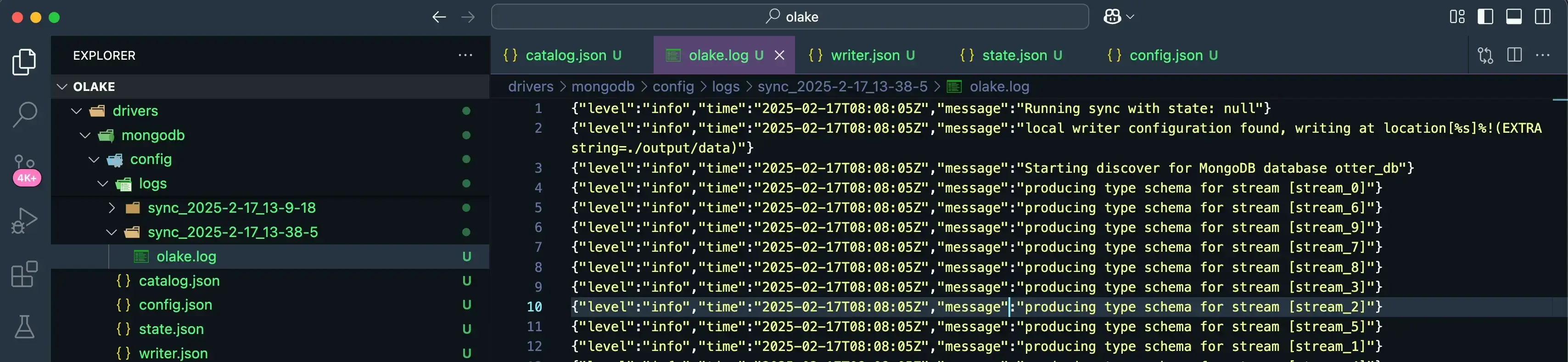
During a sync, OLake Go automatically creates an olake.log file inside a folder named sync_<TIMESTAMP_IN_UTC> (for example: sync_2025-02-17_11-41-40).
This folder is created in the same directory as the configuration files.
- The olake.log file contains a complete record of all logs generated while the command is running.
- Console logs are displayed in real time with color formatting for easier identification.
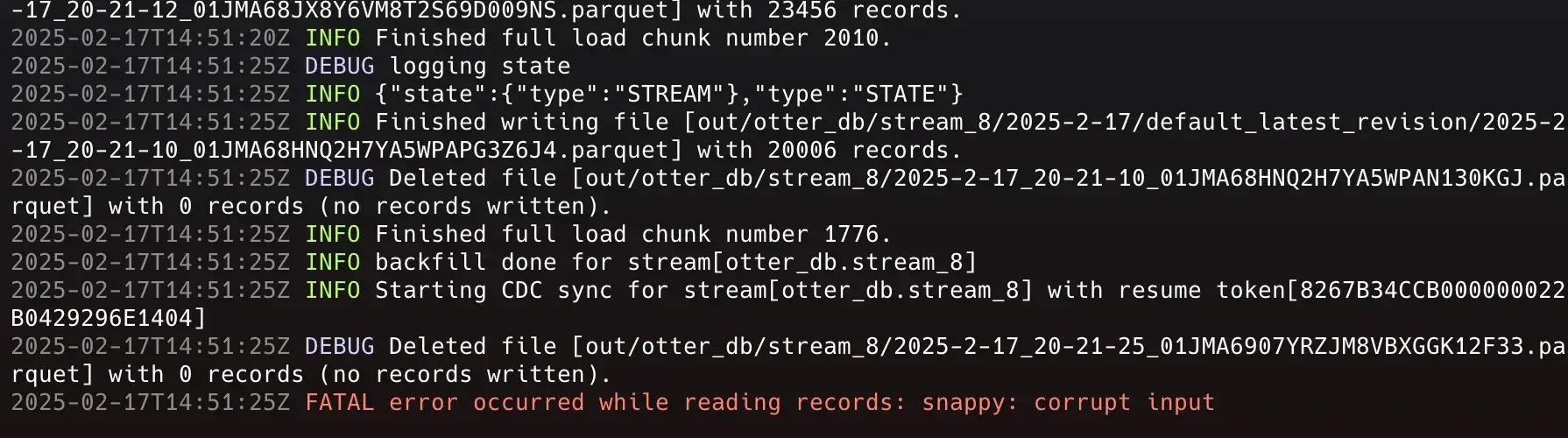
"debug": "\033[36m", // Cyan
"info":  "\033[32m", // Green
"warn":  "\033[33m", // Yellow
"error": "\033[31m", // Red
"fatal": "\033[31m", // Red
With this, the sync setup using the OLake Go CLI is complete, from configuring source and destination to reviewing key outputs such as stats and logs.
For a complete reference of all available commands and their flags (used to configure stream-level properties) see the Commands and Flags guide.